Procure-to-pay (P2P) is the end-to-end purchasing process: someone needs a material or service, purchasing finds a supplier and orders, the goods arrive, the supplier's invoice is checked and FI pays. Every step creates a document linked to the one before. This page explains the steps, the purchase requisition, RFQ and purchase order with their tables, item and account assignment categories, approval (release strategy and flexible workflow), outline agreements, services, purchasing statistics and MRP. Master data is on page 01; goods receipt, valuation and invoice verification in depth on page 03.
Part 1 – The procure-to-pay process
The standard flow is Purchase requisition → RFQ / source determination → Purchase order → Goods receipt → Invoice verification → Payment in FI, or in transactions ME51N → ME41 → ME21N → MIGO → MIRO (post) / MIR7 (park) → F110. RFQ and quotation are optional: when the source is already known from an info record, source list or contract, the requisition is converted straight into a PO.
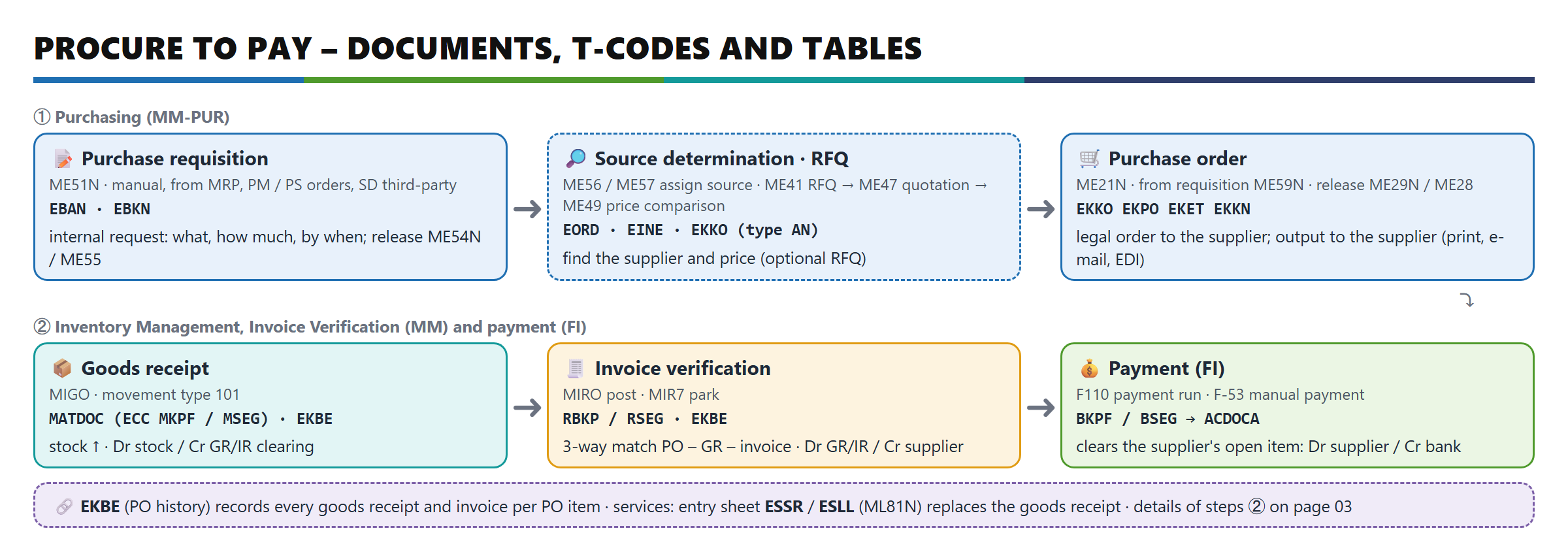
Step | Transaction | Tables | What happens |
|---|---|---|---|
1 Purchase requisition | ME51N / ME52N / ME53N | EBAN item, EBKN account assignment | Internal request for a material or service; created manually or by MRP, PM / PS orders, SD third-party items |
2 RFQ / source determination | ME41 RFQ, ME47 quotation, ME49 price comparison; ME56 / ME57 assign source | EKKO / EKPO (category A), EORD, EINE | Find the supplier and the price |
3 Purchase order | ME21N / ME22N / ME23N | EKKO header, EKPO item, EKET, EKKN | Legal order to the supplier; output sent by print, e-mail or EDI |
4 Goods receipt | MIGO (movement type 101) | Material document MKPF header / MSEG item → MATDOC in S/4HANA; EKBE PO history | Stock increases; accounting document Dr stock / Cr GR/IR clearing (page 03) |
5 Invoice verification | MIRO post, MIR7 park | RBKP header, RSEG item | Three-way match PO – goods receipt – invoice; Dr GR/IR / Cr supplier |
6 Accounting / payment | Automatic from MIRO; payment run F110 | BKPF header, BSEG item; S/4HANA ACDOCA | Supplier open item is paid and cleared |
- Services replace step 4 with a service entry sheet (header ESSR, service lines ESLL) – Part 7.
- Accounting tables: BKPF (header) and BSEG (items) exist in ECC and S/4HANA. FAGLFLEXA is the ECC new general ledger line item table; in S/4HANA all line items are in the universal journal ACDOCA, and the old totals and index tables are compatibility views.
- EKBE is the developer's key table for the process: every goods receipt (VGABE 1), invoice (VGABE 2) and service entry (VGABE 9) is recorded per PO item, with the material or invoice document number.
Part 2 – Purchase requisition
A purchase requisition (PR) is an internal document: a department or MRP asks purchasing to buy a quantity of a material or service by a date. It has no legal effect towards the supplier. Document type NB is the standard requisition (document category B).
Where requisitions come from
- Manually with ME51N (change ME52N, display ME53N).
- From MRP: directly, or as planned orders converted into requisitions (Part 8).
- From PM maintenance orders, PS networks and production orders (external operations, non-stock components).
- From an SD third-party order item (item category TAS) – the supplier ships to the customer.
From requisition to purchase order
Transaction | Use |
|---|---|
ME54N / ME55 | Release (approve) one requisition / collective release (Part 6) |
ME56 | Assign a source of supply to requisitions |
ME57 | Assign and process requisitions: assign sources and create RFQs, POs or contract releases |
ME58 | Create POs from requisitions that already have a source assigned |
ME59N | Automatic PO creation from requisitions (material and supplier must allow automatic POs: MARC-KAUTB, LFM1-KZAUT) |
ME21N | Create a PO with reference to the requisition (document overview → drag and drop) |
ME5A, ME5K, ME5J, ME5F | List display; by account assignment; for a project; reminders |
Requisition tables
Table | Content | Key | Typical fields |
|---|---|---|---|
EBAN | Requisition item (there is no separate header table) | BANFN, BNFPO | BSART, MATNR, WERKS, MENGE, LFDAT delivery date, EKGRP, FRGKZ / FRGZU release, STATU processing status, EBELN / EBELP created PO, LOEKZ deleted |
EBKN | Account assignment of the requisition item | BANFN, BNFPO, ZEBKN | KOSTL cost center, AUFNR order, PS_PSP_PNR WBS element, SAKTO G/L account |
Part 3 – RFQ and quotations
When no source is known, purchasing sends a request for quotation (RFQ) to several suppliers, enters their quotations and compares the prices. RFQ and quotation are the same document: the supplier's prices are entered into the RFQ.
Step | Transactions | Stored in |
|---|---|---|
RFQ to each supplier | ME41 create, ME42 change, ME43 display | EKKO / EKPO with category A, document type AN |
Enter the quotation | ME47 maintain quotation, ME48 display quotation | Prices and conditions in the same RFQ |
Compare and decide | ME49 price comparison list; reject the others | Best quotation → PO with reference, optional info record update |
- S/4HANA adds Fiori apps Manage RFQs and Manage Supplier Quotations (with output management and SAP Ariba integration); the classic ME41 / ME47 / ME49 transactions still exist on-premise, but new work should target the Fiori apps.
Part 4 – Purchase order and its tables
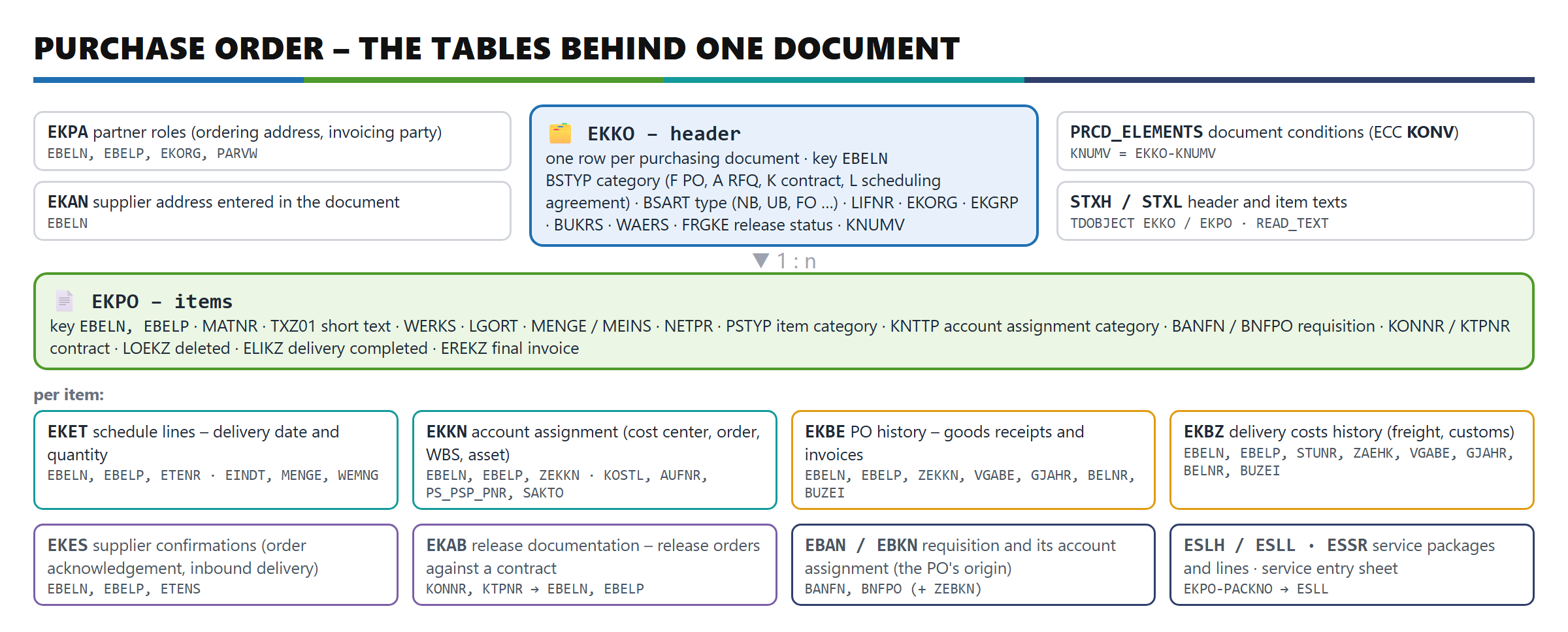
The purchase order (PO) is the legal order to a supplier: what, how much, which price, delivery date and place, and who pays. ME21N create, ME22N change, ME23N display. All purchasing documents – RFQ, PO, contract, scheduling agreement – share the tables EKKO and EKPO; the document category (EKKO-BSTYP) tells them apart and the document type (EKKO-BSART) controls the details.
4.1 Document categories and types
Category (BSTYP) | Document | Common types (BSART) | Create |
|---|---|---|---|
F | Purchase order | NB standard PO, UB stock transport order, FO framework order (value limit, validity period) | ME21N |
A | Request for quotation | AN RFQ | ME41 |
K | Contract | MK quantity contract, WK value contract | ME31K |
L | Scheduling agreement | LP scheduling agreement, LPA with release documentation | ME31L |
B | Purchase requisition (in EBAN, not EKKO) | NB requisition | ME51N |
- Document types are defined in table T161 (texts T161T); each has its own number range, allowed item categories and field selection. Customer types start with Z (e.g. ZNB).
4.2 PO tables
Table | Content | Key | Typical fields |
|---|---|---|---|
EKKO | Purchasing document header | EBELN | BSTYP, BSART, LIFNR, EKORG, EKGRP, BUKRS, WAERS, BEDAT document date, FRGKE release indicator, KNUMV condition number |
EKPO | Purchasing document item | EBELN, EBELP | MATNR, TXZ01, WERKS, LGORT, MENGE, MEINS, NETPR, PSTYP, KNTTP, LOEKZ, ELIKZ delivery completed, EREKZ final invoice, BANFN / BNFPO |
EKET | Delivery schedule (schedule lines) | EBELN, EBELP, ETENR | EINDT delivery date, MENGE scheduled quantity, WEMNG quantity received |
EKKN | Account assignment | EBELN, EBELP, ZEKKN | KOSTL, AUFNR, PS_PSP_PNR, ANLN1 asset, SAKTO |
EKBE | PO history (goods receipts, invoices) | EBELN, EBELP, ZEKKN, VGABE, GJAHR, BELNR, BUZEI | BEWTP history category (E goods receipt, Q invoice), MENGE, DMBTR, BUDAT |
EKBZ | Delivery costs history per purchasing document (freight, customs) | EBELN, EBELP, STUNR, ZAEHK, VGABE, GJAHR, BELNR, BUZEI | KSCHL condition type, MENGE, DMBTR |
EKES | Vendor confirmations: order acknowledgements and inbound deliveries | EBELN, EBELP, ETENS | EBTYP confirmation category, EINDT, MENGE, VBELN inbound delivery |
EKAN | Vendor address entered in a purchasing document | EBELN | Name and address fields |
EKAB | Release documentation: which POs were released against a contract | Contract KONNR / KTPNR → EBELN / EBELP | Released quantity and value |
EKPA | Partner roles in purchasing (ordering address, invoicing party) | EBELN, EBELP, PARVW … | LIFN2 partner supplier |
- Document conditions: ECC KONV, S/4HANA PRCD_ELEMENTS, read with EKKO-KNUMV. Header and item texts: STXH (header) / STXL (lines), object EKKO or EKPO, read with function READ_TEXT.
- Reports: ME2N by PO number, ME2L by supplier, ME2M by material, ME2C by material group, ME2K by account assignment; selection parameter WE101 = open goods receipts. Output of the PO (NACE application EF / output management) is on page 04.
Example – open PO quantities per schedule line
|
Part 5 – Item categories and account assignment categories
5.1 Item categories
The item category (EKPO-PSTYP) controls how an item is procured: whether a material number is needed, whether there is a goods receipt and stock, and whether an invoice is expected.
Screen | In EKPO-PSTYP | Item category | What happens |
|---|---|---|---|
blank | 0 | Standard | Goods are received into our stock (or consumed with account assignment) and invoiced |
B | 1 | Limit | Value limit for unplanned goods and services (framework order FO); no goods receipt needed, invoices posted against the limit |
K | 2 | Consignment | Goods stay the supplier's property in our warehouse; we pay only for what we withdraw (settlement MRKO) |
L | 3 | Subcontracting | We send components to the supplier (movement 541), he returns the finished product; goods receipt 101 consumes the components (543) |
S | 5 | Third-party | Supplier delivers directly to our customer (from an SD order); invoice in MIRO, SD bills the customer |
U | 7 | Stock transfer | Goods move between our own plants (stock transport order UB, often with an SD delivery); details on page 03 |
D | 9 | Service | Services with service lines and a service entry sheet (Part 7) |
- Developer trap: EKPO-PSTYP stores the internal numeric key (0, 1, 2, 3, 5, 7, 9); the screen shows the external letter (table T163Y). In a SELECT use
pstyp = '3'for subcontracting, not 'L'.
5.2 Account assignment categories
The account assignment category (EKPO-KNTTP, details in EKKN) says that the item is not for stock but is consumed by a cost object, and which account assignment fields are required. The goods receipt then posts directly to consumption instead of stock.
Category | Charged to | Required field in EKKN |
|---|---|---|
K | Cost center | KOSTL + G/L account |
F | Order (internal order, maintenance or production order) | AUFNR |
P | Project (WBS element) | PS_PSP_PNR |
N | Network (project activity) | NPLNR |
A | Asset | ANLN1 / ANLN2 |
E | Individual customer order (make-to-order sales order) | VBELN / VBELP |
U | Unknown – decided later at goods receipt or invoice | – |
- One item can be split over several account assignments (multiple EKKN rows, counter ZEKKN), by quantity or percentage.
Part 6 – Approval: release strategy and flexible workflow
Requisitions and POs above a value, or for certain plants, document types or purchasing groups, must be approved before they can be processed or sent. ECC uses the classification-based release strategy; S/4HANA adds the Fiori-based flexible workflow.
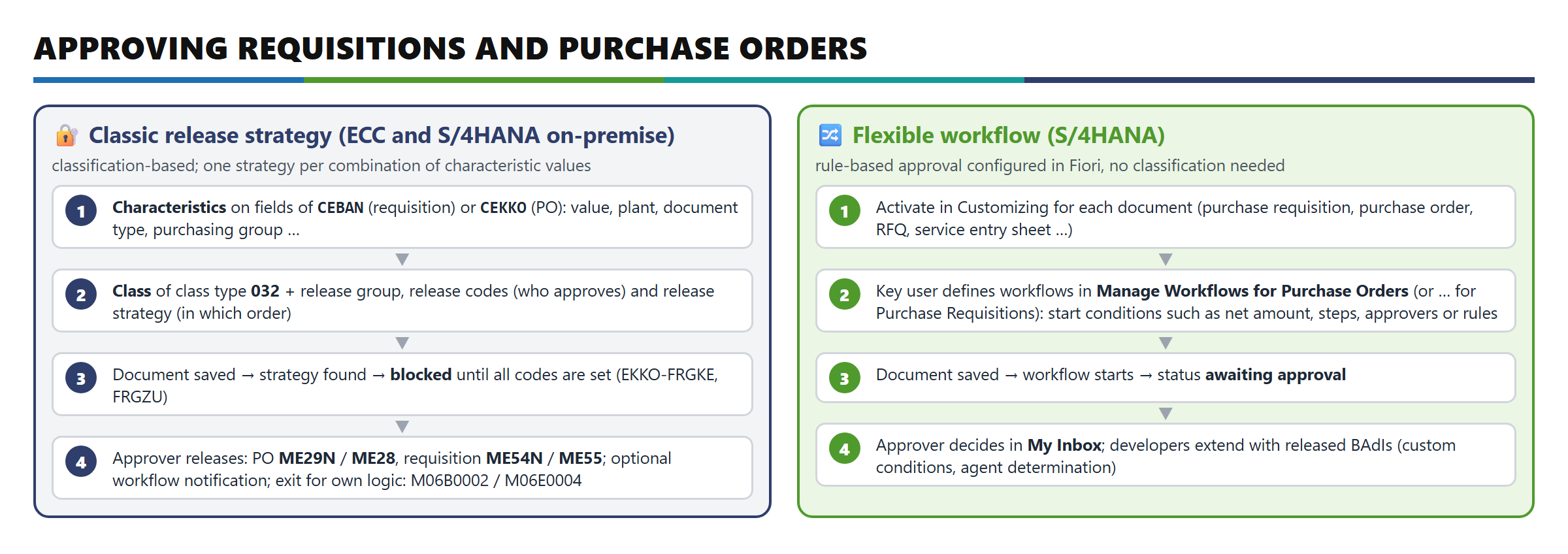
Classic release strategy | Flexible workflow (S/4HANA) | |
|---|---|---|
Configured with | Classification (class type 032), release groups, codes, strategies in SPRO | Fiori apps Manage Workflows for Purchase Requisitions / Purchase Orders |
Conditions | Characteristics on fields of CEBAN (PR) or CEKKO (PO) | Start conditions such as total net amount, plant, purchasing group; steps with approvers |
Approve with | ME54N / ME55 (PR), ME29N / ME28 (PO) | My Inbox (Fiori) |
Status fields | EBAN-FRGKZ / FRGZU, EKKO-FRGKE / FRGZU / FRGSX | Workflow status on the document |
Custom logic | User exits M06B0002 (CEBAN) / M06E0004 (CEKKO) | Released BAdIs for conditions and agent determination |
- On-premise S/4HANA still supports the classic release strategy; you choose per document type. PR release can be item-wise or for the whole requisition (overall release).
Part 7 – Outline agreements and services
7.1 Outline agreements
An outline agreement is a long-term framework with a supplier: conditions are agreed once, individual deliveries are called off later.
Agreement | Types | Transactions | How it is used |
|---|---|---|---|
Contract | MK quantity contract, WK value contract | ME31K / ME32K / ME33K | Target quantity or value for a period; release orders are normal POs with reference to the contract item, recorded in EKAB |
Scheduling agreement | LP, LPA (with release documentation) | ME31L / ME32L / ME33L; schedule lines ME38 | Delivery dates and quantities as schedule lines in EKET; no separate PO; LPA sends forecast / JIT releases (EKEK / EKEH) |
- A central contract of a reference purchasing organization can be used by several purchasing orgs (page 01 Part 2).
7.2 Services
Services (cleaning, consulting, repairs) have no stock and no goods receipt. In classic MM-SRV the PO item has item category D and an account assignment; the planned services are service lines in a service package; after the work the supplier's performance is entered in a service entry sheet (ML81N), whose acceptance posts the receipt (EKBE, VGABE 9) and allows the invoice.
Table | Content |
|---|---|
ESLH | Service package header (EKPO-PACKNO points to it) |
ESLL | Service lines – planned services in the PO and entered services in the entry sheet |
ESSR | Service entry sheet header (LBLNI entry sheet number, EBELN / EBELP, acceptance) |
ASMD | Service master record (AC03), optional standard service catalogue |
- S/4HANA – lean services: services are bought as normal PO items with a service product (no service hierarchy) and confirmed in the Fiori app Manage Service Entry Sheets – Lean Services; ML81N cannot be used for them. Classic MM-SRV with item category D and ML81N remains available on-premise; SAP S/4HANA Cloud uses lean services only.
Part 8 – Purchasing statistics and MRP
8.1 Purchasing statistics (LIS)
The Logistics Information System (LIS) updates statistics tables (info structures) whenever purchasing documents and goods movements are posted. They feed standard analyses (MCE* for purchasing) and vendor evaluation.
Info structure | Content |
|---|---|
S011 | Purchasing group statistics |
S012 | Purchasing statistics (per supplier, material, purchasing org, plant) |
S013 | Statistics for vendor evaluation (delivery reliability, quantity and date variances) |
S031 | Movements of current stock (inventory controlling) |
- Legacy – know it for interviews: LIS still exists in S/4HANA but is not developed further; new reporting uses embedded analytics on CDS views and Fiori apps, which read the documents directly.
8.2 MRP in one paragraph
Material requirements planning (MRP) compares requirements (sales orders, forecasts, reservations, dependent requirements from BOMs) with stock and open receipts, and creates planned orders (PLAF) or directly purchase requisitions (EBAN) for what is missing. Materials take part according to the MRP type in MARC (PD MRP, VB reorder point, ND no planning). Run it with MD01 (total planning), MD02 / MD03 (single item); check the result in MD04 (stock / requirements list, live) or MD05 (MRP list, saved at the run). In S/4HANA MRP Live (MD01N) runs the planning on the HANA database and is much faster; the classic transactions still exist.
Part 9 – Interview questions
Q1. Explain procure-to-pay with transactions and tables.
Purchase requisition ME51N (EBAN, EBKN) → RFQ ME41 / quotation ME47 / comparison ME49 (EKKO, EKPO) → purchase order ME21N (EKKO, EKPO, EKET, EKKN) → goods receipt MIGO 101 (MATDOC, ECC MKPF / MSEG; EKBE) → invoice MIRO or park MIR7 (RBKP, RSEG) → payment F110 (BKPF / BSEG, S/4HANA ACDOCA).
Q2. What is the difference between a purchase requisition and a purchase order?
The requisition is an internal request without supplier commitment (EBAN, no header table). The PO is the legal order to a supplier with price and delivery date (EKKO / EKPO). Requisitions are converted into POs with ME21N, ME57 / ME58 or automatically with ME59N.
Q3. Which tables does a purchase order use?
EKKO header, EKPO items, EKET schedule lines, EKKN account assignment, EKBE PO history, EKBZ delivery costs history, EKES confirmations, EKPA partners, conditions in PRCD_ELEMENTS (ECC KONV) and texts in STXH / STXL.
Q4. How do you find open purchase order quantities?
Join EKKO, EKPO and EKET and compare the scheduled quantity EKET-MENGE with the received quantity EKET-WEMNG, excluding deleted items and items with delivery completed (ELIKZ). EKBE gives the individual goods receipts and invoices.
Q5. What is the difference between document category and document type?
The category (EKKO-BSTYP) is fixed by SAP: F PO, A RFQ, K contract, L scheduling agreement (requisitions: B in EBAN – not an EKKO category). The type (BSART) is customizable inside a category, e.g. NB standard PO, UB stock transport order, FO framework order, MK / WK contracts.
Q6. Name the item categories in purchasing.
Standard (blank), limit B, consignment K, subcontracting L, third-party S, stock transfer U, service D. EKPO-PSTYP stores internal numbers (0, 1, 2, 3, 5, 7, 9), so SELECTs must use those.
Q7. What is an account assignment category?
EKPO-KNTTP says that the item is consumed by a cost object instead of going to stock: K cost center, F order, P WBS element, N network, A asset, E sales order, U unknown. The account assignment data is in EKKN (EBKN for requisitions).
Q8. How does the release strategy work, and what replaces it in S/4HANA?
Classic: characteristics on CEBAN / CEKKO in a class of type 032 determine a release strategy; the document is blocked until all release codes are set (ME29N / ME28 for POs, ME54N / ME55 for requisitions). S/4HANA offers the flexible workflow configured in Fiori with approval in My Inbox; the classic strategy still works on-premise.
Q9. What is the difference between a contract and a scheduling agreement?
A contract (MK quantity, WK value; ME31K) is called off with release orders – normal POs referring to it, recorded in EKAB. A scheduling agreement (LP / LPA; ME31L) has its own delivery schedule lines in EKET, so no separate POs are created.
Q10. How are services procured?
Classic MM-SRV: PO item category D with service lines (ESLH / ESLL), service entry sheet ML81N (ESSR) whose acceptance acts as goods receipt, then MIRO. In S/4HANA lean services use normal items with service products and the Fiori app Manage Service Entry Sheets – Lean Services.
Q11. What are S011, S012, S013 and S031?
LIS info structures: purchasing group statistics, purchasing statistics, vendor evaluation statistics and movements of current stock. They are legacy in S/4HANA, where reporting moves to CDS-based analytics.
Q12. What does MRP create and what is MRP Live?
MRP creates planned orders or purchase requisitions for uncovered requirements; the result is shown in MD04. MRP Live (MD01N) is the S/4HANA planning run executed on the HANA database, much faster than classic MD01.
🏠 Start Here · ◀ 01 · Organization & Master Data · 03 · Inventory & Invoices ▶ · Sections: CORE ABAP | OOPS ABAP | ABAP on HANA | Clean Core | RAP | ABAP Points | SAP Fiori | SAPUI5 | Mobile Development (MDK) | BTP Foundations | BTP Development | CAP | SAP Build | ABAP on BTP | Integration Suite | SAP Business AI | SAP BASIS | Security | SAP SDLC
Functional: FICO ABAP | TRM ABAP | VIM | SAP BIS | SD ABAP | MM ABAP | PP ABAP | QM ABAP | PM ABAP | PS ABAP | EWM | TM ABAP | GTM ABAP | EHS ABAP | HR ABAP | BW | SAP Datasphere | SAP Business Data Cloud | SAP MDG | SAP Analytics Cloud | SAP Ariba | SAP CX | SAP IBP