How SAP business apps reach phones and tablets, and the server that sits behind every SAP mobile app. This page covers the options from the Fiori launchpad in the mobile browser to fully native apps, a decision path for choosing between them, and SAP Mobile Services on SAP BTP: features, administration, onboarding and authentication, back-end connectivity and push notifications. The running example is the Sales Order Approval business: managers approve orders in an offline-capable MDK app. MDK itself starts on 02 · MDK Fundamentals; offline OData, deployment, the native SDKs and mobile security are on pages 04 to 07 of this section. OAuth, XSUAA and destinations are explained in BTP Foundations.
Part 1 – Why mobile, and the options on SAP
Why it matters: approvers, sales reps, technicians and warehouse staff are rarely at a desk. A manager who approves orders on the phone in two minutes keeps the business moving; a technician who must work without a network in a basement or on a plant floor needs a real native app. As an ABAP developer you already build the back end (RAP or CAP OData); the mobile part decides how that OData service reaches the device and who handles login, security, offline data and push.
SAP offers a spectrum, from no extra development to fully native code. The further right, the more device power (offline, push, camera, MDM distribution) and the more effort.
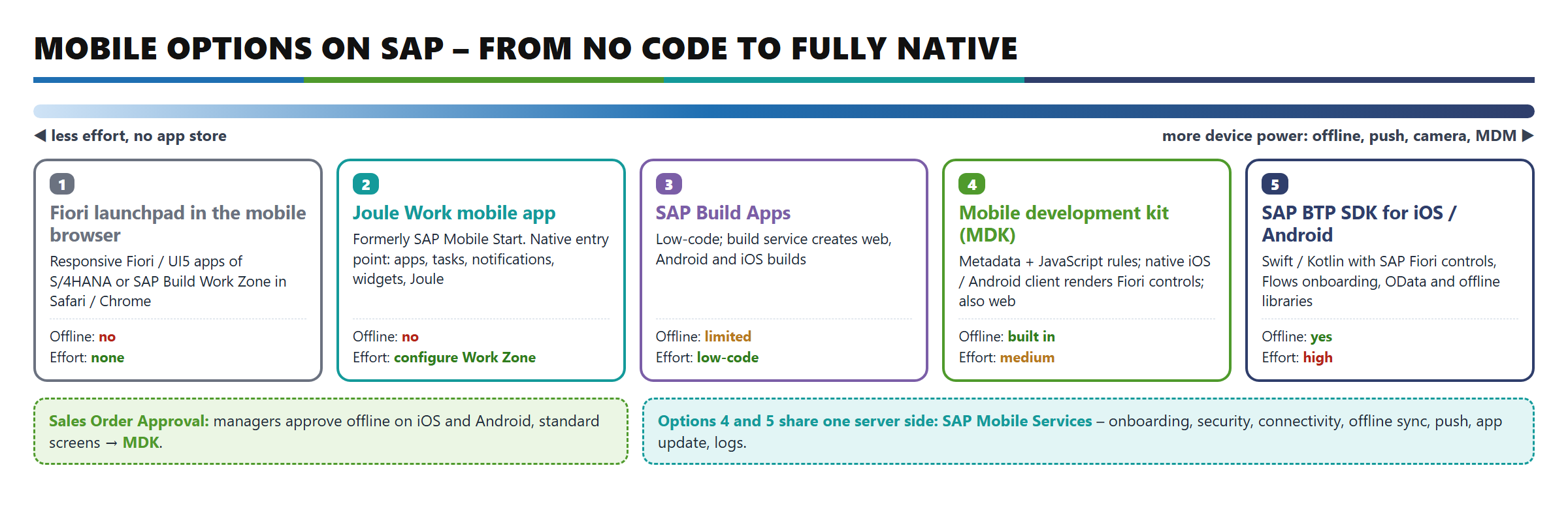
Option | What it is | Offline | Typical use |
|---|---|---|---|
Fiori launchpad in the mobile browser | Responsive Fiori / UI5 apps of S/4HANA or SAP Build Work Zone, opened in Safari or Chrome | No | Occasional mobile use of standard apps |
Joule Work mobile app (formerly SAP Mobile Start) | SAP's native iOS / Android entry point: launchpad apps, tasks, notifications, widgets, Joule; launches Fiori, native and custom apps | No (needs internet) | One mobile home for all SAP apps of an employee |
SAP Build Apps | Low-code builder; its build service produces web, Android (APK / AAB) and iOS builds | Limited | Simple apps built by business experts |
Mobile development kit (MDK) | Metadata-driven native apps (iOS, Android, plus web) on SAP Mobile Services | Yes, built in | Business apps with lists, forms, approvals, offline |
SAP BTP SDK for iOS / for Android | Native SDKs (Swift / Kotlin or Java) with SAP Fiori controls, onboarding, OData and offline libraries | Yes | Premium apps with full platform UX |
Product names and status – get these right in an interview
- SAP Mobile Start → Joule Work mobile app (2026): with release 3.0 SAP rebranded SAP Mobile Start as the Joule Work mobile app. SAP states that the core functions stay the same (apps, tasks, notifications, widgets) and adds deeper Joule integration and single sign-on for web apps opened in the app. It is configured through SAP Build Work Zone content. Many documents still say "SAP Mobile Start" – it is the same app.
- SAP Fiori Client is retired. The hybrid (Apache Cordova) wrapper was removed from the app stores in 2022 (SAP Note 2992772). Use the mobile browser or the Joule Work mobile app instead. SAP positions SAP Mobile Start (now Joule Work) as a native entry point, not as a like-for-like successor of the Fiori Client.
- Renamed services: SAP Cloud Platform Mobile Services → SAP Mobile Services; SAP Cloud Platform SDK for iOS / Android → SAP BTP SDK for iOS / for Android. The SAP Launchpad service is now SAP Build Work Zone, standard edition.
- Hybrid (Cordova / Kapsel) apps are a legacy approach; new projects use MDK or the native SDKs. The Discovery Service and the Augmented Reality feature in Mobile Services are deprecated; SAP announced their removal from the cockpit UI for Q3 2026 (Discovery Service, SAP Note 3737228) and Q4 2026 (AR).
Where each option is explained: the launchpad and Work Zone in SAP Fiori › 02 · SAP Fiori Launchpad & Security; SAP Build Apps in SAP Build with Work Zone; MDK on pages 02 to 05 of this section; the native SDKs on 06 · Native SDKs – SAP BTP SDK for iOS & Android.
Part 2 – Choosing an option: a decision path
Start from the user's need, not from the technology. Most companies end up with a mix: the launchpad for most users, the Joule Work mobile app as a native home, and one or two MDK or native apps where offline work or device features are essential.
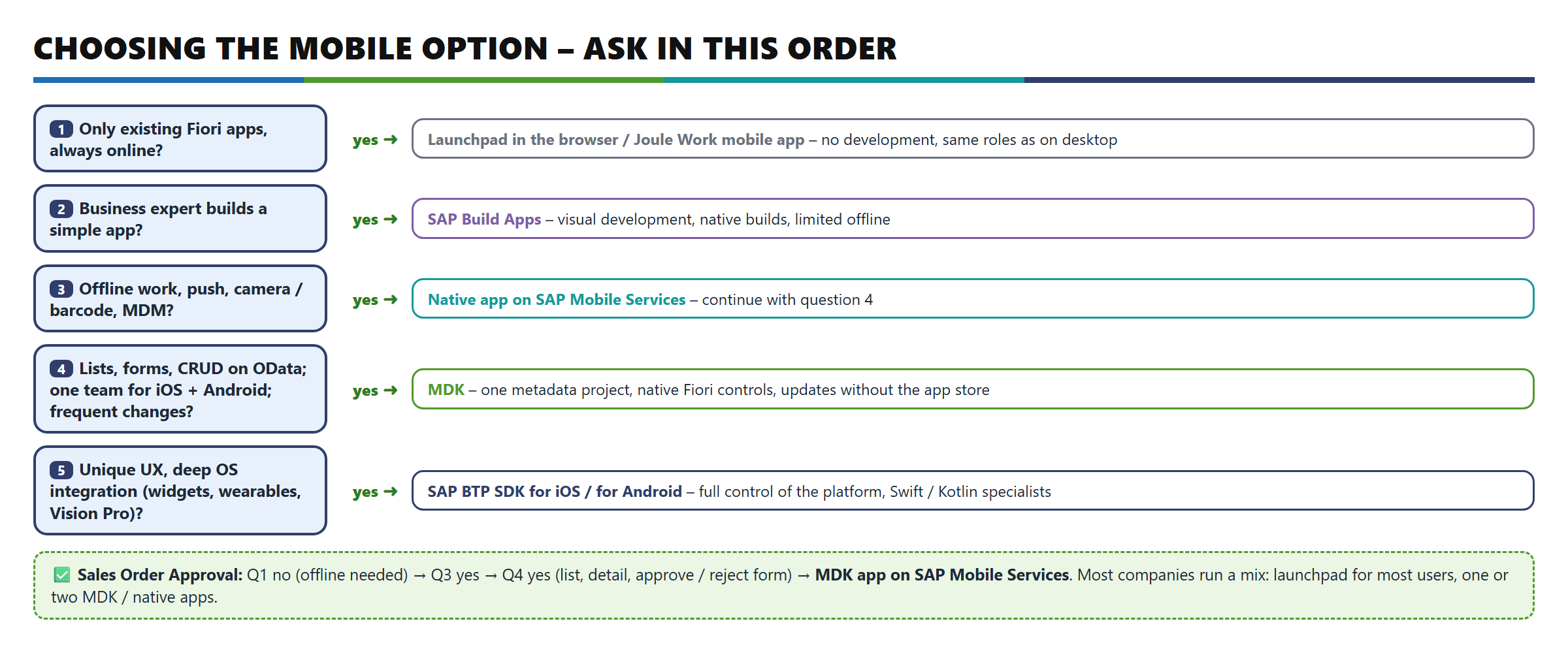
Question | If yes | Why |
|---|---|---|
Only existing Fiori apps, always online? | Launchpad in the browser / Joule Work mobile app | No development, no app store, same roles as on desktop |
Need offline work? | MDK or native SDK (offline OData) | Browser apps and the Joule Work app need a network |
Need push, camera, barcode, MDM distribution? | Native app: MDK, SDK or SAP Build Apps native build | Device APIs and store distribution need a native shell |
Mostly lists, forms, CRUD on OData; one team for iOS and Android? | MDK | One metadata project, native controls on both platforms, updates without the app store |
Unique UX, heavy custom UI, deep OS integration (widgets, wearables, Vision Pro)? | SAP BTP SDK for iOS / for Android | Full control of the native platform |
Business expert builds a simple app? | SAP Build Apps | Visual development, governed in SAP Build |
Applied to the Sales Order Approval app
Requirement | Consequence |
|---|---|
Managers approve while travelling, often without network | Offline is a must → MDK or native SDK |
Screens: list of pending orders, detail, approve / reject with a comment | Standard controls are enough → MDK |
Both iPhone and Android phones; small team of ABAP / CAP developers | One metadata project, JavaScript rules → MDK |
New fields and rules every few weeks | Metadata updates through Mobile Services without app store releases → MDK |
Push when a new order waits | Mobile Services push, available to MDK |
Interview tip: say that MDK and the native SDKs share the same server side (SAP Mobile Services). Choosing between them is about UI freedom versus development speed, not about the back end. SAP's own SAP Service and Asset Manager is an MDK app, which shows MDK scales to large offline apps.
Part 3 – SAP Mobile Services: features and administration
SAP Mobile Services is a BTP service (Cloud Foundry environment) that every MDK and native-SDK app talks to. It takes the hard enterprise parts off the app: user onboarding and authentication, a secure proxy to back ends, offline synchronisation, push notifications, app updates, logs and usage statistics. You manage it in the mobile service cockpit, opened from the BTP cockpit.
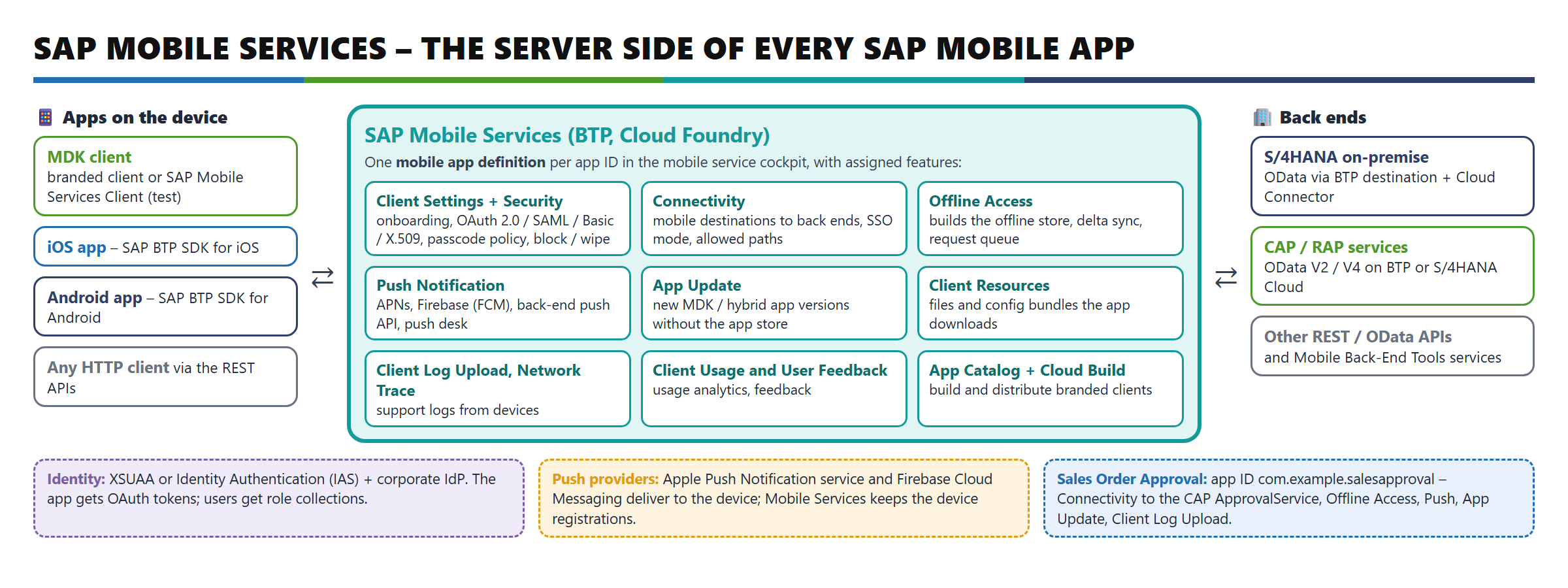
Mobile app definition and assigned features
Each app gets an app ID (e.g. com.example.salesapproval) and a list of assigned features. Client Settings and Connectivity are mandatory; Offline Access requires Connectivity; Cloud Build requires App Catalog.
Feature (cockpit name) | What it gives you |
|---|---|
Connectivity | Mobile destinations to back ends (OData, REST); allowed paths; SSO mechanism; tests (Ping, OData Application Destination Test) |
Offline Access | Server side of offline OData: builds the offline store, delta synchronisation (→ 04 · Offline OData & Synchronisation) |
Push Notification | Configuration for Apple Push Notification service (APNs) and Firebase Cloud Messaging (FCM, with a service-account key); back-end push API; push desk to send from the cockpit |
App Update | Upload new versions of MDK (and hybrid) apps; clients download them without an app store release (→ 05 · Build, Deploy & App Lifecycle) |
Client Resources | Files (resource bundles) the app downloads at runtime: configuration, documents, styles |
Client Log Upload, Network Trace | Devices upload logs and traces for support |
Client Usage and User Feedback | Usage analytics (sessions, screens, app versions) and user feedback |
App Catalog, Cloud Build | Build branded MDK clients in the cloud and offer apps for download |
Setting Exchange, Sample OData ESPM | Exchange settings with the client; SAP's sample back end for learning |
Steps to configure an app (admin view)
- Subscribe to / create an instance of SAP Mobile Services in the subaccount and assign the administrator role collection to the admins.
- In the mobile service cockpit: Create an app – ID, name, licence type – and choose the security configuration (OAuth 2.0 with XSUAA or IAS is the usual choice).
- Assign features: Connectivity (add the destination to your OData service), Offline Access, Push Notification as needed.
- Share the onboarding QR code / link (APIs tab) with testers; the client scans it to learn the server URL and app ID.
MDK projects generated in SAP Business Application Studio / SAP Build Code can create the Mobile Services app and its destination for you in the project wizard; you still review the security and feature settings.
Day-to-day administration in the cockpit
Area | What the admin does there |
|---|---|
Users and registrations | See which users and devices are registered per app; block a user, delete a registration so the device must onboard again (lock / wipe details → 07 · Security, Device Management & the Order Approval Mobile App) |
App versions | Upload or activate an MDK metadata version in App Update; roll back by activating the previous one |
Logs and traces | Read uploaded client logs and network traces; server logs per app and destination |
Usage and feedback | Check adoption (active users, app versions in use) before retiring an old version |
Destinations | Re-test mobile destinations after a back-end or Cloud Connector change |
Back-end tooling: Mobile Back-End Tools (in SAP Business Application Studio) generate an OData service from a CSDL model when no back end exists yet; in real projects the back end is usually a RAP or CAP service. For the approval app it is the CAP ApprovalService (OData V4).
Common mistake: treating Mobile Services as "just a proxy". It also owns identity for the app, the device registrations and the offline store builder; switching an app to another subaccount or app ID means every device must onboard again.
Part 4 – Onboarding and authentication
Why first: a mobile app runs on a device you do not control. It must never hold back-end passwords, and it should never call S/4HANA directly over the internet. Mobile Services is the single, authenticated entry point, and onboarding is how a device earns the right to use it.
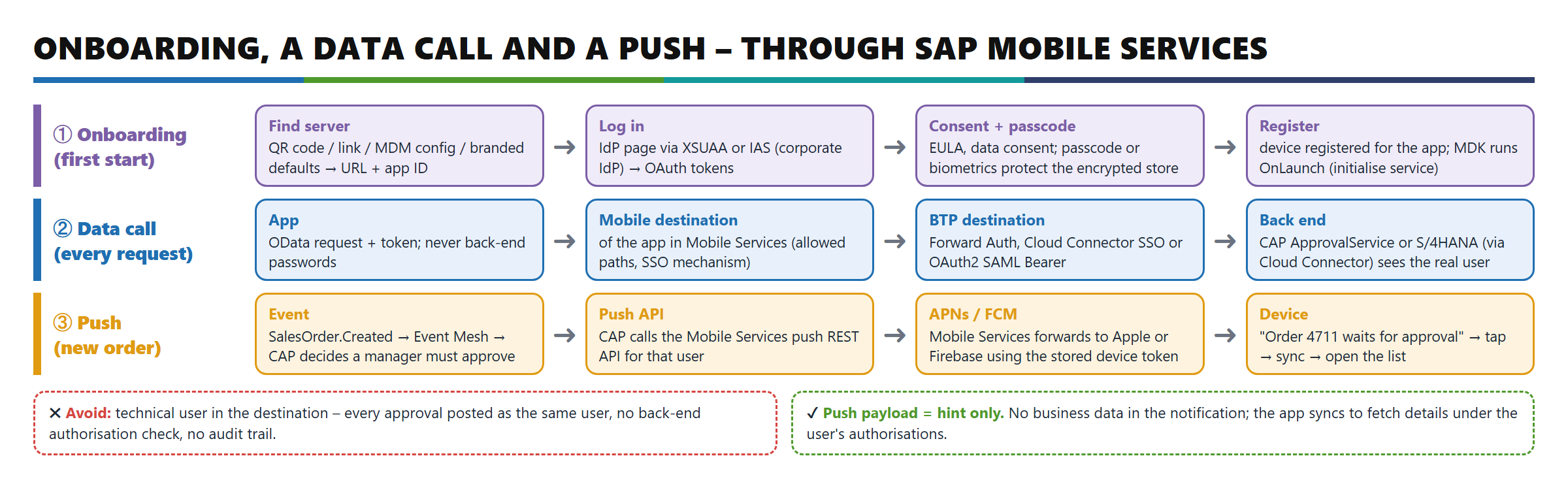
What happens during onboarding
- 1 – Find the server: the app learns the Mobile Services URL and app ID from a QR code, a link, MDM managed configuration or values compiled into a branded client.
- 2 – Log in: the app opens the identity provider's login page (XSUAA or IAS, federated to the corporate IdP); the user signs in and the app receives OAuth tokens.
- 3 – Consent and passcode: the user accepts the EULA / data-collection consent screens and sets an app passcode or biometrics, which protects the encrypted local store.
- 4 – Register: the device is registered for the app in Mobile Services (used for push, usage, lock and wipe). The app then opens its services (for MDK: the
OnLaunchinitialise action).
On later starts the user only unlocks the app with the passcode or biometrics; the app refreshes tokens silently. Logging out or resetting the client removes the registration and the local data.
Authentication types
Type | How it works | Use when |
|---|---|---|
OAuth 2.0 | Authorization code flow against XSUAA or IAS; tokens stored in the encrypted store and refreshed | Standard choice for new apps |
SAML 2.0 | Browser-based SAML login against the IdP | Existing SAML landscapes |
X.509 user certificates | Certificate on the device (often distributed by MDM) identifies the user | Managed devices, no password prompts |
Basic | User and password checked against a back end | Tests and legacy only |
- Roles: with role settings enabled (the recommended default) users need the app's role collection, assigned in BTP like any other role collection (→ BTP Foundations, BTP Security Deep Dive).
- Passcode policy: length, complexity, retry limit, lock timeout and whether biometrics are allowed are set centrally in the app's client policies.
Interview tip: onboarding is the same for MDK and native-SDK apps because it is implemented by the client frameworks against Mobile Services: in MDK by the MDK client, in the native SDKs by the onboarding Flows libraries.
Part 5 – Back-end connectivity and push notifications
Connectivity to back ends
The app calls Mobile Services with its token; a mobile destination of the app forwards to a BTP destination – and through the Cloud Connector for on-premise S/4HANA (→ BTP Foundations, BTP Services, Identity & Connectivity). The destination decides how the user's identity reaches the back end:
SSO mechanism | How it works | Use when |
|---|---|---|
Forward Authentication | The incoming credentials / token are passed on | Back end trusts the same IdP / token issuer |
SAP Cloud Connector SSO | Principal propagation through the Cloud Connector (short-lived X.509 certificate per user) | On-premise S/4HANA or SAP Gateway |
OAuth2 SAML Bearer Assertion | Exchange for a back-end OAuth token for the same user | S/4HANA Cloud and SAP SaaS APIs that offer this flow |
Basic / technical user | Fixed credentials in the destination | Only for non-personal data – no user-level authorisation |
In an MDK project the link to a destination is one small file: the .service file names the mobile destination, never a URL or credentials.
|
Common mistake: using a technical user for an approval app. Every approval would be posted under the same user, the back end could not check the manager's authorisation, and the audit trail is useless. Use principal propagation or a token flow so the back end sees the real user.
Push notifications
- Enable Push Notification on the app and enter the provider settings: APNs (key or certificate from the Apple developer account) and Firebase (service-account private key; the old server key is deprecated).
- The app registers its device token with Mobile Services (in MDK with the
Action.Type.PushNotificationRegisteraction, typically after initialisation). - The back end sends a notification with the Mobile Services push REST API, targeting users or devices of the app; admins can send test messages from the cockpit (push desk). "Push to Users" is
POST {service key URL}/mobileservices/push/v2/backend/applications/{appId}/notifications/users; the sender authenticates with a push service key (role e.g.push_multiple) – X.509, API key or basic. - Keep the payload to a hint ("2 orders wait for approval") – never business data – and let the app sync to get the details. A tap can open a specific page through the app's notification events.
Step | Sales Order Approval |
|---|---|
Event | S/4HANA raises |
Decide | CAP checks whether approval is needed and finds the responsible manager |
Send | CAP calls the Mobile Services push API for that user (OAuth client credentials of a service key) |
Deliver | Mobile Services hands the message to APNs or FCM; the phone shows "Order 4711 waits for approval" |
React | The manager taps it; the app syncs and opens the pending orders list |
Part 6 – Setting up the Sales Order Approval app in Mobile Services
Before the first MDK page exists, the app needs its definition in Mobile Services. This checklist is what you would describe in an interview for "how do you start a mobile project on BTP".
Setting | Value in the example | Why |
|---|---|---|
App ID | com.example.salesapproval | Unique; also used by the branded client and in push |
Security | OAuth 2.0, IAS federated to the corporate IdP, role settings on | Real user identity, central role assignment |
Role collection | SalesApproval_Manager | Only managers can onboard |
Connectivity | Mobile destination | CAP and Mobile Services trust the same IAS tenant |
Offline Access | Enabled | Managers approve without network (→ 04 · Offline OData & Synchronisation) |
Push Notification | APNs and FCM configured | "New order waits" hint |
App Update | Receives every MDK deploy | New fields without app store releases |
Client Log Upload | Enabled | Support can read device logs after incidents |
Next: the MDK project that runs on top of this definition → 02 · MDK Fundamentals – Metadata, Pages & Controls.
Part 7 – Interview questions
Q1. What options does SAP offer to bring business apps to mobile devices?
From least to most effort: the Fiori launchpad in the mobile browser; the Joule Work mobile app (formerly SAP Mobile Start) as SAP's native entry point to launchpad apps, tasks and notifications; SAP Build Apps with native builds for low-code; the mobile development kit (MDK) for metadata-based native apps with offline; and the SAP BTP SDK for iOS / for Android for fully native apps. MDK and the SDKs use SAP Mobile Services.
Q2. What is SAP Mobile Services and which features does it provide?
A BTP service that is the server side of MDK and native SDK apps: onboarding and authentication (OAuth 2.0, SAML, Basic, X.509), Connectivity to back ends through mobile destinations with SSO, Offline Access (offline OData sync), Push Notification (APNs, FCM), App Update, Client Resources, log upload and network trace, usage analytics and user feedback, App Catalog and Cloud Build for branded clients.
Q3. Which features are mandatory for a mobile app definition, and which depend on each other?
Client Settings and Connectivity are mandatory. Offline Access needs Connectivity, because the offline store is built from the back end behind a mobile destination. Cloud Build needs App Catalog.
Q4. Walk through onboarding of a mobile app.
The app learns server URL and app ID (QR code, link, MDM or branded defaults), the user logs in at the IdP through XSUAA or IAS and the app receives tokens, the user accepts consent screens and sets a passcode or biometrics, and the device is registered in Mobile Services. Later starts only need the passcode; tokens are refreshed silently.
Q5. How does a mobile app reach an on-premise S/4HANA with the user's identity?
The app authenticates with OAuth against XSUAA / IAS and calls Mobile Services. The app's mobile destination uses a BTP destination through the Cloud Connector with SAP Cloud Connector SSO (principal propagation), so S/4HANA receives the real user and applies its own authorisations. No back-end credentials live on the device.
Q6. What happened to SAP Fiori Client and SAP Mobile Start?
SAP Fiori Client, a Cordova-based wrapper, was removed from the app stores in 2022; users go to the mobile browser or the native entry app. SAP Mobile Start was rebranded in 2026 (release 3.0) as the Joule Work mobile app – same core functions, deeper Joule integration, configured through SAP Build Work Zone.
Q7. When would you pick the native SDK over MDK?
When the UX must be fully custom or platform-specific (complex visualisations, widgets, Vision Pro, deep OS integration) or the team are iOS / Android specialists. MDK wins for standard business screens, offline CRUD and fast cross-platform delivery. Both use the same Mobile Services features.
Q8. How do push notifications work with SAP Mobile Services?
The admin configures APNs and FCM credentials on the app; the app registers its device token with Mobile Services; the back end calls the Mobile Services push API for users or devices of the app; Mobile Services forwards to APNs / FCM. The payload is only a hint – the app syncs to get the data.
Q9. Why should an approval app not use a technical user in the destination?
All postings would carry the same user, the back end could not check the manager's authorisations, and the audit trail would not show who approved. Principal propagation or a SAML bearer / token exchange keeps the real user end to end.
Q10. Scenario: managers must approve sales orders while travelling. Which option and what setup?
MDK, because offline and standard screens are needed on iOS and Android. In Mobile Services: an app with OAuth via IAS and role settings, a mobile destination to the CAP approval service with user propagation, Offline Access, Push Notification for "new order waits", App Update for metadata versions and Client Log Upload for support.
Q11. Scenario: after a Cloud Connector change all users get errors on sync. Where do you look?
Run the destination tests (Ping / OData Application Destination Test) for the app's mobile destination in the cockpit, check the BTP destination and Cloud Connector mapping and principal-propagation trust, then read the Mobile Services server logs and uploaded client logs for the HTTP status of the failing calls.
🏠 Start Here · 02 · MDK Fundamentals ▶ · Sections: CORE ABAP | OOPS ABAP | ABAP on HANA | Clean Core | RAP | ABAP Points | SAP Fiori | SAPUI5 | Mobile Development (MDK) | BTP Foundations | BTP Development | CAP | SAP Build | ABAP on BTP | Integration Suite | SAP Business AI | SAP BASIS | Security | SAP SDLC
Functional: FICO ABAP | TRM ABAP | VIM | SAP BIS | SD ABAP | MM ABAP | PP ABAP | QM ABAP | PM ABAP | PS ABAP | EWM | TM ABAP | EHS ABAP | HR ABAP | BW | SAP MDG | SAP Analytics Cloud | SAP Ariba | SAP CX | SAP IBP