The mobile development kit (MDK) from the inside: why SAP describes apps as metadata, how the MDK client turns that metadata into native screens, the project structure (Application.app, Pages, Actions, Rules, Services, i18n, Styles), section pages and form cell pages with their controls, bindings and target paths, styling and localisation, the editor in SAP Business Application Studio / SAP Build Code, and MDK web versus mobile. The running example is the Sales Order Approval app for managers. SAP Mobile Services is explained on 01 · Mobile Options & SAP Mobile Services; actions and rules in depth on 03 · MDK Rules, Actions & Navigation; offline OData on 04; deploy and branded clients on 05.
Part 1 – Metadata-driven architecture: what MDK is
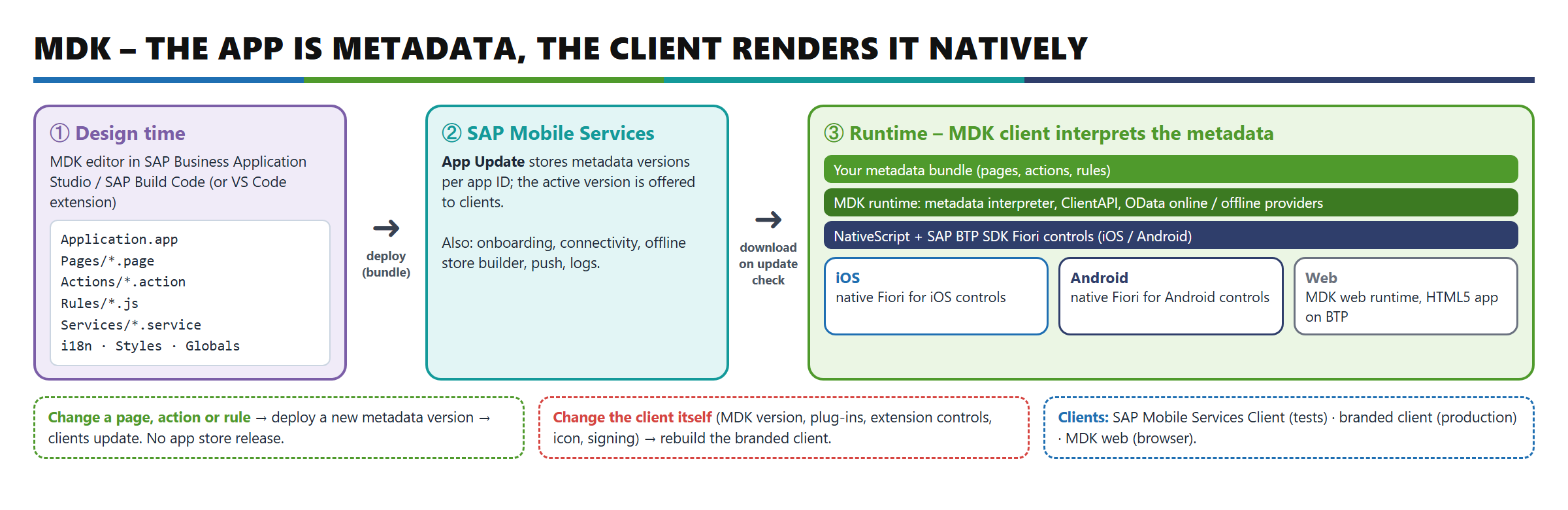
Why it exists: most enterprise mobile apps are the same few patterns – a list, a detail, a form, a sync button – over an OData service. Writing them twice, in Swift and Kotlin, and shipping every small change through the app stores is slow and expensive. MDK lets you describe the app instead of coding it.
MDK is a metadata-based development platform for SAP Mobile Services. Pages, actions and services are JSON files; logic that metadata cannot express goes into small JavaScript rules. A native MDK client downloads that metadata bundle from Mobile Services and renders native iOS and Android controls in the SAP Fiori design at runtime. The same project can also run as a web application.
Idea | What it means in practice |
|---|---|
The app is data | The client interprets JSON definitions; there is no compiled app code per project |
One project, two platforms (plus web) | The same |
Updates without app stores | A new metadata version is deployed to the App Update feature; clients download it on the next check (→ 05 · Build, Deploy & App Lifecycle) |
Enterprise services built in | Onboarding, passcode, OData online / offline, push, logging come from the client and Mobile Services – you configure, not code, them |
Escape hatches | JavaScript rules with the ClientAPI; extension controls and NativeScript plug-ins in a branded client for what metadata cannot do |
Interview tip: "metadata-based" means the app logic is data that the client interprets, not compiled code. That is why updates bypass the app store – and why very custom UI is easier in the native SDKs (→ 06 · Native SDKs – SAP BTP SDK for iOS & Android).
Part 2 – The MDK client: who renders your metadata
The MDK client is a native app built on NativeScript (JavaScript runtime with access to native iOS and Android APIs) plus SAP's Fiori control libraries from the SAP BTP SDKs. It contains the metadata interpreter, the OData online and offline providers, onboarding and the connection to Mobile Services.
Client | What it is | Use for |
|---|---|---|
SAP Mobile Services Client | SAP's generic MDK client in the Apple App Store and Google Play; onboards to any MDK app by scanning its QR code | Development, tests, proofs of concept |
Branded client | Your own build of the client with the MDK SDK or Mobile Services Cloud Build: own name, icon, signing, app ID and optional extensions / plug-ins | Production, store or MDM distribution |
MDK web runtime | Runs the same metadata in the browser, deployed as an HTML5 app on BTP Cloud Foundry and launched for example from SAP Build Work Zone | Desk users of the same app, online scenarios |
- Versions: MDK client, SDK and metadata schema follow a year-based scheme (current samples declare
"_SchemaVersion": "25.9"in Application.app). Releases are named year.month and arrive several times a year (26.3, 26.6, 26.9 in 2026, plus patches such as 26.9.1). A metadata version declares the schema it needs; the client must support it – the "What's New" and release-notes pages list each release. - One client, one app: a branded client is tied to one Mobile Services app ID. The SAP Mobile Services Client can be onboarded to different apps for testing.
Common mistake: going live with the SAP Mobile Services Client. It is for evaluation; production apps need a branded client for signing, branding, MDM configuration and controlled client upgrades.
Part 3 – Project structure
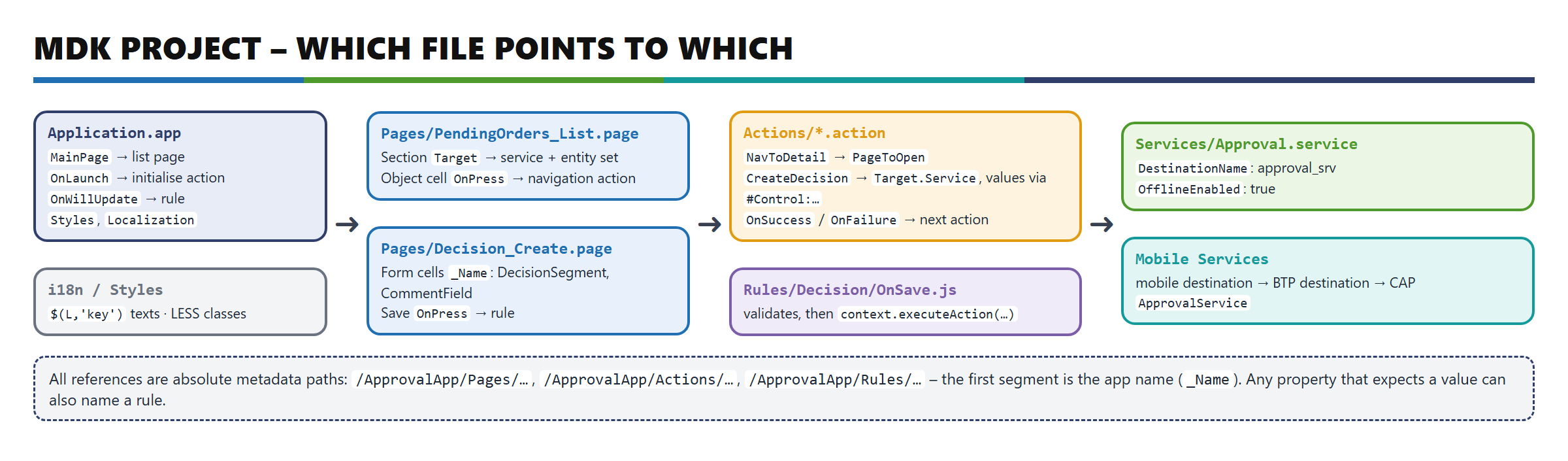
An MDK project is a folder of small files that refer to each other by absolute metadata paths of the form /<AppName>/<Folder>/<File>. Knowing which file points to which is most of understanding MDK.
|
Application.app – the entry point
|
File type | Purpose | Explained on |
|---|---|---|
Application.app | Main page, application events, styles, localisation | this page |
*.page | Layout of one screen: controls, sections, action bar, page events | Parts 4–5 |
*.action | One declarative operation (navigate, message, OData create, sync ...) | 03 · MDK Rules, Actions & Navigation |
| Exported JavaScript function receiving the ClientAPI context | 03 · MDK Rules, Actions & Navigation |
*.service | Destination name, | this page; offline → 04 |
*.global | Typed global values (string, number, boolean) | this page |
i18n/*.properties | Translatable texts used with | Part 7 |
Styles/*.less | LESS style classes for controls | Part 7 |
Common mistake: renaming the project folder or _Name. All metadata paths start with the app name, so a rename breaks every reference – use the editor's refactoring or search-and-replace consistently.
Part 4 – Pages and controls: the section page
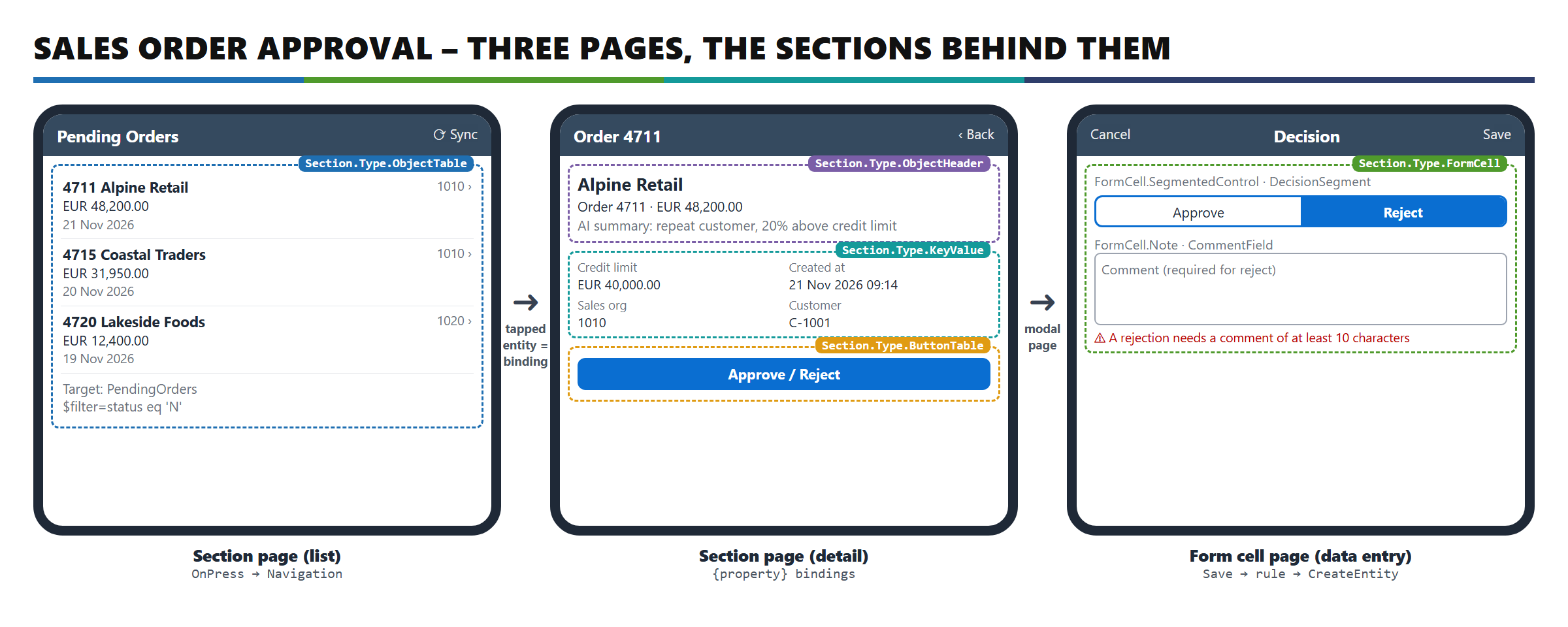
A page ("_Type": "Page") has a caption and action bar, page events (OnLoaded, OnReturning, OnUnloaded, OnResume ...), optional toolbar and pull-down, and Controls. The workhorse control is the SectionedTable (Control.Type.SectionedTable): a vertical list of sections, each of one type. A page built from it is called a section page.
Section type ( | What it shows | In the approval app |
|---|---|---|
Section.Type.ObjectTable | List of object cells (title, subhead, footnote, status, icons) bound to an entity set; search, paging, swipe actions | Pending orders list |
Section.Type.ObjectHeader | Header of one object: headline, subhead, description, status, tags, image | Order header on the detail page |
Section.Type.KeyValue | Label / value pairs in one or more columns | Customer, net amount, created on |
Section.Type.SimplePropertyCollection | Compact grid of simple property cells | Additional order data |
Section.Type.ButtonTable | Buttons as table rows | "Approve" and "Reject" on the detail page |
| Analytics, timelines, cards | Not needed here |
Section.Type.FormCell | Group of form cells inside a sectioned table (Part 5) | Decision form |
The pending orders list (section page with an object table)
|
The Target makes the section data-bound: the client runs the query (against the offline store or online), creates one object cell per entity and binds {property} placeholders to that entity. When the user taps a cell, the tapped entity becomes the binding of the next page.
The detail page (object header + key values)
|
Interview tip: an MDK page is closer to a Fiori elements floorplan than to a UI5 view – you choose sections and bind them; the client handles layout, phone / tablet differences and the Fiori look.
Part 5 – Form cell pages and form cells
Data entry uses form cells: editable controls with caption, value, validation view and change events. A page that consists of form cells is a form cell page. Classic projects use Control.Type.FormCellContainer with sections of form cells; newer templates put Section.Type.FormCell sections into a sectioned table so forms and other sections can be mixed on one page. Both appear in SAP samples.
Form cell ( | Purpose | Value read via |
|---|---|---|
SimpleProperty | Single-line text or number input | #Value |
Note | Multi-line text | #Value |
ListPicker | Pick one or many values, static or from an entity set, with search and barcode | #SelectedValue |
SegmentedControl | Few mutually exclusive options as segments | #SelectedValue |
Switch | On / off | #Value |
| Date / time / duration | #Value |
| Photos, files, signatures | #Value |
| Buttons in forms, titles, static text, filter pages | – |
The decision page of the approval app
|
The Save button points to a rule that validates the comment and then runs the OData create action; Cancel closes the modal page. Both are covered on 03 · MDK Rules, Actions & Navigation. In the reference, Segments takes an array of strings, a fixed collection of DisplayValue / ReturnValue pairs (as here) or an entity-set target; iOS shows at most five segments.
Common mistake: forgetting _Name on form cells. Actions and rules find controls by name (#Control:CommentField/#Value); without a stable name you cannot read the value.
Part 6 – Bindings, target paths and formatters
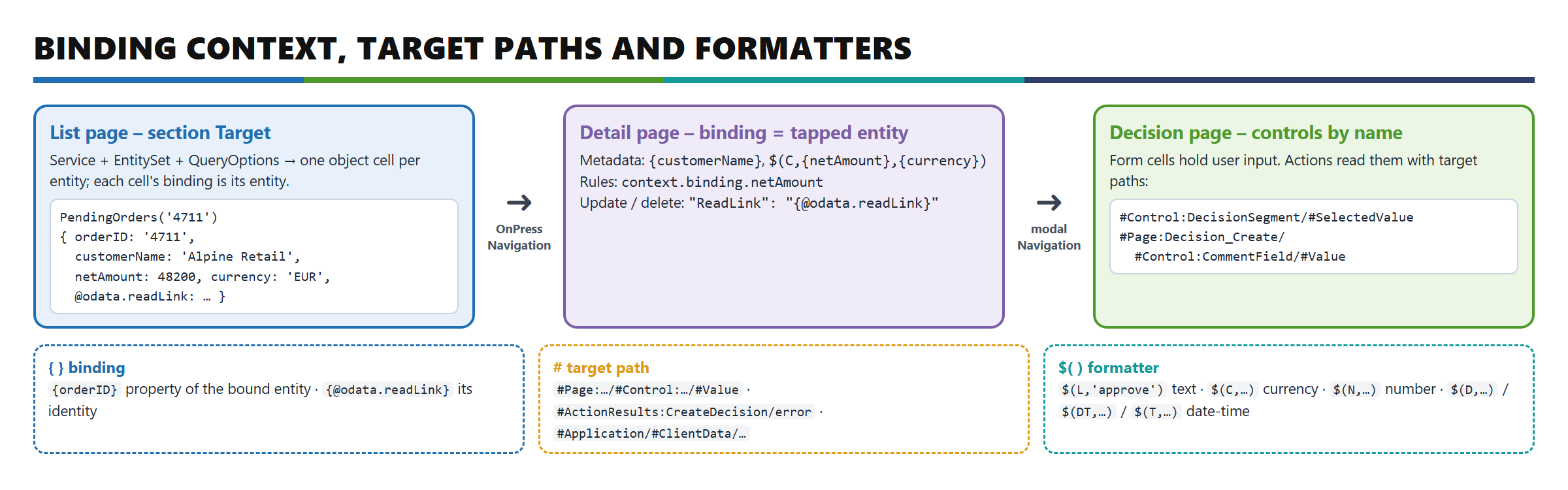
MDK has three small expression languages inside metadata strings. Reading them fluently is essential in interviews and in debugging.
Syntax | Meaning | Example |
|---|---|---|
{property} | Value of a property of the current binding (the entity behind this cell or page) | {customerName} |
{@odata.readLink} | Read link of the bound entity; identifies it for update / delete | "ReadLink": "{@odata.readLink}" |
#Page:Name/#Control:Name/#Value | Target path: value of a control on a (possibly other) page | #Page:Decision_Create/#Control:CommentField/#Value |
#Control:Name/#SelectedValue | Control on the current page; selected value of a picker or segment | #Control:DecisionSegment/#SelectedValue |
#Property:name, #ActionResults:name/error | Property of the binding; result of an earlier action | #ActionResults:CreateDecision/error |
#Application/#ClientData/... | Application-level data, e.g. the Mobile Services app ID | #Application/#ClientData/#Property:MobileServiceAppId |
$(L,key) | Localised text from i18n | $(L,'approve') |
| Formatters: currency, number, date, date-time, time (locale-aware) | $(C,{netAmount},{currency}) |
/ApprovalApp/Rules/X.js | A rule path anywhere a value is expected – the rule's return value is used | "Title": "/ApprovalApp/Rules/OrderTitle.js" |
- Binding context: a data-bound section binds each cell to one entity. Navigating from a cell passes that entity as the new page's binding (
context.bindingin rules,{property}in metadata). - Target:
Service+EntitySetplus eitherQueryOptions(OData query) orReadLink(one entity) – the reference says they are not combined. - Query options may contain bindings, e.g.
"QueryOptions": "$filter=orderID eq '{orderID}'"for the items of the current order, or come from a rule that builds them.
Common mistake: using {property} on a page that has no binding (e.g. the main page opened from Application.app). It resolves to nothing; read data with a Target or a rule instead.
Part 7 – Styling and localisation
Styling with LESS
The app's Styles.less (referenced in Application.app) defines styles. Light and dark variants (Styles.light.less, Styles.dark.less) are supported in recent versions. Styles apply by type (all controls of a type), by name (#ControlName) or by class (.ClassName), and SAP's metadata reference lists for each control which properties can be styled.
|
Controls reference classes through their Styles properties in metadata, or a rule sets them at runtime with setStyle(className, subControl) – for example to colour orders above the credit limit.
- Stay close to the Fiori design: colour only to carry meaning (status, critical values); the client already applies the SAP Fiori theme and dark mode.
Localisation
- Texts live in
i18n/i18n.properties(fallback) plus language files such asi18n_de.properties; metadata uses$(L,'key'), rules usecontext.localizeText('key', [params]). - Placeholders:
see_all_count=See All ({0})with$(L,'see_all_count',{count})orlocalizeText. - Formatters
$(C,…),$(D,…),$(N,…)and the ClientAPI format functions (formatCurrency,formatDate...) use the device locale, so never hard-code date or number formats.
Common mistake: hard-coded captions in pages. They cannot be translated and are easy to miss in reviews; the editor can extract texts to i18n.
Part 8 – Tools: the MDK editor, and MDK web versus mobile
Development tools
- SAP Business Application Studio with a dev space of type SAP Mobile Application, also reached from SAP Build Code / the SAP Build lobby (Create → Application → Mobile). The project wizard links the Mobile Services app and destination and can generate a CRUD or list-detail app from the OData metadata.
- MDK editors: a visual page editor (drag sections and form cells, bind properties from the service metadata), form-based action editors, a rule editor with code completion for the ClientAPI, and metadata validation.
- Commands on
Application.app: deploy to Mobile Services (and to Cloud Foundry for web), show the onboarding QR code, preview in the browser. Deploy details → 05 · Build, Deploy & App Lifecycle. - Mobile Development Kit Extension for Visual Studio Code for local development and debugging: create an
MDKlaunch configuration inlaunch.json, pointappRootat a locally built client, then set breakpoints in rules and run on a simulator or device.
MDK web versus MDK mobile
Aspect | MDK mobile (iOS / Android client) | MDK web |
|---|---|---|
Runs in | Native MDK client (Mobile Services Client or branded) | Browser; HTML5 app on BTP Cloud Foundry |
Deploy target | Mobile Services App Update | HTML5 Application Repository via an MTA build |
Launch | App icon, push notification, deep link | URL, SAP Build Work Zone tile |
Offline OData | Yes (offline store) | No – the Offline OData actions are listed as not supported in the web runtime; online only |
Device features | Camera, barcode, attachments, push, biometrics | What the browser offers |
Controls | Full catalogue | Most controls; some are mobile-only – the reference marks platform support per property |
Rules | Same JavaScript, NativeScript modules available | Same JavaScript; check platform before using native modules |
In rules, check the platform before calling native modules, e.g. context.nativescript.platformModule.isIOS / isAndroid, as SAP's samples do, and keep a web branch.
Interview tip: one MDK project can serve field users offline on phones and office users online in the browser – but design the web case consciously: no offline store, different navigation (Work Zone), and no device features.
Part 9 – Interview questions
Q1. What does "metadata-driven" mean in MDK?
Pages, actions and services are JSON metadata plus JavaScript rules. The native MDK client downloads the metadata from Mobile Services and interprets it at runtime, rendering native Fiori controls. Changes are deployed as a new metadata version, so no app store release is needed for them.
Q2. Name the main folders and files of an MDK project.
Application.app (main page, events, styles, localisation), Pages (.page), Actions (.action), Rules (.js), Services (.service), Globals, i18n, Styles (.less) and Images. Files refer to each other with absolute paths starting with the app name.
Q3. What is the difference between a section page and a form cell page?
A section page uses a sectioned table with display sections such as object table, object header and key values. A form cell page is for data entry with form cells (simple property, note, list picker, segmented control, date picker ...). Newer projects put form cell sections into a sectioned table, so both can be combined on one page.
Q4. How does a list page pass the selected order to the detail page?
The object table section is bound to an entity set through its Target; each object cell is bound to one entity. On tap, the navigation action opens the detail page with that entity as its binding, so the detail page uses {property} and {@odata.readLink} directly.
Q5. What is a target path? Give an example.
An expression that navigates the runtime context to a value, e.g. #Page:Decision_Create/#Control:CommentField/#Value for the comment entered on another page, #Control:DecisionSegment/#SelectedValue on the current page, or #ActionResults:CreateDecision/error.
Q6. How do you format and translate values in MDK metadata?
With $(L,key) for i18n texts and formatters such as $(C,amount,currency), $(N,…), $(D,…), $(DT,…); in rules with localizeText and formatCurrency / formatDate. They use the device locale.
Q7. SAP Mobile Services Client versus branded client versus MDK web?
The Mobile Services Client from the app stores runs any MDK app for tests. A branded client is built with the MDK SDK or Cloud Build for production: own name, icon, signing, extensions, MDM. MDK web runs the same metadata in the browser as an HTML5 app on BTP, online only.
Q8. How do you style an MDK app?
With a LESS file referenced in Application.app; styles by type, by control name or by class, optional light / dark files. Controls reference classes in metadata, rules can call setStyle at runtime. Keep to the Fiori theme and use colour for meaning.
Q9. Where is MDK not the right choice?
Highly custom or platform-specific UI (complex visualisations, widgets, wearables), heavy native device integration, or a team of iOS / Android specialists who want full control – then the SAP BTP SDKs fit better. Extension controls help for a few custom screens, not for a whole custom UX.
Q10. Scenario: the approval app must show orders above the credit limit in red and their AI summary.
Add aiSummary and creditLimit to the CAP projection and the defining request, show the summary in the object header Description, and set the style with a rule (compare netAmount with creditLimit from context.binding and return or apply a .LargeAmount class). Deploy a new metadata version – no app store release.
Q11. Scenario: after a project rename, pages open empty and actions fail. What happened?
MDK paths start with the app name (/ApprovalApp/...). Renaming the folder or _Name without updating every reference breaks pages, actions, rules and services. Rename consistently, run the metadata validation and redeploy.
🏠 Start Here · ◀ 01 · Options & Mobile Services · 03 · Rules & Actions ▶ · Sections: CORE ABAP | OOPS ABAP | ABAP on HANA | Clean Core | RAP | ABAP Points | SAP Fiori | SAPUI5 | Mobile Development (MDK) | BTP Foundations | BTP Development | CAP | SAP Build | ABAP on BTP | Integration Suite | SAP Business AI | SAP BASIS | Security | SAP SDLC
Functional: FICO ABAP | TRM ABAP | VIM | SAP BIS | SD ABAP | MM ABAP | PP ABAP | QM ABAP | PM ABAP | PS ABAP | EWM | TM ABAP | GTM ABAP | EHS ABAP | HR ABAP | BW | SAP Datasphere | SAP Business Data Cloud | SAP MDG | SAP Analytics Cloud | SAP Ariba | SAP CX | SAP IBP