The first half of this page covers mobile security: the threat picture, the app passcode and biometrics, client policies and app protection (clipboard, print and URL restrictions, attestation, device compliance), lock and wipe, MDM / EMM, certificates and shared devices. The second half is an end-to-end walkthrough of the Sales Order Approval offline app for managers: CAP or RAP back end, SAP Mobile Services, the MDK app, offline approvals, conflict handling and push notifications triggered by events. Authentication types and destinations are introduced on Mobile Development (MDK) › 01 · Mobile Options & SAP Mobile Services; offline details on 04 · Offline OData & Synchronisation; deployment on 05 · Build, Deploy & App Lifecycle.
Part 1 – The mobile threat picture and the security layers
Why it matters: a phone is lost in a taxi, a tablet is shared by a shift team, a device is rooted, an app talks over hotel Wi-Fi – and offline apps keep business data on the device. Mobile security therefore works in layers; each layer covers what the one before can miss.
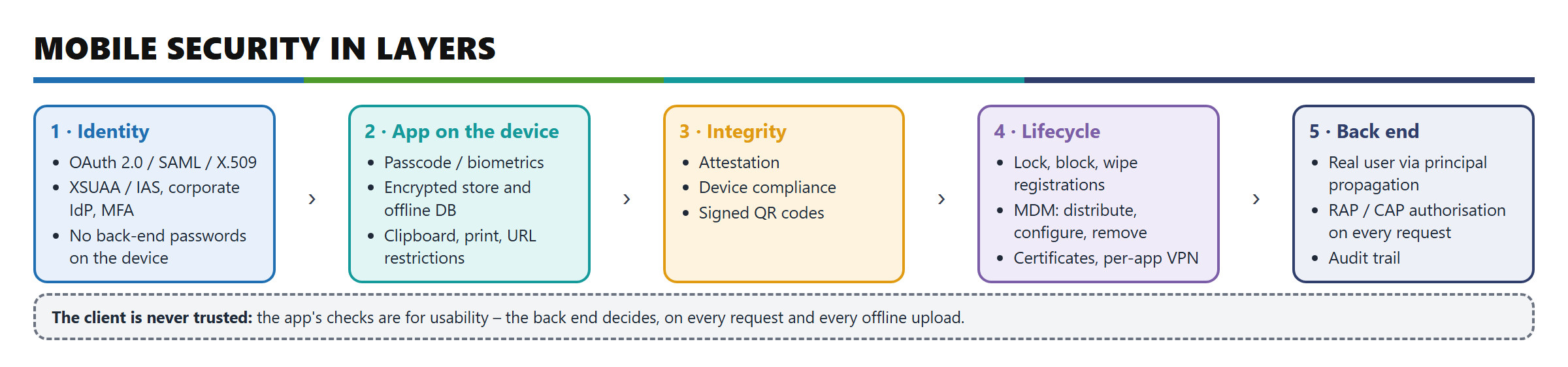
Threat | Control | Where it is set |
|---|---|---|
Stolen credentials | OAuth 2.0 / SAML via the corporate IdP (XSUAA / IAS), MFA in the IdP; no back-end passwords on the device | Mobile Services app security, IdP |
Lost or stolen device | App passcode / biometrics, encrypted store, lock and wipe | Passcode policy, user registrations |
Data leaving the app | Clipboard protection, print and opening-URLs restriction | Client policies / feature restrictions |
Tampered app or rooted device | Attestation, device compliance checks | Mobile Services security settings |
Leaver keeps access | Block the user in the IdP, delete registrations, wipe via MDM | IdP, cockpit, MDM |
Client manipulates requests | Authorisation re-checked in the back end for every request and upload | RAP / CAP / PFCG |
Golden rule: the client is never trusted. Everything the app shows or hides is convenience; the decision whether a manager may approve an order is made in the back end, every time.
Part 2 – Passcode, biometrics and client policies
The app passcode (separate from the device PIN) protects the key that encrypts the app's secure store – tokens, settings and the offline database. Biometrics (Face ID, Touch ID, Android fingerprint or face unlock) are a convenient way to unlock it. The rules come from Mobile Services, so admins change them without a new app version.
Policy area | Examples of settings |
|---|---|
Passcode policy | Minimum length, character rules, retry limit before the store is locked or reset, lock timeout in background, allow biometrics; passcode expiry and reuse restriction (iOS) |
Skip passcode | For single-user, company-managed devices only – SAP notes the security impact; use with MDM device protection |
Log policy | Log level and upload of client logs |
Usage policy | Collect and upload usage data (with consent) |
Feature restrictions / flags | Switch app functions on or off centrally |
Policy names and options follow the Mobile Services documentation ("Defining Client Passcode Policy" and the client configuration page); some options apply to one platform only. The security recommendations there: always enable the passcode policy, prefer OAuth, use X.509 service keys.
Common mistake: a long lock timeout "for convenience". An unlocked approval app on a lost phone is an open door to the business. Short background timeouts plus biometrics give security without annoying users.
Part 3 – App protection: data leakage, attestation and device compliance
Beyond the passcode, Mobile Services offers protection settings for the client (Android and iOS, depending on the feature). Their job is to keep business data inside the app and to accept requests only from genuine apps on healthy devices.
Feature (documentation name) | What it protects against | Platforms |
|---|---|---|
Clipboard protection | Copying order data into other apps | Android, iOS |
Print data and opening URLs restriction | Printing or opening links in uncontrolled apps | Android, iOS |
Attestation | Requests from modified apps or compromised devices (uses the platform's integrity services) | Android, iOS |
Device compliance | Devices that do not meet the company's requirements | iOS |
Signed QR codes | Fake onboarding QR codes pointing to a rogue server | Client onboarding |
Android attestation uses Google's Play Integrity API (SafetyNet is being retired) and needs the app's SHA-256 signing-certificate fingerprints in the cockpit; enforce it with care – unattested requests are then rejected – ideally on a Mobile Services app used only by that client.
- Root / jailbreak: attestation and MDM compliance rules are the supported way to react; do not rely on home-made checks in the app.
- Screenshots and app switcher: on Android the branded client's
EnableScreenSharingsetting (BrandedSettings.json) blocks screenshots, screen sharing and the recent-apps image whenfalse– set it tofalsein production. On iOS, hide sensitive screens with native code or an extension.
Part 4 – Device management: lock, wipe, MDM / EMM and certificates
Two levels of control: Mobile Services controls the app's registration (per user and device); an MDM / EMM tool (e.g. Microsoft Intune, VMware Workspace ONE, Jamf – the company's choice) controls the device and its managed apps.
Action | Mobile Services (app level) | MDM / EMM (device level) |
|---|---|---|
Install / distribute | App Catalog, QR code for pilots | Push the branded client to devices |
Configure | Client policies, onboarding QR code | Managed app configuration, e.g. server URL and app ID so users skip the QR code |
Lock / block | Lock or block a user's registration; lock apps that have not connected for a set time | Lock the device |
Wipe | Wipe the app's client data, force re-registration | Remove the managed app and its data; full device wipe |
Certificates | X.509 user-certificate authentication; trusted CAs | Deploy user and CA certificates, per-app VPN |
Certificates
- X.509 user certificates let users authenticate without typing passwords – the MDM installs a personal certificate, the app presents it. Mobile Services supports X.509 as an authentication type; SAP has a tutorial for certificate authentication in MDK.
- Company CAs for TLS inspection or private back ends must be trusted by the client (the MDK documentation covers CAs trusted by the MDK Android app).
- Principal propagation to on-premise S/4HANA uses short-lived X.509 certificates created by the Cloud Connector – different from device certificates (→ BTP Foundations section, connectivity).
Shared devices
Shift teams share tablets. MDK supports a multi-user mode: several users onboard on one device, each with their own encrypted data; when users switch, the previous user's pending offline transactions are synchronised first (OnUserSwitch in Application.app). With offline conflict handling enabled, a failed switch offers to discard pending transactions or upload a store snapshot first. Prerequisites: the cockpit flag Allow Upload of Pending Changes from Previous User (Mobile Settings Exchange › Shared Devices) plus either the multi-user setting in BrandedSettings.json (rebuild the client) or, from client 6.3, the in-app scanning QR code.
Part 5 – The Order Approval app: scenario and architecture
The Sales Order Approval business (→ RAP section) from the mobile side. Orders above the credit limit wait with status N for a sales manager. Managers travel, so they want an app that lists the orders waiting for them, lets them approve or reject without a network, and notifies them when a new order needs a decision.
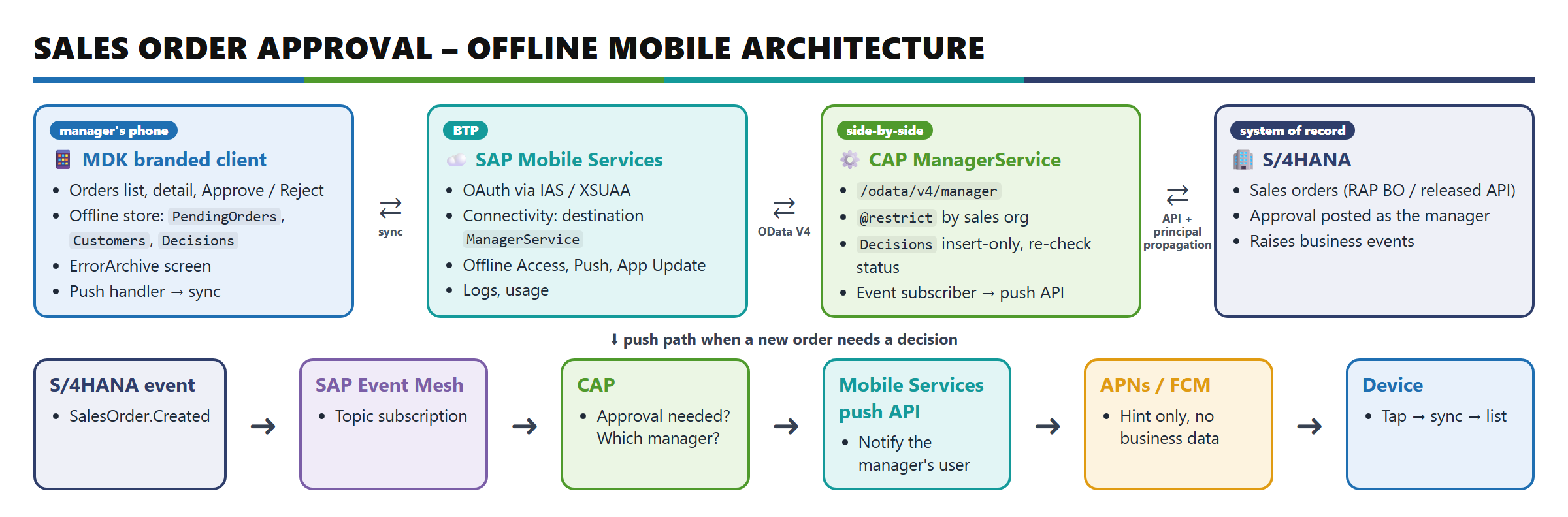
Layer | Choice | Why |
|---|---|---|
Device app | MDK branded client (Cloud Build), iOS and Android | Standard UI, offline built in, updates without store releases (→ 06 · Native SDKs for the comparison) |
Mobile back end | SAP Mobile Services: Connectivity, Offline Access, Push Notification, App Update, Client Log Upload | One secured entry point for the device |
Service | CAP | Mobile-friendly OData V4: only what the app needs |
System of record | S/4HANA sales orders (released API / RAP business object) | Approval posted where the order lives |
Events | S/4HANA / RAP business events → SAP Event Mesh → CAP | New order needing approval triggers a push |
Identity | IAS / XSUAA with the corporate IdP; principal propagation or token exchange to S/4HANA | S/4HANA logs the real manager as approver |
CAP or RAP? With CAP (→ CAP section) you shape a small mobile service, add notes and checks, and handle events and push in one place. Pointing Mobile Services directly at the RAP service works too when the service is lean and offline-friendly (filterable, ETags, no action-only writes); push then needs another component that reacts to the event.
Part 6 – Walkthrough 1: back end and Mobile Services
Step 1 – An offline-friendly service
Offline writes must be plain creates or updates (→ 04 · Offline OData & Synchronisation, Part 4). The approval is therefore modelled as an insert-only Decisions entity instead of a bound action call.
|
|
The 409 and 400 rejections are exactly what the device later sees as ErrorArchive entries with a readable message. With RAP only, the same idea is an insert-only decision entity whose save sequence calls the approve action with EML.
Step 2 – Mobile Services app
- Create the app
com.example.salesapprovalwith OAuth security (IAS / XSUAA) and role settings; assign the role collection to managers. - Connectivity: destination
ManagerServiceto the CAP app URL (or to S/4HANA through the Cloud Connector with principal propagation for the RAP variant). - Offline Access: upload the .ini (endpoint settings,
Customersas shared data,PendingOrdersper user, repeatable requests). - Push Notification: APNs key and Firebase service-account key; App Update, Client Log Upload and Cloud Build for the branded client.
- Separate apps (and destinations) for dev, test and production (→ 05 · Build, Deploy & App Lifecycle).
Part 7 – Walkthrough 2: the MDK app, offline approval and sync
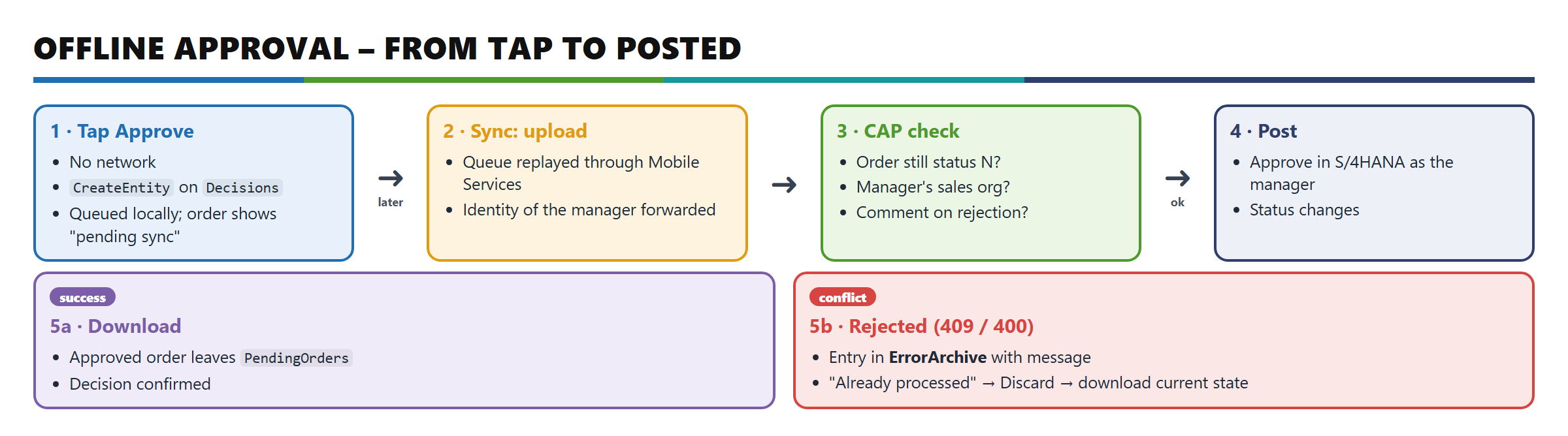
Step 3 – Project and service
- Create an MDK project from the CRUD or list-detail template in SAP Business Application Studio against the
ManagerServicedestination, offline enabled (→ 02 · MDK Fundamentals). OnLaunchruns the Initialize action with the defining requestsPendingOrders,Customersand recentDecisions, then a sync (→ 04 · Offline OData & Synchronisation, Parts 2 and 3).
Step 4 – Pages
- Orders list: object table on
PendingOrders– customer, amount, date, status; search; badge with the ErrorArchive count. - Order detail: object header, key-value section, items; a segmented control Approve / Reject, a comment field, a Submit button (→ 03 · MDK Rules, Actions & Navigation for actions and rules).
- Sync errors: list bound to
ErrorArchivewith message and a Discard action.
Step 5 – Approve offline
|
Binding and target-path syntax follow MDK patterns; control names are this example's own. A rule validates before the action runs (rejection needs a comment) – the back end checks again anyway.
Step 6 – Sync and conflicts
- The Sync button runs Upload → Download; afterwards a rule counts ErrorArchive entries and shows a banner if any exist.
- Order already decided by a colleague → CAP rejects with 409 → ErrorArchive entry "already processed" → user taps Discard (DeleteEntity on the entry) → download shows the current state.
- The approved order disappears from
PendingOrdersafter the download because its status is no longer N.
Part 8 – Walkthrough 3: push notifications via events
The manager should not have to open the app to find new work. The chain: a new order needing approval raises an event, CAP receives it and asks Mobile Services to push to the responsible manager, the device shows the notification, and the app syncs when it is opened.
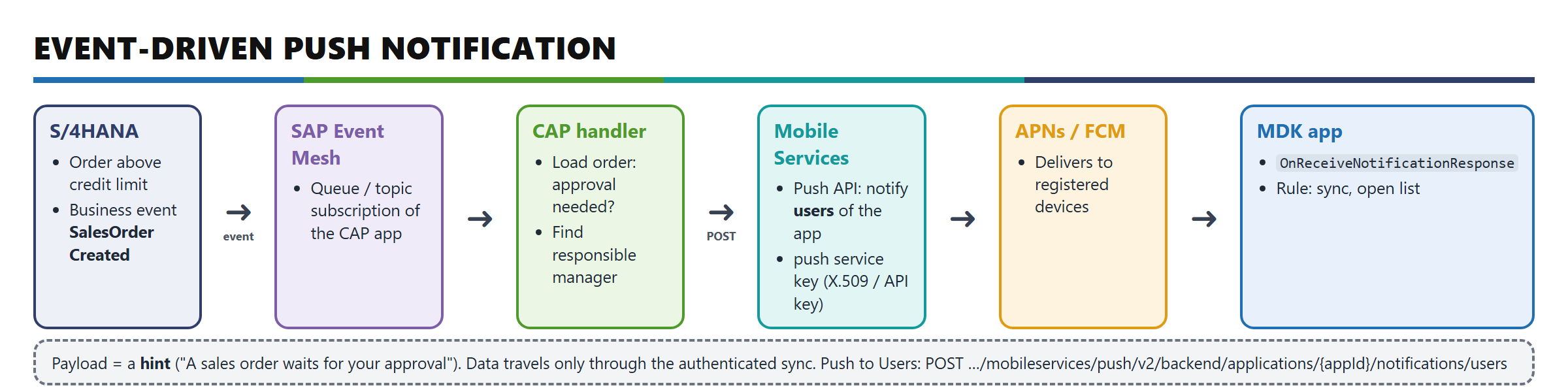
Step 7 – Receive the event in CAP
|
The topic is an example of the S/4HANA business event naming – take the exact one from the event's reference in the SAP Business Accelerator Hub. The push call is "Push to Users" of the Mobile Services push REST API (v2; notification.notifications can add texts per locale). The destination points at the URL of a push service key created with the push_multiple role; it authenticates with that key – X.509 (recommended), the X-API-Key header or basic authentication with the alias (→ Integration Suite section for Event Mesh).
Step 8 – React in the app
Application.appevents:OnReceiveForegroundNotification(notification arrives while the app is open),OnReceiveNotificationResponse(user tapped it),OnReceiveFetchCompletion(background fetch hint).- The rule runs the Sync action and navigates to the orders list.
|
- Payload rule: only a hint – never amounts, customer names or order data. The sync brings the data through the authenticated channel.
- Branded client prerequisites: APNs (paid Apple Developer account) and
google-services.jsonfor Android in Cloud Build (→ 05 · Build, Deploy & App Lifecycle).
Part 9 – Testing and go-live checklist
Test | Expected result |
|---|---|
Airplane mode: approve two orders, restart the app, go online and sync | Both decisions arrive once, in order; orders disappear from the list |
Conflict: approve offline an order a colleague approved online | ErrorArchive entry "already processed"; Discard restores server state |
Authorisation: manager of another sales organisation | Sees none of the orders, offline or online; forged Decisions rejected with 403 |
Lost response during upload (network cut) | No duplicate decision (repeatable requests) |
Push: create an order above the credit limit in S/4HANA | Responsible manager gets the hint; tapping it syncs and opens the list |
Lock / wipe: admin wipes the registration | App data removed; re-onboarding required |
Update: deploy metadata with a new field | OnWillUpdate asks, pending changes upload first, field appears |
Passcode: wrong passcode beyond the retry limit | Store locked or reset according to policy |
Go-live checklist
- Branded client signed and distributed through MDM; managed configuration with the production server URL and app ID.
- Production Mobile Services app: policies reviewed (passcode, logs at warning level, usage with consent), push keys valid, renewal dates of APNs / signing certificates in the calendar.
- Defining requests sized with production data; first sync timed on a real device and network.
- Support runbook: ErrorArchive meanings, log upload, user registrations, rollback by redeploying the previous metadata version.
Part 10 – Interview questions
Q1. How is data on a mobile device protected?
The app's secure store and offline database are encrypted; the key is protected by the app passcode or biometrics according to the passcode policy. Clipboard, print and URL restrictions keep data in the app; lock and wipe remove access; defining requests limit what reaches the device at all.
Q2. App passcode versus device PIN?
The device PIN unlocks the phone; the app passcode unlocks the app's encrypted store and is governed by the Mobile Services passcode policy (length, retries, timeout, biometrics). Skipping it is only acceptable on managed single-user devices.
Q3. What does MDM add to Mobile Services?
Device-level control: distribute the branded client, push managed configuration (server URL, app ID), certificates and per-app VPN, enforce device compliance, remove the app and its data. Mobile Services controls the app registration and client policies.
Q4. What is attestation?
A check that requests come from the genuine app on a device that has not been tampered with, using the platform integrity services; Mobile Services can require it before accepting requests.
Q5. How do you handle shared devices?
MDK multi-user mode: each user has separate encrypted data; on user switch the previous user's pending offline changes are synchronised first (OnUserSwitch); conflict handling offers discard or snapshot upload if that fails.
Q6. Why an insert-only Decisions entity instead of calling the approve action?
Offline writes are queued as plain OData requests; action calls are not a good fit offline. A Decisions create is queued, uploaded later and re-checked by the back end, which then calls the real approve logic. Rejections become clear ErrorArchive entries.
Q7. How does a push notification reach the manager?
S/4HANA raises a business event → Event Mesh → CAP checks whether approval is needed → CAP calls the Mobile Services push API for the manager's user → APNs / FCM → device. The payload is only a hint; the app syncs to get the data.
Q8. How does S/4HANA know which manager approved?
The user authenticates with OAuth via IAS / XSUAA; Mobile Services forwards the identity and the destination uses principal propagation (Cloud Connector) or a token exchange, so the back end sees the real user and applies its authorisations. A technical user would break the audit trail.
Q9. Scenario: a manager's phone is stolen. What do you do?
Block the user's sessions in the IdP if needed, lock or wipe the app registration in Mobile Services, and wipe the managed app (or device) through MDM. The encrypted store is protected by the passcode policy meanwhile; after a new device is issued, the manager re-onboards. Pending offline decisions on the stolen phone are lost – the orders remain status N for re-approval.
Q10. Scenario: managers complain they get push notifications but see no new order in the app. What is wrong?
The push arrives faster than the data: the app does not sync on notification, or the defining request filters the new order out (status, sales organisation, date window), or Mobile Services' delta tracking has not picked it up yet. Check the notification handler rule, the defining request and the back end's authorisation for that manager.
Q11. Which security checks belong in the back end even though the app already does them?
All of them: role and sales organisation of the approver, order status, mandatory comment on rejection, amount limits. The app's checks are for usability; uploads can be replayed or forged, so CAP @restrict / RAP authorisations and validations decide.
🏠 Start Here · ◀ 06 · Native SDKs · 08 · Interview Questions ▶ · Sections: CORE ABAP | OOPS ABAP | ABAP on HANA | Clean Core | RAP | ABAP Points | SAP Fiori | SAPUI5 | Mobile Development (MDK) | BTP Foundations | BTP Development | CAP | SAP Build | ABAP on BTP | Integration Suite | SAP Business AI | SAP BASIS | Security | SAP SDLC
Functional: FICO ABAP | TRM ABAP | VIM | SAP BIS | SD ABAP | MM ABAP | PP ABAP | QM ABAP | PM ABAP | PS ABAP | EWM | TM ABAP | EHS ABAP | HR ABAP | BW | SAP MDG | SAP Analytics Cloud | SAP Ariba | SAP CX | SAP IBP