When MDK's metadata-driven controls are not enough, SAP offers fully native development with the SAP BTP SDK for iOS (Swift) and the SAP BTP SDK for Android (Kotlin / Java). This page explains the SAP Fiori for iOS / for Android design languages, the SDK layers, onboarding flows, OData proxy generation, the project generators (SAP BTP SDK Assistant for iOS and the Wizard for Android Studio), Swift and Kotlin basics mapped to ABAP, and when native beats MDK. Both SDKs use the same SAP Mobile Services features as MDK (→ Mobile Development (MDK) › 01 · Mobile Options & SAP Mobile Services); offline OData concepts are on 04 · Offline OData & Synchronisation.
Part 1 – What the native SDKs are and how they are layered
Why it matters: some apps need what metadata cannot express – a custom chart, a camera workflow, home-screen widgets, Apple Vision Pro, deep OS integration. The SDKs give you those native possibilities while SAP still handles the enterprise parts: onboarding, secure storage, OData, offline and Mobile Services.
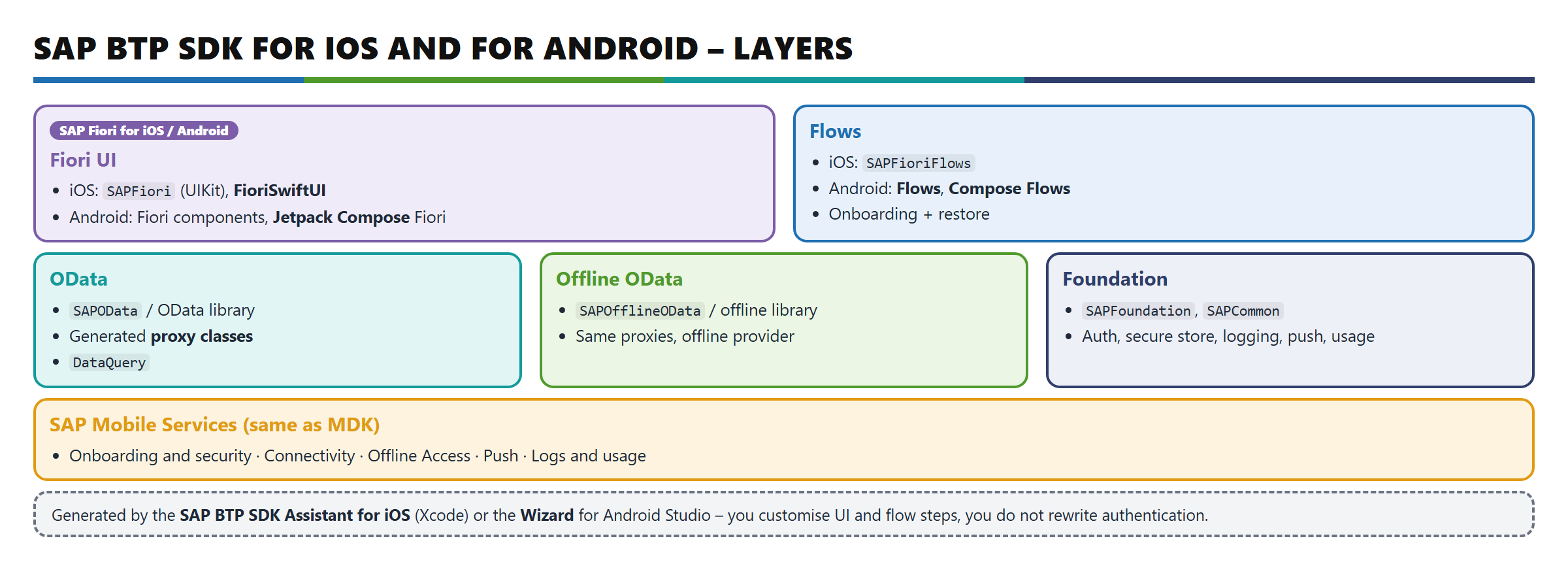
Layer | iOS (Swift) | Android (Kotlin / Java) | Gives you |
|---|---|---|---|
Fiori UI |
| Fiori UI components and Jetpack Compose Fiori components | SAP-designed native controls |
Flows / onboarding | SAPFioriFlows | Flows (view-based) and Compose Flows (since SDK 6.0) | First start, login, passcode, consent, restore |
OData |
| OData library + generated proxy classes | Typed access to services |
Offline | SAPOfflineOData | Offline OData library | Offline store and sync |
Foundation |
| Foundation library | Authentication, secure store, logging, push, usage, Mobile Services settings |
- The iOS SDK binary frameworks are distributed as a Swift Package (GitHub
SAP/cloud-sdk-ios); FioriSwiftUI is developed open source. - Versions follow a year-based scheme on both platforms (e.g. 25.x, 26.x). Each release states the minimum iOS / Xcode or Android versions on its "What's New" page – e.g. SAP BTP SDK for iOS 26.11.0 supports iOS 26 and later and requires Xcode 27.1, while 26.8.0 still supported iOS 18.
- The old SAP Cloud Platform SDK for iOS / Android names refer to the same products.
Part 2 – SAP Fiori for iOS and SAP Fiori for Android: the design languages
SAP Fiori for iOS and SAP Fiori for Android are SAP's design guidelines for native apps (part of the SAP Fiori design system). They take Fiori's principles – role-based, adaptive, simple, coherent, delightful – and express them with each platform's conventions: Apple's Human Interface Guidelines on iOS, Material Design on Android. The SDK controls implement them.
Pattern / control | Purpose | Similar web Fiori idea |
|---|---|---|
Object cell (list item) | Title, subtitle, status, icon, accessory in a list | List report row |
Object header | Key facts at the top of a detail screen | Object page header |
KPI view, charts | Numbers and trends | Analytical cards |
Timeline | Steps and history of an object | Process flow |
Filter / sort sheet, search | Find objects in large lists | Filter bar |
Onboarding screens (welcome, passcode, consent) | Standard first-start experience | Launchpad login |
Why it matters for you: a manager who uses the Fiori approver app on the desktop and a native app on the phone should recognise the same object, status colours and actions. Using the Fiori controls also saves design work and brings accessibility and dark mode support.
Interview tip: "SAP Fiori for iOS is not a web Fiori app in a wrapper – it is SAP's native design language, implemented by the SDK's UIKit and SwiftUI controls."
Part 3 – Generating a project: Assistant for iOS and Wizard for Android
You rarely start from an empty project. The generators read the app definition in Mobile Services and create a runnable app with onboarding, the service connection and (optionally) generated list and detail screens for the OData entities.
iOS | Android | |
|---|---|---|
Tool | SAP BTP SDK Assistant for iOS (Mac app) | SAP BTP SDK Wizard plug-in for Android Studio ("New SAP BTP Android project") |
IDE | Xcode | Android Studio |
Input | Mobile Services account (admin API), app ID, OData destination | Same |
Generates | Swift project: onboarding flow, | Kotlin (or Java) project: Flows onboarding, proxy classes, optional list / detail UI; Jetpack Compose for wizard apps since SDK 7.0 |
Can create the Mobile Services app | Yes, from the Assistant | Yes, from the Wizard |
Steps in short
- Create (or reuse) the app in Mobile Services: app ID such as
com.example.salesapproval.native, OAuth security, Connectivity destination to the OData service, Offline Access if needed. - Add the Mobile Services account to the Assistant / Wizard (admin API URL and credentials of a development subaccount).
- Choose the app and destination; let the tool generate proxy classes and screens; open the project in Xcode / Android Studio and run it on a simulator or device.
- On Android the SDK version of a generated project is a Gradle setting: older projects set sdkVersion in gradle.properties, current projects sapSdkVersion in gradle/libs.versions.toml.
Common mistake: treating generated screens as the product. They show every property of every entity set – useful to test the service, but real apps keep the onboarding and proxies and replace the UI with a designed one.
Part 4 – Onboarding flows: first start and restore
Onboarding is everything between installing the app and seeing data: the app must learn the server, authenticate the user, protect the local store with a passcode, ask for consent and register the device. Restore is every later start: unlock with passcode or biometrics, refresh tokens, load settings. The SDK's flows implement both, wired to your Mobile Services configuration.
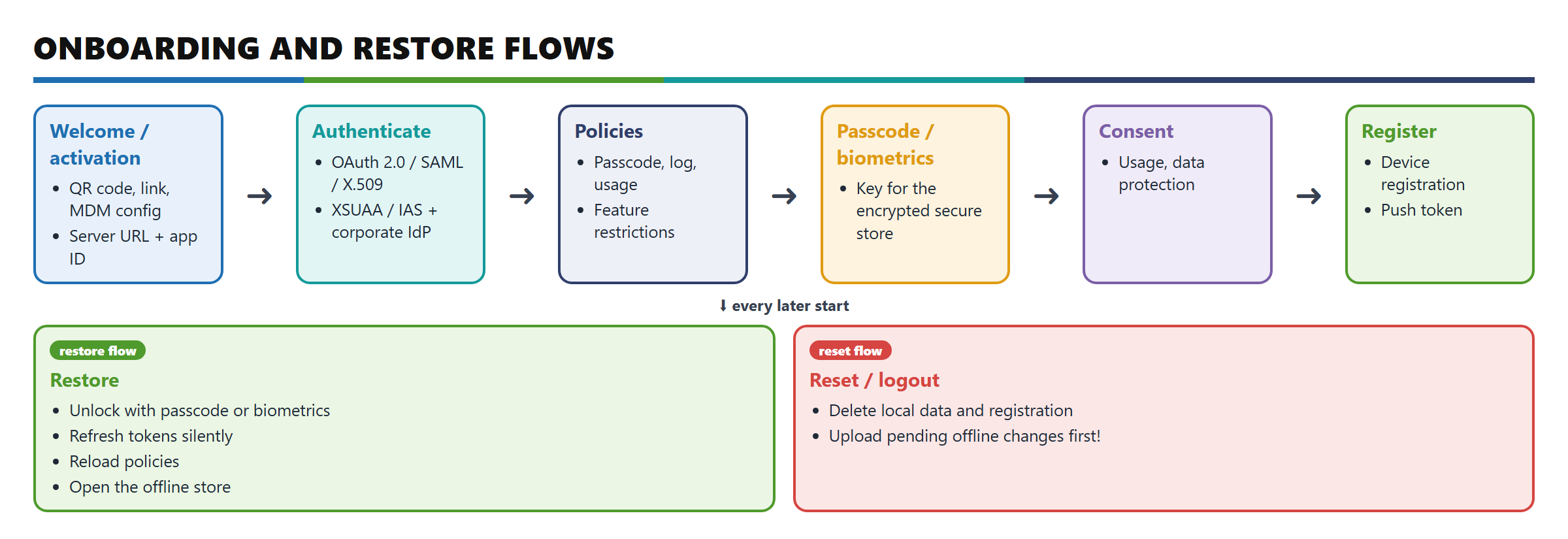
Step | What happens | Configured where |
|---|---|---|
Welcome / activation | Server URL and app ID from a QR code, link, MDM managed configuration or built in | Onboarding QR code in the cockpit; MDM |
Authentication | OAuth 2.0 (or SAML, Basic, X.509) against XSUAA / IAS and the corporate IdP | App security settings in Mobile Services |
Settings download | Client policies: passcode rules, log and usage policies, feature restrictions | Client policies in Mobile Services |
Passcode / biometrics | Creates the key that encrypts the secure store | Passcode policy |
Consent | Usage collection, crash reports, data protection notices | App code / policy |
Registration | Device registered, push token sent | User registrations; Push feature |
- iOS:
SAPFioriFlowscomposes the flow from steps (welcome, authentication, store manager, registration, consent …); the Assistant generates the step list in your project, which you then adapt. - Android: the Flows component (also as Compose Flows) starts onboarding or restore with a flow context; customisation happens through options and callbacks rather than rewriting screens. SAP tutorials cover passcode change, restore, reset and logout.
Interview tip: you do not write login code. You configure Mobile Services and customise flow steps; the SDK handles tokens, refresh and the secure store.
Part 5 – OData proxy classes: typed access to your RAP or CAP service
A proxy class is generated Swift or Kotlin / Java code for each entity type and entity set of the OData service's $metadata – comparable to the structures and methods you get in ABAP when you generate a client proxy. You call typed methods instead of building URLs and parsing JSON.
- Generation: iOS – by the Assistant or the SDK's proxy generator command-line tool; Android – by the OData Gradle plugin at build time (or the proxy generator tool). Regenerate after the service changes.
- Same proxies online and offline: the service class takes a data provider. Online it is the online OData provider, offline the offline OData provider with its defining queries. Screens do not change.
- Queries are built with a
DataQueryobject (filter, order by, top, expand) – the typed equivalent of OData query options.
|
|
Class and method names come from your $metadata (here a CAP ManagerService with PendingOrders): the OData proxy classes are generated per service, so read them in the generated code.
Part 6 – Swift and Kotlin basics for ABAP developers
You do not need to become an iOS or Android specialist to read and review native code. Most concepts map to things you know from ABAP Objects.
Concept | ABAP | Swift | Kotlin |
|---|---|---|---|
Constant / variable |
|
|
|
Structure / value type | TYPES BEGIN OF … END OF | struct | data class |
Class, interface |
|
|
|
"No value" |
| Optionals: | Nullable types: |
Internal table | STANDARD TABLE OF |
| List<PendingOrder> |
Inline loop / filter |
|
|
|
Exceptions | TRY … CATCH cx_… | do { try … } catch | try { … } catch (e: Exception) |
Asynchronous work | aRFC, background tasks, |
| Coroutines ( |
Build / packages | Packages, transports | Swift Package Manager, Xcode project | Gradle modules |
|
|
- Main thread rule: both platforms freeze the UI if you call the network or the offline store on the main thread – use async APIs, coroutines or background queues (like not doing heavy work in a PBO).
- Lifecycle: apps go to background, get killed and restored at any time – save state; restore flows and the offline store handle the SAP part.
Part 7 – When native beats MDK (and when it does not)
Both options use the same Mobile Services features, the same back end and the same offline OData technology. The choice is about UI freedom and platform depth versus speed and one code base.
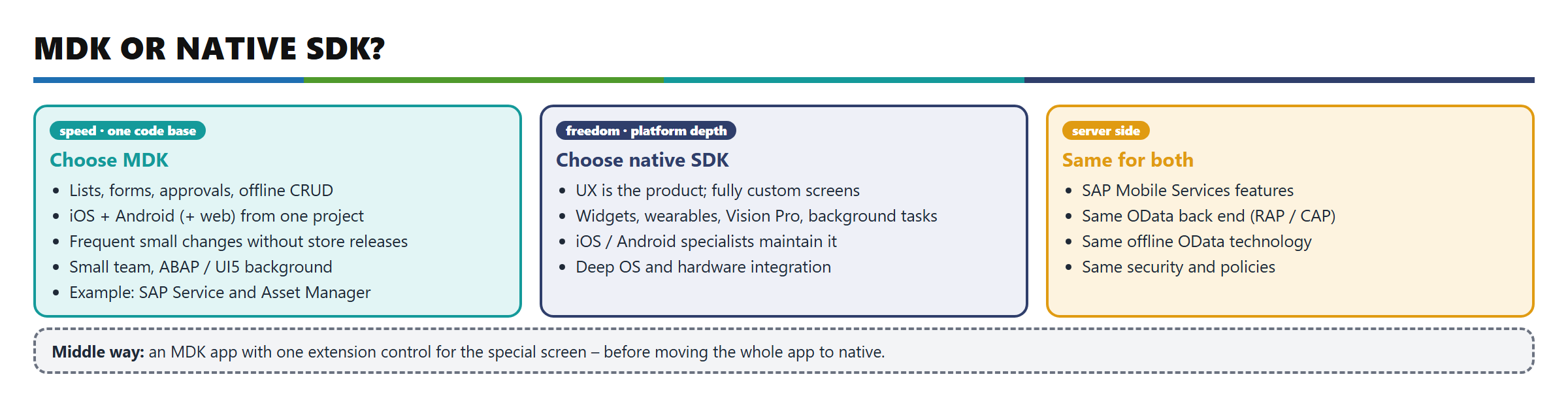
Criterion | MDK | Native SDK |
|---|---|---|
UI | SAP-provided native controls, configured; extension controls for special cases | Anything the platform offers; Fiori controls as building blocks |
Platforms | iOS, Android and web from one project | One project per platform (Swift, Kotlin) |
Skills | JSON metadata, JavaScript rules – ABAP / UI5 developers learn it quickly | iOS and Android specialists |
Updates | Metadata via App Update, no store release | Store / MDM release for every change |
Device and OS features | Common ones built in (camera, barcode, attachments, push); others via extensions | Full: widgets, wearables, Vision Pro, background tasks, custom sensors |
Offline | Built in, configured with actions | Offline library, full control in code |
Typical apps | Approvals, inspections, service and asset management (SAP Service and Asset Manager is an MDK app) | Premium consumer-grade or highly specialised apps |
- Choose native when the UX is the product, when you need OS integration MDK does not offer, or when an iOS / Android team exists and will maintain the app.
- Choose MDK for standard business screens, offline CRUD, cross-platform delivery and frequent small changes by a small team.
- Mix: MDK extension controls (native or NativeScript UI) can cover one special screen without moving the whole app to native.
Common mistake: choosing native "because it is more powerful" and then maintaining two code bases for an app that is a list, a detail page and two buttons.
Part 8 – Interview questions
Q1. What is the SAP BTP SDK for iOS / Android?
Native SDKs (Swift; Kotlin or Java) with SAP Fiori controls, onboarding flows, OData and offline OData libraries and Foundation services (authentication, secure store, logging, push, usage) that work with SAP Mobile Services. Formerly SAP Cloud Platform SDK for iOS / Android.
Q2. What are SAP Fiori for iOS and SAP Fiori for Android?
SAP's native design languages – Fiori principles expressed with Apple and Material conventions – implemented by the SDK controls (object cells, object headers, KPI views, timelines, onboarding screens). They keep native apps consistent with web Fiori apps.
Q3. What does the SDK Assistant / Wizard generate?
A runnable Xcode or Android Studio project connected to a Mobile Services app: onboarding flow, OData proxy classes for the destination's service and optional generated list/detail screens. It can also create the Mobile Services app.
Q4. What are proxy classes and why do they help offline?
Typed classes generated from the service $metadata. You query with DataQuery and get typed objects. The service class takes a data provider, so the same code works with the online provider or the offline provider.
Q5. What happens during onboarding in a native SDK app?
Activation (server URL and app ID via QR code, link or MDM), authentication via OAuth / SAML / X.509, client policy download, passcode or biometrics that protect the secure store, consent screens and device registration including the push token. Restore later just unlocks and refreshes.
Q6. Explain optionals / nullable types to an ABAP developer.
A type marked with ? may hold no value (nil / null), and the compiler forces you to handle that case (if let, guard let, ?., ?:). It is like checking IS INITIAL or IS BOUND, but enforced at compile time.
Q7. When do you choose the native SDK over MDK?
When the UX must be fully custom or platform-specific, deep OS features are needed (widgets, wearables, Vision Pro, background processing), or a native team will maintain it. Otherwise MDK is faster, cross-platform and updatable without store releases.
Q8. Do MDK and native apps need different back ends?
No. Both use SAP Mobile Services and the same OData service (RAP or CAP), the same destinations, security and offline technology. Only the client side differs.
Q9. Scenario: the business wants a home-screen widget showing "orders waiting for approval" plus the normal approval app. What do you propose?
Keep the approval app in MDK if it already exists and works. A widget is native OS functionality: either build a small native companion with the SDK (sharing the Mobile Services app and service) or evaluate whether the Joule Work mobile app already covers the need before building anything.
Q10. Scenario: you inherit a generated Android app that freezes when the list loads. Where do you look?
At OData or offline-store calls on the main thread – move them into coroutines (withContext(Dispatchers.IO)) or the async API; then at query size (add $filter / top), image loading and the logs uploaded through Mobile Services.
🏠 Start Here · ◀ 05 · Deploy & Lifecycle · 07 · Security & Project ▶ · Sections: CORE ABAP | OOPS ABAP | ABAP on HANA | Clean Core | RAP | ABAP Points | SAP Fiori | SAPUI5 | Mobile Development (MDK) | BTP Foundations | BTP Development | CAP | SAP Build | ABAP on BTP | Integration Suite | SAP Business AI | SAP BASIS | Security | SAP SDLC
Functional: FICO ABAP | TRM ABAP | VIM | SAP BIS | SD ABAP | MM ABAP | PP ABAP | QM ABAP | PM ABAP | PS ABAP | EWM | TM ABAP | GTM ABAP | EHS ABAP | HR ABAP | BW | SAP Datasphere | SAP Business Data Cloud | SAP MDG | SAP Analytics Cloud | SAP Ariba | SAP CX | SAP IBP