A maintenance order never stands alone: it reserves spare parts and buys services in MM, collects costs and settles them in FI/CO, can belong to a PS project, triggers calibration inspections in QM, receives hours from HR / CATS and shares capacity and tools with PP. Outside the core it talks to mobile apps, IoT / predictive solutions on SAP BTP and external systems (GIS, SCADA, contractors). This page shows what each integration creates, which tables to read, and how PM data is reported – from IW38 lists and PMIS to Fiori analytics on CDS. Org structure and the overview map: page 01; master data and tables: page 02; the processes themselves: page 03; exits, BAPIs and APIs: page 05.
Part 1 – The integration map
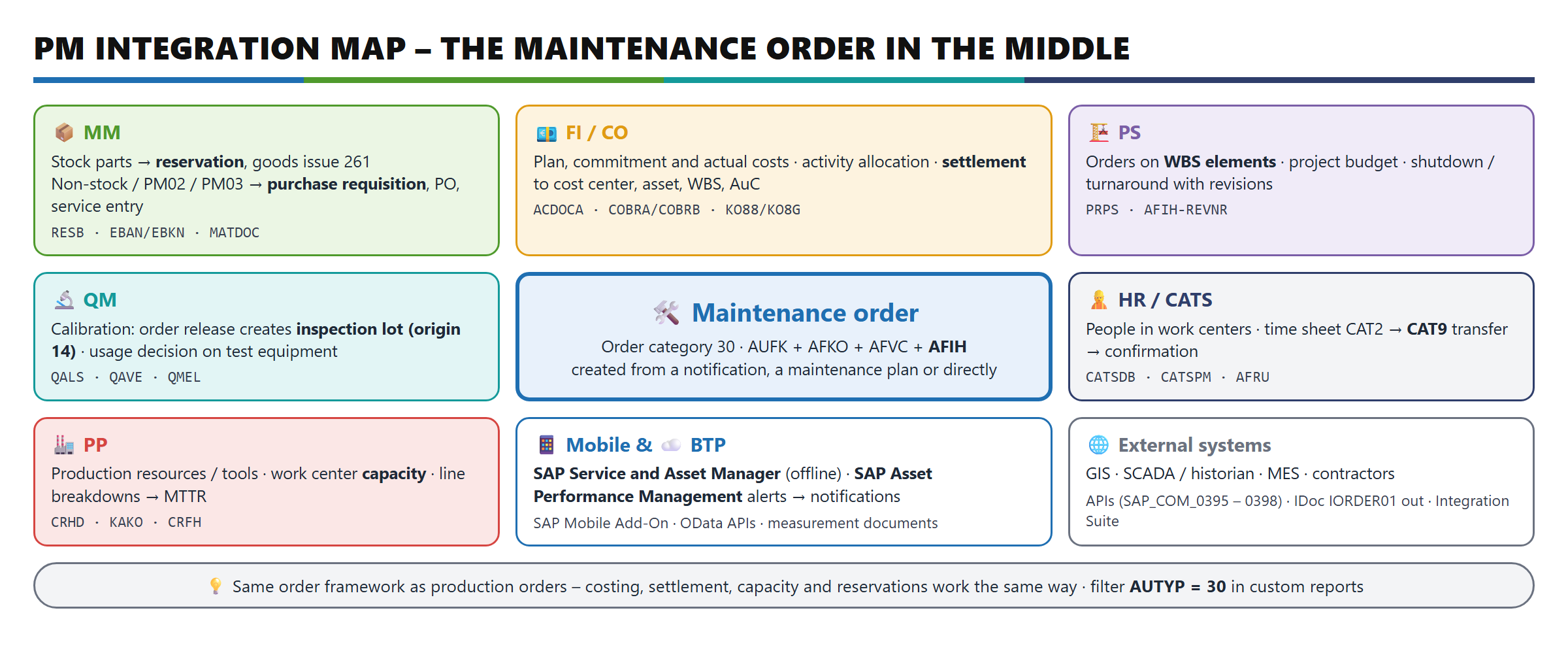
Module | What PM uses or creates there | Documents / tables |
|---|---|---|
MM | Reservations for stock components, purchase requisitions for non-stock parts and external operations, goods issues to the order, service entry | RESB, EBAN / EBKN, EKKO / EKPO, MATDOC (S/4HANA) |
FI/CO | Order costs (plan / actual / commitments), activity allocation, settlement to cost center, asset, WBS or AuC | ACDOCA (S/4HANA), COSP / COSS (ECC), COBRA / COBRB (settlement rule) |
PS | Maintenance orders assigned to WBS elements (cost collection, budget), shutdown projects | PRPS, AFIH / AUFK with WBS element |
QM | Calibration inspections: inspection lot (origin 14) from the maintenance order, usage decision on test equipment | QALS, QAVE, QMEL (shared notification table) |
HR / CATS | People in work centers, time confirmation via CATS transferred to the order | CATSDB, CATSPM, AFRU |
PP | Production resources / tools (PRTs), work center capacity, breakdowns of production lines | CRHD (work centers), KAKO (capacities), CRFH (PRT master) |
Mobile / BTP / external | SAP Service and Asset Manager, SAP Asset Performance Management, GIS, SCADA, contractors | OData APIs, IDocs, measurement documents (IMRG) |
The maintenance order is technically an order of category 30 in the same order framework as production orders (AUFK header, AFKO scheduling data, AFVC / AFVV operations) plus the PM-specific header AFIH. That is why many integration points – costing, settlement, capacity, reservations – work exactly like in production and CO internal orders.
Part 2 – MM: spare parts, purchase requisitions and external services
2.1 Components: stock, non-stock and text items
Item category | Meaning | What the order creates | Follow-on document |
|---|---|---|---|
L – stock item | Spare part kept in the warehouse | Reservation (RESB) | Goods issue movement type 261 to the order (MIGO with the order or reservation); reversal 262 |
N – non-stock item | Part bought directly for this order | Purchase requisition (EBAN) with account assignment category F (order) in EBKN | PO → goods receipt posts the cost to the order |
T – text item | Free-text component, no logistics | – | – |
- When reservations / requisitions are created is set per order type and on the order header (reservation / purchase requisition relevance): never, from release or immediately on save. Most companies use "from release" so planners can change the order freely before it is released.
- Material availability check runs at order release (and on demand); missing parts block release or only warn, depending on customizing.
- Spare parts come from the equipment / functional location BOM (page 02) – the planner picks them in the component list, so a clean BOM saves a lot of manual work.
- S/4HANA: goods issues write MATDOC (MM ABAP › 03 Inventory); costs land in ACDOCA.
2.2 External processing and services
Control key (standard) | Operation type | MM document |
|---|---|---|
PM01 | Internal processing by own work center (hours, activity type) | None – confirmation posts activity allocation |
PM02 | External processing: a contractor does the whole operation (price, vendor, material group on the operation) | Purchase requisition → PO → goods / service receipt |
PM03 | External services with a service specification (planned service lines) | Purchase requisition with service lines → PO → service entry sheet |
- Contracts and info records on the operation give a fixed price; framework orders (limits) are common for contractor work that cannot be planned in detail.
- The requisition carries the order as account assignment, so the commitment appears on the order at once and the actual cost when the GR or service entry sheet is posted.
2.3 Refurbishment of repairable spares
Expensive spares (pumps, motors) are repaired instead of scrapped. They use split valuation with valuation types such as new, refurbished and defective. A refurbishment order issues the defective part (261, valuation type defective) and receives it back as refurbished (101, valuation type refurbished); the price difference becomes the repair cost. Process variant: page 03 Part 6; valuation basics: MM ABAP › 03.
2.4 Reading order components in code
|
BDMNG is the requirement quantity, ENMNG the quantity already withdrawn, POSTP the item category (L / N / T). EBAN-EBELN is filled once a purchase order exists.
Part 3 – FI/CO: order costs, settlement and investment orders
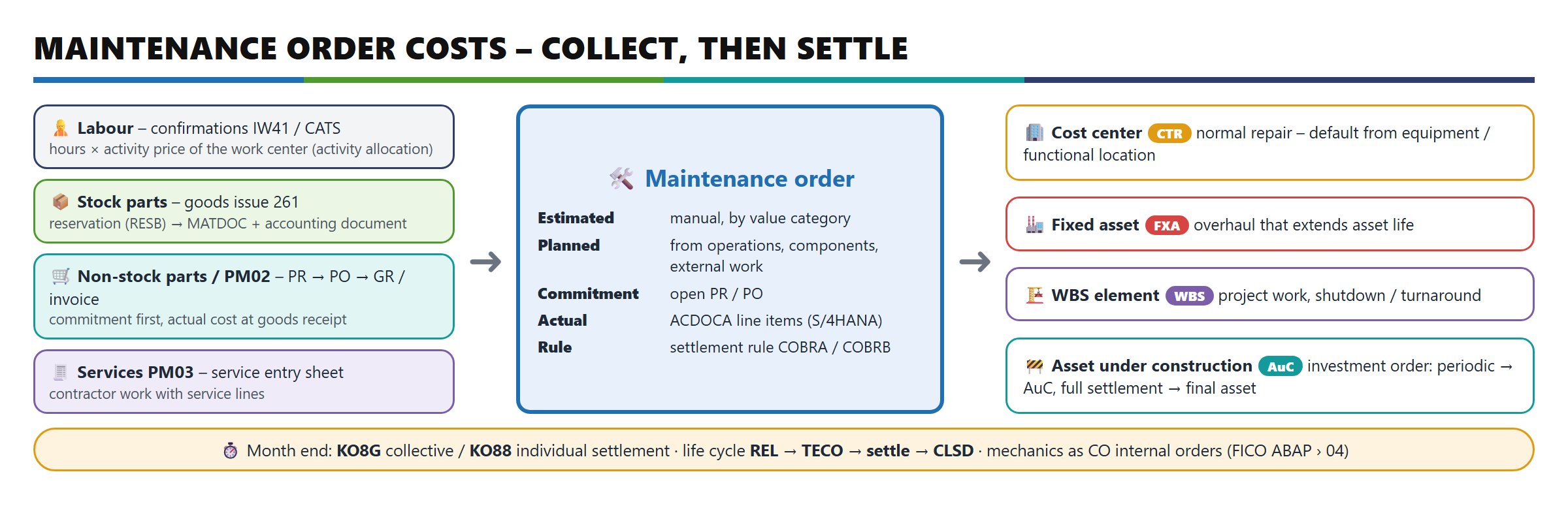
3.1 The three cost views of a maintenance order
Cost view | Where it comes from | Used for |
|---|---|---|
Estimated costs | Entered manually by value category (rough estimate before planning) | Approval, budget check, early reporting |
Planned costs | Calculated from operations (hours × activity price), components and external operations when the order is saved | Comparison plan vs actual, approval workflows |
Actual costs | Confirmations (activity allocation), goods issues, invoices / GR for purchased items, service entry sheets | Settlement, cost analysis |
Commitments | Open purchase requisitions and purchase orders | Budget availability control |
- Costs are grouped by value categories (cost elements → value categories in customizing) so the order shows labour, material, services separately; ECC keeps a PM cost summary by value category (table PMCO).
- S/4HANA: actual postings are line items in the Universal Journal ACDOCA (field AUFNR = order); the CO totals tables of ECC are compatibility views. The Fiori app Actual Cost Analysis evaluates maintenance actual costs from the Universal Journal. Ledger and ACDOCA design: FICO ABAP › 02.
3.2 Settlement
A maintenance order is only a temporary cost collector. At period end the costs are settled to the real receiver according to the settlement rule (tables COBRA header, COBRB distribution rules). The mechanics (settlement profile, allocation structure, KO88 / KO8G) are the same as for CO internal orders – see FICO ABAP › 04.
Receiver | Typical case |
|---|---|
Cost center (CTR) | Normal repair – the cost center of the equipment / functional location (default from the reference object) |
Fixed asset (FXA) | Major overhaul that extends the asset life (capitalised) |
WBS element (WBS) | Maintenance done within a project, shutdown / turnaround |
Asset under construction (AuC) | Investment order – capitalisation after completion |
Order / G/L account / profitability segment | Special cases (e.g. charge another order, sales order-related service) |
- The settlement rule is usually generated automatically from the reference object's cost center (settlement profile + strategy on the order type); user exit IWO10027 builds a custom rule (page 05).
- Order life cycle and settlement: TECO (technically complete) → final settlement → CLSD (business complete). Costs posted after TECO (late invoices) are still settled; CLSD blocks further postings.
- Collective settlement KO8G at month end, individual KO88 – both with settlement type periodic or full.
3.3 Investment orders and assets under construction
- An order type with an investment profile (or an order assigned to an investment program position) is an investment order: its costs are capitalised, not expensed.
- During the work the order settles periodically to an AuC (asset under construction) created automatically from the investment profile.
- After completion a full settlement distributes the costs to the final fixed asset(s); the AuC is cleared. Budget and availability control can stop postings when the budget is used up.
- Architect question: where is the line between repair (expense, cost center) and improvement (capitalise, asset)? It drives order types, settlement profiles and approval rules – agree it with finance early. Asset Accounting background: FICO ABAP › 03.
3.4 Reading the actual costs of an order (S/4HANA)
|
For reporting rather than single lookups prefer the analytical CDS views (Part 9), e.g. I_MaintOrderActualCostDataCube (classic API, not released for ABAP Cloud), which already know value categories and the order context.
Part 4 – PS: maintenance on WBS elements and shutdown projects
- Single order on a WBS element: the order header carries a WBS element (cost collection and settlement receiver); the project's budget and availability control then also cover the maintenance work.
- Shutdown / turnaround (outage): hundreds of orders executed in a few days while the plant is down. Classic design: a PS project with WBS elements per area holds the budget; maintenance orders are assigned to the WBS elements and grouped by a revision (field REVNR on the order header) that defines the outage period for scheduling and reporting.
- Networks are used when pure project activities (engineering, scaffolding by project team) must be scheduled together with maintenance work; maintenance orders stay the execution objects.
- S/4HANA: event-based maintenance planning buckets (app Manage Maintenance Planning Buckets) group the orders of an outage for planning and backlog control without a full PS project (page 06). WBS elements, budget and availability control in depth: PS ABAP.
Option | When to choose it |
|---|---|
Orders with cost center settlement only | Routine maintenance, no project budget |
Orders assigned to WBS elements | Budgeted campaigns, capital-related work, shutdowns needing project controlling |
Revision + planning buckets | Outage scheduling and backlog grouping, with or without PS |
PS network + maintenance orders | Large turnarounds with engineering and project activities |
Part 5 – QM: calibration and test equipment
Gauges, scales and measuring instruments must be checked regularly. PM schedules the work; QM records the results and decides whether the instrument is still usable. Process overview: page 03 Part 6; here the integration steps.
- 1. The test instrument is an equipment of a test / measuring equipment category, often also a PRT (Part 6).
- 2. A maintenance plan (time-based) uses a task list with inspection characteristics (master inspection characteristics) and a calibration order type.
- 3. Scheduling creates the maintenance order; at release an inspection lot with origin 14 (plant maintenance) is created, with the equipment as inspection point.
- 4. The technician records the measured values (results recording); the usage decision on the inspection lot says OK / not OK and can trigger follow-up actions (change the equipment status, create a notification for repair).
- 5. The order is confirmed and technically completed; the next call is calculated by the plan.
PM and QM notifications share the notification framework (QMEL header, the same QQMA user exits – page 05). In S/4HANA 2025 the released CDS view I_MaintOrderInspectionLot links maintenance orders and their inspection lots. Inspection lots, results recording and usage decisions in depth: QM ABAP.
Part 6 – HR / CATS time confirmation and PP
6.1 Time confirmation
Channel | T-code / app | Result |
|---|---|---|
Individual time confirmation | IW41 (IW42 overall completion confirmation, IW44 collective, IW48 with selection) | Confirmation (AFRU), activity allocation to the order, optional goods issue and TECO |
Cross-application time sheet | CAT2 entry → CAT9 transfer to PM/CS (report RCATSTPM); CATA transfers to all target components | Time sheet records (CATSDB) → transfer table CATSPM → order confirmation |
Mobile / Fiori | SAP Service and Asset Manager, Fiori Perform Maintenance Jobs | Same confirmation, posted through APIs |
- HR link: people (personnel numbers) are assigned to work centers; qualifications and availability feed capacity and assignment of technicians to operations.
- Confirmed hours × the activity price of the work center's activity type = labour cost on the order (CO activity allocation).
- CATS is preferred when the same people also book time to projects, cost centers or attendance – one entry, several target components. HR and payroll aspects: HR ABAP.
6.2 PP: tools, capacity and breakdowns
- Production resources / tools (PRTs): equipment with PRT data (or materials / documents) assigned to operations – a test instrument or a special tool needed for the job.
- Capacity: maintenance work centers have capacities like production work centers; operations create capacity requirements. Leveling uses the PP capacity tools (CM01 load, CM25 graphical planning table) or, in S/4HANA, the Fiori resource scheduling apps (page 06). Work centers and capacity planning in depth: PP ABAP.
- Breakdown of a production line: a malfunction report with the breakdown flag records downtime – the basis of MTTR / MTBR (Part 8). Production planning must respect planned maintenance windows.
- Production and maintenance orders share the order tables, so a custom report selecting AUFK must filter AUTYP = 30 (maintenance) or 10 (production).
Part 7 – Mobile, IoT / predictive maintenance and external systems
7.1 Mobile maintenance
Solution | What it is |
|---|---|
SAP Service and Asset Manager | SAP's strategic native mobile app for maintenance and field service (iOS, Android, Windows), offline capable. Built with the SAP mobile development kit (MDK) and configured via SAP BTP mobile services; the SAP Mobile Add-On for SAP S/4HANA provides the OData services in the back end. |
SAP Work Manager | Legacy – the older mobile product (SAP Mobile Platform based); successor SAP Service and Asset Manager. |
SAP Fiori apps | Browser / tablet apps such as Perform Maintenance Jobs, Create Maintenance Request – online only. |
Partner apps | Certified third-party mobile solutions using the same APIs. |
7.2 IoT and predictive maintenance
- Measuring points and counters (page 02) receive readings as measurement documents – manually, from mobile, or automatically from SCADA / historians via API_MEASUREMENTDOCUMENT or the RFC MEASUREM_DOCUM_RFC_SINGLE_001. Counter readings drive performance-based maintenance plans.
- SAP Asset Performance Management (APM) on SAP BTP: condition monitoring with alerts, risk and criticality assessment, FMEA and reliability-centred maintenance, predictive models. It combines the earlier products SAP Asset Strategy and Performance Management and SAP Predictive Asset Insights (formerly SAP Predictive Maintenance and Service).
- Typical flow: sensor data → APM alert → maintenance notification created in S/4HANA via API → planned order → results back to APM for reliability analysis.
- SAP Business Network Asset Collaboration (formerly SAP Asset Intelligence Network, renamed 2022) shares equipment models, documents and maintenance strategies between operators, manufacturers and service providers.
7.3 External systems: GIS, SCADA, contractors
Integration | Typical technique |
|---|---|
GIS (e.g. Esri ArcGIS) – network assets on a map | Technical objects synchronised via APIs; map UI calls S/4HANA to create notifications; linear asset data (start / end point) on the objects |
SCADA / historian / MES | Readings → measurement documents; alarms → notifications (APIs or middleware); MES gets released orders |
Contractors | PO from external operations; confirmations and service entry sheets back via portal or APIs |
Outbound order data | IDoc IORDER01 (SM/PM order) created with IORD – there is no standard inbound order IDoc, inbound uses BAPIs or APIs (page 05) |
Cloud APIs | OData APIs grouped in communication scenarios SAP_COM_0395 (master data), SAP_COM_0396 (maintenance planning), SAP_COM_0397 (maintenance processing), SAP_COM_0398 (execution) |
Middleware (SAP Integration Suite / Cloud Integration) maps and routes these messages – see SAP BTP Integration Suite › 01 SAP Cloud Integration; IDoc and RFC basics: CORE ABAP › 07 Interfaces.
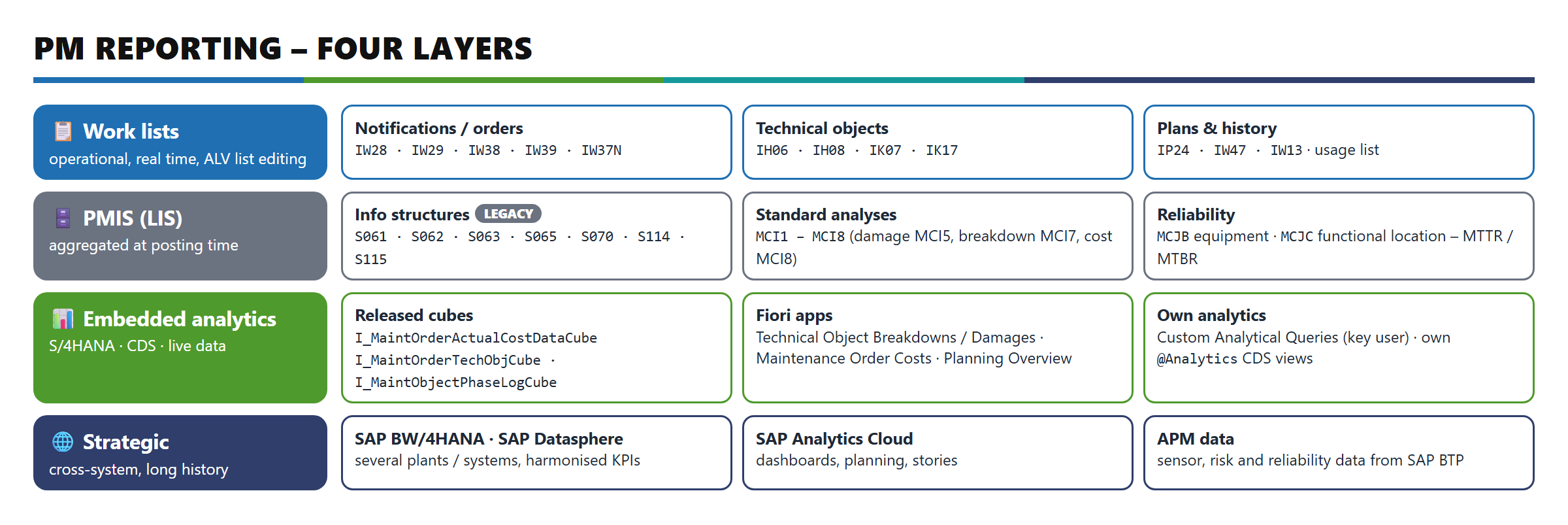
Part 8 – Standard reports and PMIS
8.1 List reports
T-code | List | Program / note |
|---|---|---|
IW28 / IW29 | Change / display notifications | RIQMEL20 |
IW38 / IW39 | Change / display maintenance orders | RIAUFK20 |
IW37N | Order and operation list (planner's work list) | Operations with dates, work centers |
IW47 | Confirmations list | Hours per order / operation |
IH06 / IH08 | Functional location / equipment lists | RIIFLO20 / RIEQUI20 |
IP24 | Scheduling overview of maintenance plans (list) | Calls due / called / completed |
IK07 / IK17 | Measuring points / measurement documents (display list) | Counter and condition history |
IW13 | Material where-used list for orders | Which parts went into which orders |
- These lists are ALV list editing reports with selection variants and layouts; mass changes (e.g. release, TECO) are possible from the change lists (IW38, IW28).
- Developers often get "add field X to IW38" – first check the field selection and layout options, then a custom ALV report on AUFK / AFIH / AFKO / ILOA (page 05) instead of modifying the standard.
8.2 PMIS – Plant Maintenance Information System (legacy)
PMIS is part of the Logistics Information System (LIS): info structures filled at posting time with aggregated key figures. It still exists in S/4HANA but is legacy – new reporting uses CDS-based embedded analytics (Part 9).
Info structure | Content | Analysis |
|---|---|---|
S061 | Location and planning | MCI3 location, MCI4 planner group |
S062 | Object class and manufacturer | MCI1 object class, MCI2 manufacturer |
S063 | Damage analysis | MCI5 |
S065 | Object statistics | MCI6 |
S070 | Breakdown statistics | MCI7; MCJB MTTR / MTBR for equipment, MCJC for functional locations |
S115 | Cost evaluation | MCI8 |
S114 | Vehicle consumption analysis | Fleet |
- MTTR / MTBR (mean time to repair / between repairs) need malfunction reports with the breakdown indicator and malfunction start / end times – a data-quality topic as much as a report.
- Because LIS is filled at posting time, info structures must be set up again (statistical setup) after mass data loads or changed update rules.
Part 9 – Embedded analytics and Fiori analytical apps
Fiori app | What it shows |
|---|---|
Technical Object Breakdowns | Breakdowns of technical objects with chart and table, drill-down to the notification (analytical list page) |
Technical Object Damages | Damage codes per technical object from notifications |
Maintenance Order Costs | Analytical list page on maintenance costs (query C_MaintOrderActualCostQ) |
Actual Cost Analysis | Actual maintenance costs from the Universal Journal |
Maintenance Planning Overview | Overview page for planners (backlog, due orders, KPIs) |
Maintenance Backlog Overview / Resource Scheduling | Backlog by planning bucket, work center utilisation (page 06) |
Released analytical CDS view | Content |
|---|---|
I_MaintOrderActualCostDataCube | Actual costs of maintenance orders (classic API, not released for ABAP Cloud) |
I_MaintOrderTechObjCube | Maintenance orders by technical object |
I_LocationAnalysisCube | Analysis by location |
I_MaintObjectPhaseLogCube / C_MaintObjectPhaseLogQuery | Process phases over time (phase model, page 06) |
- Key user: build own analytical queries on the released cubes with Custom Analytical Queries and show them in the Fiori launchpad – no ABAP.
- Developer: own CDS cube / query views with
@Analyticsannotations on top of released I_ views (ABAP on HANA › 05 CDS Views); never on PMIS tables. - Strategic: cross-system KPIs (several plants on different systems, long history, APM data) belong in SAP BW/4HANA, SAP Datasphere or SAP Analytics Cloud.
- Classic maintenance history lists (usage list of equipment, completed and historical orders) remain available alongside the Fiori apps.
Part 10 – Interview questions
Q1. What happens in MM when you add a stock and a non-stock component to a maintenance order?
The stock item (category L) creates a reservation in RESB, later consumed by goods issue 261 to the order. The non-stock item (N) creates a purchase requisition with account assignment F; the PO and goods receipt post the cost directly to the order. Timing depends on the reservation / requisition relevance setting (never, from release, immediately).
Q2. What is the difference between control keys PM01, PM02 and PM03?
PM01 is internal processing by an own work center (confirmation posts activity costs). PM02 is external processing of a whole operation – a purchase requisition is created. PM03 is external service with a service specification – requisition with service lines and a service entry sheet.
Q3. How are maintenance costs settled?
The order collects plan, commitment and actual costs; at period end KO8G (or KO88) settles them per settlement rule (COBRA / COBRB) to cost center, asset, WBS element or AuC. The rule is usually derived from the reference object's cost center; IWO10027 can build a custom rule. After TECO and final settlement the order is set to CLSD.
Q4. What is an investment order and how does it reach the fixed asset?
An order with an investment profile (or assigned to an investment program). It settles periodically to an asset under construction; after completion a full settlement distributes the costs to the final fixed assets. The decision repair vs capitalise is agreed with finance.
Q5. Where do you find maintenance order costs in S/4HANA?
As line items in ACDOCA (field AUFNR); the ECC totals tables are compatibility views. For reports use the cube I_MaintOrderActualCostDataCube (classic API, not released for ABAP Cloud) or the Fiori apps Maintenance Order Costs / Actual Cost Analysis.
Q6. How is a shutdown (turnaround) handled?
A PS project with WBS elements holds budget and controlling; maintenance orders are assigned to WBS elements and grouped by a revision for the outage window. Large turnarounds add networks for project activities. In S/4HANA event-based planning buckets help to plan and track the outage backlog.
Q7. Describe the calibration process with QM.
Test equipment has a maintenance plan with a task list containing inspection characteristics. The order release creates an inspection lot with origin 14; results are recorded and the usage decision triggers follow-up actions such as an equipment status change or a repair notification.
Q8. How do hours from CATS reach a maintenance order?
Time is entered in CAT2 (CATSDB), transferred with CAT9 (RCATSTPM) or CATA to the PM/CS interface table CATSPM, which creates order confirmations (AFRU) and activity allocations.
Q9. Which mobile solution does SAP offer for maintenance today?
SAP Service and Asset Manager: native, offline-capable app built with the mobile development kit on SAP BTP mobile services, connected through the SAP Mobile Add-On for S/4HANA. SAP Work Manager is the legacy product; Fiori apps cover online scenarios.
Q10. How does predictive maintenance integrate with S/4HANA?
Sensor and measurement data are analysed in SAP Asset Performance Management on BTP. Alerts or risk results create maintenance notifications in S/4HANA through APIs; readings are stored as measurement documents that can drive performance-based plans.
Q11. Which standard reports do you know for PM, and what is PMIS?
IW28/IW29 notifications, IW38/IW39 orders, IW37N operations, IH06/IH08 technical objects, IP24 plan scheduling overview. PMIS is the LIS-based information system (S061–S115, MCI1–MCI8, MCJB/MCJC for MTTR / MTBR) – legacy, replaced by CDS-based embedded analytics.
Q12. A user wants a breakdown KPI dashboard across two plants. How do you build it?
If both plants are in one S/4HANA system: Fiori Technical Object Breakdowns or a custom analytical query on released cubes. If data comes from several systems or needs long history and sensor data: SAP BW/4HANA, Datasphere or SAP Analytics Cloud. Either way ensure malfunction reports carry the breakdown flag and times.
🏠 Start Here · ◀ 03 · Processes & Config · 05 · Development ▶ · Sections: CORE ABAP | OOPS ABAP | ABAP on HANA | Clean Core | RAP | ABAP Points | SAP Fiori | SAPUI5 | Mobile Development (MDK) | BTP Foundations | BTP Development | CAP | SAP Build | ABAP on BTP | Integration Suite | SAP Business AI | SAP BASIS | Security | SAP SDLC
Functional: FICO ABAP | TRM ABAP | VIM | SAP BIS | SD ABAP | MM ABAP | PP ABAP | QM ABAP | PM ABAP | PS ABAP | EWM | TM ABAP | GTM ABAP | EHS ABAP | HR ABAP | BW | SAP Datasphere | SAP Business Data Cloud | SAP MDG | SAP Analytics Cloud | SAP Ariba | SAP CX | SAP IBP