The processes that run on the master data of page 02: corrective maintenance (notification → order → execution → completion → settlement), preventive maintenance (plans scheduled into call objects), condition-based maintenance (readings that trigger work), refurbishment of spare parts, and the phase-based maintenance process that S/4HANA adds on top. For each step: the SAP GUI transaction, the Fiori app, the status and the tables written. The key customizing settings close the page. Postings to MM, CO and FI in detail: page 04; exits and BAdIs per step: page 05.
Part 1 – Corrective maintenance end to end
The classic breakdown process. A user reports a problem, a planner turns it into an order, technicians do the work and confirm it, the order is completed and its costs are settled. Every step changes the system status – the status is the developer's main handle on where an order is.
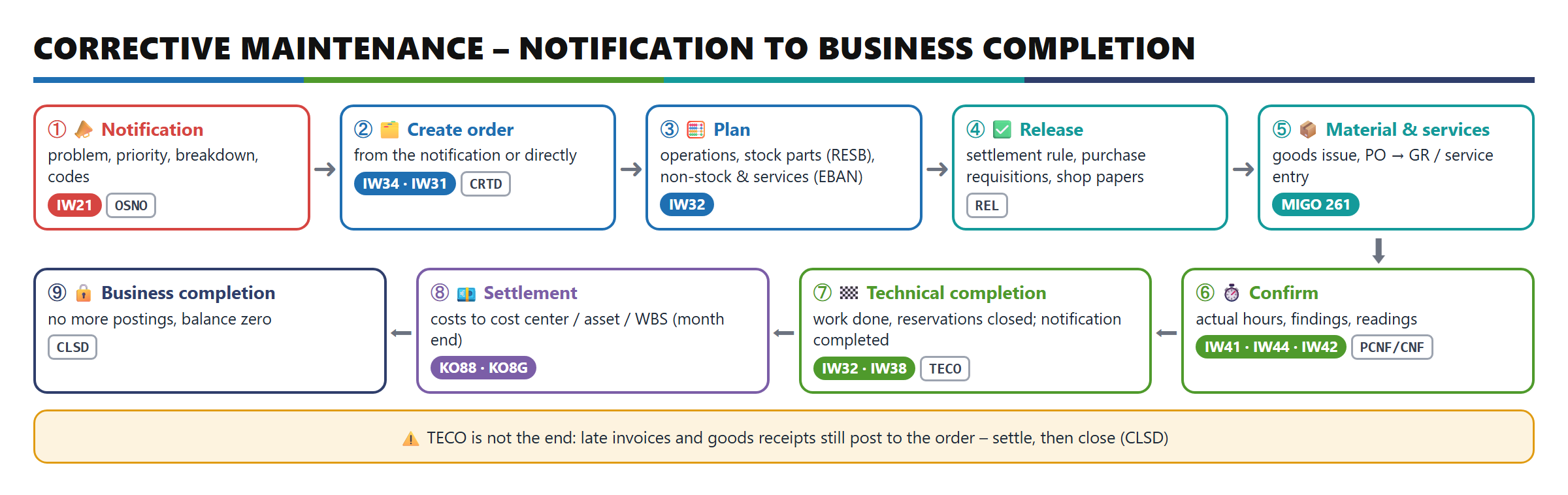
Step | What happens | T-code | Status / tables |
|---|---|---|---|
1 Notification | Requester reports the problem on a technical object: description, priority, malfunction start, breakdown flag, damage / cause codes | IW21 (change IW22, display IW23) | OSNO outstanding; QMEL, QMIH, QMFE |
2 Create order | Planner screens the notification and creates an order from it (or creates the order directly) | IW22 → Create order, IW34 order for notification, IW31 | CRTD; AUFK, AFIH, AFKO; notification ORAS |
3 Plan operations | Operations with work center, work, duration, control key; copied from a task list or typed in | IW32 | AFVC, AFVV; capacity requirements |
4 Plan components | Stock parts (item category L) → reservation; non-stock parts (N) → purchase requisition | IW32 Components tab | RESB; EBAN |
5 Plan services | External operation (PM02) or service (PM03) → purchase requisition → PO | IW32 | EBAN, then EKKO / EKPO |
6 Release | Order released for execution: reservations become relevant for withdrawal, purchase requisitions are created (if set to "at release"), shop papers can be printed | IW32 Release | REL |
7 Goods issue | Spare parts withdrawn for the order; goods receipt / service entry for external work | MIGO (movement type 261), MIGO GR, service entry | MATDOC; RESB-ENMNG; costs on the order |
8 Time confirmation | Technicians confirm actual work per operation; final confirmation; damage, cause, activity and measurement readings can be entered with it | IW41 single, IW44 collective, IW42 overall completion confirmation; CATS | PCNF / CNF; AFRU |
9 Technical completion | Work is done: open reservations and capacity are cleared; notification can be completed with it | IW32 → Complete technically; IW38 mass | TECO; notification NOCO |
10 Settlement | Actual costs move to the receiver of the settlement rule (cost center, asset, WBS) | KO88 single, KO8G collective (month end) | Settlement document; costs in ACDOCA |
11 Business completion | Order closed for any further postings | IW32 → Complete (business); IW38 mass | CLSD |
Things that trip people up
- TECO ≠ closed: after TECO the order can still receive costs (late invoices, goods receipts) and must still be settled. Only business completion (CLSD) blocks postings – and requires a zero balance.
- Settlement rule: created automatically at release from the settlement profile of the order type (usually to the cost center of the technical object, ILOA-KOSTL). Without a rule the order cannot be settled.
- Overall completion confirmation (IW42) combines time confirmation, goods movements, technical findings, measurement readings and TECO on one screen – common for simple jobs.
- Emergency orders: for a breakdown the order can be created and released immediately (immediate order, or order without notification) and planned afterwards.
Part 2 – Status management of notifications and orders
Every PM object has system statuses (set by SAP, control which business transactions are allowed) and optional user statuses (from a status profile assigned to the notification or order type, e.g. "waiting for approval"). Both are rows in JEST (page 02 Part 10).
Object | System status | Meaning |
|---|---|---|
Notification | OSNO | Outstanding notification – created, not yet in process |
Notification | NOPR | Notification in process (put in process) |
Notification | ORAS | Order assigned |
Notification | NOCO | Notification completed |
Order | CRTD | Created – can be planned, no goods issue or confirmation |
Order | REL | Released – execution, goods issue, confirmation allowed |
Order | PCNF / CNF | Partially / finally confirmed |
Order | TECO | Technically completed |
Order | CLSD | Closed (business completed) |
Order | MANC / PRC / SETC | Material availability not checked / pre-costed / settlement rule created |
- Status profile customizing: BS02 (general status management); assignment to notification and order types in the PM IMG.
- The allowed business transactions per status are in status management (business transactions such as RMRU confirmation); a user status can block them – a common way to add an approval step without code.
Part 3 – Preventive maintenance: scheduling and call objects
Preventive maintenance runs on maintenance plans (page 02 Part 7). Scheduling calculates planned dates from the cycles; when a planned date falls inside the call horizon, the plan is called and the call object – order, notification or service entry sheet – is created automatically.
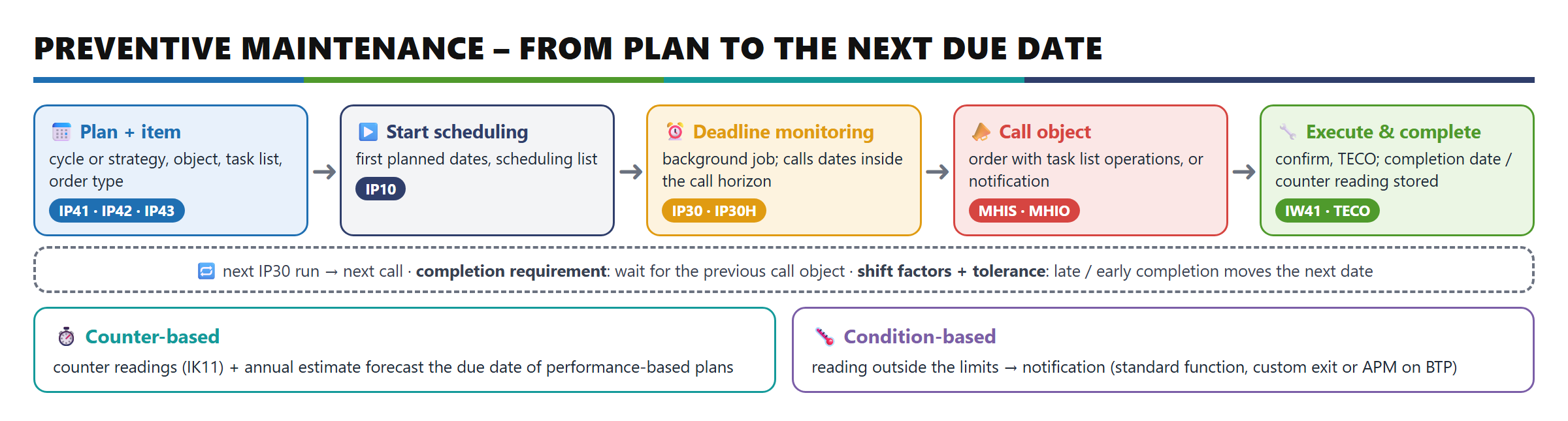
Step | T-code / app | What happens |
|---|---|---|
1 Create plan and item | IP41 / IP42 / IP43; Fiori Manage Maintenance Plans | Cycle or strategy, scheduling parameters, item with object, task list, order type, planner group |
2 Start scheduling | IP10 (schedule a single plan: start, restart, manual call) | First planned dates are calculated (scheduling list); calls inside the horizon are created |
3 Deadline monitoring | IP30 (report RISTRA20) as a periodic background job; S/4HANA IP30H (RISTRA20H, business function LOG_EAM_MPSI) preselects due plans and runs in parallel | All due plans are scheduled and called |
4 Call objects | MHIS row per call, MHIO links the object | Order (with task list operations), notification or service entry sheet |
5 Execute and complete | IW32 / IW41 / TECO as in Part 1 | Completion date or counter reading is stored on the call |
6 Next cycle | Automatic at the next IP30 run | With completion requirement the next call waits until the previous order is completed; the actual completion date can shift the next date (shift factors, tolerances) |
Scheduling parameter | Effect |
|---|---|
Call horizon | How early the call object is created (e.g. 80 % of the cycle → order created 6 days before a 30-day due date) |
Scheduling period | How far ahead planned dates are calculated (for forecasts and capacity) |
Shift factor late / early completion + tolerance | How much a late or early completion moves the next planned date |
Scheduling indicator | Time, time – key date, time – factory calendar, or performance-based (counter) |
Completion requirement | Next call only after the previous call object is completed |
Cycle start / offset | Where the cycle begins and offsets of packages within a strategy |
- Overview of scheduled dates: IP19 (scheduling overview – ECC graphical / list; S/4HANA list only, SAP Business Graphics not available), IP24 (scheduling overview list form).
- Performance-based plans need an annual estimate on the counter so the system can forecast dates between readings; every counter reading (IK11) refines the forecast.
Part 4 – Condition-based and predictive maintenance
Condition-based maintenance replaces fixed intervals with measured conditions. The measuring point defines target value and limits; each reading is a measurement document (IK11, IK22, mobile app or interface). What happens when a limit is crossed depends on the tool:
Option | How it works | Where |
|---|---|---|
Counter-based plan | Counter readings drive a performance-based or multiple counter plan (Part 3) | All editions |
Reading with notification | A notification is created together with the measurement document (e.g. MEASUREM_DOCUM_RFC_SINGLE_001 has a create-notification option with a notification type); limit checks beyond that are custom logic | All editions (classic) |
Condition-based maintenance function | Conditions (limits, tolerances in % or absolute) and actions defined per measuring point; a breach creates the follow-up automatically | S/4HANA Cloud from 2202 |
Custom logic | Customer exit on measurement document posting compares the reading with the limits and creates a notification via BAPI / API | Page 05 |
SAP Asset Performance Management | IoT data and readings evaluated by rules, anomaly detection and predictive models on BTP; creates notifications in S/4HANA via API | BTP (page 04) |
- Predictive maintenance is condition-based maintenance where a model forecasts the failure before a limit is reached; the S/4HANA side is the same (notification → order).
Part 5 – The phase-based maintenance process in S/4HANA
S/4HANA adds a phase model on top of notification and order: instead of reading a list of system statuses, every maintenance request and order shows the phase of the process it is in. Introduced with S/4HANA Cloud 2011 and available on-premise from S/4HANA 2021, it is the basis of the public cloud scope items 4HH reactive, 4HI proactive, 4VT improvement and 4WM operational / overhead maintenance. System statuses still exist underneath.
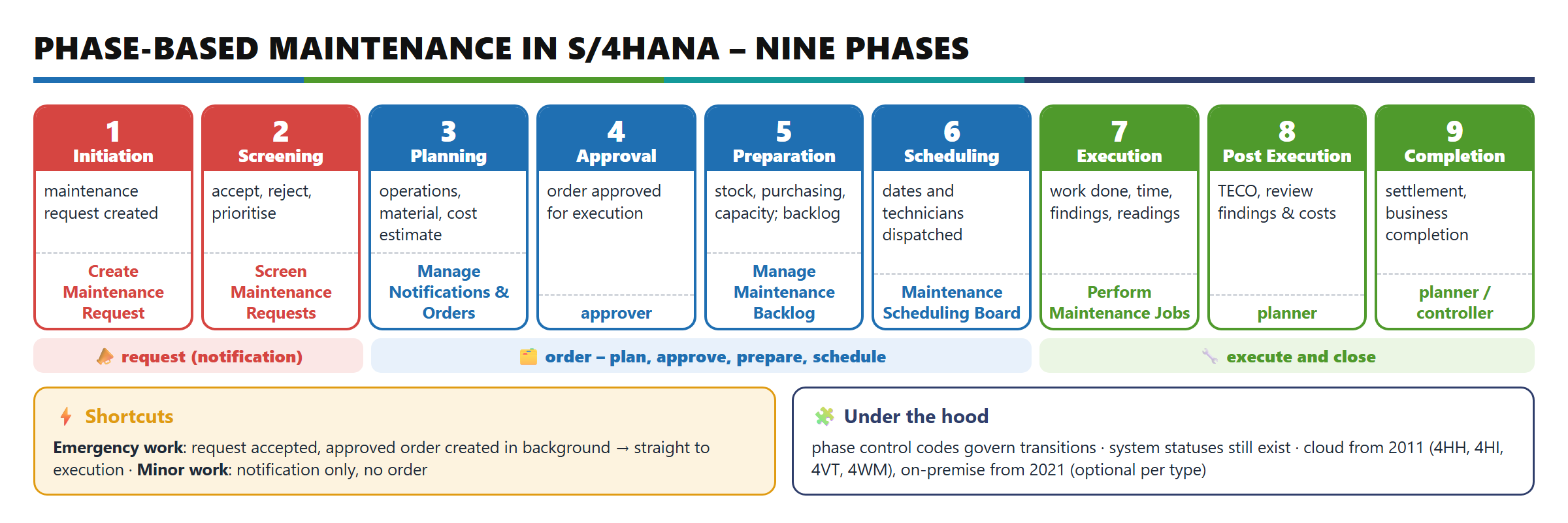
Phase | What happens | Typical role / Fiori app |
|---|---|---|
1 Initiation | Anyone reports a need: a maintenance request (notification) is created | Requester / technician – Create Maintenance Request |
2 Screening | Gatekeeper reviews open requests: accept, reject, ask for details, set priority | Supervisor – Screen Maintenance Requests |
3 Planning | Order with operations, materials, services and estimated costs is planned | Planner – Manage Maintenance Notifications and Orders |
4 Approval | Order approved for execution (approval settings per order type, e.g. by cost) | Approver |
5 Preparation | Material availability, purchase requisitions and capacity checked; backlog managed in planning buckets | Planner – Manage Maintenance Backlog |
6 Scheduling | Operations scheduled and dispatched to dates and technicians | Scheduler – Maintenance Scheduling Board |
7 Execution | Work done and documented: time, findings, measurement readings | Technician – Perform Maintenance Jobs, mobile app |
8 Post Execution | Technical completion, review of findings and costs | Planner |
9 Completion | Settlement and business completion | Planner / controller |
- Phase control codes govern transitions between phases (e.g. block execution until approved) and can carry authorization keys.
- Shortcuts: emergency work – the request is not screened and is accepted automatically, going straight to execution; minor work – a notification without an order, all steps handled in the notification.
- On-premise the phase model is optional and activated per notification / order type; the classic IW21 → IW31 process of Part 1 keeps working. The architect's choice is on page 06.
Part 6 – Refurbishment, calibration and other process variants
Variant | Process | Key points |
|---|---|---|
Refurbishment | Defective rotable spare parts are repaired in a refurbishment order instead of being scrapped | Material with split valuation by valuation type (e.g. new / refurbished / defective); order type with refurbishment indicator; goods issue of the defective part and goods receipt in the refurbished valuation type at a different value |
Calibration | Test equipment inspected on schedule | Maintenance plan → order + QM inspection lot (origin 14) → results recording and usage decision in QM → equipment status |
Investment / improvement | Work that adds value (modification, upgrade) | Order settled to an asset under construction or WBS element; investment program link |
External work (subcontracting) | Whole operation done by a contractor | Control key PM02 / PM03 → purchase requisition → PO → service entry sheet or GR → invoice |
Shutdown / turnaround | Many orders for one plant stop | Orders grouped under a WBS / project or revision (REVNR); scheduling across orders |
Work clearance management | Safety isolation before work | Work clearance application and document linked to the order; tagging and untagging steps; on-premise / private cloud |
Part 7 – Key customizing
IMG root: SPRO → Plant Maintenance and Customer Service. An ABAP developer must know what these settings control, because exits and reports depend on them.
Setting | IMG area / t-code | What it controls |
|---|---|---|
Notification types | Maintenance and Service Notifications → Notification Creation → Notification Types | Notification category, screen areas, number range, catalog profile, partner determination, status profile, workflow |
Catalogs and catalog profiles | Notifications → Notification Content (QS41 catalog edit) | Code groups and codes for object part, damage, cause, activity, task |
Priorities | Notifications → Response Time Monitoring → Define Priorities; Orders → General Data → Define Priorities | Priority type per notification / order type (e.g. 1 very high … 4 low) and the relative start / end dates they set |
Order types | Maintenance and Service Orders → Functions and Settings of Order Types (OIOA "Configure Order Types") | Number range, settlement profile, costing variants, status profile, refurbishment indicator, release immediately, notification link |
Order type ↔ planning plant | Assign order types to maintenance planning plants (OIOD) | Which order types each planning plant may use |
Maintenance activity types | Define and assign to order types; default value per order type | Kind of work (inspection, repair, overhaul) – AFIH-ILART, used in reporting |
Control keys | Operations → control key | Internal / external processing, costing, confirmation, print |
Settlement profile | Controlling → OKO7; assigned to the order type | Allowed receivers, default receiver, allocation structure |
Default values per order type and plant | Order types → default values for task list data / component item categories | Task list usage, item categories for stock and non-stock parts |
Scheduling parameters | Maintenance and service orders → Scheduling | Scheduling type, capacity requirement, reduction |
Maintenance plan categories / strategies | Maintenance Plans → plan categories; strategies IP11 | Call object type and number range of plans; packages and cycles |
Phase model | Business feature, order type flag "phase model", phase control codes, approval settings | S/4HANA phase-based process (Part 5) |
Part 8 – Transactions and Fiori apps per step
Step | SAP GUI | Fiori app (S/4HANA) |
|---|---|---|
Find / maintain technical objects | IL01–IL03, IE01–IE03, IH01 structure, IH06 / IH08 lists | Find Technical Object |
Report a problem | IW21 general, IW24 malfunction report, IW26 maintenance request | Create Maintenance Request |
Screen notifications | IW22, IW28 change list, IW29 display list | Screen Maintenance Requests |
Plan orders | IW31, IW32, IW34; IW38 / IW39 order lists; IW37N operation list | Manage Maintenance Notifications and Orders, Find Maintenance Order |
Backlog and scheduling | IW37N, IW38; capacity CM01 / CM25 | Manage Maintenance Backlog, Maintenance Scheduling Board |
Execute and confirm | IW41, IW42, IW44, IW43 display, IW45 cancel; CATS (CAT2) | Perform Maintenance Jobs; SAP Service and Asset Manager (mobile) |
Readings | IK11, IK22, IK17 | Measuring point / measurement document apps |
Preventive | IP41 / IP42 / IP43, IP10, IP30 / IP30H, IP19, IP24 | Manage Maintenance Plans, Mass Schedule Maintenance Plan (cloud) |
Complete and settle | IW32 TECO / CLSD, IW38 mass, KO88, KO8G | Order apps; settlement jobs |
Part 9 – Interview questions
Q1. Walk through the corrective maintenance process with t-codes.
Notification IW21 → order IW31 / IW34 → plan operations, components, services in IW32 → release → goods issue MIGO 261 and purchasing for external work → time confirmation IW41 / IW44 (or IW42) → TECO → settlement KO88 / KO8G → business completion (CLSD).
Q2. What is the difference between TECO and CLSD?
TECO means the work is done: open reservations and capacities are removed, but costs can still be posted and the order must be settled. CLSD (business completion) blocks all further postings and needs a zero balance after settlement.
Q3. What happens when an order is released?
Status REL is set: goods issues and confirmations become possible, reservations become relevant for withdrawal, purchase requisitions are created if set to "at release", a settlement rule is generated and shop papers can be printed.
Q4. How are stock and non-stock components handled?
Stock items (item category L) create a reservation in RESB and are withdrawn with movement type 261. Non-stock items (N) and external operations (control key PM02 / PM03) create purchase requisitions that become purchase orders; costs come from the goods receipt or service entry.
Q5. Explain IP10 and IP30.
IP10 starts or restarts scheduling of a single maintenance plan. IP30 (report RISTRA20) is deadline monitoring for many plans, run periodically in background; it calls all plans whose dates fall in the call horizon. In S/4HANA IP30H preselects due plans and runs in parallel.
Q6. What is the call horizon and the completion requirement?
The call horizon decides how early (as a percentage of the cycle) the call object is created. The completion requirement makes the next call wait until the previous call object is completed.
Q7. How does condition-based maintenance work in SAP?
Measuring points carry limits; readings are recorded as measurement documents. A reading outside the limit leads to a notification – created with the reading, by the condition-based maintenance function in S/4HANA Cloud, by custom logic in the measurement document exit, or by SAP Asset Performance Management on BTP. Counter readings drive performance-based plans.
Q8. What is the phase model in S/4HANA maintenance?
A process layer with nine phases – initiation, screening, planning, approval, preparation, scheduling, execution, post execution, completion – each with roles and Fiori apps. Phase control codes govern transitions; emergency and minor work skip phases. Cloud from 2011, on-premise from 2021, optional per type on-premise.
Q9. Which settings does the order type control?
Number range, settlement profile, status profile, costing, release behaviour, refurbishment indicator, allowed maintenance activity types, notification link and (S/4HANA) the phase model flag. Order types are assigned to planning plants.
Q10. What is a refurbishment order?
An order type with the refurbishment indicator for repairing rotable spare parts. The material is split-valuated; the defective part is issued and received back in the refurbished valuation type at a different value.
Q11. What is the settlement profile and where does the settlement rule come from?
The settlement profile (OKO7, assigned to the order type) defines allowed and default receivers. At release the system creates the settlement rule, usually to the cost center of the technical object; KO88 / KO8G settle the actual costs.
Q12. As an architect, classic process or phase model on-premise?
Phase model when the customer wants Fiori-based roles, approvals, backlog and scheduling apps and a path to cloud best practices; classic when heavy SAP GUI processes, custom code and integrations built on IW21 / IW31 must be kept. Both run on the same tables, so a gradual move per order type is possible.
🏠 Start Here · ◀ 02 · Master Data · 04 · Integration & Reporting ▶ · Sections: CORE ABAP | OOPS ABAP | ABAP on HANA | Clean Core | RAP | ABAP Points | SAP Fiori | SAPUI5 | Mobile Development (MDK) | BTP Foundations | BTP Development | CAP | SAP Build | ABAP on BTP | Integration Suite | SAP Business AI | SAP BASIS | Security | SAP SDLC
Functional: FICO ABAP | TRM ABAP | VIM | SAP BIS | SD ABAP | MM ABAP | PP ABAP | QM ABAP | PM ABAP | PS ABAP | EWM | TM ABAP | GTM ABAP | EHS ABAP | HR ABAP | BW | SAP Datasphere | SAP Business Data Cloud | SAP MDG | SAP Analytics Cloud | SAP Ariba | SAP CX | SAP IBP