What changes for Plant Maintenance when a company moves to S/4HANA, what each edition offers, how maintenance data is migrated, and which design decisions a solution architect makes – technical object hierarchy, notification vs order-only process, phase model, mobile, predictive maintenance on SAP BTP, turnarounds with PS – and how to keep PM extensions clean-core. The products around S/4HANA (APM, Business Network Asset Collaboration) are introduced on page 01 Part 6; the phase model itself on page 03 Part 5; APIs and extensions on page 05.
Part 1 – What changed for PM in S/4HANA
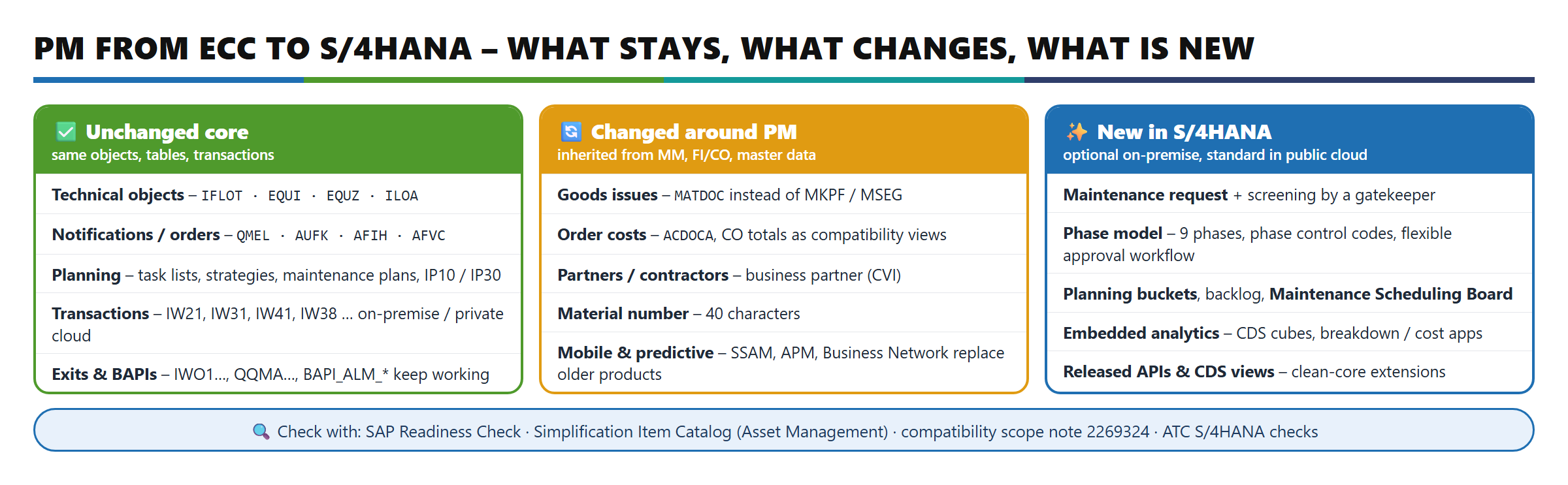
The short answer for interviews: the PM core is largely unchanged – the same technical objects, notifications, orders, maintenance plans, tables (EQUI, IFLOT, QMEL, AUFK, AFIH …) and SAP GUI transactions. What changes comes from the modules around PM and from new S/4HANA capabilities on top (Fiori apps, phase model, planning and scheduling, embedded analytics).
Area | ECC | S/4HANA | Impact on PM code / design |
|---|---|---|---|
Goods issues to orders | MKPF / MSEG + stock tables | MATDOC; old tables via compatibility views | Reads still work; no writes to stock tables (MM ABAP › 03) |
Order costs | COEP / COSP / COSS | ACDOCA line items; CO tables as compatibility views | Cost reports on ACDOCA or released cubes (page 04 Part 3) |
Vendors / customers in partners and purchasing | Vendor / customer master | Business partner (CVI) | Partner functions and contractors are BPs |
Material number | 18 characters | 40 characters | BAPI fields |
Reporting | PMIS (LIS), list reports | PMIS still there but legacy; embedded analytics on CDS | New KPIs as CDS / Fiori apps (page 04 Part 9) |
Process | System / user status | Optional phase model (on-premise from 2021) with roles and approval | Status logic and APIs filter by phase (page 03 Part 5) |
Planning and scheduling | IW37N, CM25 | Planning buckets, backlog, Maintenance Scheduling Board, resource scheduling apps | Part 2 |
Mobile | SAP Work Manager, older solutions | SAP Service and Asset Manager | Rebuild mobile extensions in MDK / add-on (page 04 Part 7) |
Predictive / strategy | SAP PdMS, ASPM, AIN | SAP APM, Business Network Asset Collaboration on BTP | Integration via APIs (page 05 Part 6) |
- Simplification items: compared with Finance or Logistics the EAM list is short. Run the SAP Readiness Check and the Simplification Item Catalog filtered on Asset Management for the target release; check classic functions such as Work Clearance Management against the compatibility scope note (2269324) and the edition.
- Custom code: PM custom code usually survives a conversion; the findings come from surrounding changes – SELECTs on MSEG / COEP / KONV in PM reports, 18-character material fields, vendor master access. Use ATC with the S/4HANA readiness checks (ABAP on HANA › 02).
Part 2 – New planning and scheduling with Fiori
The phase model (page 03 Part 5) organises maintenance into nine phases from initiation to completion. Its preparation and scheduling phases are supported by a set of Fiori apps that replace the planner's IW37N / CM25 work:
App | Phase | Purpose |
|---|---|---|
Create Maintenance Request / Screen Maintenance Requests | Initiation / screening | Anyone reports a problem in a simple app; a gatekeeper accepts, returns or rejects the request |
Manage Maintenance Notifications and Orders | Planning | Planner's central work list |
Manage Maintenance Planning Buckets (F3888) | Preparation | Group work into buckets – operational (e.g. weekly) or event-based (e.g. a shutdown); since S/4HANA 2021 |
Manage Maintenance Backlog (F4073) / Maintenance Backlog Overview | Preparation | Level the backlog per bucket, check parts and capacity, move start dates |
Maintenance Scheduling Board | Scheduling | Gantt chart of orders, operations and sub-operations; resolve conflicts, dispatch, relationships |
Manage Work Center Utilization, Manage Schedule, Assign Maintenance Order Operations | Scheduling | Dispatch operations to work centers, build weekly schedules, assign technicians |
Perform Maintenance Jobs | Execution / post execution | Technician confirms work and readings |
- The apps work with standard orders – classic transactions remain usable in parallel on-premise.
- Approval of orders (e.g. above a cost limit) uses flexible workflow in the approval phase (app Manage Workflows for Maintenance Orders), configured by the business instead of a coded SAP Business Workflow.
- Classic Multi-Resource Scheduling and third-party schedulers still exist on-premise; for new projects check first whether the standard scheduling apps cover the requirement.
Part 3 – Editions: what is available where
Topic | On-premise / private cloud | Public cloud |
|---|---|---|
Scope | Full PM / EAM incl. classic transactions, refurbishment, calibration, linear assets, WCM | Best-practice scope items 4HH reactive, 4HI proactive, 4VT improvement, 4WM operational and overhead maintenance (BH1 / BH2 / BJ2 deprecated since 2302) |
Process | Classic or phase model (optional, per notification / order type) | Phase model is the standard (since 2011) |
Work Clearance Management | Available (check the compatibility scope for the classic version) | Not offered |
UI | SAP GUI and Fiori | Fiori only |
Extensions | Classic exits, BAdIs, modifications possible (avoid); ABAP Cloud recommended | Key user, released BAdIs and APIs, developer extensibility (ABAP Cloud), side-by-side |
Integration | APIs, BAPIs, IDocs, RFC | Released APIs with communication arrangements (SAP_COM_0395 – 0398) |
Upgrades | Customer-controlled release cycles | SAP-controlled, frequent – no unreleased objects |
- Private cloud (RISE) has the on-premise scope but SAP operates the system; clean core matters because upgrades are part of the contract.
- Asset Management capabilities are delivered per release – for a given requirement check the Fiori apps reference library and the release notes of the target edition.
Part 4 – Data migration
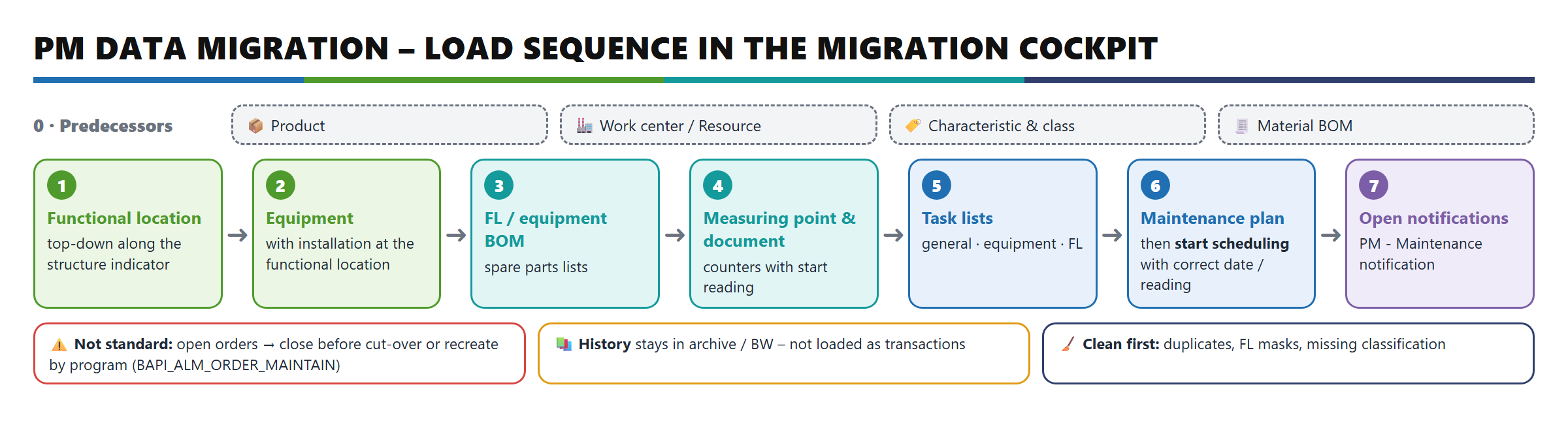
Greenfield migration uses the SAP S/4HANA Migration Cockpit (app Migrate Your Data; LTMC is legacy). The Asset Management migration objects come with predecessor objects that must be loaded first.
Migration object | Notes |
|---|---|
PM - Functional location | Load top-down along the structure indicator; reference functional locations if used |
PM - Equipment | Includes installation at the functional location; serialised equipment needs the product first |
PM - Functional location BOM / PM - Equipment BOM | Spare parts lists; need products |
PM - Measuring point / PM - Measurement document | Counters need a start reading so that counter-based plans calculate correctly |
PM - General maintenance task list / Equipment task list / Functional location task list | Need work centers (predecessor Work center / Resource) and, for strategies, the strategy customizing |
PM - Maintenance plan | Loaded after task lists; then start scheduling with the correct start date / counter reading – otherwise the first calls are wrong |
PM - Maintenance notification | Open notifications only; history usually stays in the archive or a reporting system |
- Open maintenance orders: migration object PM - Maintenance order (direct transfer selects PM01 – PM03 orders in status CRTD / REL); long history is not migrated. Alternative: finish or close orders before cut-over and recreate the remaining ones (BAPI_ALM_ORDER_MAINTAIN program), keep history read-only in BW or an archive.
- Data quality first: duplicate equipment, inconsistent functional location masks and missing classification are the usual blockers – clean them in the source before loading.
- Brownfield conversion keeps all PM data in place; the work is custom code, Fiori activation and optional new features (phase model, planning buckets).
Part 5 – Architect decisions
5.1 Technical object hierarchy
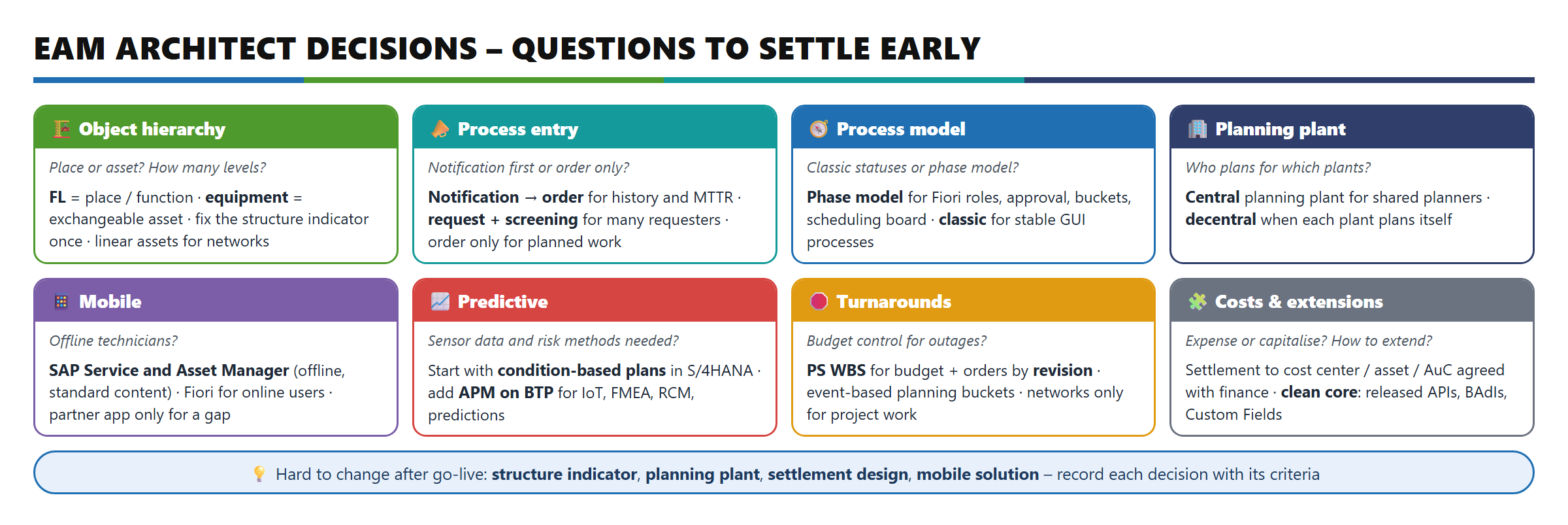
- Functional locations model the place and function (plant → area → line → position); equipment models the individual asset that can be moved or exchanged. The functional location keeps the cost and history of the position, the equipment its own life history.
- Decide the structure indicator (edit mask and levels) once – it is hard to change after go-live; use 4 – 6 levels and a naming standard aligned with engineering (e.g. KKS / ISO 14224 style).
- Not everything needs to be equipment: use equipment for assets with own history, serial number, warranty or maintenance plans; small parts stay materials in BOMs.
- Linear assets (pipelines, roads, rail) use the linear asset management data (start / end point, offsets) instead of thousands of tiny functional locations.
5.2 Notification vs order-only process
Option | When |
|---|---|
Notification → order (M1 request, M2 malfunction) | Standard: history of damage / cause codes, breakdown KPIs (MTTR / MTBR), screening of requests |
Maintenance request + screening (phase model) | Many casual requesters, a gatekeeper should filter before planning |
Order only (with automatic or no notification) | Planned work, small jobs, preventive orders – but without a notification there is no catalog-based history |
Activity report (M3) after the work | Document work done without prior planning |
5.3 Further decisions
Decision | Options and criteria |
|---|---|
Planning plant | Central planning plant for several maintenance plants (shared planners, harmonised processes) vs decentralised (each plant plans itself) – page 01 |
Classic vs phase model | Phase model when Fiori roles, approvals, backlog and scheduling apps are wanted; classic for stable GUI-based processes with heavy custom code |
Mobile | SAP Service and Asset Manager (offline, native, standard content) vs Fiori (online, simple) vs partner apps; decide early – it drives the order and notification design |
Predictive maintenance | Start with condition-based plans on measuring points in S/4HANA; add APM on BTP when sensor data, risk / criticality and reliability methods are needed |
Turnarounds | PS project with WBS elements for budget and controlling + maintenance orders by revision; event-based planning buckets for planning; networks only for project activities |
Costs and capitalisation | Repair vs improvement rules, settlement to cost center / asset / AuC, investment orders – agree with finance (page 04 Part 3) |
Safety | Work clearance / permit process in S/4HANA (on-premise) or a specialised solution; not in public cloud |
Analytics | Embedded analytics for operational KPIs, BW / Datasphere / SAC for cross-system and long history |
Part 6 – Clean core for PM
Instead of … | Use … |
|---|---|
CMOD exits IWO1… / QQMA… for checks | Released BAdIs (e.g. EAM_ORDER_FIELD_CONTROL), Custom Logic, or a classic BAdI as documented exception on-premise |
Appends + screen modifications on IW31 / IW21 | Custom Fields for the maintenance business contexts; fields flow into Fiori apps and APIs |
Z reports reading AUFK / AFIH / JEST | Released CDS views and cubes; Fiori elements or Custom Analytical Queries |
RFC / IDoc point-to-point interfaces | Released OData APIs via SAP Integration Suite |
Custom mobile apps on BAPIs | SAP Service and Asset Manager extensions (MDK) or a BTP app on released APIs |
Z tables with maintenance data for side processes | RAP apps in ABAP Cloud (on-stack) or CAP / RAP on BTP (side-by-side) |
- Classify every PM extension in the clean-core levels and track the classic ones with ATC; the general rules and levels are on Clean Core › 01 Clean Core.
- Do not modify SAPLCOIH (order) / SAPLIQS0 (notification) or the PM status logic – every upgrade (and in private cloud every SAP-driven update) has to adjust them.
Part 7 – Roadmap and successor products
Legacy | Successor / direction |
|---|---|
SAP Work Manager and older mobile solutions | SAP Service and Asset Manager |
SAP Predictive Maintenance and Service → Predictive Asset Insights; Asset Strategy and Performance Management | SAP Asset Performance Management (BTP) |
SAP Asset Intelligence Network | SAP Business Network Asset Collaboration |
PMIS / LIS reporting | Embedded analytics on CDS, SAP Analytics Cloud |
Status-driven classic process | Phase model with Fiori apps (optional on-premise, standard in public cloud) |
IW37N / CM25 planning | Planning buckets, backlog and scheduling board apps |
Direction: S/4HANA stays the system of record for technical objects and work execution; intelligence (prediction, risk, reliability) and collaboration move to SAP BTP and SAP Business Network, connected through released APIs.
Part 8 – Interview questions
Q1. What changed in PM with S/4HANA?
The PM core (objects, tables, transactions) is largely unchanged. Changes come from the surroundings – MATDOC, ACDOCA, business partner, 40-character material number – and from new capabilities: Fiori apps, maintenance requests, the phase model, planning buckets, scheduling board and embedded analytics.
Q2. How do you find the simplification items relevant for PM?
SAP Readiness Check and the Simplification Item Catalog filtered on Asset Management for the target release; classic functions like WCM against the compatibility scope note; custom code with ATC S/4HANA checks.
Q3. Which Fiori apps support maintenance planning and scheduling?
Manage Maintenance Planning Buckets (operational or event-based), Manage Maintenance Backlog, Maintenance Scheduling Board (Gantt), Manage Work Center Utilization, Manage Schedule and Assign Maintenance Order Operations; technicians use Perform Maintenance Jobs.
Q4. What maintenance scope does the public cloud offer?
Scope items 4HH reactive, 4HI proactive, 4VT improvement and 4WM operational and overhead maintenance on the phase model; the older BH1 / BH2 / BJ2 are deprecated since 2302. No WCM, Fiori only, extensions only with released objects.
Q5. Which migration objects exist for PM and in which order do you load them?
Predecessors product, work center, characteristics, material BOM; then functional locations, equipment, FL / equipment BOMs, measuring points and documents, task lists, maintenance plans (then start scheduling), open notifications. Open orders: migration object PM - Maintenance order (CRTD / REL orders) or recreate by program.
Q6. Functional location or equipment – how do you decide?
Functional location for the place / function and its cost and history; equipment for the individual, exchangeable asset with its own history, serial number or plan. Fix the structure indicator early.
Q7. When would you skip notifications and work order-only?
For planned and preventive work or very small jobs. For breakdowns keep notifications – they carry damage and cause codes and the breakdown flag needed for MTTR / MTBR.
Q8. Classic process or phase model on-premise?
Phase model when the customer wants role-based Fiori apps, request screening, approval workflow and the planning / scheduling apps; classic when processes are stable, GUI-based and heavily customised. It is activated per notification / order type.
Q9. How do you design predictive maintenance?
Start with measuring points and condition-based plans in S/4HANA; add SAP APM on BTP for sensor data, risk and reliability analysis. APM creates notifications in S/4HANA through APIs; S/4HANA remains the execution system.
Q10. How do you set up a refinery turnaround in S/4HANA?
PS project with WBS elements for budget and cost control; maintenance orders assigned to WBS elements and a revision for the outage window; event-based planning buckets and the scheduling board for planning; networks only for project activities.
Q11. Which mobile solution would you propose?
SAP Service and Asset Manager for technicians who need offline work, readings and standard content; Fiori apps for online, occasional users; partner apps only with a clear gap. Extensions go into the MDK app and the mobile add-on services.
Q12. How do you keep PM extensions clean-core?
Custom Fields and released BAdIs instead of CMOD exits and screen modifications, released CDS views and APIs instead of table reads and IDocs, side-by-side apps on BTP for new processes; classic extensions only on-premise, documented and tracked with ATC.
🏠 Start Here · ◀ 05 · Development · 07 · Interview Questions ▶ · Sections: CORE ABAP | OOPS ABAP | ABAP on HANA | Clean Core | RAP | ABAP Points | SAP Fiori | SAPUI5 | Mobile Development (MDK) | BTP Foundations | BTP Development | CAP | SAP Build | ABAP on BTP | Integration Suite | SAP Business AI | SAP BASIS | Security | SAP SDLC
Functional: FICO ABAP | TRM ABAP | VIM | SAP BIS | SD ABAP | MM ABAP | PP ABAP | QM ABAP | PM ABAP | PS ABAP | EWM | TM ABAP | GTM ABAP | EHS ABAP | HR ABAP | BW | SAP Datasphere | SAP Business Data Cloud | SAP MDG | SAP Analytics Cloud | SAP Ariba | SAP CX | SAP IBP