PS (Project System) is the SAP module for work that is done once, has a start and an end, and must be planned, budgeted, executed and controlled as a whole: building a plant, developing a product, delivering a machine designed for one customer, rolling out an IT system. PS gives the project a structure (WBS elements, networks, activities, milestones), collects every cost, revenue, date and material on it, and hands the result to FI / CO through settlement. In S/4HANA PS belongs to the Enterprise Portfolio and Project Management (EPPM) area, next to Portfolio and Project Management and Commercial Project Management. This page gives the big picture: project types, the structures, organization assignments, the integration map and the product landscape. Tables and profiles: page 02; processes and customizing: page 03.
Part 1 – What PS does and key business terms
A project in PS answers four questions at the same time: what has to be delivered (the work breakdown structure), how and when it is done (networks and activities with dates and resources), how much it may cost or earn (plan, budget, revenue) and where the money ends up (settlement to an asset, a cost center or profitability analysis). Every other module that does project work posts to the project, so PS is as much a controlling object as a planning tool.
Component | What it does | Main objects |
|---|---|---|
PS-ST Structures | Build and maintain the project | Project definition, WBS elements, networks, activities, milestones, standard structures |
PS-DAT Dates | Schedule WBS elements and networks | Basic / forecast / actual dates, relationships, scheduling |
PS-COS Costs | Plan costs, budget and control them | Cost planning, budget, availability control, commitments |
PS-REV Revenues and earnings | Plan and post revenues of customer projects | Billing plans, resource-related billing, results analysis |
PS-RES Resources | Plan internal work and external services | Work centers, external activities, purchase requisitions |
PS-MAT Material | Plan and procure components for the project | Material components, reservations, project stock |
PS-CON Confirmations | Report work done and progress | Confirmations, CATS time sheets |
PS-IS Information system | Report on structures, dates, costs, progress | Structure and cost reports, progress analysis |
Key business terms
Term | Meaning |
|---|---|
Project definition | The frame of the project: number, description, profile, organization defaults, overall dates. It holds no costs itself. |
WBS element | A node of the work breakdown structure – a deliverable, phase or cost area. It collects costs, budget and revenue (the controlling view). |
Network / activity | The process view: which steps, in which order, with which work centers, services and materials, on which dates (the logistics view). |
Milestone | An event of special importance, e.g. 'design approved'. Drives billing, progress analysis or follow-up actions. |
Budget | The approved cost limit. Plan is what you expect, budget is what you are allowed. |
Availability control | The check that stops or warns when commitments and actual costs exceed the budget. |
Settlement | The period-end transfer of the costs (and revenues) collected on the project to its final receiver: asset under construction, fixed asset, cost center, G/L account, profitability segment. |
TECO / CLSD | Technically completed (no new planning, costs may still arrive) / closed (no actual postings, no hierarchy changes). |
Part 2 – Project types
The same PS objects are used for very different business cases. The project type decides which receiver the costs settle to, whether there is revenue, and which profiles are used.
Project type | Example | Funding / revenue | Typical settlement receiver | Special objects |
|---|---|---|---|---|
Investment / capital project | New production line, building, IT platform | Capital budget, often from an investment program (IM) | Asset under construction (AuC), then final fixed assets | Investment profile, AuC, IM program |
Customer / revenue project | Engineer-to-order machine, construction contract, consulting | Revenue from the sales order; billing by milestones or by expenses | Profitability analysis (margin analysis) after results analysis / revenue recognition | Billing element, sales order, billing plan |
Overhead project | Trade fair, marketing campaign, internal event | Cost budget, no revenue | Cost center or G/L account | Simple WBS, often no network |
R&D project | Develop a new product generation | Cost budget; capitalisation possible where allowed | Cost center, CO-PA or asset (if capitalised) | Phases with milestones, often PPM on top |
Internal / maintenance project | Plant shutdown, large overhaul, rollout | Cost budget | Cost center or asset | Maintenance orders assigned to WBS |
- The WBS element field project type (PRPS-PRART) records the type for reporting; the real control comes from the project profile and the profiles behind it (page 02).
- Interview trap: a project type is not a module setting. One client often runs investment, customer and overhead projects side by side with different project profiles.
Part 3 – PS structures: WBS, networks, activities, milestones
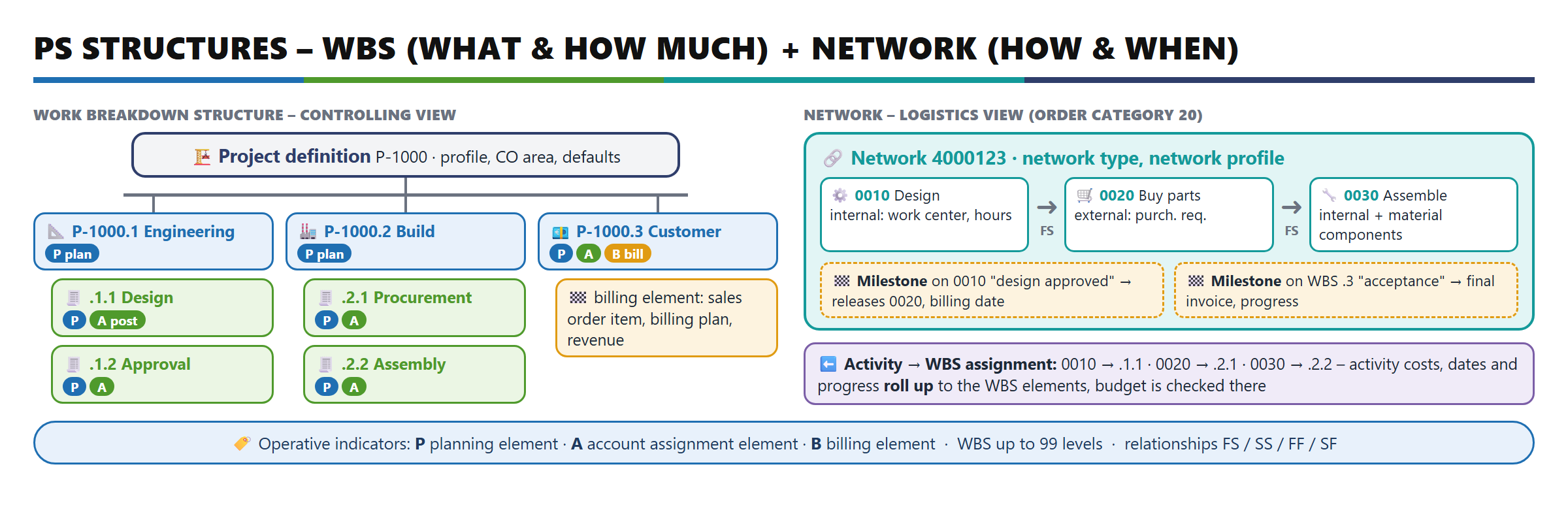
A project has two complementary structures. The WBS is hierarchical and answers 'what and how much'; the network is a flow of activities with relationships and answers 'how and when'. Activities are assigned to WBS elements, so their costs and dates roll up into the WBS.
Object | What it is | Key facts |
|---|---|---|
Project definition | Frame and default values for all WBS elements | One per project; carries the project profile, controlling area, company code, plant, person responsible; edited in CJ20N |
WBS element | Hierarchical node (phase, deliverable, cost area) | Up to 99 levels; operative indicators: planning element, account assignment element, billing element |
Network | Header for a set of activities | Technically an order (order category 20); controlled by the network type and network profile; often one per WBS branch |
Activity | One step of the work | Internal processing (work center + hours), external processing (purchase requisition), general costs, service; can have material components |
Activity element | A sub-part of an activity | Same kinds as activities; used to plan costs of one activity in more detail |
Relationship | Order between two activities | FS finish-start, SS start-start, FF finish-finish, SF start-finish; with time interval |
Milestone | Event on a WBS element or activity | Used for milestone billing, milestone technique in progress analysis, milestone trend analysis, functions such as releasing activities |
Which structure do I need?
- WBS only: cost collector projects, overhead and most investment projects – plan costs on WBS elements, post actuals, settle.
- WBS + networks: when dates, capacities, external services or materials must be planned in detail (engineer-to-order, construction, plant shutdown).
- Developer note: because a network is an order, network headers live in the order tables (AUFK, AFKO) and activities in the operation tables (AFVC, AFVV) – the same tables as production orders (page 02).
Part 4 – Organization assignments
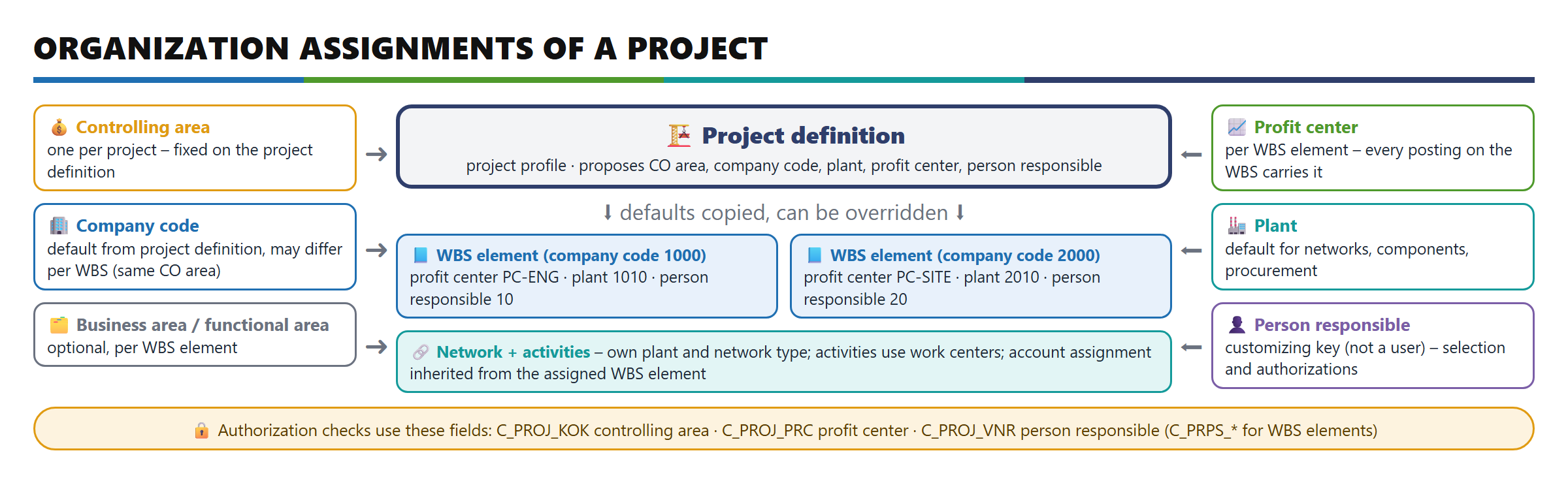
PS has no organization unit of its own. A project is assigned to the existing FI / CO and logistics units, and these assignments decide where postings go. The project definition proposes the values; each WBS element can override some of them.
Unit | Assigned at | Rule | Field (PROJ / PRPS) |
|---|---|---|---|
Controlling area | Project definition | One per project – all WBS elements and networks of a project are in the same controlling area | VKOKR / PKOKR |
Company code | Project definition (default), WBS element | A WBS element can use another company code of the same controlling area – cross-company projects | VBUKR / PBUKR |
Business area | Project definition, WBS element | Optional; for segment-like reporting in classic FI | VGSBR / PGSBR |
Profit center | Project definition, WBS element | Determines the profit center of every posting on the WBS; important for document splitting and margin analysis | PRCTR |
Plant | Project definition, WBS element, network, activity | Default for networks, material components and procurement | WERKS |
Person responsible | Project definition, WBS element | Key from a customizing table (not a user); used for selection and authorizations | VERNR |
Functional area | WBS element | Cost-of-sales accounting | FUNC_AREA |
- The network has its own plant and network type; activities point to work centers of a plant. Activities and networks inherit the account assignment of the WBS element they are assigned to.
- The project profile can fix organizational defaults so that users do not choose them freely (page 02 Part 6).
- Authorizations: PS checks organizational fields and the person responsible in objects such as C_PROJ_KOK (controlling area), C_PROJ_PRC (profit center) and C_PROJ_VNR (person responsible) for the project definition, with C_PRPS_* counterparts for WBS elements; C_PROJ_TCD restricts PS business transactions.
Part 5 – PS as cost collector and integration hub
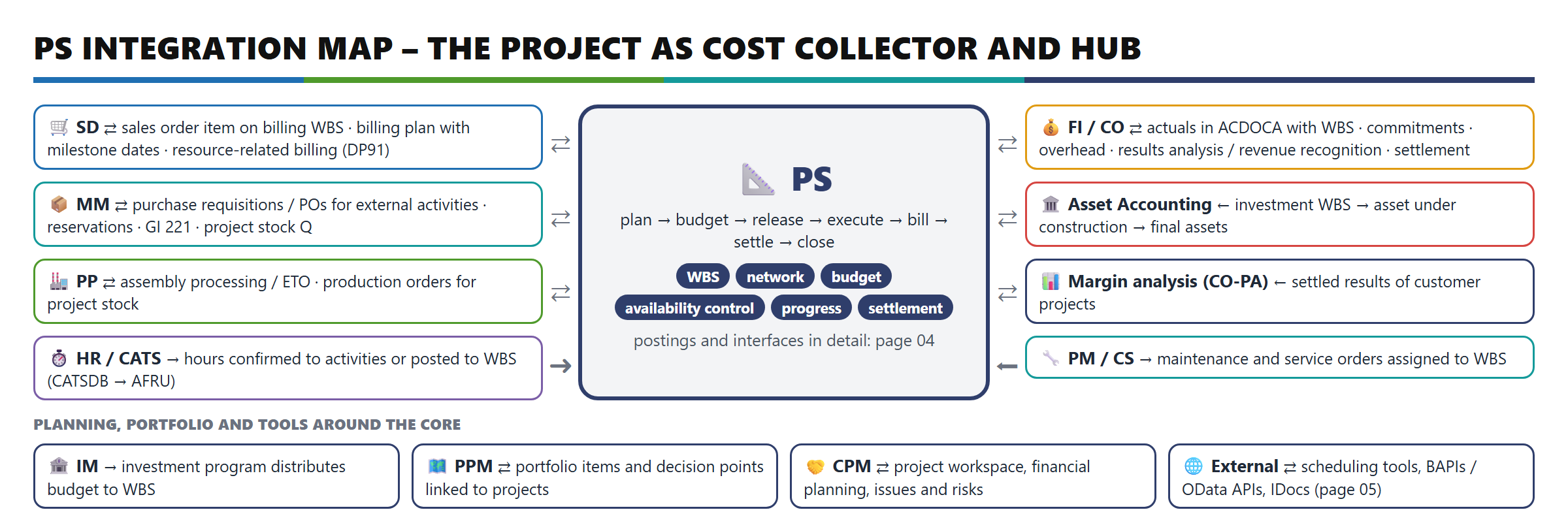
Almost every logistics and finance process can post to a WBS element or network activity. PS keeps the totals and the budget check, and settles the result. That makes it the integration hub for everything project-related. The postings in detail are on page 04.
Module | What flows to or from PS | Objects / tables |
|---|---|---|
FI / CO | Actual costs and revenues with WBS account assignment, plan and budget, commitments, overhead, settlement | ACDOCA, COOI (commitments), BPGE / BPJA (budget) |
FI-AA | Investment WBS creates an asset under construction; settlement capitalises costs | ANLA, settlement documents |
SD | Sales order item assigned to a billing WBS element; billing plan with milestone dates; resource-related billing from project costs (SD ABAP › 02 Part 7) | VBAP-PS_PSP_PNR, FPLA / FPLT |
MM | External activities and non-stock components create purchase requisitions; stock components create reservations; goods issue 221 to the project; project stock (special stock Q) | EBAN, EKKN, RESB, MSPR |
PP | Assembly processing and engineer-to-order: production orders for project stock | AUFK, AFPO |
HR / CATS | Time sheet hours confirmed to activities or posted to WBS elements | CATSDB, AFRU (confirmations) |
PM / CS | Maintenance and service orders assigned to WBS elements; costs roll up | AUFK, AFIH |
IM | Investment program positions distribute budget to investment WBS elements | IMTP, IMPR |
- Every posting carries the WBS element: in documents as PS_PSP_PNR (internal number, e.g. EKKN, VBAP, MATDOC, ACDOCA) – see page 02 Part 2 for internal vs external numbers.
Part 6 – PS in the SAP project landscape: PPM, CPM, enterprise projects
EPPM (Enterprise Portfolio and Project Management) is SAP's umbrella name for its project solutions. An architect must know which part does what, because customers often confuse them.
Solution | Focus | Relation to PS |
|---|---|---|
Project System (PS) | Operative execution and financial control of projects: structures, dates, costs, budget, procurement, billing, settlement | The core – part of S/4HANA (on-premise and private cloud) |
SAP Portfolio and Project Management (PPM) | Strategic portfolio management (which projects to fund), collaboration projects, resource management, integration with Microsoft Project | Add-on in SAP ERP; in S/4HANA on-premise part of the stack with a separate licence. PS projects can be linked to portfolio items; financial data comes from PS / CO |
SAP Commercial Project Management (CPM) | Customer projects end to end: project workspace, project financial planning, issue and change management, risk management | Shipped with S/4HANA since 1709 (separate licence); sits on top of PS, sales orders and CO; useful for engineering, construction, professional services |
Enterprise projects (S/4HANA Cloud Public Edition) | Investment and overhead projects in the public cloud, maintained in Fiori apps | Built on the same PS data model (PROJ, PRPS); no networks – needs are expressed as project demands |
Professional services projects (Public Edition) | Customer projects for service companies: staffing, time recording, billing | Separate business roles and processes; also based on WBS elements |
Deployment options (overview – details on page 06)
- On-premise / private cloud: full classic PS – CJ20N, networks, standard structures, versions, classic and Fiori reports – plus optional PPM and CPM.
- Public cloud: enterprise projects and professional services projects only, maintained in Fiori, extended only through released APIs, BAdIs and CDS views (clean core). Several classic transactions (for example CJ11, CJ12) are not offered.
- S/4HANA modernises PS step by step with Fiori apps; some classic functions are in the compatibility scope with a planned end of usage (page 06).
Part 7 – Interview questions
Q1. What is SAP PS and what problem does it solve?
The Project System plans, budgets, executes and controls one-time undertakings. It gives the project a structure (WBS, networks, milestones), collects all costs, revenues, dates and materials on it, checks them against the budget and settles the result to FI / CO.
Q2. What is the difference between a WBS element and a network?
The WBS is the hierarchical, controlling view – what is delivered and how much it costs. The network is the process view – which activities, in which order, with which resources and dates. Activities are assigned to WBS elements so their costs and dates roll up.
Q3. Which operative indicators does a WBS element have?
Planning element (costs can be planned), account assignment element (actuals and commitments can be posted) and billing element (revenues and billing). A summary node might only be a planning element; a work package is an account assignment element.
Q4. Name typical project types and their settlement receivers.
Investment projects settle to an asset under construction and then fixed assets; customer projects settle results to profitability analysis after revenue recognition; overhead and internal projects settle to cost centers or G/L accounts; R&D to cost centers, CO-PA or assets when capitalised.
Q5. Can one project span several company codes or controlling areas?
Several company codes – yes: each WBS element can have its own company code. Several controlling areas – no: the controlling area is fixed on the project definition for the whole project.
Q6. Why are networks stored in the order tables?
A network is technically an order of order category 20 with a network type. The header is in AUFK / AFKO and the activities are operations in AFVC / AFVV, like production order operations. So order logic (status, costing, confirmations) is reused.
Q7. Which modules post to a project?
FI / CO (actuals, overhead, settlement), MM (purchase requisitions, POs, goods issues, project stock), SD (sales orders, billing), HR / CATS (hours), PP (assembly processing), PM / CS (maintenance and service orders), FI-AA (AuC) and IM (budget distribution).
Q8. What is the difference between plan and budget?
Plan is the expected cost, often detailed by cost element. Budget is the approved, binding limit, usually on WBS level; availability control checks commitments and actuals against the budget, not against the plan.
Q9. What is the difference between PS, PPM and CPM?
PS executes and controls projects financially and logistically. PPM decides which projects to fund (portfolio) and handles collaboration and resources. CPM adds commercial control of customer projects – financial planning, issue / change and risk management – on top of PS and SD.
Q10. What changes for PS in SAP S/4HANA Cloud Public Edition?
Projects are enterprise projects or professional services projects maintained in Fiori apps. They use WBS elements on the PS data model but have no networks – needs are modelled as project demands – and extensions use only released APIs and BAdIs.
Q11. As an architect, when do you recommend networks?
When the project needs detailed scheduling, capacity planning of work centers, external services or material procurement tied to dates – engineer-to-order, construction, shutdowns. For cost collector or overhead projects a WBS alone is simpler and cheaper to run.
🏠 Start Here · 02 · Structures & Data ▶ · Sections: CORE ABAP | OOPS ABAP | ABAP on HANA | Clean Core | RAP | ABAP Points | SAP Fiori | SAPUI5 | Mobile Development (MDK) | BTP Foundations | BTP Development | CAP | SAP Build | ABAP on BTP | Integration Suite | SAP Business AI | SAP BASIS | Security | SAP SDLC
Functional: FICO ABAP | TRM ABAP | VIM | SAP BIS | SD ABAP | MM ABAP | PP ABAP | QM ABAP | PM ABAP | PS ABAP | EWM | TM ABAP | GTM ABAP | EHS ABAP | HR ABAP | BW | SAP Datasphere | SAP Business Data Cloud | SAP MDG | SAP Analytics Cloud | SAP Ariba | SAP CX | SAP IBP