PS has no classic master data like a customer or a material – the project structure itself is the master data, and every document (purchase order, goods issue, time sheet, billing document, journal entry) points to it. This page shows the objects and their tables, the profiles that control them, status management, templates and versions, and the released CDS views. You need it for every PS report, interface or enhancement. The big picture is on page 01; how the values get onto the project is on page 03.
Part 1 – The PS data model at a glance
Two families of tables make up a project. The WBS family (PROJ, PRPS, PRHI, PRTE) is PS's own. The network family reuses the order and routing tables of logistics (AUFK, AFKO, AFVC, AFVV, AFAB, RESB), because a network is an order. Both are tied together by the WBS assignment of networks and activities, and both carry an object number (OBJNR) that links them to status management, CO values and settlement rules.
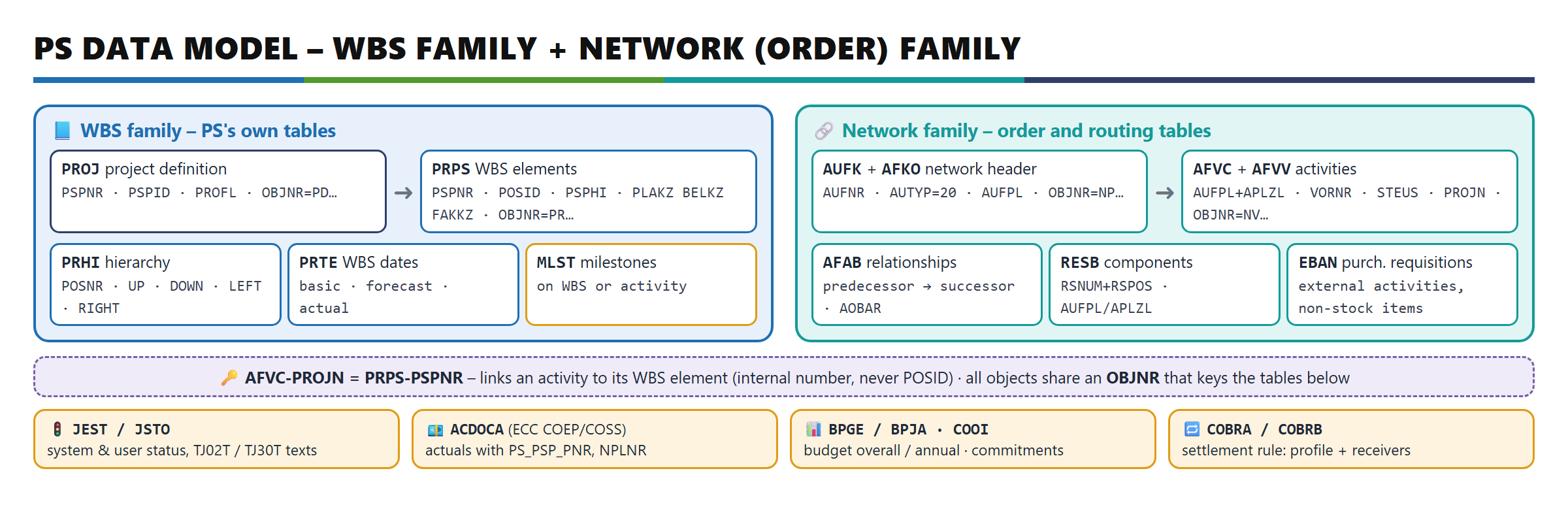
Object | ECC table(s) | S/4HANA | Key |
|---|---|---|---|
Project definition | PROJ | Unchanged | PSPNR (internal), PSPID (external) |
WBS element | PRPS | Unchanged | PSPNR (internal), POSID (external) |
WBS hierarchy | PRHI | Unchanged | POSNR (= WBS internal number) |
WBS dates | PRTE | Unchanged | POSNR |
Network header | AUFK (order master), AFKO (order header PP / PS) | Unchanged | AUFNR; order category AUTYP = 20 |
Activity / activity element | AFVC (operation), AFVV (quantities, dates, values) | Unchanged | AUFPL + APLZL |
Relationship | AFAB | Unchanged | Predecessor and successor AUFPL / APLZL |
Material component | RESB (reservation / dependent requirement) | Unchanged | RSNUM + RSPOS |
Milestone | MLST | Unchanged | MLST_ZAEHL (milestone number) |
Status | JEST / JSTO, texts TJ02T / TJ30T | Unchanged | OBJNR + STAT |
Actual costs and revenues | COEP line items, COSS / COSP totals | ACDOCA; COEP / COSS / COSP as compatibility views | WBS in ACDOCA-PS_PSP_PNR |
- The PS master data tables themselves were not simplified in S/4HANA – old PS reports on PROJ / PRPS / AFVC still run. What changed is the value side (Part 5).
Part 2 – Project definition: PROJ, numbers and the coding mask
Every PS object has two numbers: an external key the user sees and an internal number the system uses as the foreign key in all other tables. Forgetting this is the most common bug in PS custom code.
Object | External key (user) | Internal number (system) | Conversion exit |
|---|---|---|---|
Project definition | PROJ-PSPID, e.g. P-1000 | PROJ-PSPNR (NUMC 8) | KONPD (edit mask) |
WBS element | PRPS-POSID, e.g. P-1000.1.1 | PRPS-PSPNR (NUMC 8) | ABPSN for POSID, ABPSP for PSPNR (shows POSID on screen) |
Network | AUFK-AUFNR (12 digits, from the order number range) | Same number | ALPHA |
Activity | AFVC-VORNR (0010, 0020 …) | AFVC-AUFPL + APLZL | – |
- Fields in other tables always hold the internal WBS number: EKKN-PS_PSP_PNR, VBAP-PS_PSP_PNR, MATDOC-PS_PSP_PNR, ACDOCA-PS_PSP_PNR, COBRB-PS_PSP_PNR. ACDOCA also stores the external key (PS_POSID) and the network and activity (NPLNR, NPLNR_VORGN).
- Coding mask (transaction OPSJ): defines the edit mask of project and WBS keys per project prefix, e.g.
P-XXXX.X.X. The special characters are not stored – the database holds the unedited key, the conversion exit adds the mask for display. Always convert user input before a SELECT. - Important PROJ fields: POST1 description, PROFL project profile, VERNR person responsible, VKOKR controlling area, VBUKR company code, VGSBR business area, WERKS plant, PLFAZ / PLSEZ planned start / finish, OBJNR (
PD+ PSPNR).
|
Part 3 – WBS elements: PRPS, PRHI and PRTE
Table | Content | Important fields |
|---|---|---|
PRPS | WBS element master data | PSPNR, POSID, POST1, PSPHI (project), STUFE (level), PLAKZ planning element, BELKZ account assignment element, FAKKZ billing element, PRART project type, PBUKR, PKOKR, PRCTR, WERKS, VERNR, FUNC_AREA, OBJNR ( |
PRHI | Hierarchy of WBS elements as a linked structure | POSNR, PSPHI, UP (superior), DOWN (first subordinate), LEFT / RIGHT (neighbours on the same level) |
PRTE | Scheduling data of WBS elements | Basic dates (PSTRT / PENDE), forecast dates, actual dates (ISTRT / IENDE), durations |
PROJ / PRPS texts | Long texts | Read with READ_TEXT (text objects of PS) |
Operative indicators
Indicator | Field | Allows | Typical use |
|---|---|---|---|
Planning element | PRPS-PLAKZ | Cost and revenue planning on this WBS element | Phases and work packages that need a plan |
Account assignment element | PRPS-BELKZ | Actual costs, commitments, purchase orders, goods issues, time sheets | Work packages where real costs arrive |
Billing element | PRPS-FAKKZ | Revenue planning and revenue postings; assignment of sales order items | Top WBS of a customer project |
- Indicators can be set or removed while no values exist; once costs are posted, removing the account assignment indicator is blocked.
- Statistical WBS element: costs are only for information – it cannot be settled and is not a real cost object (field PRPS-XSTAT). Used for reporting structures.
- Hierarchy reading: walk PRHI with UP / DOWN / RIGHT, or select all PRPS of the project and build the tree from PRHI-UP. Function modules for hierarchy reads exist, but a two-table SELECT is usually enough.
Part 4 – Networks, activities, relationships and milestones
Table | Content | Important fields |
|---|---|---|
AUFK | Order master (all order types) | AUFNR, AUTYP = 20 network, AUART network type, WERKS, OBJNR ( |
AFKO | Order header PP / PS | AUFNR, AUFPL (routing number of the activities), PRONR project, scheduling dates |
AFVC | Activities (operations) | AUFPL, APLZL, VORNR activity number, LTXA1 text, STEUS control key, ARBID work center, PROJN WBS element of the activity, OBJNR ( |
AFVV | Activity quantities, dates and values | ARBEI work, DAUNO duration, scheduled dates, planned costs of external activities |
AFAB | Relationships between activities | AUFPL_VOR / APLZL_VOR (predecessor), AUFPL_NCH / APLZL_NCH (successor), AOBAR relationship type (FS, SS, FF, SF), time interval |
RESB | Material components of activities | RSNUM, RSPOS, MATNR, BDMNG quantity, AUFPL / APLZL, item category (L stock, N non-stock), PSPEL |
MLST | Milestones | MLST_ZAEHL (milestone number), assignment to WBS element or activity, usage, billing and progress analysis flags, planned and actual dates |
Activity categories and control keys
Activity category | Control key (standard) | What it creates |
|---|---|---|
Internal processing | PS01 | Capacity requirement on a work center; planned costs from work × activity price; confirmations (CN25, CATS) |
External processing | PS02 | Purchase requisition → purchase order to a supplier |
General costs | PS03 | Planned costs by cost element (travel, licences) without a resource |
Service | PS05 | Purchase requisition with service specifications |
- Header-assigned vs activity-assigned networks: in PS the activities normally carry the costs (activity-assigned); header-assigned networks collect costs on the network header. The choice is made in Customizing for the network type.
- Components with item category L reserve stock (RESB) or project stock; N creates a purchase requisition for direct procurement to the network.
|
The internal values of AOBAR are the German abbreviations (NF Normalfolge = finish-start, AF Anfangsfolge = start-start, EF Endfolge = finish-finish, SF Sprungfolge = start-finish); the screen shows FS / SS / FF / SF.
Part 5 – Where the values live: costs, budget, commitments, settlement
PS reports combine structure tables with value tables. All value tables are keyed by the object number (or the internal WBS number), never by POSID.
Values | ECC | S/4HANA |
|---|---|---|
Actual costs and revenues | COEP line items, COSS / COSP totals | ACDOCA (Universal Journal); COEP / COSS / COSP readable as compatibility views |
Plan costs (classic planning CJ40, CJR2, network costing) | COSP / COSS (plan value types) | Classic plan totals still available; new planning and Easy Cost Planning (as of 2022) write ACDOCP |
Commitments (purchase requisitions, POs) | COOI line items | COOI (unchanged) |
Budget | BPGE overall values, BPJA annual values; documents BPBK header, BPEG / BPEJ line items | Unchanged for classic PS budgeting |
Settlement rule | COBRA header (settlement profile), COBRB distribution rules | Unchanged |
Settlement documents | AUAK header, AUAA / AUAS items | Unchanged; postings in ACDOCA |
Billing plan of the sales order | FPLA / FPLT | Unchanged |
- Value type (WRTTP) separates plan (01), actual (04), commitment (21 / 22) and budget-related records in the CO tables; in ACDOCA plan data is not mixed with actuals.
- For new reports prefer released CDS views and the standard Fiori project cost apps over joins on ACDOCA by hand (page 04).
Part 6 – Profiles: project profile, network profile and the profiles behind them
PS behaviour is driven by profiles. The project profile is entered when the project is created and brings all other profiles with it; the network profile and network type do the same for networks. Change a profile and every new project behaves differently – no code needed.
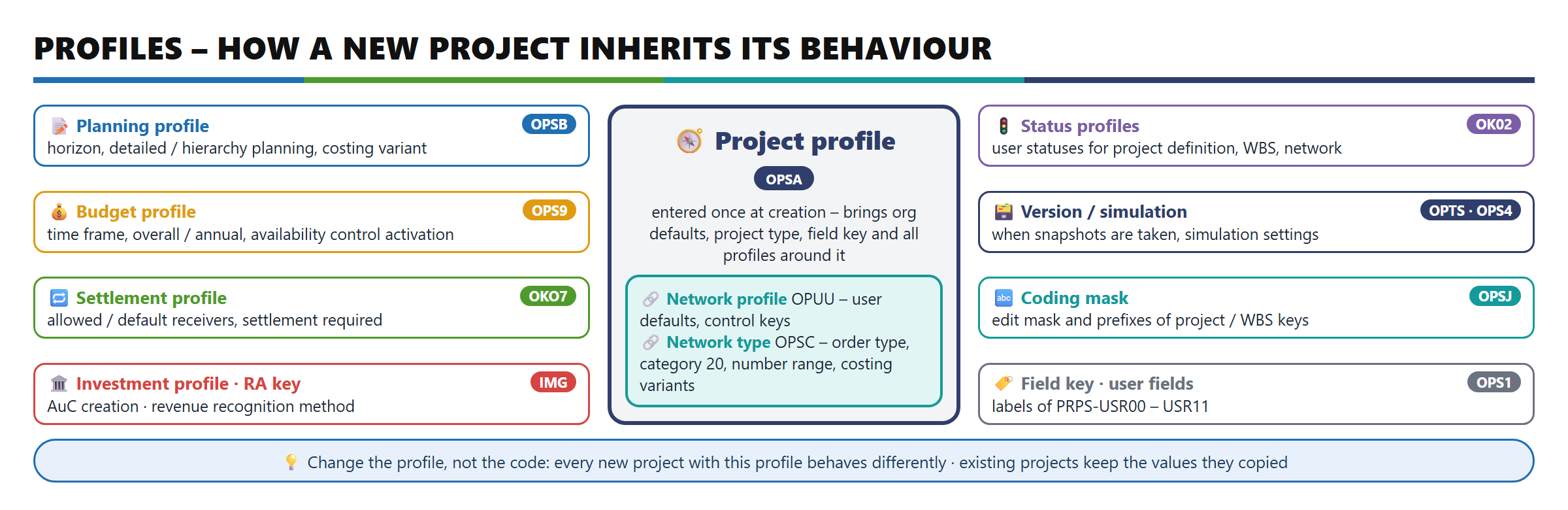
Profile | T-code | What it controls |
|---|---|---|
Project profile | OPSA | Defaults and control for the whole project: organization (controlling area, company code, plant, profit center), project type, field key, planning and budget profiles, settlement and investment profile, results analysis key, status profiles, network defaults, scheduling, version and simulation profiles |
Network profile | OPUU | Defaults for networks: plant, network type, control keys for the activity categories, relationship view, graphics, level of detail |
Network type | OPSC | Order type of the network (order category 20): number range, costing variants for plan / actual costs, commitments, status profile, settlement profile |
Planning profile (cost planning profile) | OPSB | Planning horizon, detailed / hierarchical planning, costing variant for unit costing, planning currency |
Budget profile | OPS9 | Time frame, overall vs annual budget, currency, availability control activation and usage basis |
Settlement profile | OKO7 | Allowed receivers (asset, cost center, G/L, profitability segment, WBS), default receiver, settlement mandatory or not, allocation structure |
Status profile (user status) | OK02 | Customer statuses and which business transactions they allow or forbid |
Project version profile / simulation profile | OPTS / OPS4 | When project versions are created and what they include / settings of simulation versions |
Coding mask | OPSJ | Edit mask and prefixes of project and WBS keys |
User fields | OPS1 | Labels of the WBS user fields USR00 – USR11 (field key) |
- Number ranges: networks use order number ranges assigned through the network type; project and WBS keys come from the coding mask or the internal PS number.
- Other settings an architect asks for: investment profile (creates an asset under construction for investment WBS), results analysis key (revenue recognition for customer projects, page 03), costing sheet (overhead), DIP profile ODP1 (resource-related billing).
Part 7 – Status management
Every project definition, WBS element, network and activity has system statuses (set by SAP, e.g. released) and optional user statuses (from a status profile). The status decides which business transactions are allowed – posting costs, planning, budgeting, settling.
System status | Code | Meaning |
|---|---|---|
CRTD | I0001 | Created: planning possible, no actual postings |
REL | I0002 | Released: actual costs, purchasing, confirmations allowed |
PREL | – | Partially released (some activities or WBS elements released) |
TECO | I0045 | Technically completed: no new planning or new purchase requisitions, but open commitments and costs can still arrive |
CLSD | I0046 | Closed: no actual postings to the WBS element, no hierarchy changes; set after the final settlement |
DLFL | I0076 | Deletion flag (reversible), before archiving |
BUDG / SETC / AVAC | – | Budgeted, settlement rule created, availability control active – information statuses set by the business transactions |
Table | Content |
|---|---|
JEST | Statuses per object: OBJNR, STAT (system I…, user E…), INACT (inactive flag) |
JSTO | Status object information: OBJNR, OBTYP, STSMA (user status profile) |
TJ02 / TJ02T | System statuses and their texts |
TJ30 / TJ30T | User statuses per status profile and texts |
JCDS | Change documents of statuses (who set which status when) |
- OBJNR prefixes: PD project definition, PR WBS element, NP network header, NV activity.
|
- For one object the function modules STATUS_READ (status table) and STATUS_TEXT_EDIT (status line as on the screen) are the standard way; never INSERT into JEST yourself – use the business transaction (or BAPI) that sets the status.
Part 8 – Templates, standard structures, versions and simulation
Object | T-code | Purpose |
|---|---|---|
Standard WBS | CJ91 create, CJ92 change | Template for WBS hierarchies; copied into an operative project in CJ20N |
Standard network | CN01 create, CN02 change | Template for networks and activities, also inserted by milestone functions |
Operative project as template | CJ20N (copy) | Copy a finished project as the start of a new one |
Project version | CN72 create | Frozen snapshot of quantities, dates and values at a point in time (e.g. at release) for comparison; profile OPTS |
Simulation version | CJV1 create, CJV2 change, CJV4 transfer | Changeable copy to plan alternatives (pre-sales, what-if) and transfer back to the operative project; profile OPS4 |
- Project versions are read-only history; simulation versions are editable planning copies – a classic interview question.
Part 9 – Project Builder and maintenance transactions
T-code | Purpose |
|---|---|
CJ20N / CJ2D | Project Builder (CJ20N) / structure planning (CJ2D) – the whole project: definition, WBS, networks, activities, milestones, documents in one screen (structure tree, worklist, detail area) |
CJ06 / CJ07 / CJ08 | Create / change / display project definition (older single transactions) |
CJ01 / CJ02 / CJ03 | Create / change / display WBS element |
CN21 / CN22 / CN23 | Create / change / display network |
CJ2B / CJ2C | Project planning board change / display (Gantt chart – compatibility scope; Fiori app Project Schedule from S/4HANA 2021) |
CNMASS | Mass change of WBS elements, networks, activities |
CN41N | Project structure overview (report, page 04) |
- Developers create and change projects with the PS BAPIs (BAPI_BUS2001_* project definition, BAPI_BUS2054_* WBS elements, BAPI_BUS2002_* networks) inside BAPI_PS_INITIALIZATION … BAPI_PS_PRECOMMIT – full example on page 05.
Part 10 – Released CDS views
New code and analytics should read projects through CDS views rather than PROJ / PRPS directly. Names differ between the classic project model and enterprise projects. The release state (C1 = released for cloud development and key-user apps) is shown in ADT and in the View Browser app.
CDS view | Content | Note |
|---|---|---|
I_EnterpriseProject | Project (definition) data | Released in the public cloud; recommended by SAP for extracting projects |
I_EnterpriseProjectElement | Project elements (WBS elements) with hierarchy information | Released in the public cloud (I_EnterpriseProjectElement_2: public and private cloud) |
I_ProjectData_2 | Project definition data | Classic PS view – released for private cloud / on-premise |
I_WBSElementData_2 | WBS element data | Classic PS view – released for private cloud / on-premise |
I_WBSElementBasicData | WBS element basic data | Used as data source in custom CDS views (key-user tools) – private cloud / on-premise |
- Never guess field names: open the view in ADT, check its annotations (
@VDM.viewType,@AccessControl) and use Released Objects to see successors of deprecated views. - Building your own analytical view on these (CDS view entity, associations, DCL): ABAP on HANA › 05 CDS Views.
Part 11 – Interview questions
Q1. Which tables store a PS project?
PROJ (project definition), PRPS (WBS elements), PRHI (hierarchy), PRTE (WBS dates); networks in AUFK / AFKO, activities in AFVC / AFVV, relationships in AFAB, components in RESB, milestones in MLST, statuses in JEST.
Q2. What is the difference between PSPNR and POSID?
POSID is the external WBS key the user sees (with coding mask); PSPNR is the internal 8-digit number used as foreign key in all other tables (EKKN, VBAP, ACDOCA-PS_PSP_PNR). Conversion exits ABPSP / ABPSN translate between them; KONPD does the same for the project definition.
Q3. How is the WBS hierarchy stored?
In PRHI as a linked structure: for each WBS element its superior (UP), first subordinate (DOWN) and neighbours (LEFT / RIGHT). PRPS-STUFE holds the level and PRPS-PSPHI the project.
Q4. How do you recognise a network in the order tables?
AUFK-AUTYP = 20; the network type is AUFK-AUART. AFKO-AUFPL links to the activities in AFVC / AFVV (key AUFPL + APLZL); the activity's WBS element is AFVC-PROJN.
Q5. What does the project profile control?
Organizational defaults, project type, planning and budget profiles, settlement and investment profiles, results analysis key, status profiles, network and scheduling defaults, version and simulation profiles – everything a new project inherits.
Q6. Network profile vs network type?
The network profile (OPUU) holds defaults for users (plant, control keys, graphics). The network type (OPSC) is the order type with order category 20: number range, costing variants, settlement and status profile.
Q7. How do you read the status of a WBS element?
Through its object number PRPS-OBJNR (PR + PSPNR) in JEST with INACT = space, texts from TJ02T / TJ30T, or with STATUS_READ / STATUS_TEXT_EDIT. Example codes: I0002 REL, I0045 TECO, I0046 CLSD.
Q8. What is the difference between TECO and CLSD?
TECO stops new planning and requisitions but still accepts follow-up costs from open commitments. CLSD blocks actual postings to the WBS element and hierarchy changes and is set after the final settlement.
Q9. Project version vs simulation version?
A project version (CN72, profile OPTS) is a read-only snapshot for comparison. A simulation version (CJV1 / CJV2, profile OPS4) is an editable copy for what-if planning that can be transferred back to the operative project with CJV4.
Q10. Where are project costs stored in S/4HANA?
Actuals in ACDOCA with the WBS element (PS_PSP_PNR, PS_POSID) and network / activity; commitments still in COOI; budget in BPGE / BPJA; new plan data in ACDOCP. COSP / COSS / COEP remain as compatibility views for old reports.
Q11. Which CDS views would you use for a project extraction to BTP or a data warehouse?
Released views such as I_EnterpriseProject and I_EnterpriseProjectElement (released in the public cloud; private cloud: I_ProjectData_2, I_WBSElementData_2, I_WBSElementBasicData), after checking the release state in ADT – not direct reads of PROJ / PRPS, which are not released APIs.
Q12. What are the operative indicators and when can you change them?
Planning element, account assignment element and billing element (PRPS-PLAKZ / BELKZ / FAKKZ). They can be changed freely until values exist; after postings, removing an indicator is blocked.
🏠 Start Here · ◀ 01 · Overview & Org · 03 · Processes & Config ▶ · Sections: CORE ABAP | OOPS ABAP | ABAP on HANA | Clean Core | RAP | ABAP Points | SAP Fiori | SAPUI5 | Mobile Development (MDK) | BTP Foundations | BTP Development | CAP | SAP Build | ABAP on BTP | Integration Suite | SAP Business AI | SAP BASIS | Security | SAP SDLC
Functional: FICO ABAP | TRM ABAP | VIM | SAP BIS | SD ABAP | MM ABAP | PP ABAP | QM ABAP | PM ABAP | PS ABAP | EWM | TM ABAP | GTM ABAP | EHS ABAP | HR ABAP | BW | SAP Datasphere | SAP Business Data Cloud | SAP MDG | SAP Analytics Cloud | SAP Ariba | SAP CX | SAP IBP