QM (Quality Management) is the SAP module that makes sure materials and products meet their specifications along the whole logistics chain: it plans what to inspect and how, inspects goods when an event happens (goods receipt, production, delivery, maintenance), records results and defects, decides whether the goods can be used, and handles problems with quality notifications. QM has no stock or money of its own – it controls the stock of MM (quality inspection stock) and works inside the processes of MM, PP, SD and PM. This page gives the big picture: scope, components, key terms, organization units, the integration map and QM in S/4HANA. Master data and tables: page 02; processes and customizing: page 03.
Part 1 – What QM does and where it sits in logistics
QM follows the classic quality loop plan → inspect → control → improve. Every loop starts with a logistics event in another module; QM reacts to it with an inspection lot and ends with a usage decision that releases, blocks or scraps the goods.
Logistics area | Event that triggers QM | What QM does |
|---|---|---|
Procurement (MM) | Purchase order, goods receipt, supplier invoice | Checks the supplier's QM system and release, blocks suppliers, inspects at goods receipt or at the supplier (source inspection), requests certificates, blocks the invoice until the goods are OK |
Production (PP) | Order release, operation confirmation, goods receipt from production | In-process inspection per operation, final inspection of the product, results feed the confirmation and the batch |
Sales (SD) | Outbound delivery, customer return, customer complaint | Inspection before shipping, certificate of analysis for the customer, inspection of returns, customer complaint notifications |
Plant maintenance (PM) | Maintenance plan due date, maintenance order | Calibration inspection of test equipment; the inspection result updates the equipment |
Inventory (MM) | Stock transfer, batch reaching its next inspection date | Stock transfer inspection, recurring inspection of batches in stock |
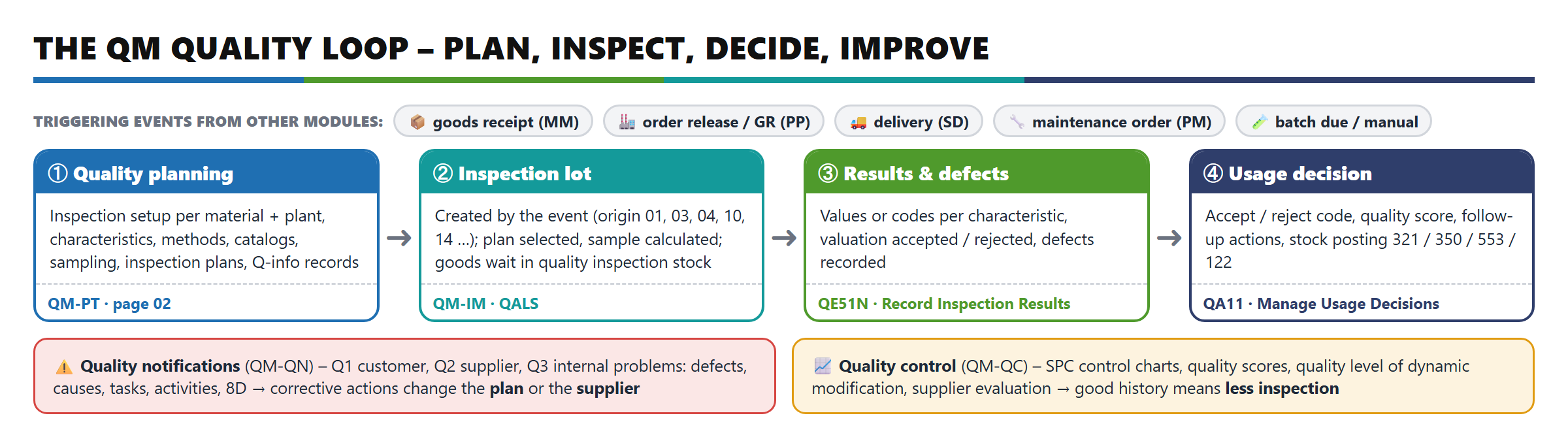
- QM is event-driven: there is no separate "QM transaction" for a goods receipt. The goods movement in MIGO creates the inspection lot automatically when the material's inspection setup is active (page 02 Part 2).
- QM decides whether goods can be used; MM still owns the stock. The link is the quality inspection stock (MARD-INSME, in S/4HANA calculated from MATDOC): goods sit there until the usage decision posts them on (MM ABAP › 03 Part 3).
Part 2 – Components of QM
SAP groups QM into components. The codes appear in SAP Help, in support notes and as the application component of every QM object in the package hierarchy.
Component | What it does | Main objects | Page |
|---|---|---|---|
QM-PT Quality Planning | Defines what is inspected, how and how often | Inspection setup in the material master, master inspection characteristics, inspection methods, catalogs, sampling procedures, dynamic modification rules, inspection plans, material specifications, quality info records | 02 |
QM-IM Quality Inspection | Runs the inspection | Inspection lot, sample, results recording, defects, usage decision, stock posting | 03 |
QM-QC Quality Control | Monitors quality over time | SPC control charts, quality scores, quality level (dynamic modification), QM part of supplier evaluation, quality analyses | 03, 04 |
QM-QN Quality Notifications | Records and solves quality problems | Notification types Q1 / Q2 / Q3, items (defects), causes, tasks, activities | 03 |
QM-CA Quality Certificates | Certificates out and in | Certificate profile, certificate of analysis for deliveries, certificate receipt in procurement | 03 |
Test equipment management | Calibrates gauges and instruments | Equipment master (PM) used as test equipment, maintenance plan, calibration inspection lot (origin 14) | 03 |
Stability study | Tests how a product keeps its quality over time under storage conditions (pharma, food, chemicals) | Stability study, storage conditions, test schedule, inspection lots of origin 16 (not stock-relevant) | 03 |
Quality control in one paragraph
- SPC (statistical process control): characteristics flagged as SPC characteristics feed control charts (e.g. mean value / standard deviation charts) while results are recorded, so a drifting process is seen before parts go out of tolerance.
- Quality score: each usage decision can carry a score (QAVE-QKENNZAHL, e.g. 1–100) calculated with the procedure set per inspection type (QMAT-QKZVERF). Scores of goods receipt lots feed the QM criterion of supplier evaluation in purchasing.
- Quality level: stores the current inspection stage of a dynamic modification rule per material, supplier or customer, so good suppliers are inspected less often (page 02 Part 6).
Part 3 – Key business terms
Term | Meaning |
|---|---|
Inspection lot | The request to inspect a quantity of one material (optionally batch) for one reason; the central QM document (table QALS). Created automatically by an event or manually. |
Inspection lot origin | SAP-defined source of the lot: 01 goods receipt, 03 production, 04 goods receipt from production, 10 delivery, 14 plant maintenance, 89 miscellaneous … (page 03 Part 1). |
Inspection type | Customer-configurable variant of an origin that controls how the lot is processed (e.g. 01, 0101, 04, 08). Activated per material and plant in the inspection setup. |
Inspection characteristic | What is checked: a measured value (quantitative, e.g. diameter 10 ± 0.1 mm) or an attribute (qualitative, e.g. surface OK / scratched). |
Inspection plan | Task list (type Q) with operations and the characteristics to inspect in each operation, assigned to materials. |
Sample | The quantity actually inspected, calculated from the lot quantity by the sampling procedure. |
Results recording | Entering the measured values or codes for each characteristic; each characteristic is valuated as accepted (A) or rejected (R). |
Defect | A recorded nonconformity (defect type, location, number of defects); can create or belong to a quality notification. |
Usage decision (UD) | The final decision on the lot: accepted / rejected code, quality score, follow-up actions and the stock posting out of quality inspection stock. |
Quality notification | Document to record and solve a quality problem (customer complaint, complaint against a supplier, internal problem) with defects, causes, tasks and activities. |
Quality info record | Material + supplier + plant record that releases a supplier, blocks it or triggers source inspection. |
Certificate of analysis (CoA) | Document that shows the customer the inspection results of the delivered batch or lot. |
Part 4 – Organization structure
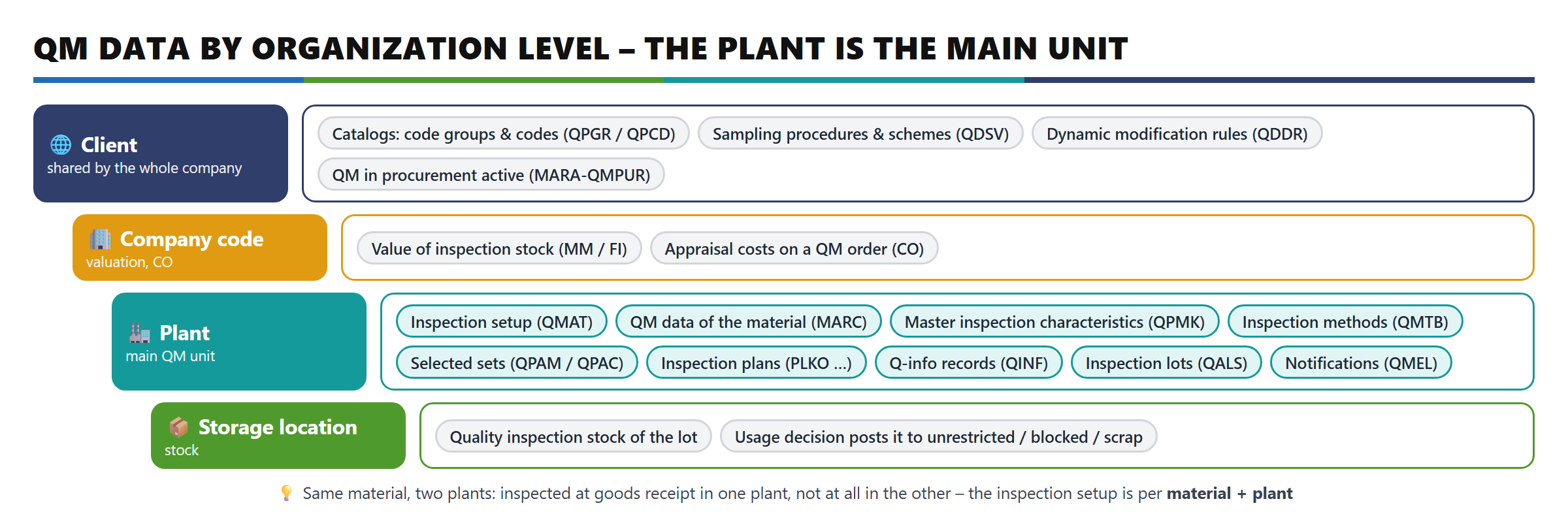
QM has no organization units of its own. It uses the logistics units of MM and PP, and the plant is the main unit: inspection setup, master inspection characteristics, inspection methods, inspection plans, quality info records and inspection lots all exist per plant. A few objects are client-wide so that the whole company shares them.
Level | QM objects at this level | Key field |
|---|---|---|
Client | Catalogs and code groups (catalog types 1, 3, 9 …), sampling procedures and sampling schemes, dynamic modification rules, the QM in procurement active indicator (MARA-QMPUR, client-wide on purpose) | MANDT |
Company code / controlling area | Valuation of the inspected stock (MM / FI); appraisal costs can be collected on a QM order (CO) | BUKRS / KOKRS |
Plant | Inspection setup per material (QMAT), QM data of the material (MARC), master inspection characteristics, inspection methods, selected sets, inspection plans, quality info records, inspection lots, quality notifications (reporting plant) | WERKS (QPMK-ZAEHLER for MICs) |
Storage location | Holds the quality inspection stock of the lot; the usage decision posts it from there | LGORT |
Work center | Where an inspection operation runs (lab, inspection station); same object as in PP (CRHD) | ARBPL |
Responsible people | Lab / office and QM authorization group in the material master; planner group of the inspection plan; responsible persons and partners in notifications | Material master and task list fields |
Rules to remember
- Inspection setup is per material and plant: the same material can be inspected at goods receipt in plant 1000 and not at all in plant 2000 (table QMAT, key inspection type + material + plant).
- QM in procurement is switched on client-wide in the material master (MARA-QMPUR) and then needs a control key in the plant data; a missing plant control key gives error QB114 in the purchase order.
- Inspection lots and their stock always belong to one plant; cross-plant views are reporting only.
- Plant, inspection type and notification type are the fields QM authorizations and worklists filter on – use them first in custom reports and authority checks.
Part 5 – Integration map
QM sits between the logistics modules: events come in, decisions go out. MM, PP, SD and PM create the events (goods receipt, order release, delivery, calibration order), QM creates the inspection lots and notifications, and the usage decision sends results back as stock postings, batch values, supplier scores or equipment status. EWM, LIMS and shop-floor systems connect at the edges (Part 6.2).
- The integration map with every module, its lot origins, movement types and what comes back from QM, plus the interfaces to EWM, LIMS and ALE: page 04 Part 1.
Part 6 – QM in S/4HANA: architecture, Fiori roles and deployment
QM is embedded in the S/4HANA core – there is no separate QM system, no replication and the same tables as in ECC (QALS, QAVE, QMEL …). In S/4HANA it belongs to the manufacturing line of business together with PP. What changed is mainly the user experience: role-based Fiori apps on top of the classic transactions, a simplified defect object and Fiori-based problem solving.
6.1 Business roles and typical apps
Role (business role) | Does | Typical Fiori apps / transactions |
|---|---|---|
Quality planner (SAP_BR_QUALITY_PLANNER) | Maintains inspection planning master data | Manage Inspection Plans, Manage Quality Info Records; QS21, QP01, QI01 |
Quality technician (SAP_BR_QUALITY_TECHNICIAN) | Processes inspection lots and records results and defects | Manage Inspection Lots, Record Inspection Results, Manage Defects; QE51N, QA32 |
Quality engineer (SAP_BR_QUALITY_ENGINEER) | Makes usage decisions, solves problems, analyses quality | Manage Usage Decisions, Process Quality Tasks, Resolve Internal Problems (8D); QA11, QM02 |
Quality manager / auditor | Monitors KPIs, audits | Analytical apps and overview pages (page 04) |
Calibration technician | Calibrates test equipment | Maintenance order + calibration inspection lot |
- Classic SAP GUI transactions (QA01 – QA33, QE51N, QA11, QM01 – QM03, QS21 …) still work in on-premise and private cloud; the public cloud offers the Fiori apps only.
- Defects (S/4HANA): a defect can be recorded on its own, without a notification header, and later transferred to a notification item; from a defect a Fiori 8D problem-solving process can be started (details on page 03 Part 8 and page 06).
6.2 Architecture choices around QM
Topic | Options | Architect's view |
|---|---|---|
Where results are recorded | SAP GUI / Fiori, shop floor system (SAP Digital Manufacturing), LIMS | Labs with many instruments usually keep a LIMS and send results to the inspection lot; QM remains the system of record for the usage decision and stock |
Warehouse inspections | Embedded EWM: QM with or without EWM inspection rules (with rules: lots of origin 17), decentralised EWM with QIE | Embedded EWM can work without EWM inspection rules |
Deployment | On-premise / private cloud (full QM scope incl. classic transactions), public cloud (scope items and Fiori apps, extensions only via released APIs, BAdIs and CDS views) | Details and simplification items on page 06 |
Part 7 – Interview questions
Q1. What is SAP QM and which components does it have?
The module that plans, performs and documents quality inspections and solves quality problems. Components: quality planning (QM-PT), quality inspection (QM-IM), quality control (QM-QC, SPC and quality scores), quality notifications (QM-QN), quality certificates (QM-CA), plus test equipment management and stability study.
Q2. How does QM integrate with MM, PP, SD and PM?
MM: goods receipt to quality inspection stock creates lot 01, the usage decision posts the stock (321, 350, 553, 122), Q-info records control suppliers. PP: lots 03 and 04 for in-process and final inspection. SD: delivery inspection (10 – 12), certificates of analysis, complaints (Q1). PM: calibration lots (14) for test equipment and shared notification tables.
Q3. Does QM have its own organization units?
No. It uses the plant as the main unit: inspection setup, MICs, methods, plans, Q-info records and lots are per plant. Catalogs, sampling procedures and dynamic modification rules are client-wide.
Q4. What is the difference between inspection lot origin and inspection type?
The origin is fixed by SAP and says where the lot comes from (01 goods receipt, 04 GR from production, 89 manual). The inspection type is configurable, belongs to one origin and controls the processing (e.g. 01 GR inspection, 0101 model inspection for a GR); it is activated per material and plant.
Q5. What is quality inspection stock and who owns it?
A stock type of inventory management (MARD-INSME) for goods waiting for a usage decision. MM owns the stock and its value; QM decides when it moves on. The goods cannot be consumed until the usage decision posts them to unrestricted use.
Q6. What does a usage decision do?
It closes the inspection lot: accept / reject code from the usage decision catalog (catalog type 3), quality score, follow-up actions and the stock posting from quality inspection stock to unrestricted, blocked, scrap, sample or return to supplier.
Q7. What is SPC and the quality score used for?
SPC monitors a process with control charts built from the recorded values of SPC characteristics. The quality score of each usage decision measures lot quality; goods receipt scores feed the QM criterion of supplier evaluation.
Q8. Why is the QM in procurement indicator client-wide?
It sits in MARA (QMPUR) for technical reasons, so it is active in every plant. Each plant then needs a control key that says what is required (release, certificate, technical delivery terms, invoice block); otherwise the purchase order fails with QB114.
Q9. What changed for QM in S/4HANA?
The data model and the core processes stay; QM is embedded in the core. New are the role-based Fiori apps (Manage Inspection Lots, Record Inspection Results, Manage Usage Decisions …), the simplified defect object without a notification header, 8D problem solving in Fiori and the 40-character material number. Stock is calculated from MATDOC.
Q10. Which business roles does SAP deliver for QM?
Quality planner (master data), quality technician (inspection lots, results, defects), quality engineer (usage decisions, problem solving), quality manager and auditor (analytics, audits) and calibration technician (test equipment).
Q11. As an architect, would you keep a LIMS next to S/4HANA QM?
Yes when the lab has many instruments, complex sample management or regulatory lab workflows; the LIMS sends results to the inspection lot (QM-IDI or APIs) and QM keeps the usage decision, stock and traceability. For simple goods receipt or production checks QM alone is enough.
🏠 Start Here · 02 · Master Data ▶ · Sections: CORE ABAP | OOPS ABAP | ABAP on HANA | Clean Core | RAP | ABAP Points | SAP Fiori | SAPUI5 | Mobile Development (MDK) | BTP Foundations | BTP Development | CAP | SAP Build | ABAP on BTP | Integration Suite | SAP Business AI | SAP BASIS | Security | SAP SDLC
Functional: FICO ABAP | TRM ABAP | VIM | SAP BIS | SD ABAP | MM ABAP | PP ABAP | QM ABAP | PM ABAP | PS ABAP | EWM | TM ABAP | GTM ABAP | EHS ABAP | HR ABAP | BW | SAP Datasphere | SAP Business Data Cloud | SAP MDG | SAP Analytics Cloud | SAP Ariba | SAP CX | SAP IBP