QM master data answers four questions before any inspection starts: which material is inspected for which reason (inspection setup), what is checked (master inspection characteristics, methods, catalogs), how much is checked (sampling procedures, dynamic modification) and in which order (inspection plans). The quality info record adds the supplier view. The second half of the page is the transactional data model – inspection lot, results, usage decision, defects, notifications, certificates – with the tables you SELECT in custom code and the released CDS views. The QM data model is the same in ECC and S/4HANA; the differences are listed where they exist. Processes that use this data: page 03; BAdIs, BAPIs and APIs: page 05.
Part 1 – Overview of QM master data
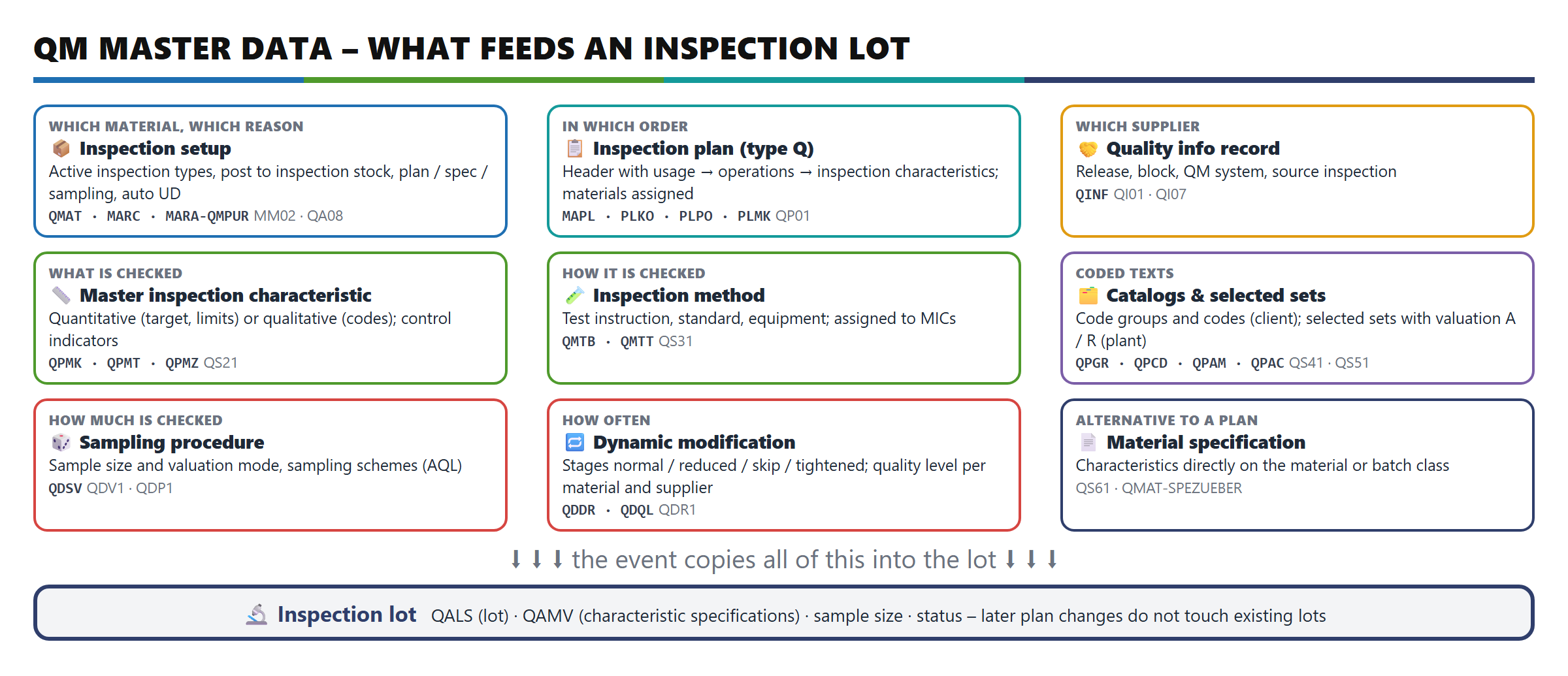
Object | Create / change / display | Main tables | Level |
|---|---|---|---|
Inspection setup (material master, QM view) | MM01 / MM02 / MM03; mass: QA08 | QMAT, MARC, MARA | Material + plant (+ inspection type) |
Master inspection characteristic (MIC) | QS21; versions QS22 / QS23 | QPMK, QPMT (texts), QPMZ (assigned methods) | Plant |
Inspection method | QS31; versions QS32 / QS33 | QMTB, QMTT (texts) | Plant |
Catalog: code groups and codes | QS41 edit / QS42 display | QPGR, QPGT, QPCD, QPCT | Client |
Selected set | QS51 / QS52 / QS53 | QPAM, QPAC | Plant (or cross-plant) |
Sampling procedure | QDV1 / QDV2 / QDV3 | QDSV | Client |
Sampling scheme | QDP1 / QDP2 / QDP3 | Sampling scheme tables | Client |
Dynamic modification rule | QDR1 / QDR2 / QDR3 | QDDR (header), QDQL (quality level) | Client |
Inspection plan (task list type Q) | QP01 / QP02 / QP03 | PLKO, PLPO, PLMK, MAPL, PLKZ | Plant |
Material specification | QS61 | Characteristics assigned to the material | Material |
Quality info record | QI01 / QI02 / QI03; mass QI06 | QINF | Material + supplier + plant |
- Fiori (S/4HANA): Manage Inspection Plans, Manage Quality Info Records (first article inspection for purchase orders can only be planned there); the GUI transactions remain available on-premise and in the private cloud.
Part 2 – Material master: QM view and inspection setup
The Quality Management view of the material (per plant) switches QM on. Its key element is the inspection setup: a list of inspection types that are active for this material in this plant. No active inspection type → no automatic inspection lot.
2.1 Inspection setup – table QMAT
QMAT field | Meaning |
|---|---|
ART / MATNR / WERKS | Key: inspection type, material, plant |
AKTIV | The inspection type is active for this material and plant |
APA | Preferred inspection type – used when several types of the same origin are active (e.g. 01 and 0101) |
INSMK | Post to inspection stock: the goods receipt goes to quality inspection stock |
PPL / SPEZUEBER / MER | Inspect with task list (inspection plan) / with material specification / by characteristics (results per characteristic instead of only a usage decision) |
STICHPRVER / DYNREGEL | Sampling procedure / dynamic modification rule used when there is no inspection plan |
HPZ / SPROZ / DYN | 100 % inspection / inspection percentage / skips allowed |
AVE | Automatic usage decision planned (QA10 job) |
CHG | Control of inspection lot creation: one lot per GR item, per batch, per material document … |
MPDAU | Average inspection duration in days – sets the lot's end date |
QKZVERF | Procedure for calculating the quality score |
KZPRFKOST / AUFNR_CO | Record appraisal costs on a QM order |
2.2 Inspection types you activate most often
Inspection type | Use | Origin |
|---|---|---|
01 | Goods receipt inspection for a purchase order | 01 |
0101 | Model inspection for a goods receipt for a purchase order | 01 |
0130 | Goods receipt inspection for external processing (subcontracted operation) | 01 |
02 | Goods issue inspection | 02 |
03 | In-process inspection for a production order | 03 |
04 | Goods receipt inspection from production | 04 |
05 | Inspection for other goods receipts (e.g. 501, 561) | 05 |
06 | Inspection of a customer return | 06 |
08 | Stock transfer inspection | 08 |
09 | Recurring inspection of batches | 09 |
10 / 11 / 12 | Delivery to customer with / without sales order / general delivery | 10 / 11 / 12 |
14 | Inspection in plant maintenance (calibration) | 14 |
89 | Miscellaneous (manual lots, QA01; also the only origin the inspection lot create API supports) | 89 |
2.3 Other QM fields of the material
- MARA-QMPUR – QM in procurement active (client-wide); the plant data then needs a control key and, if certificates are required, a certificate type.
- Inspection interval for recurring inspection of batches, QM material authorization group, lab / office, documentation required, target QM system of the supplier – all on the QM view.
- Mass changes: QA08 (collective processing of the inspection setup) activates an inspection type for many materials at once – a common data migration and go-live step.
- S/4HANA: same fields; the material is the product in Fiori and in released APIs, and the material number can be 40 characters long.
Part 3 – Master inspection characteristics
A master inspection characteristic (MIC) is a reusable definition of one check – for example "Diameter in mm" or "Visual check of the surface". It is created once per plant with QS21 and used in many inspection plans and material specifications.
Type | Recorded as | Main settings |
|---|---|---|
Quantitative | A measured value | Unit, decimal places, target value, lower / upper specification limits, plausibility limits |
Qualitative | A code from a catalog (accepted / rejected valuation in the selected set) | Selected set or code group of catalog type 1 (characteristic attributes) |
- Control indicators (screen of QS21) decide the behaviour in results recording: required or optional, single or summarized results, long-term characteristic (result can come after the usage decision), sampling procedure required, SPC characteristic, scope (fixed / not fixed / smaller allowed), record defects automatically, documentation required on rejection.
- Copy behaviour: a reference characteristic is used in plans as is (changes need a new version); a complete or incomplete copy model is copied into the plan and can be completed or changed there.
- Key of QPMK: ZAEHLER (plant), MKMNR (MIC number), VERSION; texts in QPMT; assigned inspection methods in QPMZ. Only a released MIC can be used in plans.
- MICs can also be linked to a class characteristic of the batch class, so inspection results are copied to the batch classification at the usage decision.
Part 4 – Inspection methods
An inspection method describes how to check a characteristic – the test instruction, standard (e.g. an ISO norm), equipment to use. Created with QS31 per plant (table QMTB, texts QMTT, key WERKS + PMTNR + VERSION) and assigned to MICs (QPMZ). Long texts and documents (DMS) hold the detailed work instruction that the inspector sees during results recording.
Part 5 – Catalogs, code groups and selected sets
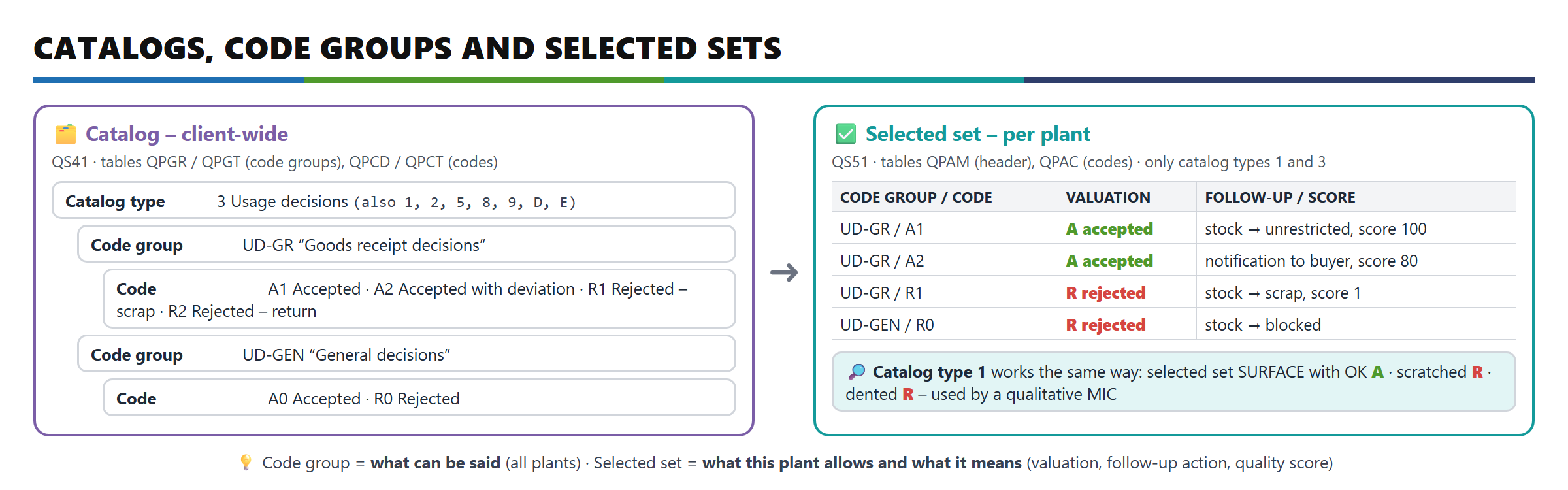
Catalogs hold coded, language-independent texts so that attributes, defects and decisions can be evaluated statistically. PM and QM share the same catalog tables.
Catalog type | Content | Used in |
|---|---|---|
1 | Characteristic attributes (OK, scratched, wrong colour …) | Qualitative MICs |
2 | Tasks | Notifications |
3 | Usage decisions (accepted, accepted with restriction, rejected – scrap …) | QA11 |
5 | Causes | Notifications, defects |
8 | Activities | Notifications |
9 | Defect types | Defect recording, notification items |
D | Coding (problem category of a notification) | Notification header |
E | Defect locations | Defect recording, notification items |
- Code group (QS41, table QPGR, texts QPGT) groups codes of one catalog type, e.g. code group PAINT in catalog 9; codes in QPCD (texts QPCT). Code groups are client-wide and have a status (released / can no longer be used).
- Selected set (QS51, tables QPAM header, QPAC codes) collects the allowed codes from one or more code groups for a plant and gives each a valuation (A accepted, R rejected) and, for usage decisions, a follow-up action and a quality score. Only catalog types 1 and 3 use selected sets.
- Customizing defines the catalog types (types P – Z are free for customer use) and which catalogs a notification type uses (catalog profile).
Part 6 – Sampling procedures and dynamic modification
The sampling procedure calculates how many units of the lot are inspected and how the result is valuated. The dynamic modification rule changes the inspection scope based on the history – after several good lots it reduces or skips inspections, after a rejection it tightens them.
Object | T-code / table | What it defines |
|---|---|---|
Sampling procedure | QDV1 · QDSV | Sampling type (fixed sample, 100 %, percentage, sampling scheme), valuation mode (attributive by nonconforming units or defects, variable with s- / sigma-method, manual), number of inspection points |
Sampling scheme | QDP1 | Tables of lot size → sample size and acceptance number per AQL, e.g. for ISO 2859 – used by sampling procedures of type sampling scheme |
Dynamic modification rule | QDR1 · QDDR | Inspection stages (normal, reduced, skip, tightened) with the number of accepted / rejected lots that switch to the next stage |
Quality level | QDL1 · QDQL | The current stage per dynamic modification criteria (material, supplier, manufacturer, customer …) – updated at each usage decision |
- The dynamic modification criteria and the moment of the update (lot creation or usage decision) are visible on the lot itself (QALS-STAT44 to STAT50).
- Dynamic modification can work at lot level (whole lot skipped) or at characteristic level (only some characteristics skipped) – set in the inspection plan header.
Part 7 – Inspection plans and material specifications
An inspection plan is a task list of type Q that lists the operations of an inspection and the inspection characteristics of each operation. It uses the same task list tables as a PP routing (PP ABAP › 02), only the task list type and usage differ.
Table | Content | Key fields |
|---|---|---|
MAPL | Assignment of materials (and supplier / customer) to the task list | MATNR, WERKS, PLNTY, PLNNR, PLNAL |
PLKO | Task list header: usage (e.g. 5 goods receipt, 3 universal, 1 production), status, lot size range, sampling / dynamic modification level | PLNTY = 'Q', PLNNR, PLNAL |
PLAS / PLPO | Selection of operations / operations with work center and control key | PLNTY, PLNNR, PLNKN |
PLMK | Inspection characteristics of an operation: MIC reference, specifications, sampling procedure, control indicators | PLNTY, PLNNR, PLNKN, MERKNR |
PLKZ | Task list main header (counter for the group) | PLNTY, PLNNR |
- In-process inspection (type 03) uses the characteristics in the operations of the routing (type N) or master recipe (type 2) instead of a separate inspection plan; the production order copies them.
- The inspection lot copies the plan into its own tables (operations in AFVC with the lot's routing number, characteristics in QAMV), so later plan changes do not affect existing lots.
- Material specification (QS61): characteristics assigned directly to a material (or batch class) without operations – a simple alternative to an inspection plan (QMAT-SPEZUEBER).
- Engineering change management (change numbers) and plan versions keep a history of plan changes – important in regulated industries.
Part 8 – Quality info record
The quality info record (Q-info record) is the QM view of a supply relationship: material + supplier + plant. It is required when the material's control key asks for a supplier release, and it is where source inspection is planned.
Content | Effect |
|---|---|
Release until date / release quantity | The supplier may deliver up to that date or quantity; afterwards purchase orders are blocked |
Block (blocking reason, per material) | Blocks RFQ, purchase order or goods receipt for this material and supplier; a block for all materials sits in the supplier master |
Actual QM system and its validity | Compared with the target QM system the material requires |
Status of the supply relationship | Model series, pre-series, series – each with its own inspection type and inspection plan usage |
Source inspection type, lead time, No Inspection flag | QI07 lists open POs and creates source inspection lots (type from the Q-info record) before delivery; the No Inspection flag suppresses the goods receipt lot |
- Transactions QI01 / QI02 / QI03, QI06 mass maintenance, table QINF (key material, supplier, plant, revision level).
- Technical delivery terms (document type Q02) and quality assurance agreements (Q01) are documents in the DMS that the control key can require for the supplier.
Part 9 – Inspection lot, results and usage decision tables
Every inspection creates the same chain of records. Read them top-down: lot → operations → characteristics → samples → single values, and next to it usage decision, link to the material document and status.
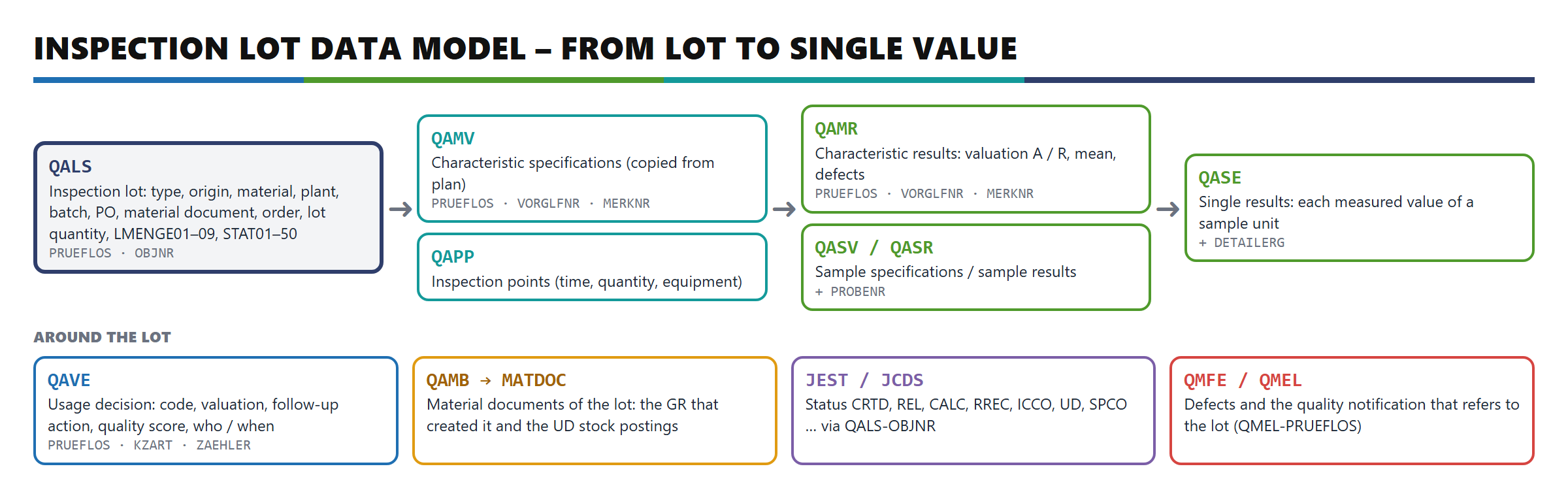
Table | Content | Key fields |
|---|---|---|
QALS | Inspection lot: type ART, origin HERKUNFT, MATNR, WERK, CHARG, LIFNR, EBELN / EBELP, MBLNR / MJAHR / ZEILE, AUFNR, KUNNR, LS_VBELN (delivery), LOSMENGE, MENGENEINH, task list PLNTY / PLNNR / PLNAL, ENSTEHDAT, OBJNR, indicators STAT01 – STAT50 | PRUEFLOS |
QAMV | Characteristic specifications copied into the lot (targets, limits, MIC reference) | PRUEFLOS, VORGLFNR, MERKNR |
QAMR | Characteristic results: valuation, mean value, number of defects, status | PRUEFLOS, VORGLFNR, MERKNR |
QASV / QASR | Sample specifications / sample results per characteristic | + PROBENR |
QASE | Single results of sample units (each measured value) | + DETAILERG |
QAPP | Inspection points (e.g. per hour or per pallet in production) | PRUEFLOS, VORGLFNR … |
QPRS | Physical samples (sample management) | PHYNR |
QAVE | Usage decision: code VCODE, code group VCODEGRP, selected set VAUSWAHLMG, valuation VBEWERTUNG, follow-up action VFOLGEAKTI, quality score QKENNZAHL, VNAME, VDATUM | PRUEFLOS, KZART, ZAEHLER |
QAMB | Link inspection lot ↔ material documents (the GR that created it, the UD postings) | PRUEFLOS, ZAEHLER |
JEST / JCDS | System and user status of the lot and its changes (object number QALS-OBJNR) | OBJNR, STAT |
QALS fields every developer uses
- LMENGE01 – LMENGE09: quantities posted by the usage decision – 01 unrestricted, 02 scrap, 03 sample, 04 blocked, 05 reserves, 06 to another material, 07 returned to supplier, 08 / 09 other.
- STAT34 stock postings completed, STAT35 usage decision made, STAT09 source inspection, STAT11 GR blocked stock, STAT32 stability study lot – quick filters without reading JEST.
|
- S/4HANA: same tables; the stock behind LMENGE* is posted as MATDOC lines (movement types 321, 350, 553 …). Use QAMB, not a guess on MATDOC fields, to find the material documents of a lot.
Part 10 – Notification, defect and certificate tables
Quality notifications use the same notification tables as PM – the notification category tells them apart.
Table | Content | Key fields |
|---|---|---|
QMEL | Notification header: QMNUM, QMART (type, e.g. Q1 / Q2 / Q3), MATNR, LIFNUM / KUNUM, PRUEFLOS (inspection lot), EBELN, reference objects, priority, OBJNR (status) | QMNUM |
QMIH | Maintenance data of the notification (equipment, functional location) – used by PM notifications | QMNUM |
QMFE | Items = defects: defect type and location (catalogs 9 / E), number of defects; also defects recorded in results recording | QMNUM, FENUM |
QMUR | Causes of an item (catalog 5) | QMNUM, FENUM, URNUM |
QMSM | Tasks (catalog 2) with responsible person, planned dates and status | QMNUM, MANUM |
QMMA | Activities (catalog 8) – what was done | QMNUM, MANUM |
IHPA | Partners of the notification (customer, supplier, coordinator) | OBJNR, PARVW |
- S/4HANA defects: a defect created in the Fiori defect apps is a defect record without a notification header ("generic defect"); it can later be transferred to a notification item or start an 8D problem-solving process (page 03 Part 8).
Certificate table | Content |
|---|---|
QCVK | Certificate profile header (which characteristics, layout, output) |
QCVM | Characteristics of the certificate profile |
QCVV | Preliminary products list of the certificate profile |
QCPR | Certificates received in procurement (certificate receipt) |
Part 11 – Number ranges, status and released CDS views
11.1 Number ranges
- Inspection lot numbers (12 digits) have a number range interval per inspection lot origin; by default the number starts with the origin, so 01… is a goods receipt lot and 89… a manual lot. Customizing: Quality Inspection → Inspection Lot Creation.
- Notifications use the notification number range of PM / QM, assigned per notification type (Quality Notifications → Notification Creation → Notification Type).
- Inspection plans use the task list group number range of type Q; MICs, methods and code groups have internal or external keys.
11.2 Inspection lot status
System status | Meaning |
|---|---|
CRTD | Created (lot exists, not yet released) |
REL | Released – inspection can start |
CALC | Sample calculated |
SPRQ | Stock posting required – quantity is in quality inspection stock |
RREC | Results confirmed – results have been recorded for the lot |
ICCO | Inspection close completed – all characteristics closed |
UD | Usage decision made |
SPCO | Stock posting completed |
LTCA | Lot cancelled |
- Read the status with QALS-OBJNR in JEST (or function module STATUS_TEXT_EDIT for the status line) – never parse the text shown on the screen.
11.3 Released CDS views and APIs
For new code in S/4HANA (and the only option in ABAP Cloud and the public cloud) read QM data through released CDS views instead of the tables. Names seen in SAP documentation and notes:
CDS view | Content |
|---|---|
I_InspectionLot | Inspection lot header incl. material, plant, inspection type, delivery reference; extend it through its extension include view E_InspectionLot |
I_InspectionCharacteristic | Inspection characteristics of a lot with specifications |
I_InspectionCodeText | Code groups and codes with texts |
I_InspectionPlanVersion | Versions of inspection plans |
- Check the release state (C1 for ABAP Cloud) of each view in ADT (Properties → API State) or the View Browser app before you use it; names for results and usage decisions differ between releases (ABAP on HANA › 05 CDS Views).
- OData APIs for the same objects – API_INSPECTIONLOT_SRV, API_INSPECTIONPLAN_SRV, API_MASTERINSPCHARACTERISTIC_SRV, API_QUALITYINFORECORD_SRV, API_QUALITYNOTIFICATION – are on page 05.
Part 12 – Interview questions
Q1. Where is the inspection setup of a material stored and what does it control?
In table QMAT (inspection type + material + plant), maintained in the QM view of MM02 or in bulk with QA08. It says which inspection types are active, whether goods go to inspection stock, whether a plan, specification or sampling procedure is used, the preferred type, automatic usage decision and the quality score procedure.
Q2. What is a master inspection characteristic and how does it differ from a plan characteristic?
A reusable check definition per plant (QS21, QPMK). Plans reference it (reference characteristic, locked) or copy it (complete / incomplete copy model). A plan characteristic in PLMK can also exist without any MIC.
Q3. Quantitative vs qualitative characteristics?
Quantitative ones record measured values against target and limits; qualitative ones record codes from catalog type 1 whose valuation (accepted / rejected) comes from the selected set.
Q4. What is the difference between a code group and a selected set?
A code group (QPGR / QPCD) is a client-wide list of codes of one catalog type. A selected set (QPAM / QPAC) picks codes from one or more code groups for a plant and adds the valuation, and for usage decisions the follow-up action and quality score. Only catalogs 1 and 3 use selected sets.
Q5. Which catalog types do you know?
1 characteristic attributes, 2 tasks, 3 usage decisions, 5 causes, 8 activities, 9 defect types, D coding, E defect locations; P – Z are free for customers.
Q6. What do the sampling procedure and the dynamic modification rule do?
The sampling procedure (QDV1, QDSV) calculates the sample size and valuation mode. The dynamic modification rule (QDR1, QDDR) moves between inspection stages (normal, reduced, skip, tightened) based on lot results; the current stage is kept in the quality level (QDQL).
Q7. Which tables hold an inspection plan?
Task list tables with type Q: MAPL (material assignment), PLKO (header with usage), PLAS / PLPO (operations) and PLMK (inspection characteristics). In-process inspection uses the same tables of the routing or master recipe.
Q8. What is a quality info record used for?
Material + supplier + plant (QI01, QINF): supplier release until a date or quantity, blocks, the supplier's QM system, status of the supply relationship and source inspection (source inspection type, QI07, No Inspection flag).
Q9. Name the transactional QM tables from lot to usage decision.
QALS lot, QAMV characteristic specifications, QAMR characteristic results, QASR sample results, QASE single values, QAPP inspection points, QAVE usage decision, QAMB link to material documents, JEST status via QALS-OBJNR.
Q10. How do you find out in code whether a lot already has a usage decision?
Check QALS-STAT35 (usage decision made) or the system status UD in JEST with QALS-OBJNR; the decision itself is in QAVE (VCODE, VBEWERTUNG). In ABAP Cloud use the released inspection lot CDS view or API instead of the tables.
Q11. Which tables hold a quality notification?
The PM / QM notification tables: QMEL header, QMFE items (defects), QMUR causes, QMSM tasks, QMMA activities, IHPA partners; QMIH carries maintenance data for PM notifications.
Q12. How are inspection lot numbers assigned?
From a 12-digit number range interval per inspection lot origin; by default the number starts with the origin (01… goods receipt, 04… production, 89… manual).
🏠 Start Here · ◀ 01 · Overview & Org · 03 · Processes & Config ▶ · Sections: CORE ABAP | OOPS ABAP | ABAP on HANA | Clean Core | RAP | ABAP Points | SAP Fiori | SAPUI5 | Mobile Development (MDK) | BTP Foundations | BTP Development | CAP | SAP Build | ABAP on BTP | Integration Suite | SAP Business AI | SAP BASIS | Security | SAP SDLC
Functional: FICO ABAP | TRM ABAP | VIM | SAP BIS | SD ABAP | MM ABAP | PP ABAP | QM ABAP | PM ABAP | PS ABAP | EWM | TM ABAP | GTM ABAP | EHS ABAP | HR ABAP | BW | SAP Datasphere | SAP Business Data Cloud | SAP MDG | SAP Analytics Cloud | SAP Ariba | SAP CX | SAP IBP