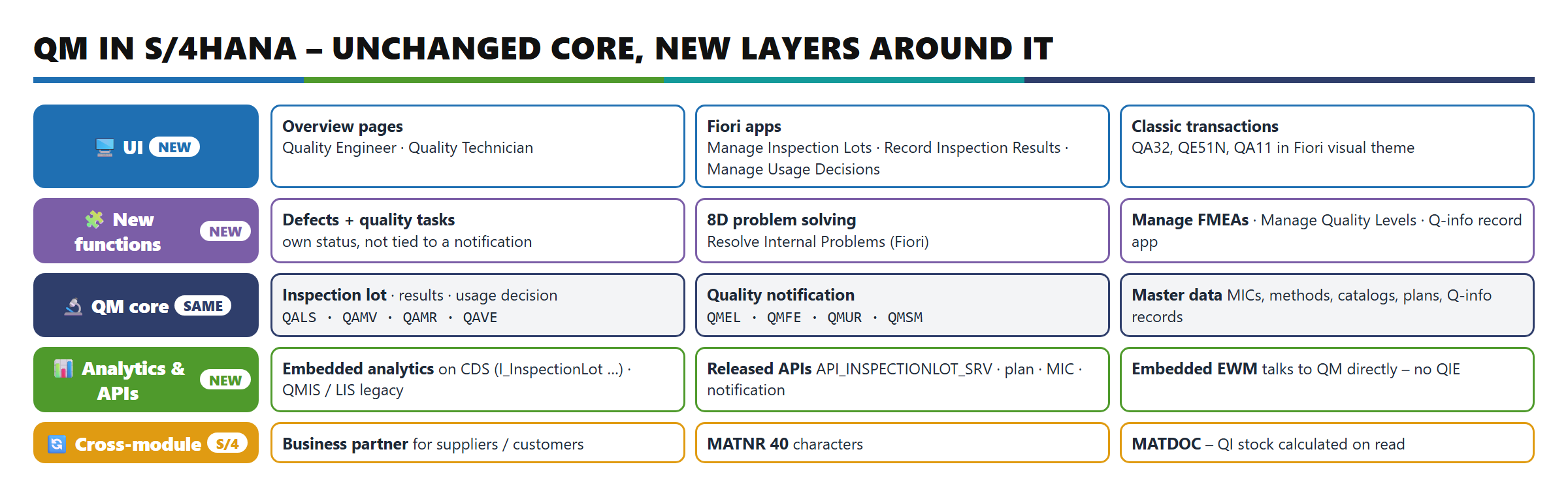
Good news for a QM interview: the QM core is largely unchanged in S/4HANA – the inspection lot, results recording, usage decision and quality notification work as in ECC, on the same tables. What changed is around the core: Fiori apps per role, a new defect and quality task model, embedded analytics, released APIs, embedded EWM with optional inspection rules, and the general S/4HANA changes (business partner, 40-character material number, MATDOC). This page covers these changes, the editions, data migration and the design decisions a solution architect makes. Integration: page 04; development objects: page 05.
Part 1 – What changed for QM in S/4HANA
Area | ECC | S/4HANA | Impact |
|---|---|---|---|
QM core processes | QA01 / QA32, QE51N, QA11, QM01 | Same transactions (with the Fiori visual theme) plus Fiori apps | Little process change; custom code on QALS / QAVE / QMEL keeps working |
Suppliers and customers | Vendor (LFA1) / customer (KNA1) | Business partner (CVI) | Q-info records and notifications reference BP-based suppliers / customers |
Material number | 18 characters | 40 characters | Check custom code, IDoc segments, LIMS mappings |
Inventory | MKPF / MSEG, stock tables | MATDOC; QI stock calculated | Reports on QI stock read MATDOC or CDS views (MM ABAP › 03) |
Defects and actions | Defects as notification items | Defect object with own status and categories (same table, not tied to a notification); quality tasks – Record Defect, Process Defects, Process Quality Tasks | Lightweight problem solving; notifications still used for complaints; 8D in Fiori (Resolve Internal Problems) since 2020 |
Analytics | QMIS / LIS (MCXV …), BW | Embedded analytics on CDS views, overview pages | LIS-based QM analytics are legacy – plan their replacement |
Warehouse | WM; EWM (decentral) with QIE | Embedded EWM: QM with or without inspection rules; decentral EWM with QIE | Simpler set-up, inspection rules optional in embedded EWM |
Enhancements | CMOD exits, classic BAdIs | Same on-premise; some exits migrated to BAdIs (QPL10001 → BADI_QPL1_CHANGE_AT_CREATE); released cloud BAdIs | Re-test every exit after conversion |
Integration | IDocs, QM-IDI RFCs | Plus released OData APIs (API_INSPECTIONLOT_SRV …) and events | New interfaces via APIs and Cloud Integration |
- There are only a few QM-specific entries in the Simplification Item Catalog; the larger impact comes from the cross-module items above. Run the SAP Readiness Check / Simplification Item Check and the custom code checks (ATC) for the actual list of your system – see ABAP on HANA › 02 Migration & Performance.
- Other S/4HANA additions around QM: Manage FMEAs (Fiori, graphical), Manage Quality Levels for dynamic modification, Q-info record app with exception cards, initial sample (PPAP) handling, nonconformance management in Fiori.
Part 2 – Fiori apps per QM role
SAP delivers business roles such as Quality Planner, Quality Technician, Quality Engineer, Quality Manager, Calibration Technician and Quality Auditor; each role's catalogs contain the apps below and the classic transactions in Fiori theme (e.g. QE51N).
Role | Main apps | Classic equivalent |
|---|---|---|
Quality Planner | Object pages for inspection method, master inspection characteristic, sampling procedure; Manage FMEAs; inspection plans | QS21, QS31, QDV1, QP01 |
Quality Technician | Quality Technician Overview, Record Inspection Results (per lot, per characteristic across lots, for inspection points), Record Defect, Manage Inspection Lots | QE51N, QE01 |
Quality Engineer | Quality Engineer Overview, Manage Inspection Lots, Manage Usage Decisions, Process Defects, Manage Defects, Process Quality Tasks, Manage Control Charts, Manage Quality Info Records, Resolve Internal Problems (8D) | QA32, QA11, QI01, QM02 |
Quality Manager | Inspection Lot / Characteristic / Nonconformance (Detailed) Analytics, Display Results History, Manage Quality Levels | QGA1 – QGA4, MCXV (legacy) |
Calibration Technician | Calibration orders and inspection lots for test equipment | IP10, IW32, QA32 |
- App availability differs by release and edition – always check the SAP Fiori apps reference library for the target release before promising an app.
- Analytics and KPIs in detail: page 04 Part 9.
Part 3 – Editions: on-premise, private cloud, public cloud
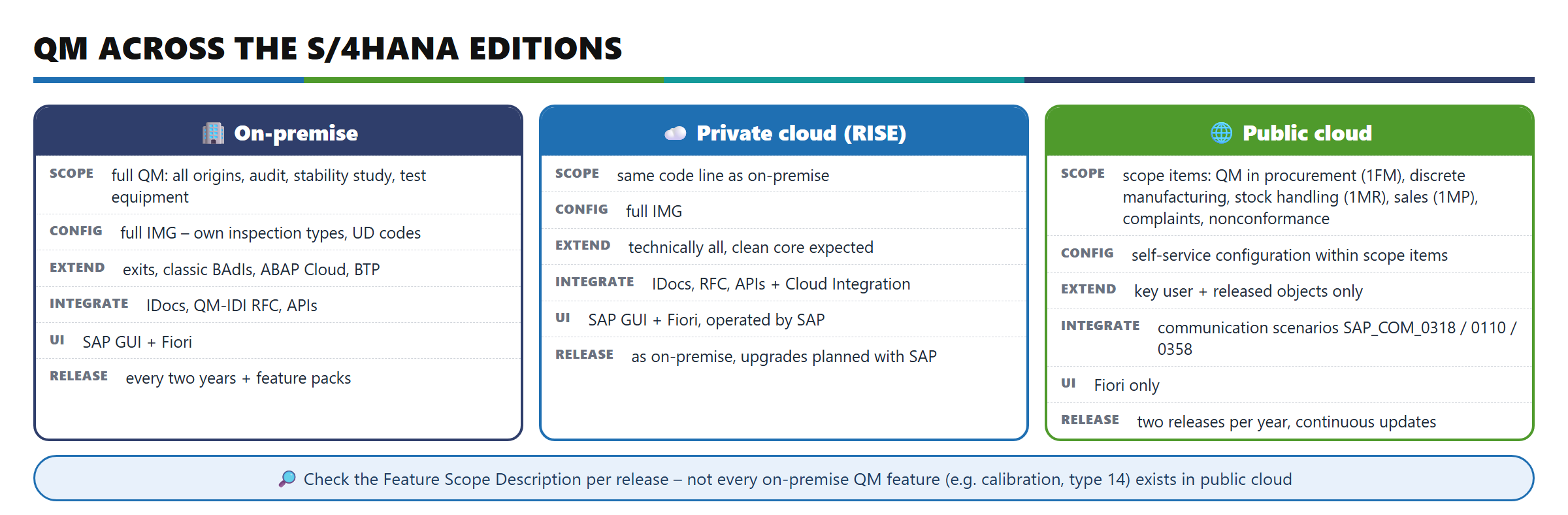
Aspect | On-premise / private cloud | Public cloud |
|---|---|---|
Scope | Full QM incl. all inspection lot origins, audit management, stability study, test equipment, QM-IDI / QM-STI, decentral EWM with QIE | Pre-configured scope items, e.g. QM in procurement (1FM), QM in discrete manufacturing, QM in stock handling (1MR), QM in sales (1MP), complaints from customers / against suppliers, internal problems, nonconformance management, QM analytics |
Configuration | Full IMG (SPRO): own inspection types, UD codes, notification types | Self-service configuration within the scope items; fewer free choices |
UI | SAP GUI and Fiori | Fiori only (some classic apps in Fiori theme) |
Extensibility | All: exits, classic BAdIs, modifications (not recommended), ABAP Cloud | Key user + developer extensibility with released objects only; side-by-side on BTP |
Integration | IDocs, RFC (QM-IDI), APIs | Released APIs and communication scenarios (SAP_COM_0318, SAP_COM_0110, SAP_COM_0358 …), events |
Release cycle | New release every two years (since 2023) with feature packs in between; upgrade when the customer decides | Continuous updates, two releases per year |
- Public cloud: functions are added continuously; some on-premise features (e.g. calibration with inspection type 14) are not, or only later, available – check the Feature Scope Description of the release.
- Private cloud = the on-premise code line operated by SAP (RISE); the technical options are the on-premise ones, but the clean-core rules are expected.
Part 4 – Data migration
For a greenfield implementation the SAP S/4HANA Migration Cockpit offers QM migration objects (file or staging table approach). They must be loaded in dependency order:
Order | Migration object | Content / remark |
|---|---|---|
1 | QM/PM – Catalog code group / code | Code groups and codes (defects, causes, UD codes …) |
2 | QM – Selected set / QM – Selected set code | Selected sets (e.g. UD codes per plant) referencing the codes |
3 | QM – Inspection method | Inspection methods with their versions |
4 | QM – Master inspection characteristic | MICs; external number ranges must allow the legacy numbers |
5 | Inspection setup data (part of the product migration object) | Inspection types per material (needs the material / product) |
6 | QM – Inspection plan | Plans with operations, characteristics and material assignments; MIC reference mode and operation assignment cause most errors |
7 | Quality info record (procurement) | No file template in the on-premise cockpit (direct transfer from ERP only) – otherwise API or own load program |
- Transactional data: open inspection lots and notifications are normally not migrated. Close lots in the legacy system before cutover; post remaining quality inspection stock with initial entry movement type 563 (561 unrestricted, 565 blocked) and decide whether new lots are needed.
- Results history (for SPC, quality scores, dynamic modification) stays in the legacy system or an archive – define the reporting access early.
- Brownfield (system conversion): QM data is converted in place; the work is custom code adaptation, BP conversion and Fiori activation.
Part 5 – Architect decisions
Decision | Options | Guidance |
|---|---|---|
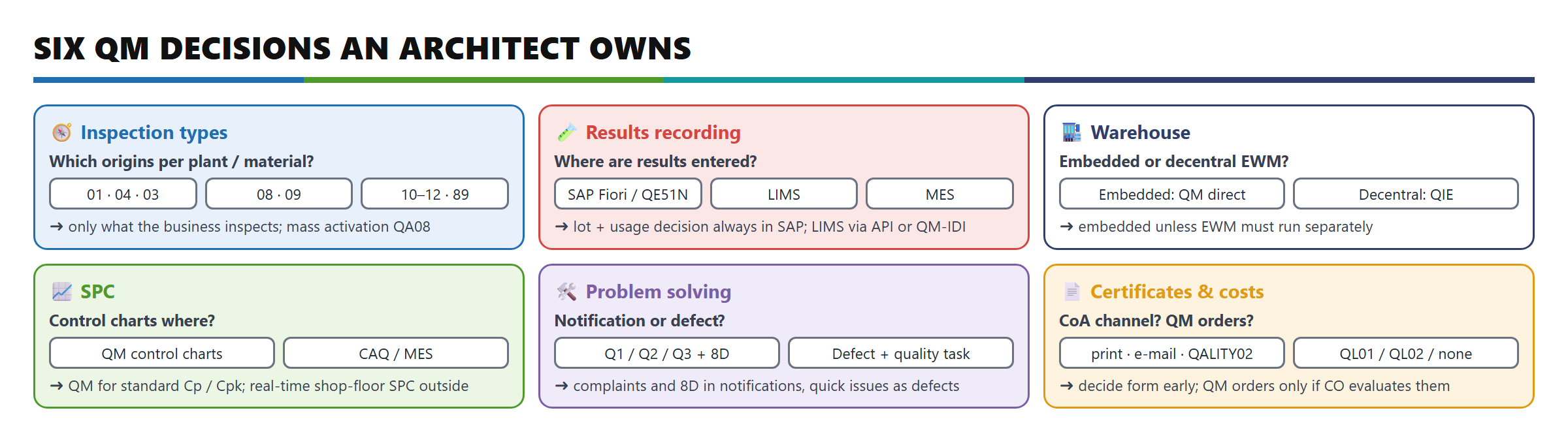
Which inspection types per plant / material | 01 GR, 04 GR production, 03 in-process, 08 stock transfer, 09 recurring batches, 10 – 12 delivery, 89 manual | Start with the few origins the business really inspects; activate per material (mass maintenance QA08); every active type creates lots and work |
Where results are recorded | In SAP (QE51N / Fiori) · LIMS via QM-IDI or API · MES / SAP Digital Manufacturing | Lab-heavy industries (pharma, chemicals, food) use a LIMS; the inspection lot and the usage decision stay in SAP as system of record |
EWM and QM | Embedded EWM: QM with or without inspection rules · decentral EWM with QIE | Embedded: simpler, inspection rules optional; decentral only when EWM must run separately |
SPC / statistics | QM control charts · external CAQ (QM-STI, partner products) · MES | QM SPC for standard charts and Cp / Cpk; specialised SPC on the shop floor in MES / CAQ |
Problem solving | Quality notification (Q1 / Q2 / Q3, 8D) · defect + quality task | Notifications for complaints, defects / tasks for quick internal issues, 8D (Fiori) for complex problems |
Certificates | Outgoing CoA via certificate profile + output · incoming certificates | Define the form and output channel (print, e-mail, IDoc QALITY02) early – typical RICEFW form |
Appraisal costs | No cost tracking · QM orders (QL01 / QL02) · production order (03) | Only if controlling really evaluates them – every QM order needs settlement |
Batch and classification | Batch-managed materials with characteristics valuated from results | Needed for CoA per batch, shelf life, recurring inspection (09) |
- Integration architecture: new interfaces through released APIs and SAP Cloud Integration; keep QM-IDI only where an existing LIMS already uses it.
- Org design: QM settings are mostly per plant (inspection setup, selected sets, quality info records); harmonise UD codes and catalogs across plants early – it drives analytics and migration.
Part 6 – Clean core for QM
Need | Clean-core option | Avoid |
|---|---|---|
Extra field on lot / notification | Custom Fields (business context inspection lot / quality notification) | Appends + screen modifications |
Logic at notification save | Custom Logic in BADI_QQM_NOTIF_EVENT_SAVE_CLD (cloud) or a released BAdI | Modifying function groups |
Lot-creation logic | BADI_QPL1_CHANGE_AT_CREATE (on-premise) / BADI_QPL1_CHANGE_AT_CREATE4CLD (ABAP Cloud, released) | Calling unreleased QPL1 / QPLEXT modules |
Reports and KPIs | Released CDS views (I_InspectionLot …), analytical queries, Fiori elements | SELECTs on QM tables in new cloud code |
LIMS / MES interface | API_INSPECTIONLOT_SRV + Cloud Integration + events | New QM-IDI or custom RFC interfaces |
Own app (e.g. lab worklist) | RAP on released views; side-by-side on BTP | Z dynpro transactions |
The classic options stay valid on-premise when nothing released exists – document the reason and keep them small. Clean-core levels and ATC checks: Clean Core › 01 Clean Core.
Part 7 – Interview questions
Q1. What changed in QM with S/4HANA?
The core (lot, results, UD, notification, tables QALS / QAVE / QMEL) is largely unchanged. New are Fiori apps and overview pages per role, defects and quality tasks, embedded analytics, released APIs, QM directly integrated with embedded EWM, plus the general changes: business partner, 40-character material, MATDOC.
Q2. Which Fiori apps would a quality engineer use?
Quality Engineer Overview, Manage Inspection Lots, Manage Usage Decisions, Process Defects / Manage Defects, Process Quality Tasks, Manage Control Charts, Manage Quality Info Records and Resolve Internal Problems for 8D.
Q3. What is the new defect object?
A defect with its own category and status that is not tied to a quality notification header but stored in the same table; quality tasks can be assigned to it. If needed, it is transferred to a notification or an 8D problem-solving process is started from it.
Q4. How does QM in the public cloud differ from on-premise?
Pre-configured scope items (e.g. QM in sales 1MP, QM in stock handling 1MR), Fiori only, self-service configuration, only released extensibility and APIs, continuous updates. On-premise / private cloud has the full IMG, all inspection origins, exits and QM-IDI.
Q5. Which QM objects does the Migration Cockpit support and in which order?
Catalog code groups / codes, selected sets and selected set codes, inspection methods, master inspection characteristics, inspection setup data (product migration object), inspection plans – in that order. Q-info records have no file template on-premise. Open lots are not migrated; QI stock is posted with 563.
Q6. Would you record lab results in SAP or in a LIMS?
Depends on the lab: simple inspections in SAP (Fiori / QE51N); many tests, instruments and lab workflows in a LIMS. Either way the lot and the usage decision stay in SAP, the LIMS is integrated via API_INSPECTIONLOT_SRV (or QM-IDI in existing landscapes).
Q7. Embedded EWM or decentral EWM for a plant with QM?
Embedded EWM works with QM with or without inspection rules – one system. Decentral EWM needs the QIE and an interface to QM; it is chosen for warehouse independence or performance reasons, not for QM.
Q8. How do you decide which inspection types to activate?
From the business process: which events really need an inspection (GR, production, delivery, recurring batches). Each active type creates lots and work; keep the set small, activate per material (QA08), and align UD codes and catalogs across plants.
Q9. What is your clean-core approach for QM extensions?
Custom fields and custom logic first, released BAdIs and CDS views, APIs with Cloud Integration for interfaces, RAP or BTP for own apps; classic exits only on-premise when no released option exists.
Q10. What happens to QMIS / LIS reports like MCXV?
ECC: QMIS / LIS is the standard QM reporting. S/4HANA: still there, but only in the compatibility scope with limited usage rights (ID 473, SAP Note 2269324), and the MC… transactions are removed from the Fiori launchpad. Replace them with the Fiori analytical apps (inspection lot, characteristic and nonconformance analytics) or own analytical CDS queries; plan this in the conversion project.
Q11. How would you handle SPC requirements?
QM control charts on characteristics with an SPC criterion (Manage Control Charts, Cp / Cpk in characteristic analytics) for standard needs; real-time shop-floor SPC in an MES / CAQ that sends results to QM.
Q12. What does a conversion project need to check in QM custom code?
Exits that are no longer called (e.g. QPL10001 → BAdI), MATNR length in interfaces, vendor / customer access via BP, stock reads from MKPF / MSEG → MATDOC, LIS-based reports – found with ATC and the Readiness Check.
🏠 Start Here · ◀ 05 · Development · 07 · Interview Questions ▶ · Sections: CORE ABAP | OOPS ABAP | ABAP on HANA | Clean Core | RAP | ABAP Points | SAP Fiori | SAPUI5 | Mobile Development (MDK) | BTP Foundations | BTP Development | CAP | SAP Build | ABAP on BTP | Integration Suite | SAP Business AI | SAP BASIS | Security | SAP SDLC
Functional: FICO ABAP | TRM ABAP | VIM | SAP BIS | SD ABAP | MM ABAP | PP ABAP | QM ABAP | PM ABAP | PS ABAP | EWM | TM ABAP | GTM ABAP | EHS ABAP | HR ABAP | BW | SAP Datasphere | SAP Business Data Cloud | SAP MDG | SAP Analytics Cloud | SAP Ariba | SAP CX | SAP IBP