What RAP is, why it replaced the older models, how its layers fit together, how a request runs through the transactional buffer and the save sequence, and how to choose an implementation type – all shown on the Sales Order Approval app: R1 (the managed BO), R7 (one Approve traced end to end), R11/R12/R18 (one BO, many consumers) and R13 (when unmanaged is needed).
Part 1 – RAP in one picture: the Sales Order Approval app
Requirements on this page
R-ID | Requirement | Where on this page |
|---|---|---|
R1 | Reps create, edit and delete orders with items | Part 1 (the stack), Part 5 (why managed) |
R7 | Manager approves or rejects | Part 4.4 – one Approve click traced end to end |
R11, R12, R18 | Approver app, ABAP jobs, CRM API use the same order | Part 2.4 – one BO, many consumers |
R2 / R3 | Find and list orders; see only own sales organisation | Part 3.2 – query access |
R4–R10, R14, R15, R21 | Logic, numbering, locks, log, event, follow-up work | Part 4 – which phase each one runs in |
R13 | Legacy Z tables written by function modules | Part 5 – managed vs unmanaged |
RAP (ABAP RESTful Application Programming Model) is SAP's programming model for building transactional Fiori apps and Web APIs (OData) in ABAP, end to end: data model, business logic and service. You describe the data with CDS, declare what the object may do in a behavior definition, write only the special logic in ABAP, and publish it as an OData service. It exists so that every SAP app is built the same way, with the routine work (saving, locking, drafts) done by a framework.
On this page the whole stack is shown on the section's one example: the Sales Order Approval app of a medical-supplies distributor. Reps capture orders with items (R1), orders above the credit limit need a manager's approval (R7), and approved orders go on to the warehouse and other systems (R15). The full story and requirements table: 00 · Start Here – Roadmap & the Business Scenario.
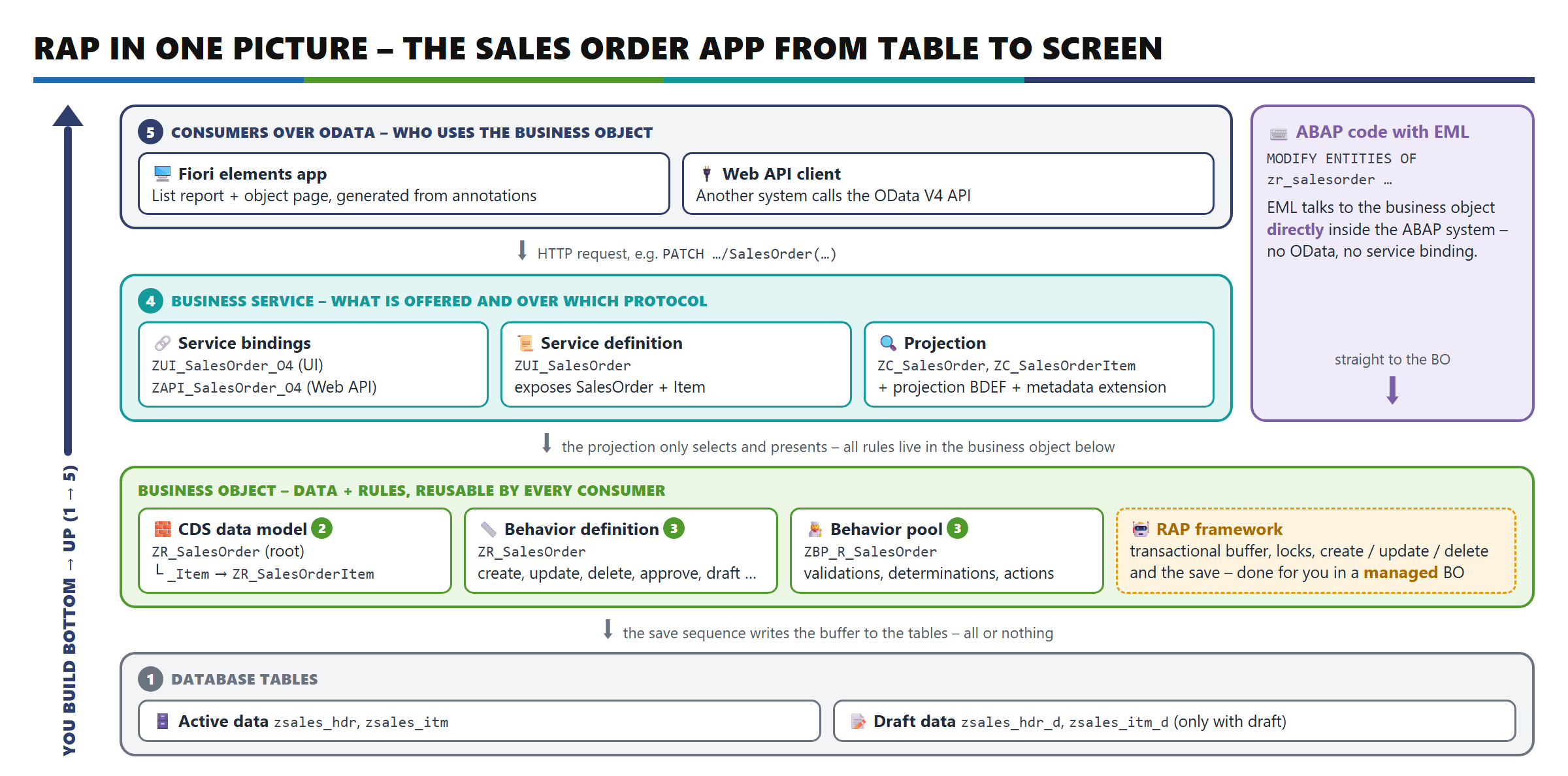
1.1 Read the picture bottom-up: the build order
Step | You create | Sales Order object | Built on page |
|---|---|---|---|
1 | Database tables (active + draft) |
| 02 |
2 | CDS view entities (the data model) |
| 02 |
3 | Behavior definition + behavior pool | BDEF | 04, 05 |
4 | Projection, service definition, service binding |
| 03 |
5 | Consumer | Fiori elements app, Web API client, ABAP with EML | 03, 08, 11 |
At runtime a request travels the other way, top-down: the Fiori app sends an OData request to the service binding, the projection passes it to the business object, the framework runs your logic in the transactional buffer, and the save sequence writes the result to the tables (Part 4).
1.2 The restaurant analogy
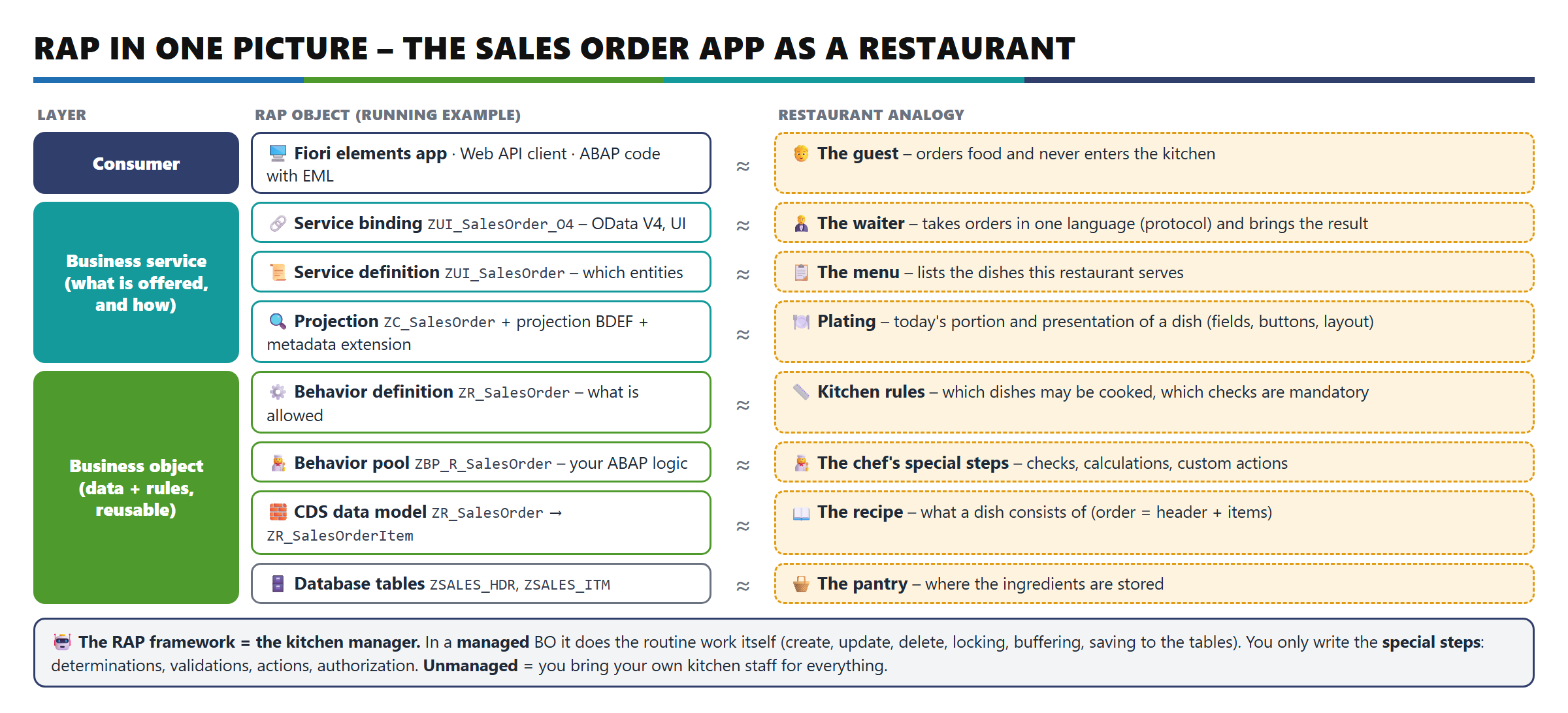
- The guest (Fiori app) orders from the menu (service definition) through the waiter (service binding, OData). The kitchen rules (BDEF) say what may be cooked; the chef (behavior pool) adds the special steps; the recipe (CDS) says what a dish is made of; the pantry (tables) stores the ingredients.
- The RAP framework is the kitchen manager: in a managed BO it does the routine work itself (create, update, delete, locking, the transactional buffer and saving), so you code only business logic.
1.3 Three facts to remember from the picture
- One business object, many consumers. The same
ZR_SalesOrderserves the reps' app (R1), the approver app (R11), the CRM's Web API (R18) and the nightly job using EML (R12). The rules – for example "Approve only for status N" (R7) – are written once. - The projection holds no logic. It selects fields and actions for one app and adds UI annotations. All checks, calculations and actions live in the base BO.
- EML skips the service layer. ABAP code inside the same system calls the BO directly with
READ ENTITIES/MODIFY ENTITIES– no OData, no binding (→ see 08 · EML).
1.4 The same app in a few lines
|
These are fragments that show where each object fits, not complete objects. The full objects are built on 02 · Data Model & CDS, 03 · Projection, UI, Access Control & Service and 04 · Behavior Definition & Behavior Pool. SAP's own tutorials (RAP100, the ABAP Flight Reference Scenario) use a Travel / Booking example – the concepts are the same, only the names differ.
- Interview tip: when asked "What is RAP?", draw the picture: tables → CDS → BDEF + behavior pool → projection → service definition → binding → Fiori / API. Then say who does what: you declare and write business logic, the framework does the transactional plumbing.
Part 2 – Why RAP: the problems of classical ABAP and the evolution
Imagine building the Sales Order Approval app ten years ago: a dynpro or Web Dynpro for the rep, a second screen for the manager, a SEGW project for the CRM, home-made locks, number assignment in an update task – and each team doing it differently. RAP turns that plumbing into a standard framework, so one model serves a Fiori UI, a Web API and ABAP code, and the result stays upgrade-safe in the cloud.
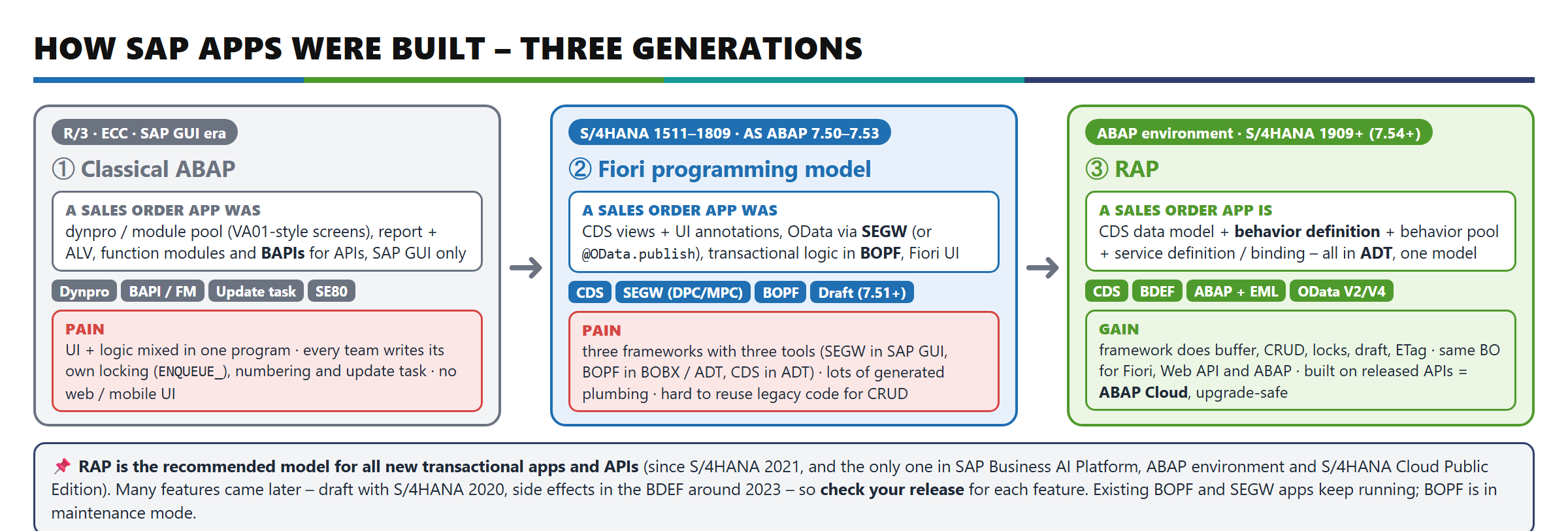
2.1 Problems RAP solves
Classical ABAP | With RAP |
|---|---|
UI and logic mixed in reports and dynpros (SAP GUI only) | Logic in a business object, UI is Fiori elements generated from annotations – same BO for UI and APIs |
Every developer builds locking, buffering, number assignment and update tasks differently | The framework provides them in a standard way (managed BO) |
OData via SEGW: hand-written DPC/MPC classes per entity set | Service definition + binding, no OData plumbing code |
CDS + SEGW + BOPF were three separate frameworks, hard to integrate and to learn | One model: CDS + BDEF + ABAP, all in ADT |
Modifications and unreleased APIs make upgrades risky | Built on released APIs only – upgrade-stable, cloud-ready (ABAP Cloud) |
No standard for drafts or concurrency in stateless web apps | Draft, ETags and locks are BDEF keywords (R10) |
2.2 What you write – before and after
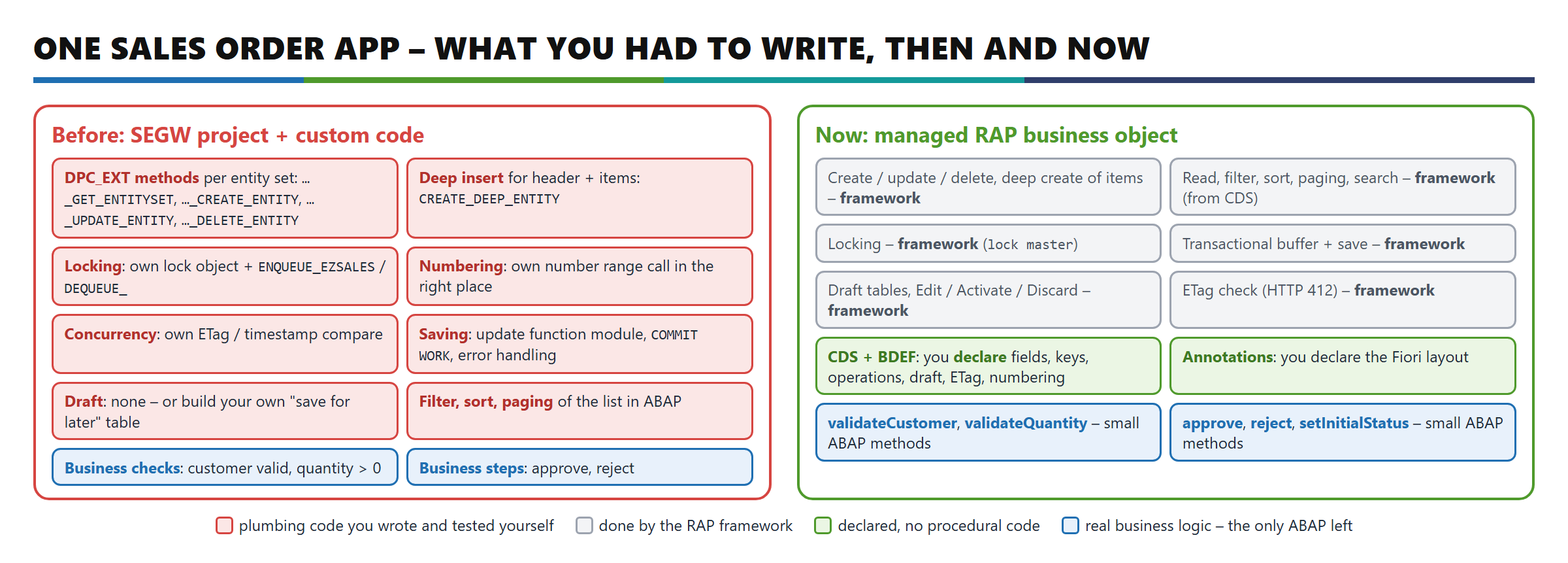
The point of the picture: with RAP most of the red boxes disappear. What is left is declarative (CDS, BDEF, annotations) plus a handful of small methods for the real business rules – for our app setInitialStatus (R4), calculateTotal (R5), validateCustomer (R6) and approve (R7).
2.3 Evolution of ABAP programming models
Generation | Releases | How a sales order app was built | Main weakness |
|---|---|---|---|
Classical ABAP | R/3, ECC | Module pool / dynpro, report + ALV, function modules, BAPIs, update task, SAP GUI | UI and logic mixed; no web UI; everyone builds their own locking and saving |
ABAP on HANA | AS ABAP 7.4 / 7.5 | Same model plus code pushdown: CDS views, AMDP | Faster reads, but the transactional model is unchanged |
ABAP Programming Model for SAP Fiori | S/4HANA 1511–1809 (AS ABAP 7.50–7.53) | CDS + UI annotations, OData via SEGW or | Three frameworks, three tools; hard to reuse legacy code |
RAP | SAP Business AI Platform, ABAP environment, S/4HANA 1909+ (AS ABAP 7.54+), S/4HANA Cloud | CDS + BDEF + behavior pool + service definition / binding, all in ADT | Newer features need newer releases |
- Many RAP features arrived release by release (draft with S/4HANA 2020, side effects, collaborative draft with BTP 2508 / S/4HANA 2025), so check your release for each feature. SAP's RAP100 tutorial needs S/4HANA 2022 or later on-premise, or the cloud systems.
- RAP is SAP's recommended model for new transactional apps and APIs on S/4HANA, and the only one in SAP Business AI Platform, ABAP environment and S/4HANA Cloud Public Edition.
- It replaces dynpro / Web Dynpro apps, SEGW OData projects and the BOPF-based Fiori programming model for new development. SAP builds its own new S/4HANA apps in RAP; existing BOPF objects keep running, but BOPF is not developed further.
- BOPF could not easily reuse existing (legacy) application code for CRUD. RAP can: that is exactly what R13 needs, and Part 5 shows which implementation type does it.
2.4 One model, many consumers
With SEGW, the reps' app and the CRM API were often two projects with copied logic. In RAP the business object is written once; each consumer gets its own service binding and, if needed, its own projection:
Requirement | Consumer | Object | Protocol |
|---|---|---|---|
R1, R2 | Reps' app "Manage Sales Orders" | binding | OData V4 – UI, with draft |
R11 | Managers' app "Approve Sales Orders" | service | OData V4 – UI |
R18 | External CRM | binding | OData V4 – Web API, no UI metadata |
R12 | ABAP report, nightly job, another BO | the BO | EML, inside the system |
2.5 ABAP Cloud: the rules RAP lives in
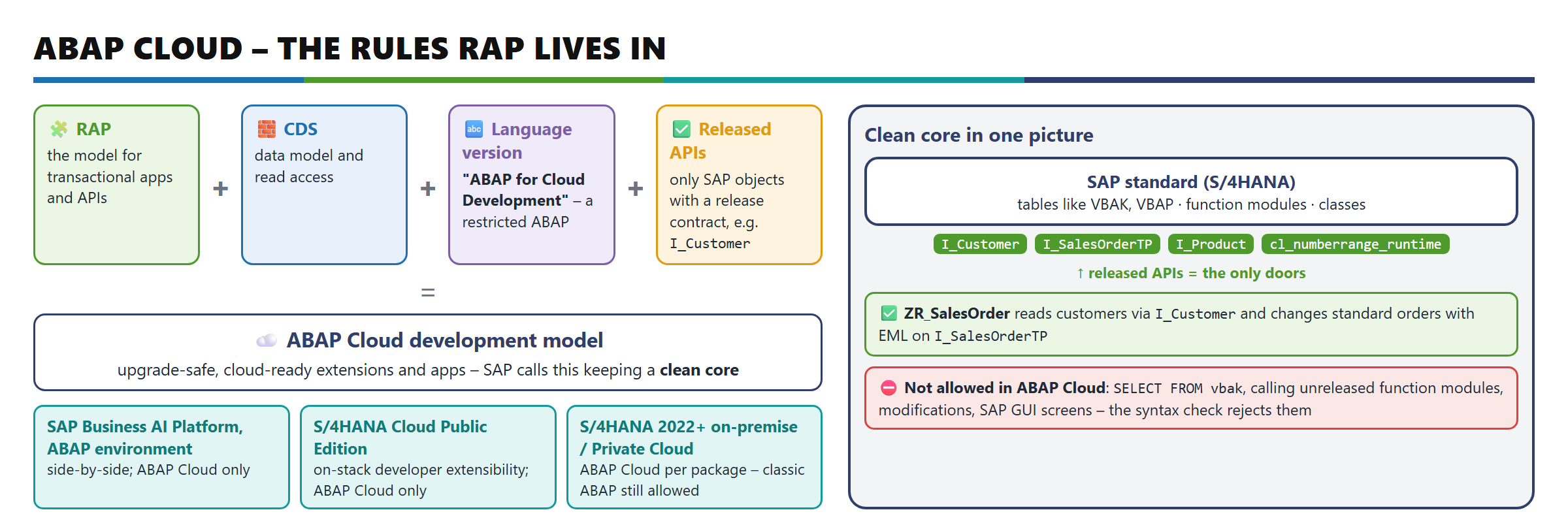
- ABAP Cloud is SAP's development model for cloud-ready, upgrade-safe code: RAP for transactional apps, CDS for data, the restricted language version ABAP for Cloud Development, and released APIs only.
- The syntax check enforces it: in an ABAP Cloud package,
SELECT FROM vbakor calling an unreleased function module is a syntax error. For R6 the customer check reads the released viewI_Customer; for R18 the standard sales order is created through the released BOI_SalesOrderTP(→ see 11 · Files, Custom Entities & Integration). - On-premise and Private Cloud you choose per package: ABAP Cloud or classic ABAP. RAP works with both, but SAP recommends ABAP Cloud for new code (→ see 13 · Debugging, Best Practices, Clean Core & What's New).
2.6 Building blocks
Technology | Role in RAP |
|---|---|
CDS (Core Data Services) | Data model: entities, associations, compositions, annotations |
BDL (Behavior Definition Language) | What the BO can do: operations, logic, draft, locks, authorizations |
ABAP + EML | Business logic in behavior pools; EML to read and change BOs |
OData V2 / V4 | Stateless protocol for UI services and Web APIs |
Draft | Stateful-like editing with stateless technology |
ADT (Eclipse) | The IDE for RAP objects (ADT for VS Code in newer releases – check your release) |
- Common mistake: saying "RAP is just OData". OData is only the protocol at the top; RAP is the whole stack – data model, behavior, transactional runtime and service.
- Interview tip: name three concrete pains RAP removes – hand-written DPC classes, home-made locking and number assignment, no standard draft – and add that RAP is the basis of ABAP Cloud and clean core.
Part 3 – Architecture and key terms: layers, the business object, a RAP glossary
RAP separates what the data and rules are (the business object) from how one app shows them (the business service) and who uses them (consumers). That is why the reps' app and the managers' app (R11) can share one sales order BO without copying logic – like one kitchen serving the dining room, takeaway and delivery.
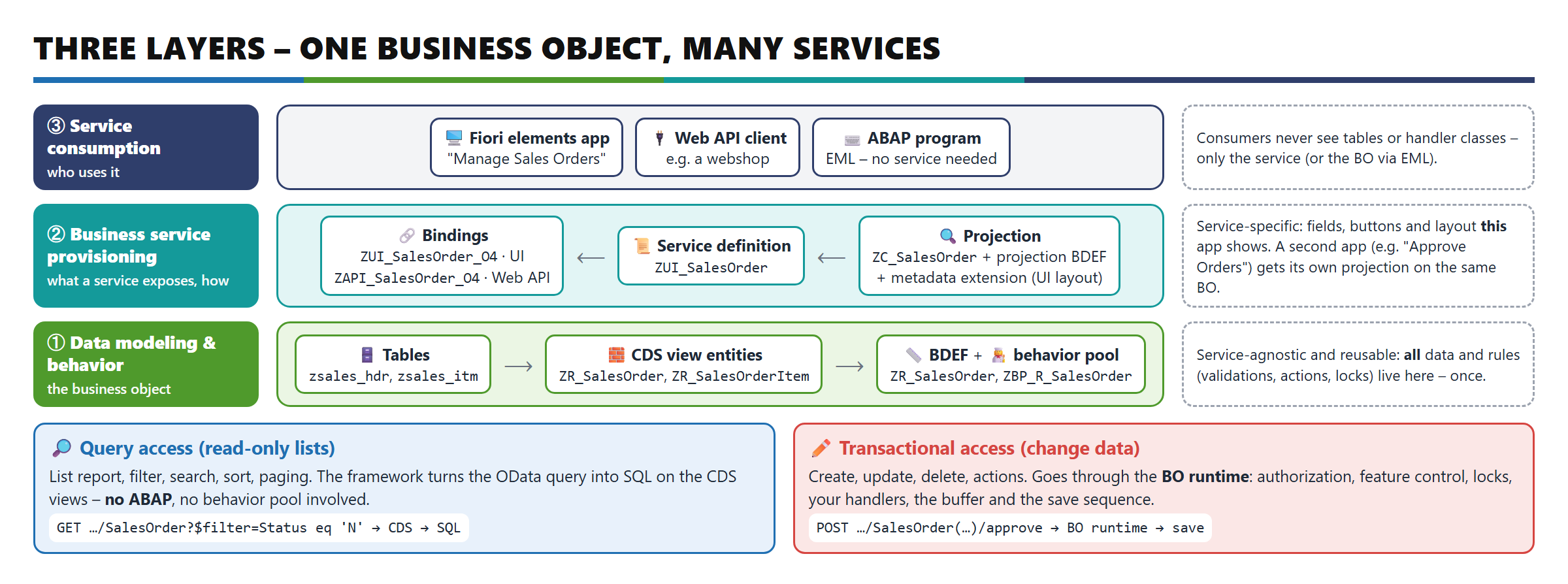
3.1 The three layers
Layer | Artifacts | Sales Order requirements here |
|---|---|---|
1. Data modeling & behavior | DB tables, CDS view entities, behavior definition + behavior pool | R1 (composition), R4–R10 (logic, control, numbering, draft), R13, R14 – service-agnostic, reusable |
2. Business service provisioning | Projection views + projection BDEF, metadata extension, service definition, service binding | R2 (UI, search, value help), R11 (approver projection), R18 (Web API binding) |
3. Service consumption | Fiori elements app, Web API consumer, EML consumer | Reps, managers, CRM, nightly job (R12) |
3.2 Two ways in: query access and transactional access
- Query access – the rep's order list with search and filter (R2): the framework translates the OData query into SQL on the CDS views. No behavior pool code runs; the access control still filters to the rep's sales organisation (R3).
- Transactional access – create an order (R1), Approve (R7), Copy (R8): goes through the BO runtime – authorization, feature control, locks, your handler methods, the transactional buffer and the save sequence (Part 4).
3.3 The business object (BO)
A business object represents a real-world thing – here the sales order with its items. It is defined by structure (composition tree of CDS entities) + behavior (BDEF) + runtime implementation (behavior pool).
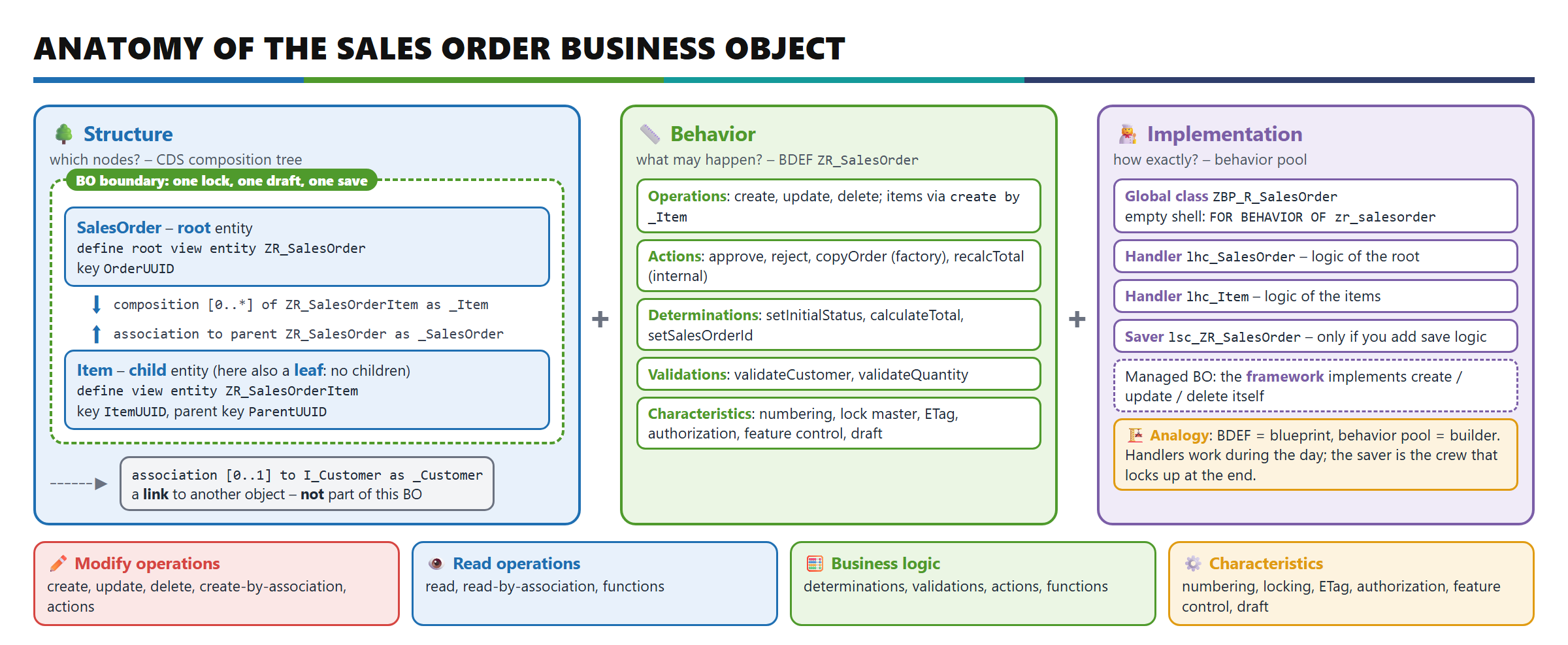
- Root entity – top node, represents the whole BO (
define root view entity):ZR_SalesOrder. Locks, draft and the ETag are usually managed at the root (lock master), so locking the order also protects its items (R10). - Child entity –
ZR_SalesOrderItem, linked to its parent byassociation to parent(_SalesOrder, viaParentUUID); the parent declarescomposition [0..*] of ZR_SalesOrderItem as _Item. Item is also a leaf (a child without children). - Composition vs association: items cannot exist without their order (composition, R1); the customer is only linked (association
_CustomertoI_Customer) and is not part of the BO. Modelling details: → see 02 · Data Model & CDS. - Analogy: the BDEF is the blueprint that declares what may happen; the behavior pool is the builder. Handler classes (
lhc_) work in the interaction phase; the saver class (lsc_) is the crew that finishes the job at the end (Part 4). Anatomy and method signatures: → see 04 · Behavior Definition & Behavior Pool.
3.4 Operations and behavior characteristics
Group | Items | Sales Order example |
|---|---|---|
Modify operations | create, update, delete, create-by-association, actions | R1 create order + items, R7 approve |
Read operations | read, read-by-association, functions | read the order with its items |
Business logic | determinations, validations, actions, functions | R4, R5, R6, R7, R8 |
Characteristics | numbering, locking, ETag, authorization, feature control, draft | R9, R10, R3/R7 |
3.5 RAP glossary
Term | Meaning | Sales Order example |
|---|---|---|
Business object (BO) | Real-world object = composition tree + behavior + implementation | Sales order with items |
Root / child / leaf entity | Top node / node with a parent / node without children |
|
Composition | Parent–child "part of" relationship inside one BO | _Item |
Association to parent | The child's link back to its parent | _SalesOrder |
Behavior definition (BDEF) | Declares operations, logic, draft, locks, authorization (BDL) | BDEF |
Implementation type | Who provides buffer, CRUD and save: managed or unmanaged (+ save variants) |
|
Behavior pool | Global ABAP class | ZBP_R_SalesOrder |
Handler class | Local class ( |
|
Saver class | Local class ( | lsc_ZR_SalesOrder |
Transactional buffer | In-memory copy of all instances changed in the current transaction | The new order before it is saved |
Interaction phase / save sequence | Phase that changes the buffer / phase that checks and saves it | Edit fields / press Save |
RAP BO provider / consumer | The BO implementation / whoever calls it (Fiori via OData, or EML) |
|
EML | Entity Manipulation Language: | R12 (page 08) |
Derived types | Types generated from CDS + BDEF, e.g. |
|
Projection | Service-specific view on the BO ( |
|
BO interface | Stable released layer ( | SAP's |
Service definition / binding | Which entities are exposed / protocol and type (OData V2/V4, UI/API) |
|
Draft | Saved intermediate state in a draft table, before activation |
|
Persistent table | Database table the managed framework writes to | zsales_hdr |
Strict mode |
| page 04 |
Newer persistence options (check your release): CDS table entities (define table entity) can be the active persistence of a BO instead of a classic DDIC table (BTP 2502); writable view entities and external entities also exist. Classic DDIC tables remain the standard on S/4HANA on-premise.
- Common mistake: thinking the projection layer holds logic. All logic lives in the base BO (
ZR_); the projection only selects and presents – the approver projection hides buttons, but R7 is enforced in the base BO. - Interview tip: "A RAP BO is a tree of CDS entities with one root, plus a behavior definition and a behavior pool. The root is usually the lock master, so locking, draft and the ETag work for the whole tree."
Part 4 – How RAP processes a request: buffer, interaction phase, save sequence
Every RAP transaction has two phases. In the interaction phase the consumer reads and changes instances – the changes live only in the transactional buffer (memory). COMMIT ENTITIES (or the end of an OData change set) starts the save sequence, which checks the buffer and writes it to the database – all or nothing. Think of a shopping cart: you add and remove items freely; only at checkout is anything paid.
4.1 The transactional buffer
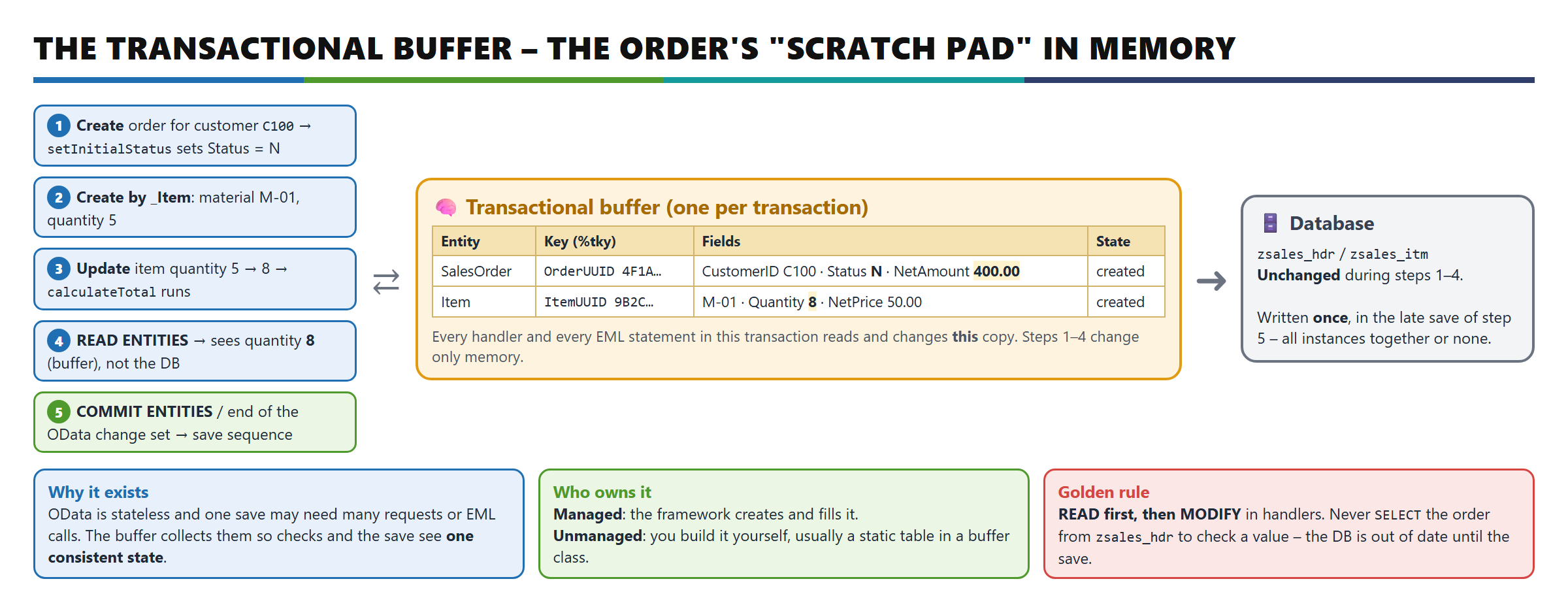
- What: the in-memory copy of all instances changed in the current transaction – one buffer per transaction. In the picture the rep creates an order (R1), it gets status N (R4) and its net amount is recalculated (R5) – all in the buffer, nothing in
zsales_hdryet. - Why: OData is stateless and many requests or EML statements may change the same order; the buffer collects them so checks and the save see one consistent state.
- READ returns the buffer state, not the database. Always READ first, then MODIFY in handlers – the buffer, not the DB, is the truth during the interaction phase.
- Managed BO: the framework owns the buffer. Unmanaged BO: you build it yourself (Part 5).
- With draft (R10), each request's changes are also stored in the draft tables (
zsales_hdr_d) so the rep can continue later. The active tables are written only when the draft is activated (→ see 07 · Locking, Draft & Side Effects).
4.2 Which requirement runs in which phase
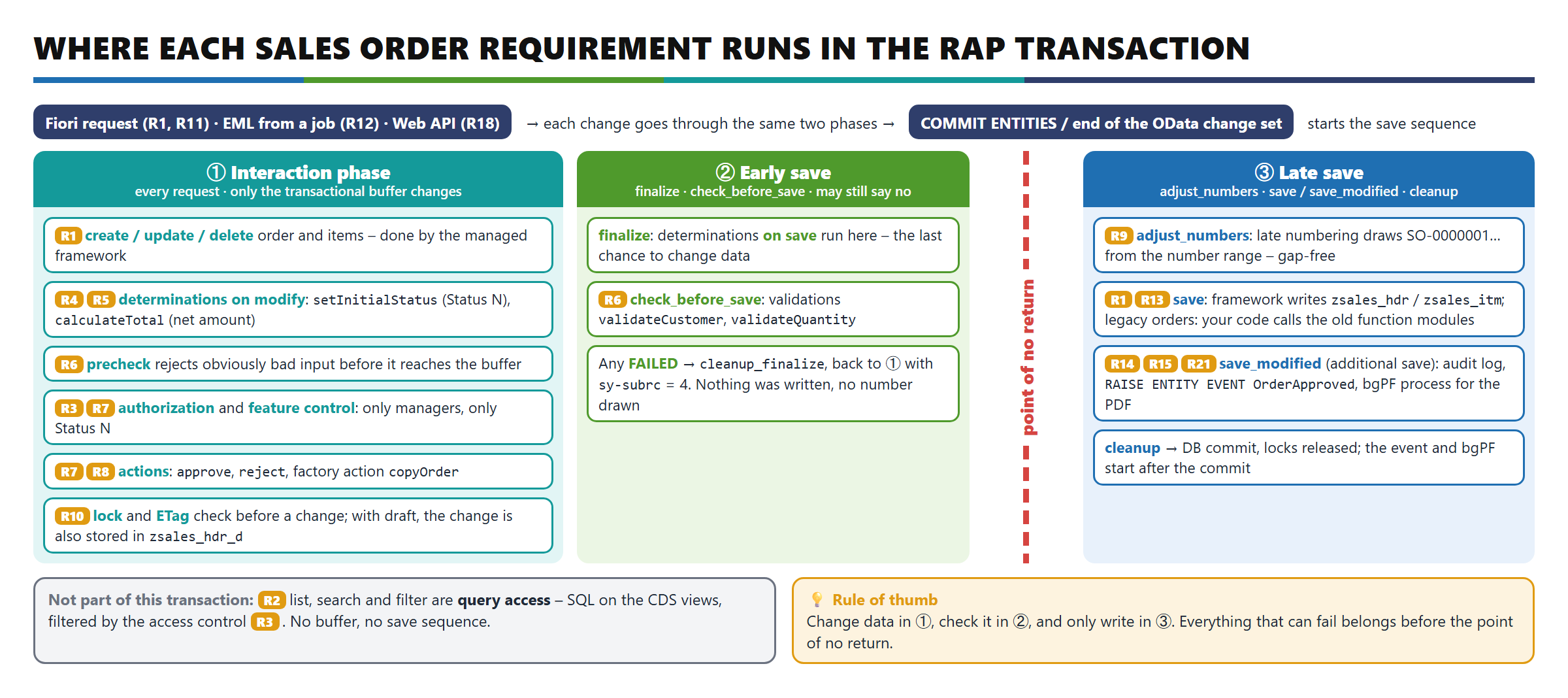
The interaction phase runs on every request. The framework calls the handler methods of lhc_SalesOrder and lhc_Item that belong to the requested operation:
What runs | Handler method kind | Sales Order example |
|---|---|---|
Create, update, delete (managed: framework) |
| R1 new order, change quantity |
Actions and functions |
| R7 |
Determinations on modify | FOR DETERMINE ON MODIFY | R4 |
Feature control |
| R7 Approve only for status N |
Authorization |
| R7 only managers approve |
Locking (unmanaged only) | FOR LOCK | managed: the framework locks |
Precheck (optional) | precheck method for create / update / action | R6 reject bad input before it reaches the buffer |
How to write each of these: → see 05 · Business Logic & Messages and 06 · Feature Control, Authorization & Numbering.
4.3 The save sequence step by step
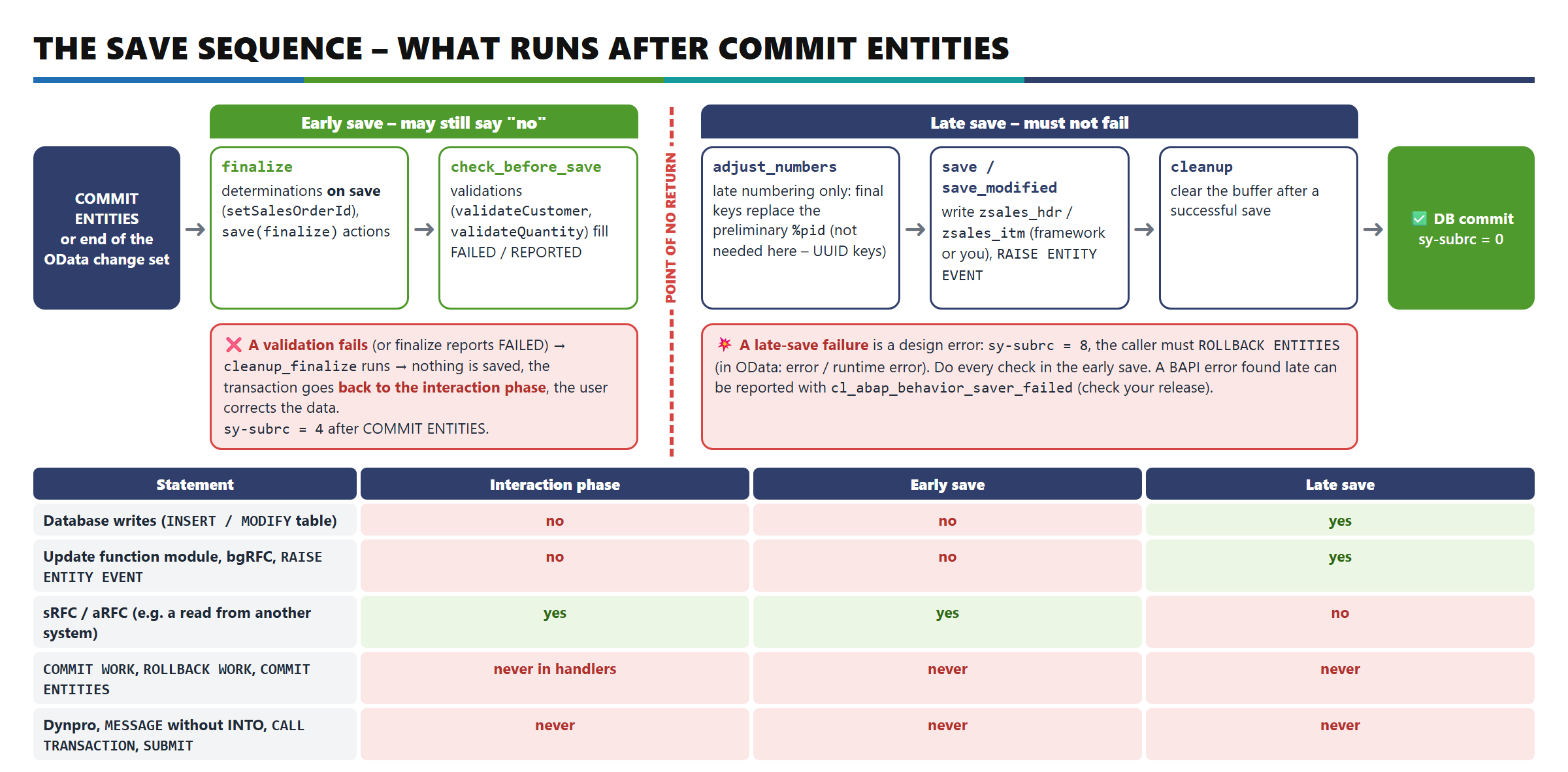
Phase | Saver method | When / what | Sales Order |
|---|---|---|---|
Early save | finalize | Last chance to change data – determinations on save run here (and | on-save determinations |
Early save | check_before_save | Consistency checks – validations run here; any failure stops the save | R6 |
Early save | cleanup_finalize | Only if | rep corrects the customer |
point of no return | From here the data is saved; you cannot go back to the interaction phase | ||
Late save | adjust_numbers | Late numbering only: assign the final keys ( | R9 SO-0000001… |
Late save |
| Write to DB (unmanaged) / extra work or own DB writes (managed with additional or unmanaged save); | R13, R14, R15, R21 |
Late save | cleanup | Clear the buffer after a successful save |
- Why R9 waits until
adjust_numbers: a number drawn earlier would be lost whenever a validation fails – a gap. After the point of no return the save cannot fail any more, so the numbers stay gap-free. - A late-save failure gives
sy-subrc= 8 after COMMIT ENTITIES and the caller must runROLLBACK ENTITIES. The late save is designed not to fail: do every check in the early save. If legacy code called there still reports an error (R13),cl_abap_behavior_saver_failedreports it (released with BTP 2311 – check your release). - Bridge for video learners: a course may talk about a "determination phase" and a "validation phase". These are not separate phases in SAP's model: determinations on modify run in the interaction phase, determinations on save run in
finalize, validations run incheck_before_save– both inside the save sequence.
What sy-subrc tells the caller – the nightly job of R12
|
The EML statements themselves, their responses and derived types: → see 08 · EML.
4.4 One Fiori click – R7 Approve – traced end to end
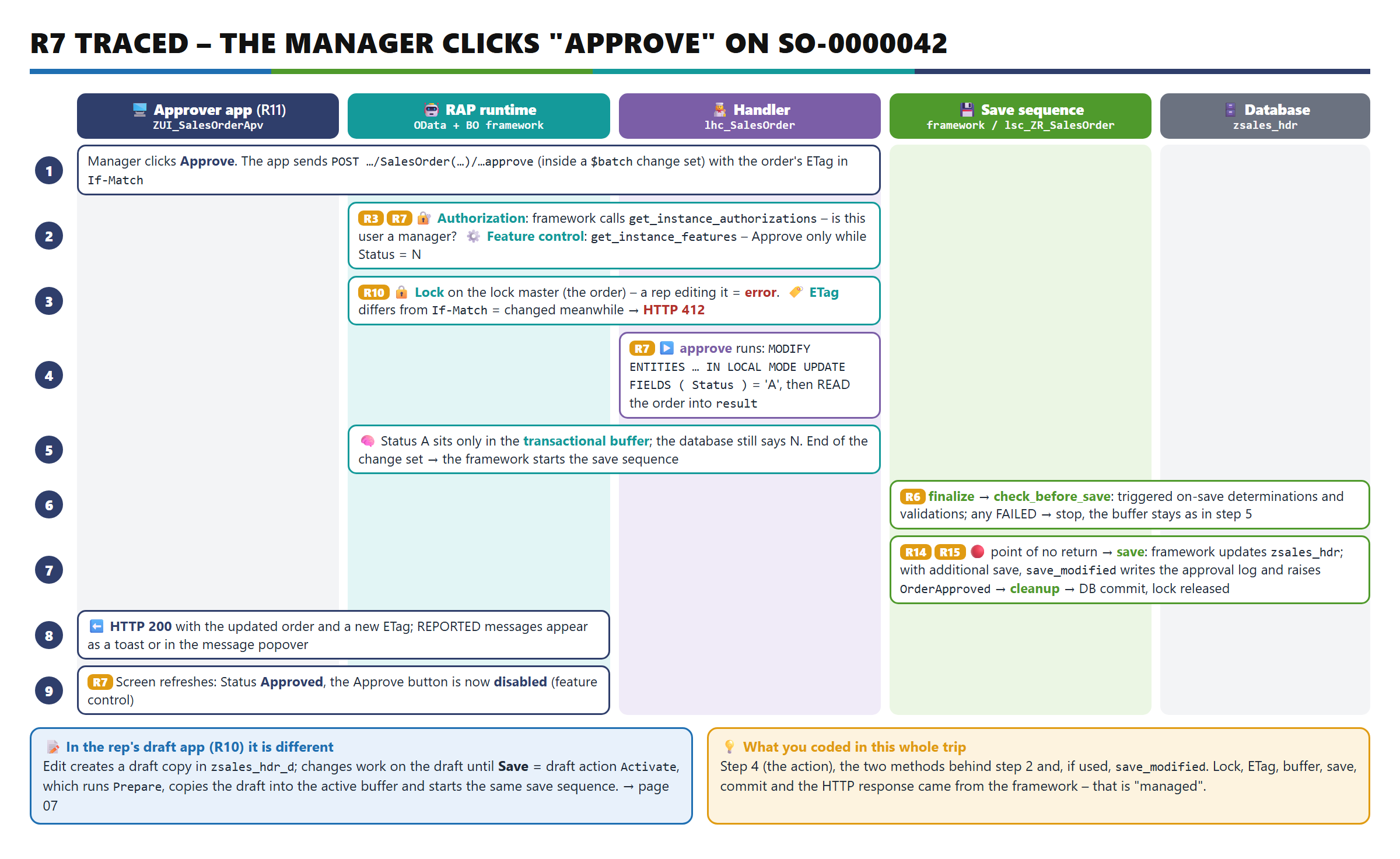
Step | Who | What happens |
|---|---|---|
1 | Approver app (R11) |
|
2–3 | RAP runtime | Authorization ( |
4 | lhc_SalesOrder | Action method |
5 | Buffer | Status A exists only in the transactional buffer; the database still says N |
6 | Save sequence |
|
7 | Framework | Point of no return, |
8–9 | Approver app | HTTP 200 with the new data and ETag; messages from REPORTED; the Approve button is disabled now (R7) |
In the reps' draft app it is different (R10): the rep first clicks Edit, which copies the order into the draft tables and locks the active instance. Field changes and actions then work on the draft. Save calls the draft action Activate: it runs Prepare (validations and determinations on save on the draft), copies the draft into the active buffer and starts the same save sequence (→ see 07 · Locking, Draft & Side Effects).
4.5 Rules for each phase
Statement | Interaction phase | Early save | Late save |
|---|---|---|---|
Database writes ( | no | no | yes |
Update function module ( | no | no | yes |
sRFC / aRFC (they trigger an implicit database commit) | yes | yes | no |
| no | no | no |
| no | no | no |
Dynpro statements, | no | no | no |
Source: ABAP cheat sheet "ABAP EML / ABAP for RAP". How strictly this is enforced (syntax error or runtime error) depends on the BDEF strict mode.
- Common mistake:
SELECT SINGLE status FROM zsales_hdrinside a validation. It reads the old DB value; read the buffer withREAD ENTITIES OF zr_salesorder IN LOCAL MODEinstead. - Common mistake: calling
COMMIT ENTITIESorCOMMIT WORKin a handler "to be sure it is saved". The framework or the EML caller commits – a commit in a handler causes a runtime error. - Interview tip: explain the point of no return with R9: "Early save may still say no and return the user to the interaction phase; after the point of no return the late save must succeed. That is why all checks belong in finalize and check_before_save, and why gap-free numbers are drawn in adjust_numbers."
Part 5 – Implementation types: managed, unmanaged and the save variants (overview)
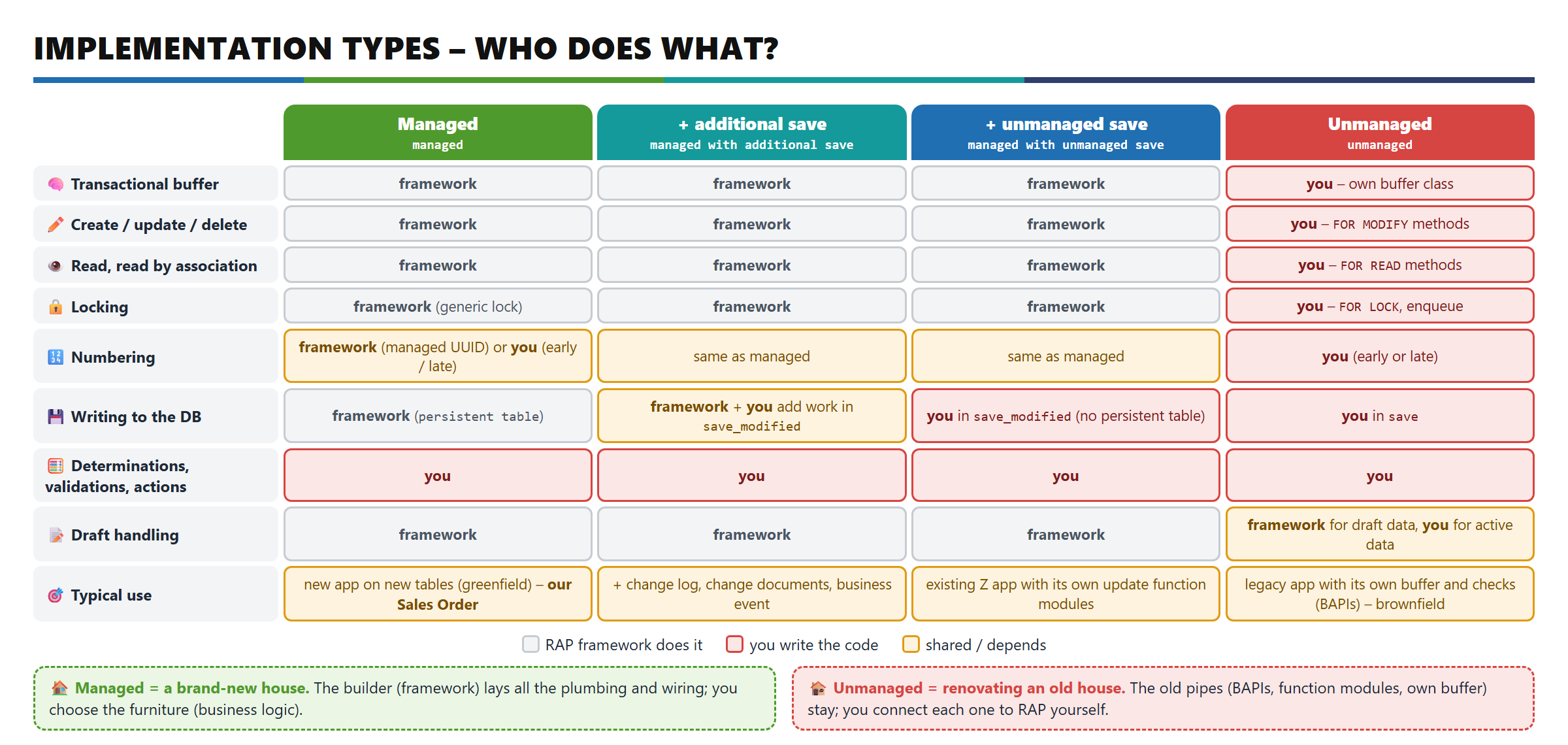
The implementation type says who provides the transactional behavior (buffer, create, update, delete, read, locking) and who saves. It is the first word of the BDEF. Think of a house: managed is a brand-new house where the builder lays all the plumbing (greenfield); unmanaged is renovating an old house where the old pipes – BAPIs, function modules, an own buffer – stay and you connect each one yourself (brownfield).
5.1 The scenario decides: R1 vs R13
- R1 – the new app on new tables
zsales_hdr/zsales_itm: there is no old code that owns the data. The framework can do buffer, create, update, delete, locks and the save, so the sales order BO is managed – that is the BO built on pages 02–08. - R14, R15, R21 – extra work when saving (audit log, the
OrderApprovedevent, the PDF confirmation in the background): the framework should still write the tables; you only add work. That is managed with additional save. - R13 – old orders in legacy Z tables, written by existing function modules: the old code must keep doing the writing. If only the DB write must go through it, use managed with unmanaged save; if the legacy modules also own their own buffer and checks, use unmanaged.
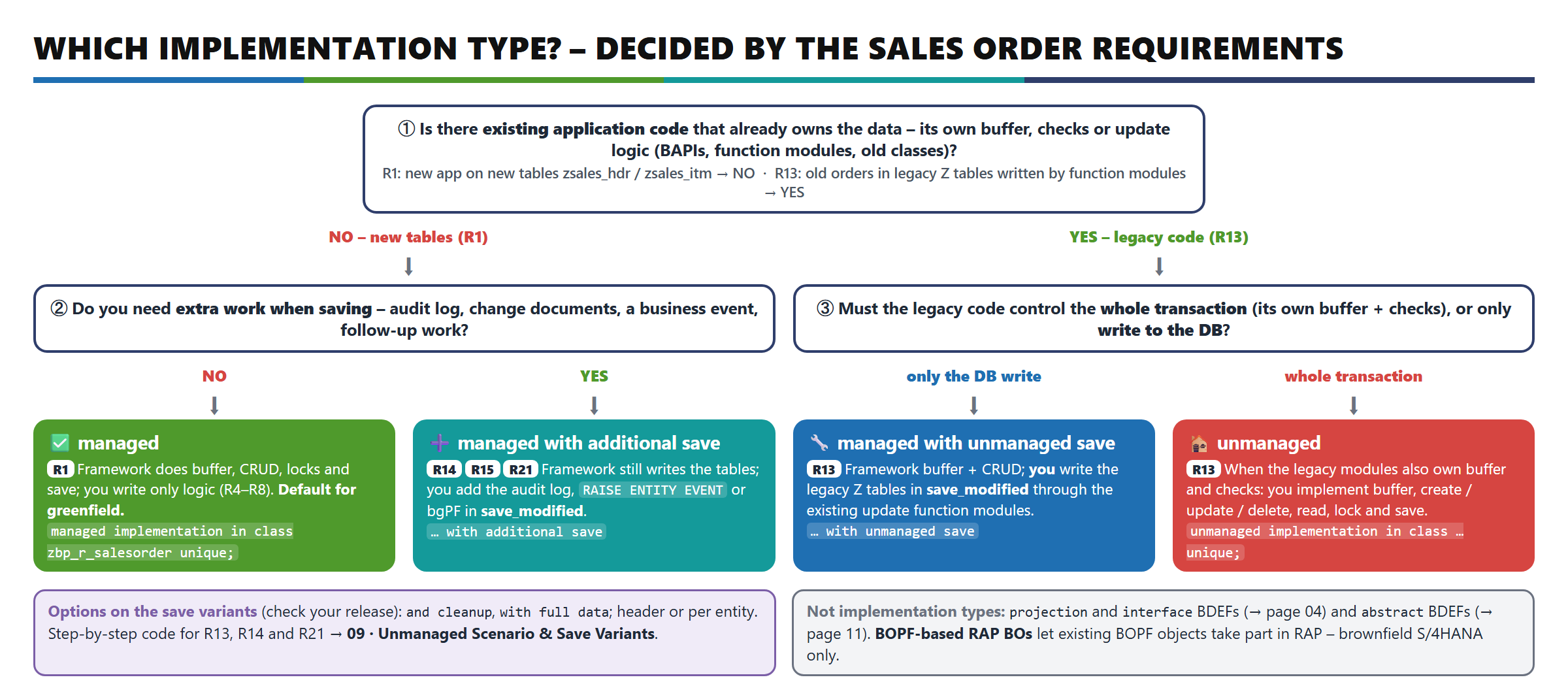
5.2 The four types
Type | BDEF header | You implement | In the scenario |
|---|---|---|---|
Managed | managed implementation in class zbp_r_salesorder unique; | Only business logic: determinations, validations, actions, feature control, authorization | R1 – the sales order BO |
Managed with additional save | managed with additional save implementation in class zbp_r_salesorder unique; | Business logic + | R14 log, R15 event, R21 bgPF |
Managed with unmanaged save | managed with unmanaged save implementation in class zbp_r_salesorder unique; | Business logic + the DB write in | R13 – legacy update modules write the Z tables |
Unmanaged | unmanaged implementation in class zbp_r_salesorder unique; | Everything: buffer, create, update, delete, read, lock, save + business logic | R13 – legacy code owns the whole transaction |
- Draft works with all four types. The draft runtime always manages the draft data; in an unmanaged BO you still implement the operations on the active data.
- Save options (check your release):
and cleanupandwith full datacan be added to the save variants, in the BDEF header or per entity.save_modifiedreceives thecreate,updateanddeletetables of the changed instances. - BOPF-based RAP BO – existing BOPF business objects can take part in RAP (consumed with EML, exposed in RAP services) without a full rewrite. It applies only to S/4HANA systems that already have BOPF objects; check your release for the details.
- Not implementation types:
projectionandinterfaceBDEFs (→ see 04 · Behavior Definition & Behavior Pool) andabstractBDEFs (→ see 11 · Files, Custom Entities & Integration). - Prefer the highest level of framework support that fits: every step towards unmanaged means more code to write, test and keep consistent (locking, buffer, numbering, read).
The unmanaged handler methods, the buffer class around the legacy function modules, save_modified with full code, change documents and bgPF are on 09 · Unmanaged Scenario & Save Variants; raising OrderApproved is on 10 · Business Events & Event-Driven RAP.
- Common mistake: choosing unmanaged for a new app "to have control". You then write locking, buffering, numbering, read and save yourself – code a managed BO gets for free.
- Common mistake: writing to the BO's own tables in
save_modifiedof a managed BO with additional save. The framework already writes them; your code would write twice. - Interview tip: "Managed for greenfield, like our new sales order app; additional save when I need extra work at save time, like the audit log or a business event; unmanaged save when existing update modules must write the legacy tables; unmanaged only when a legacy application owns the whole transaction."
Part 6 – Interview questions
Q1. What is RAP?
The ABAP RESTful Application Programming Model is SAP's model for building transactional OData services (Fiori apps, Web APIs) with CDS, behavior definitions and ABAP behavior pools. It is the standard for S/4HANA and ABAP Cloud. The framework provides buffering, locking, draft and the OData plumbing, so the developer writes mainly business logic – in our app the approval rules, not the save.
Q2. Which problems of classical ABAP does RAP solve?
Classical apps mix UI and logic, and each developer builds locking, buffering and update logic differently. OData via SEGW needs hand-written classes, and CDS, SEGW and BOPF were separate frameworks. RAP gives one model with standard transactional behavior, generated Fiori UIs and released, upgrade-stable APIs.
Q3. Name the RAP layers and artifacts.
Data modeling & behavior (tables, CDS view entities, BDEF, behavior pool) → business service provisioning (projection views and projection BDEF, metadata extension, service definition, service binding) → consumption (Fiori elements app, Web API, EML). The base BO is service-agnostic; the projection is service-specific, which is how the reps' app and the approver app share one BO.
Q4. What is the transactional buffer?
The in-memory state of all instances changed in the current transaction. During the interaction phase all reads and changes work on the buffer, not on the database. The save sequence checks the buffer and writes it to the database in one step; ROLLBACK ENTITIES discards it.
Q5. Interaction phase vs save sequence?
In the interaction phase handler methods run operations, determinations on modify, feature control and authorization on the buffer. COMMIT ENTITIES starts the save sequence: early save with finalize (determinations on save), check_before_save (validations) and cleanup_finalize on failure, then the point of no return, then late save with adjust_numbers, save and cleanup.
Q6. What is the point of no return, and why does it matter?
It separates the early save, which may still reject the transaction and send the user back to the interaction phase (sy-subrc 4), from the late save, which must succeed. So every check belongs in finalize or check_before_save, and things that must not be lost or repeated – gap-free numbers in adjust_numbers, database writes, events – happen after it. A late failure gives sy-subrc 8 and needs ROLLBACK ENTITIES.
Q7. Query access vs transactional access?
Query access – lists, search, filter, paging – is translated by the framework into SQL on the CDS views; no behavior pool code runs, but access control (DCL) still filters the rows. Transactional access – create, update, delete, actions – goes through the BO runtime with authorization, feature control, locks, handlers, buffer and save sequence.
Q8. Managed vs unmanaged?
Managed: the framework handles the transactional buffer, create/update/delete, locks and the save – used for new apps on new tables, like our sales order app. Unmanaged: you implement them yourself, typically to wrap existing legacy logic with its own buffer, like the old Z order tables. Both use the same CDS model, BDEF syntax and EML.
Q9. What are additional save and unmanaged save?
Two managed variants. With additional save the framework still writes the tables and your save_modified adds work such as an audit log or a business event. With unmanaged save the framework keeps the buffer but you do the database writes yourself in save_modified, e.g. through existing update function modules.
Q10. Scenario: trace one "Approve" click from the browser to the database.
The approver app sends a $batch POST with the action call and the ETag. The OData V4 runtime finds the binding and service definition, the projection passes it to the base BO, and the RAP runtime checks authorization, feature control, lock and ETag, then calls lhc_SalesOrder→approve, which sets Status 'A' in the buffer. The save sequence follows: finalize, check_before_save (validations), the point of no return, save (managed: the framework writes zsales_hdr; with additional save also the log and the event), cleanup and commit. The response returns the new state, the new ETag and the messages. To debug I'd follow the same path: network tab, Cross Trace, breakpoint.
🏠 Start Here · 02 · Data Model & CDS ▶ · Sections: CORE ABAP | OOPS ABAP | ABAP on HANA | Clean Core | RAP | ABAP Points | SAP Fiori | SAPUI5 | Mobile Development (MDK) | BTP Foundations | BTP Development | CAP | SAP Build | ABAP on BTP | Integration Suite | SAP Business AI | SAP BASIS | Security | SAP SDLC
Functional: FICO ABAP | TRM ABAP | VIM | SAP BIS | SD ABAP | MM ABAP | PP ABAP | QM ABAP | PM ABAP | PS ABAP | EWM | TM ABAP | EHS ABAP | HR ABAP | BW | SAP MDG | SAP Analytics Cloud | SAP Ariba | SAP CX | SAP IBP