This page builds the foundation of the Sales Order Approval app: the system and package, the order in which RAP objects are created, the two tables and their administrative fields, and the CDS root and child view entities that turn header and items into one business object. It implements R1 (an order with several items) and prepares the fields that R2, R3, R9 and R10 need later.
Part 1 – Requirements, development setup and the build path
Before the first line of RAP you need three things: a tool (Eclipse with ADT), a system that speaks ABAP Cloud, and a package for the objects. Then you build in a fixed order, like a house: foundation (tables), walls (CDS), wiring (behavior), and only then the front door (service and app).
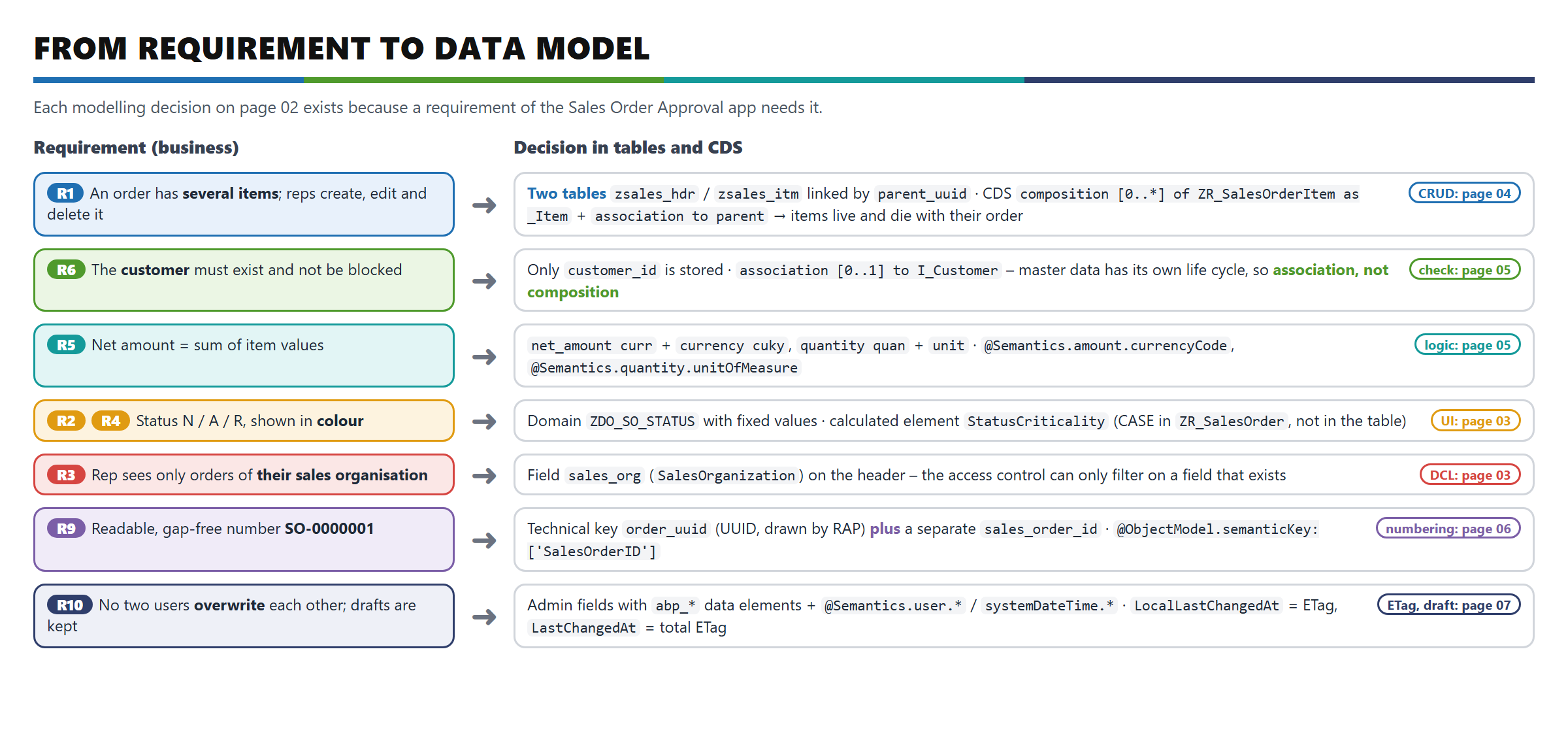
1.1 Requirements on this page
R-ID | Requirement | Where on this page |
|---|---|---|
R1 | Reps create an order with several items, edit and delete it | Part 3 (tables), Part 5 (root, child, composition) |
R3 | A rep sees only orders of their sales organisation | Part 3: field |
R2, R4 | Status N / A / R with a colour | Part 3 (domain), Part 5 ( |
R9, R10 | Readable order number; no overwriting | Part 3 (UUID key + |
1.2 Tool and system
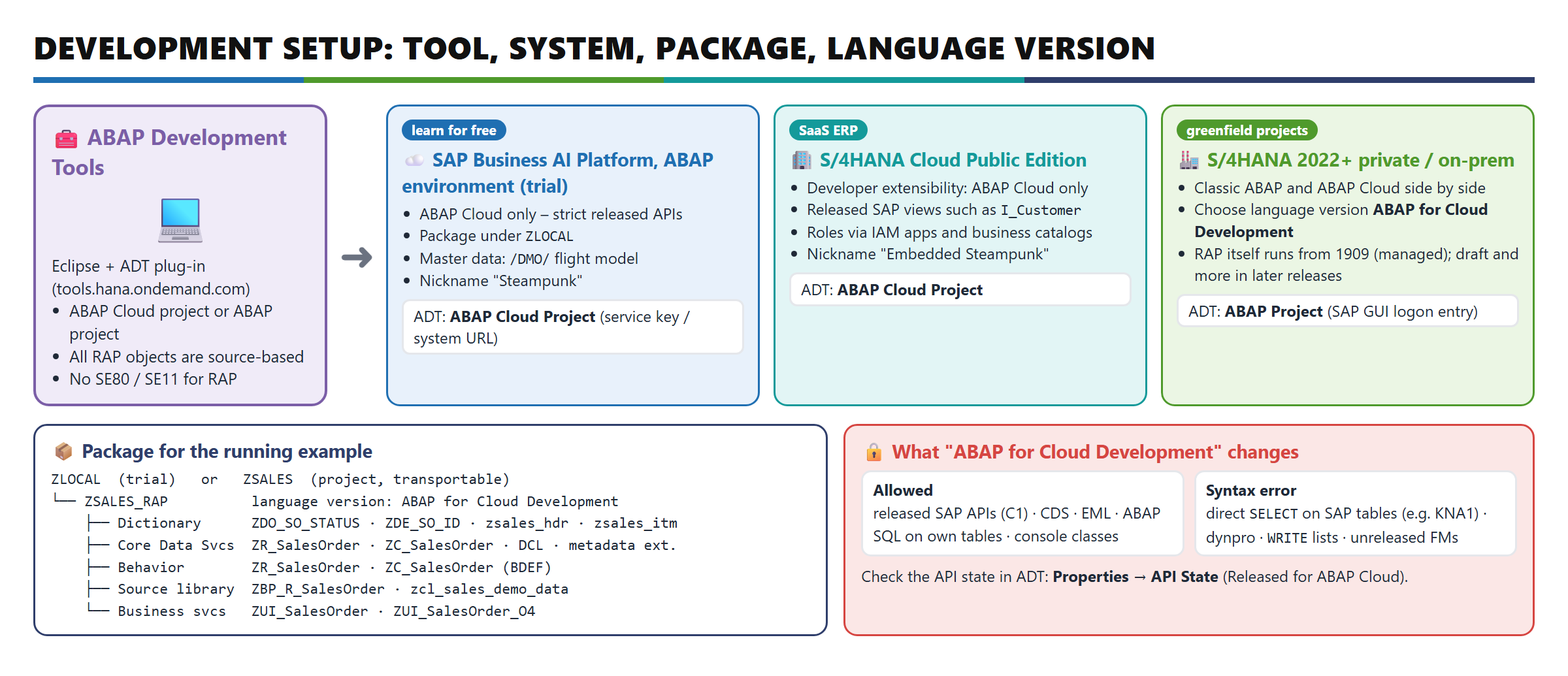
System | When you use it | What to know |
|---|---|---|
SAP Business AI Platform, ABAP environment – trial | Learning, RAP100 tutorials | Free, shared system, ABAP Cloud only; create your package under |
SAP Business AI Platform, ABAP environment – productive | Side-by-side extensions, own apps | Own system per customer; managed in the Landscape Portal (software components, hibernation to save cost, updates) |
S/4HANA Cloud Public Edition | Developer extensibility in the ERP | ABAP Cloud only; released SAP views such as |
S/4HANA 2022+ private cloud / on-premise | Greenfield S/4 projects | Classic ABAP and ABAP Cloud side by side; set the language version ABAP for Cloud Development on the package or objects. RAP exists since 1909; draft and most features came later – check your release |
- ADT: Eclipse plus the ADT plug-in from tools.hana.ondemand.com. Cloud systems: *File → New → ABAP Cloud Project* (service key or system URL). On-premise: *ABAP Project* from the SAP GUI logon entry.
- Developer user in a productive ABAP environment system: an administrator creates the business user (Fiori app *Maintain Business Users*) and assigns a business role built from the template SAP_BR_DEVELOPER.
- Package: transportable
ZSALESwith sub-packageZSALES_RAPin projects; aZLOCALsub-package (not transportable) in the trial. - ABAP for Cloud Development: only released APIs (*Properties → API State*: *Released for ABAP Cloud*), no dynpro, no
WRITElists, no directSELECTon SAP tables such as KNA1. Violations are syntax errors ("Use of … is not permitted"), not warnings – look for the released successor, e.g.cl_abap_context_infoinstead ofsy-uname. - BTP system not reachable in the morning: productive systems can be hibernated in the Landscape Portal and must be resumed first.
1.3 The build path
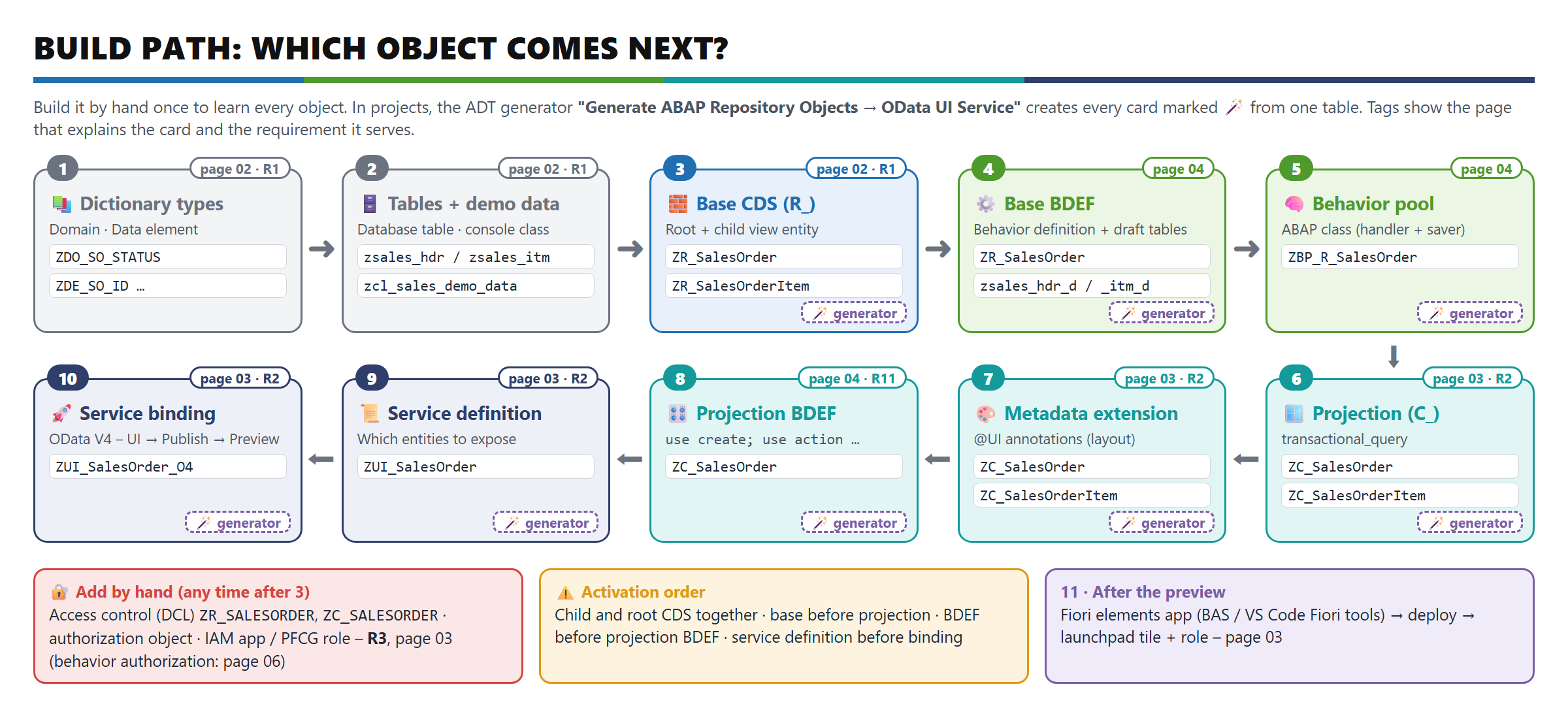
# | Object (ADT type) | Sales order name | Explained on |
|---|---|---|---|
1 | Domain, data element | ZDO_SO_STATUS, ZDE_SO_ID … | this page, Part 3 |
2 | Database tables + demo data class | zsales_hdr, zsales_itm, zcl_sales_demo_data | this page, Part 3–4 |
3 | Base CDS view entities (root, child) | ZR_SalesOrder, ZR_SalesOrderItem | this page, Part 5 |
4 | Base behavior definition + draft tables | ZR_SalesOrder, zsales_hdr_d, zsales_itm_d | 04, 07 |
5 | Behavior pool | ZBP_R_SalesOrder | 04 |
6 | Projection views | ZC_SalesOrder, ZC_SalesOrderItem | 03 |
7 | Metadata extensions | ZC_SalesOrder, ZC_SalesOrderItem | 03 |
8 | Projection behavior definition | ZC_SalesOrder | 04 |
9 | Service definition | ZUI_SalesOrder | 03 |
10 | Service binding (OData V4 – UI) | ZUI_SalesOrder_O4 | 03 |
+ | Access control, authorization object, IAM app / PFCG role | ZR_SALESORDER, ZAO_SO | 03, 06 |
- Activation order: root and child CDS together (they point at each other) → projection → base BDEF → projection BDEF → service definition → binding. ADT's *Activate All* (Ctrl+Shift+F3) handles the cycles.
1.4 Generator or by hand?
ADT can create objects 3 to 10 for you: right-click a table → Generate ABAP Repository Objects… → OData UI Service. You get a managed, draft-enabled BO with UUID keys, the projection, a metadata extension with a basic layout, the behavior pool, the draft tables, service definition and binding.
By hand | ADT generator | |
|---|---|---|
Best for | Learning: you see why every object exists | Projects: consistent names, minutes instead of hours |
Input | Nothing – you write every object | A table (newer releases: also views, or a wizard from scratch that creates the table too) |
Result | Exactly what you typed | Managed + draft + UUID keys + admin fields expected; then you add validations, actions and access control |
Availability | Every release with RAP | SAP Business AI Platform, ABAP environment and S/4HANA Cloud; on-premise in newer releases – check your release |
- Newer ADT versions offer the wizard OData UI Service from Scratch, optionally driven by Joule (licence needed, SAP Note 3571857), and SAP publishes XCO generation APIs for generating objects from ABAP code – check your release. The community RAP Generator (SAP-samples/cloud-abap-rap) is an older alternative.
- Interview tip: "I built the Sales Order BO by hand once, so I can debug and extend what the generator produces."
Part 2 – Modern ABAP syntax you meet in RAP code
RAP handlers work on internal tables of derived types, so 7.40+ expressions are everywhere. One line each, with Sales Order examples (the RAP-specific components %tky, %cid, %control are explained on 08 · EML):
Construct | Example | Means |
|---|---|---|
Inline declaration | DATA(orders) = VALUE tt_orders( ). | Declare where first used |
VALUE # | failed-salesorder = VALUE #( ( %tky = order-%tky ) ). | Build a structure or table |
CORRESPONDING # | DATA(keys) = CORRESPONDING #( orders ). | Copy same-named fields |
COND # | COND #( WHEN o-Status = 'A' THEN 3 ELSE 2 ) | if / else as an expression |
SWITCH # | SWITCH #( o-Status WHEN 'A' THEN 'Approved' WHEN 'R' THEN 'Rejected' ) | case as an expression |
CONV | CONV zde_item_no( max_item_no + 10 ) | Type conversion inline |
REDUCE | REDUCE #( INIT s = CONV decfloat34( 0 ) FOR i IN items NEXT s = s + i-NetPrice * i-Quantity ) | Fold a table into one value (R5) |
| VALUE #( FOR o IN orders ( %tky = o-%tky Status = 'A' ) ) | Loop inside an expression |
Table expression |
| Read one row (raises |
LOOP … GROUP BY | LOOP AT items INTO DATA(i) GROUP BY i-ParentUUID … | Group rows, e.g. totals per order |
line_exists( ) | IF line_exists( orders[ Status = 'N' ] ). | Check without a read |
- Common mistake:
REDUCE #( INIT s = 0 …)–sbecomes an integer and the decimals of the amount are lost. GiveINITthe right type, as above.
Part 3 – Data model: domains, data elements and tables (R1)
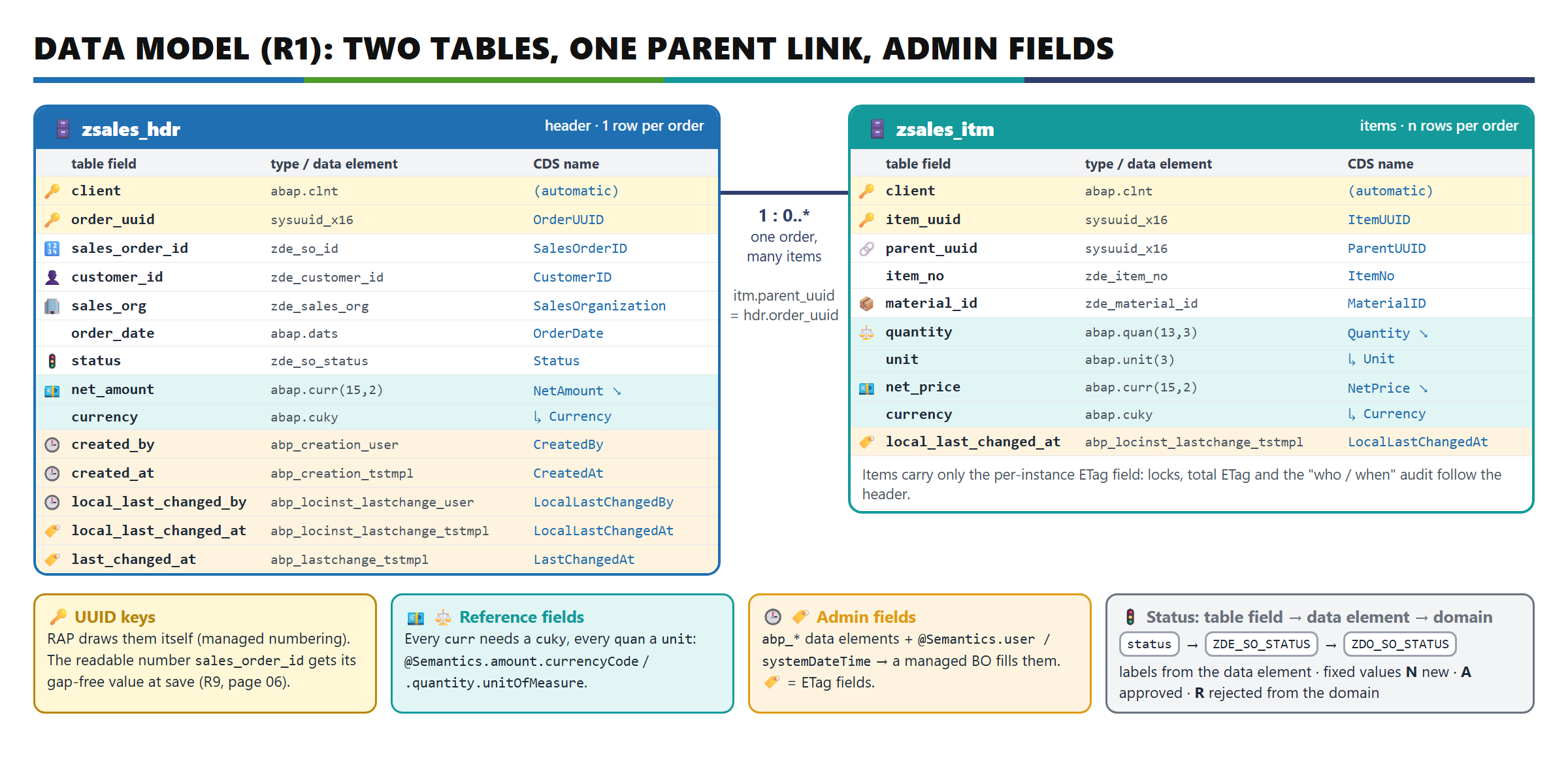
R1 says an order has several items. That is two tables: one row per order in zsales_hdr, one row per item in zsales_itm, linked by the parent key. A few extra fields serve later requirements, so add them now – every later object (CDS, BDEF, draft table) copies the field list.
3.1 Design decisions
Decision | Choice in the example | Why (requirement) |
|---|---|---|
Primary key |
| RAP draws UUIDs itself (managed numbering) – no number range needed for the key (R1) |
Readable number |
| Users need a number to talk about; it gets its gap-free value when the order is saved (R9 → 06 · Feature Control, Authorization & Numbering) |
Parent link |
| Each item belongs to exactly one order; the CDS composition uses it (R1) |
Sales organisation |
| The access control can only filter on a field that exists (R3) |
Amounts and quantities |
| An amount is meaningless without its currency, a quantity without its unit (R5, R6) |
Admin fields | 5 on the header, 1 on the item, | RAP fills them; ETags and draft use them (R10, Part 4) |
Master data | Only | Customers live in SAP ( |
3.2 Domains and data elements
A domain holds the technical type and the allowed values; a data element gives the business meaning and the field labels, and points to a domain or a built-in type. ADT: New → Other ABAP Repository Object → Dictionary → Domain / Data Element. The labels later appear as column headers in Fiori.
Object | Type | Content |
|---|---|---|
Domain | CHAR 1 | Fixed values N New, A Approved, R Rejected (R4, R7) |
Data element | Domain ZDO_SO_STATUS | Labels: Status / Order Status |
Data element | CHAR 10 | Labels: Sales Order |
Data element | CHAR 10 | Labels: Customer |
Data element | CHAR 4 | Labels: Sales Organization |
Data element | CHAR 40 | Labels: Material |
Data element | NUMC 6 | Labels: Item |
- Reuse released SAP data elements where they exist; create your own when you need your own labels or values.
3.3 The tables
ADT: New → Other → Dictionary → Database Table. Tables are edited as source code. Delivery class A (application data), data maintenance restricted.
|
|
- The foreign key documents the header–item link in the dictionary. RAP does not need it – the parent-child relation comes from the CDS composition (Part 5).
- Currency / quantity semantics: a
currfield must reference acukyfield and aquanfield aunitfield. Without the annotation the table does not activate, and Fiori could not show "150.00 EUR" with the right decimals. - The draft tables
zsales_hdr_d/zsales_itm_dare generated from the BDEF later (→ 07 · Locking, Draft & Side Effects); the extra customer field of R19 goes through an extension include (→ 12 · Extensibility & Testing). - Newer option: since SAP Business AI Platform, ABAP environment 2502 a CDS table entity (
define table entity) can replace the DDIC table as persistence. Check your release – this page uses classic DDIC tables, which work everywhere.
Part 4 – Administrative fields and demo data
4.1 Administrative fields
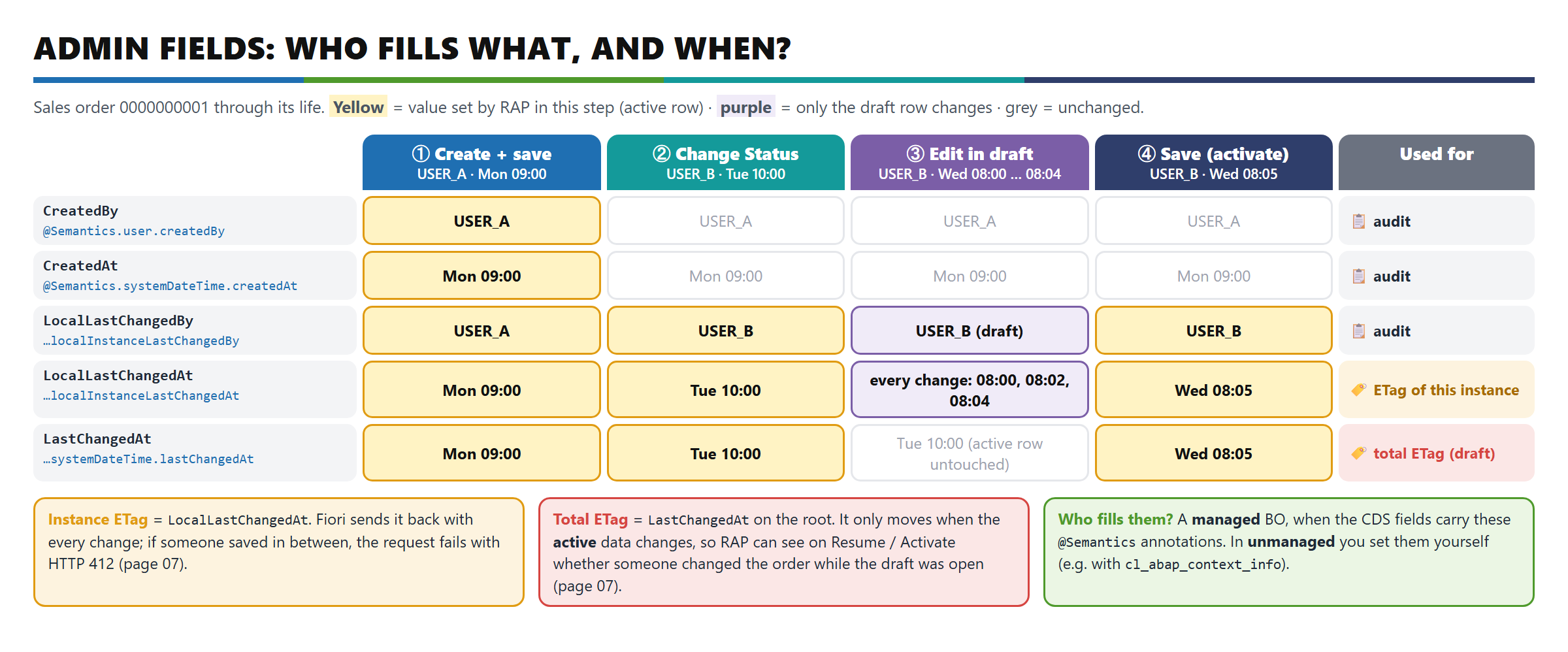
Five header fields answer "who created it, who changed it last, and has it changed since I read it?". With the right data elements and CDS annotations a managed BO fills them automatically – you never write code for them. They are the raw material for R10 (no two users overwrite each other).
Field | Data element | CDS annotation | Used for |
|---|---|---|---|
created_by | abp_creation_user | @Semantics.user.createdBy | Audit |
created_at | abp_creation_tstmpl | @Semantics.systemDateTime.createdAt | Audit |
local_last_changed_by | abp_locinst_lastchange_user | @Semantics.user.localInstanceLastChangedBy | Audit |
local_last_changed_at | abp_locinst_lastchange_tstmpl | @Semantics.systemDateTime.localInstanceLastChangedAt | ETag per instance |
last_changed_at | abp_lastchange_tstmpl | @Semantics.systemDateTime.lastChangedAt | Total ETag (draft) |
LocalLastChangedAtchanges with every change of the instance, also in the draft;LastChangedAton the root changes only when the active data changes. How RAP uses them as ETag and total ETag → 07 · Locking, Draft & Side Effects.- Unmanaged BOs fill these fields themselves, e.g. with
cl_abap_context_info=>get_user_technical_name( )andGET TIME STAMP FIELD(→ 09 · Unmanaged Scenario & Save Variants). - Common mistake: forgetting the
@Semanticsannotations in the base view – a managed BO then leaves the admin fields empty and ETag checks do not work.
4.2 Demo data with a console class
In ABAP Cloud there are no reports. A class that implements IF_OO_ADT_CLASSRUN runs in ADT with F9 and writes to the console – the standard way to fill test data.
|
unit = 'ST'is the internal code of the unit "piece" (shown as PC in English). Use customer numbers and a sales organisation that exist in your system, otherwisevalidateCustomer(R6) rejects the orders and the access control (R3) hides them.- Direct
INSERTbypasses the BO – fine for demo data, never in application code. Once the BO exists, a better demo class creates orders withMODIFY ENTITIES … CREATE+COMMIT ENTITIES, so determinations and validations run too (→ 08 · EML, R12). - Preview is empty later? Either the tables have no data (run this class) or the access control filters every row (→ 03 · Projection, UI, Access Control & Service).
Part 5 – CDS view entities: root, child and composition (R1)
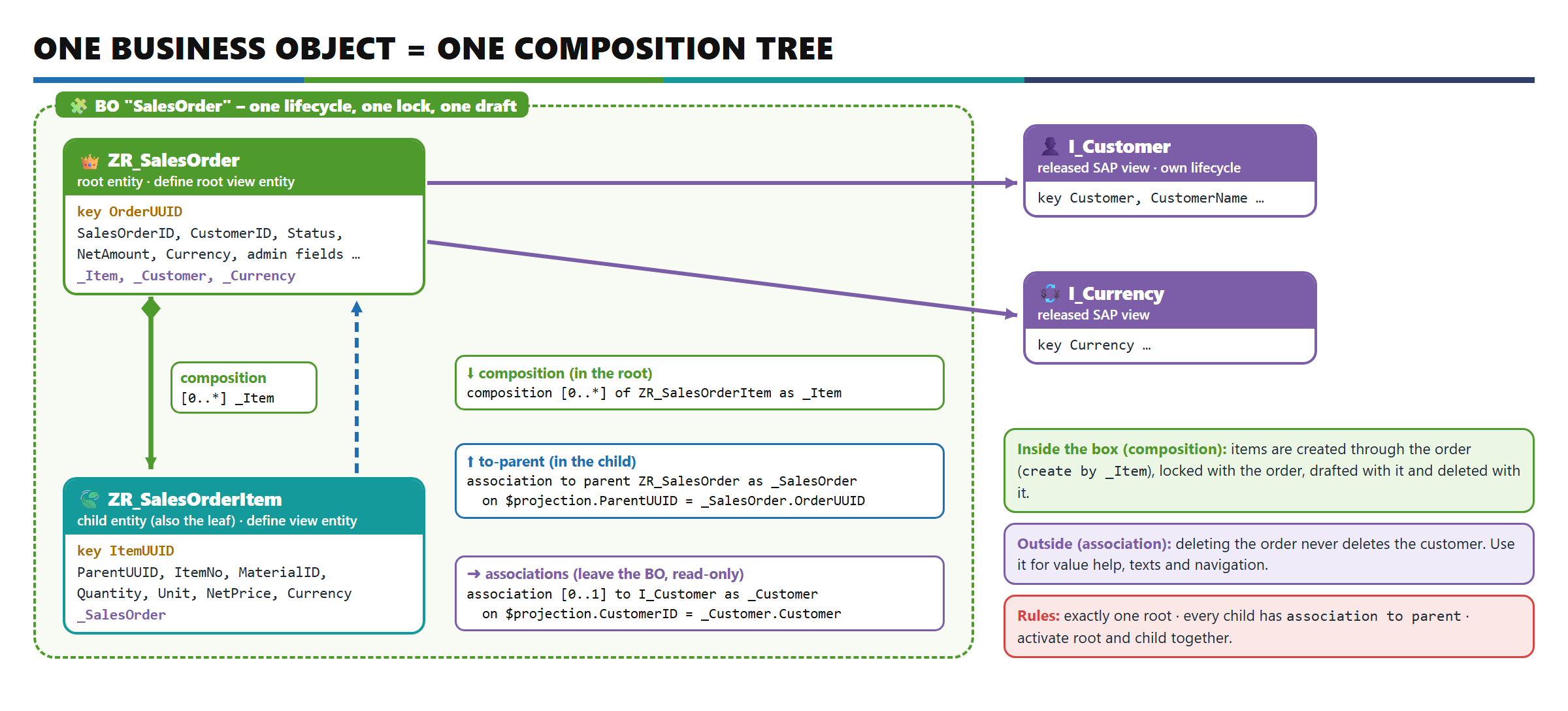
Tables store data; CDS view entities give it business names, relationships and meaning. The base views (ZR_) form the tree of the business object – a root for the order and a child for its items – and everything else in RAP (behavior, projection, EML, OData) is built on them. The composition is how R1 ("an order with several items") becomes one business object.
5.1 The root and child view entities
ADT: right-click the table → New Data Definition → template *Define Root View Entity* for the header, *Define View Entity* for the item. The CDS names (CamelCase) are what RAP, EML and OData use from now on.
|
|
- Activation: create both, then activate them together (they refer to each other).
- Master data comes from released SAP views:
I_Customerin S/4HANA. In the BTP trial use the flight model's/DMO/I_Customerinstead. StatusCriticality(R2) is a calculated element: Fiori uses it for the status colour (→ 03 · Projection, UI, Access Control & Service). It is not in the table, so the BDEF marks it read-only (→ 04 · Behavior Definition & Behavior Pool).
5.2 Root, child, composition, association
Association | Composition | |
|---|---|---|
Relationship | Loose link ("uses") | Whole–part ("consists of") |
Cardinality | Any: |
|
Child exists without parent? | Yes (SalesOrder → Customer) | No (an item only inside its order) |
Delete parent | Target stays | Children deleted too (R1: delete an order) |
Locking / ETag / auth | Independent | Children follow the parent (lock / authorization dependent) |
CDS syntax | association [0..1] to … |
|
Navigation |
|
|
In the BDEF | Nothing needed (read-only) |
|
- Root: the top entity,
define root view entity, exactly one per BO. Child: an entity reached by composition. Leaf: a child with no children of its own (here the item is both child and leaf). - 1:1 vs 1:n:
[0..1]= at most one target (customer of an order),[0..*]= many (items of an order). - Common mistake: modelling master data (customer, material) as a composition. They have their own lifecycle – use an association.
- Common mistake: forgetting
association to parentin the child – the composition does not activate.
Part 6 – VDM naming and key annotations in the base view
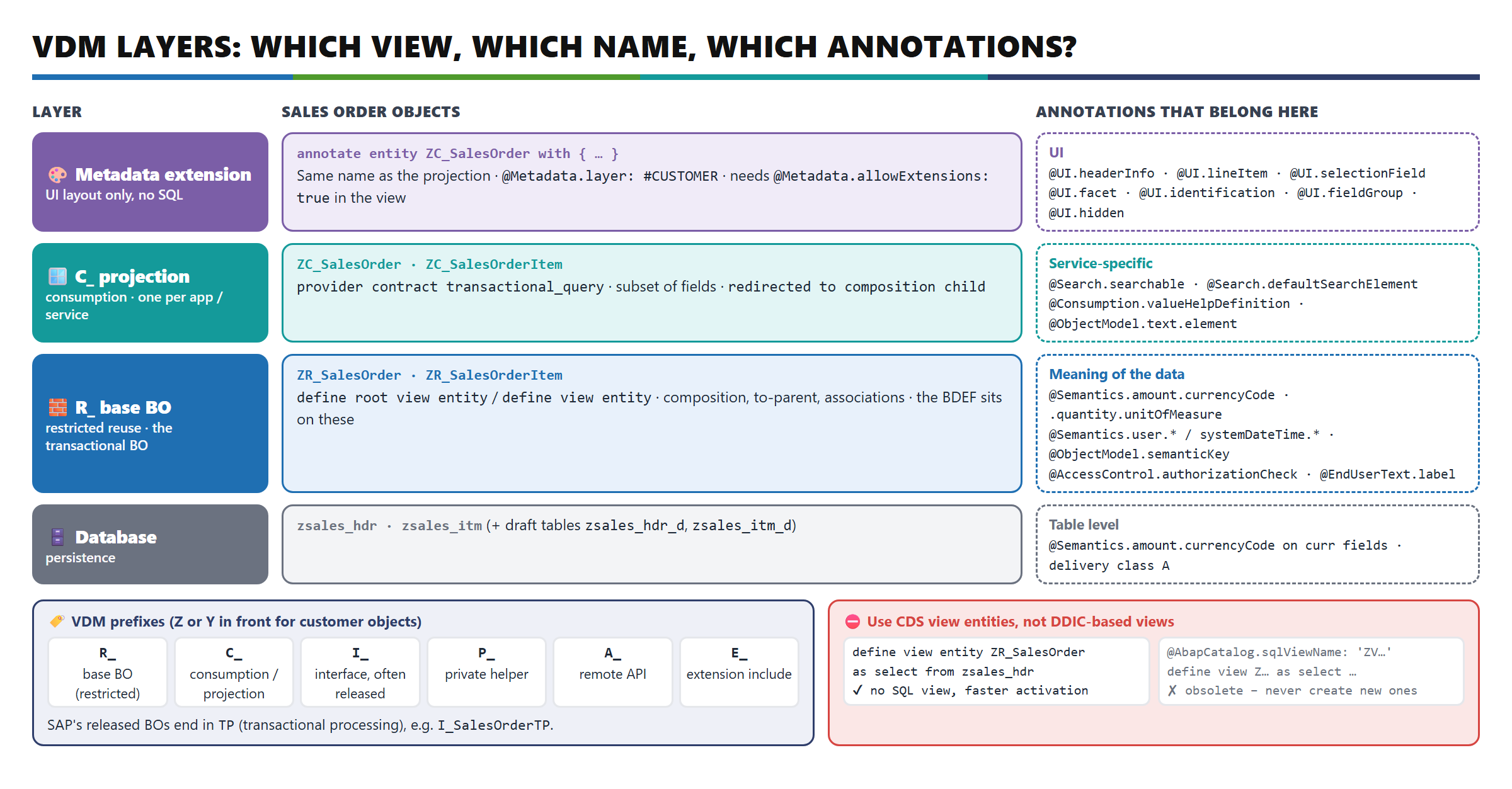
SAP's Virtual Data Model (VDM) gives each view a prefix that says its job. Following it makes your BO look like SAP's own and tells every reader where to put which annotation.
6.1 VDM prefixes
Prefix | Meaning | Sales order example |
|---|---|---|
R_ | Restricted reuse view – the base BO the BDEF sits on | ZR_SalesOrder |
C_ | Consumption view – projection for one app or API | ZC_SalesOrder, ZC_SalesOrderApv |
I_ | Interface view – stable, often released for reuse; also BO interfaces | ZI_SalesOrderTP, ZI_CustomerVH |
P_ | Private helper view, not for direct use | – |
A_ | Remote API view (published OData APIs) | – |
E_ | Extension include view for customer fields | – |
- SAP's released transactional BOs end in TP (transactional processing), e.g.
I_SalesOrderTP(used for R18 → 11 · Files, Custom Entities & Integration). Older tutorials usedZI_for the base view; the ADT generator and current guidelines useZR_. - Always create CDS view entities (
define view entity). DDIC-based views (define view+@AbapCatalog.sqlViewName) are obsolete, create an extra SQL view and cannot be created in ABAP for Cloud Development.
6.2 Key annotations in the base view
Annotation | Effect | Example |
|---|---|---|
@AccessControl.authorizationCheck |
|
|
@EndUserText.label | Description of the view and default label | 'Sales order' |
@ObjectModel.semanticKey | The human key: shown bold in Fiori, used in draft messages | [ 'SalesOrderID' ] |
@Semantics.amount.currencyCode | Amount ↔ currency field | NetAmount → Currency |
@Semantics.quantity.unitOfMeasure | Quantity ↔ unit field | Quantity → Unit |
| Admin fields filled by managed RAP | CreatedBy, LastChangedAt |
@ObjectModel.text.element | Which element holds the text for a code | CustomerID → CustomerName |
@Semantics.text: true | Marks an element as a text (in value help or text views) | CustomerName |
@Metadata.allowExtensions: true | Allows a metadata extension (usually on the projection) | ZC_SalesOrder |
- Rule of thumb: meaning of the data (semantics, keys, access control) goes in the base view; anything a specific app needs (search, value help, UI) goes in the projection or metadata extension (→ 03 · Projection, UI, Access Control & Service).
Part 7 – Interview questions
Q1. How do you start a RAP project – generator or by hand?
For a standard managed BO on new tables I let the ADT generator ("Generate ABAP Repository Objects → OData UI Service" or the wizard from scratch) create the stack, then adapt names, annotations and behavior. I build by hand when I wrap existing tables or logic, or when the generated structure doesn't fit. Either way I must understand every object, because I maintain it afterwards.
Q2. Which administrative fields does a RAP table need and why?
CreatedBy/CreatedAt, LocalLastChangedBy/LocalLastChangedAt and LastChangedAt, typed with the abp_* data elements and annotated with @Semantics.user.* / @Semantics.systemDateTime.*. A managed BO fills them automatically; LocalLastChangedAt is the ETag of the instance and LastChangedAt the total ETag that draft uses to detect changes to the active data.
Q3. Composition vs association?
A composition is a whole–part relation: the item cannot exist without its order, is created through it, locked via it and deleted with it, and the compositions define the BO tree. An association is a loose link to independent data such as the customer. Each composition child needs association to parent back to its parent.
Q4. Why a UUID key and a separate order number?
The UUID is drawn by the framework the moment an order is created, so the key never depends on a number range and works for drafts. The readable number SO-0000001 is a separate field (the semantic key) that can be assigned gap-free at save time with late numbering. Users see the number, RAP works with the UUID.
Q5. What do root, child and leaf mean, and what must exist for a composition to activate?
The root is the top entity (define root view entity, one per BO), a child is reached by composition, a leaf is a child without children. The root declares composition [0..*] of the child, the child declares association to parent with the ON condition on the parent key, and both are activated together.
Q6. Why CDS view entities and not DDIC-based CDS views?
DDIC-based views (define view with @AbapCatalog.sqlViewName) are obsolete: they create an extra SQL view in the dictionary, activate more slowly and cannot be created in ABAP for Cloud Development. View entities are the current CDS object type and what RAP BOs are built on.
Q7. How do you fill test data in ABAP Cloud without reports?
With a console class that implements if_oo_adt_classrun and runs with F9 in ADT. For a quick start it inserts directly into the tables; once the BO exists, I create the data with MODIFY ENTITIES and COMMIT ENTITIES, so determinations and validations run as in the app.
Q8. Which annotations belong in the base view and which in the projection?
The base view (ZR_) carries what is true for every consumer: semantic key, currency and unit references, admin field semantics, text relations and the access control check. The projection and its metadata extension carry what one app needs: search, value help, UI layout and labels. That keeps the base BO reusable for several apps and APIs.
🏠 Start Here · ◀ 01 · Foundations · 03 · Projection & Service ▶ · Sections: CORE ABAP | OOPS ABAP | ABAP on HANA | Clean Core | RAP | ABAP Points | SAP Fiori | SAPUI5 | Mobile Development (MDK) | BTP Foundations | BTP Development | CAP | SAP Build | ABAP on BTP | Integration Suite | SAP Business AI | SAP BASIS | Security | SAP SDLC
Functional: FICO ABAP | TRM ABAP | VIM | SAP BIS | SD ABAP | MM ABAP | PP ABAP | QM ABAP | PM ABAP | PS ABAP | EWM | TM ABAP | EHS ABAP | HR ABAP | BW | SAP MDG | SAP Analytics Cloud | SAP Ariba | SAP CX | SAP IBP