This page keeps two reps from overwriting each other and keeps unfinished orders (R10): pessimistic locks, ETags and the total ETag, draft with its tables, actions, lifecycle, draft query views and collaborative draft; then side effects that refresh the net amount at once (R5).
Part 1 – Two users, one order, unfinished work
Rep A opens order SO-0000001 at 10:00 to add an item. At 10:02 rep B opens the same order to change the delivery date. Rep A goes to lunch with half-typed changes; meanwhile the manager wants to approve. Without protection the last save silently overwrites the others (a lost update), and rep A's unfinished input is lost if the browser closes. This page shows how RAP keeps unfinished work, stops users from overwriting each other, and refreshes derived values on the screen at once.
Requirements on this page
R-ID | Requirement | Where on the page |
|---|---|---|
R10 | Unfinished orders are kept; no two users overwrite each other | Part 2 (locks, ETags, total ETag), Part 3 (draft, collaborative draft) |
R5 | Net amount = sum of item net values, refreshed at once | Part 4 (side effects; the calculation itself → 05 · Business Logic & Messages) |
Tool | Protects against | Sales Order example |
|---|---|---|
Lock (pessimistic) | Two users changing at the same time | Rep B cannot Edit while rep A edits |
ETag (optimistic) | Saving a change based on an old copy | Rep B's save is rejected (HTTP 412) after rep A saved |
Total ETag | Resuming a draft whose active order changed meanwhile | Rep A's parked draft becomes outdated after someone else saved |
Draft | Losing unfinished input | Rep A's half-typed order survives lunch and a browser crash |
Side effect | The screen showing stale derived values | Net amount updates as soon as a quantity changes |
Part 2 – Locking and ETags (R10)
RAP protects against lost updates twice: a lock stops a second user while the first is changing the order ("occupied" sign on a meeting room), and an ETag – a version stamp – rejects a change that was based on an old copy ("this document has changed since you opened it").
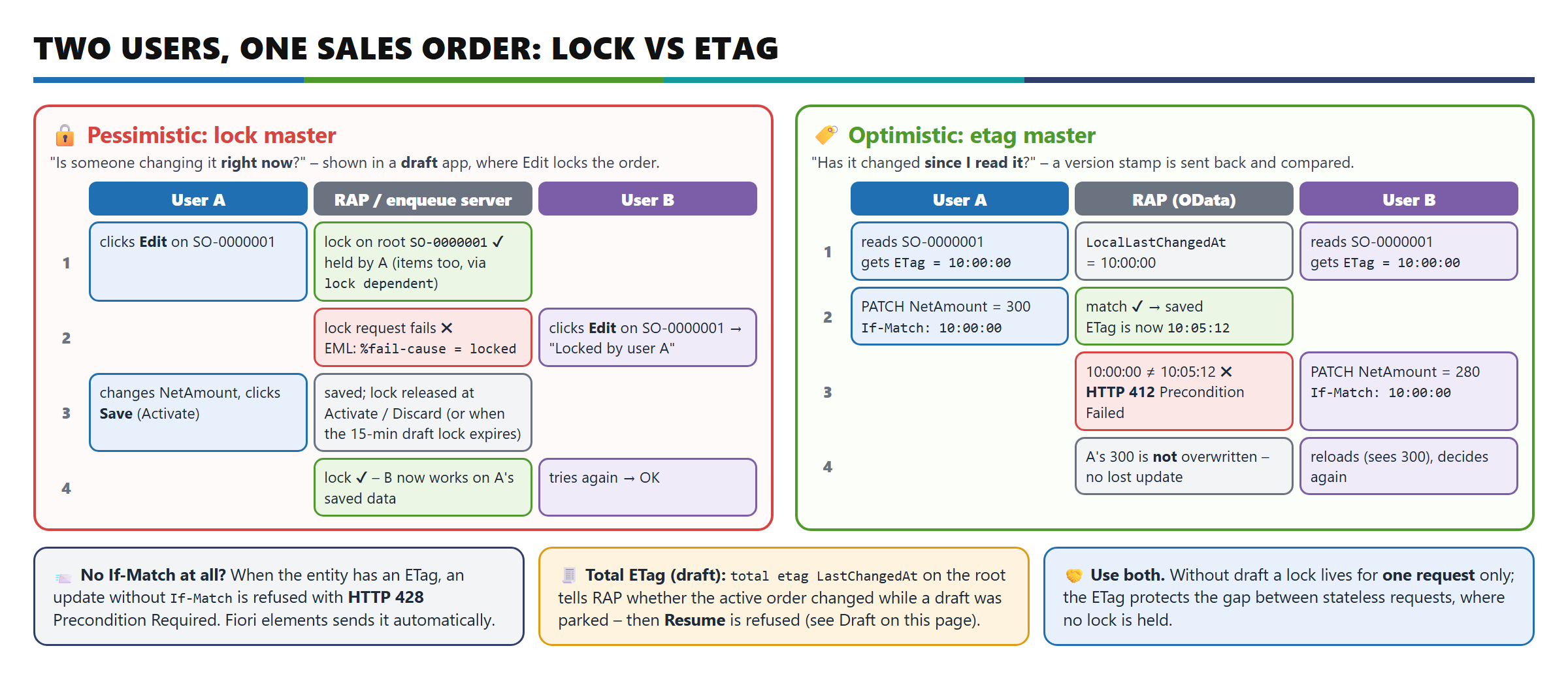
Lock (pessimistic) | ETag (optimistic) | |
|---|---|---|
Question | "Is someone else changing it right now?" | "Has it changed since I read it?" |
How | Enqueue lock on the root instance | Compare a timestamp sent back by the client |
When it fails | Request rejected: instance locked ( | Request rejected: data outdated – HTTP 412 |
Lives for | One request (no draft) or as long as the draft lock (draft) | Across stateless requests – no server state |
BDEF |
|
|
2.1 Pessimistic locking: lock master and dependent
|
- The lock is always set on the root: changing item 10 locks order SO-0000001 with all its items. Two users can therefore never change different items of the same order at the same time.
- Managed BOs lock automatically for update, delete, create-by-association and actions (
lock : noneon an action switches that off). Unmanaged BOs implement thelockmethod (FOR LOCK); a managed BO can do the same withlock master unmanagedwhen it must use an existing lock object. - Locks are released at the end of the RAP transaction (save or rollback). In a draft app the lock is set by Edit and held while the draft is protected (Part 3).
- EML can lock explicitly with
SET LOCKS(→ see 08 · EML).
Own lock method in ABAP Cloud style, with a lock object EZ_SALES_HDR on zsales_hdr (the classic ENQUEUE_EZSALES_HDR variant for legacy code → see 09 · Unmanaged Scenario & Save Variants):
|
2.2 Optimistic locking: etag master
|
How it works over OData: every read returns the ETag (the value of LocalLastChangedAt). Fiori sends it back in the If-Match header of the next PATCH, DELETE or action. RAP compares it with the current value:
Situation | HTTP result | What the user sees |
|---|---|---|
ETag matches | 200 / 204 – change saved, new ETag returned | Normal save |
ETag differs (someone saved in between) | 412 Precondition Failed | "The data has been changed by another user" – reload and redo |
No | 428 Precondition Required | Only for hand-written clients – Fiori always sends it |
- The ETag field must change on every change of the instance.
LocalLastChangedAt(@Semantics.systemDateTime.localInstanceLastChangedAt: true, data elementabp_locinst_lastchange_tstmpl) is set by the managed framework automatically; keep it read-only in the BDEF.CreatedByorLastChangedByare poor ETag fields: they do not change on every save. - An unmanaged BO must update the ETag field itself on every save – otherwise the check never fails.
2.3 Total ETag
total etag LastChangedAton the root is mandatory with draft and is written afterlock master. Its value changes whenever the active order is saved, and it is copied into the draft at Edit. When the user resumes a draft, RAP compares both values: different = the active order changed meanwhile, the draft is outdated and cannot be resumed (Part 3).- Use a different field than the instance ETag:
LastChangedAt(@Semantics.systemDateTime.lastChangedAt: true) for the total ETag,LocalLastChangedAtfor the instance ETag.
2.4 The keywords side by side
Keyword | On which entity | Effect |
|---|---|---|
lock master | Root (one lock master per BO) | Enqueue lock for the whole order during a change |
lock dependent by _SalesOrder | Children | Lock request is forwarded to the order |
etag master LocalLastChangedAt | Root and/or children with an own ETag field | Per-instance version check (412) |
etag dependent by _SalesOrder | Child without own ETag field | Uses the order's ETag |
total etag LastChangedAt | Root, draft BOs | Detects outdated drafts on Resume |
use etag | Projection BDEF | Exposes the ETag in the service |
Common mistakes
- Thinking a lock is enough in a stateless app: without draft the lock lives for one request only. Between the read and the save only the ETag protects the data.
- Forgetting
use etagin the projection BDEF – the service then sends no ETag and lost updates are possible again. - Using the same field for
etag masterandtotal etag, or a field that is not updated on every change. - Interview tip: "Lock = pessimistic, enqueue on the root,
lock master/lock dependent. ETag = optimistic,If-Match, 412 when outdated, 428 when missing. Total ETag = detects outdated drafts."
Part 3 – Draft (R10: unfinished orders are kept)
Draft lets reps work like in a desktop app: changes are stored on the server as a draft while they type, checked, and only activated when the user clicks Save. OData is stateless – the server keeps no session between requests – so without draft a rep could not keep unfinished input, and a browser crash would lose everything. A draft is like a saved e-mail draft: private, kept across sessions, and sent only when you decide.
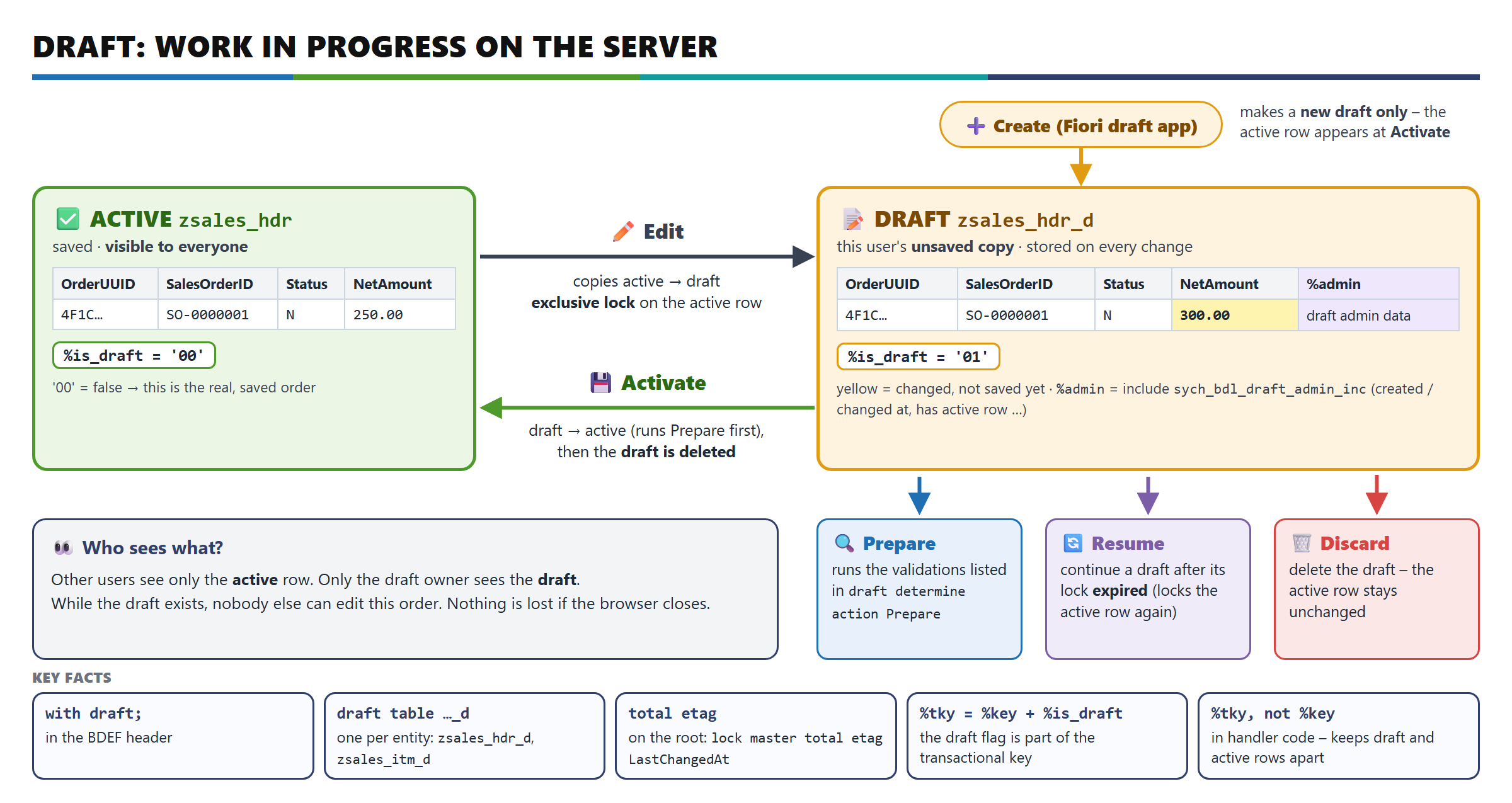
3.1 What changes in the BO
|
Activate optimized(BTP 2308 / ABAP 7.58 onwards) is the faster activation the ADT generator writes; use it for new BOs.- The active tables (
zsales_hdr,zsales_itm) do not change at all. Draft data lives only in the draft tables. - In strict mode the syntax check reports errors until all draft actions are declared explicitly.
3.2 Draft tables and the admin include
- After adding
draft table zsales_hdr_dto the BDEF, the quick fix (Ctrl+1) generates the table: one field per CDS element (named like the element, so no mapping is needed) plus the draft admin include.
|
- The include
sych_bdl_draft_admin_incholds the draft's technical data, such as creation and last-change time of the draft, whether an active row exists, and the link to the draft administration record. - Regenerate the draft table (or add the field by hand) every time you add a field to the CDS view – otherwise activation fails or the field is lost in the draft.
- With late numbering the draft table needs an extra key field
DRAFTUUID(→ see 06 · Feature Control, Authorization & Numbering).
3.3 New draft vs edit draft
New draft | Edit draft | |
|---|---|---|
Created by | Create in a draft app | Edit on an existing order |
Active row | None yet – it appears at the first Activate | Exists in parallel, unchanged until Activate |
Lock | Nothing to lock | Exclusive lock on the active order |
Activate does | CREATE of the active order | UPDATE of the active order |
Discard does | Deletes the draft – the order never existed | Deletes the draft – the active order stays |
3.4 Draft actions
Draft action | What it does | Feature / auth control |
|---|---|---|
Edit | Copies the active instance (with its items) to the draft tables and sets an exclusive lock on the active instance | Yes – disabled for approved orders (R7 → page 06) |
Activate optimized | Runs Prepare, then creates or updates the active data from the draft and deletes the draft – in the buffer; the save sequence writes the database | No |
Discard | Deletes the draft; the active data stays as it was | No |
Resume | Re-creates the lock when a user returns to a draft whose lock expired – only if the total ETag shows the active data is unchanged | – |
Prepare ( | Runs the validations and on-save determinations listed in it, before activation; Fiori also calls it before Save | No |
- Newer releases add
draft action AdditionalSave(BTP 2308) for saving extra data at activation – check your release.
3.5 Draft lifecycle: 15-minute lock, 28-day expiry
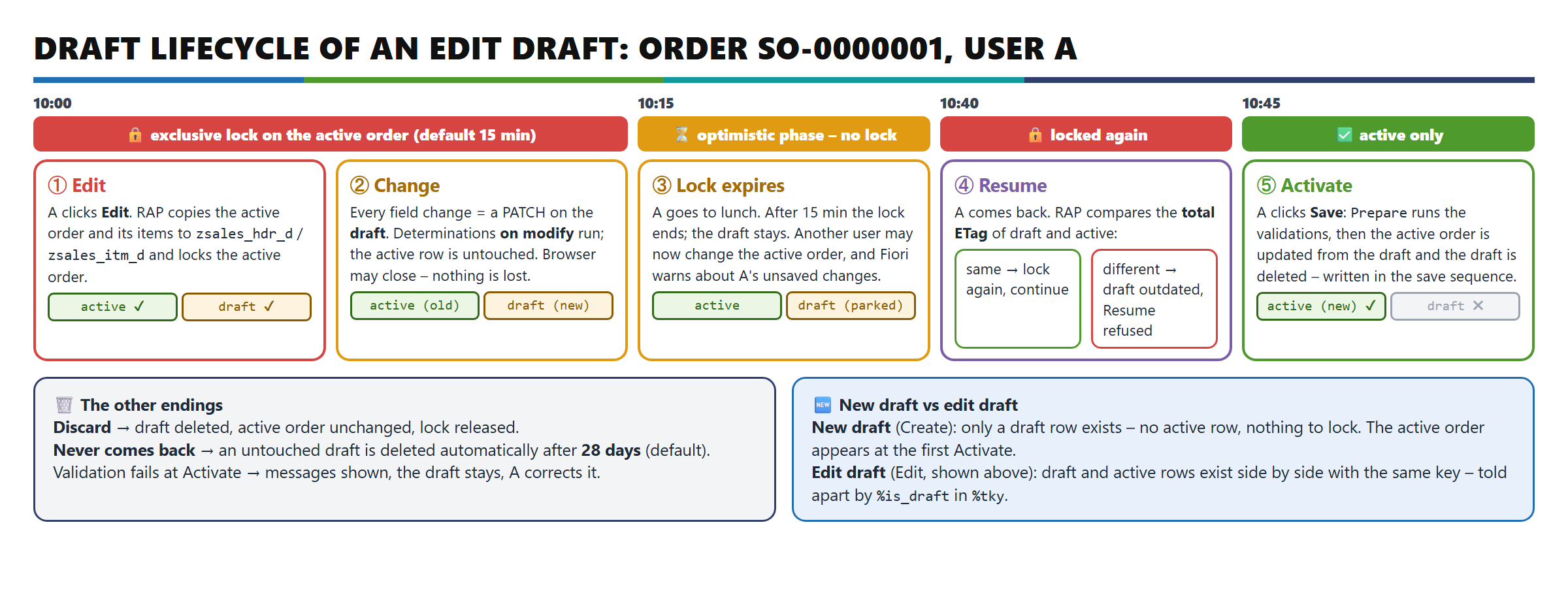
- Exclusive lock phase: after Edit the active order is locked for the draft owner – by default for 15 minutes after the last activity, even if the session ends. Rep B sees "locked by" and cannot edit.
- Optimistic lock phase: after the lock expires the draft still exists but holds no lock. Rep B may now edit the order; Fiori warns about rep A's unsaved changes.
- Resume: rep A continues. RAP compares the total ETag of draft and active order – unchanged → lock again; changed (rep B saved) → the draft is outdated and cannot be resumed.
- Expiry: a draft nobody touches is deleted automatically after 28 days by default. Both values are defaults that administrators can change.
3.6 What Fiori sends – draft requests over OData V4
User does | OData V4 request | RAP does |
|---|---|---|
Create | POST | create with |
Types in a field | PATCH | update of the draft, determinations on modify, side effects |
Edit | POST bound action | Edit: copy to draft + lock |
Save | POST | validations; activation; save sequence |
Cancel / Discard | DELETE the draft | Discard |
IsActiveEntityin the URL is the OData view of%is_draft(true = active, i.e.%is_draft = mk-off).
3.7 %is_draft and %tky in code
%tky=%is_draft+ key (+%pidwith late numbering). The sameOrderUUIDexists twice – as draft and active – so handler code must always pass%tky, never%key.if_abap_behv=>mk-on= draft instance,mk-off= active instance.- Validations run on Prepare/Activate, not on every keystroke; determinations on modify run on every change of the draft (→ see 05 · Business Logic & Messages).
|
3.8 Draft query views, collaborative draft and cross-BO draft (newer releases)
- Draft query view – CDS access control on the active view does not apply to draft rows, so the sales-organisation restriction of R3 would not cover drafts. A draft query view is a CDS view entity on the draft table (
@AccessControl.authorizationCheck: #MANDATORY) with its own access control, usuallyinheriting conditions from entity ZR_SalesOrder. The BDEF names it after the draft table:draft table zsales_hdr_d query ZR_SalesOrder_D_Query. Check your release. - Collaborative draft (BTP 2508; S/4HANA 2025 onwards – check your release): the R10 option where several users work on the same draft, e.g. two reps completing a large order together; the owner invites others with the draft action
Share. BDEF:with collaborative draft;anddraft action Share;; projection:use collaborative draft;anduse action Share;. It needs a draft query view on the authorization master. - Cross-BO draft: BOs connected by cross-BO associations can share one draft scope (
with cross associations;in the header,use draft as dependent;in the dependent projection) – check your release.
Common draft mistakes
- Forgetting a validation in
Prepare– it then runs only in the save sequence and the user gets the message later than expected. - No
total etagon the root – syntax error for draft BOs; or a total ETag field that does not change on save, so outdated drafts are not detected. - Draft table not regenerated after a new field was added to the CDS view.
- Using
%keyinstead of%tky, or reading the active table withSELECTinside a handler – the draft values are not there. Read withREAD ENTITIES … IN LOCAL MODEso draft and buffer are respected. - Missing
with drafton an association, oruse draft/use action …in the projection – buttons missing or runtime errors on Edit. - Drawing numbers on modify: every discarded new draft burns a number (→ see 06 · Feature Control, Authorization & Numbering).
- Interview tip: "Draft = server-side unsaved copy in a separate table with the admin include. New vs edit draft. Edit locks (15 min default), Activate = Prepare + copy + delete draft, Resume checks the total ETag, drafts expire after 28 days. Always
%tky."
Part 4 – Side effects (R5: net amount refreshed at once)
R5 wants the order's Net Amount to show the new total as soon as a rep changes an item quantity. The backend already calculates it (determination calculateTotal → internal action recalcTotal, → see 05 · Business Logic & Messages). But a draft app does not reload the whole page after every keystroke – that would be slow – so the screen keeps showing the old total until the user refreshes. Side effects tell the Fiori UI which data to reload after a change.
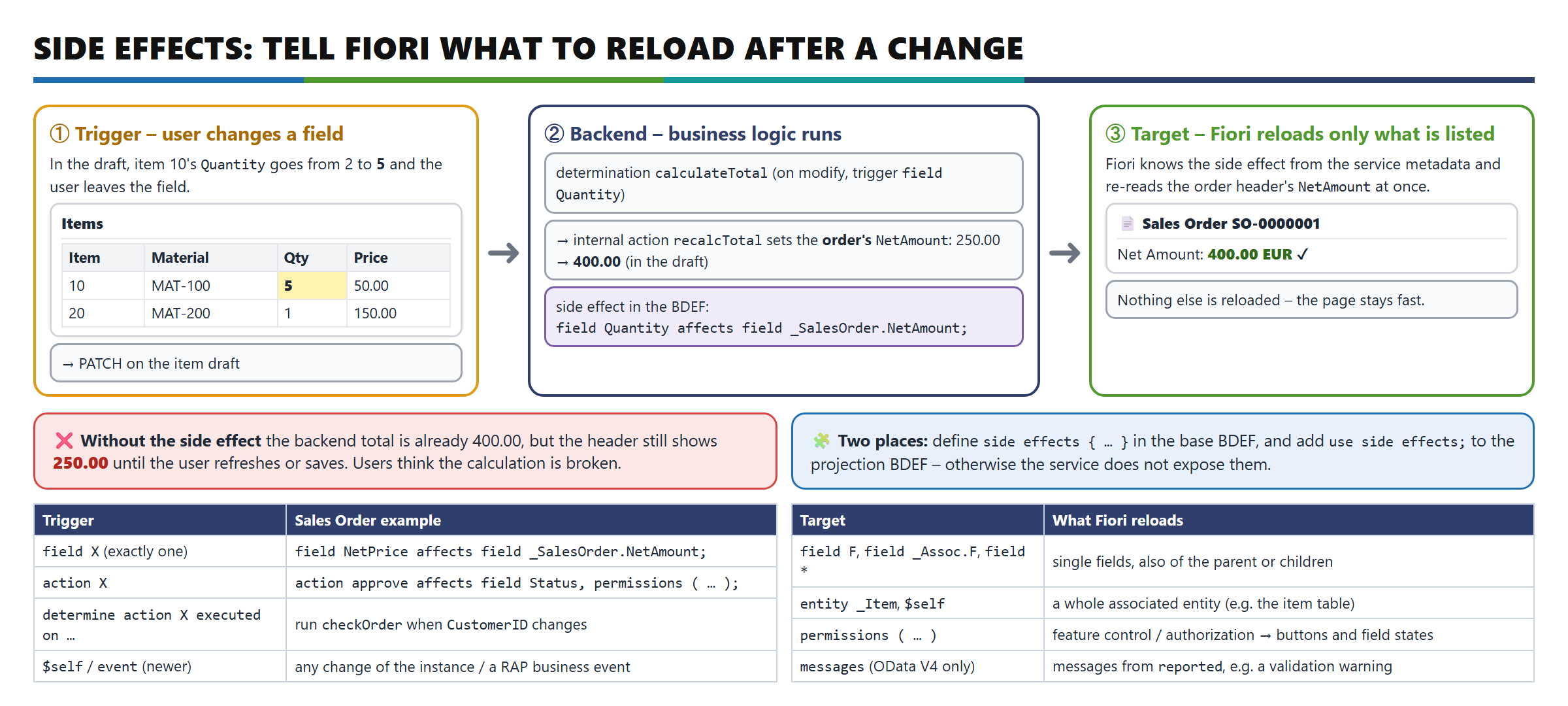
4.1 Syntax
|
- A side effect is trigger
affectstargets, several targets separated by commas. List all targets of one trigger in one side effect. - Side effects are defined on the data model (base BDEF) and switched on per service with
use side effects;in the projection BDEF. Fiori finds them in the service metadata. The determine actioncheckOrdermust also be exposed in the projection BDEF (→ see 04 · Behavior Definition & Behavior Pool).
4.2 Triggers and targets
Trigger | Fires when | Sales Order example |
|---|---|---|
field X | The user changes field X and leaves it |
|
action X | Action X was executed | action approve affects field Status, permissions ( … ) |
determine action X executed on … | A change of the listed fields (a field group: when the cursor leaves the group) or of an associated entity; runs the determine action first | Run |
$self | Any create, update or delete of the instance | Reload associated data after any change |
event X | A RAP business event declared | Refresh when a background job changed the order |
Target | What Fiori reloads |
|---|---|
| Single fields of this instance, of the parent/children via an association path, or all fields of the instance |
| A whole associated entity (e.g. the item table) or the instance itself |
permissions ( action …, field …, create _Assoc … ) | Feature control and authorization – button and field states |
messages | Messages from REPORTED, e.g. a validation warning (not with OData V2) |
- With a
$selftrigger you cannot target fields of the same entity – only associated entities.
4.3 How it plays together in the Sales Order app
- R5 – item quantity changes → determination
calculateTotal(on modify) calls the internal actionrecalcTotal→ the order'sNetAmountchanges in the draft → the side effect reloads_SalesOrder.NetAmount. - R7 – Approve clicked →
Statusbecomes A → feature control now disables Approve and Reject →permissions ( … )makes Fiori fetch the new button states without a page refresh. - R6 – customer typed → determine action
checkOrderrunsvalidateCustomeron the draft →affects messagesshows "customer does not exist" immediately instead of at Save.
4.4 Releases and newer variants
- Side effects in the BDEF are available since BTP 2302 / S/4HANA 2023 (ABAP 7.58). Before that they could only be defined as annotations in the Fiori app (local annotation file). Check your release.
- Event-driven side effects (BTP 2502 – check your release): an event declared
event X for side effects;and a side effectevent X affects field …refresh the UI when the data changes in the background, e.g. when the nightly job of R12 approves an order. The event is raised in the save sequence (→ see 10 · Business Events & Event-Driven RAP). - Global side effects (BTP 2511 – check your release): a determine action side effect that is not tied to one field (
determine action X executed on global affects …). Check the BDL documentation of your release for the exact syntax.
Common mistakes
- Defining the side effect in the base BDEF but forgetting
use side effects;in the projection – nothing happens and there is no error. - Expecting a side effect to calculate something. It only reloads; the value must be computed by a determination or action in the backend.
- Splitting the targets of one trigger over several side effects – list them in one.
- Targeting
messagesin an OData V2 service – supported by OData V4 only. - Interview tip: "Side effects are UI hints: trigger (field, action, determine action,
$self, event) affects targets (fields, entities, permissions, messages). Defined in the base BDEF since 2302 / S/4HANA 2023, enabled withuse side effectsin the projection."
Part 5 – Interview questions
Q1. ETag vs lock?
An ETag is an optimistic check that the data has not changed since it was read; the request is rejected (HTTP 412) if it has, and with 428 if the client sent no If-Match. A lock is a pessimistic exclusive enqueue lock on the root while changing. The total ETag detects whether the active data changed while a draft existed.
Q2. Why is the lock always on the root, and what does that mean for items?
Children are lock dependent by _SalesOrder, so every item change requests the lock of its order. Two users can never change different items of the same order at the same time – the whole order is one unit of consistency.
Q3. What is draft and what do you need for it?
Draft stores unfinished work in draft tables so users can continue later, while OData stays stateless. You need with draft, a draft table per entity, a total ETag on the root, with draft on associations, the draft actions Edit, Activate, Discard, Resume and Prepare, and use draft in the projection. Handlers use %tky because the same key exists as draft and active.
Q4. What happens when a draft's exclusive lock expires?
After the default 15 minutes the draft enters the optimistic phase: it still exists but holds no lock, so another user may edit the active order. When the owner returns, Resume compares the total ETag of draft and active order; if the active order was saved meanwhile, the draft is outdated and cannot be resumed. Untouched drafts are deleted after 28 days by default.
Q5. Why do you need a draft query view?
The DCL of the active view does not cover draft rows, so restrictions such as the sales organisation would not protect drafts. A draft query view is a CDS view on the draft table with its own access control (usually inheriting the active view's conditions), named in the BDEF with draft table … query …. It is mandatory for collaborative draft.
Q6. What is collaborative draft?
Several users work on the same draft at the same time; further users are added through the draft action Share. The BDEF declares with collaborative draft; and draft action Share;, the projection use collaborative draft; and use action Share;, and a draft query view is required. Available since BTP 2508 and S/4HANA 2025 – check your release.
Q7. What are side effects?
Side effects, declared in the BDEF and enabled with use side effects in the projection, tell the Fiori UI which fields, entities, permissions or messages to reload after a field change, action, determine action or event. Example: a changed item quantity reloads the order's net amount at once.
Q8. Scenario: users see "instance not found" only in the draft app. What do you check?
Whether the handlers use %key instead of %tky. In a draft BO the same key exists as draft and active, so READ, MODIFY, FAILED and REPORTED must use %tky (or CORRESPONDING #( keys ), which keeps %is_draft). I'd confirm in the debugger by looking at %is_draft in keys.
Q9. Scenario: the order total in the header doesn't update when an item quantity changes.
First check that the determination calculateTotal fires on the item fields Quantity and NetPrice and writes the header with IN LOCAL MODE (e.g. through the internal action recalcTotal). If the value is correct after a refresh, the backend is fine and the UI just didn't reload: add a side effect field Quantity affects field _SalesOrder.NetAmount and use side effects in the projection.
🏠 Start Here · ◀ 06 · Control, Auth & Numbering · 08 · EML ▶ · Sections: CORE ABAP | OOPS ABAP | ABAP on HANA | Clean Core | RAP | ABAP Points | SAP Fiori | SAPUI5 | Mobile Development (MDK) | BTP Foundations | BTP Development | CAP | SAP Build | ABAP on BTP | Integration Suite | SAP Business AI | SAP BASIS | Security | SAP SDLC
Functional: FICO ABAP | TRM ABAP | VIM | SAP BIS | SD ABAP | MM ABAP | PP ABAP | QM ABAP | PM ABAP | PS ABAP | EWM | TM ABAP | EHS ABAP | HR ABAP | BW | SAP MDG | SAP Analytics Cloud | SAP Ariba | SAP CX | SAP IBP