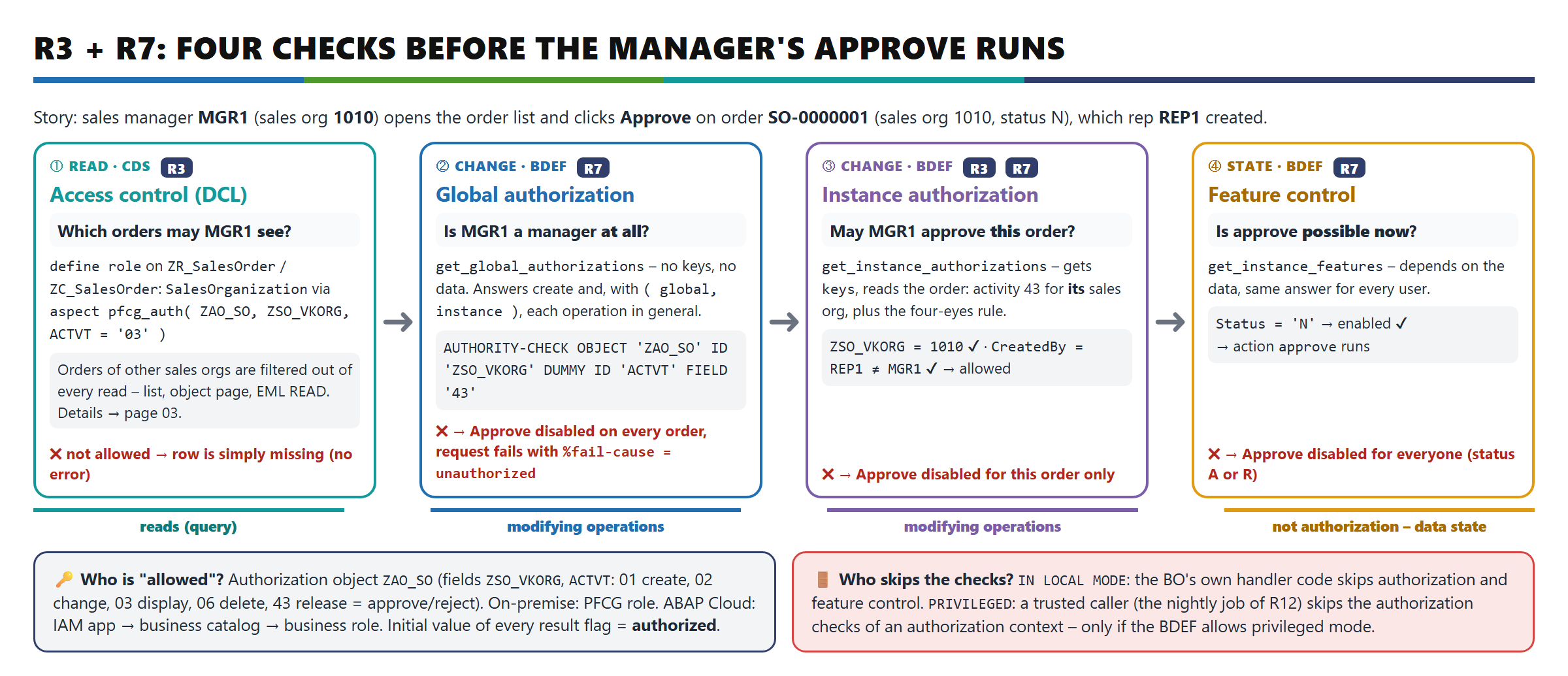
This page explains what may happen to a sales order and who may do it: instance and global feature control (R7 – Approve only for status N), global and instance authorization with the sales organisation and the manager role (R3, R7), privileged access, and numbering up to gap-free SO numbers drawn at save (R9).
Part 1 – What is possible, who is allowed, which number
Three questions decide whether a click in the Sales Order app works: is the operation possible for this order right now (feature control), is this user allowed to do it (authorization), and which number does a new order get (numbering). RAP answers all three in the BO, so the Fiori app, the approver app, Web API callers and EML programs all get the same answer.
Requirements on this page
R-ID | Requirement | Where on the page |
|---|---|---|
R3 | A rep sees and changes only orders of their sales organisation | Part 3 (instance authorization by |
R7 | Manager approves or rejects; Approve only for status N and only for managers | Part 2 (status N = feature control), Part 3 (managers = authorization) |
R9 | Gap-free order numbers SO-0000001… assigned only when the order is saved | Part 4 (late numbering with a number range) |
Mechanism | Question | Depends on | Sales Order rule |
|---|---|---|---|
Feature control | Is it possible now? | The order's data, same for every user | R7 – Approve, Reject, Edit, Delete only while Status = N |
Authorization | Is this user allowed? | The user's roles (and the order's sales org) | R3 – only own sales org; R7 – only managers approve |
Numbering | Which key does a new order get, and when? | The BDEF declaration | R9 – SO-0000001… drawn at save, no gaps |
- Feature control and authorization can both grey out the Approve button, but they live in different methods and must not be mixed: a status rule never goes into authorization, a user right never into feature control.
Part 2 – Feature control (R7: Approve only for status N)
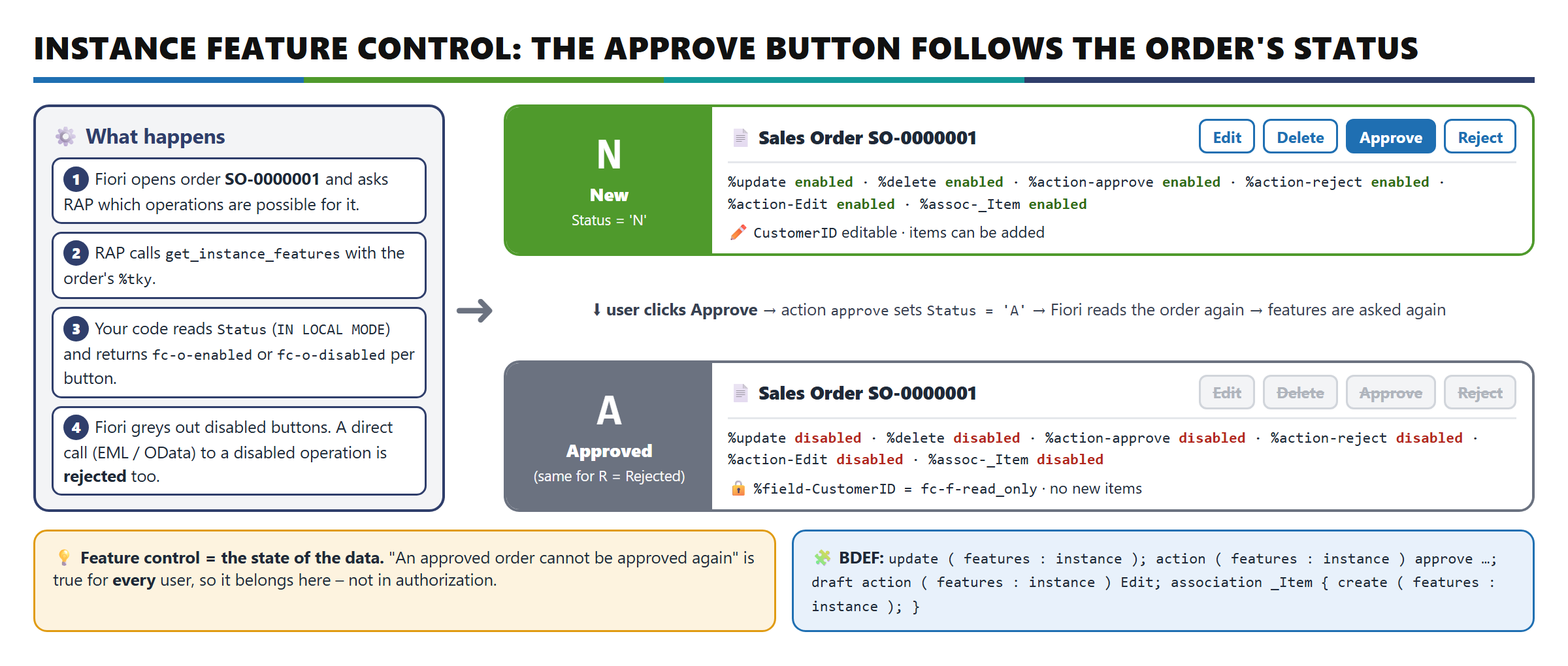
R7 says an order can be approved only while it is New. After approval it must not be approved again, edited or deleted. Think of a vending machine: the button for a sold-out drink still exists, but its light is off and pressing it does nothing. Feature control lets the BO say which buttons and fields are switched on for each order, so Fiori greys them out and every other consumer gets the same rule.
2.1 Three kinds and two levels
Feature control works on two levels: operations (create, update, delete, actions, create-by-association – the buttons) and fields (read-only, mandatory – the input fields). It comes in three kinds, which differ in when the decision is made.
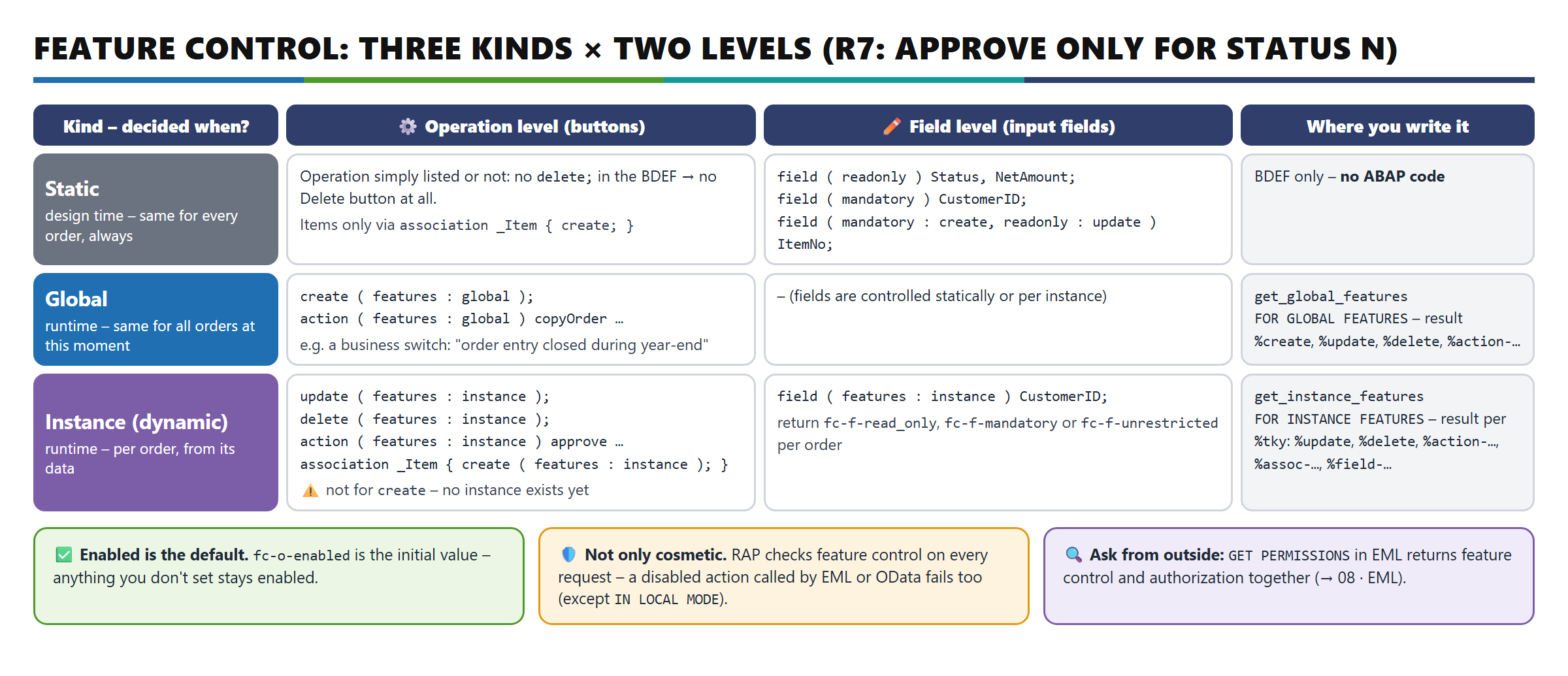
Kind | BDEF | Decided | Sales Order use |
|---|---|---|---|
Static |
| At design time – no code |
|
Global |
| At runtime in | Order entry closed during year-end (business switch) |
Instance (dynamic) |
| At runtime in | R7: Approve, Reject, Edit, Delete only for status N |
- Static field characteristics are part of the BDEF syntax → see 04 · Behavior Definition & Behavior Pool. This Part is about the dynamic kinds.
- Instance feature control is not possible for
create– there is no instance yet. Use global feature control (or authorization) for create. For items,create ( features : instance )on the association controls the Add item button per order.
2.2 BDEF – switching dynamic feature control on
|
- Each
features : instanceadds a component to the result ofget_instance_features:%update,%delete,%action-approve,%action-Edit,%assoc-_Item,%field-CustomerID. Without the keyword the component does not exist and the syntax check complains when you fill it. CustomerIDmoves fromfield ( mandatory )tofield ( features : instance ): the method now returns mandatory or read-only per order.
2.3 get_instance_features – Approve disabled after approval
|
Result: only New orders can be edited, deleted, approved, rejected or get new items, and only there is the customer typed (mandatory). For approved (A) and rejected (R) orders Fiori greys out the buttons and shows the customer as read-only text.
Constant (IF_ABAP_BEHV) | Level | Meaning |
|---|---|---|
fc-o-enabled | Operation | Operation possible (initial value – the default) |
fc-o-disabled | Operation | Operation not possible – button disabled, request rejected |
fc-f-unrestricted | Field | Editable, optional |
fc-f-read_only | Field | Read-only |
fc-f-mandatory | Field | Editable and required (UI marks it with an asterisk) |
- Use
%tky, never%key, in the result: in a draft BO the same order exists as draft and as active instance (→ see 07 · Locking, Draft & Side Effects). requested_featurestells you which components were asked for – skip expensive reads that nobody requested.- The method is called whenever Fiori needs the button states (when an object page or list is read, and again after an action). Keep it fast: one
READ ENTITIESfor all keys, no single reads in a loop.
2.4 get_global_features – a business switch
|
- No
keys, no instance data: the answer is the same for every order (%create,%update,%delete,%action-…).
2.5 Not only cosmetic
- RAP checks feature control on every modifying request, not only in the UI. An EML call or an OData request that executes
approveon an approved order fails with an entry in FAILED – unless the BO itself calls itIN LOCAL MODE(e.g. from a determination). - A consumer can ask in advance with EML
GET PERMISSIONS, which returns feature control and authorization together (→ see 08 · EML). - So that Fiori refreshes the button states right after Approve, the BO declares a side effect
affects permissions ( … )(→ see 07 · Locking, Draft & Side Effects).
Common mistakes
- Putting the user right of R7 ("only managers may approve") into feature control. Feature control is about the data state and is the same for every user; user rights belong to authorization (Part 3).
- Filling
%action-approvewithout( features : instance )on the action in the BDEF – syntax error. - Relying on
field ( mandatory )as the business check: it marks the field in the UI, but the rule (customer filled and valid) belongs in a validation (→ see 05 · Business Logic & Messages). Whether RAP itself also rejects an empty value depends on the characteristic and release – check your release. - Forgetting
%action-Editin a draft app: Delete is disabled but the user can still click Edit on an approved order. - Interview tip: "Feature control answers *is it possible now?* and depends on the data; authorization answers *is this user allowed?* and depends on the user. Static is in the BDEF, global and instance are methods; instance feature control cannot be used for create."
Part 3 – Authorization (R3 sales organisation, R7 managers)
Authorization decides what this user may do. In classical ABAP you wrote AUTHORITY-CHECK somewhere in the program, and every new program had to remember it. In RAP the checks are declared once in the BO and in CDS, and RAP calls them for every consumer – Fiori, Web API and EML. Like a building: the guard at the door decides who gets in (read), the key card decides which rooms you may change (modify).
The scenario uses one own authorization object ZAO_SO with two fields: ZSO_VKORG (sales organisation) and ACTVT (activity: 01 create, 02 change, 03 display, 06 delete, 43 release = approve and reject).
3.1 Read vs modify – two different mechanisms
Read access | Modify access | |
|---|---|---|
Defined in | CDS access control (DCL, | BDEF |
Protects | Which rows a user can see (list, object page, EML READ, value help) | create, update, delete, actions, create-by-association, Edit |
When it fails | Rows are silently filtered out – no error | Request rejected, FAILED with |
R3 in the app | Rep sees only orders whose | Rep may change only orders whose |
- R3 needs both halves. The DCL hides foreign orders from reads, but a Web API or EML caller that knows an order key could still try to change it – the instance authorization below closes that gap.
- Draft rows are not covered by the DCL of the active view; protecting them needs a draft query view (→ see 07 · Locking, Draft & Side Effects).
3.2 Global vs instance authorization
Global | Instance | |
|---|---|---|
Question | May the user do this at all? | May the user do this to this order? |
BDEF | authorization master ( global ) | authorization master ( instance ) |
Method |
|
|
Input |
|
|
Covers | create, static actions, and (with both declared) every operation in general | update, delete, instance actions, Edit, create-by-association – depends on the order's data |
Sales Order example | R7 – user has no ACTVT 43 for any sales org → not a manager, Approve disabled everywhere | R3 – order in sales org 1020, user has ZSO_VKORG 1010 only → no change; four-eyes rule for approve |
authorization master ( global, instance )declares both: instance operations are then checked globally and per instance.createcan only be checked globally – there is no instance yet.- Initial value = authorized. The result flags (
if_abap_behv=>auth-allowed/auth-unauthorized) start as allowed, so you only set the unauthorized cases.
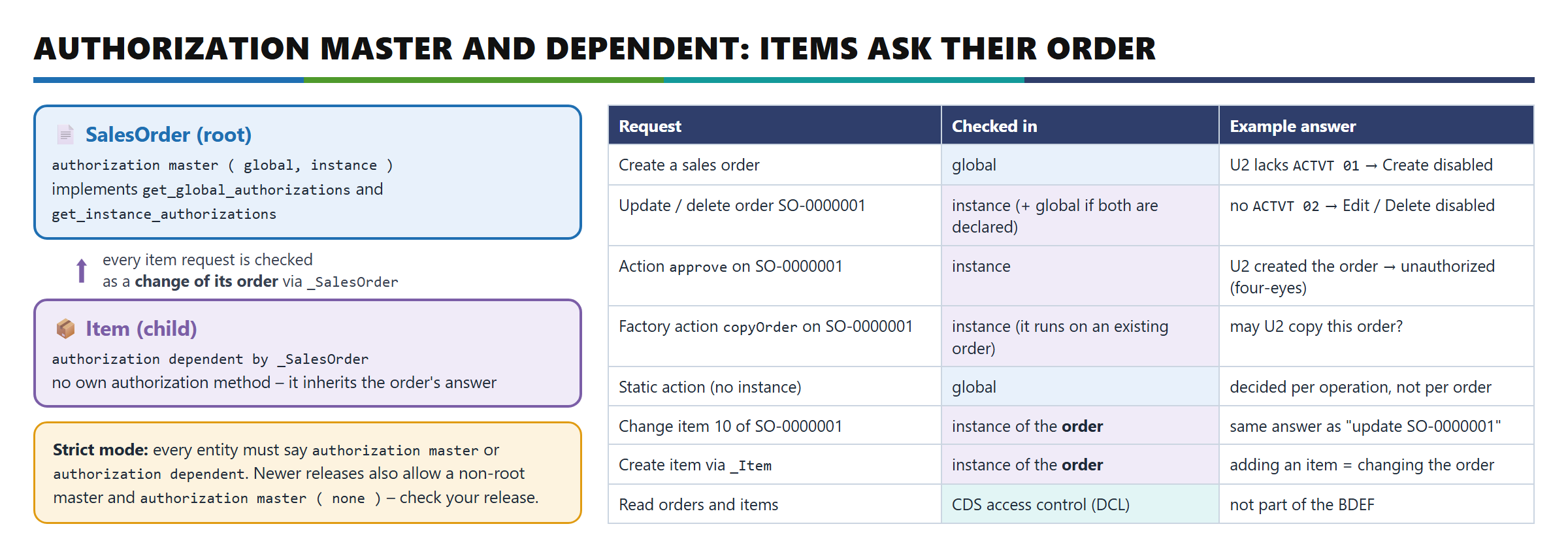
3.3 Master and dependent
|
- Changing, deleting or creating an item is checked by the order's instance authorization: adding an item to order SO-0000001 = changing order SO-0000001 – so R3 also protects the items.
- Strict mode requires every entity to declare
authorization masterorauthorization dependent. - Finer control per operation (check your release):
delete ( authorization : update )andaction ( authorization : update ) …reuse the update check,action ( authorization : none ) …skips checks, andauthorization : global/instanceon a single action (ABAP 7.58). Newer still: a non-root authorization master (BTP 2405) andauthorization master ( none )(BTP 2411).
3.4 Code – managers (R7) and sales organisation (R3)
|
SalesOrganizationis the order's sales organisation field from the data model (→ see 02 · Data Model & CDS).DUMMYin the global check means "for any value of this field": the user is a manager if they have activity 43 for at least one sales organisation.ZAO_SOis your own authorization object (created in ADT). In ABAP CloudAUTHORITY-CHECKworks for your own objects and released SAP objects; users get it through an IAM app, business catalog and business role (→ see 03 · Projection, UI, Access Control & Service). On-premise it goes into a PFCG role.- Instance authorization must depend on instance data – here
SalesOrganizationandCreatedBy. A check that never looks at the order belongs in the global method. - Check only what was requested (
requested_authorizations) when the checks are expensive.
3.5 Skipping checks: IN LOCAL MODE, privileged mode, authorization context
Sometimes trusted code must do what the user may not: the determination setInitialStatus writes the read-only field Status (R4), or the nightly job of R12 approves orders without a manager logged on. RAP has two controlled doors for this.
Mechanism | Who uses it | What it skips |
|---|---|---|
IN LOCAL MODE | Only the BO's own behavior pool | Authorization and feature control of the BO itself |
| Any trusted consumer, e.g. the R12 job class | The authorization checks listed in the authorization context named for privileged mode – only if the BDEF allows it |
FORWARDING PRIVILEGED | A BO that calls another BO | Passes the caller's privileged mode on (BTP 2408 – check your release) |
|
- The own authorization context lists every authorization object the BO checks; it documents the BO and is used to prefill authorization defaults (e.g. for IAM apps).
PRIVILEGEDskips authorization only – feature control still applies, so the job cannot approve an order that is not in status N.- Privileged access is a security decision: use it for technical callers you control, never to fix a missing role assignment. EML details → see 08 · EML.
Common mistakes
- Putting a status rule ("approved orders can't be changed") into authorization. State rules belong to feature control (Part 2); user rights to authorization.
- Expecting
get_instance_authorizationsto protect reading – read access is CDS access control only. - Implementing R3 only in the DCL: the list is filtered, but an API caller can still change an order of another sales organisation.
- Forgetting the access control of the projection view (
ZC_SalesOrder) – the Fiori app then shows all rows. - Interview tip: "DCL for read, BDEF authorization for modify. Global = no instance (create, 'is a manager at all'), instance = per record (sales org, four-eyes). Items are
authorization dependent by _SalesOrder.IN LOCAL MODEandPRIVILEGEDare the only ways to skip checks."
Part 4 – Numbering (R9: gap-free numbers at save)
Numbering = who assigns the primary key of a new instance, and when. A new order needs a key from the very first request, because every later request (add item, change field, activate) must address it. RAP offers four answers: the caller brings it, the framework draws a UUID, your code draws a number at once (early), or your code draws it at the last moment of the save (late).
R9 asks for order numbers SO-0000001, SO-0000002… without gaps, assigned only when the order is saved. A rep who starts an order and then discards it must not use up a number.
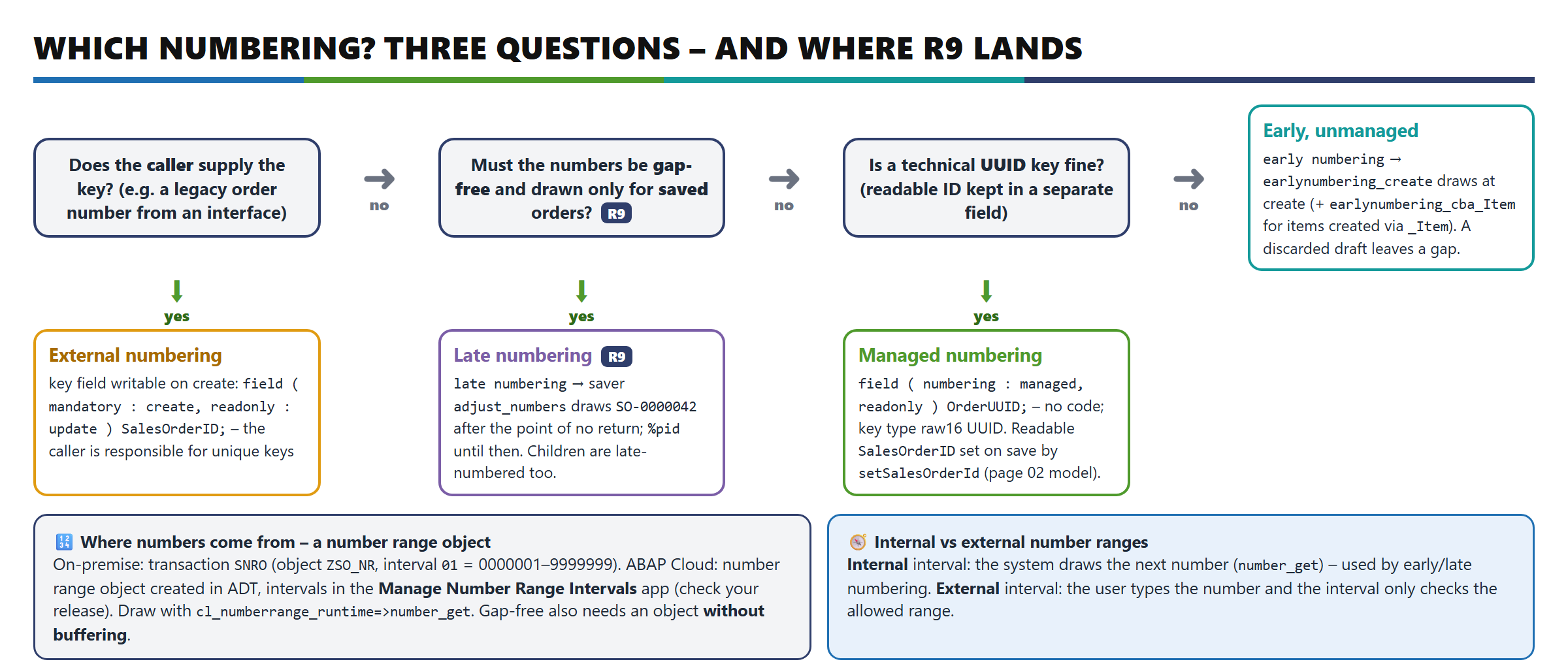
Type | BDEF | Who assigns the key | When |
|---|---|---|---|
Early, external | Key field writable, e.g. | The consumer | In the create request |
Early, managed | field ( numbering : managed, readonly ) OrderUUID; | Framework – a UUID (raw16) | At create – no code |
Early, unmanaged |
| You, in | At create, interaction phase |
Late |
| You, in the saver method | Late save, after the point of no return |
- Managed numbering works only for a single UUID key field (raw16, e.g.
sysuuid_x16). Without any numbering specification the numbering is external.
4.1 Early vs late on a timeline
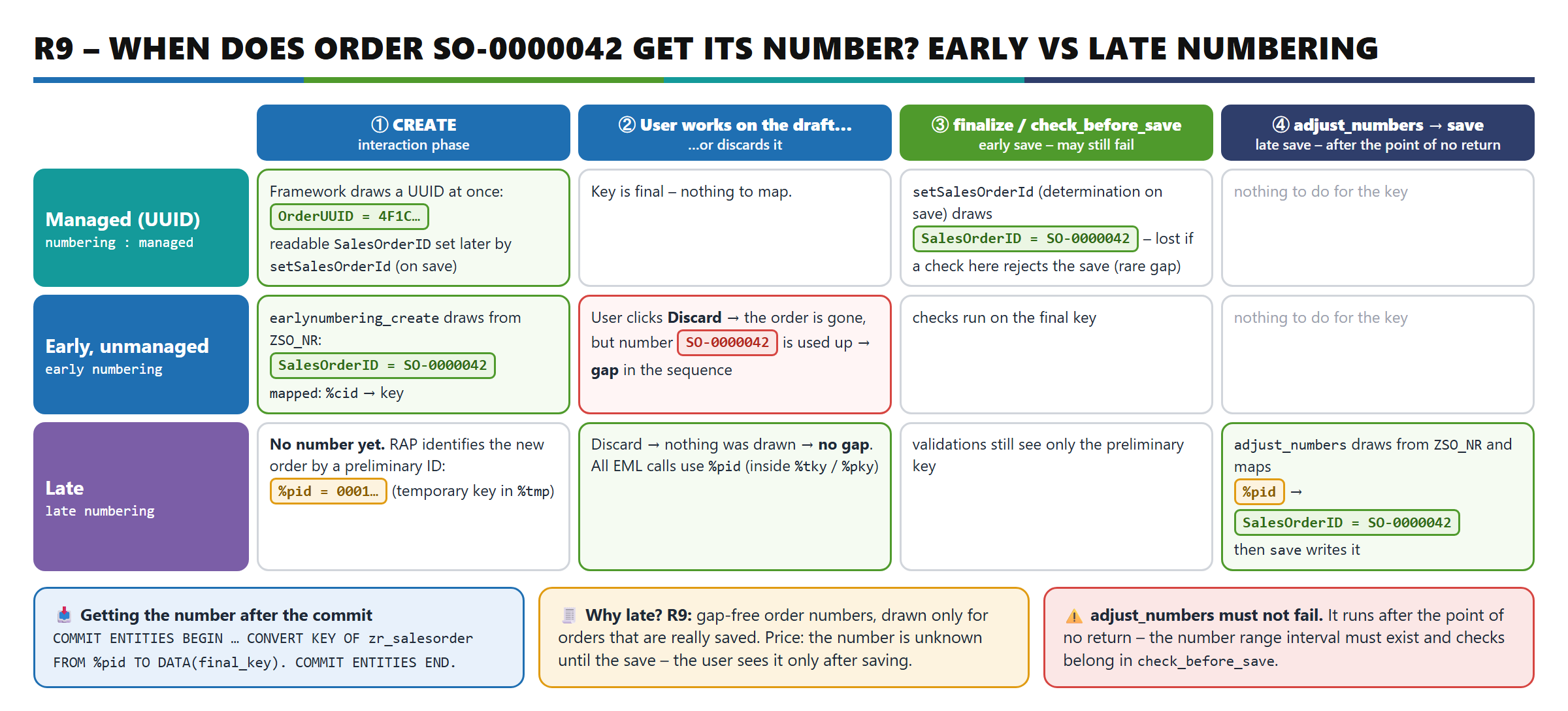
The difference shows when the user cancels or the save fails. An early number is drawn when the new draft is created; if the user discards the draft, the number is used up. A number drawn in the early save (finalize, where determinations on save run) is lost if check_before_save then rejects the save. Late numbering draws the number in adjust_numbers, after the point of no return – only orders that are really written get a number. That is exactly R9.
4.2 R9 in the Sales Order BO – two designs
A: UUID key + number on save | B: SalesOrderID as key + late numbering | |
|---|---|---|
Key |
|
|
Number drawn in | Determination | Saver method |
Discarded draft | No number used | No number used |
Save rejected by a validation | Number already drawn → gap | Nothing drawn → no gap |
Price | Simple; the key is known at once |
|
Use when | "No numbers for abandoned orders" is enough | Strictly gap-free numbers (R9 as written, legal numbering) |
- SAP's own
I_SalesOrderTPuses design B, which is why its EML examples always showCONVERT KEY. - In both designs
SalesOrderIDholdsSO-+ 7 digits, so its data element is CHAR 10.
Design A in code – the determination setSalesOrderId (declared on save { create; }, → see 05 · Business Logic & Messages) draws the number from the number range object ZSO_NR:
|
- Gap-free also needs a number range object without buffering: buffered numbers that were never used are lost, e.g. when a server restarts.
4.3 Number ranges
On-premise (classic) | ABAP Cloud | |
|---|---|---|
Create the object | Transaction | Number range object in ADT (check your release) |
Maintain intervals |
| App Manage Number Range Intervals (check your release) |
Draw a number |
| cl_numberrange_runtime=>number_get |
- Internal interval: the system draws the next number – used by early and late numbering. External interval: the user types the number and the interval only checks that it is in range.
- The SAP BTP documentation for RAP also describes
cl_numberrange_bufferwith one method per buffer type (number_get_no_buffer,number_get_main_memory,number_get_parallel) – check which API your release recommends.
4.4 Design B: late numbering for R9 – full implementation
|
- Until the save the instance has only a preliminary ID
%pid(preliminary key values move to%tmpinadjust_numbers).%tkyand%pkycontain%pid, so handler code that always uses%tkyworks unchanged. - Late numbering works in managed and unmanaged BOs, with and without draft (SAP's ABAP cheat sheets have a managed draft demo with late numbering). In a draft BO the draft table needs an extra key field
DRAFTUUID(raw16). - The items' reference to the order is only known in
adjust_numbers, so the item entity is late-numbered as well. - Consumers get the final key after the commit with
CONVERT KEYinsideCOMMIT ENTITIES BEGIN … END(→ see 08 · EML).
4.5 Variant: early unmanaged numbering
If gaps don't matter but the key must be a readable number, the BDEF says early numbering and field ( readonly ) SalesOrderID;, and the handler draws the number at create:
|
mappedlinks the consumer's%cid(content ID of the create) to the new key – that is how Fiori and EML learn the key.- The method is called again when a new draft is activated – the
IS NOT INITIALcheck keeps it idempotent so the order does not get a second number. - Items created through
_Itemget their own methodearlynumbering_cba_Itemif the item entity also uses early numbering (with UUID keys and managed numbering it is not needed).
Common mistakes
- Combining
numbering : managedandearly numberingon the same key – choose one. - Drawing the number in a determination on modify – every discarded draft burns a number. Use a determination on save (design A) or late numbering (design B).
- Doing checks in
adjust_numbers: it runs after the point of no return, so it cannot reject the save. Validate incheck_before_save(validations). - Reading
mappedwith%keyright after a create in a late-numbering BO – the key is not known yet; use%pidandCONVERT KEY. - Promising "gap-free" with a buffered number range object.
- Interview tip: "Managed UUID is the default. Early unmanaged = my number at create (gaps possible). Late =
%piduntiladjust_numbers, gap-free, final key only after the commit viaCONVERT KEY."
Part 5 – Interview questions
Q1. Static vs dynamic feature control, and feature control vs authorization?
Static feature control is fixed in the BDEF (readonly, mandatory, readonly : update); dynamic instance feature control decides per instance in get_instance_features – Approve is disabled for approved orders. Feature control depends on the state of the data, authorization on the rights of the user; both can disable a button but live in different methods.
Q2. Why can't you use instance feature control for create?
Instance feature control decides per existing instance, and before a create there is no instance to look at. Use global feature control (a business switch) or global authorization for create; for child creation use create ( features : instance ) on the association, which is decided per parent.
Q3. Global vs instance authorization, and what is privileged mode?
Global authorization is checked independent of data (may the user create orders, is the user a manager at all?); create can only be checked globally. Instance authorization is checked per record (may the user change this order of sales org 1010?). Privileged mode lets trusted callers skip certain checks: the BDEF declares with privileged mode disabling <authorization context> and the caller uses EML with PRIVILEGED; only the checks of objects listed in that context are skipped.
Q4. A rep may see and change only orders of their sales organisation (R3). How do you build it?
Read: a DCL role on the base and projection views with pfcg_auth( ZAO_SO, ZSO_VKORG, ACTVT = '03' ) on the SalesOrganization field. Modify: authorization master ( global, instance ), and in get_instance_authorizations an AUTHORITY-CHECK on ZAO_SO with the order's SalesOrganization and activity 02/06. Items follow with authorization dependent by _SalesOrder. The DCL alone is not enough, because it doesn't stop a modify request on a known key.
Q5. Only managers may approve, and only New orders (R7). Where does each half go?
"Only managers" is a user right: global authorization (activity 43 for any sales org) and instance authorization (activity 43 for the order's sales org, plus the four-eyes rule on CreatedBy). "Only New orders" is a data state: instance feature control on the approve action. Both are enforced for Fiori, Web API and EML callers.
Q6. What do IN LOCAL MODE and PRIVILEGED skip?
IN LOCAL MODE is for the BO's own behavior pool and skips the BO's authorization and feature control, e.g. when a determination writes the read-only Status. PRIVILEGED is for external trusted consumers and skips only the authorization checks listed in the privileged-mode authorization context; feature control still applies.
Q7. Scenario: managers only approve or reject, reps create and edit (R7, R11). How do you design it?
One base BO with all behavior and two projections with their own projection BDEFs: ZC_SalesOrder for reps with use create; use update; use delete;, and ZC_SalesOrderApv for managers with only use action approve; use action reject;, each with its own service and app. The projections only shape the apps; security stays in the base BO: global and instance authorization check activity 43 on ZAO_SO for approve and reject, so the rule also holds for EML and Web API callers who bypass the approver app.
Q8. Early vs late numbering, and late numbering with a number range?
Early numbering assigns the key at create: externally, managed by the framework (UUID) or unmanaged in earlynumbering_create. Late numbering assigns the final key in adjust_numbers in the late save, using a preliminary %pid until then. Drawing the number there with cl_numberrange_runtime=>number_get gives gap-free numbers, because the save can no longer fail after the point of no return.
Q9. Scenario: order numbers must be gap-free (R9). Which numbering do you choose?
Late numbering with SalesOrderID as the key and an unbuffered number range interval, drawn in adjust_numbers. Keeping a UUID key and setting SalesOrderID in a determination on save avoids numbers for discarded drafts, but a validation that fails after finalize still burns a number – fine for "no abandoned numbers", not for strictly gap-free numbering.
Q10. Why must adjust_numbers never fail, and what do you do if the number range is exhausted?
It runs after the point of no return: RAP can no longer return to the interaction phase, so FAILED is not an option. Make sure intervals are maintained and monitored; if drawing still fails, the only clean reaction is a short dump (RAISE SHORTDUMP), which rolls the whole LUW back.
🏠 Start Here · ◀ 05 · Logic & Messages · 07 · Locking, Draft & Side Effects ▶ · Sections: CORE ABAP | OOPS ABAP | ABAP on HANA | Clean Core | RAP | ABAP Points | SAP Fiori | SAPUI5 | Mobile Development (MDK) | BTP Foundations | BTP Development | CAP | SAP Build | ABAP on BTP | Integration Suite | SAP Business AI | SAP BASIS | Security | SAP SDLC
Functional: FICO ABAP | TRM ABAP | VIM | SAP BIS | SD ABAP | MM ABAP | PP ABAP | QM ABAP | PM ABAP | PS ABAP | EWM | TM ABAP | EHS ABAP | HR ABAP | BW | SAP MDG | SAP Analytics Cloud | SAP Ariba | SAP CX | SAP IBP