This page shows how to take over the save: an unmanaged BO around legacy function modules, managed with unmanaged save when only the posting is legacy (R13), managed with additional save for the audit log and change documents (R14), and the background processing framework bgPF for the PDF confirmation after the save (R21).
Part 1 – Legacy code, audit and background work: choosing the save variant
Requirements on this page
R-ID | Requirement | Where on this page |
|---|---|---|
R13 | Old orders still live in legacy Z tables, written by existing function modules | Part 1 (choice), Parts 2–4 (unmanaged), Part 5 (managed with unmanaged save) |
R14 | Every change is logged for audit; a follow-up log is written on approval | Part 6 (additional save), Part 7 (change documents) |
R21 | Long follow-up work (PDF confirmation) must not slow down saving | Part 8 (bgPF) |
R15 | Notify warehouse and e-mail service on approval | One line in Part 6 → 10 · Business Events & Event-Driven RAP |
So far the Sales Order BO was managed: the framework writes zsales_hdr and zsales_itm. Three requirements need more control over the save:
- R13 – in a brownfield S/4HANA system the order tables already exist and are written by existing function modules that old reports and IDocs still use. On this page
Z_SO_READ,Z_SO_CHECK,Z_SO_UPDATEand the lock objectEZSALES_HDRstand for that legacy code. - R14 – every change and every approval must leave an audit trail.
- R21 – the PDF order confirmation is slow and must run after the save, not during it.
The four implementation types are introduced on 01 · RAP Foundations (with the "who does what" grid and the decision tree). This page shows how to build the three variants that change the save: unmanaged, managed with unmanaged save and managed with additional save.
Your situation | Choose | Why | Scenario |
|---|---|---|---|
Nothing reusable, new tables | Managed | Framework does everything | R1–R11 (pages 02–07) |
Only the posting is legacy (update function module or a BAPI that only writes) | Managed with unmanaged save | Framework keeps buffer, locks, draft, numbering; you replace only the database write | R13, Part 5 |
The legacy code has its own buffer, checks and number logic and must stay the single source of truth | Unmanaged | You implement buffer, create/update/delete, read, lock and save | R13, Parts 2–4 |
Framework writes the tables, but extra work is needed at save time | Managed with additional save | Framework saves; your | R14, R21, Parts 6–8 |
- Prefer the variant with the most framework support that fits: every step towards unmanaged means more code to write, test and keep consistent.
- ABAP Cloud note: in ABAP Cloud you may only call released APIs, and update function modules are not available. Unmanaged BOs that wrap legacy function modules therefore live in classic ABAP (S/4HANA on-premise or private cloud), or the legacy call is wrapped in a released wrapper class (tier 2 of the clean core model → 13 · Debugging, Best Practices, Clean Core & What's New).
Part 2 – Unmanaged step by step: BDEF and buffer class
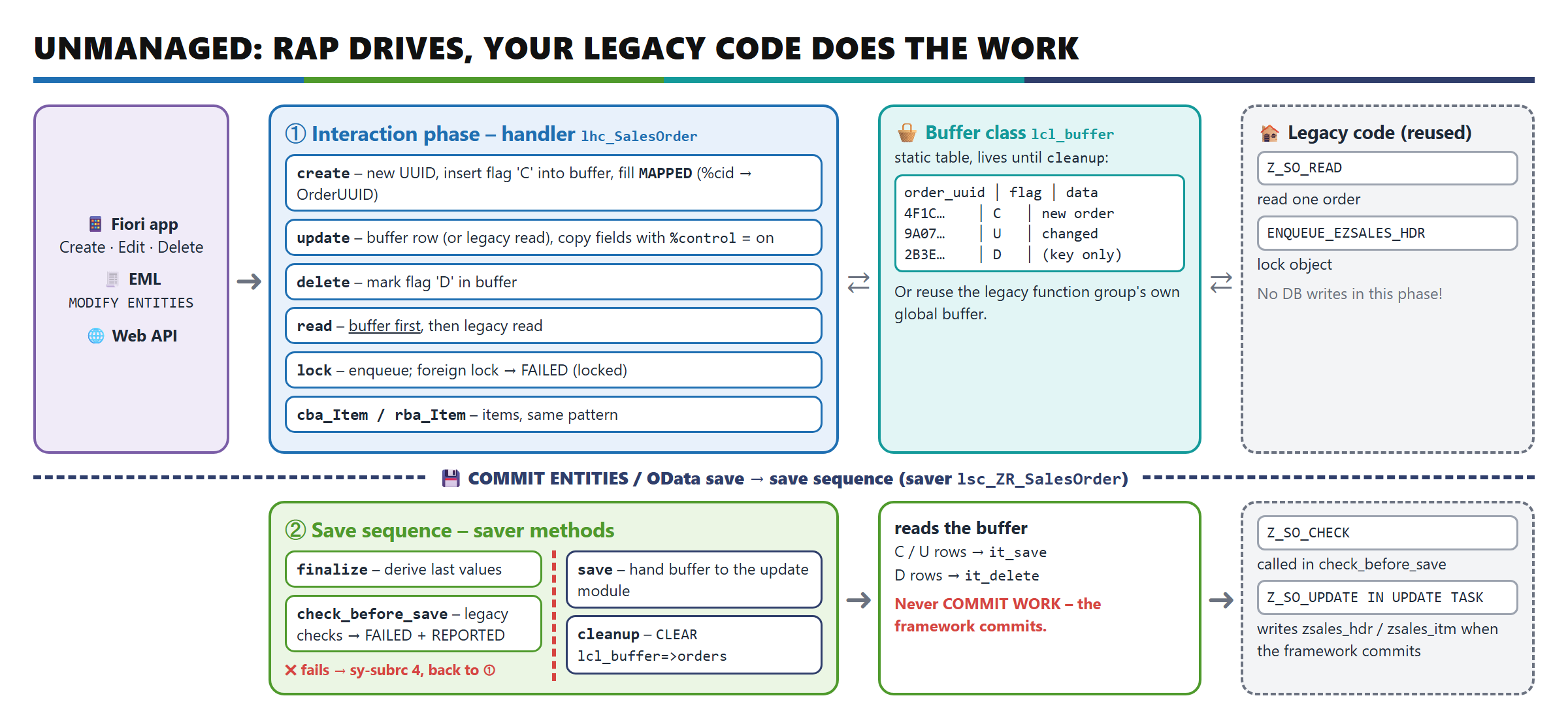
In an unmanaged BO you keep the existing order logic and let RAP drive it. RAP still gives you the OData service, the Fiori elements UI, EML, messages and draft – but you implement create, update, delete, read, lock and save. Analogy: RAP is the waiter who takes the order; your existing kitchen still cooks.
Step 1 – the BDEF
|
- No
persistent table, nomappingfor the save and no managed numbering: in unmanaged, you save and assign keys. - Draft can be added (
with draft;+ draft tables, total ETag). The draft runtime keeps the draft data itself; your handlers work on the active data, e.g. when a draft is activated (check your release for unmanaged draft details).
Step 2 – the buffer class
Between the requests of one transaction (until COMMIT) the changes must live somewhere. A local class with static tables in the behavior pool is the usual transactional buffer for unmanaged BOs. If the legacy code already has a buffer (a function group with global tables), call that instead.
|
- Items get a second table of the same shape (
items, keyed byitem_uuid) – left out here to keep the example short.
Part 3 – Unmanaged: the handler methods (interaction phase)
|
- create assigns the key and fills MAPPED (
%cid→OrderUUID). Without that line the consumer (and the item created with%cid_ref) cannot find the new order. - update uses
%controlto copy only the fields that were sent. delete of an order that was created in the same transaction just removes it from the buffer. - read checks the buffer first, then the legacy read – otherwise Fiori shows old values right after an update. lock calls the enqueue function; the lock is released when the transaction ends.
- approve sets
status = 'A'in the buffer row and returns the order inresult; the R7 rules (feature control, authorization) are declared and implemented exactly as in the managed BO → 06 · Feature Control, Authorization & Numbering. - The item entity gets its own handler
lhc_Itemwith update, delete, read andrba_SalesOrder– the same pattern with the item buffer table.
Read and read by association in the unmanaged handler
In a managed BO the framework answers READ ENTITIES; in unmanaged your read and rba_ methods do – for the consumer, for Fiori and for your own validations IN LOCAL MODE. SAP's RAP guide: the read method returns the data from the transactional buffer, and only if it is not there it reads the database (here: the legacy read Z_SO_READ). The read method above does this for the header; rba_Item does the same for the items of each requested order.
- rba_Item gets keys_rba (the source orders, plus %control for the requested item fields) and the flag result_requested (FULL). association_links (LINK) is always filled with the source and target keys; result only when result_requested = abap_true. The order in the definition is fixed: IMPORTING … FULL … RESULT … LINK.
- Fill at least the requested fields (%control) in result. An order that does not exist goes into FAILED of the source entity (failed-salesorder) with cause not_found – no links, no items.
- SAP's RAP guide: mapped and reported are not filled in read implementations – only result, association_links and failed.
- The buffer wins: items created, changed or deleted in this transaction replace the legacy rows – otherwise the object page shows the old item list right after an edit.
- Assumed here: lcl_buffer=>items (Part 2: item_uuid, flag, data TYPE zsales_itm, and an item delete keeps data-parent_uuid), zsales_itm_tt (table type of zsales_itm) and Z_SO_READ returning the items in et_items. The item's own read and rba_SalesOrder follow the same pattern.
METHOD rba_Item.
DATA items TYPE zsales_itm_tt.                 " table type of zsales_itm
LOOP AT keys_rba INTO DATA(key).
CLEAR items.
" 1. does the source order exist? buffer first, then the legacy read
DATA(buffered) = VALUE lcl_buffer=>ty_order(
lcl_buffer=>orders[ order_uuid = key-OrderUUID ] OPTIONAL ).
DATA(order) = buffered-data.
IF buffered-flag <> lcl_buffer=>flag-create.  " saved order: header + items
CALL FUNCTION 'Z_SO_READ' EXPORTING iv_order_uuid = key-OrderUUID
IMPORTING es_header     = order
et_items      = items.
ENDIF.
IF order IS INITIAL OR buffered-flag = lcl_buffer=>flag-delete.
APPEND VALUE #( %tky = key-%tky  %fail-cause = if_abap_behv=>cause-not_found )
TO failed-salesorder.                     " FAILED of the SOURCE entity
CONTINUE.
ENDIF.
" 2. the buffer wins: items created, changed or deleted in this transaction
LOOP AT lcl_buffer=>items INTO DATA(buf) WHERE data-parent_uuid = key-OrderUUID.
DELETE items WHERE item_uuid = buf-item_uuid.
IF buf-flag <> lcl_buffer=>flag-delete.
APPEND buf-data TO items.
ENDIF.
ENDLOOP.
" 3. links always, data only if the consumer asked for it (FULL)
LOOP AT items INTO DATA(item).
INSERT VALUE #( source-%tky     = key-%tky
target-ItemUUID = item-item_uuid ) INTO TABLE association_links.
IF result_requested = abap_true.
INSERT VALUE #( ItemUUID = item-item_uuid  ParentUUID = item-parent_uuid
ItemNo   = item-item_no    MaterialID = item-material_id
Quantity = item-quantity   Unit       = item-unit
NetPrice = item-net_price  Currency   = item-currency )
INTO TABLE result.
ENDIF.
ENDLOOP.
ENDLOOP.
SORT association_links BY target ASCENDING.     " as in SAP's /DMO/BP_TRAVEL_U
DELETE ADJACENT DUPLICATES FROM association_links COMPARING ALL FIELDS.
SORT result BY %tky ASCENDING.
DELETE ADJACENT DUPLICATES FROM result COMPARING ALL FIELDS.
ENDMETHOD.
Part 4 – Unmanaged: the saver class (save sequence)
|
zsales_hdr_ttis a table type ofzsales_hdr(assumed to exist, or declare it locally).- In
save, calling an update function moduleIN UPDATE TASKis the classic and safe way: the framework issues the commit. NeverCOMMIT WORKyourself. - The legacy checks belong in
check_before_save– the last point where the save can still be rejected. If the legacy update can still fail in the late save, report the failed instances with the exception classCL_ABAP_BEHAVIOR_SAVER_FAILED(released BTP 2311, check your release) instead of a dump. - Since BTP 2408
READ ENTITIESis not allowed in the late save – the saver works with its buffer (→ 08 · EML).
Numbering in unmanaged
Variant | Who provides the key | Where in the code |
|---|---|---|
Internal (early) | Your code: a UUID or the legacy number function (e.g. |
|
Internal (late) | Your code, at save time – the order gets its number only when it is saved (R9) | BDEF |
External | The consumer sends the key (e.g. typed by the user or sent by an interface) | Key field not read-only ( |
- Numbering itself is explained on 06 · Feature Control, Authorization & Numbering. Never draw a number in
save–adjust_numbersis the place for late numbers.
Plain ABAP SQL instead of a legacy module
If there is no update module, save may write the tables directly – the save method is exactly the place where database changes belong:
|
Common mistakes
- Writing to the database in a handler method (create/update) – the database may only be written in
save/save_modified. - Forgetting
cleanup→ the static buffer keeps old data for the next request in the same session. - A
readthat ignores the buffer → Fiori shows old values right after an update. - Calling a BAPI that does its own
COMMIT WORK(orBAPI_TRANSACTION_COMMIT) insave→ runtime error. Use the BAPI's update logic without its commit, or choose a non-committing API.
Part 5 – Managed with unmanaged save: only the posting is legacy
Here the framework keeps buffer, locks, draft, numbering and the checks (managed), but instead of writing zsales_hdr itself it hands you the changes in save_modified. Use it for R13 when only the posting logic Z_SO_UPDATE must be reused. SAP's Flight Reference Scenario uses this for the booking supplement entity.
|
|
save_modifiedimportscreateandupdate(derived type REQUEST FOR CHANGE – one TABLE FOR CHANGE per entity, e.g.update-salesorder) anddelete(keys only), and returns messages inreported.- Without
with full data,update-salesordercontains only the keys and the changed fields;%controltells which ones. For an update module with X-flags, declaremapping for zsales_hdr control <x-structure>and map withMAPPING FROM ENTITY USING CONTROL.with full datapasses all fields (check your release). - Unmanaged save is set per entity: the item entity needs its own
with unmanaged save(or apersistent table) and is handled the same way insave_modified(create-item, ...). with unmanaged save and cleanup(also for additional save) additionally lets the saver redefinecleanupfor your own buffers (check your release).
Interview tip
- "Why not just use unmanaged for full control?" → In unmanaged you write buffer, CRUD, read, lock and save yourself and lose much of what managed gives for free. Choose it only when legacy logic must stay the single source of truth; if only the database write is legacy, use managed with unmanaged save.
Part 6 – Managed with additional save: the audit log (R14)
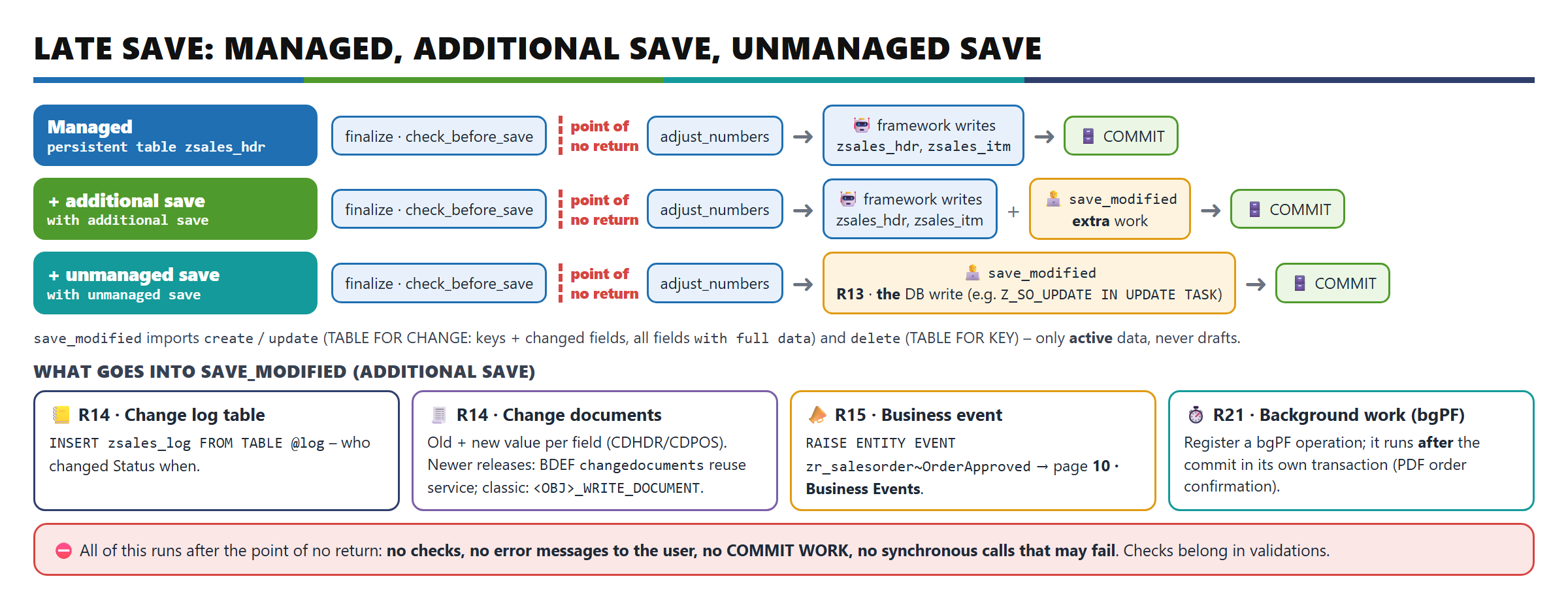
R14 – every status change must be logged for audit, and the approval writes a follow-up log row. The framework should keep writing zsales_hdr and zsales_itm; we only need one more thing at save time. Managed with additional save lets the framework save as usual and then calls your save_modified for the extra work – in the same database transaction.
with additional save | with unmanaged save | |
|---|---|---|
Who writes | The framework ( | You, in |
BDEF |
|
|
What you do in | Extra work: log, change documents, events, bgPF | The database write (e.g. legacy update module), plus any extra work |
Scenario | R14, R15, R21 | R13 (Part 5) |
- Both run in the late save – after the point of no return. Do not put checks there; a failure cannot be shown to the user anymore. Checks belong in validations (→ 05 · Business Logic & Messages).
- Only active data reaches
save_modified– draft saves never do; for a draft order it is called when the draft is activated.
|
|
- Writing your own tables with
INSERTinsave_modifiedis allowed – the save sequence is the one place where database changes belong. - Status 'A' in a log row is the follow-up log on approval. Without the
%control-Statuscheck you would log every update, even when the status did not change. - The log row is written in the same database transaction as the order: if the save is rolled back, the log row disappears too – the audit trail never claims a change that did not happen.
Common mistakes
- Writing
zsales_hdrinsave_modifiedof a BO with additional save – the framework already writes it; your code would write twice. - Validations or a synchronous call to an external system in
save_modified– the late save must not fail. For external calls raise an event (page 10) or register a bgPF process (Part 8).
Part 7 – Change documents (R14)
Auditors often want more than a status log: old and new value per field. That is what SAP change documents record (tables CDHDR / CDPOS, shown in the "display changes" functions). There are two ways in RAP:
Way | How | Release |
|---|---|---|
RAP change documents (reuse service) | Create a change document object for | S/4HANA 2023 (ABAP 7.58) onwards and recent ABAP environment releases – take the exact BDEF syntax from the ABAP keyword documentation of your release |
Write them yourself in | Change document object (classic: transaction SCDO) with its generated write function | Classic ABAP; check your release for the ABAP Cloud variant |
- For the manual way you need the before-image:
update-salesorderholds only new values, and EML reads are not allowed in the late save. Plan where the old values come from and test it with draft activation – one reason to prefer the reuse service where your release has it. - The simple log table of Part 6 and change documents can coexist: the log answers "who approved when", change documents answer "which field changed from what to what".
Part 8 – Long-running work after the save: bgPF (R21)
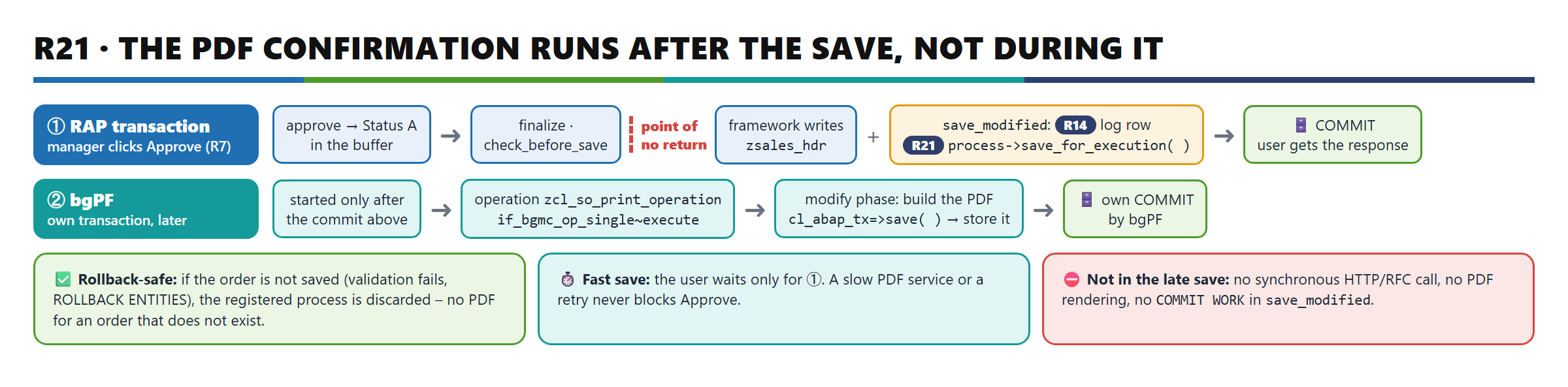
R21 – an approved order needs a PDF confirmation. Rendering it takes seconds and may call a form service; doing that in the late save would slow down every approval and could fail after the point of no return. The Background Processing Framework (bgPF) runs such work asynchronously, in its own transaction, after your transaction has committed. You register the work in save_modified; if the order is not saved, the background work is not started either.
|
|
- Two variants of the operation. The controlled one (
IF_BGMC_OP_SINGLE, registered withset_operation) runsexecutewith RAP-like transactional phases:cl_abap_tx=>modify( )before the work,cl_abap_tx=>save( )before database writes, and the runtime checks that no write happens in the modify phase. The uncontrolled one (IF_BGMC_OP_SINGLE_TX_UNCONTR,set_operation_tx_uncontrolled) has no such checks. SAP recommends the controlled variant; both can be registered fromsave_modified. - Inside RAP you only call
save_for_execution( ); the RAP framework's commit starts the process. Outside RAP (a report, a class) you callsave_for_execution( )and thenCOMMIT WORKyourself. - bgPF is built on bgRFC and is the ABAP Cloud way to start background work instead of calling bgRFC directly. It needs the bgRFC setup for bgPF on-premise; monitor it with the bgPF monitoring app or transaction SBGRFCMON on-premise (check your release for names and setup).
zso_uuid_tt,zcl_so_print_operationand the process name are our own names; check the exact method names ofcl_bgmc_process_factoryand the process interface in your release.
Common mistakes
- Rendering the PDF or calling the form service synchronously in
save_modified→ slow saves, and an error after the point of no return. - Calling
COMMIT WORKaftersave_for_execution( )inside RAP → runtime error; the framework commits. - Putting large data (the PDF itself, whole orders) into the operation's attributes – they are serialized; pass keys and read the data in
execute.
Part 9 – Interview questions
Q1. How do you wrap legacy code in RAP?
If the legacy code owns buffer, checks and numbering, with an unmanaged BO: the handler methods collect the changes in a buffer class (or the legacy buffer), check_before_save calls the legacy checks and the saver's save calls the existing update function module in update task. If only the posting is legacy, with managed + unmanaged save and the update module in save_modified. In both cases the legacy code must not commit – the RAP framework does.
Q2. Scenario: an unmanaged BO dumps as soon as Save is pressed. What do you check?
Most likely a called BAPI or function module executes COMMIT WORK, or the code writes the database during the interaction phase. In RAP only the framework commits. I read the dump (ST22 / Feed Reader), move the database update into the saver's save, and call the update logic without its own commit (or the BAPI variant without commit).
Q3. What must the read and lock methods of an unmanaged BO do?
read must return the buffer state first – including unsaved creates and updates, and not_found for buffered deletes – and fall back to the legacy read; otherwise Fiori shows stale data right after a change. lock calls the legacy enqueue function and reports a foreign lock in FAILED with cause locked plus a message. The lock is released when the transaction ends.
Q4. Additional save vs unmanaged save – and what does save_modified receive?
With additional save the framework writes the BO's tables and save_modified adds extra work (log, change documents, events, bgPF). With unmanaged save there is no persistent table and save_modified does the database write itself. save_modified gets create, update and delete with one table per entity; update holds only keys and changed fields with %control, unless with full data is declared.
Q5. Why may you not validate or call an external system in save_modified?
save_modified runs in the late save, after the point of no return. A failure there can no longer be shown to the user or undo the transaction cleanly. Checks belong in validations or check_before_save; external calls go into a business event or a bgPF process that runs after the commit.
Q6. What is bgPF and how do you use it from RAP?
The Background Processing Framework runs follow-up work asynchronously in its own transaction after the RAP transaction commits. An operation class implements IF_BGMC_OP_SINGLE (controlled, recommended – execute with cl_abap_tx=>modify( ) / save( )) or IF_BGMC_OP_SINGLE_TX_UNCONTR. In save_modified you create a process with cl_bgmc_process_factory, set the operation and call save_for_execution( ); the framework's commit starts it, and a rollback discards it – check your release.
Q7. How do you record change documents for a RAP BO?
On newer releases (S/4HANA 2023 / 7.58, recent BTP) with the RAP change document reuse service: a change document object plus the changedocuments setting in the BDEF, and the framework logs old and new values of persisted changes. Otherwise manually in save_modified of an additional save, calling the generated write function or class – then I must supply the before-image myself.
Q8. What is CL_ABAP_BEHAVIOR_SAVER_FAILED for?
A saver that calls legacy code in the late save can raise it to report failed instances instead of causing a dump (released BTP 2311, check your release). The transaction is rolled back and COMMIT ENTITIES returns sy-subrc 8. It is a safety net – the real checks still belong in the early save.
Q9. Where does an unmanaged BO draw its order numbers?
Early numbers in create (UUID or the legacy number function), filling MAPPED for the consumer's %cid. Gap-free numbers (R9) with late numbering: create returns a %pid and the saver's adjust_numbers draws the number after all checks have passed. Never in save.
🏠 Start Here · ◀ 08 · EML · 10 · Business Events ▶ · Sections: CORE ABAP | OOPS ABAP | ABAP on HANA | Clean Core | RAP | ABAP Points | SAP Fiori | SAPUI5 | Mobile Development (MDK) | BTP Foundations | BTP Development | CAP | SAP Build | ABAP on BTP | Integration Suite | SAP Business AI | SAP BASIS | Security | SAP SDLC
Functional: FICO ABAP | TRM ABAP | VIM | SAP BIS | SD ABAP | MM ABAP | PP ABAP | QM ABAP | PM ABAP | PS ABAP | EWM | TM ABAP | GTM ABAP | EHS ABAP | HR ABAP | BW | SAP Datasphere | SAP Business Data Cloud | SAP MDG | SAP Analytics Cloud | SAP Ariba | SAP CX | SAP IBP