How the Sales Order Approval app announces that an order was approved and how other code reacts without being called directly: R15 (warehouse and e-mail service notified via SAP Event Mesh), triggered by the R7 approval, the R14 follow-up log in a local event handler, the standard S/4 event SalesOrder Created for R18, and an event-driven side effect for orders approved by the R12 job.
Part 1 – Why events: R15 and event-driven basics
Requirements on this page
R-ID | Requirement | Where on this page |
|---|---|---|
R15 | When an order is approved, the warehouse system and an e-mail service are notified | Parts 2–5 (declare, raise, consume locally, send out) |
R7 | Manager approves the order (action | Part 3 (raised in the saver after the approval is saved) |
R14 | A follow-up log entry is written on approval | Part 4 (local event handler) |
R12 | A nightly job approves orders – an open Fiori page should show it | Part 7 (event-driven side effect) |
R18 | The standard S/4 sales order is created from our order – we want to know when it exists | Part 6 (consuming the standard event SalesOrder Created) |
R21 | Long follow-up work must not slow down saving | Part 9 (event or bgPF?) |
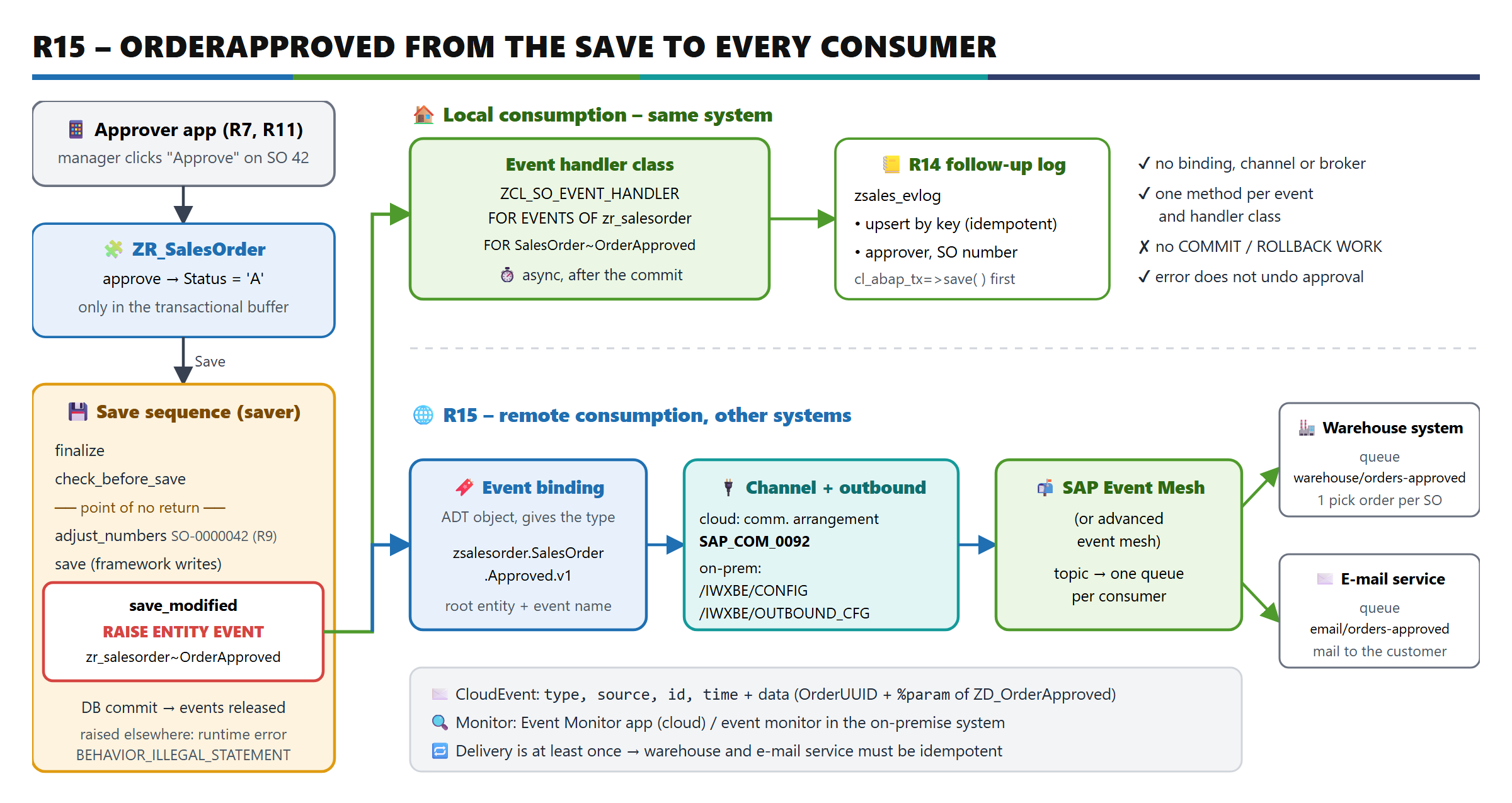
R15 – the story. A sales manager approves order SO-0000042 in the approver app (R7, R11). The warehouse system must start picking, and an e-mail service must tell the customer. Without events the save would have to call the warehouse API and the e-mail API one after the other and wait for both – if one is down, the approval fails or hangs. With a RAP business event the order BO only announces "order 42 was approved"; a broker (SAP Event Mesh) delivers that message to every interested system, now or when it is back online.
RAP business events exist since release 2022 (SAP Business AI Platform, ABAP environment, S/4HANA Cloud, S/4HANA 2022 FPS00 on-premise / private cloud). Newer features below are marked "check your release".
1.1 Three ways to connect systems
Synchronous API (OData) | Event (publish / subscribe) | Workflow | |
|---|---|---|---|
Question it answers | "Give me / do this now" | "This just happened" | "Who must decide or do the next step?" |
Caller waits? | Yes – needs the answer | No – fire and forget | No – process runs for hours or days |
Coupling | Caller knows URL and interface | Only the event type / topic | Process model knows every step |
In our scenario | CRM creates orders (R18) → 11 · Files, Custom Entities & Integration | Order approved → warehouse, e-mail (R15, this page) | The approval itself could be a workflow; here it is the R7 action |
1.2 Core ideas
- Publish / subscribe – the publisher sends to a topic (an address such as
zsalesorder/SalesOrder/Approved/v1); the broker copies the message into every queue whose subscription matches. One queue per consumer (warehouse, e-mail), so a slow consumer does not slow the other. - Loose coupling – a third consumer next year (e.g. invoicing) means one more queue; the ABAP code of
ZR_SalesOrderdoes not change. - At-least-once delivery – queues are persistent and the broker redelivers until the consumer confirms. The same event can arrive twice, and order is not guaranteed across retries.
- Idempotency – processing the same event twice must give the same result as once: the warehouse creates one pick order per
SalesOrderID, not one per message.
1.3 Thin vs fat events
Thin – notification event | Fat – data event | |
|---|---|---|
Payload | Key only: | Key + business data: SO number, approver, net amount |
Consumer then… | Calls | Can act without calling back |
Plus | Small, never stale, little data-privacy risk | Fewer calls, works when the source is offline |
Minus | Extra API call per event | Bigger messages, data may be outdated, more privacy care |
In RAP | event OrderApproved; |
|
For R15 we choose a fat event with a small payload: the warehouse needs the SO number, the e-mail service the customer, both like the net amount; nobody needs the items in the message.
1.4 CloudEvents format
SAP events follow the CloudEvents 1.0 specification (CNCF): context attributes (the header) plus data. The framework builds this envelope – you only supply key and parameter values.
|
Attribute | Meaning |
|---|---|
| Event type – what happened. Comes from the event binding (Part 5) |
| Where it happened + unique ID; the pair is unique for each distinct event |
| CloudEvents version, |
| Optional: when, payload format, which object |
Extension attributes | Extra header fields defined by the producer – usable for event filters (Part 5.5) |
Part 2 – Declare OrderApproved: payload and BDEF
2.1 BDL syntax for events
BDEF statement | Meaning |
|---|---|
event OrderApproved; | No parameter – the payload is the instance key only (thin) |
event OrderApproved parameter ZD_OrderApproved; | Flat payload from a CDS abstract entity; the derived type gets |
event … deep parameter ZD_…; | Deep payload – the parameter is an abstract BDEF |
managed event D on E parameter ZI_…; | Derived event (Part 3.4) – new payload for event E, no ABAP code (BTP 2308 / ABAP 7.58) |
event … for side effects; | Only for event-driven side effects (Part 7), not for integration |
use event OrderApproved; | Reuse in an interface BDEF (BO interface) so that other components may consume it |
- Events can be defined in managed and unmanaged BOs and in BDEF extensions. ABAP 7.58 allows them only on the root entity; BTP 2405 and newer releases also on child entities (check your release). Remote exposure through an event binding (Part 5) uses events of the root entity –
SalesOrderhere.
2.2 Payload: abstract entity ZD_OrderApproved
|
- The key (
OrderUUID) is always part of the event automatically – don't repeat it in the abstract entity. - Types must match
ZR_SalesOrder(→ 02 · Data Model & CDS); in a real project you would type the fields with the same data elements as the table fields.
2.3 BDEF – additions to ZR_SalesOrder
Only two changes to the BDEF from 04 · Behavior Definition & Behavior Pool: the header gets with additional save with full data (explained in 09 · Unmanaged Scenario & Save Variants), and the SalesOrder entity gets the event.
|
with additional savegives the saver the methodsave_modified, where events are raised; the framework still writeszsales_hdrandzsales_itm.with full datamakessave_modifiedreceive all fields of changed orders, so the payload can be filled without a READ (EML reads are not allowed in the late save in newer releases).- The projection
ZC_SalesOrderneeds nothing for a business event – events are not part of the OData service. The only projection-related case is the side effect in Part 7.
Part 3 – Raise the event in the saver
3.1 Where and when to raise – and why
RAISE ENTITY EVENT may be used only in an ABAP behavior pool, and the RAP transactional contract allows it only in the late save – in a saver method. Raised elsewhere (an action, a determination) it ends in a runtime error such as BEHAVIOR_ILLEGAL_STATEMENT (strict mode; check your release).
Implementation type | BDEF | Raise in |
|---|---|---|
Managed | with additional save |
|
Managed with unmanaged save | with unmanaged save |
|
Unmanaged | – |
|
- Why the late save? It is the point of no return: validations (R6) have passed and the data is about to be committed. Raised in the
approveaction, the event could announce an approval that a validation later rejects – the warehouse would pick an order that was never approved. - Final numbers exist only there. The SO number
SO-0000042is assigned by late numbering (R9) inadjust_numbers, which runs beforesave_modified– so the payload carries the final number. - No events for drafts.
TYPE TABLE FOR EVENThas%key(+%param) but no%is_draft/%tky. Draft changes never reachsave_modified; the event comes when the order is saved (draft activated) or when the approver approves the active order. - Only events of the same BO can be raised. To raise from reused code, call it from the saver, e.g. in a static method of a local class in the behavior pool or an auxiliary class – it still runs in the late save.
3.2 Saver class – raising OrderApproved
|
update-salesordercontains only orders changed in this transaction; the%control-Statuscheck makes sure the event is raised only when the status really changed, not on every later edit of an approved order.- The user who saves the approval is the approver –
cl_abap_context_info=>get_user_technical_name( )is the released ABAP Cloud API for it. - ADT: after adding
with additional save, activate the BDEF – the warning offers a quick fix (Ctrl+1) that addssave_modifiedto the saver class.
3.3 What happens at runtime
The framework collects the raised events and hands them over only when the transaction commits. If the save fails later, no event leaves the system. After the commit, local handlers (Part 4) and the outbound channel (Part 5) each get their copy – asynchronously, the manager does not wait for them.
3.4 Derived events – a second payload without code
Suppose the e-mail service later also needs the order date and the customer name, but the warehouse must not receive personal data. A derived event reuses OrderApproved with another payload, read from a CDS view entity. It is raised automatically together with the referenced event – no ABAP code.
|
- Rules: the parameter is a flat CDS view entity without associations; its key fields match the entity of the referenced event; the referenced event is in the same BDEF (or the original BDEF that is extended).
- The framework reads the view with privileged access – no authorization check on the payload. If the view returns no row, no derived event is raised.
- Clean core use: in a BDEF extension of an SAP BO you can define a derived event on an SAP event, if the BO is extensibility-enabled and the event is exposed in its released BO interface.
- Available from BTP 2308 / ABAP 7.58 – check your release.
- 1. New ABAP class
ZCL_SO_EVENT_HANDLER; addFOR EVENTS OF zr_salesorderafterFINAL. This makes it an event handler class (a class pool, like a behavior pool). - 2. On the Local Types tab create a class that inherits from
CL_ABAP_BEHAVIOR_EVENT_HANDLER(it may only have a private section). - 3. One method per event:
METHODS … FOR ENTITY EVENT <parameter> FOR <entity>~<event>.The parameter is aTYPE TABLE FOR EVENT(key +%param); there are nofailed/reportedparameters. - 4. Activate, approve an order in the approver app, check the log table with F8 (data preview).
- 1. New ABAP class
Part 4 – Local consumption: the follow-up log (R14)
Local consumption = the event is handled in the same system where it is raised. No event binding, channel or broker is needed. For R14 we want a follow-up log entry for every approval – work that must not slow down or break the approval itself.
4.1 ADT steps
|
|
4.2 How the handler runs
- Asynchronously – after the approval has been committed, in a separate background session (based on the background processing framework). The manager does not wait, and an error in the handler does not undo the approval.
- Within one handler class an event is handled by one method only; several handler classes may consume the same event (e.g. one for the log, one for an internal follow-up document).
- To consume an event of an SAP BO locally, the event must be exposed in its released RAP BO interface (
use event). For your own BO in your own software component this is not needed. - Errors and retries: a failing handler is never shown to a user – see ST22 or the ADT Feed Reader. Newer releases retry a failed local handler up to three times (BTP 2508 – check your release); design it idempotent anyway.
4.3 What you may and may not do in the handler
Allowed | Not allowed / avoid |
|---|---|
READ ENTITIES / MODIFY ENTITIES on other BOs (the framework saves them when the handler ends; EML → 08 · EML) |
|
Own DB writes – after | DB writes while still in the modify phase |
Send an e-mail, write an application log | Dialog statements, |
Catch and log your own errors (no user sees the handler) | Assuming order: events may arrive late, twice or after a newer change |
- Debugging: set a breakpoint in
on_order_approved, then approve an order; the debugger stops in the background session and shows the importedapprovedtable.
Part 5 – Event binding and Event Mesh: warehouse and e-mail service
For other systems the event leaves the ABAP system through the Enterprise Event Enablement framework: the event binding gives OrderApproved an external name, a channel connects the system to a broker, an outbound binding says which topics go out on that channel.
5.1 Event binding (ADT object, type EVTB)
ADT: right-click the package → New → Other ABAP Repository Object → Business Services → Event Binding. Supported from S/4HANA 2022 FPS00 and in the cloud releases.
Field (ADT label) | Example | Note |
|---|---|---|
Namespace | zsalesorder | Lower case, no spaces; customers may not use |
Business Object | SalesOrder | External name of the business object |
Business Object Operation | Approved | What happened, in business terms |
Type (display only) | zsalesorder.SalesOrder.Approved.v1 | = CloudEvents |
Event version: major / minor / patch | 1 / 0 / 0 | Minor and patch = compatible changes |
Entity name + event name |
| Root entity and event from the BDEF |
- Topic used in channels and queues: the type with
/–zsalesorder/SalesOrder/Approved/v1(wildcard…/Approved/*for all versions). - To offer the event to other software components or customers, release the event version for remote use (C2 contract).
5.2 Channel and outbound binding – by product
Step | SAP Business AI Platform, ABAP environment / S/4HANA Cloud Public | S/4HANA on-premise / Private Cloud |
|---|---|---|
1. Broker instance | Event Mesh instance in the BTP subaccount → service key | Same |
2. Channel (connection) | Communication arrangement SAP_COM_0092 with the service key; arrangement name = channel name | Transaction |
3. Outbound binding | App Enterprise Event Enablement – Configure Channel Binding → channel → Create → topic | Transaction |
4. Check | Arrangement → check connection; app Enterprise Event Enablement – Event Monitor | Channel status green in |
Advanced event mesh | S/4HANA Cloud: its own communication scenario (SAP_COM_0492 – check your release) | Channel to advanced event mesh in |
- Each channel offers its AsyncAPI metadata (JSON) for download – hand it to the warehouse and e-mail teams; it describes the event type and the
ZD_OrderApprovedpayload.
5.3 Broker side – one queue per consumer
Queue | Subscription | Consumer |
|---|---|---|
warehouse/orders-approved | <namespace>/ce/zsalesorder/SalesOrder/Approved/* | Warehouse system – creates a pick order per SalesOrderID (idempotent) |
email/orders-approved | same topic | E-mail service, e.g. a webhook to an HTTP endpoint or an Integration Suite iFlow that sends the customer mail |
- Event Mesh prefixes topics with the instance namespace and
ce/– copy the full topic exactly. - Test: approve an order → the message count of both queues rises → Test → Consume shows the CloudEvent with your type and payload.
- Other possible consumers: a CAP or other BTP app, SAP Build Process Automation (event trigger), another ABAP system (Part 6).
5.4 Which broker? (product names 2026)
Broker | Use it for |
|---|---|
Event Mesh capability of SAP Integration Suite | Default for new projects: queues, topics, webhooks for small-to-medium volumes. The older standalone SAP Event Mesh service is what you meet in existing landscapes |
SAP Integration Suite, advanced event mesh | Enterprise scale: network of brokers across clouds and on-premise, high volume, event portal, replay |
SAP Cloud Application Event Hub | Events between SAP cloud applications (S/4HANA Cloud, SuccessFactors, BTP apps), configured in the BTP global account (System Landscape), no broker administration. Earlier name: SAP Event Broker for SAP cloud applications |
More on the brokers in Integration Suite › 01, Part 3.2.
5.5 Event filters
Suppose a second warehouse only handles orders in one currency. Mark a payload field as a context attribute, then filter per channel and topic in the Configure Channel Binding app (filters on topics with wildcards are not supported; check the naming rules of your release):
|
Part 6 – Consuming events, including standard S/4 SalesOrder events
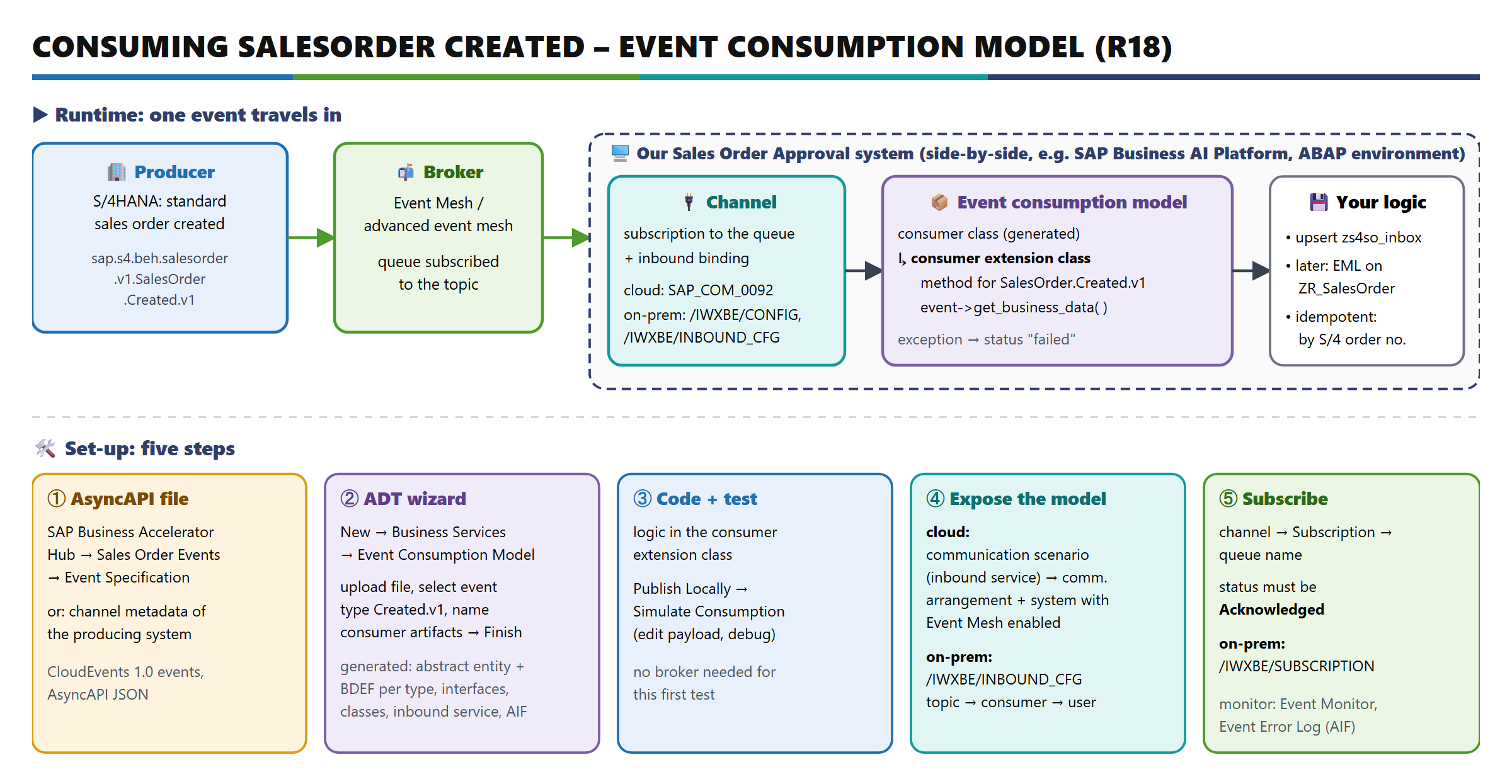
The other direction: your ABAP Cloud system receives events. In our scenario, R18 creates the standard S/4 sales order from our order through I_SalesOrderTP (→ 11 · Files, Custom Entities & Integration). We want to store the S/4 order number on ZR_SalesOrder once the standard order exists. S/4HANA announces that with its standard event SalesOrder Created.
6.1 SAP standard events
S/4HANA publishes many business events (sales order, business partner, product, …). They are documented on the SAP Business Accelerator Hub (api.sap.com): product → Events → *Sales Order Events* → Event Specification = the AsyncAPI JSON.
|
- SAP raises the event – you only bind its topic to a channel (Configure Channel Binding app /
/IWXBE/OUTBOUND_CFG), e.g.sap/s4/beh/salesorder/v1/SalesOrder/Created/*. - Standard events are often thin (the sales order number and a few fields) – the consumer calls a released API for details, or a derived event in a BDEF extension (Part 3.4) adds a custom payload.
- 1. Get the AsyncAPI file of *Sales Order Events* from the SAP Business Accelerator Hub (or the channel metadata of the producing system).
- 2. Package → New → Other ABAP Repository Object → Business Services → Event Consumption Model: description, model identifier, artifacts prefix, upload the file.
- 3. Select Event Types – tick
SalesOrder.Created.v1. - 4. Define Consumer Artifacts – accept or rename consumer class, consumer extension class and interfaces; choose a transport → Finish → activate.
6.2 Two ways to consume, depending on where the app runs
Where our app runs | How it consumes SalesOrder Created |
|---|---|
On-stack – same S/4HANA system (developer extensibility) | Local event handler class |
Side-by-side – SAP Business AI Platform, ABAP environment or another ABAP system | Event binding/channel on the S/4 side → Event Mesh → event consumption model in our system (6.3) |
6.3 Event consumption model – ADT wizard
Generated artifact | Purpose |
|---|---|
Abstract entity + abstract BDEF per event type | Typed payload |
Typed event interface per event type | Hands a typed event object to your code |
Consumer class | Generated base class – don't change, it is regenerated |
Consumer extension class | Your code: one handler method per event type |
Inbound service | Puts the model into a communication scenario |
AIF interface | Monitoring of the consumption |
6.4 Handler code (sketch)
|
zs4so_inboxis our own inbox table. A follow-up step reads the S/4 order through a released API, finds our order by the reference that R18 wrote into it, and stores the S/4 number onZR_SalesOrderwith EML – how the two orders are linked is a design decision of R18.- Keep the handler short and idempotent: store first, process later.
6.5 Wiring it up
Step | SAP Business AI Platform, ABAP environment / S/4HANA Cloud | S/4HANA on-premise |
|---|---|---|
Channel to the broker | Communication arrangement SAP_COM_0092 (as in Part 5) | /IWXBE/CONFIG |
Expose the model | Communication scenario (customer managed) with the model's inbound service; a communication arrangement for it with a communication system where Event Mesh is enabled | Inbound binding in |
Subscription to the queue | Enterprise Event Enablement app → channel → Subscription → queue name; status must become Acknowledged |
|
- Test without a broker (newer ADT – check your release): in the model editor, Publish Locally prepares authorizations for your user; Simulate Consumption sends an editable test payload to your handler – set a breakpoint and debug.
Part 7 – Event-driven side effects (R12)
Side effects tell the Fiori UI what to reload (→ 07 · Locking, Draft & Side Effects). Normally the trigger is a user action in the same browser. But R12 has a nightly job (or another program) approve orders through EML. A sales rep who still has SO-0000042 open sees the old status N until they refresh. An event-driven side effect closes that gap (BTP 2502 – check your release).
|
|
- It still needs
with additional saveandRAISE ENTITY EVENTin the saver; the event has no parameter and no event binding. - The projection must enable side effects with
use side effects;as for every side effect (→ 07). Take any further projection statements and the Fiori elements prerequisites (OData V4) from the documentation of your release. - Keep
OrderApproved(integration) andStatusUpdated(UI refresh) separate: an eventfor side effectsis not meant for event bindings.
Part 8 – Testing, monitoring and troubleshooting
What to test | How |
|---|---|
Event raised at all? | Breakpoint in |
Local handler (R14 log) | Breakpoint in |
Leaves the system? | Event Monitor app (cloud) / the on-premise event monitor (check the transaction in your release) – per channel, outbound and inbound events with status |
Reaches the broker? | Event Mesh: message count of |
Inbound consumption (Part 6) | Simulate Consumption in the model editor; Event Monitor inbound status; Event Error Log app and the generated AIF interface |
Handler exceptions | ADT Feed Reader, ST22 |
Automated tests of the saver and the event payload use the RAP test doubles → 12 · Extensibility & Testing.
Troubleshooting checklist
Symptom | Check |
|---|---|
Local handler never runs | Class has |
Event not in the Event Monitor | Event binding missing / inactive / wrong entity or event name; no outbound binding for the topic on this channel; an event filter drops it |
Monitor says sent, queue empty | Topic mismatch: the subscription needs broker namespace + |
Channel errors | Channel inactive ( |
Inbound events not processed | No inbound binding / arrangement for the model; subscription not Acknowledged; the technical user lacks authorization; exception in the handler |
Warehouse creates two pick orders | Consumer not idempotent – dedupe by CloudEvents |
Payload fields empty |
|
Part 9 – Design guidance and the clean core angle
9.1 Choosing the tool
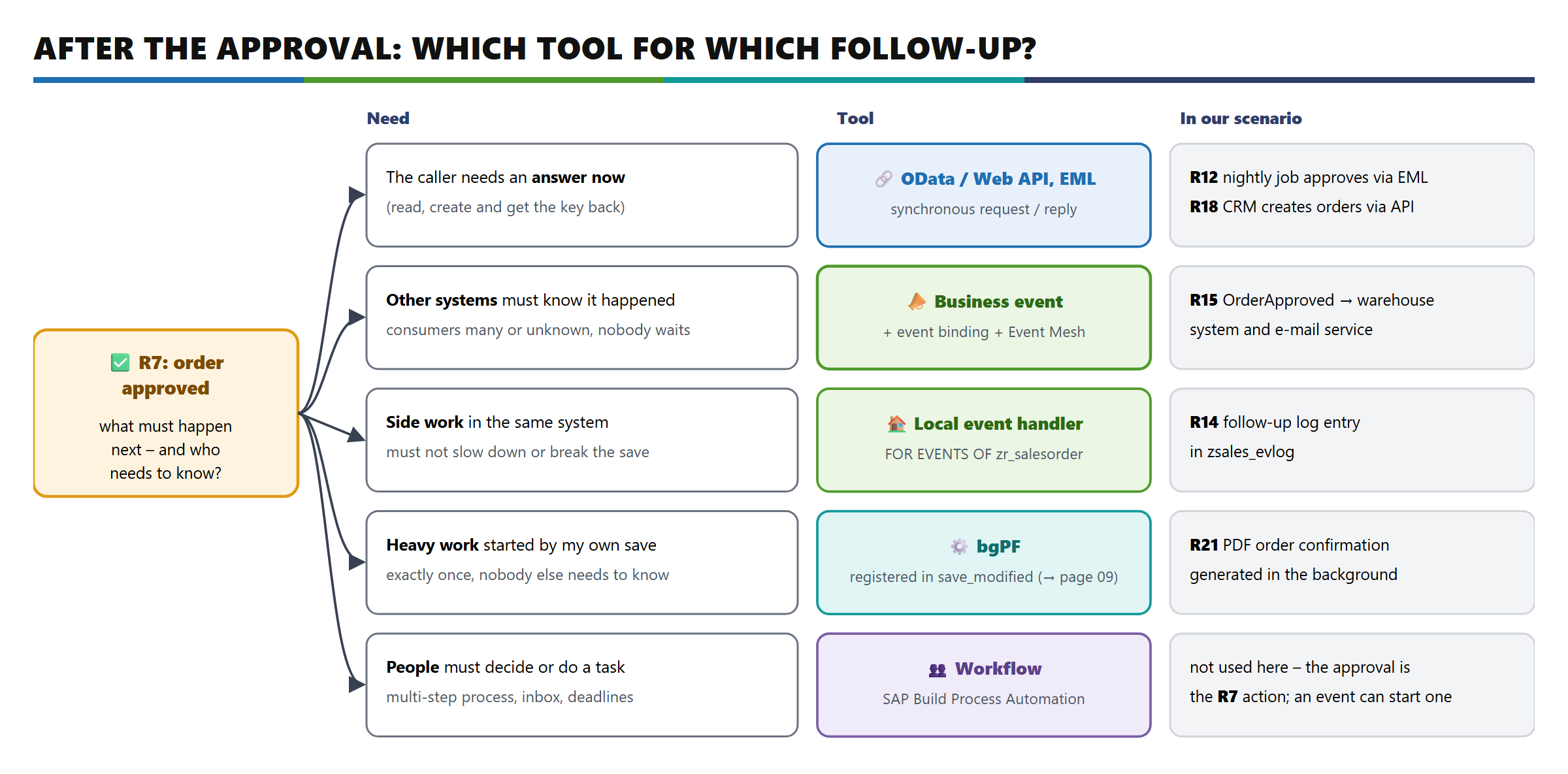
Need | Use | Why not the others |
|---|---|---|
Caller needs an answer now (R12 job, R18 CRM) | OData / Web API or EML (→ 08, 11) | An event has no reply |
Tell other systems "it happened"; consumers unknown or many (R15) | Business event + event binding | An API would make S/4 call every system and wait |
Side work in the same system after the save (R14 follow-up log) | Local event handler | Keeps the save fast; failure does not break the save |
Heavy follow-up work started by your own code, exactly once (R21 PDF) | bgPF (→ 09 · Unmanaged Scenario & Save Variants) | No other consumer needs to know; bgPF runs it once, in its own transaction |
People must approve or do a task; multi-step process | Workflow (SAP Build Process Automation / flexible workflow) | Events carry no human steps; a workflow can be started by an event |
9.2 Rules of thumb
- Raise once, in the late save – one event per business fact, never in actions or determinations.
- Name events in business terms (
SalesOrder.Approved), not technical ones (SalesOrder.StatusUpdated– that name is fine only for the UI-only side-effect event of Part 7). - Idempotent consumers – assume duplicates; key your writes, store processed event IDs.
- Ordering – never rely on it. An order approved and then changed may arrive in the wrong order; carry a timestamp or read the current state via API.
- Payload size – thin by default; add fields only when most consumers need them. Keep personal data out unless required – the event lands in queues you don't control.
- Versioning – adding optional fields = minor/patch version; removing or changing meaning = new major version (
….v2), run both until all consumers have moved.
9.3 Clean core angle
- Released SAP events and released event versions are stable, upgrade-safe extension points: side-by-side apps subscribe instead of putting code into SAP's transaction.
- They replace classic patterns such as calling an RFC or sending an IDoc from a user exit in the save, or polling change pointers from outside.
- Derived events on SAP BOs (BDEF extension) give custom payloads without modifications; local handlers on released BO interfaces react on-stack in ABAP Cloud. More: 13 · Debugging, Best Practices, Clean Core & What's New.
Part 10 – Interview questions
Q1. What is a RAP business event, and how do you raise one?
A message declared in the BDEF (event OrderApproved …;) that the BO raises when its state changes in a business-relevant way. With a managed BO you add with additional save and call RAISE ENTITY EVENT in save_modified. It is consumed asynchronously – locally by an event handler class or remotely through an event binding and a broker such as SAP Event Mesh.
Q2. Events vs OData APIs – when do you use which?
OData when the caller needs an answer now (synchronous request/reply, e.g. the CRM creating an order). Events to notify unknown or many receivers without waiting – loose coupling, the broker buffers while a receiver is down (warehouse and e-mail service on approval).
Q3. Where can you raise an event, and why only there?
Only in a saver method of the late save (save_modified with additional or unmanaged save, save in an unmanaged BO); elsewhere a runtime error such as BEHAVIOR_ILLEGAL_STATEMENT follows. It is after the point of no return, so the event never announces data that is later rejected or rolled back, and late numbers such as the SO number are final.
Q4. How do you define the payload?
Without a parameter the payload is the key. event X parameter <abstract entity> adds %param fields; deep parameter uses an abstract BDEF with hierarchy; a derived event (managed event … on …) reads its payload from a flat CDS view entity. with full data lets save_modified fill %param without a READ.
Q5. What is a derived event?
managed event D on E parameter <view entity>; – raised automatically together with event E, with a payload read (privileged) from a flat CDS view entity whose keys match the entity. No ABAP code. Useful in BDEF extensions of SAP BOs for custom payloads (BTP 2308 / ABAP 7.58).
Q6. How do you consume an event in the same system, and can you commit there?
Global class … FOR EVENTS OF <BDEF>, local class inheriting CL_ABAP_BEHAVIOR_EVENT_HANDLER, method FOR ENTITY EVENT <param> FOR <entity>~<event>. It runs asynchronously after the commit. No COMMIT WORK / ROLLBACK WORK – use EML on other BOs (the framework saves) or call cl_abap_tx=>save( ) before own DB writes.
Q7. What is an event binding, and how does the event reach Event Mesh?
An ADT object that maps a root-entity event to a CloudEvents type namespace.object.operation.version, e.g. zsalesorder.SalesOrder.Approved.v1. Then a channel (cloud: SAP_COM_0092 with the Event Mesh service key; on-premise: /IWXBE/CONFIG), an outbound binding of the topic, and a queue subscribed to the topic. Without the binding the event cannot leave the system.
Q8. How do you consume a standard S/4HANA event such as SalesOrder Created?
Find it on the SAP Business Accelerator Hub (sap.s4.beh.salesorder.v1.SalesOrder.Created.v1) and bind its topic to a channel. Side-by-side, generate an event consumption model from the AsyncAPI file and code in the consumer extension class; on-stack, a local handler on the released BO interface if the event is exposed there.
Q9. What is idempotency and why does it matter for events?
Processing the same event twice has the same effect as once. Brokers deliver at least once and local handlers may be retried, so duplicates happen; dedupe by the CloudEvents id or upsert by business key.
Q10. What is an event-driven side effect?
An event declared for side effects and used as a trigger in side effects { event … affects … }. Raised in the saver, it makes an open Fiori page reload the affected fields when the data was changed in the background, e.g. by a job (BTP 2502, check your release).
Q11. Business event or bgPF for follow-up work?
An event when other systems or components should react and the producer need not know them. bgPF when your own code has heavy work to do once after the commit (e.g. the PDF confirmation of R21) and nobody else needs to know.
Q12. How do you monitor and troubleshoot events?
Event Monitor app (on-premise: the event monitor of your release), Event Error Log / AIF for inbound, broker queue counts, ST22 and the ADT Feed Reader for handler dumps. Typical causes: missing event or outbound binding, inactive channel, topic mismatch, missing authorization, no with full data.
🏠 Start Here · ◀ 09 · Unmanaged & Save Variants · 11 · Files & Integration ▶ · Sections: CORE ABAP | OOPS ABAP | ABAP on HANA | Clean Core | RAP | ABAP Points | SAP Fiori | SAPUI5 | Mobile Development (MDK) | BTP Foundations | BTP Development | CAP | SAP Build | ABAP on BTP | Integration Suite | SAP Business AI | SAP BASIS | Security | SAP SDLC
Functional: FICO ABAP | TRM ABAP | VIM | SAP BIS | SD ABAP | MM ABAP | PP ABAP | QM ABAP | PM ABAP | PS ABAP | EWM | TM ABAP | EHS ABAP | HR ABAP | BW | SAP MDG | SAP Analytics Cloud | SAP Ariba | SAP CX | SAP IBP