This page connects the sales order BO to files and to other systems: the customer's PO as a PDF attachment and an Excel/CSV item upload (R16), live delivery tracking from a carrier through a custom entity (R17), and the external CRM that creates orders through a Web API, followed by the standard S/4HANA sales order created with the released BO I_SalesOrderTP (R18).
Part 1 – Large objects: the customer's PO as an attachment
R-ID | Requirement | Where on this page |
|---|---|---|
R16 | The customer's PO (PDF) is attached; items can be uploaded from a CSV/Excel file | Part 1 (attachment), Part 2 (upload action) |
R17 | Delivery tracking comes from a carrier's API (not stored in SAP) | Part 3 (custom entity), Part 6 (outbound call) |
R18 | An external CRM creates orders through an API; the standard S/4 sales order is created from it | Part 5 (Web API), Part 7 (I_SalesOrderTP) |
Why first: a sales order is more than the fields the rep types. The customer sends a purchase order as a PDF, and big orders arrive as a spreadsheet with 200 lines. RAP handles both without any GUI upload function: a large object (LOB) stores a file in a field and is exposed as an OData stream, and an action with a file parameter reads an uploaded file and creates data from it.
R16, part 1 – the customer's PO (PDF) is attached to the order. One file per order is enough, so it is stored in three extra fields of the order header.
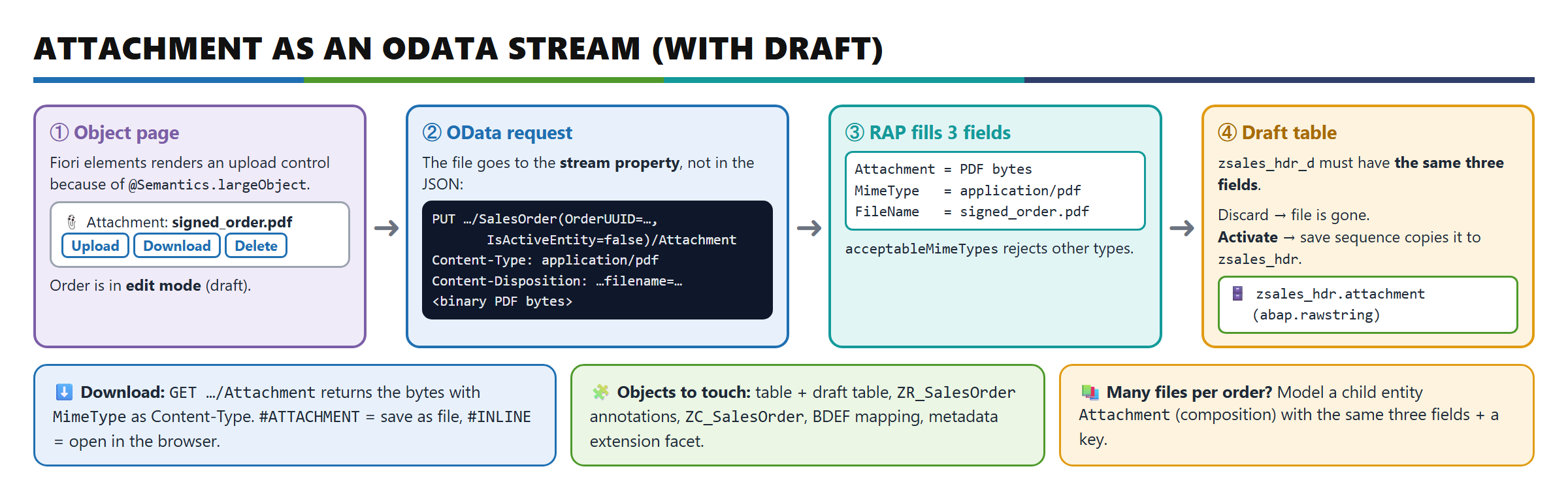
1.1 Three fields and one annotation
SAP's RAP100 tutorial (exercise 2) uses exactly this pattern. Fiori elements shows upload, download and delete controls automatically once the annotation is there.
|
- Then add the three elements to the projection view
ZC_SalesOrder, the BDEF mapping and a field group or facet in the metadata extension (→ see 03 · Projection, UI, Access Control & Service). - With draft the upload lands in
zsales_hdr_dfirst; the PDF reacheszsales_hdronly on Activate, and Discard throws it away (→ see 07 · Locking, Draft & Side Effects). #ATTACHMENT= download as a file;#INLINE= open in the browser.acceptableMimeTypesrestricts the accepted file types – here only PDF, so an .exe or .xlsx is refused.- Several files per order: model a child entity (composition
_Attachment) with its own key and the same three fields. - S/4HANA also has the Attachment Service (GOS/DMS reuse component) for standard documents; how it works with RAP draft apps depends on the release – check your release.
Common mistakes
- Wrong element names in
@Semantics.largeObject(they are case-sensitive) → the field shows as plain text instead of an upload control. - LOB fields missing in the draft table, or with other types → activation error or the file is lost while editing.
Part 2 – Uploading items from Excel or CSV
R16, part 2 – the rep uploads the customer's item list instead of typing it. On the order's object page a button Upload Items opens a dialog with a file picker; the action reads the sheet and creates the items through the BO, so validateQuantity, calculateTotal and the draft work exactly as for typed items. The file travels as a deep action parameter: an abstract entity with a large-object field.
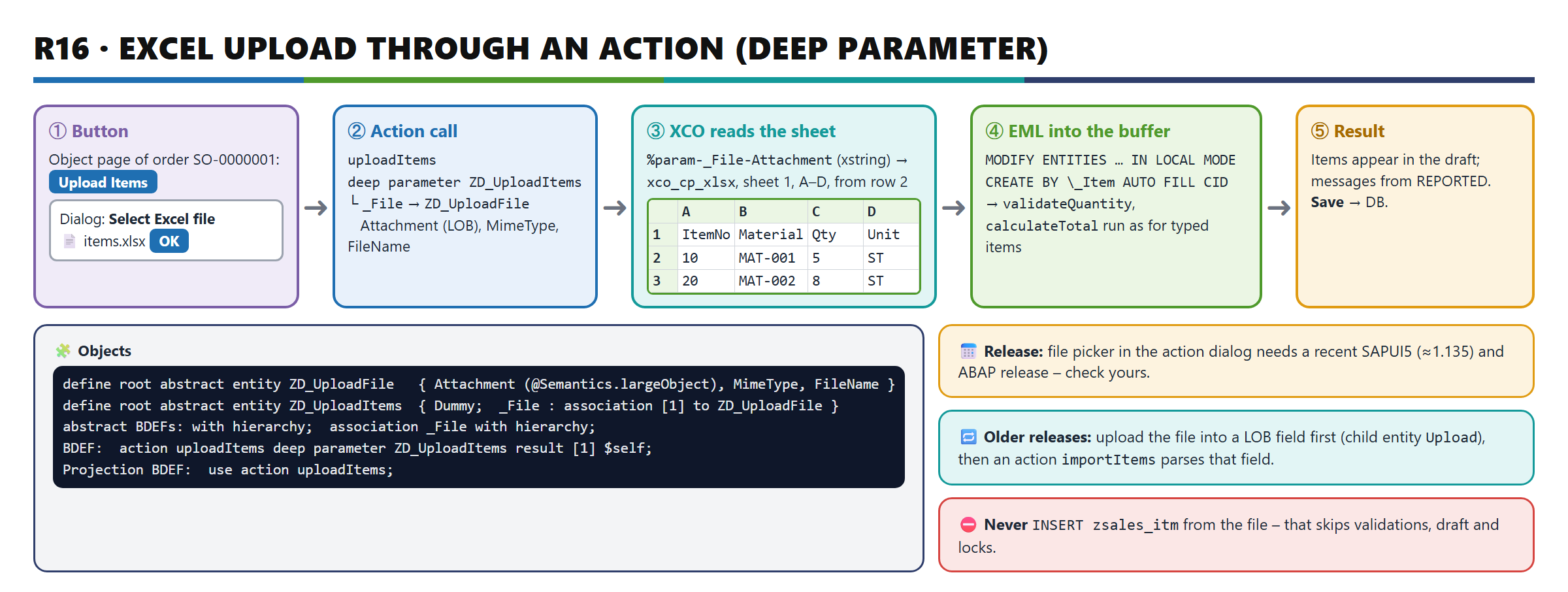
2.1 The parameter: two abstract entities
|
2.2 Abstract BDEF, action and button
|
features : instanceletsget_instance_featuresoffer the button only while the order has status N (→ see 06 · Feature Control, Authorization & Numbering).- Add
action uploadItems affects entity _Item, field NetAmount;to the side effects so the items table and the total refresh at once (→ see 07 · Locking, Draft & Side Effects).
2.3 The handler: read the sheet, create the items with EML
|
- The VALUE constructor converts the text cells to the field types. A cell like "abc" in the quantity column raises a conversion error, so check or convert the values first, and let
validateQuantitycatch quantities of 0 instead of trusting the file. - Release: a file picker in the action dialog needs a recent SAPUI5 version (around 1.135, 2025) and a recent ABAP release. It works on SAP Business AI Platform, ABAP environment; on S/4HANA on-premise 2023 the service metadata had issues – check your release.
- Fallback for older releases: let the user upload the file into a large-object field (Part 1, e.g. on a child entity
Upload), then an actionimportItemsreads that field and does the same parsing.
CSV instead of Excel
|
Clean-core notes
- In ABAP Cloud use released APIs only:
XCO_CP_XLSXfor Excel,CL_ABAP_CONV_CODEPAGEfor text. Classic helpers such asCL_FDT_XL_SPREADSHEETor GUI upload functions are not released. - The open-source library abap2xlsx (Apache-2.0) is an option in classic ABAP; check your company's rules for open-source code.
Common mistake
- Inserting the uploaded rows with SQL
INSERTintozsales_itm– this bypasses validations, the total, draft and locks. Always go through EML (→ see 08 · EML).
Part 3 – Custom entities: delivery tracking from the carrier (R17)
Why: not everything on the order's object page lives in an SAP table. R17 – the delivery status comes from the carrier's API and must not be copied into SAP; it is read live whenever the user opens the order. A custom entity is a CDS entity without a SQL data source: the framework calls your ABAP class (the query provider) to get the rows.
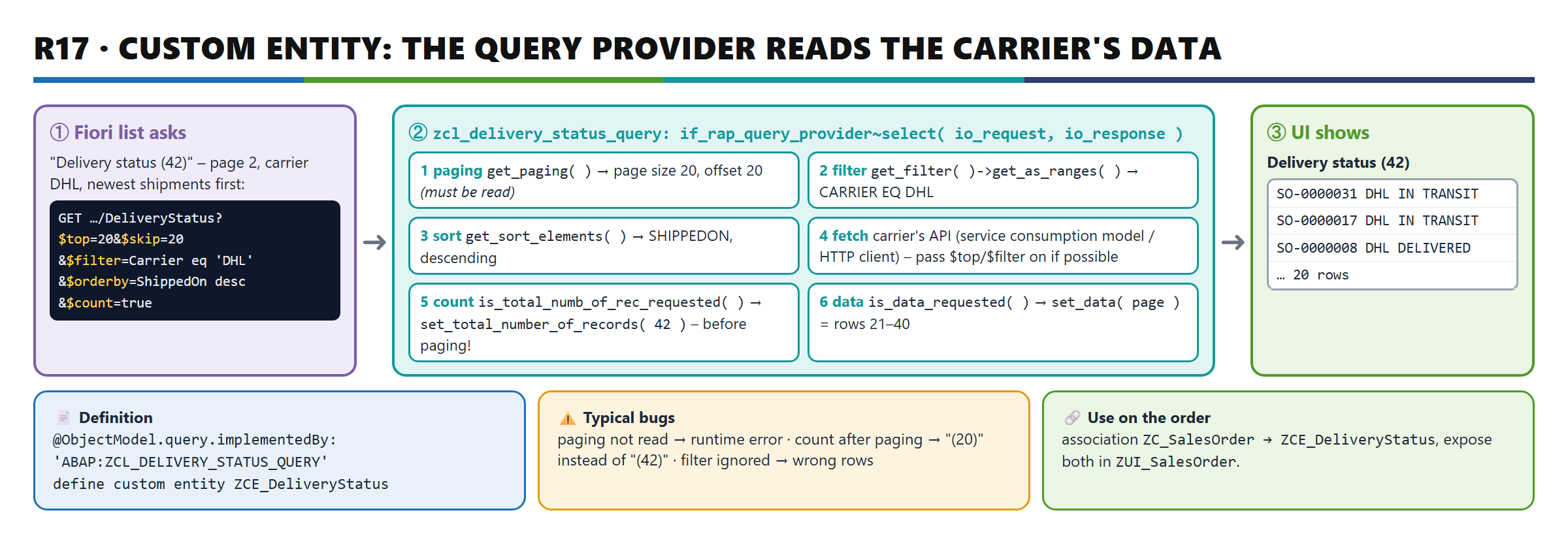
3.1 Definition and query provider
|
|
io_request method | OData part | Use |
|---|---|---|
|
| Return only one page; |
| $filter | Ranges per element or a SQL WHERE string (for a SELECT on a table) |
get_sort_elements( ) | $orderby | Element name + descending flag |
get_search_expression( ) | $search | Free-text search field |
get_requested_elements( ) | $select | Fetch only the columns the UI shows |
is_total_numb_of_rec_requested( ) | $count | Then call |
is_data_requested( ) | – | Then call |
3.2 Show it on the order
|
- When the user opens order SO-0000001, Fiori follows
_Delivery; the query provider receives the filterSALESORDERID = SO-0000001– that is why the filter loop handles it. - A custom entity is read-only here. It can also be made transactional with an unmanaged BDEF on top – rare, check your release.
- SAP's RAP620 exercise builds a value help from a custom entity on a service consumption model in the same way.
Common mistakes
- Not reading
get_paging( )(or the sort elements) in a query provider when the UI sends them → runtime error. - Applying paging before counting → "Delivery status (20)" although there are 42.
- Building a custom entity for data that is in a table – a CDS view entity is simpler, faster and filterable by the database.
Part 4 – Virtual elements, abstract entities and other read-only tools
Besides custom entities, RAP has a tool for each kind of data that is only shown or only describes a structure:
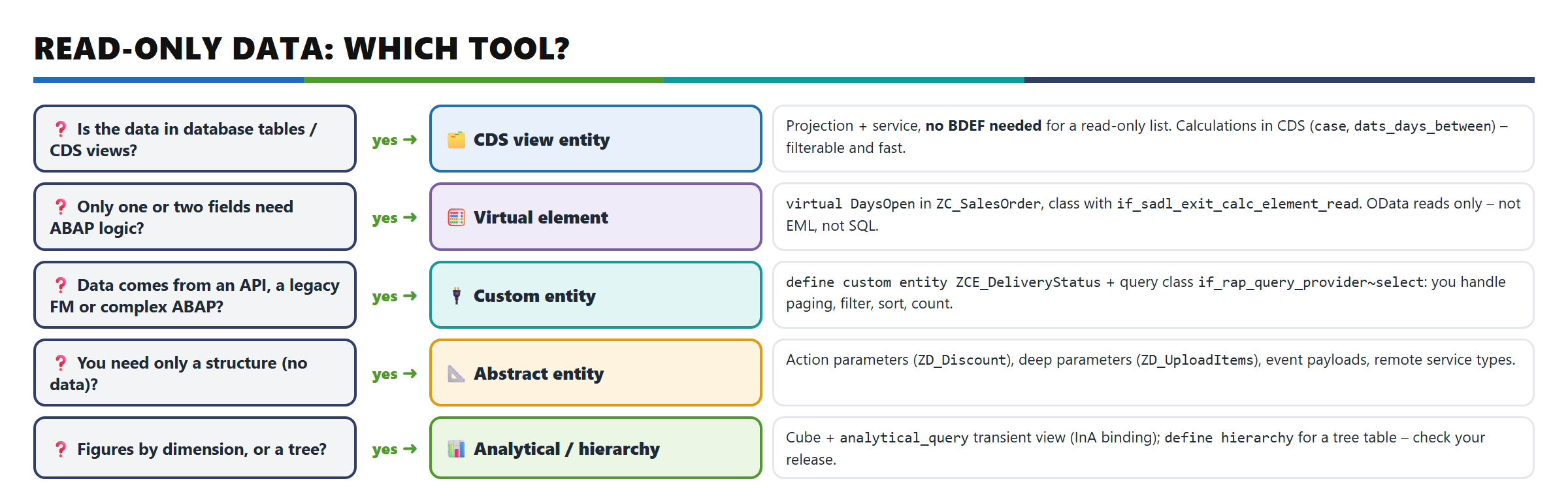
4.1 Virtual elements
A virtual element is one field of a projection view that ABAP calculates when the data is read through OData – e.g. "days open": how long an order has been waiting, useful for the approver (R7).
|
|
- Virtual elements are filled only for OData reads – not in EML
READ ENTITIES, not in ABAP SQL, not in a CDSWHERE. - Filtering and sorting on them need extra exits (
if_sadl_exit_filter_transform,if_sadl_exit_sort_transform). If the value can be computed in CDS (e.g. withdats_days_between), prefer a normal calculated element – faster and filterable.
4.2 Abstract entities
An abstract entity only describes a structure – no data, no database. RAP uses it wherever a "shape" is needed:
Use | Example |
|---|---|
Action / function parameter |
|
Deep parameter (with a file) |
|
Event payload |
|
Result of a remote call | The service consumption model generates abstract entities for the remote service (Part 6) |
4.3 Analytical and hierarchy views in brief
- Analytical: a cube view entity (
@Analytics.dataCategory: #CUBE) with dimension views, and a query asdefine transient view entity ... provider contract analytical_query, exposed in a service binding of type InA for SAP Analytics Cloud and analytical Fiori apps (check your release). - Hierarchies:
define hierarchyon a parent-child association (e.g. a sales organisation tree) can be shown as a tree table in Fiori elements; editable hierarchies are a newer RAP feature (check your release). - A read-only list report on normal CDS views needs no BDEF at all – just projection and service.
Part 5 – Inbound: the CRM creates orders through a Web API (R18)
Why: a RAP BO is not only for Fiori. R18 – the external CRM creates orders through an API. The same BO gets three doors: other systems call it as a Web API (inbound), it calls the carrier's service (outbound, Part 6), and our code creates SAP standard documents through SAP's released RAP BOs instead of BAPIs (Part 7).
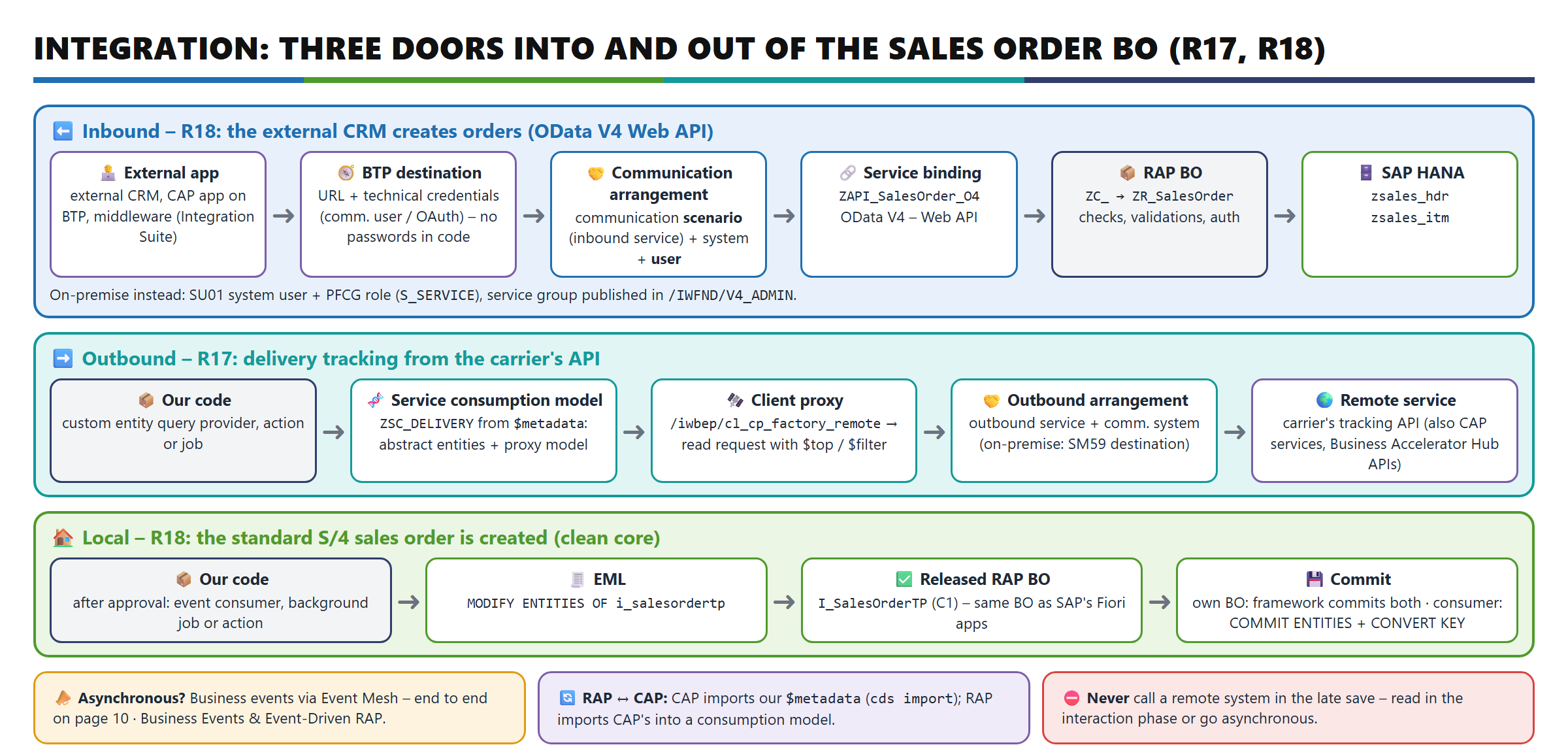
5.1 A second binding on the same service
A Web API service binding has no UI-specific behavior and is meant for system-to-system calls. The Fiori app keeps its UI binding ZUI_SalesOrder_O4; the CRM gets its own binding:
- Service definition
ZUI_SalesOrder(or a separate API service definition that exposesZC_SalesOrder/ZC_SalesOrderItem, or a projection made for the API). - Service binding
ZAPI_SalesOrder_O4, binding type OData V4 – Web API, then publish.
Step | SAP Business AI Platform, ABAP environment / S/4HANA Cloud | S/4HANA on-premise / private cloud |
|---|---|---|
Who may call? | Communication scenario (ADT, inbound): add the inbound service of the binding; for OData V2 its ID ends with | Service published in the gateway ( |
Technical user | Communication user (app *Maintain Communication Users*) | System user (SU01) with the role from the line above |
Connection | Communication system + communication arrangement for the scenario → shows the service URL | Gateway URL |
Checks in the BO | Same validations, authorization and feature control as for Fiori users | Same as on the left |
|
srvd_a2xin the URL marks a Web API service (a UI service hassrvd). Copy the exact URL from the binding or the communication arrangement.- The request runs through the same interaction phase and save sequence as Fiori:
setInitialStatus(R4),calculateTotal(R5),validateCustomer(R6) and the number assigned on save (R9) all apply. The CRM works on active data; draft is meant for UI services. - A deep insert (header +
_Itemin one POST) works because of the composition. - The CRM never sees a password in code: it authenticates as the communication user, and the BO's authorization checks run for that user.
Part 6 – Outbound: calling the carrier's service (R17)
The query provider of Part 3 needs real data. If the carrier offers an OData service, import its metadata into a service consumption model – ADT generates abstract entities and a proxy model, and you call it through a client proxy.
- 1. Get the
$metadata(EDMX) file of the carrier's service. - 2. ADT: New → *Service Consumption Model* → OData → import the EDMX; ADT generates abstract entities (e.g.
ZSC_DELIVERYwithZA_DeliveryStatus) and shows sample code. - 3. Cloud: outbound communication scenario + outbound service, then a communication arrangement with the carrier's URL and credentials (on-premise: an HTTP destination in SM59).
- 4. Call it from the query provider, an action or a background job.
|
Inside the query provider, pass paging, count and filter on to the carrier instead of loading everything:
|
- ADT's sample code in the service consumption model shows the exact entity set name and proxy key – copy from there. For an OData V2 service the generated sample uses
cl_web_odata_client_factory=>create_v2_remote_proxy. - Wrap the calls in TRY ... CATCH and raise an exception based on
cx_rap_query_providerso Fiori shows a message instead of a dump. - Many carriers offer plain REST/JSON instead of OData: call it with
cl_web_http_client_managerdirectly and parse the JSON with a released JSON API (check which one your release offers). SOAP works through a consumption model for WSDL. - Never hard-code URLs or passwords – the communication arrangement (or SM59 destination) holds them.
- Never call a remote service in the late save. Read in the interaction phase (as here), or send changes asynchronously (events → 10 · Business Events & Event-Driven RAP, bgPF → 09 · Unmanaged Scenario & Save Variants).
Part 7 – Released BOs: creating the standard sales order with I_SalesOrderTP (R18)
R18, part 2 – once our order is approved, the standard S/4HANA sales order (VBAK/VBAP) must be created from it. SAP releases many business objects as RAP BO interfaces – I_SalesOrderTP, I_PurchaseOrderTP_2, I_BusinessPartnerTP_3 and others. For clean core, creating a standard sales order from custom code means EML on I_SalesOrderTP, not BAPI_SALESORDER_CREATEFROMDAT2.
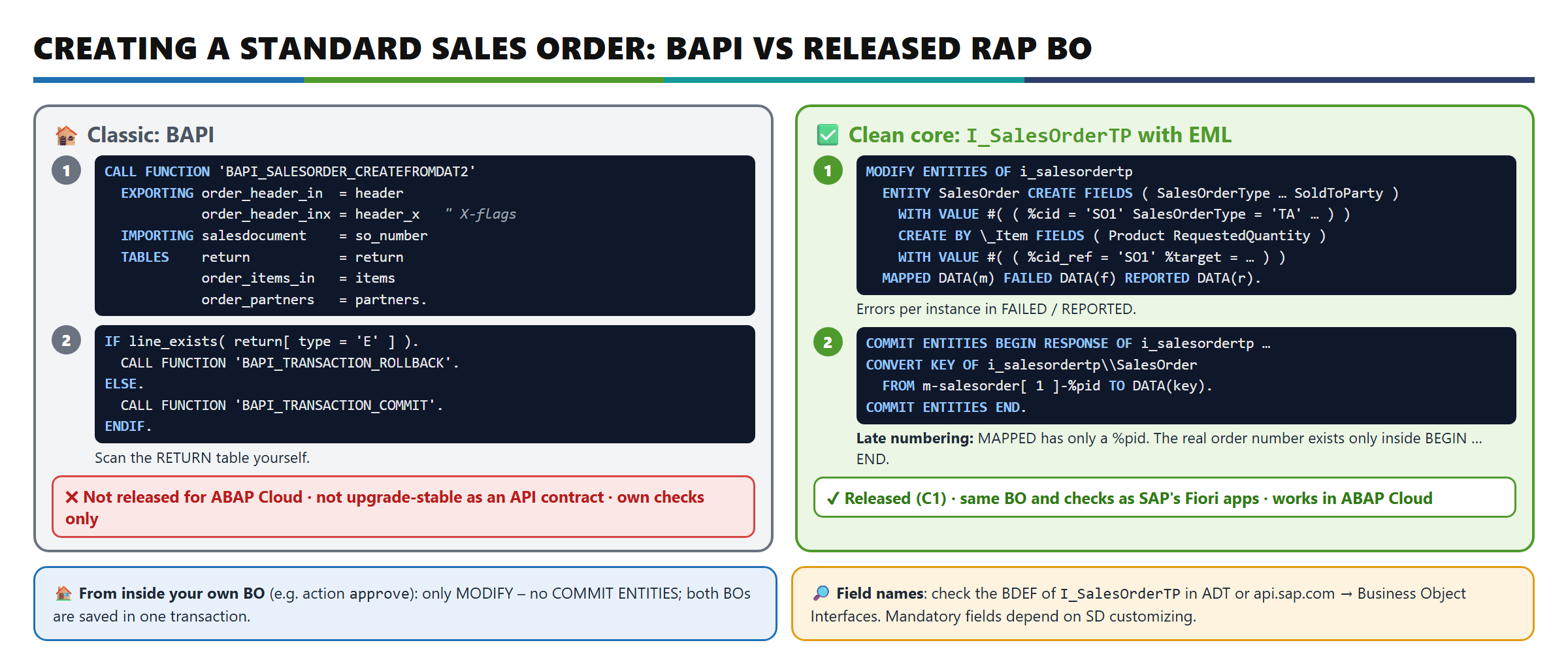
|
COMMIT ENTITIES, the commit scope and CONVERT KEY are explained once on 08 · EML; here only what is special about a released SAP BO.
BAPI | Released RAP BO (EML) | |
|---|---|---|
Call |
|
|
Errors |
| FAILED + REPORTED per entity |
Commit |
|
|
New number | Exporting parameter |
|
ABAP Cloud / clean core | Not released for ABAP Cloud – a classic API (clean core level B) | Released (C1 contract), upgrade-stable – level A |
Same checks as the Fiori app | Partly | Yes – the same BO behind SAP's standard Fiori apps |
7.1 Where to call it in the scenario
- Inside our own behavior pool (e.g. in
approve): run only theMODIFY ENTITIES OF i_salesordertp– no COMMIT ENTITIES. Both BOs are then saved together when our transaction commits, but an SD error blocks the approval, and the SD number is known only after the save. - After the approval, in its own transaction: the code above with COMMIT ENTITIES and CONVERT KEY, started from the consumer of the event
OrderApproved(→ 10 · Business Events & Event-Driven RAP) or from a background operation (bgPF → 09 · Unmanaged Scenario & Save Variants). The approval is never blocked by SD, and the new number is available at once. Which EML statements are allowed in such a handler depends on the release – check your release. - Field and entity names: check them in ADT (open
I_SalesOrderTP, look at the BDEF and the *API State* tab) or on the SAP Business Accelerator Hub (Business Object Interfaces). Mandatory fields depend on your SD customizing. - Find released BOs in ADT: project explorer → *Released Objects*, or filter by API state *Released*.
- A C1-released BO interface whose view has
@ObjectModel.supportedCapabilities: [#UI_PROVIDER_PROJECTION_SOURCE]can even be the base of your own UI service (a projection on SAP's BO) – check your release.
Common mistakes
- Expecting the SD order number in MAPPED → it holds only the
%pid; useCONVERT KEY. - Calling
BAPI_TRANSACTION_COMMITorCOMMIT WORKafter EML → use COMMIT ENTITIES, and never inside a behavior pool.
Part 8 – RAP and CAP together
Many BTP landscapes have both: RAP in S/4HANA or the ABAP environment, and CAP (SAP Cloud Application Programming Model, Node.js or Java) for side-by-side apps – the external CRM integration of R18 could be one. They talk OData to each other, in both directions:
Direction | How | Key objects |
|---|---|---|
CAP → RAP (a CAP app reads or creates sales orders) | CAP imports the RAP Web API's | BTP destination (URL + communication user) → communication arrangement → |
RAP → CAP (RAP reads data owned by a CAP app) | RAP imports the CAP service's | Outbound communication scenario + arrangement to the CAP app's URL |
Asynchronous, both ways | Business events (RAP | → see 10 · Business Events & Event-Driven RAP |
- Authentication between them is technical: a communication user or OAuth client – never a personal user or a password in code.
- Keep the UI binding for the Fiori app and the Web API binding for systems – they serve different consumers, and mixing them up is a common mistake.
Part 9 – Interview questions
Q1. How do you handle attachments in RAP?
As large objects: a RAWSTRING field annotated with @Semantics.largeObject (pointing to a MIME type and a file name field) becomes an OData stream, and Fiori elements shows upload and download automatically. In a draft BO the draft table needs the same fields. For several files per order I model a child entity; for mass data from a file I use an action with a file parameter.
Q2. How would you build an Excel upload for order items?
An action uploadItems with a deep parameter: an abstract entity with a large-object field, described by an abstract BDEF with hierarchy. The handler reads the sheet with the released XCO_CP_XLSX API and creates the items with MODIFY ENTITIES ... IN LOCAL MODE CREATE BY \_Item, so validations, the total and draft work as for typed items. Never INSERT into the table directly. On older releases the file goes into a LOB field first and an action parses it.
Q3. What is a custom entity and what must its query provider do?
A CDS entity without SQL data source; its rows come from an ABAP class implementing if_rap_query_provider – an unmanaged query, used for remote or computed read-only data such as a carrier's delivery status. The class must handle paging, filter, sort and count itself, read paging and sort when they are requested, and count before paging.
Q4. Virtual element or calculated CDS element?
A calculated CDS element is computed by the database, so it is fast and can be filtered and sorted. A virtual element is calculated in ABAP after the read (if_sadl_exit_calc_element_read), only for OData requests – not in EML or ABAP SQL. I use a virtual element only when the logic can't be expressed in CDS.
Q5. How do you expose a RAP BO as a Web API?
A second service binding of type OData V4 – Web API (ZAPI_SalesOrder_O4) on the same or an API-specific service definition. In the cloud: a communication scenario with the service as inbound service, then a communication system, communication user and communication arrangement; the caller authenticates as that user. On-premise the service is published and protected with roles (S_SERVICE). The same validations and authorization run as for the Fiori app.
Q6. How do you call a remote OData service from RAP?
Import its $metadata into a service consumption model, which generates abstract entities and a proxy model. At runtime: destination from the communication arrangement, HTTP client, client proxy, read request with top/skip/filter, get_business_data. Typically inside a custom entity's query provider. Never with hard-coded URLs or passwords, and never in the late save.
Q7. How do you create a sales order in S/4HANA Cloud from custom code?
With EML on the released RAP BO interface I_SalesOrderTP: MODIFY ENTITIES with header and CREATE BY \_Item, check FAILED and REPORTED, then COMMIT ENTITIES BEGIN, CONVERT KEY to turn the %pid into the late-numbered order number, COMMIT ENTITIES END. BAPIs are not released for ABAP Cloud. Inside my own behavior pool I only call MODIFY and let the framework commit both BOs.
Q8. Why must a RAP BO never call a remote system in the save sequence?
After the point of no return the save must not fail, and a remote call can be slow or fail at any time; it also cannot be rolled back with the database. So I read remote data in the interaction phase (e.g. in a query provider) and send changes asynchronously – with a business event or bgPF after the commit.
🏠 Start Here · ◀ 10 · Business Events · 12 · Extensibility & Testing ▶ · Sections: CORE ABAP | OOPS ABAP | ABAP on HANA | Clean Core | RAP | ABAP Points | SAP Fiori | SAPUI5 | Mobile Development (MDK) | BTP Foundations | BTP Development | CAP | SAP Build | ABAP on BTP | Integration Suite | SAP Business AI | SAP BASIS | Security | SAP SDLC
Functional: FICO ABAP | TRM ABAP | VIM | SAP BIS | SD ABAP | MM ABAP | PP ABAP | QM ABAP | PM ABAP | PS ABAP | EWM | TM ABAP | EHS ABAP | HR ABAP | BW | SAP MDG | SAP Analytics Cloud | SAP Ariba | SAP CX | SAP IBP