SAP Analytics Cloud (SAC) is SAP's cloud (SaaS) tool for business intelligence (stories and dashboards), planning (budgets, forecasts, what-if) and augmented and predictive analytics (natural-language questions, automatic insights, machine-learning forecasts), all in one product on the same models and connections. It is SAP's strategic analytics and planning front end: it reads live from SAP S/4HANA, SAP BW and SAP Datasphere or imports data into its own models, and its planning results can be written back to S/4HANA. This page explains what SAC is for, what it replaces or complements, how it is built, where it sits in SAP Business Data Cloud, the user interfaces, the release cycle and the users. Models, stories and planning in detail: page 02; connections and write-back: page 03.
Part 1 – What SAC is: three pillars on one platform
Before SAC, an SAP customer typically used one tool for reporting (BusinessObjects, BEx), another for dashboards (Lumira / Design Studio), another for planning (BW Integrated Planning or BPC) and a fourth for predictive analytics, each with its own models, security and user interface. SAC puts the three jobs into one browser-based product: a planner sees the same model and the same story as the analyst, and a forecast created with machine learning can be copied straight into a plan version.
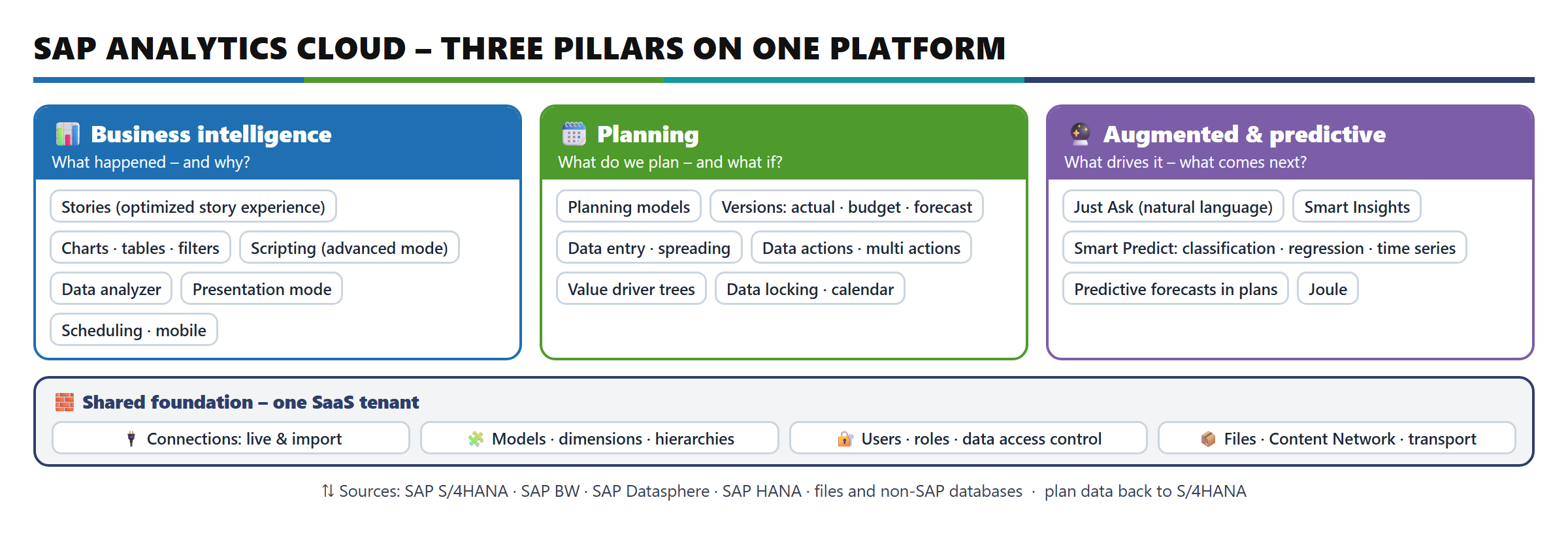
Pillar | Questions it answers | Main features (page 02) |
|---|---|---|
Business intelligence (BI) | What happened? Where are we against plan? Why did margin drop? | Stories in the optimized story experience (charts, tables, filters, scripting), data analyzer, presentation mode, scheduling and publishing, mobile |
Planning | What do we expect? What budget do we agree? What if prices rise 5%? | Planning models, versions (actual, budget, plan, forecast, rolling forecast), data entry and spreading, allocations, data actions, multi actions, value driver trees, data locking, calendar workflow |
Augmented and predictive analytics | What drives this number? What will happen next? | Just Ask (natural-language questions), Smart Insights, Smart Predict (classification, regression, time-series forecasting), predictive forecasts in planning, Joule |
1.1 Key terms
Term | Meaning |
|---|---|
Connection | Technical link to a source system: live (data stays in the source) or import (data is copied into SAC). Part 3, page 03 |
Model | The semantic layer of SAC: dimensions, measures / accounts, hierarchies, currencies. Analytic model (reporting only) or planning model (versions, write access). Page 02 |
Acquired data | Data imported into an SAC model and stored in SAC's own SAP HANA database – needed for native SAC planning |
Story | The report / dashboard: pages with charts, tables, filters, input controls; in the optimized story experience also scripting (former analytic applications) |
Version | A copy of the data of a planning model: one public Actual, plus budget, plan and forecast versions, public or private |
Data action / multi action | Server-side planning logic (copy, allocation, advanced formulas) / a chain of data actions, publishing, predictive, import and API steps |
Tenant | A customer's SAC system in SAP's cloud, reached by its own URL |
Part 2 – History and predecessors: BusinessObjects, Lumira, BW-IP, BPC
SAC started in 2015 as a cloud planning product (SAP Cloud for Planning) and was launched as SAP Cloud for Analytics at the end of 2015, became SAP BusinessObjects Cloud in 2016 when BI features were added, and has been called SAP Analytics Cloud since 2017, after predictive functions were added. It was built new for the cloud – it is not a hosted version of an on-premise tool.
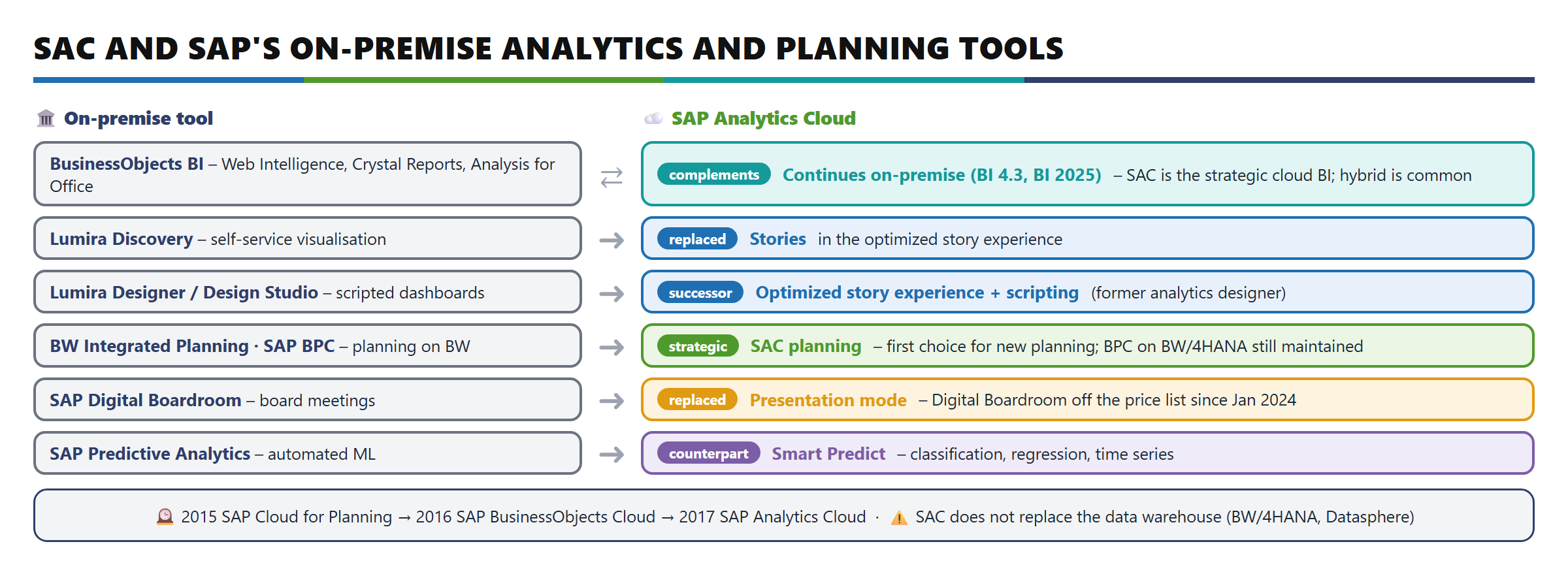
On-premise tool | What it did | Relationship to SAC |
|---|---|---|
SAP BusinessObjects BI (Web Intelligence, Crystal Reports, Analysis for Office) | Enterprise reporting, pixel-perfect and formatted reports, Excel analysis on BW | Complemented, not switched off: the on-premise suite continues (BI 4.3, BI 2025). SAC is SAP's strategic cloud BI; hybrid landscapes are common (page 05) |
SAP Lumira Discovery | Self-service data visualisation | Not part of BI 2025; SAC stories are the successor |
SAP Lumira Designer (successor of Design Studio) | Scripted dashboards and analytic applications on BW / HANA | SAC optimized story experience with scripting (former analytics designer) is the cloud successor; migration is a re-build |
BEx Analyzer / Analysis for Office | Excel front end for BW queries | Analysis for Office remains on-premise; SAC offers its own add-in for Microsoft Office (Part 6) |
BW Integrated Planning (BW-IP) and SAP BPC (standard and embedded) | Planning on BW: planning functions, sequences, input-ready queries; BPC adds consolidation and business-user modelling | SAC planning is SAP's strategic planning solution and its first choice for new planning scenarios; BPC on BW/4HANA is maintained in parallel (page 05) |
SAP Digital Boardroom | Board-meeting presentation on large touch screens | Taken off the price list in January 2024; presentation mode in optimized stories is the replacement (not a legal successor licence) |
On-premise predictive tools (SAP Predictive Analytics) | Automated machine learning for analysts | Smart Predict inside SAC is the cloud counterpart |
- Consolidation is not a core SAC function: financial consolidation in the S/4HANA world is done in SAP S/4HANA Finance for group reporting; SAC is used for group-level planning and reporting next to it (see FICO ABAP).
- Interview angle: "Does SAC replace BW?" – No. SAC is a front end and planning tool; the data warehouse role goes to BW/4HANA or SAP Datasphere (Part 4).
Part 3 – Architecture: SaaS tenant, live data and acquired data
SAC is software as a service: SAP runs the application, the database and the upgrades; the customer configures connections, models, stories, planning logic and users. There is no on-premise SAC. Each customer has its own tenant with its own URL, users and content.
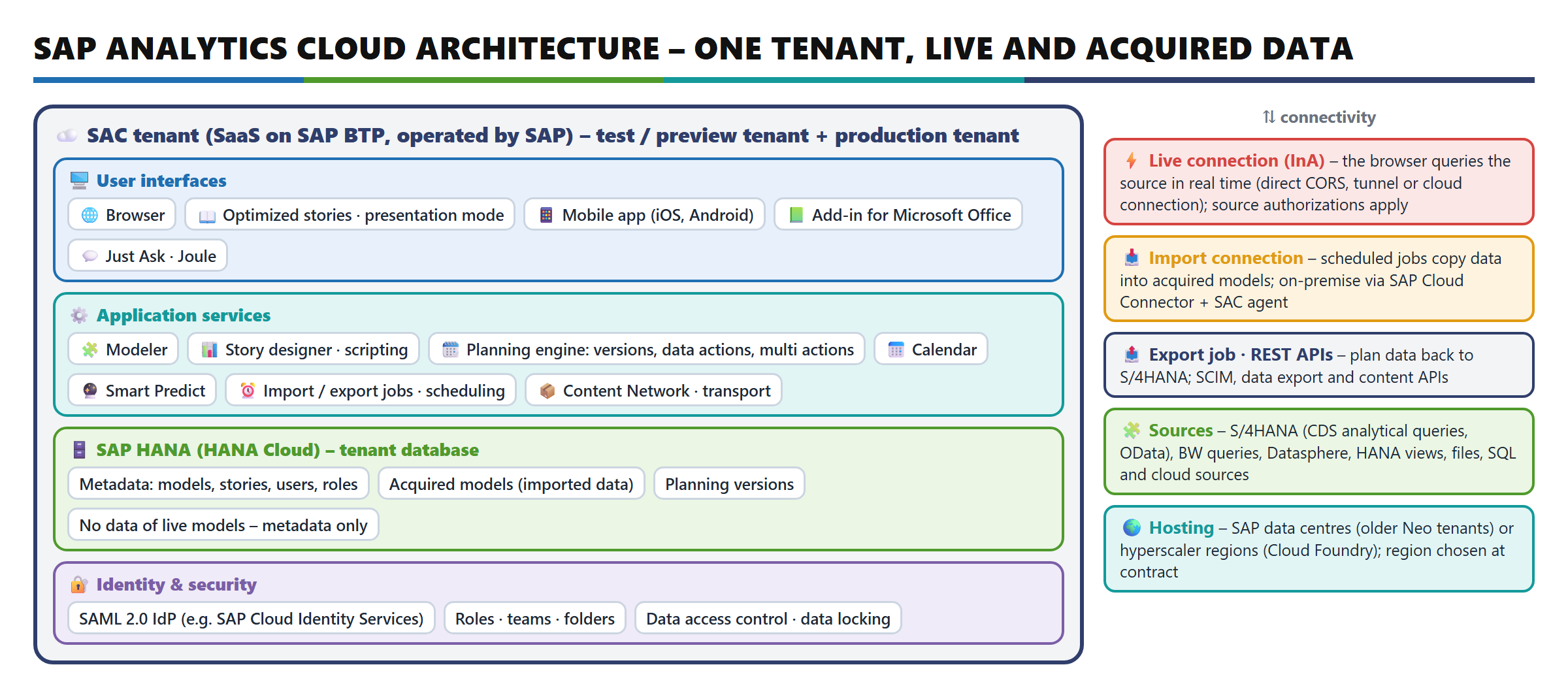
Layer | Content | What it means for you |
|---|---|---|
Platform | SAC runs as a service on SAP BTP; older tenants were hosted in SAP's own data centres (Neo environment), newer ones run on hyperscaler infrastructure (Cloud Foundry), with the region chosen at contract time | Data residency is decided by the tenant's region; moving a tenant between environments is a project with SAP |
Database | Each tenant stores its metadata (models, stories, users) and all acquired data in SAP HANA; current tenants run on SAP HANA Cloud | Some newer features (e.g. seamless planning with Datasphere) require a tenant on SAP HANA Cloud |
Application services | Modeler, story designer, planning engine (data actions, multi actions, version management), calendar, Smart Predict, Just Ask, scheduling, Content Network, Transport | All configuration is done in the browser – no ABAP, no local installation |
Connectivity | Live connections (InA protocol), import connections and export jobs, SAP Cloud Connector and SAP Analytics Cloud agent for on-premise systems, REST APIs | The ABAP developer works mostly on the source side: CDS analytical queries, OData services, plan-data APIs (page 03, page 04) |
Identity | SAML 2.0 identity provider (default SAP ID or a custom IdP such as SAP Cloud Identity Services), user / team provisioning via SCIM | Direct live connections authenticate the user in the source system by SAML single sign-on or user / password; the user must exist in the source (Part 8) |
3.1 Live data vs acquired (imported) data
The single most important architecture decision in SAC: does the data stay in the source, or is it copied into SAC?
Aspect | Live connection | Import connection (acquired data) |
|---|---|---|
Where data lives | In the source system (S/4HANA, BW, HANA, Datasphere); SAC stores only metadata | Copied into the SAC tenant's HANA database |
How it works | The browser sends queries to the source with the InA protocol – directly (CORS, single sign-on) or through a tunnel / cloud connection | Scheduled import jobs read OData services, files, SQL sources or SAP systems (via SAP Cloud Connector; the SAC agent only for BW, universes, SQL sources and the SAP ERP (ECC) connection) |
Freshness | Real time – every navigation queries the source | As fresh as the last import |
Security | Source authorizations apply (e.g. S/4HANA DCL roles on CDS views) | SAC data access control on dimensions must be maintained in SAC |
S/4HANA source | CDS analytical queries ( | OData services (e.g. CDS views exposed for extraction); CDS queries are not read by import |
Planning | Read-only for native SAC planning (special cases: page 03) | Full SAC planning: versions, data actions, write access |
Smart features | Limited by source (e.g. some smart features not on S/4HANA live models) | All SAC features available |
- Rule of thumb: live for operational reporting on S/4HANA and for BW / Datasphere models that must not be duplicated; acquired (or seamless planning, Part 4) when you plan, blend sources or need every SAC feature. The connection types in detail: page 03.
Part 4 – SAC in the portfolio: Datasphere, Business Data Cloud, planning roadmap
SAC is the consumption and planning layer of SAP's data and analytics portfolio. The data layer underneath is SAP Datasphere (cloud) or SAP BW/4HANA (on-premise); since 2025 both are packaged with SAC in SAP Business Data Cloud. The products themselves are described in BTP Development › 04 Data & AI – here only what matters for SAC.
Product | Role next to SAC |
|---|---|
SAP Datasphere | Business data fabric / cloud data warehouse: combines SAP and non-SAP data in spaces with business semantics. SAC consumes its analytic models live; with seamless planning an SAC planning model can store its data in a Datasphere space |
SAP BW/4HANA, SAP BW | On-premise data warehouse; SAC reads BW queries live, BPC embedded / BW-IP planning can be combined with SAC (page 03) |
SAP Business Data Cloud (BDC) | SaaS announced in February 2025 that bundles SAP Datasphere, SAP Analytics Cloud and SAP BW (as a migration path), with SAP-managed data products, SAP Databricks and packaged intelligent applications. The packaged applications have been called intelligent content since June 2026. Existing standalone SAC and Datasphere subscriptions continue and can be rewired to BDC; since 1 January 2026 neither is offered for new BTPEA, CPEA or pay-as-you-go subscriptions, and SAP's SAC pricing page licenses SAC through BDC core capacity (as of November 2026) |
SAP S/4HANA embedded analytics | Operational reporting inside S/4HANA on CDS analytical queries; SAC adds cross-system dashboards and planning (Part 5) |
Other SAP cloud products | Some embed SAC for their own analytics (e.g. stories in SAP SuccessFactors People Analytics); others feed SAC with data (see HR ABAP › 06 and SAP IBP sections) |
4.1 Seamless planning and live versions
- Seamless planning (generally available since 2025): the planning model is defined in SAC (structure, calculations, data actions), but its fact and master data are stored in an SAP Datasphere space. Datasphere sees the plan data without replication; SAC keeps the planning functions. Requires the new model type (not the classic account model) and SAC on SAP HANA Cloud.
- Live versions: Datasphere views (and selected SQL sources) can appear as read-only versions in an SAC planning model – e.g. actuals – which planners copy into a plan version instead of importing them.
- Why it matters: the classic pattern "import actuals into SAC, plan, export plan" becomes "plan on the shared data layer" – fewer copies, one semantic model for reporting and planning.
4.2 Planning roadmap and AI
- At SAP Sapphire in May 2026 SAP announced SAP Enterprise Planning, a new planning offering built on SAP Business Data Cloud data products and SAP Analytics Cloud, with Joule agents that monitor signals, simulate scenarios and propose plan updates (it is now a separate cloud service that requires SAP Business Data Cloud core capacity; in BDC the number of SAP Enterprise Planning users must be at least the number of SAC Planning Standard and Planning Professional users – SAP Enterprise Planning Supplement v.8-2026). SAP states that SAC remains the foundation for strategic and tactical planning cycles.
- Joule is embedded in SAC for natural-language analysis; it builds on the Just Ask technology (page 02 Part 8). SAP Business AI in general: BTP Development › 04.
Part 5 – SAC and S/4HANA: embedded analytics and embedded SAC
S/4HANA has its own analytics on CDS views (embedded analytics); SAC is the separate cloud tool. Know the difference and how they meet.
S/4HANA embedded analytics | SAC (standalone tenant) | |
|---|---|---|
Runs in | The S/4HANA system itself | Separate SaaS tenant |
Data | Only that S/4HANA system, in real time, on CDS analytical queries | Any number of sources: S/4HANA live, BW, Datasphere, imported non-SAP data |
UIs | Fiori analytical apps, analytical list page, overview page, KPIs (Smart Business), Analysis for Office | Stories, presentation mode, mobile app, Office add-in |
Planning | Not a planning tool (plan data only via APIs / Fiori apps) | Full planning: versions, data actions, calendar, write-back to S/4HANA |
Typical use | Operational reporting for clerks and managers in their processes | Management dashboards across systems, budgeting and forecasting, predictive |
5.1 Embedded SAC in S/4HANA Cloud Public Edition
- SAP S/4HANA Cloud Public Edition contains an embedded SAC that powers embedded stories: story-based analytical apps on the system's own CDS analytical queries, created by key users with the Manage KPIs and Reports app and opened from the Fiori launchpad.
- Its scope is limited to that S/4HANA system: planning, predictive scenarios, other data sources and the full SAC feature set need a standalone SAC tenant connected to S/4HANA (page 03).
- S/4HANA on-premise and private cloud connect a standalone SAC tenant through a live connection to their CDS analytical queries; SAC stories can be added to the Fiori launchpad as tiles or URLs.
- Business content: SAP delivers ready-made SAC packages (models, stories, data actions) in the Content Network, for example for integrated financial planning with S/4HANA – a common starting point for planning projects (page 05).
Part 6 – User interfaces: browser, mobile, Microsoft Office, Joule
Interface | Used for | Notes |
|---|---|---|
Web browser | Everything: modelling, stories, planning, administration | Main interface; the home screen, files repository, calendar and Just Ask live here |
Optimized story experience | Designing and viewing stories, incl. scripting (advanced mode) | The only story editor since the classic story experience was deprecated in 2026 (page 02 Part 5) |
Presentation mode | Meeting and board presentations from optimized stories | Replacement for SAP Digital Boardroom |
SAC mobile app (iOS, Android) | Viewing mobile-ready stories, bookmarks, notifications | Use responsive pages; consumption-focused, planning is a browser task |
SAP Analytics Cloud, add-in for Microsoft Office | Analysing SAC models (and Datasphere data) in Excel; planning in Excel on SAC planning models | Excel desktop and Excel for the web; the cloud counterpart to Analysis for Office |
Joule / Just Ask | Questions in natural language, generated charts and explanations | Models must be enabled for Just Ask by an administrator (page 02 Part 8) |
Embedding | SAC stories in the Fiori launchpad, SAP Build Work Zone, other SAP cloud products | Page 03 and page 04 |
Part 7 – Release cycle, tenants and content transport
7.1 Release cycle
- SAP develops SAC in two-week waves (version numbers such as 2026.15). Most customers are on the Quarterly Release Cycle (QRC): their tenants receive the accumulated waves four times a year – in February, May, August and November. A few tenants are on the bi-weekly Fast Track cycle; SAP is moving all subscriptions to QRC.
- Because each quarterly release bundles several waves, QRC version numbers skip values (the 2026 Q3 QRC, for example, is version 2026.15).
- Preview tenants (test tenants on the preview cycle) receive the quarterly release about a month earlier, so the team can regression-test stories, data actions and connections before production is upgraded.
- Features are announced in the What's New / release notes; deprecations are announced in advance – e.g. no new classic stories since wave 2025.14, classic experience deprecated with the 2026 Q3 QRC.
7.2 Tenants and transport
- A typical landscape: a test (often preview) tenant and a production tenant. Content is built in test and moved with Transport → Export / Import packages, the Content Network or SAP Cloud Transport Management; there is no ABAP transport system (CTS) inside SAC.
- Content can be moved only between tenants on compatible versions – between a QRC and a Fast Track tenant only around a quarterly update.
- Connections are tenant-specific: after import, live connections in production must point to the production S/4HANA / BW system (same connection name, different target).
Part 8 – Users, roles, licences and security
Role (persona) | Typical work in SAC |
|---|---|
Administrator | Tenant settings, users, teams, roles, connections, identity provider, transport |
Modeler | Models, public dimensions, hierarchies, currencies, data import jobs, data access control |
Story designer / BI content creator | Stories, calculations, scripting, publishing and scheduling |
Planner (Planner Reporter) | Data entry in planning stories, private versions, running data actions, calendar tasks |
Planning administrator / process owner | Data actions, multi actions, calendar processes, data locking, validation rules, version publishing |
Viewer / BI content viewer | Read stories, mobile, comments, bookmarks |
Predictive analyst | Predictive scenarios in Smart Predict |
- Standard application roles (e.g. BI Admin, BI Content Creator, BI Content Viewer, Modeler, Planner Reporter, Viewer) are templates; projects copy and adjust them. Roles are assigned to users or teams; folders and files are shared with teams.
- Licences are user-based and come in tiers: Business Intelligence, Planning Standard and Planning Professional – a role can only be assigned if the user has the matching licence (details and trade-offs: page 05).
- Data security has three layers: authorizations in the source (live connections), data access control on SAC model dimensions (read / write per member, acquired data) and data locking for planning (page 02).
- Identity: users authenticate against a SAML 2.0 identity provider – usually SAP Cloud Identity Services – Identity Authentication connected to the corporate directory. For direct live connections the same user must be known in the source system (user mapping by user ID or e-mail).
Part 9 – Interview questions
Q1. What is SAP Analytics Cloud?
SAP's SaaS product for business intelligence, planning and augmented / predictive analytics in one tool. It works on live data in S/4HANA, BW or Datasphere or on data imported into its own HANA-based models, and it is SAP's strategic front end for analytics and planning.
Q2. Which on-premise products does SAC replace or complement?
It complements SAP BusinessObjects BI, which continues on-premise. It is the successor of Lumira Discovery (stories), Lumira Designer / Design Studio (optimized story experience with scripting) and Digital Boardroom (presentation mode), and SAP's strategic planning solution after BW-IP and BPC. Smart Predict is the cloud counterpart of the on-premise predictive tools.
Q3. Explain live connection vs import connection.
With a live connection the data stays in the source; the browser sends InA queries in real time and source authorizations apply – typical for S/4HANA CDS analytical queries and BW queries. With an import connection data is copied into an SAC model (acquired data) by scheduled jobs; it is needed for native SAC planning and for blending sources, and security is maintained in SAC.
Q4. Describe the SAC architecture.
A SaaS tenant per customer, operated by SAP on SAP BTP, with SAP HANA (HANA Cloud) storing metadata and acquired data. Application services cover modelling, stories, planning engine, calendar and smart features; connectivity is live (InA, direct or tunnel), import (SAP Cloud Connector, SAC agent, APIs) and export jobs; identity via a SAML identity provider.
Q5. Does SAC replace SAP BW or Datasphere?
No. SAC is the consumption and planning layer. Integrating, harmonising and storing large data volumes is the job of BW/4HANA or SAP Datasphere; SAC reads their models live or, with seamless planning, stores plan data in Datasphere.
Q6. What is SAP Business Data Cloud and where is SAC in it?
A SaaS offering announced in 2025 that bundles SAP Datasphere, SAP Analytics Cloud and SAP BW as a migration path with SAP-managed data products, SAP Databricks and intelligent content (called intelligent applications until June 2026). SAC is its analytics and planning layer.
Q7. What is the difference between S/4HANA embedded analytics and SAC?
Embedded analytics runs inside one S/4HANA system on CDS analytical queries with Fiori analytical apps for operational reporting. SAC is a separate cloud tool that combines several sources, adds planning and predictive, and consumes the same CDS queries through a live connection.
Q8. What is embedded SAC in S/4HANA Cloud Public Edition?
An SAC instance included in S/4HANA Cloud Public Edition that powers embedded stories on that system's CDS analytical queries, created with the Manage KPIs and Reports app. Planning, predictive and other sources need a standalone SAC tenant.
Q9. How often is SAC updated and how do you prepare?
SAP develops in two-week waves; most tenants are on the quarterly release cycle (February, May, August, November). Preview test tenants get the release about a month earlier, where stories, data actions, connections and scripts are regression-tested before production is upgraded.
Q10. How is content moved from test to production?
With Transport export / import packages, the Content Network or SAP Cloud Transport Management – not with CTS. Tenants must be on compatible versions, and live connections must exist in the target tenant under the same name, pointing to the production source.
Q11. How is security handled in SAC?
Users log on via a SAML identity provider (typically SAP Cloud Identity Services). Roles (from standard templates) and teams grant functions and content access; data access control restricts dimension members in acquired models; live connections inherit the source system's authorizations; planning adds data locking and validation rules.
Q12. As an architect, when would you recommend SAC over on-premise BI tools?
For a cloud-first or S/4HANA greenfield landscape that needs management dashboards across systems, integrated planning (budget, forecast, what-if) and AI features without running servers. Formatted mass reporting (Crystal / Web Intelligence) or heavy Excel use on BW may justify keeping parts of BusinessObjects in a hybrid setup.
🏠 Start Here · 02 · Capabilities & Data ▶ · Sections: CORE ABAP | OOPS ABAP | ABAP on HANA | Clean Core | RAP | ABAP Points | SAP Fiori | SAPUI5 | Mobile Development (MDK) | BTP Foundations | BTP Development | CAP | SAP Build | ABAP on BTP | Integration Suite | SAP Business AI | SAP BASIS | Security | SAP SDLC
Functional: FICO ABAP | TRM ABAP | VIM | SAP BIS | SD ABAP | MM ABAP | PP ABAP | QM ABAP | PM ABAP | PS ABAP | EWM | TM ABAP | GTM ABAP | EHS ABAP | HR ABAP | BW | SAP Datasphere | SAP Business Data Cloud | SAP MDG | SAP Analytics Cloud | SAP Ariba | SAP CX | SAP IBP