What SAC can do and how its content is built: models (analytic and planning, the new model with measures and the classic account model), dimensions and hierarchies, versions and the planning categories, stories in the optimized story experience, the planning toolbox (data entry, allocations, data actions, multi actions, value driver trees, data locking, calendar) and the augmented and predictive features (Just Ask, Smart Insights, Smart Predict). The page ends with the end-to-end planning process from S/4HANA actuals to plan data written back to S/4HANA. Product overview and architecture: page 01; connection and API details: page 03.
Part 1 – The building blocks at a glance
Every SAC solution is built from the same chain: a connection to a source, a model that gives the data business meaning, and stories that show it. Planning adds versions and server-side actions; the smart features work on top of the same models.
Object | What it is | Built by |
|---|---|---|
Connection | Live or import link to S/4HANA, BW, Datasphere, HANA, files, SQL sources (page 03) | Administrator |
Model | Dimensions + measures / accounts, hierarchies, currencies, security; analytic or planning | Modeler |
Data import / export job | Scheduled load of acquired data; export of plan data to S/4HANA | Modeler |
Story | Pages with charts, tables, input controls, scripting; data entry for planners | Story designer |
Data action / multi action | Server-side planning logic and its orchestration | Planning administrator |
Calendar process | Planning cycle with tasks, owners, deadlines, approvals | Process owner |
Predictive scenario | Classification, regression or time-series model in Smart Predict | Predictive analyst |
- All objects are files in the SAC file repository (folders, sharing with users and teams) and can be transported between tenants together (page 01 Part 7).
Part 2 – Models: analytic vs planning, new model vs classic account model
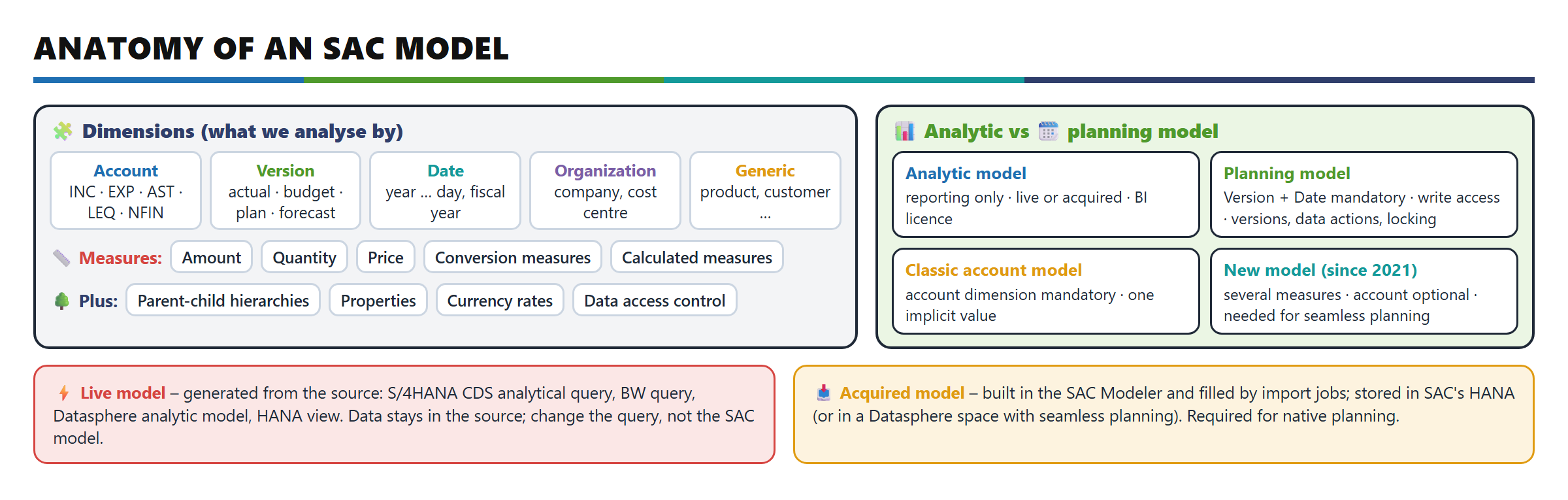
2.1 Analytic model vs planning model
Aspect | Analytic model | Planning model |
|---|---|---|
Purpose | Reporting and analysis | Planning: data entry, versions, actions, plus reporting |
Data | Live (S/4HANA query, BW query, Datasphere analytic model, HANA view) or acquired | Acquired (stored in SAC) or stored in Datasphere with seamless planning |
Mandatory dimensions | None beyond what the data needs | Version and Date (created automatically) |
Write access | No | Yes – in private versions and public versions in edit mode |
Planning features | – | Spreading, allocations, data actions, multi actions, data locking, validation rules, calendar input tasks |
Licence | Business Intelligence | Planning licence for planners; BI users can only view (and do limited private data entry) |
- Live models on S/4HANA are generated from the CDS analytical query – the query defines dimensions, measures, hierarchies and variables (prompts). Change the CDS query, not the SAC model (see ABAP on HANA › 05 CDS Views Part 9).
- Acquired models are built in the SAC Modeler: you define dimensions, measures and formulas, then fill them with import jobs (wrangling, mapping, transformations on import).
2.2 New model (with measures) vs classic account model
Since 2021 SAC offers a new model type. It is the default for new models and the basis of newer features such as seamless planning.
Aspect | Classic account model | New model (measure-based) |
|---|---|---|
Numbers stored in | One implicit value per record; the account dimension (mandatory) decides what the number means | One or more measures (e.g. Quantity, Price, Amount), each with its own aggregation and unit |
Account dimension | Mandatory | Optional – can be combined with measures; you choose whether aggregation, format and units come from accounts or measures |
Currency conversion | Model-level setting | Conversion measures – several currencies side by side |
Typical use | Older finance planning models | All new models; required for seamless planning |
- Stories built on a classic account model are not migrated automatically when the model is re-created as a new model – a reason to start greenfield projects on the new model type.
Part 3 – Dimensions, hierarchies, measures and currencies
Dimension type | Content | Remarks |
|---|---|---|
Account | Chart of accounts or KPIs with account types INC (income), EXP (expense), AST (asset), LEQ (liabilities and equity), NFIN (non-financial) | INC / EXP form the P&L, AST / LEQ the balance sheet (aggregated over time); formulas as account members; sign switch for INC / LEQ |
Version | Actual, budget, plan, forecast versions | System dimension of planning models (Part 4) |
Date | Time with chosen granularity (year to day) and optional fiscal year | System dimension; drives time-based formulas and forecasts |
Organization | Company code, cost centre, profit centre, region | Can carry a currency property for conversion |
Generic | Everything else: product, customer, project, employee | Most dimensions are generic |
- Public dimensions are shared by several models (one product master for sales and margin planning); private dimensions belong to one model.
- Properties (attributes) hold additional information on members, e.g. responsible person, currency, region – used for filters, data access control and data locking ownership.
- Hierarchies are parent-child in acquired models (a dimension can have several, e.g. by region and by legal entity). Live models use the source hierarchies (CDS hierarchy views, BW hierarchies).
- Measures and calculations: base measures, calculated measures, restricted measures and account formulas in the model; story calculations on top. Prefer model calculations when several stories need the same number.
- Currency conversion uses a currency rate table maintained in SAC (rate types and versions, e.g. plan rates vs actual rates).
- Data access control (per dimension) grants read / write access per member – the SAC equivalent of DCL for acquired data. Live models rely on the source's authorizations (page 01 Part 8).
Part 4 – Versions, planning categories and version management
A version is a full slice of a planning model's data. Versions let a company keep the actual figures, the approved budget and several forecasts side by side and compare them in one story.
Category | Use | Remarks |
|---|---|---|
Actual | Booked figures, usually imported from S/4HANA | Only one public actual version per model; private copies are allowed |
Budget | The approved annual target | Typically locked after approval |
Planning | Working plans, scenarios, simulations | Many versions possible |
Forecast | Expected result of the year: actuals for closed periods + forecast for open periods | A cut-over date controls where actuals end and forecast begins |
Rolling Forecast | Forecast over a moving horizon (e.g. next 12 or 18 months) | Look-back and look-ahead periods relative to the cut-over |
- The categories are fixed – customers cannot add their own; apart from the actual and forecast specifics they behave the same way. The meaning comes from how the process uses them.
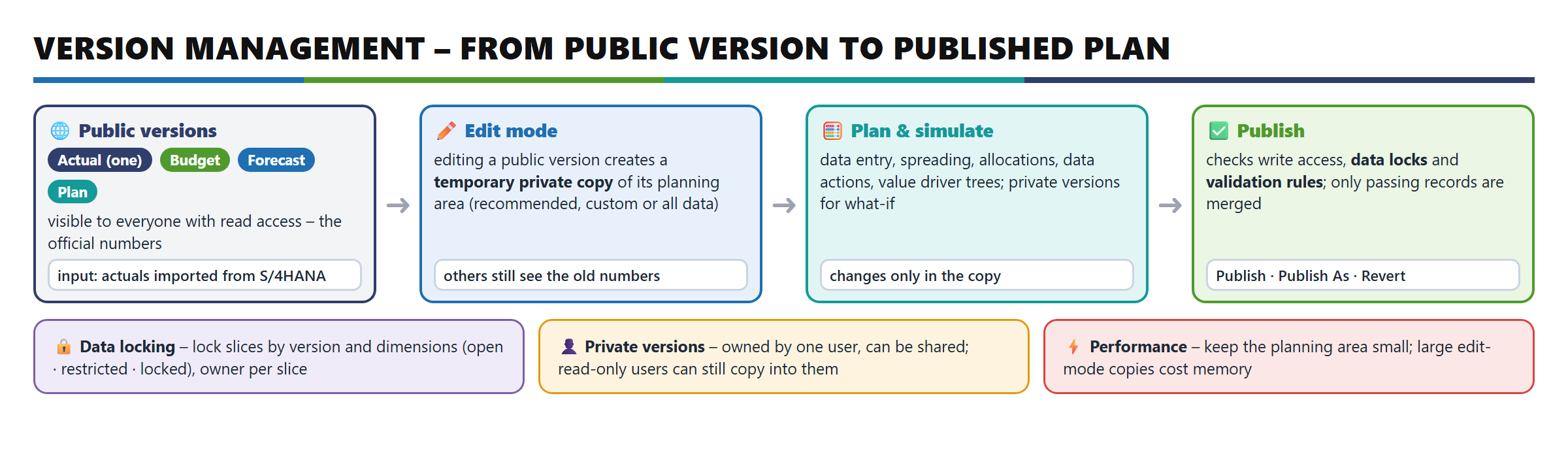
4.1 Public and private versions
- Public versions are visible to everyone with read access – the "official" numbers.
- Private versions belong to one user (who can share them) – for simulations. A user with only read access to a public version can still copy it into a private version and play with it.
- Editing a public version puts it into edit mode: SAC creates a temporary private copy of the selected planning area (recommended area, a custom area or all version data). Other users see the old numbers until you publish.
- Publish merges the changes into the public version after checks: write authorization, data locks and validation rules (allowed member combinations). Only records that pass all checks are published. Publish As creates a new public version; Revert discards the changes.
- Performance: large edit-mode copies cost memory and time – keep planning areas small (filters in the story, recommended planning area).
Part 5 – Stories and the optimized story experience
A story is SAC's report, dashboard and planning screen at once. Since 2022–2023 SAP has unified classic stories and analytic applications (built with the former analytics designer) in the optimized story experience: one design environment where you start with drag-and-drop and add scripting only where needed.
Element | What it does |
|---|---|
Pages and layouts | Canvas or responsive pages (responsive for mobile); themes and templates |
Charts and tables | Bar, line, waterfall, variance charts, geo maps, KPI tiles; tables with drill, hierarchies and input-ready cells for planning |
Filters and input controls | Story and page filters, linked analysis between widgets, variables (prompts) of live queries |
Calculations | Story-level calculated measures, restricted measures, variance and difference calculations |
Advanced mode (scripting) | Script objects, script variables and event scripts (JavaScript-like API) for guided applications – former analytic applications (page 04) |
Planning widgets | Data action and multi action triggers, version management panel, value driver trees, data locking |
Collaboration and output | Comments, bookmarks, scheduled publications (PDF / PowerPoint), presentation mode |
5.1 Status of classic features (2026)
- Classic stories and analytic applications: no new ones since wave 2025.14; the classic experience was deprecated with the 2026 Q3 QRC (version 2026.15, August 2026). Existing content is converted with File → Convert to Optimized Design Experience – a one-way conversion; unsupported features are lost, so test the result.
- Digital Boardroom: taken off the price list in January 2024; the classic Digital Boardroom is part of the classic experience deprecated as of 2026.15; presentation mode in optimized stories is the replacement.
- Smart Discovery (a classic-story feature) is gone; Smart Insights, Just Ask and the data analyzer cover its use cases (Part 8).
- Data analyzer: ad-hoc, pivot-table style analysis on a model or a live query without building a story.
Part 6 – The planning toolbox
Feature | What it does | Example |
|---|---|---|
Data entry and spreading | Type values into input-ready table cells at any level; SAC disaggregates (spreads) them to the leaves by reference data or equally; values can be locked in the table and redistributed (value shift) | Enter 1.2 M revenue for a region for the year – SAC spreads it to products and months by last year's pattern |
Allocations | Distribute costs from senders to receivers by a driver – modelled as an allocation step in a data action | Spread IT costs to cost centres by headcount |
Data actions | Server-side logic on a version: copy, cross-model copy, allocation, advanced formulas, currency conversion, embedded data action; with parameters | Copy actuals into the forecast; revenue = quantity × price |
Multi actions | Chain steps across models and versions: data action, version management (publish), predictive, data import, data locking and API steps | Import actuals → predictive forecast → calculate → publish, one click |
Value driver trees (VDT) | Driver-based tree in a story showing how input drivers roll up to KPIs; drivers can be changed for simulation | Price, volume, cost per unit → margin |
Data locking | Lock slices of data by version and dimensions (states open, restricted, locked) with an owner per slice | Lock January–June actuals; lock a region after approval |
Validation rules | Allowed combinations of dimension members for data entry | Product group X may only be planned in sales org 1000 |
Calendar | Planning processes with general, review and composite tasks (composite tasks are planned for deprecation; classic input tasks are not supported in optimized stories), data locking, data action and multi action tasks, dependencies, approvals and recurring cycles | Annual budget: preparation → entry by cost centre owners → review → approval → lock |
6.1 Data actions and advanced formulas
Advanced formulas are SAC's script language for planning calculations. They run on the server, on the target version selected for the data action, and write results with DATA() from values read with RESULTLOOKUP(). MEMBERSET limits the scope – the smaller the scope, the faster the action.
|
- The version is not hard-coded: the data action runs on the version the planner selects (or a parameter passes it), so the same logic works for budget and forecast.
- Multi action steps commit one by one – a failed step does not roll back earlier steps. Design multi actions so that they can be re-run safely; prefer an embedded data action when steps belong together.
- Data actions on a public version run only on the data in edit mode (its planning area); the result becomes official when the version is published.
Part 7 – The end-to-end planning process with S/4HANA
The classic integrated financial planning cycle: S/4HANA delivers the actuals and master data, SAC plans, the plan is approved in a calendar process, and the approved plan goes back to S/4HANA so that plan / actual reports in S/4HANA show it.
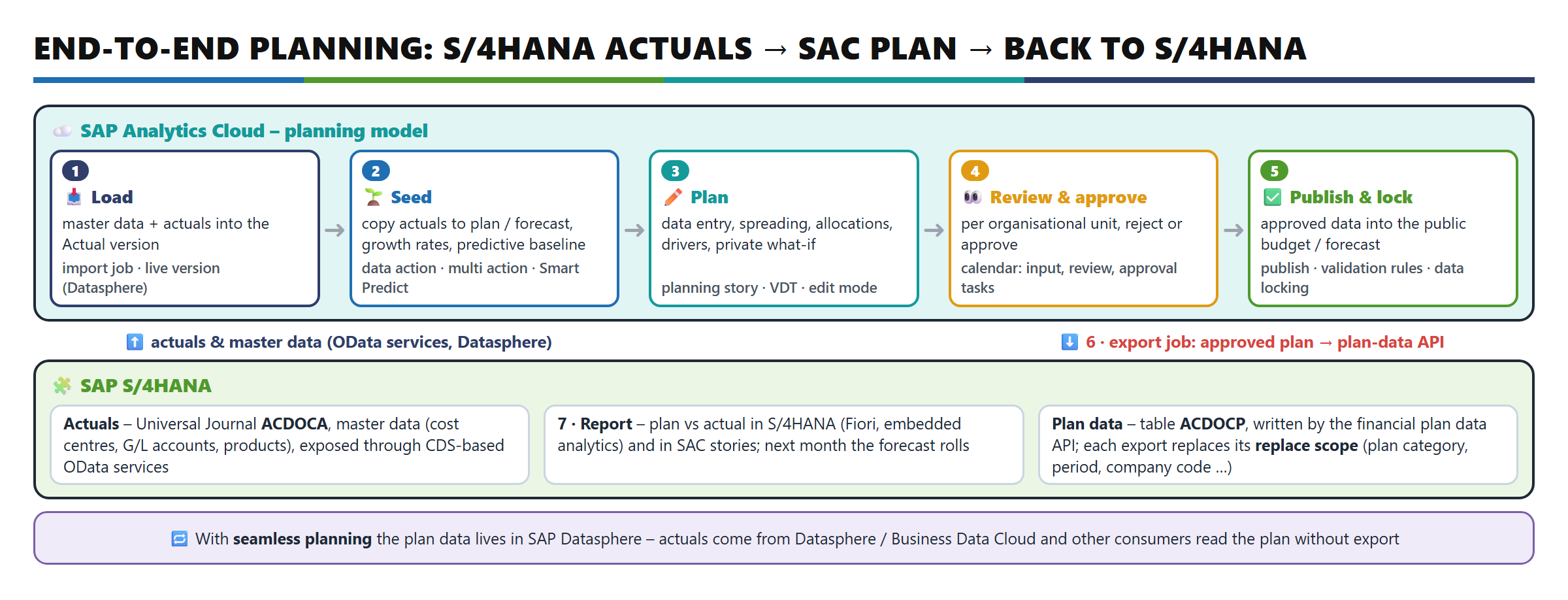
Step | What happens | SAC objects / S/4HANA side |
|---|---|---|
1. Load master data and actuals | Cost centres, accounts, products and the actual line items flow from S/4HANA into the model | Import jobs from OData services (S/4HANA side: CDS-based services), or a live version from Datasphere; S/4HANA table ACDOCA |
2. Seed the plan | Copy actuals into the plan or forecast version, apply growth rates, run a predictive forecast | Data actions (copy, advanced formulas), multi action with predictive step |
3. Plan | Cost centre owners and planners enter and spread values, run allocations and driver calculations, simulate in private versions | Planning story, data entry, allocations, VDT, private versions |
4. Review and approve | Reviewers check the numbers, reject or approve per organisational unit | Calendar process with input, review and approval tasks; comments |
5. Publish and lock | Approved data is published to the public budget / forecast version and locked | Publish (validation rules), data locking tasks |
6. Write back to S/4HANA | The approved plan is exported to S/4HANA plan data so that plan / actual comparisons work there | Export job to the S/4HANA plan-data API (financial plan data in table ACDOCP); details: page 03 |
7. Report and repeat | Plan vs actual in SAC stories and S/4HANA reports; next month actuals are loaded and the forecast rolls | Stories, rolling forecast versions |
- Write-back wording: SAC calls it export (data export job). The older term retraction comes from BPC, where plan data was "retracted" from BW back into ERP.
- Each export replaces a defined slice of S/4HANA plan data, the replace scope (e.g. plan category, fiscal year period, company code): existing ACDOCP records in that slice are deleted and the exported records are posted. A value deleted in SAC therefore disappears in S/4HANA if it lies in the scope – choose the scope carefully (details: page 03 Part 4.2).
- With seamless planning steps 1 and 6 change: actuals come from Datasphere (replicated from S/4HANA or as data products in Business Data Cloud) and plan data is stored in Datasphere, where other consumers can use it directly.
Part 8 – Augmented and predictive analytics
Feature | What it does | Notes |
|---|---|---|
Just Ask | Ask a question in natural language ("revenue by region last quarter") and get a chart or answer | Successor of Search to Insight (generally available since 2024); models must be enabled and can be tuned with synonyms; Joule's analytical insights build on it |
Smart Insights | Explains a data point or variance: top contributors, related dimensions, auto-generated text | Available in optimized stories; not on every source (e.g. not on S/4HANA CDS-based live models) |
Smart Predict – predictive scenarios | Automated machine learning: classification (yes / no, e.g. churn), regression (a number, e.g. delivery delay), time-series forecasting (e.g. sales per product for 12 months) | Train several models, compare quality indicators, apply the best one to new data or write forecasts into a planning version |
Predictive forecasts in planning | Time-series forecast directly in a planning table or as a multi action predictive step | Seeds the forecast version with a statistical baseline |
Joule | Conversational assistant across SAC: questions, explanations, navigation | Builds on Just Ask; new generative AI features arrive with the quarterly releases |
- Interview angle: Smart Predict is automated ML for business analysts inside SAC; heavy data science with custom models belongs on SAP Databricks / SAP AI Core (see BTP Development › 04).
Part 9 – Interview questions
Q1. What is the difference between an analytic model and a planning model?
An analytic model is for reporting and can be live or acquired. A planning model is acquired (or stored in Datasphere with seamless planning), always has Version and Date dimensions, and supports data entry, private and public versions, data actions, allocations, data locking and calendar tasks.
Q2. What is the new model type compared with the classic account model?
The new model (since 2021) stores numbers in one or more measures, each with its own aggregation and unit, and makes the account dimension optional; it supports conversion measures and seamless planning. The classic account model has one implicit value and a mandatory account dimension that defines its meaning.
Q3. Which dimension types does SAC know?
Account (with account types INC, EXP, AST, LEQ, NFIN), Version, Date, Organization and Generic. Version and Date are mandatory in planning models; dimensions can be public (shared) or private, and carry properties and parent-child hierarchies.
Q4. Explain public and private versions and edit mode.
Public versions hold the official numbers; private versions are personal simulations. Editing a public version creates a temporary private copy of its planning area; Publish checks write access, data locks and validation rules and merges the changes, Publish As creates a new public version and Revert discards the changes.
Q5. Which version categories exist?
Actual, Budget, Planning, Forecast and Rolling Forecast. There is only one public actual version per model; forecast versions use a cut-over between actuals and forecast. Customers cannot add categories.
Q6. What is the difference between a data action and a multi action?
A data action runs planning logic on one model – copy, cross-model copy, allocation, advanced formulas, currency conversion, embedded data actions. A multi action chains data actions with version publishing, predictive, data import, data locking and API steps across models; each step commits separately.
Q7. What are advanced formulas?
SAC's server-side script language in data actions. MEMBERSET restricts the scope, RESULTLOOKUP reads values and DATA writes results, e.g. revenue = quantity × price for the year, running on the version selected when the data action is triggered.
Q8. What is the optimized story experience and what happened to classic stories?
The unified story designer that merged classic stories and analytic applications: drag-and-drop design plus optional scripting in advanced mode. New classic stories could not be created after wave 2025.14 and the classic experience was deprecated with the 2026 Q3 QRC; classic content is converted one way to the optimized design.
Q9. What replaced the Digital Boardroom?
The presentation mode of optimized stories. Digital Boardroom was taken off the price list in January 2024.
Q10. Walk me through an integrated financial planning cycle with S/4HANA.
Import master data and actuals from S/4HANA, seed plan and forecast versions with data actions and predictive forecasts, let planners enter and allocate data, review and approve in calendar tasks, publish and lock, then export the approved plan to S/4HANA plan data (ACDOCP) through the plan-data API so that plan / actual reports work in S/4HANA.
Q11. Which smart features does SAC offer?
Just Ask for natural-language questions (successor of Search to Insight), Smart Insights to explain values and variances, Smart Predict with classification, regression and time-series scenarios, predictive forecasts in planning, and Joule as the conversational assistant.
Q12. As an architect, how do you keep SAC planning fast?
Use the new model type with only the dimensions needed, small planning areas in edit mode, scoped advanced formulas (MEMBERSET), embedded data actions instead of long multi action chains, data locking instead of copies, and separate models per process linked by cross-model copy rather than one huge model.
🏠 Start Here · ◀ 01 · Overview & Architecture · 03 · Integration ▶ · Sections: CORE ABAP | OOPS ABAP | ABAP on HANA | Clean Core | RAP | ABAP Points | SAP Fiori | SAPUI5 | Mobile Development (MDK) | BTP Foundations | BTP Development | CAP | SAP Build | ABAP on BTP | Integration Suite | SAP Business AI | SAP BASIS | Security | SAP SDLC
Functional: FICO ABAP | TRM ABAP | VIM | SAP BIS | SD ABAP | MM ABAP | PP ABAP | QM ABAP | PM ABAP | PS ABAP | EWM | TM ABAP | GTM ABAP | EHS ABAP | HR ABAP | BW | SAP MDG | SAP Analytics Cloud | SAP Ariba | SAP CX | SAP IBP