How an SAC project is run and decided: the SAP Activate approach with business content, licensing at a conceptual level (BI, Planning Standard, Planning Professional, embedded and BTP-based options), the paths from BPC and BW-IP to SAC planning, SAC's place in the Datasphere / Business Data Cloud strategy, and the architect decisions – live or import, model design, where to calculate, performance, security, embedded or enterprise SAC. Product overview: page 01; capabilities: page 02; connections and APIs: pages 03 and 04.
Part 1 – Implementation approach with SAP Activate
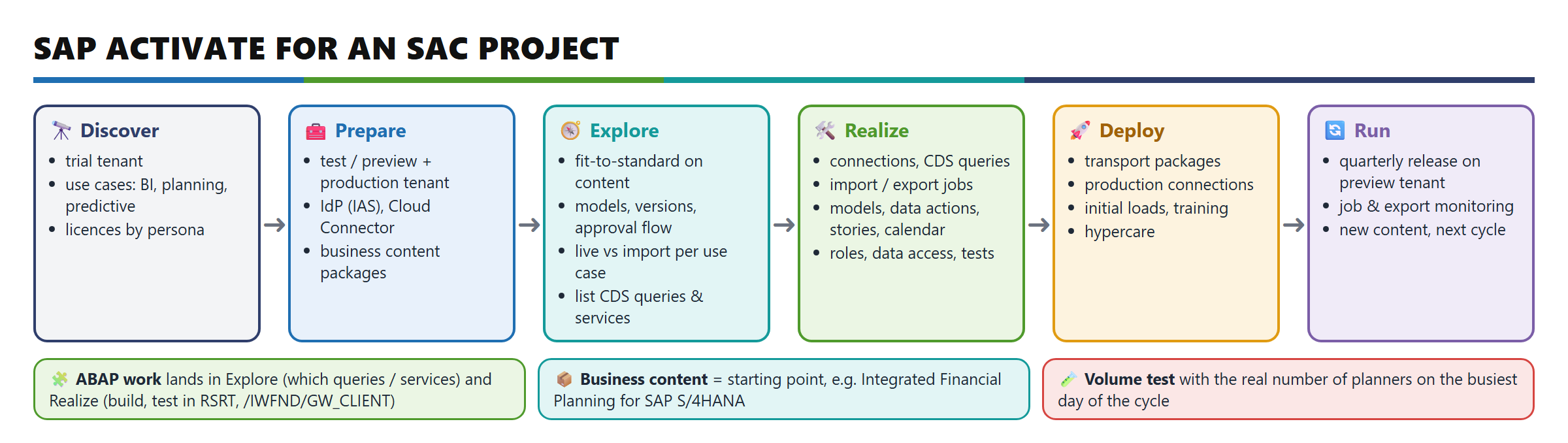
SAC projects follow SAP Activate like other SAP cloud products. Because SAC is SaaS and ships business content, the project is a fit-to-standard on content plus the integration and model design – not a blueprint written from scratch.
Phase | SAC-specific work |
|---|---|
Discover | Trial tenant, use cases (dashboards, planning, predictive), first licence sizing by persona |
Prepare | Order tenants (test / preview + production), set up the identity provider (IAS), Cloud Connector and live connectivity, import the relevant business content packages from the Content Network |
Explore | Fit-to-standard workshops on the content (e.g. Integrated Financial Planning for SAP S/4HANA): models, dimensions, versions, planning steps, approval flow; decide live vs import per use case; list the CDS queries and OData services needed (page 03) |
Realize | Sprints: connections, CDS queries, import / export jobs, models, data actions, multi actions, stories, calendar processes, roles and data access control; unit, integration and performance tests with production-like volumes |
Deploy | Transport content to production (export / import packages or Content Network), point connections to production systems, initial data loads, training, hypercare |
Run | Quarterly releases tested on the preview tenant, job and export monitoring, user administration, new content and planning cycles |
1.1 Typical team
- SAC consultants (modeller / planning, story design), business process owner (e.g. FP&A), FI/CO consultant (plan categories, ACDOCP, organisational structure), ABAP developer (CDS queries, OData services, plan-data services – Part 9), Basis / security (SSO, CORS, Cloud Connector, roles), optionally an integration developer (APIs, Integration Suite).
- Business content is a starting point, not a finished solution: expect to adapt dimensions, data actions and stories to the customer's structures.
Part 2 – Licensing and editions (conceptual)
No prices here – the concepts an architect must know to size a landscape and assign roles. Exact entitlements change and come from the order form and SAP's "features by licence type" documentation.
Licence (per named user) | What it allows | Typical users |
|---|---|---|
Business Intelligence | Stories, live and acquired analytic models, Just Ask, Smart Insights, mobile, Office add-in for analysis; viewing planning data | Managers, analysts, report consumers |
Planning Standard | BI plus working in planning models: data entry, private versions, running data actions and multi actions, calendar tasks, uploading data into existing models | Cost centre owners, planners who execute a process |
Planning Professional | Planning Standard plus building planning: create and change planning models and dimensions, design data actions, allocations and calendar processes, BPC connections (at least one Professional user is needed to set up a BPC connection) | Planning administrators, FP&A modellers, consultants |
- Roles consume licences: a role that contains planning permissions makes the user count as a planning user. Design custom roles per persona so viewers do not accidentally use planning licences.
- Some functions sit only in the higher tier – e.g. a data action with currency conversion fails for a Planning Standard user. Check the feature-by-licence table before promising a design.
2.1 Other ways to obtain SAC
Option | What it is | Limits |
|---|---|---|
Embedded SAC in S/4HANA Cloud Public Edition | Included in the public edition for embedded stories on the system's own CDS queries (page 03 Part 5) | One system's data, no planning or other sources |
Embedded SAC in other SAP cloud products | e.g. People Analytics in SAP SuccessFactors | That product's data only |
SAC, embedded edition | Former SAP BTP service for embedding SAC in custom BTP applications – deprecated on 15 March 2025: no new CPEA contracts, no renewal | Not the enterprise planning tenant |
SAP BTP consumption contracts | Existing BTPEA, CPEA and pay-as-you-go contracts keep SAC until their term ends; since 1 January 2026 SAC is no longer offered for new BTPEA, CPEA or pay-as-you-go subscriptions | Commercial detail with SAP |
SAP Business Data Cloud | Bundles SAC with Datasphere and data products (page 01 Part 4) | Existing standalone subscriptions continue and can be rewired to BDC; SAP's pricing page offers SAC through BDC core capacity (as of November 2026) |
- SAP Datasphere is licensed separately by capacity; seamless planning therefore needs both SAC user licences and Datasphere capacity.
- Test tenants (incl. preview tenants for regression tests) are separate subscriptions – plan for at least test + production.
Part 3 – From BPC and BW-IP to SAC planning
SAP states that its future planning investment goes primarily into SAC. Existing BPC and BW-IP customers therefore plan a move, but with long maintenance runways they can choose the pace.
3.1 Maintenance facts
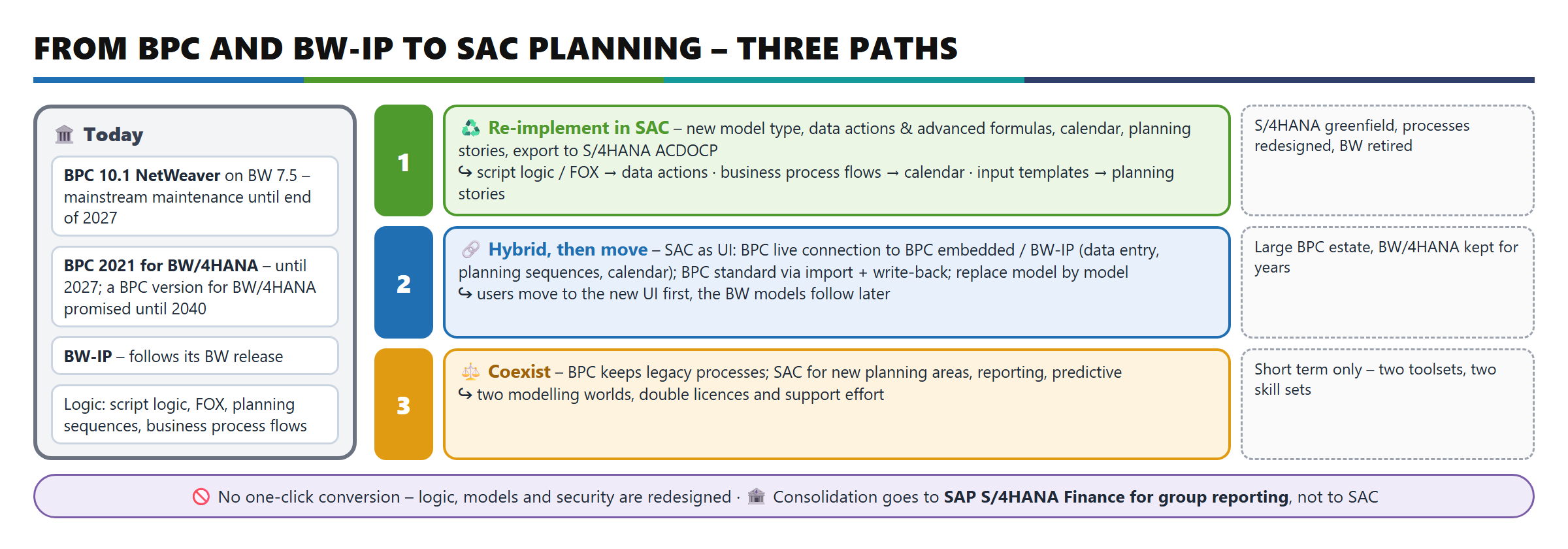
- SAP BPC 10.1, version for SAP NetWeaver: mainstream maintenance until the end of 2027, in line with SAP BW 7.5.
- SAP BPC 2021, version for SAP BW/4HANA: supported until 2027; SAP has committed that SAP BW/4HANA will be supported with a corresponding BPC version until 2040, without naming that version yet.
- BW-IP (planning in BW / BW/4HANA) follows the maintenance of its BW release.
3.2 Migration paths
Path | How | When |
|---|---|---|
1. Re-implement in SAC | Rebuild models, logic and reports natively: BPC script logic / BW planning functions (FOX) become data actions and advanced formulas, BPC business process flows become calendar processes, input templates become planning stories | S/4HANA greenfield, processes are redesigned anyway, BW is being retired |
2. Hybrid, then move | SAC as the UI on existing planning: BPC live connection to BPC embedded / BW-IP (data entry, planning sequences, calendar workflow around BW models); BPC standard through import and write-back; replace model by model | Large BPC estates, BW/4HANA kept for years, users should move to the new UI first |
3. Coexist | BPC stays for complex legacy processes; SAC handles new planning areas, reporting and predictive | Short term only; doubles the skills and licences needed |
- There is no one-click conversion from BPC or BW-IP to SAC: logic, models and security are redesigned. Treat it as a re-implementation project with data migration of history and plans.
- Consolidation is not an SAC function: BPC consolidation moves to SAP S/4HANA Finance for group reporting (or another consolidation product); SAC covers group-level planning and reporting.
- SAP runs a dedicated "BPC move to SAC" programme with guidance and hybrid scenarios – a good source for interview examples.
Part 4 – SAC in SAP's data strategy: Datasphere and Business Data Cloud
The products are introduced on page 01 Part 4 and in BTP Development › 04; here only what changes the architecture of an SAC solution.
Fact | Architecture consequence |
|---|---|
SAC is the analytics and planning layer; Datasphere (cloud) or BW/4HANA (on-premise) is the data layer | Do not use SAC acquired models as a data warehouse – harmonise and store large or shared data in Datasphere / BW |
SAP Business Data Cloud (announced February 2025) bundles Datasphere, SAC and SAP BW as a migration path, with SAP-managed data products and SAP Databricks | Actuals can come from data products instead of custom extraction; new projects check BDC first |
Seamless planning stores SAC planning data in a Datasphere space; live versions read actuals from Datasphere | Fewer copies and exports; requires the new model type and SAC on SAP HANA Cloud |
SAP BW 7.5 mainstream maintenance ends in 2027; BW/4HANA continues; BW in BDC is positioned as the bridge | Plan the data layer and the planning tool together – a BW exit often triggers the BPC decision |
SAP announced SAP Enterprise Planning (May 2026) on Business Data Cloud and SAC | A separate cloud service that requires BDC core capacity; in BDC the number of SAP Enterprise Planning users must be at least the number of SAC planning users (supplement v.8-2026) – include it in licence sizing; SAP positions SAC as the foundation for planning cycles (page 01 Part 4.2) |
Part 5 – Architect decisions
5.1 Live or import?
Choose live when … | Choose import (or seamless planning) when … |
|---|---|
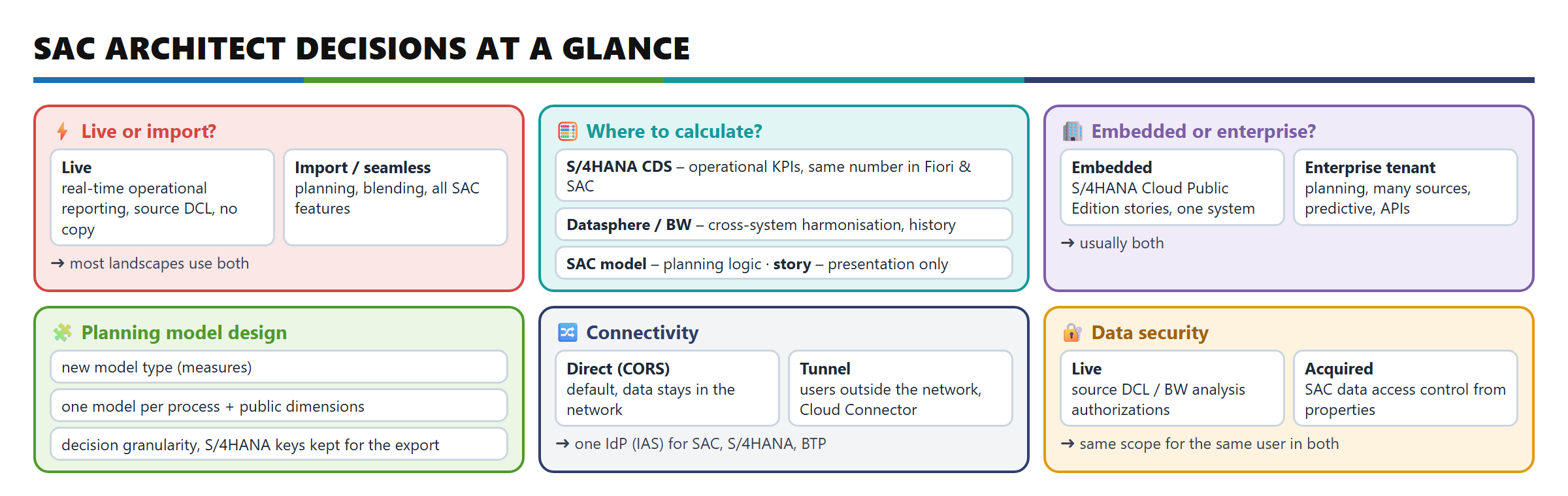
Real-time operational reporting on S/4HANA (open orders, today's postings) | You plan (versions, data actions, write access) |
Source authorizations (DCL) must apply unchanged | Several sources must be blended in one model |
Data volume or privacy rules forbid copying data to the cloud | You need every SAC feature (smart features, some calculations) or offline-tolerant performance |
A BW or Datasphere model already exists and must not be duplicated | The source has no live interface (non-SAP SaaS, files) |
5.2 Where to calculate
Layer | Put here | Avoid here |
|---|---|---|
S/4HANA CDS (cube / query) | Operational KPIs that Fiori apps and SAC must show identically, currency conversion on source data, authorization | Cross-system logic, plan logic |
Datasphere / BW | Harmonisation across systems, history, master-data mapping, heavy transformations, data shared by many consumers | Interactive planning logic |
SAC model | Planning logic (data actions, allocations, driver formulas), model-level calculations reused by several stories | Heavy data cleansing on import, data warehouse duties |
SAC story | Presentation-only calculations (variance %, ranking) for one story | Business logic that other consumers also need |
5.3 Planning model design
- Use the new model type (measures, optional account dimension) – required for seamless planning and newer features.
- One model per planning process (cost centre, sales, workforce, capex) linked by cross-model copy and shared public dimensions, rather than one huge model.
- Plan at the granularity decisions are taken (e.g. month × cost centre × account group), not at line-item level; import actuals aggregated to that level.
- Keep the S/4HANA keys (company code, cost centre, G/L account) in the dimensions so the export to ACDOCP needs no mapping tables.
- Define versions and the planning calendar with the business early – they drive data locking and approval design.
5.4 Other decisions
Decision | Options and guidance |
|---|---|
Embedded vs enterprise SAC | Embedded (S/4HANA Cloud Public Edition) for operational stories on one system at no extra licence; enterprise tenant as soon as planning, other sources, predictive or APIs are needed – most customers have both |
Direct vs tunnel live connection | Direct (CORS) by default; tunnel only if users outside the network need on-premise data |
Business content vs custom | Start from SAP content (financial planning, line-of-business dashboards); customise instead of building from zero |
Excel | SAC add-in for Microsoft Office for SAC models; Analysis for Office stays for BW-heavy Excel users in hybrid landscapes |
Tenant landscape | At least test (ideally on the preview cycle) and production; transport via export / import packages or Content Network |
Part 6 – Performance
- Live models: performance is the source query's performance. Mandatory variables for large data, only needed dimensions in the query, aggregation pushed down to HANA, no row-by-row calculations; test with RSRT and realistic users (page 04 Part 7.4).
- Stories: fewer widgets per page, filters set before data loads, story filters instead of many widget filters, light
onInitializationscripts. - Planning: small planning areas in edit mode, scoped advanced formulas (
MEMBERSET), embedded data actions instead of long multi action chains, aggregated actuals (page 02 Parts 4 and 6). - Imports and exports: filtered, delta-style loads (by period) instead of full reloads; schedule outside the planning window.
- Volume test before go-live with the real number of planners entering data in the same period – the busiest day of the budget cycle is the real load test.
Part 7 – Security and data access design
Layer | Mechanism | Design rule |
|---|---|---|
Authentication | SAML 2.0 via IAS; same IdP for SAC, S/4HANA and BTP | No SAC-local passwords; SSO is the precondition for live connections |
Functional access | Roles (from standard templates) assigned to users or teams | Roles per persona; mind licence consumption (Part 2) |
Content access | Folders and file sharing with teams | Team-based sharing, no personal folders for productive content |
Data – live | Source authorizations: CDS DCL, BW analysis authorizations | Model authorizations once, in the source |
Data – acquired | Data access control on dimensions (read / write per member), model privacy | Rebuild the needed restrictions in SAC; derive them from a property (e.g. responsible person) to keep maintenance low |
Planning | Data locking, validation rules, calendar task ownership | Lock what is approved; owners per organisational unit |
Technical users and APIs | Connection credentials, OAuth clients | Least privilege, rotation, never personal users |
- Mixed models (live reporting next to acquired planning data) need both concepts kept consistent – the same manager must see the same cost centres in both.
Part 8 – AI features and roadmap
- Current features (details page 02 Part 8): Just Ask (natural-language questions, models must be enabled and tuned with synonyms), Smart Insights, Smart Predict (classification, regression, time series) and predictive forecasts in planning, Joule in SAC.
- Architect angle: natural-language features are only as good as the model – clear names, descriptions, synonyms and hierarchies matter more than the feature itself.
- Roadmap: SAP Enterprise Planning with Joule agents on Business Data Cloud (announced May 2026, page 01 Part 4.2). Generative AI features change every quarter – confirm availability in the release notes and the licence before committing to them in a design.
Part 9 – The ABAP developer's role in an SAC project
Task | Page |
|---|---|
Design and build cubes and analytical queries with DCL for live stories; test in RSRT | 04 Part 7 |
Provide OData services for imports (actuals, master data) and tune them for bulk reads | 03 Part 3 |
Activate and support the plan-data services (ACDOCP export), analyse export errors | 03 Part 4 |
Build RAP actions called from planning stories; ABAP clients of the SAC APIs | 04 Parts 3, 5 |
Support Basis with SSO, CORS, ICF and Cloud Connector set-up | 03 Part 2 |
Advise the architect on where to calculate and on source-side performance | 05 Part 5 |
- How to present yourself: "I build the S/4HANA side of SAC solutions – analytical queries for live dashboards, the services for actuals and plan write-back, and the authorizations behind them – and I understand enough of SAC modelling and planning to design them together with the SAC consultants."
Part 10 – Interview questions
Q1. How do you run an SAC implementation?
With SAP Activate: prepare tenants, identity provider, connectivity and business content; run fit-to-standard workshops on the content in Explore and decide live vs import per use case; build connections, CDS queries, models, data actions, stories, calendar and security in Realize sprints; transport to production, load data and train in Deploy; test each quarterly release in Run.
Q2. Explain the SAC licence types.
Licences in three tiers (named users; Business Intelligence also as concurrent sessions): Business Intelligence for stories and analysis, Planning Standard for working in planning models (data entry, private versions, running data actions, calendar tasks) and Planning Professional for building planning (models, data actions, allocations, calendar processes, BPC connections). Roles decide which licence a user consumes.
Q3. What other ways of getting SAC exist?
Embedded SAC in S/4HANA Cloud Public Edition and other SAP cloud products (limited to their data), and SAP Business Data Cloud (BDC core capacity), which bundles SAC with Datasphere. SAC embedded edition and new BTPEA / CPEA / pay-as-you-go subscriptions are no longer offered; existing contracts run to their end.
Q4. A customer runs BPC 10.1 on BW 7.5. What do you recommend?
Plan the move before mainstream maintenance ends in 2027, together with the BW decision. For an S/4HANA greenfield, re-implement planning natively in SAC with export to ACDOCP and move consolidation to group reporting; if BW/4HANA stays for years, start hybrid with SAC as the UI on BPC embedded via a BPC live connection and replace models step by step.
Q5. Can BPC logic be migrated automatically to SAC?
No. Script logic and FOX planning functions are rebuilt as data actions and advanced formulas, business process flows as calendar processes and input templates as planning stories. It is a redesign with migration of historical and plan data.
Q6. How does SAC fit with Datasphere and Business Data Cloud?
SAC is the analytics and planning layer; Datasphere is the data layer that harmonises and stores data. Business Data Cloud bundles both with SAP BW as a migration path, SAP-managed data products and SAP Databricks. Seamless planning stores SAC plan data in Datasphere and live versions read actuals from it, so fewer copies and exports are needed.
Q7. Live or import – how do you decide?
Live for real-time operational reporting, unchanged source security and data that must not be copied; import or seamless planning for planning, blending sources and the full SAC feature set. Most landscapes use both: live S/4HANA dashboards and acquired planning models.
Q8. Where should a KPI be calculated – S/4HANA, Datasphere or SAC?
Operational KPIs that Fiori and SAC must show identically belong in the CDS query or cube; harmonised cross-system logic in Datasphere or BW; planning logic in SAC models and data actions; presentation-only calculations in the story.
Q9. How do you design planning models for performance and maintainability?
New model type, one model per process with public dimensions and cross-model copy, granularity at the level decisions are taken, S/4HANA keys kept for the export, small planning areas, scoped advanced formulas and data locking instead of version copies.
Q10. How do you design data security across live and acquired models?
Live models rely on the source (CDS DCL, BW analysis authorizations) through SSO. Acquired models need SAC data access control on dimensions, ideally derived from properties, plus roles, team-based folders, data locking and validation rules. Both must give each user the same scope.
Q11. Embedded SAC or an enterprise tenant?
Embedded SAC in S/4HANA Cloud Public Edition covers operational stories on that system without an extra licence. An enterprise tenant is needed for planning, multiple sources, predictive and APIs; most customers use both.
Q12. What is your role as an ABAP developer in an SAC project?
Building the S/4HANA side: cubes and analytical queries with DCL for live stories, OData services for imports, support of the plan-data services for the export to ACDOCP, RAP actions and API clients, help with SSO and CORS, and advice on where to calculate and on source performance.
🏠 Start Here · ◀ 04 · Extensibility · 06 · Interview Questions ▶ · Sections: CORE ABAP | OOPS ABAP | ABAP on HANA | Clean Core | RAP | ABAP Points | SAP Fiori | SAPUI5 | Mobile Development (MDK) | BTP Foundations | BTP Development | CAP | SAP Build | ABAP on BTP | Integration Suite | SAP Business AI | SAP BASIS | Security | SAP SDLC
Functional: FICO ABAP | TRM ABAP | VIM | SAP BIS | SD ABAP | MM ABAP | PP ABAP | QM ABAP | PM ABAP | PS ABAP | EWM | TM ABAP | GTM ABAP | EHS ABAP | HR ABAP | BW | SAP MDG | SAP Analytics Cloud | SAP Ariba | SAP CX | SAP IBP