What a developer builds around SAC: scripting in the optimized story experience (the former analytics designer), calls from a story to S/4HANA OData actions, custom widgets and widget add-ons, the SAC REST APIs (data export, data import, multi actions, SCIM), the URL API and embedding – and the part that lands on an ABAP developer's desk: CDS analytical queries for live connections and the services behind planning write-back. Connection set-up: page 03; models, data actions and advanced formulas: page 02.
Part 1 – Configure or extend: the extension ladder
SAC is SaaS: there is no code in the SAC tenant except browser-side scripts and widgets. Most requirements are solved by configuration; take the lowest rung that solves the problem.
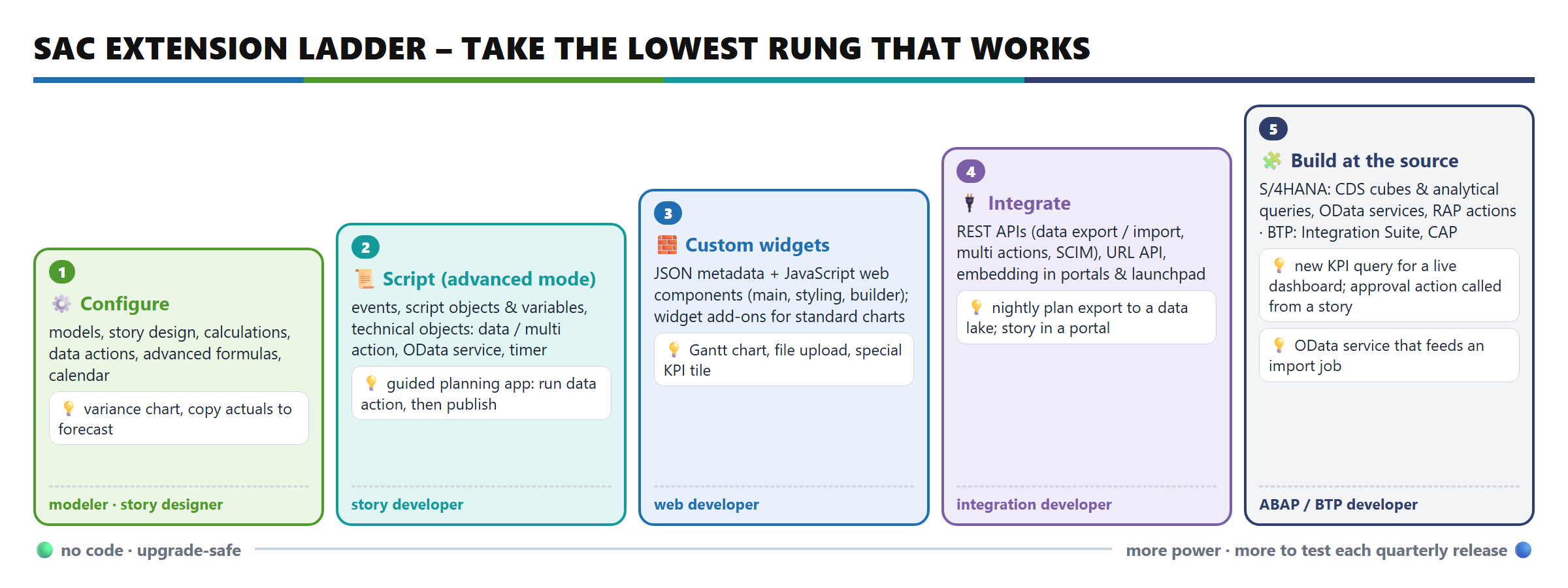
Rung | Tool | Who | Example |
|---|---|---|---|
1. Configure | Models, story designer, calculations, data actions, advanced formulas, calendar | Modeler, story designer | Variance chart, allocation, copy actuals to forecast |
2. Script | Advanced mode of the optimized story experience | Story developer | Guided planning app: buttons that run data actions and publish |
3. Custom widget | Web components + JSON metadata; widget add-ons | Web developer | Gantt chart, special KPI tile, file upload widget |
4. Integrate | REST APIs, URL API, embedding | Integration developer | Nightly export of plan data to a data lake; story in a portal |
5. Build at the source | CDS analytical queries, OData services, RAP actions; BTP apps | ABAP / BTP developer | New KPI query for a live dashboard; plan approval action in S/4HANA |
Part 2 – Scripting in the optimized story experience
SAC scripting started as the analytics designer for analytic applications (successor of Lumira Designer / Design Studio). Since the optimized story experience merged stories and applications, scripting is switched on in a story's advanced mode; the API documentation is still published as the Analytics Designer API Reference (versioned with each release).
Concept | What it is |
|---|---|
Scripting language | JavaScript-based, typed subset with code completion and validation in the script editor; runs in the user's browser – no server-side code, no DOM access |
Events | Scripts attached to widget and page events: |
Script objects | Reusable functions, called from several event scripts |
Script variables | Global variables; can be exposed as URL parameters to pass values into the story |
Technical objects | Non-visual helpers added in the outline: data action and multi action triggers, calendar integration, OData services, timers, export to PDF, bookmarks and others |
Widget APIs |
|
2.1 Example: filter a table by a chart selection
|
getSelections()returns an array of selection objects (dimension ID → member ID); the filter applies to the table's data source only. Story-wide filters belong in story filters or input controls.
2.2 Example: guided planning – run a data action, then publish
|
DataAction_Revenueis a data action technical object pointing to a data action with a parameterYear(page 02 Part 6).executeInBackground()starts long actions asynchronously; multi actions have the sameexecute/executeInBackground/setParameterValuemethods.publish()runs the normal publish checks (write access, data locks, validation rules) – script does not bypass security.
2.3 Good practice
- Keep
onInitializationlight: every API call there delays the first paint. Set filters and variables before data is loaded, not after. - Prefer configuration (linked analysis, input controls) to script; script only for real guided flows. Put shared logic in script objects.
- Test each quarterly release on the preview tenant – scripts are the first thing to break when an API changes (page 01 Part 7).
Part 3 – Calling S/4HANA from a story: OData actions
An OData service technical object lets a script read entities from and call actions on an OData V4 service in S/4HANA – for example an approval or release action of a RAP business object. This turns a planning story into a small "plan-to-action" app.
|
- Prerequisites: a direct (CORS) live connection to S/4HANA on-premise (the OData service uses its host); service path under
/sap/opu/odata4/; JSON format; the CORS allowlist must also allow theif-matchheader. - Actions: unbound actions (action imports) with simple parameters, or actions bound to a single entity – the key goes into the call as shown. Actions bound to an entity collection, complex parameter types and streams are not supported.
- Reads:
getEntitiesFromEntitySet(with filter, orderby, select, top, skip, count),getEntityby key; no$expand, no entity sets with parameters; without query options at most 1,000 entities. - RAP side: model the operation as an instance action in the behavior definition, expose the BO through an OData V4 service binding, and protect it with authorization control (RAP › 05 · Business Logic & Messages and 06 · Feature Control, Authorization & Numbering). The action runs with the user's own S/4HANA authorizations via SSO.
Part 4 – Custom widgets and widget add-ons
A custom widget is a reusable visual component written by a developer and used by story designers like a standard widget – with properties, events, script methods and optional data binding to a model. Custom widgets are fully supported in the optimized story experience.
Part | Content |
|---|---|
JSON metadata file | ID, version, name, vendor, icon; the list of web components (kind |
Main web component | A JavaScript custom element ( |
Styling / builder panel | Optional web components shown in the designer's side panels to configure appearance and data |
Hosting | Upload the resource files into SAC or host them on your own web server; the JSON file is what you upload in SAC (Custom Widgets in the files area) |
|
|
- Lifecycle hooks called by SAC:
onCustomWidgetBeforeUpdate,onCustomWidgetAfterUpdate,onCustomWidgetResize,onCustomWidgetDestroy. - Security: the code runs in the user's browser with access to the story's data – review it like any front-end code, use the integrity hash so SAC rejects modified files, and avoid loading libraries from public CDNs at run time.
- Widget add-ons customise standard charts instead of replacing them: a tooltip add-on or a plot area add-on (bar / column, stacked, area, line charts), uploaded as JSON plus web components and switched on in the chart's builder panel under Custom Add-Ons.
Part 5 – SAC REST APIs
SAC exposes REST APIs under https://<tenant>/api/v1/…. A caller authenticates with an OAuth client created in System → Administration → App Integration, where the administrator also chooses which APIs (access scopes) the client may use.
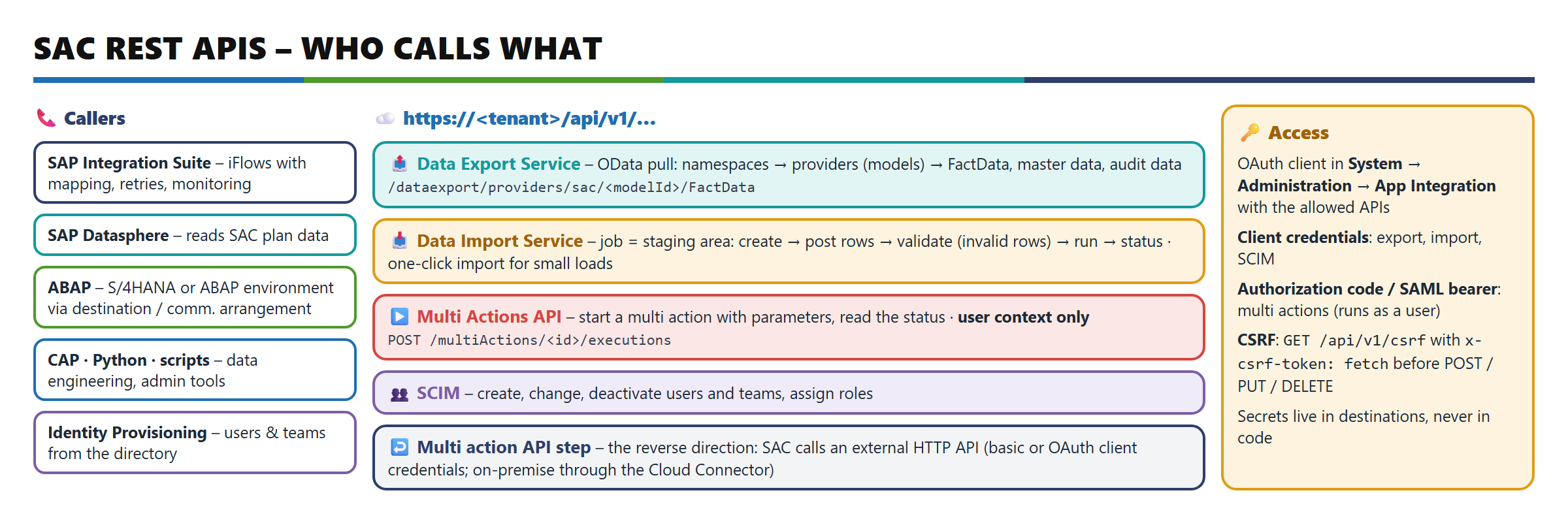
API | What it does | Notes |
|---|---|---|
Data Export Service | OData service to pull model data: administration service lists namespaces and providers (models); provider service returns FactData, master data and audit data ( | OAuth client credentials; used by Integration Suite, Datasphere, data lakes, SAC-to-SAC replication |
Data Import Service | Push fact and master data into a model: create a job (staging area), post rows, validate (read invalid rows), run, poll the status; or a one-click import for small volumes | Rows violating data access control reject the whole import – use a suitable technical user |
Multi Actions API | Start a multi action ( | Needs a user context (authorization code or SAML bearer grant) – client-credential tokens are not accepted |
User and team provisioning (SCIM) | Create, change, deactivate users and teams; assign roles | Used by SAP Cloud Identity Services – Identity Provisioning |
Content and planning APIs | e.g. calendar events, content network, stories and other resources | Documented in the SAC REST API reference |
- CSRF: write calls (POST, PUT, DELETE) need a token fetched with
GET /api/v1/csrfand headerx-csrf-token: fetch; send the token and the session cookies back with the write call. - Multi action API step (the reverse direction): a multi action can call an external HTTP API through an HTTP API connection (basic or OAuth client credentials; on-premise targets through the Cloud Connector) – e.g. to trigger a process after publishing.
5.1 Example: read SAC fact data from ABAP
An S/4HANA or ABAP environment program pulls plan data through the Data Export Service. The destination holds the URL and the OAuth client credentials, so no secret appears in the code:
|
- Deserialize the JSON with
/ui2/cl_json=>deserializeor thexco_cp_jsonlibrary (ABAP Cloud) into a table typed like the model's columns. - In the ABAP environment or S/4HANA Cloud, use a communication arrangement (
cl_http_destination_provider=>create_by_comm_arrangement) instead of SM59. For recurring bulk transfers, SAP Integration Suite is usually the better home: mapping, retries and monitoring in one place (Integration Suite › 02).
Part 6 – URL API and embedding
6.1 URL API
- A story URL can carry parameters: mode (view or edit), page selection, pageBar for embed mode, filter parameters (
f01Model,f01Dim,f01Val…, numbered per filter), variable parameters for prompts (v01Model,v01Par,v01Val…) and, for optimized stories, an operator parameter (v01Op, e.g. between). - Passed filters apply only to that session and are not saved; filters work on the default hierarchy; variables are applied before filters. Behaviour differs between classic and optimized stories – test every URL in the target story type.
- Script variables exposed as URL parameters let a calling application pass its own values into a scripted story.
6.2 Embedding
- SAC content can be shown in an iframe of another application (portal, Fiori launchpad, SAP Build Work Zone). Embedding is not allowed by default: add the host under trusted origins in App Integration.
- Use the same identity provider for host and SAC; otherwise users get an SAC logon screen inside the frame (or the IdP refuses to be framed).
- The reverse also exists: an embedded web page widget shows an external page inside a story, and the two can exchange messages (postMessage).
Part 7 – The ABAP side: CDS analytical queries for live connections
For live S/4HANA dashboards the real development happens in ABAP: SAC shows exactly what the CDS analytical query exposes. The VDM background (dimension, fact and cube views, DCL) is taught in ABAP on HANA › 05 CDS Views Parts 9 and 10; here is a complete example and the rules that matter for SAC.
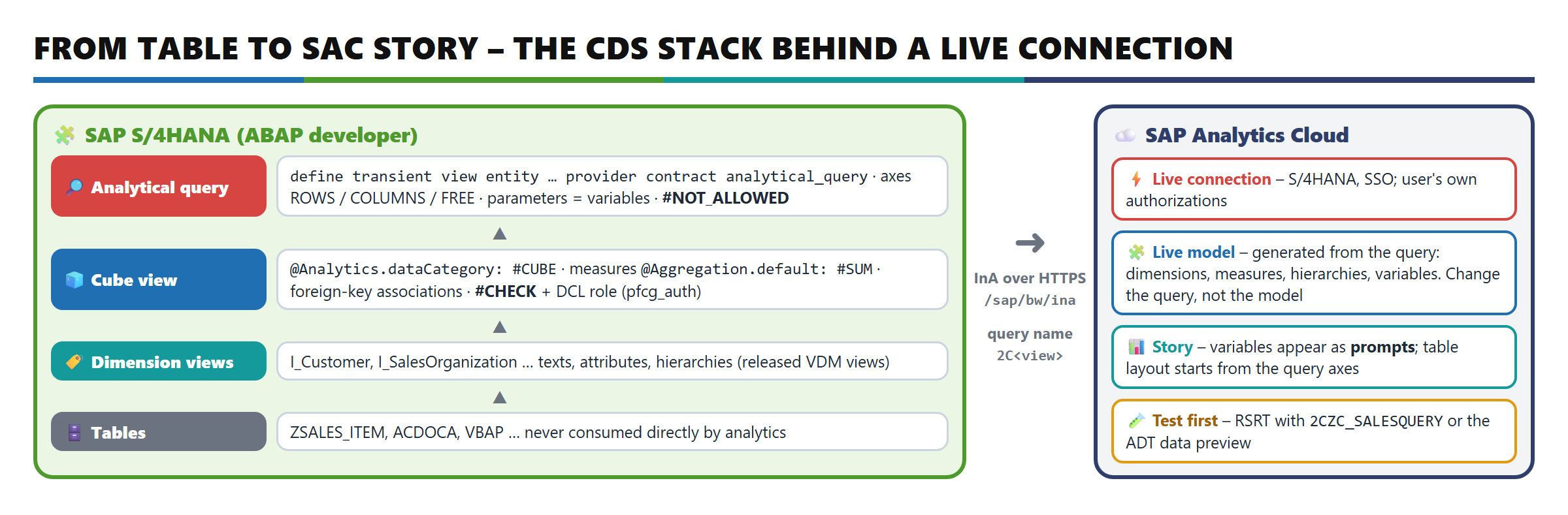
7.1 Cube view
|
- The cube carries the measures (
@Aggregation.default: #SUM) and links dimensions through foreign-key associations to dimension views – SAC then shows texts and attributes of customer and sales organisation. - Authorization is checked here (
#CHECK) with a DCL role on the cube, e.g.pfcg_auth( V_VBAK_VKO, VKORG, ACTVT = '03' )on SalesOrganization (ABAP on HANA › 05 CDS Views Part 10).
7.2 Analytical query (current syntax)
|
- Transient view entity with
provider contract analytical_query: no SQL view on the database, interpreted by the analytic engine at run time; it must project a cube. @AccessControl.authorizationCheck: #NOT_ALLOWEDis mandatory on the query – the authorization check happens in the cube.- Axes:
#ROWS,#COLUMNS(all measures on one axis) and#FREE(available for drill-down and filtering, not shown initially). SAC uses the axes as the initial layout of a new table. Currencyis the reference field ofNetAmount(@Semantics.amount.currencyCodein the cube); keep it in the element list so the amount carries its currency.- Variables: each parameter becomes a prompt in SAC;
@AnalyticsDetails.variablecontrols mandatory, multiple selections and selection type (#INTERVAL,#RANGE,#HIERARCHY_NODE);@Consumption.hidden: truehides a variable that gets a default or derived value. - Technical name for SAC and RSRT:
2CZC_SALESQUERY. Test in RSRT or the ADT analytical data preview before the SAC team builds on it.
7.3 Legacy syntax – know it when you read SAP's or older custom queries
|
@Analytics.query: trueon a (DDIC-based) view or view entity is the older way; it still runs, but new queries use the transient view entity, where this annotation is not allowed. Older queries declared filter variables with@Consumption.filter.
7.4 Rules that make SAC live models work well
- One query per business question; expose only the dimensions users need – every free dimension costs performance and confuses users.
- Push calculations into the query or cube (restricted and calculated measures, currency conversion) rather than story calculations, so Fiori apps and SAC show the same number.
- Provide text and hierarchy associations in the dimension views; SAC cannot add texts to a live model.
- Make filters mandatory variables for large fact data (fiscal year, company code) – an unfiltered first query on ACDOCA-based cubes is slow for everyone.
- S/4HANA Cloud: key users build queries with Custom Analytical Queries; developers in the ABAP Cloud model build on released cubes and dimensions only (Clean Core › 01 Clean Core).
Part 8 – Planning write-back interfaces
Interface | Direction | Developer's job |
|---|---|---|
API_FINANCIALPLANDATA_SRV (ACDOCP), C_ACTYTYPEPLANCOSTRATE_SRV, C_SKF_SRV | SAC export job → S/4HANA | Activate and test the services, help FI/CO with plan categories, analyse errors in /IWFND/ERROR_LOG (page 03 Part 4) |
Data Export Service | Pull from SAC | Integration flow or ABAP / CAP client that reads plan data and posts it with a released S/4HANA API or a custom RAP service |
Data Import Service | Push into SAC | Feed SAC models from systems without a standard connector |
OData actions from a story | Story → S/4HANA | RAP instance action (approve, release, create follow-on document) called by script (Part 3) |
Multi action API step | SAC → any HTTP API | Expose an endpoint (BTP service, S/4HANA API) that the multi action calls after publishing |
BPC live connection | SAC → BW | BW-IP aggregation levels, input-ready queries, planning functions (BW / BPC developer) |
- Classic CO reports still reading COSP / COSS-style data need the ACDOCP → CO transfer programs (page 03 Part 4.2).
Part 9 – Typical custom developments
Type | Example | Built with |
|---|---|---|
Report (live) | Margin dashboard on S/4HANA billing data | Cube + analytical query (Part 7), SAC story |
Interface (in) | Actuals and master data for planning | OData V2 service on CDS, SAC import job |
Interface (out) | Approved plan to S/4HANA or a data lake | Export job; Data Export Service + Integration Suite |
Enhancement | Approval button in a planning story | Script + OData service technical object + RAP action |
Custom visual | Gantt or decomposition tree | Custom widget (JSON + web component) |
Automation | Nightly import → data action → publish → export | Multi action, scheduled or started via the Multi Actions API |
Administration | Users and teams from the corporate directory | SCIM API via Identity Provisioning |
Part 10 – Interview questions
Q1. What is the analytics designer and what happened to it?
The scripting environment for analytic applications, the successor of Lumira Designer. It was merged with stories into the optimized story experience; scripting is now the story's advanced mode, documented in the Analytics Designer API Reference.
Q2. Describe SAC scripting.
A typed, JavaScript-based language that runs in the browser. Scripts react to events such as onInitialization, onSelect, onClick and onResultChanged, use script objects and variables, and work with widgets' data sources and planning APIs and with technical objects such as data action, multi action, OData service and timer.
Q3. How can a story trigger something in S/4HANA?
With an OData service technical object on a direct live connection to S/4HANA on-premise: the script calls executeAction on an OData V4 action – unbound or bound to a single entity, typically an instance action of a RAP business object – with the user's own authorizations.
Q4. What is a custom widget and what does it consist of?
A developer-built component used like a standard widget. It consists of a JSON metadata file (ID, properties, methods, events, data bindings, web component list) and JavaScript web components: the main component plus optional styling and builder panels, hosted in SAC or on a web server.
Q5. What is the difference between a custom widget and a widget add-on?
A custom widget is a completely new component. A widget add-on customises a standard chart – its tooltip or plot area – while keeping the chart's data handling and features.
Q6. Which SAC REST APIs do you know?
Data Export Service (OData pull of fact, master and audit data), Data Import Service (jobs that push data into models), the Multi Actions API (start and monitor multi actions in a user context), SCIM user and team provisioning, plus content and calendar APIs. Access is through OAuth clients defined in App Integration; write calls need a CSRF token.
Q7. How would you get SAC plan data into a non-SAP data lake every night?
Create an OAuth client with Data Export Service access and let SAP Integration Suite (or Datasphere) read the model's FactData and master data, map it and write it to the target, with monitoring and retries in the integration layer.
Q8. Write the CDS objects for an SAC live dashboard on custom sales data.
A cube view entity with @Analytics.dataCategory: #CUBE, measures with @Aggregation.default: #SUM, foreign-key associations to dimension views and a DCL role; then a transient view entity with provider contract analytical_query projecting the cube, @AccessControl.authorizationCheck: #NOT_ALLOWED, axes via @AnalyticsDetails.query and parameters as variables. SAC finds it as 2C plus the view name.
Q9. @Analytics.query: true or transient view entity?
The transient view entity with provider contract analytical_query is the current approach and does not allow @Analytics.query. Views with @Analytics.query: true are the older style; they still run and are common in existing systems.
Q10. Where is authorization checked for an SAC live story on S/4HANA?
In S/4HANA: the cube carries @AccessControl.authorizationCheck: #CHECK and a DCL role (e.g. pfcg_auth on the sales organisation); the query itself must be #NOT_ALLOWED. The user reaches S/4HANA through SSO, so their own PFCG values apply.
Q11. How do you embed an SAC story in a portal or the Fiori launchpad?
Use the story URL (with URL API parameters such as filters, variables and pageBar for embed mode) in an iframe or URL tile, add the host to the trusted origins in App Integration, and use the same identity provider so the user is signed on automatically.
Q12. Which custom developments land on an ABAP developer in an SAC project?
Analytical CDS queries and cubes with DCL for live stories, OData services for import, activation and support of the plan-data services for export, RAP actions called from planning stories, ABAP or integration clients of the SAC REST APIs, and help with SSO and CORS set-up on the S/4HANA side.
🏠 Start Here · ◀ 03 · Integration · 05 · Architect View ▶ · Sections: CORE ABAP | OOPS ABAP | ABAP on HANA | Clean Core | RAP | ABAP Points | SAP Fiori | SAPUI5 | Mobile Development (MDK) | BTP Foundations | BTP Development | CAP | SAP Build | ABAP on BTP | Integration Suite | SAP Business AI | SAP BASIS | Security | SAP SDLC
Functional: FICO ABAP | TRM ABAP | VIM | SAP BIS | SD ABAP | MM ABAP | PP ABAP | QM ABAP | PM ABAP | PS ABAP | EWM | TM ABAP | GTM ABAP | EHS ABAP | HR ABAP | BW | SAP Datasphere | SAP Business Data Cloud | SAP MDG | SAP Analytics Cloud | SAP Ariba | SAP CX | SAP IBP