This page looks at SAP Ariba from the project and architecture side: how an Ariba implementation runs with SAP Activate, why supplier enablement is a project of its own, how licensing works at a conceptual level, how customers leave SAP SRM, which design decisions an architect makes (Ariba vs S/4HANA central procurement, where the PO is created, integration technology, master data ownership, multi-ERP, next-gen SAP Ariba) and how to present Ariba experience in an interview as an ABAP developer. Products and architecture: page 01; processes: page 02; integration: page 03; extensions: page 04.
Part 1 – Implementation approach with SAP Activate
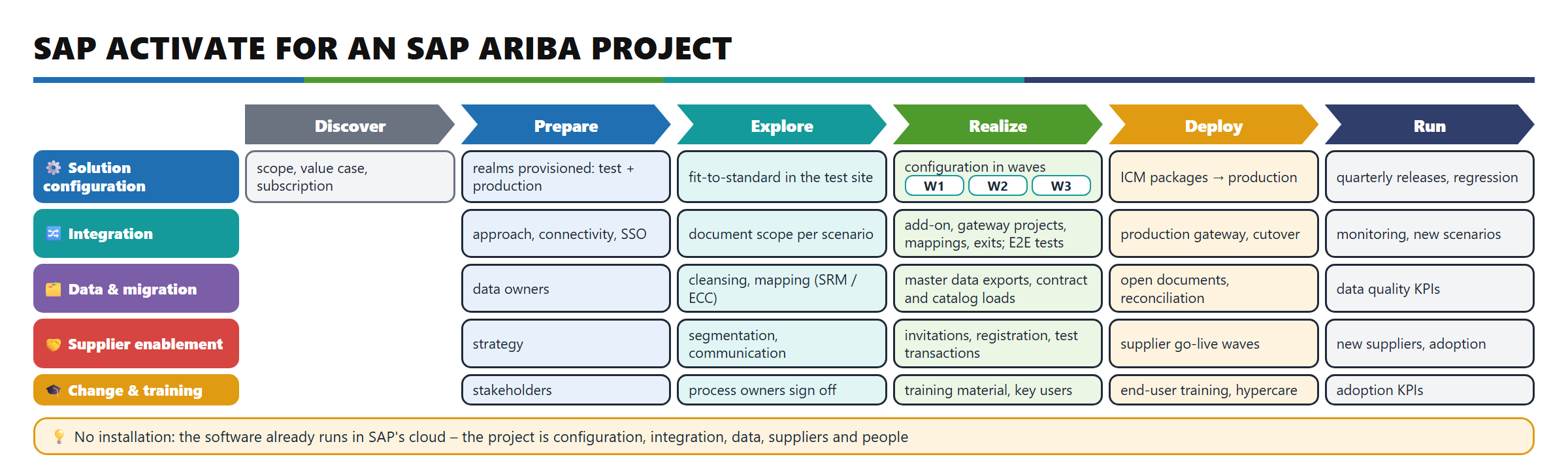
Ariba projects follow SAP Activate (the application-specific roadmaps are in the SAP Roadmap Viewer). Because the software is already running in SAP's cloud, there is no installation or system build: the work is configuration, integration, data, supplier onboarding and change management.
Phase | Ariba-specific content |
|---|---|
Discover | Value case, scope (which solutions, which spend categories, which countries), subscription |
Prepare | Realms provisioned (test and production), project team and governance, supplier enablement strategy, integration approach, data centre and SSO decisions |
Explore | Fit-to-standard workshops per process using the test site: approval rules, guided buying channels, invoicing rules, templates; integration scope per document; supplier segmentation |
Realize | Configuration in the test site in waves, add-on installation and gateway projects, master data loads, custom fields and mappings, ERP enhancements, end-to-end tests with S/4HANA QA and the network test account, supplier onboarding starts |
Deploy | Configuration moved to production (ICM packages, repeated settings), production gateway activation, cutover of open documents, supplier go-live waves, hypercare |
Run | Quarterly releases (feature review, regression tests), new suppliers and categories, adoption KPIs, continuous improvement |
- Deployment waves by solution: a common sequence is strategic first (Sourcing, Contracts – quick savings, little integration), then procurement (Buying and Invoicing with guided buying and the ERP integration), then supplier management (SLP, Supplier Risk). Many customers instead start with network collaboration for ERP POs to automate invoices early.
- Waves by geography or company code are typical for global rollouts: one template, country waves that add tax, invoicing rules and local suppliers.
- Roles: SAP or a partner for Ariba configuration, an integration consultant for the gateway, an ABAP developer for ERP-side enhancements and extracts, a Basis team for the add-on and connectivity, supplier enablement leads, and the customer's procurement process owners.
Part 2 – Supplier enablement
The business case of Ariba depends on suppliers transacting on SAP Business Network. Supplier enablement – getting suppliers registered, linked to the buyer and transacting electronically – is therefore a work stream with its own plan, team and KPIs.
Segment | Typical criteria | Enablement method |
|---|---|---|
Strategic / high volume | Many POs and invoices, catalog content | Integrated cXML / EDI connection or full enterprise account with catalogs; project per supplier |
Regular | Frequent but moderate volume | Enterprise account in the portal, PO flip invoicing, CSV upload |
Long tail | Few documents per year | Standard account – free, works from interactive email |
- Steps: analyse the supplier base (spend, document volume), segment, prepare communication, send trading relationship requests, supplier registers or links its existing account, test transactions, go live in waves, measure adoption (share of POs and invoices on the network).
- Buyer configuration: invoicing rules, supplier groups, enablement tasks and questionnaires on the network; the ERP supplier number must be linked to the supplier's ANID (page 03).
- Support: SAP offers supplier enablement services and supplier-side help; optional enablement services can involve additional fees. Supplier fees (Part 3) are a frequent supplier question – prepare the answer before the first wave.
Part 3 – Licensing at a conceptual level
No prices here – they are negotiated and change. What an architect must know is who pays for what and which metric drives the cost, because it influences the design.
Party | What is licensed | Concept |
|---|---|---|
Buyer | Subscriptions per solution or suite (Sourcing, Contracts, Buying and Invoicing, Invoice Management, SLP, Supplier Risk …) | Annual cloud subscription; the metric depends on the solution (e.g. spend volume, document volume or users) and is fixed in the order form |
Buyer | Test and production sites | Provisioned with the subscription (page 01 Part 6) |
Buyer | Integration | The managed gateway comes with the SAP Ariba subscription (no separate gateway fee); own middleware (Integration Suite, PI / PO) is licensed separately |
Supplier | SAP Business Network standard account | Free |
Supplier | SAP Business Network enterprise account | Free until documents and value with a buyer relationship exceed SAP's thresholds; then transaction fees (share of document value, capped per relationship) and a subscription level based on activity |
Both | Optional services | Custom field packages, implementation and enablement services, premium support |
- Design impact: licence metrics influence which spend runs through Ariba (e.g. only indirect spend through Buying, direct material POs from S/4HANA through the network).
- Supplier fees affect adoption: low-volume suppliers stay on free standard accounts; large suppliers often integrate. SAP publishes the supplier fee rules and a fee calculator on sap.com.
- RISE with SAP: RISE contracts include an SAP Business Network Starter Pack (network use with a limited number of documents and key suppliers) – a common first step before a full network subscription. Know what the customer already owns before proposing extra licences.
Part 4 – Moving from SAP SRM: migration and coexistence
SRM 7.0 mainstream maintenance ends on 31 December 2027 (optional extended maintenance to the end of 2030) and there is no technical migration path (page 01 Part 4). Moving off SRM is a re-implementation with data migration and usually a period of coexistence.
SRM object | Target | How it moves |
|---|---|---|
Shopping carts (open) | Ariba requisitions or S/4HANA purchase requisitions | Finish in SRM where possible; open carts re-entered or converted to ERP requisitions at cutover |
Central contracts | SAP Ariba Contracts (workspace + compliance contract) and / or S/4HANA central purchase contracts | Extract, cleanse, load (contract import, CSV); attach legal documents |
Supplier data (SUS / ROS) | SLP + network accounts; business partners in S/4HANA | Suppliers re-registered or loaded; ANID link built during enablement |
Catalogs (SRM-MDM) | SAP Ariba Catalog (or S/4HANA catalogs) | Re-published by suppliers in CIF / cXML or punch-out |
RFx and auctions (history) | Archive / reporting | Usually not migrated; keep for reporting |
Custom SRM BAdIs and workflows | Ariba approval rules, gateway mappings, BTP extensions | Re-designed – not copied; many become configuration |
- Coexistence: sourcing and contracts often move to Ariba first while SRM shopping carts continue; then operational procurement moves to guided buying or S/4HANA. Plan which system is leading for each document during the overlap to avoid double contracts.
- With an ECC → S/4HANA move: decide whether SRM is retired before, during or after the conversion; SRM's classic and extended classic scenarios have no equivalent in S/4HANA and must be redesigned.
- ABAP work: extraction programs for contracts and suppliers, data cleansing reports, mapping tables SRM → Ariba / S/4HANA, reconciliation reports after the load.
Part 5 – Architect decisions
Decision | Options | Criteria |
|---|---|---|
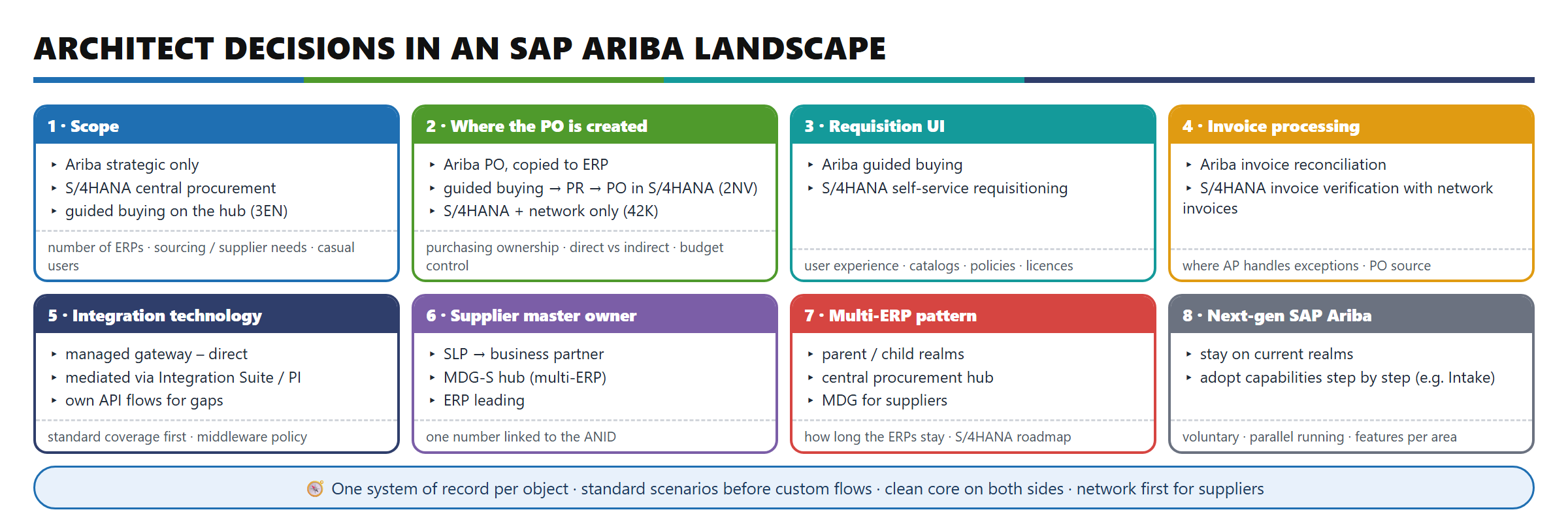
Scope: Ariba, S/4HANA central procurement or both | Ariba only for strategic; S/4HANA central procurement hub; Ariba guided buying on top of the hub (3EN) | Number of ERPs, need for sourcing and supplier management, licences owned, user experience for casual users |
Where the requisition and PO are created | Requisition and PO in Ariba (PO copied to ERP); requisition in guided buying → PR in S/4HANA → PO in S/4HANA (2NV); everything in S/4HANA + network | Who owns purchasing (procurement vs plants), direct vs indirect, MRP demand, budget control, need for ERP commitments |
Requisition UI | Guided buying; S/4HANA self-service requisitioning (Fiori) | Casual-user experience, catalog strategy, policies; SAP positions guided buying as the recommended UI with central procurement |
Invoice processing | Ariba invoice reconciliation (Buying and Invoicing / Invoice Management); S/4HANA invoice verification with network invoices | Where exceptions are handled (AP in Ariba or in the ERP), PO source, tolerance logic |
Integration technology | Managed gateway direct; mediated via Integration Suite / PI; own API flows | Standard coverage (prefer the gateway), middleware policy, non-SAP systems |
Supplier master ownership | SLP leading → BP in S/4HANA; MDG-S hub; ERP leading | Number of ERPs, existing MDG, onboarding process owner, one supplier number linked to the ANID |
Multi-ERP | Ariba parent / child realms; central procurement hub; MDG for suppliers | Number and type of back ends (SAP / non-SAP), common catalogs and approval rules |
Next-gen SAP Ariba | Stay on current realms; adopt next-gen capabilities as SAP releases them | Voluntary move, parallel running possible, feature availability per area (Part 7) |
5.1 Guiding principles
- One system of record per object: each document (requisition, PO, contract, invoice) and master object (supplier, cost centre, commodity mapping) has one leading system; others hold copies.
- Standard integration first: the managed gateway scenarios and SAP Best Practices scope items (2NV, 3EN, 42K) before custom flows; custom APIs only for gaps (page 04).
- Clean core on both sides: no Ariba code changes (impossible) and no ERP modifications – use add-on BAdIs, released APIs and BTP extensions (Clean Core › 01 Clean Core).
- Network first for suppliers: every supplier interaction (PO, confirmation, invoice, payment status) over SAP Business Network – email and paper only for the long tail.
- Design for quarterly releases: keep configuration and mappings documented and regression tests automated where possible.
Part 6 – Reference landscapes
Pattern | Landscape | Fits when |
|---|---|---|
A – Network for ERP POs | S/4HANA creates POs (direct and indirect) and processes invoices; SAP Business Network for supplier collaboration (scope item 42K / gateway add-on) | Quick automation of PO-to-invoice, little change for buyers; no Ariba Buying licence |
B – Strategic Ariba + S/4HANA operational | Sourcing, Contracts, SLP in Ariba; requisitions, POs and invoices in S/4HANA; network for suppliers | Strong ERP purchasing organisation; Ariba adds sourcing, contracts and onboarding |
C – Full Ariba source-to-pay | Guided buying, Ariba POs and invoice reconciliation, catalogs, strategic suite; S/4HANA posts and pays | Indirect spend focus, many casual users, AP centralised around Ariba |
D – Central procurement hub + guided buying | Guided buying → S/4HANA central procurement hub → several back-end ERPs; Ariba strategic suite and network | Multi-ERP landscape moving to one S/4HANA hub; scope item 3EN |
E – Multi-ERP with parent / child realms | Ariba parent realm with child realms per ERP, MDG-S for suppliers | Several ERPs that stay for years, common catalogs and approval rules |
- Direct material usually stays in S/4HANA (MRP, scheduling agreements) with SAP Business Network and Supply Chain Collaboration for the supplier side; Ariba Sourcing can source it (page 02).
- Services and contingent workforce often involve SAP Fieldglass; travel expenses SAP Concur – both outside Ariba but linked from guided buying (page 01 Part 2).
Part 7 – Next-gen SAP Ariba and the roadmap
SAP made next-gen SAP Ariba available on 12 March 2026: a re-engineered source-to-pay suite on SAP BTP with a Fiori-based experience, SAP Ariba Intake Management as the single entry point, embedded Joule capabilities and open APIs (details on page 01 Part 6.2). For architects this means:
- No forced migration: moving is voluntary and current and next-gen environments can run in parallel; capabilities arrive step by step through 2026 and 2027. Plan adoption per capability, not as a big bang.
- Integration continuity: keep the S/4HANA side on the managed gateway standard; check for each next-gen capability which integration and APIs SAP documents before designing custom flows.
- Intake as front door: Intake Management changes where requests start – review the guided buying landing pages, forms and approval design together with it.
- AI features: Joule bid analysis, supplier-response summaries, simplified invoice creation and intelligent contracting are announced capabilities – evaluate them in the test environment with real data-protection review before relying on them in a design.
- Stay current: follow the quarterly release readiness information and SAP's roadmap explorer; only confirmed, released features belong in an architecture document.
Part 8 – Risks, lessons learned and talking points
Risk | Mitigation |
|---|---|
Low supplier adoption | Segmentation, early communication, enablement waves, invoicing rules that require network invoices, KPI tracking |
Poor master data (cost centres, commodity mapping, supplier links) | Data cleansing before Realize, full and incremental export tested early, one owner per object |
Too many custom fields and rules | Fit-to-standard, approval rule review, custom fields only with an end-to-end purpose (UI, mapping, report) |
Integration tested too late | Gateway project and add-on in the first Realize wave; end-to-end tests with S/4HANA QA and network test account per document type |
Release changes break processes | Release calendar, regression test set, controlled enablement of Customer Configured features |
Unclear system of record | Decision log per document and master object (Part 5), signed off by process owners |
8.1 How an ABAP developer talks about Ariba
- Your part of the project: add-on configuration support, IDoc and proxy troubleshooting, customer exits and BAdIs (MM06E001, ARBCIG_MASTERDATA), master data extracts, migration programs from SRM / ECC, API clients and BTP extensions, monitoring set-up.
- Show the end-to-end view: explain a document's full path – ERP output → ARBCIG_ORDERS → gateway mapping → cXML OrderRequest → supplier → confirmation back – and where you would look when it fails.
- Show judgement: configuration and gateway mapping before ABAP, standard scenarios before custom flows, clean core, security of API credentials.
- Use a STAR example: "Invoices from the network failed with status 51 because tax codes were not mapped; I analysed the IDocs, aligned the lookup table with the integration consultant and added a reconciliation report – posting errors dropped and AP stopped manual entry."
Part 9 – Interview questions
Q1. How do you implement SAP Ariba?
With SAP Activate: Prepare (realms, team, strategy), Explore (fit-to-standard in the test site), Realize in waves (configuration, gateway and add-on, data, enhancements, end-to-end tests), Deploy (production configuration, cutover, supplier waves, hypercare), Run (quarterly releases). Supplier enablement and change management run in parallel.
Q2. Why is supplier enablement a separate work stream?
The value of Ariba comes from suppliers transacting on SAP Business Network. Suppliers must be segmented, invited, registered, linked to the buyer's ERP supplier number and tested – that takes months, its own team and its own KPIs.
Q3. How is SAP Ariba licensed?
Buyers pay annual subscriptions per solution or suite with metrics such as spend volume, documents or users depending on the contract. Suppliers use SAP Business Network free with a standard account; enterprise accounts become chargeable above SAP's thresholds per buyer relationship (transaction fee plus subscription level).
Q4. How do you move a customer from SRM?
There is no technical migration. Map SRM functions to Ariba and S/4HANA, re-implement, migrate active contracts, suppliers and catalogs, let open documents finish in SRM, and plan a coexistence period with a clear leading system per document. Custom SRM logic is redesigned as configuration, mappings or BTP extensions.
Q5. Ariba guided buying or S/4HANA self-service requisitioning?
Guided buying for many casual users, rich catalogs and policies, and when Ariba procurement is licensed; SAP positions it as the recommended UI with central procurement. S/4HANA self-service requisitioning when purchasing stays fully in the ERP and the user group is small.
Q6. Where should the purchase order be created?
It depends on who owns purchasing and on the spend type. Indirect spend with Ariba Buying can create the PO in Ariba (copied to the ERP); with scope item 2NV the requisition becomes an S/4HANA PR and the PO is created in S/4HANA; direct material POs come from S/4HANA (MRP). In all cases the PO reaches the supplier through SAP Business Network.
Q7. What is S/4HANA central procurement and how does it relate to Ariba?
An S/4HANA hub that runs requisitioning, purchasing, contracts and approvals centrally for several back-end ERPs. Ariba complements it: guided buying as the requisition UI (scope item 3EN), Sourcing, Contracts and SLP for the strategic part, the network for suppliers.
Q8. Who should own the supplier master?
One leading system: SLP for onboarding with replication to S/4HANA business partners for one ERP, or MDG-S as hub in a multi-ERP landscape. The ERP supplier number is linked to the supplier's ANID so documents can be routed.
Q9. How do you handle a multi-ERP landscape?
Options are Ariba parent / child realms (common data and approval rules in the parent, one child per ERP), an S/4HANA central procurement hub in front of the back ends, and MDG-S for supplier harmonisation. The choice depends on how long the ERPs stay and on the S/4HANA roadmap.
Q10. Should a customer move to next-gen SAP Ariba now?
It is available since March 2026 on SAP BTP, but the move is voluntary and both environments can run in parallel while capabilities roll out through 2026–2027. Adopt per capability (e.g. Intake Management) after testing, keeping the S/4HANA integration on the standard gateway.
Q11. What are typical risks in an Ariba project?
Low supplier adoption, poor master data and commodity mapping, late integration testing, too many custom fields and rules, quarterly release changes and an unclear system of record. Mitigate with segmentation, early data cleansing, gateway in the first wave, fit-to-standard and a decision log.
Q12. What does an ABAP developer contribute to an Ariba project?
Support for the add-on configuration, the PO customer exit with the ARBCIG includes and master data BAdIs, IDoc and proxy analysis together with the integration consultant, migration extracts and reconciliation reports, API clients and BTP extensions for reporting data, and monitoring set-up – always configuration and mapping first, ABAP only where needed.
🏠 Start Here · ◀ 04 · Extensibility · 06 · Interview Questions ▶ · Sections: CORE ABAP | OOPS ABAP | ABAP on HANA | Clean Core | RAP | ABAP Points | SAP Fiori | SAPUI5 | Mobile Development (MDK) | BTP Foundations | BTP Development | CAP | SAP Build | ABAP on BTP | Integration Suite | SAP Business AI | SAP BASIS | Security | SAP SDLC
Functional: FICO ABAP | TRM ABAP | VIM | SAP BIS | SD ABAP | MM ABAP | PP ABAP | QM ABAP | PM ABAP | PS ABAP | EWM | TM ABAP | EHS ABAP | HR ABAP | BW | SAP MDG | SAP Analytics Cloud | SAP Ariba | SAP CX | SAP IBP