SAP Ariba is SaaS: nobody changes its code, not even the customer's developers. Adapting it means configuration inside Ariba (parameters, fields, forms, templates, approval rules), custom mappings in the managed gateway, enhancements on the ERP side (page 03 Part 7) and side-by-side extensions that use the SAP Ariba APIs – usually on SAP BTP. This page shows what can be done where, the API families and how authentication works, how to build extensions on BTP, typical custom developments and an ABAP example that calls an Ariba API. Integration technology: page 03; approval rules and templates as business concepts: page 02.
Part 1 – Configure, map, extend: the extension ladder
Take the lowest rung that solves the requirement – each rung up adds cost, testing and operations. This is the clean-core idea applied to a SaaS product (Clean Core › 01 Clean Core).
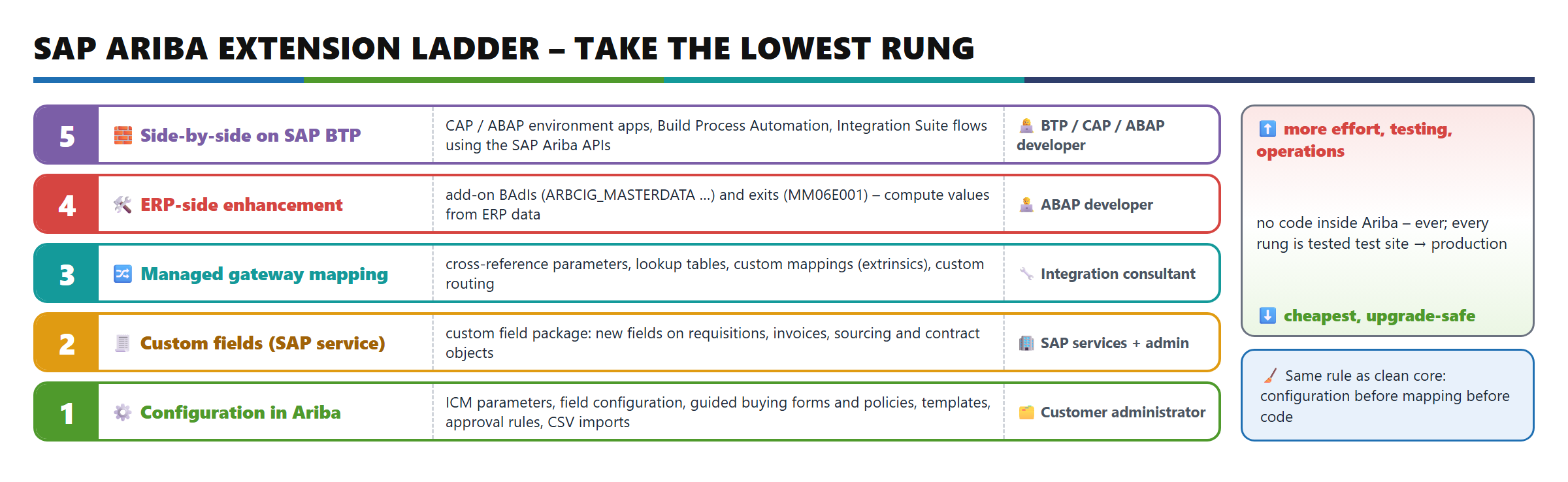
Requirement | Where it is solved | Who does it |
|---|---|---|
Change a behaviour switch (e.g. allow PO changes by suppliers) | Parameter in Intelligent Configuration Manager, or a feature switch requested from SAP | Customer administrator / SAP |
An extra field on a requisition line or a sourcing event | Field configuration (self-service) or SAP custom field service | Customer administrator / SAP services |
A category-specific request form in guided buying | Guided buying forms and policies | Procurement administrator |
A field value must reach S/4HANA differently | Managed gateway cross-reference or custom mapping | Integration consultant |
A value must be computed from ERP data | Add-on BAdI or exit in the ERP (page 03 Part 7) | ABAP developer |
A new app, dashboard, approval channel or data export | Side-by-side app on SAP BTP using the SAP Ariba APIs | BTP / ABAP / CAP developer |
Part 2 – Configuration inside SAP Ariba
Tool | What it controls | Notes |
|---|---|---|
Intelligent Configuration Manager (ICM) | Site parameters of procurement (Core Administration) and sourcing (Administration) sites | Self-service parameters are changed in the test site, packaged, tested, approved and deployed to production; production is read-only. SAP-controlled parameters need a case with SAP Support. Procurement and sourcing sites have separate parameters |
Field configuration | Standard and custom fields on objects such as requisition header and line, invoice header and line, sourcing and contract objects: labels, visibility, editability, defaults | Adjusts existing standard and custom fields; changes are made in the test site first |
Custom field package for SAP Ariba solutions | New custom fields beyond self-service | SAP service sold in packs of fields; the custom fields then appear in UI, exports, APIs and mappings |
Approval processes | Approval rules per approvable (page 02 Part 6) | Graphical editor; rule conditions often use custom fields |
Guided buying configuration | Landing pages, tiles, forms per category, policies, buying channels | Forms map their fields to requisition fields |
Templates | Sourcing projects and events, contract workspaces, supplier questionnaires | Conditional content and tasks make one template serve many cases |
Data import / export | CSV imports of master data, users, groups, lookup data; exports for migration and checks | Also the fallback for loads the ERP integration does not cover |
Feature enablement | "Customer Configured" features of each quarterly release (page 01 Part 7) | Self-service or service request; plan them in the release calendar |
- Test first, always: every configuration change is built in the test site, tested with the ERP QA system and the network test account, then deployed or repeated in production.
- Custom fields end to end: a custom field is only useful when it also travels – into the integration mapping (page 03, Part 6 below), into reports and into approval rules. Plan all four together.
Part 3 – SAP Ariba APIs: families and the developer portal
SAP Ariba exposes REST APIs (JSON over HTTPS). They are documented on the SAP Business Accelerator Hub and managed in the SAP Ariba Developer Portal, where customers and partners register applications and request access. The hub lists every API with its current version and specification.
Area | APIs (examples) | Typical use |
|---|---|---|
Reporting | Operational Reporting API for Procurement, Operational Reporting API for Strategic Sourcing, Analytical Reporting API | Extract requisitions, POs, invoices, events, contracts into a data warehouse, SAP Datasphere or SAC |
Master data | Master Data Retrieval API for Procurement, Master Data Retrieval API for Sourcing | Read cost centres, accounts, units of measure, commodity codes, regions held in Ariba |
Approvals | Document Approval API (requisitions, invoices); External Approval API for Sourcing and Supplier Management | Approve outside Ariba – a custom app, a chat tool, a workflow inbox |
Contracts | Contract Workspace Retrieval API, Contract Workspace Modification API, Contract Terms Management API | Contract repository integration, contract data for other systems |
Sourcing | Event Management API, Project Document Management API | Read events and bids, create documents in projects |
Supplier management | Supplier Data API with Pagination | Supplier registration and qualification data for MDG, risk or analytics tools |
SAP Business Network | Purchase Orders Buyer API and Supplier API, Order Change Requests API for Buyers / Suppliers | Read network POs and change requests, e.g. for supplier-side integration |
- Instance APIs vs network APIs: most solution APIs work on a realm (parameter realm); network APIs work on the buyer's or supplier's ANID.
- Not every object has a write API. Many APIs are read-only; documents are created through the standard integration (page 03) or through the UI – read the API specification before promising a design.
- Next-gen SAP Ariba is built on SAP BTP with open APIs (page 01 Part 6.2); new APIs appear with its rollout – plan new extensions against the API version that SAP documents at that time.
3.1 Getting access
- 1. Register an application in the SAP Ariba Developer Portal (a developer from the customer or partner organisation).
- 2. Request API access for that application, per API and per realm (test and production are separate). SAP Ariba approves the request; the portal administrator then generates the OAuth secret.
- 3. Get the credentials: the portal shows the application key; the portal administrator's action Generate OAuth Secret creates the OAuth client ID and secret (store the secret in a secret store, never in code or config files).
- 4. Call the API with an OAuth access token and the application key (Part 4).
Part 4 – Authentication, realms and rate limits
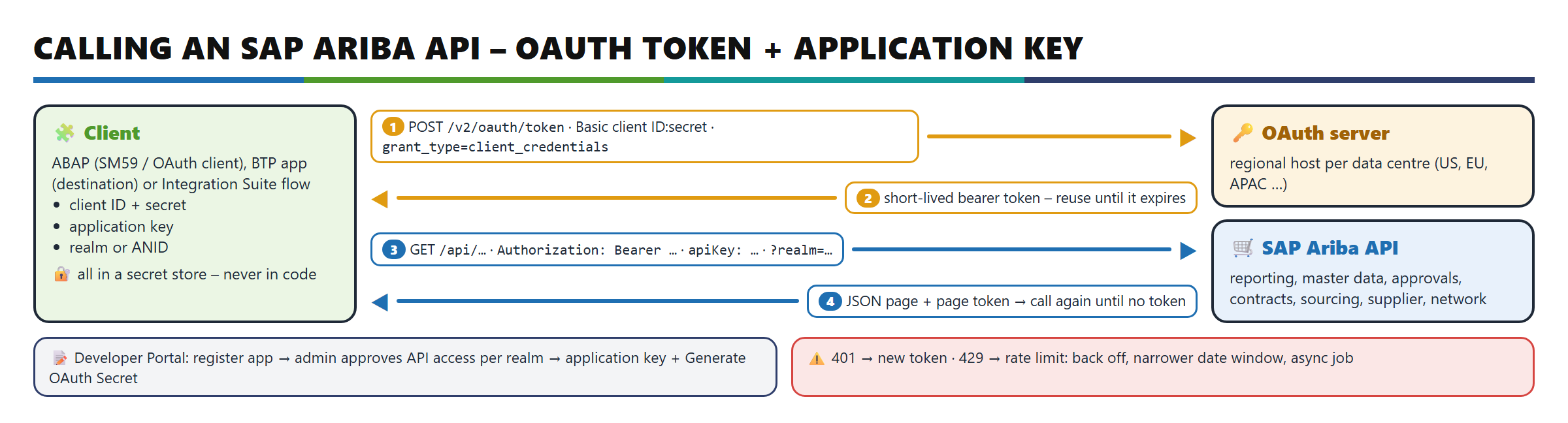
Element | Meaning |
|---|---|
OAuth 2.0 client credentials | The client sends client ID and secret (HTTP Basic) with |
Application key | Sent as HTTP header |
Realm / ANID | Query parameter (e.g. |
Regional hosts | API and OAuth hosts differ by data centre (e.g. US, EU, APAC) – take them from the API documentation of your data centre |
Token lifetime | Reuse the token until it expires instead of requesting one per call; request a new one on HTTP 401 |
Rate limits | Per API, per second / minute / hour / day; exceeding them returns HTTP 429 – synchronous reporting APIs allow only a few calls per minute, so batch and page carefully |
- Security rules: one application per purpose, least privilege (only the APIs needed), secrets in SAP BTP destinations / credential store or in SM59 / OAuth client configuration in ABAP, rotation of the OAuth secret, no secrets in logs.
Part 5 – Reporting APIs in practice
Concept | Explanation |
|---|---|
View template | Defines the document type, the fields returned and the filters. SAP delivers system templates; custom templates are created through the API (view management). Fewer fields → faster calls and smaller files |
Synchronous call | Returns the records directly, page by page; recommended for small templates and short date ranges (near real-time checks) |
Asynchronous job | The client posts a job for a view template and date range, polls the job status and downloads the result files; designed for large volumes and data-warehouse loads |
Pagination | If more data exists the response contains a page token; the next call passes it back until no token is returned |
Date filters | Created / updated date ranges per call; narrow windows avoid timeouts and 429 errors |
Analytical Reporting API | Reads the analytical (fact) data of Ariba reporting; data arrives with a delay of several hours, so it suits dashboards rather than operational checks |
- Typical pattern: a nightly asynchronous job per document type loads changed documents into SAP Datasphere or a data lake; a synchronous call with a small template answers on-demand questions ("status of requisition PR123").
- Delta logic: store the last successful "updated to" timestamp and start the next window there, with a small overlap; de-duplicate by document ID and version.
Part 6 – Custom mappings in the managed gateway
Mapping type | Built by | Used for |
|---|---|---|
Standard mapping | SAP, for every supported document | The default ERP ⇄ cXML / Ariba transformation |
Cross-reference parameters | Customer, in the project's Cross Reference Configuration tab | Single scenario settings that change mapping behaviour |
Lookup tables (incl. UoM) | Customer | Value translations – required for some transactions, e.g. real-time budget check, total landed cost, sourcing contracts; UoM cross-references for network projects |
Custom mapping (mapping tool) | Customer – self-service in the portal (My Configurations › Mappings) | Change a standard mapping: map a field to a cXML extrinsic, delete a node, set a constant; activated separately for test and production |
Manual extension | SAP implementation services, special cases | Requirements the tool cannot cover |
Custom routing | Customer – self-service tool | Custom inbound and outbound transactions |
- Schemas are fixed: custom mappings work within the existing source and target schemas – a custom field is carried in an existing element or as an extrinsic, not as a new type.
- Division of work: the ABAP developer makes sure the value is in the IDoc or proxy (page 03 Part 7); the integration consultant maps it in the gateway; the Ariba administrator shows it in the UI (field configuration). Test the three together.
- Supplier UI: what the supplier sees on SAP Business Network can be adjusted with the network's UI customisation tool, transported by SAP implementation services.
Part 7 – Side-by-side extensions on SAP BTP
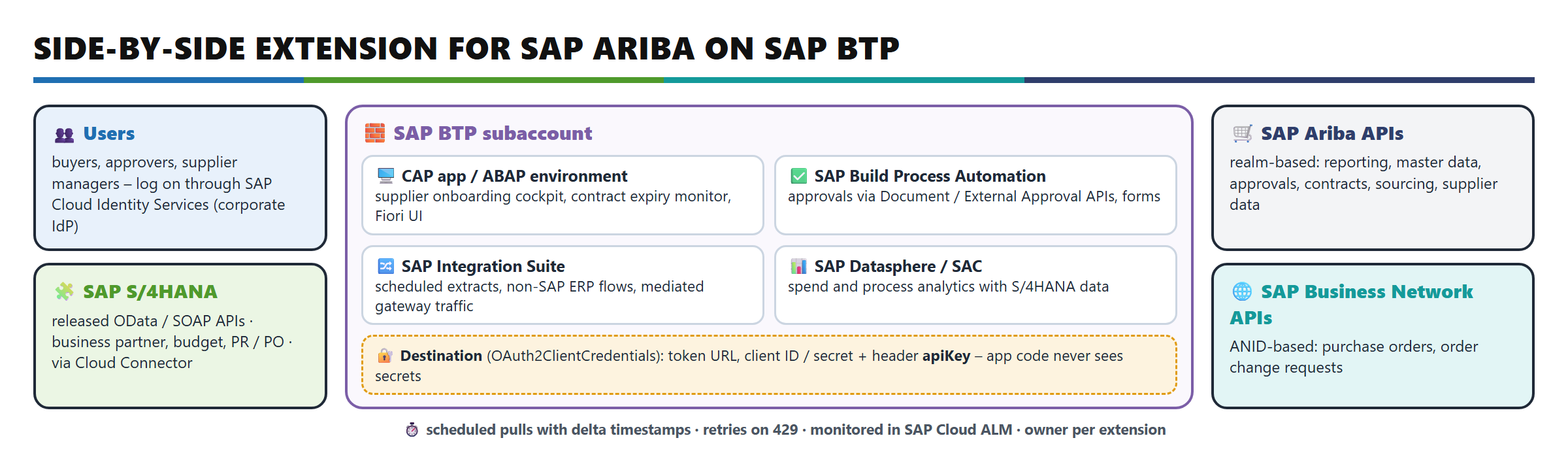
BTP service | Ariba use case |
|---|---|
SAP Integration Suite (Cloud Integration) | Mediated gateway connectivity, own flows calling the Ariba APIs (e.g. reporting extracts, non-SAP ERP integration, file-based loads that used ITK), SAP-delivered integration packages |
CAP application (Node.js / Java) or SAP Business AI Platform, ABAP environment | Custom apps that combine Ariba data with S/4HANA data: supplier onboarding cockpit, contract expiry monitor, spend dashboard |
SAP Build Process Automation | Approvals outside Ariba through the Document Approval / External Approval APIs, onboarding workflows with forms |
SAP Datasphere / SAP Analytics Cloud | Spend and process analytics on data loaded through the reporting APIs together with S/4HANA data |
SAP Master Data Integration / MDG | Business partner distribution between S/4HANA and Ariba (page 03 Part 5) |
- Destinations: store the API host, OAuth token URL, client ID and secret in a BTP destination (OAuth2ClientCredentials); add the application key as an additional header property so the app code never sees credentials.
- Events: design extensions as scheduled pulls with delta logic unless SAP documents an event or notification mechanism for the object you need.
- Operate it: a side-by-side app needs monitoring, alerting and an owner – include it in SAP Cloud ALM like any other interface (Integration Suite › 02 SAP Cloud Integration).
Part 8 – Typical custom developments
Type | Example | Technique |
|---|---|---|
Report | Open requisitions per cost centre with ERP budget, spend per supplier with network status | Reporting APIs → Datasphere / SAC, or ABAP report reading an extract |
Interface | Contract data to a legal repository; supplier qualification data to MDG or a risk tool; non-SAP ERP to the network | Integration Suite flows with Ariba / network APIs, managed gateway custom routing |
Conversion | Open contracts, suppliers and catalogs from SRM or a legacy tool | CSV imports, contract workspace import, catalog upload; one-time ABAP extracts from SRM / ECC |
Enhancement | Custom field from S/4HANA on the network PO; accounting split; master data filter | Add-on exits and BAdIs (page 03 Part 7) + gateway custom mapping |
Form / output | Supplier-facing PO layout | Network UI customisation, cXML attachments; ERP output forms only for non-network suppliers (CORE ABAP › 11 Forms) |
Workflow | Approval in Microsoft Teams or a BTP inbox; budget owner approval from S/4HANA data | Document / External Approval APIs with SAP Build Process Automation; real-time budget check integration |
Part 9 – Example: calling an SAP Ariba API from ABAP
An on-premise S/4HANA system reads data from an SAP Ariba API, e.g. to show the guided buying status next to an ERP purchase requisition. Two HTTP destinations (SM59, type G) hold the hosts: ZARIBA_OAUTH with the OAuth client ID and secret as Basic-authentication logon data, ZARIBA_API for the API host. The application key comes from a protected customizing entry. The resource path and filter parameters are taken from the API's specification on the SAP Business Accelerator Hub.
|
- Call:
DATA(lv_json) = NEW zcl_ariba_api_client( lv_key )->get( |{ lv_path }?realm={ lv_realm }| ).– deserialise the JSON into a structure with /UI2/CL_JSON and follow the page token in a loop. - ZCX_ARIBA_API is an exception class (CX_STATIC_CHECK) with interface IF_T100_DYN_MSG, so it can be raised with MESSAGE; message class ZARIBA holds the texts (001 destination, 002 communication, 003 HTTP status). The destinations are maintained per system, so QA points to the test realm and production to production.
- Better practice in newer releases: use the OAuth 2.0 client configuration of the ABAP platform (or a BTP destination via Cloud Connector) instead of Basic credentials in SM59; in ABAP Cloud use
CL_WEB_HTTP_CLIENT_MANAGERwith a communication arrangement (CORE ABAP › 09 Web Services, SAP BTP ABAP on BTP › 01 ABAP on BTP). - Prefer the standard integration for business documents – an API call from ABAP is for reading data or for niche scenarios, not a replacement for the managed gateway.
Part 10 – Interview questions
Q1. Can you write ABAP code inside SAP Ariba?
No. Ariba is multi-tenant SaaS; customers configure it (parameters, fields, forms, templates, approval rules) and extend it outside: custom mappings in the managed gateway, enhancements on the ERP side and side-by-side apps that use the SAP Ariba APIs.
Q2. How do you change a parameter in an Ariba site?
Self-service parameters in the Intelligent Configuration Manager: change in the test site, package, test, approve, deploy to production (production is read-only). SAP-controlled parameters need a case with SAP Support.
Q3. How do you add a custom field and get it into S/4HANA?
Create or adjust the field in Ariba (field configuration or SAP's custom field service), map it in the managed gateway mapping tool (often as a cXML extrinsic) and process it on the ERP side with the add-on BAdIs or exits. Add it to reports and approval rules if needed, and test end to end.
Q4. Which SAP Ariba API families do you know?
Reporting (Operational Reporting for Procurement and for Strategic Sourcing, Analytical Reporting), master data retrieval, approvals (Document Approval, External Approval for Sourcing and Supplier Management), contracts (Contract Workspace Retrieval / Modification, Contract Terms Management), sourcing events, supplier data with pagination and SAP Business Network purchase order APIs.
Q5. How does authentication work for the Ariba APIs?
An application registered in the SAP Ariba Developer Portal gets an application key and an OAuth client ID and secret. The client gets a short-lived bearer token with the client-credentials grant and sends it with the apiKey header and the realm parameter on every call.
Q6. Synchronous or asynchronous reporting API – which do you use when?
Synchronous for small view templates and short date ranges (on-demand checks). Asynchronous jobs for large volumes and data-warehouse loads: post a job, poll, download the files. Both use view templates; synchronous calls page with a page token.
Q7. How do you handle rate limits?
Narrow date windows, small view templates, asynchronous jobs for bulk data, token reuse, and retry with back-off on HTTP 429. Schedule extracts instead of calling per user action.
Q8. What can the managed gateway mapping tool do?
Customer-built custom mappings on top of the SAP standard: map fields to extrinsics, delete nodes, set constants, activate separately for test and production. Cross-reference parameters and lookup tables cover settings and value translations; schemas themselves cannot be changed.
Q9. Give an example of a side-by-side extension for Ariba.
A CAP app on SAP BTP that shows a supplier onboarding cockpit: supplier data from the Supplier Data API with Pagination, business partner data from S/4HANA via released APIs, approvals in SAP Build Process Automation – credentials in a BTP destination.
Q10. How would you call an Ariba API from S/4HANA on-premise?
CL_HTTP_CLIENT with SM59 destinations: POST to the OAuth token endpoint with the client credentials, then GET the API with the bearer token, apiKey header and realm parameter; parse JSON with /UI2/CL_JSON; handle 401 and 429. Credentials in SM59 or the OAuth client configuration, never in code.
Q11. What replaced the Integration Toolkit (ITK) for file-based integration?
ITK reached end of support at the end of 2023. File and non-SAP scenarios move to the managed gateway, the SAP Ariba APIs or SAP Integration Suite flows.
Q12. Where does approval logic belong if the approver data is in S/4HANA?
Keep the approval flow in Ariba and bring the data in (master data export, lookup tables, real-time budget check). If an approval must happen outside Ariba, use the Document Approval or External Approval API from a BTP workflow instead of rebuilding the rules in the ERP.
🏠 Start Here · ◀ 03 · Integration · 05 · Architect View ▶ · Sections: CORE ABAP | OOPS ABAP | ABAP on HANA | Clean Core | RAP | ABAP Points | SAP Fiori | SAPUI5 | Mobile Development (MDK) | BTP Foundations | BTP Development | CAP | SAP Build | ABAP on BTP | Integration Suite | SAP Business AI | SAP BASIS | Security | SAP SDLC
Functional: FICO ABAP | TRM ABAP | VIM | SAP BIS | SD ABAP | MM ABAP | PP ABAP | QM ABAP | PM ABAP | PS ABAP | EWM | TM ABAP | GTM ABAP | EHS ABAP | HR ABAP | BW | SAP Datasphere | SAP Business Data Cloud | SAP MDG | SAP Analytics Cloud | SAP Ariba | SAP CX | SAP IBP