How an SAP ABAP system is built from the Basis administrator's point of view: the landscape, the identifiers (SID, instance number, client, host name, ports), the instance types ASCS / PAS / AAS / ERS, the central services, work processes and their monitoring, logon groups, operation modes and memory management – and what is different in S/4HANA. The developer's view of the same architecture (3 tiers, dispatcher, user context, LUWs) is in CORE ABAP › 01 SAP & ABAP Basics, Parts 2–3.
Part 1 – What SAP Basis is
SAP Basis is the technical foundation of every SAP ABAP system and the name of the team that runs it. It connects the operating system, the database, the communication protocols and the SAP applications (FI, SD, MM …), and provides the tools to install, configure, monitor, secure and update the system.
- The expansion "Business Application Software Integrated Solution" is a popular backronym, not an official SAP name – Basis simply means "base". The technical product today is SAP NetWeaver AS ABAP (ECC era) or the ABAP Platform (S/4HANA).
- A developer writes and transports ABAP code; the Basis administrator keeps the platform underneath running: installations, kernel and support packages, transports, clients, users, performance, backups.
Core areas of Basis
Area | What it covers | Where |
|---|---|---|
System architecture | Structure of SAP environments: servers, instances and layers | This page |
Installation & setup | Installing server components, SAP GUI and the supporting infrastructure | Page 02 |
User & security admin | Creating and managing users, roles and authorizations; enforcing security policies | Page 03, Security › 01 |
System monitoring | System performance, background jobs, health checks | Page 04 |
Transport management | Moving transport requests and configuration changes between systems | Page 03 |
Patch & kernel management | Support packages, kernel patches, implementing SAP Notes | Page 02 |
Backup & recovery | Regular database and log backups, recovery procedures | Page 04 |
RFC & communication | Setting up and testing RFC, HTTP and mail connections | Page 04 |
Client administration | Creating, copying and deleting clients (logical partitions of a system) | Page 03 |
Part 2 – System landscape and key identifiers
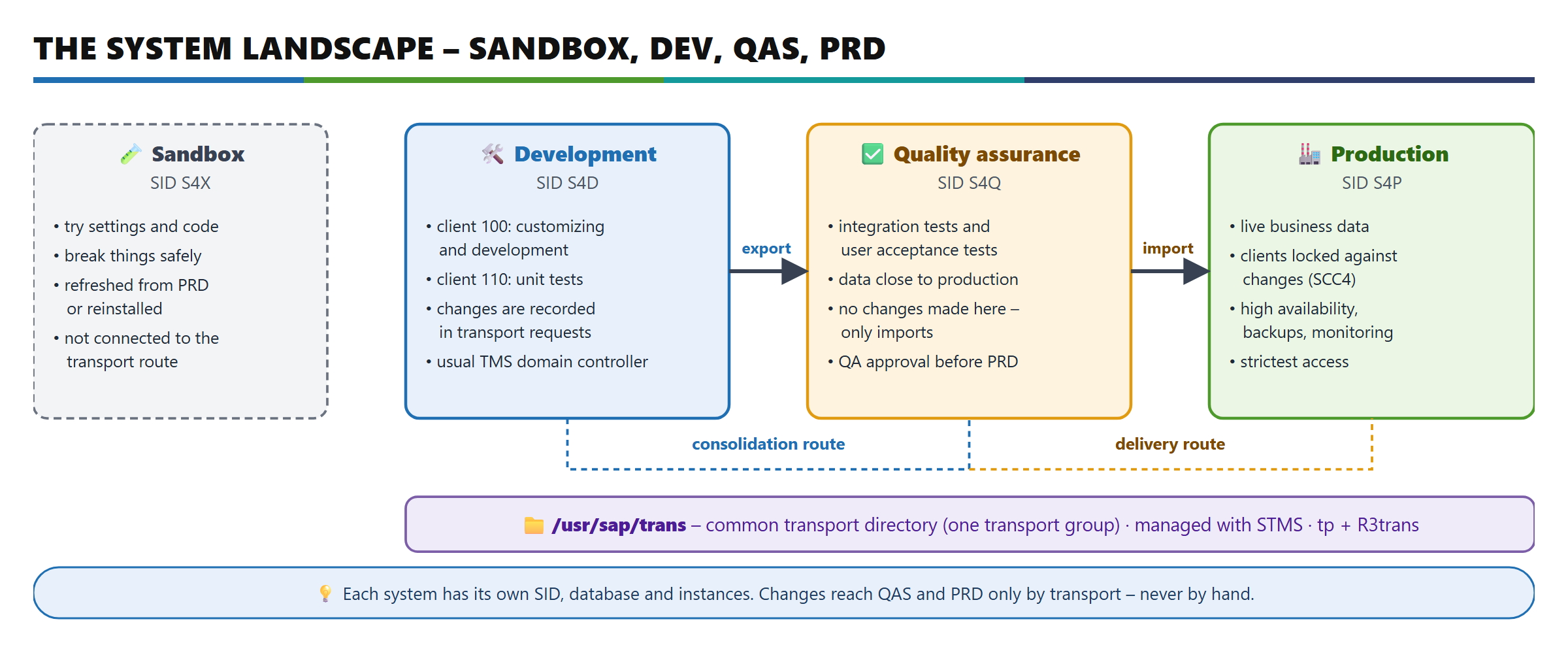
System | Purpose | Rules |
|---|---|---|
Sandbox | Try out settings, code and support packages | Not part of the transport route; refreshed or reinstalled freely |
DEV (development) | Customizing and ABAP development; unit tests in a separate client | The only place where changes are made; every change is recorded in a transport request |
QAS (quality assurance) | Integration tests and user acceptance tests | Receives transports only; QA approval before PRD |
PRD (production) | Live business | Clients locked against changes (SCC4); HA, backups, strict access |
- The three-system landscape DEV → QAS → PRD is the standard. Large projects add systems such as pre-production or training, or a second development track for projects next to maintenance.
SID, instance number, host name, client
Term | Rule | Example |
|---|---|---|
SID (SAP system ID) | Exactly 3 characters, uppercase letters and digits, first character a letter; unique in the landscape. Reserved words are not allowed (e.g. ADD, ALL, AND, DBA, KEY, SAP, SQL, SYS). Typical scheme: product + environment | S4D, S4Q, S4P |
Instance number | Two digits 00–97, unique per host (98 and 99 are reserved by SAP). It decides the port numbers of the instance | 00, 01, 10 |
Instance name | Instance type + instance number | ASCS01, D00, ERS10, HDB00 (old: DVEBMGS00) |
Host name | Server name of the instance; at most 13 characters, letters, digits and hyphen. HA systems use virtual host names that move with the instance | s4papp1, s4pascs |
Client | Three digits 000–999 (1,000 possible clients); a logical partition inside one system with its own users and business data (field MANDT) – see page 03 | 000, 100, 800 |
Port numbers
Ports are derived from the instance number NN (example in the last column: NN = 00).
Service | Port pattern | Example |
|---|---|---|
Dispatcher (SAP GUI, DIAG protocol) | 32NN | 3200 |
Gateway (RFC) · secure gateway (SNC) | 33NN · 48NN | 3300 · 4800 |
Message server: external (logon) · internal · HTTP | 36NN · 39NN · 81NN | 3600 · 3900 · 8100 |
ICM HTTP · HTTPS (defaults, configurable) | 80NN · 443NN | 8000 · 44300 |
sapstartsrv (sapcontrol, SAP MMC) HTTP · HTTPS | 5NN13 · 5NN14 | 50013 · 50014 |
SAP HANA SQL: system DB · first tenant | 3NN13 · 3NN15 | 30013 · 30015 |
SAP Host Agent HTTP · HTTPS (fixed) | 1128 · 1129 | – |
SAProuter (fixed) | 3299 | – |
- Additional HANA tenants get ports from the range 3NN40–3NN99. Check the real ports in the system (SMICM → Services, SMMS, HANA cockpit) before opening firewalls.
Part 3 – Instance types: ASCS, PAS, AAS, ERS
An instance is a group of processes started and stopped together, with one instance number on one host. One SAP system (one SID) = one database + one ASCS + one or more application server instances.
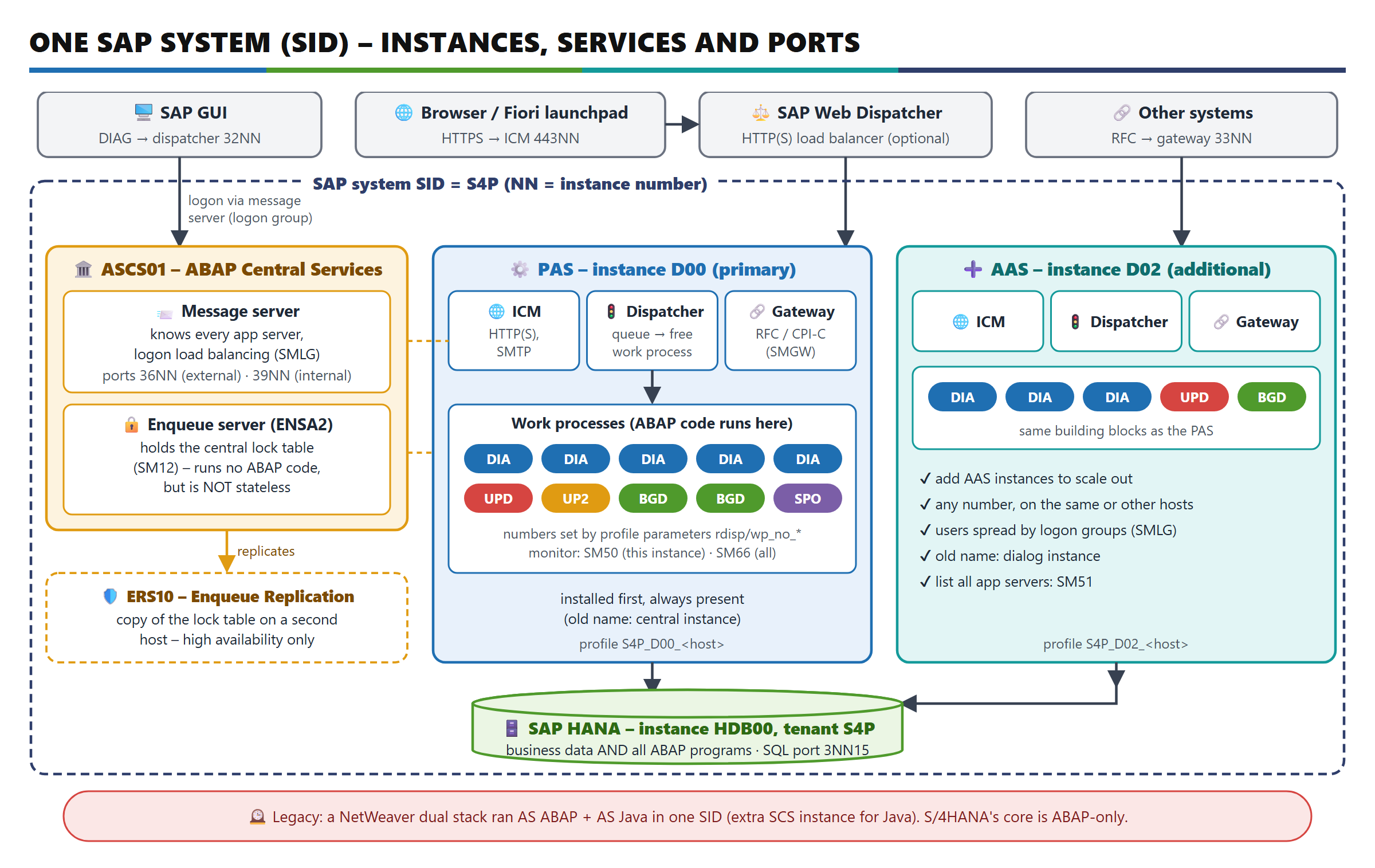
Instance | Contains | How many | Key facts |
|---|---|---|---|
ASCS – ABAP Central Services | Message server + enqueue server (optionally a standalone gateway or an embedded Web Dispatcher) | Exactly 1 per SID | No work processes, runs no ABAP code – but it is not stateless: the enqueue server keeps the lock table in memory. Single point of failure → protected by HA |
ERS – Enqueue Replication Server | Copy of the lock table | 1 (HA systems) | Runs on a different host than the ASCS; after a failover the enqueue server rebuilds the lock table from it, so no locks are lost |
PAS – Primary Application Server | Dispatcher, work processes (DIA, UPD, UP2, BGD, SPO), gateway, ICM | Exactly 1 | The first application server installed; technically the same as an AAS. Old name: central instance (DVEBMGS) |
AAS – Additional Application Server | Same as PAS | 0 … n | Added to scale out; old name: dialog instance. Users are spread over them by logon groups |
Database instance | SAP HANA (HDB<NN>) | 1 per SID | Holds business data and all ABAP programs and DDIC objects |
SCS (legacy) | Java central services | AS Java only | Part of Java and old dual-stack systems |
- Central (standard) system: ASCS, PAS and database on one host. Distributed: on separate hosts. Installation options: page 02 Part 4.
- Old central systems without ASCS ran the message server and an enqueue work process inside the central instance. Current installations always have an ASCS.
Part 4 – Central services and server processes
Component | Runs in | Role | Monitor |
|---|---|---|---|
Message server | ASCS | Knows all application servers; logon load balancing; passes messages between instances | SMMS |
Enqueue server | ASCS | Central lock table for SAP locks (lock objects, | SM12 |
Dispatcher | Every app server | Puts incoming requests in a queue and hands them to free work processes | SM50 |
Gateway | Every app server | RFC / CPI-C connections to other SAP and non-SAP systems | SMGW |
ICM (Internet Communication Manager) | Every app server | HTTP(S) and SMTP: Fiori, OData, web services | SMICM |
sapstartsrv | Every instance | Starts, stops and monitors the instance; used by | sapcontrol |
SAP Host Agent | Every host | Host monitoring and control (used by SWPM, Solution Manager, Cloud ALM) | saphostctrl |
SAP Web Dispatcher | Own host (or embedded in ASCS) | Entry point and load balancer for HTTP(S) | Web admin UI |
Enqueue server: ENSA1 and ENSA2
- ENSA2 (Standalone Enqueue Server 2) is the default since ABAP Platform 1809, i.e. in every current S/4HANA system. Older systems use ENSA1.
- Difference in HA: with ENSA1 the ASCS had to fail over to the host where the ERS was running; with ENSA2 the ASCS can restart on any cluster node and pulls the lock table from the ERS over the network.
How a request moves through dispatcher and work process, and why a user is not bound to one work process (roll-in / roll-out of the user context): CORE ABAP › 01 SAP & ABAP Basics, Part 3.
Part 5 – Work processes and their monitoring
A work process (WP) is an operating-system process on the application server that executes ABAP requests. Each WP has one type – dialog, update, background, spool. The dispatcher gives each incoming task to a free WP of the right type.
Type | Role | Purpose | T-codes | How many |
|---|---|---|---|---|
Dialog (DIA) | User interaction | Screens, reports, RFC calls; short steps. Long dialog steps are cancelled (dump TIME_OUT) | SM50, SM66 | Most WPs; at least 2 |
Update (UPD) | V1 updates | Critical database changes after | SM13 | ≥ 1 |
Update 2 (UP2) | V2 updates | Less critical updates such as statistics; without UP2 the UPD WPs do them | SM13 | 0–1 |
Background (BGD) | Batch jobs | Scheduled reports, data loads, long-running work (shown as BTC in older releases) | SM36, SM37 | ≥ 2 |
Spool (SPO) | Output | Formats output and passes it to printers, fax, files – see page 04 | SP01, SP02, SPAD | ≥ 1 per system |
Enqueue (ENQ) | Locks | Only in old central systems without ASCS; otherwise the enqueue server in the ASCS does this | SM12 | 0 in current systems |
- Not work processes: the message server (SMMS), the gateway (SMGW) and the ICM (SMICM) are separate processes.
- Spool work processes, access methods (L, U/S, F/G …) and the local, remote and front-end printing flows: page 04 Part 5 – Spool and printing.
- The number of each type comes from profile parameters:
rdisp/wp_no_dia,rdisp/wp_no_btc,rdisp/wp_no_vb,rdisp/wp_no_vb2,rdisp/wp_no_spo(profiles: page 02 Part 7).
Monitoring transactions
T-code | Shows |
|---|---|
SM50 | Work processes of the current instance (type, status, reason, program, user, CPU time) |
SM66 | Work processes of all instances of the system |
SM51 | Active application servers; jump to an instance; kernel release notes |
SM04 | Users logged on to the current instance and their sessions |
AL08 | Users logged on to all instances |
SMLG | Logon groups (Part 6) |
RZ20 | CCMS alert monitor – central monitoring with thresholds and alerts |
SMMS / SMGW / SMICM | Message server, gateway, ICM monitors |
SM12 / SM13 | Lock entries / update requests |
SM21 / ST22 | System log / ABAP short dumps |
Work process status in SM50
Status / reason | Meaning |
|---|---|
Waiting | Idle and free for a new request – the normal state of an unused WP |
Running | Processing a request; the Action and Table columns show what it is doing (e.g. sequential read on a table) |
On Hold | Waiting for something outside the WP; the Reason column tells why (see below) |
Stopped | The process terminated (error or cancelled by an administrator) and was not restarted (column Restart = No) – check the trace file dev_w<n> in the work directory |
Reason PRIV | Private mode: a dialog WP uses heap memory and stays bound to one user (Part 8) – many PRIV processes point to memory problems |
Reason RFC / CPIC | Waiting for the answer of a remote call |
Reason DEBUG | A user is debugging – the WP is blocked for everybody else |
Reason SLEEP | Waiting, e.g. ABAP statement |
- The CPU column shows the CPU time used; very high values on one WP point to an expensive program. Long-running dialog WPs and many WPs "On Hold" are the first things to look at when users complain.
Part 6 – Logon groups and load balancing
A logon group is a named set of application servers. In SAP Logon the user picks a group instead of a server; the message server sends the logon to the server of that group with the best response time / fewest users.
- Maintain logon groups in SMLG (e.g. FINANCE, SALES, FIORI). The default group is SPACE.
- Per server you can set limits (response time, number of users) after which it receives no new logons.
Load | How it is balanced | T-code |
|---|---|---|
SAP GUI logons | Logon groups via the message server (port 36NN) | SMLG |
Parallel RFC (aRFC) and parallel processing | RFC server groups | RZ12 |
Background jobs | Background server groups / target server in the job | SM61, SM36 |
HTTP(S): Fiori, OData | SAP Web Dispatcher, which asks the message server for the available servers | – |
- Do not confuse: SMLG maintains logon groups; RZ20 is the CCMS monitor.
Part 7 – Operation modes
An operation mode is a named distribution of work process types per application server, e.g. many dialog WPs during the day and more background WPs at night. The system switches between modes automatically according to a timetable.
Step | T-code | What you do |
|---|---|---|
1. Define modes | RZ04 | Create modes (DAY, NIGHT …) and set the number of DIA / BGD / UPD / SPO WPs per instance |
2. Schedule | SM63 | Assign the modes to the hours of the day (normal operation) or to a specific date (exception operation) |
3. Check / switch | RZ03 | See the current mode, switch manually, check for errors |
Mode | Time | DIA | BGD | Total |
|---|---|---|---|---|
DAY | 06:00–20:00 | 10 | 3 | 13 |
NIGHT | 20:00–06:00 | 5 | 8 | 13 |
- The total number of WPs per instance stays the same – a switch only changes their type (mainly dialog ↔ background).
- A busy WP finishes its current task first; the dispatcher changes its type when it becomes free.
Part 8 – Memory management
Every user session needs memory for its user context (variables, internal tables, screens). The application server provides several memory areas and uses them in a fixed order.
Memory area | What it is | Main parameters |
|---|---|---|
Roll area | Local memory of each WP; holds the first small part of the user context | ztta/roll_first, ztta/roll_area (legacy – deleted with AS ABAP 7.40) |
Extended memory (EM) | Large shared pool; user contexts are mapped into a WP only while it works for them – the main memory for dialog users |
|
Heap (private) memory | Memory private to one WP process, taken only when needed and released when the WP ends its work |
|
Buffers (shared memory) | Program buffer, table buffers, nametab – speed up repeated access |
|
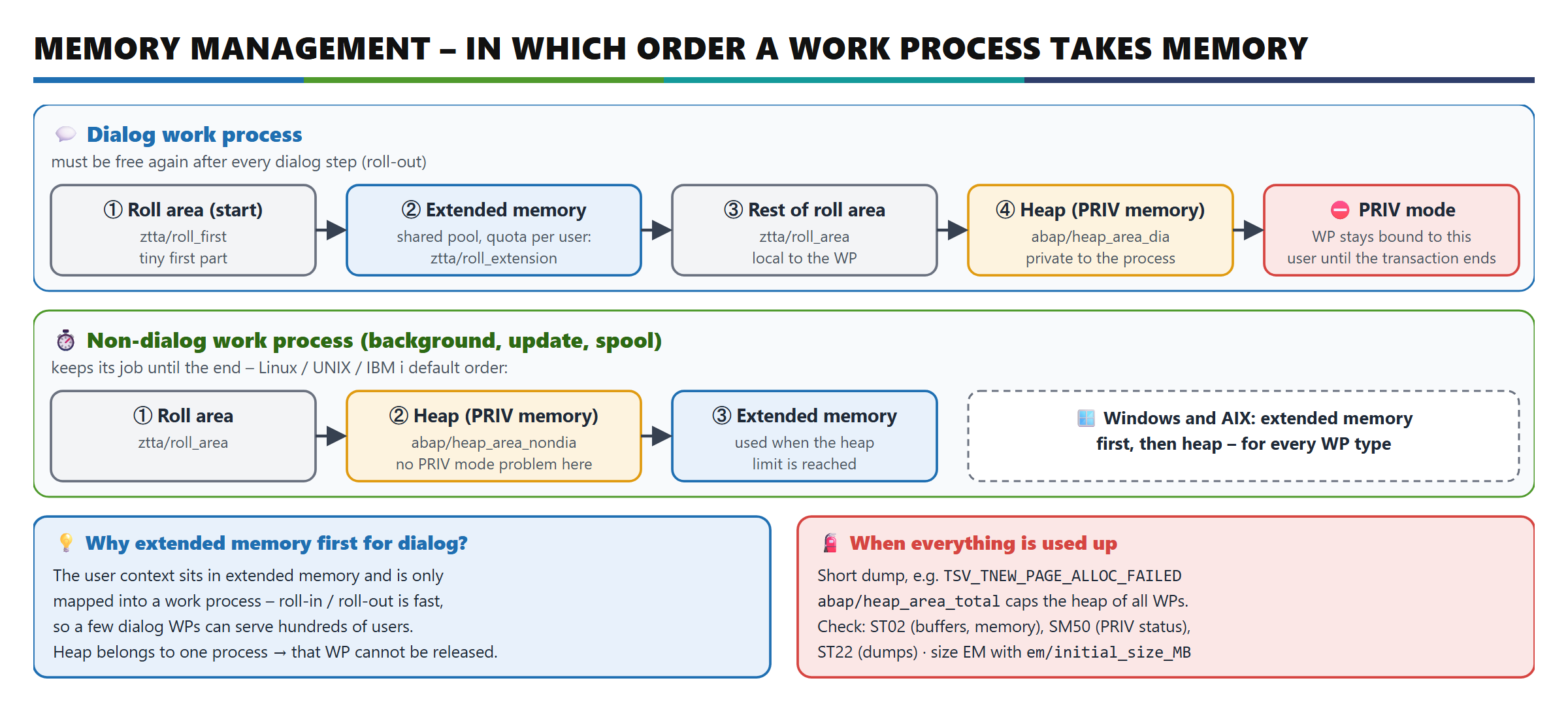
Allocation order
Work process type | Standard UNIX (default) | AIX with ES/TABLES = SHM_SEGS, Linux with es/implementation = map (Windows, IBM i: own sequence) |
|---|---|---|
Dialog work processes | 1. Extended memory 2. Heap (PRIV) | 1. Extended memory 2. Heap (PRIV) |
Non-dialog work processes (background, update, spool) | 1. Heap 2. Extended memory | 1. Extended memory 2. Heap |
- ECC: a small roll area (ztta/roll_first) is used first · as of AS ABAP 7.40 ztta/roll_first and ztta/roll_area are deleted.
- When a dialog WP has to use heap memory it enters PRIV mode: the user context can no longer be rolled out, so the WP stays bound to that user until the transaction ends.
rdisp/wppriv_max_nolimits how many dialog WPs may be in PRIV mode. - Non-dialog WPs keep their job until it ends anyway, so heap first costs nothing there.
- When all memory is used up the program dumps (e.g.
TSV_TNEW_PAGE_ALLOC_FAILED). Analyse with ST02 (buffers, memory, swaps), SM50 (PRIV) and ST22. PHYS_MEMSIZEtells the instance how much of the host's RAM it may use; many memory defaults are derived from it.
Part 9 – S/4HANA architecture vs the classic dual stack
SAP S/4HANA runs on the ABAP Platform (the successor of NetWeaver AS ABAP 7.5x) and only on SAP HANA. The core is ABAP-only: no Java stack inside the system.
ECC on NetWeaver | S/4HANA on ABAP Platform | |
|---|---|---|
Database | Any supported DB (Oracle, SQL Server, Db2, MaxDB, ASE, HANA) | SAP HANA only |
Stacks | ABAP, Java, or both in one SID (dual stack, older NetWeaver releases only) | ABAP only; Java tools run as separate systems |
Central services | Central instance with message server and enqueue WP (old) or ASCS | ASCS with ENSA2, ERS for HA |
User interface | SAP GUI, Web Dynpro; optional SAP Fiori apps for SAP Business Suite (via SAP Gateway) | SAP Fiori launchpad and SAP GUI |
Kernel | 7.2x–7.5x | Current releases 7.8x / 7.9x (Unicode only) |
Installation tool | SWPM 1.0 | SWPM 2.0 |
Legacy – the dual stack
A dual-stack system ran AS ABAP and AS Java in one SID with one database (two schemas): an ASCS for ABAP, an SCS for Java, and application servers with both an ABAP dispatcher and a Java startup framework. Dual stack exists only in older NetWeaver releases; existing systems are separated with the SWPM Dual-Stack Split. Know it for interviews, do not build it.
- Typical S/4HANA deployment: HANA host(s) · ASCS + ERS in a cluster · PAS + AAS · SAP Web Dispatcher in front for Fiori. Java-based products (e.g. SAP Process Orchestration) are separate systems; many functions moved to SAP BTP.
- HANA basics: ABAP on HANA › 01 HANA Fundamentals. Moving from ECC: ABAP on HANA › 02 Migration to S/4HANA.
Part 10 – Interview questions
What is SAP Basis?
The technical foundation of an SAP system and the team that runs it: installation, kernel and support packages, transports, clients, users, monitoring, performance, backup. It connects OS, database, communication and the SAP applications.
What is the difference between SID, instance and client?
The SID (3 characters) names the whole system – database plus all instances. An instance is a group of processes on one host with a 2-digit instance number (00–97). A client (000–999) is a logical partition inside one system with its own users and business data.
What does the ASCS contain and why is it critical?
The message server and the enqueue server. It runs no ABAP code, but it holds the lock table and coordinates logons, so if it fails the system stops. In HA setups it runs in a cluster with an ERS that keeps a replica of the lock table.
What is the difference between PAS and AAS?
Technically none – both run dispatcher, work processes, gateway and ICM. The PAS is the first application server installed (exactly one); AAS instances are added to scale out. Old names: central instance and dialog instance.
Which work process types exist?
Dialog, update (V1), update 2 (V2), background and spool. An enqueue work process exists only in old central systems without ASCS. Message server, gateway and ICM are separate processes, not work processes.
How do SM50 and SM66 differ?
SM50 shows the work processes of the instance you are logged on to; SM66 shows the work processes of all instances of the system.
What is a logon group?
A set of application servers maintained in SMLG. Users log on to a group, and the message server sends them to the server with the best load in that group.
What are operation modes?
Named distributions of work process types (e.g. DAY with more dialog, NIGHT with more background WPs), defined in RZ04 and scheduled in SM63. The total number of WPs stays the same.
What is PRIV mode?
A dialog work process that had to take heap memory: the user context cannot be rolled out, so the WP stays bound to one user until the transaction ends. Many PRIV processes mean extended memory is too small or a program uses too much memory.
In which order does a dialog work process use memory?
Extended memory (up to the user quota), then heap memory (PRIV mode). ECC: a small roll area came first (ztta/roll_first, deleted with AS ABAP 7.40). Non-dialog WPs on standard UNIX use heap before extended memory (AIX / Linux with certain EM settings: EM first).
What is ENSA2?
Standalone Enqueue Server 2, the default since ABAP Platform 1809. In HA setups the ASCS can fail over to any cluster node and gets the lock table back from the enqueue replication server.
What changed in the architecture with S/4HANA?
HANA is the only database, the core is ABAP-only (no dual stack), the ASCS with ENSA2 is standard, and Fiori is the main UI next to SAP GUI. Installation uses SWPM 2.0, and current releases run a Unicode kernel of release 7.8x / 7.9x.
🏠 Start Here · 02 · Installation & Kernel ▶ · Sections: CORE ABAP | OOPS ABAP | ABAP on HANA | Clean Core | RAP | ABAP Points | SAP Fiori | SAPUI5 | Mobile Development (MDK) | BTP Foundations | BTP Development | CAP | SAP Build | ABAP on BTP | Integration Suite | SAP Business AI | SAP BASIS | Security | SAP SDLC
Functional: FICO ABAP | TRM ABAP | VIM | SAP BIS | SD ABAP | MM ABAP | PP ABAP | QM ABAP | PM ABAP | PS ABAP | EWM | TM ABAP | GTM ABAP | EHS ABAP | HR ABAP | BW | SAP Datasphere | SAP Business Data Cloud | SAP MDG | SAP Analytics Cloud | SAP Ariba | SAP CX | SAP IBP