How an SAP S/4HANA system is planned, prepared and installed with SWPM, which users, directories and profiles the installation creates, how to start and stop the system – and how it is kept up to date afterwards: kernel upgrades, support packages, add-ons, upgrades and SAP Notes. Architecture terms (SID, instance number, ASCS, PAS, ports) are explained on page 01.
Part 1 – Planning and sizing
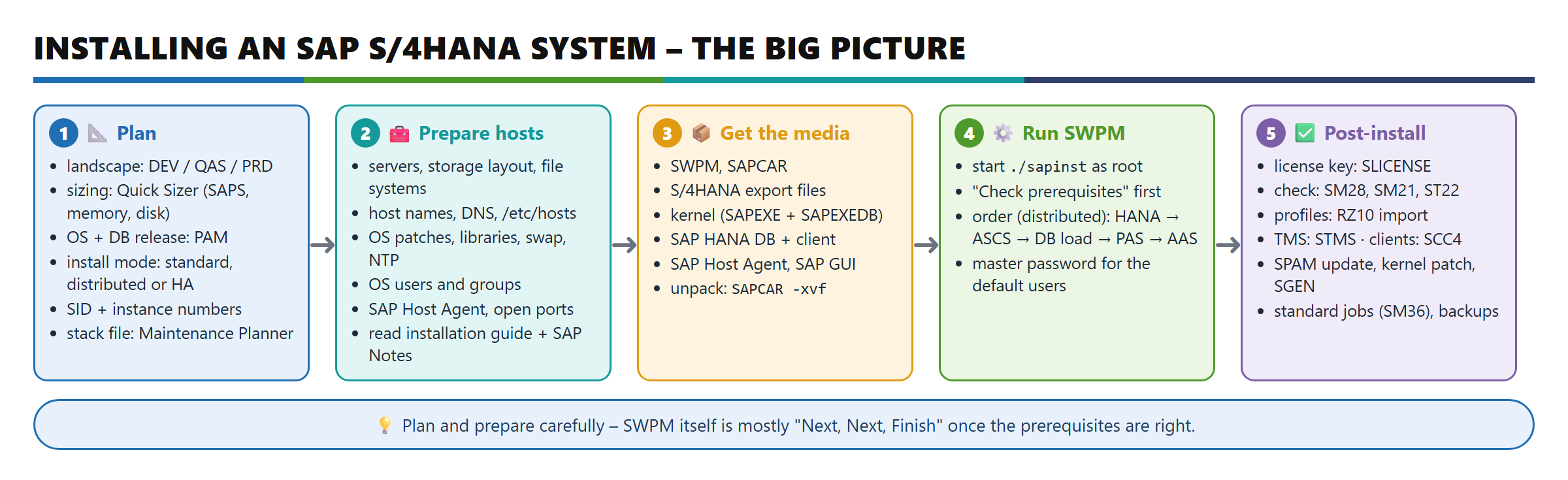
Step | What you decide | Tool |
|---|---|---|
Define the landscape | Which systems (DEV, QAS, PRD, sandbox) and how each is built | – |
Sizing | CPU (in SAPS), memory and disk from the number of users and the expected business volume. For ECC → S/4HANA, a sizing report measures the existing system | SAP Quick Sizer, report |
OS and database | A supported combination of OS, DB and their versions for the SAP release (e.g. SUSE or Red Hat Linux + SAP HANA) | Product Availability Matrix (PAM) |
Hardware | SAP HANA runs only on certified hardware (appliance or TDI) | Certified and Supported SAP HANA Hardware Directory |
Target stack | Release, support package level and add-ons; produces the stack file (stack.xml) and the download list | Maintenance Planner |
Names and layout | SID, instance numbers, host names, installation mode (Part 4) | – |
Hardware orientation
Real numbers always come from sizing. As a rough orientation for lab and project systems:
System | CPU | RAM | Disk |
|---|---|---|---|
ECC 6.0 (any DB), small test system | 2–4 cores, 64-bit | 16 GB+ (bare minimum about 4–6 GB) | 200 GB+ |
S/4HANA sandbox / demo | Multi-core, 64-bit | 128 GB+ – HANA keeps the data in memory | 200 GB+ for SAP, HANA volumes sized from memory (SSD) |
S/4HANA production | Certified HANA hardware, from sizing | 256 GB up to several TB | SSD / NVMe per HANA storage requirements |
Part 2 – Preparing the hosts
Hardware, storage and network
- Allocate servers: physical or virtual machines with the sized CPU, memory, disk and network.
- Storage layout: separate file systems for
/usr/sap,/sapmnt/<SID>,/usr/sap/trans,/hana/data,/hana/log,/hana/sharedand backups (Part 6). - Host names: unique, at most 13 characters, letters, digits and hyphens; virtual host names for HA.
- Network: DNS and
/etc/hostsentries with the fully qualified name, stable connectivity between all hosts, firewall ports open (port list: page 01 Part 2).
Operating system and software
- Apply the OS patches, libraries and kernel settings the SAP Notes for your OS require. On Linux the tools saptune (SUSE) and the tuned SAP profiles (Red Hat) apply the recommended settings; the
uuidddaemon must run. - Swap space: size it as the SAP Note for your OS and database recommends.
- Time synchronisation: NTP (or chrony) on every host – logs, HA clusters and Kerberos SSO depend on it.
- Java: only needed for AS Java-based products; SWPM brings its own Java runtime.
OS users and groups
- SWPM creates the OS users and groups if they do not exist:
<sid>adm(e.g. s4padm),sapadm, groupsapsys(plus<hanasid>admon the HANA host,ora<sid>and groupdbafor Oracle). - Create them yourself beforehand only when they must come from a central directory (LDAP) or need the same user and group IDs on every host.
- SWPM writes the environment files (
.bash_profile,.cshrc,.sapenv*) with SAPSYSTEMNAME, paths and DB settings, and sets the owners and permissions of the SAP directories.
SAP Host Agent and database
- SAP Host Agent: SWPM installs it if it is missing; keep it updated (Part 10).
- SAP HANA: installed with
hdblcm(or by SWPM in the same run). With the option "existing database", the DB users / schemas and the DB parameters recommended by SAP Notes must be prepared first. - Connectivity: after installation
R3trans -d(as<sid>adm) tests the connection from the SAP kernel to the database.
SID and instance numbers
- SID: 3 characters, uppercase letters and digits, starting with a letter, unique in the landscape, no reserved word.
- Instance number: 00–97, unique on the host (98 and 99 are reserved); it determines the ports.
Before you start
- Back up existing systems and configuration if hardware is reused.
- Read the installation guide and master guide for your release, and the SAP Notes they list.
- Download the latest SWPM and run its Prerequisites Check option first.
Part 3 – Installation media and SWPM
Software | What it is |
|---|---|
SWPM (Software Provisioning Manager) | The installation tool ( |
Exports | The product-specific installation data (repository and tables) – S/4HANA, ECC, SRM, CRM, MDG … |
Kernel | OS- and DB-specific executables of the SAP system (Part 10) |
Database + DB client | SAP HANA database software and the client the kernel uses to connect |
SAP Host Agent | Agent for host monitoring and control |
SAPCAR | Tool that unpacks SAP archives: |
SAP GUI | Front end for the users and administrators |
- Download everything from the SAP Software Center (SAP for Me / SAP Support Portal); the Maintenance Planner puts the right files into a download basket.
Component | SAP ECC 6.0 (NetWeaver 7.x) | SAP S/4HANA |
|---|---|---|
Installation tool | SWPM 1.0 (sapinst) | SWPM 2.0 (sapinst) |
Main installation files | NetWeaver and ECC exports | S/4HANA exports |
Kernel | SAP kernel 7.2x–7.5x | Current releases: kernel 7.8x / 7.9x (Unicode only) |
Database software / client | Oracle, SQL Server, Db2, MaxDB, SAP ASE or HANA | SAP HANA DB and HANA client |
Stack file | Optional | stack.xml from the Maintenance Planner – the standard way; SWPM then installs directly at the planned SP level |
SAPCAR, SAP Host Agent, SAP GUI | Yes | Yes (plus a browser for the Fiori launchpad) |
Optional / support tools | AS Java components, JDBC drivers, Adobe Document Services | IGS (own archive), SUM, SAP HANA cockpit, Web Dispatcher |
Running SWPM
|
- SWPM's browser UI listens on port 4237 of the installation host. On Windows run
sapinst.exeas an administrator. - Choose the product (e.g. S/4HANA 2023), the installation option (standard, distributed, HA) and the stack file; SWPM asks for SID, instance numbers, host names, the master password and the media paths.
- In a distributed installation the options run in this order: HANA database → ASCS → database instance (loads the exports) → PAS → AAS.
Part 4 – Installation modes
- Standard (central) system: application server, central services and database on one host (physical or virtual).
- Distributed system: database, ASCS and application servers can each run on a separate host.
- High availability (HA): distributed, plus clustering and redundancy so that no single failure stops the system.
Mode | Number of hosts | Scalability | Failure risk | Use case |
|---|---|---|---|---|
Standard | 1 | Low | High – the host is a single point of failure | Sandbox, demo, small production |
Distributed | 2+ | High | Medium – DB and ASCS are single points of failure | Enterprise production, performance focus |
High availability | 2+ with cluster | Very high | Low | Mission-critical production |
- HA building blocks: ASCS + ERS in a cluster (Pacemaker on Linux, Windows Server Failover Clustering), HANA System Replication to a second HANA, at least two application servers, virtual host names and highly available shared file systems.
Part 5 – Default users after the installation
The installation creates users on three layers. During SWPM you enter a master password, which is used for these users unless you set individual ones – change them after the installation.
Layer | Default user | Purpose |
|---|---|---|
OS |
| SAP system administrator: start/stop, sapcontrol, kernel, OS-level SAP tools. On Windows also the service user |
OS | sapadm | SAP Host Agent administration |
OS (HANA host) | <hanasid>adm | HANA administrator at OS level: start/stop HANA ( |
SAP application | SAP* | Super user in every client. Hard-coded in the kernel: if its user master record is deleted and |
SAP application | DDIC | Dictionary administrator; used by installation, upgrade (SUM) and some DDIC operations; exists in client 000 and the delivered clients |
SAP application | TMSADM | Communication user in client 000 for transport RFCs, created when STMS is configured (page 03) |
Database (HANA) | SYSTEM | Database super user in the system DB and each tenant; create named admin users and deactivate SYSTEM for daily work |
Database (HANA) | SAPHANADB or SAPABAP1 (depending on product and install method) | ABAP schema owner – the SAP system connects to HANA with this user (key DEFAULT in |
- User types (dialog, system, communication, service) and protection of default users: Security › 01 Authorization Concept.
Part 6 – SAP directories
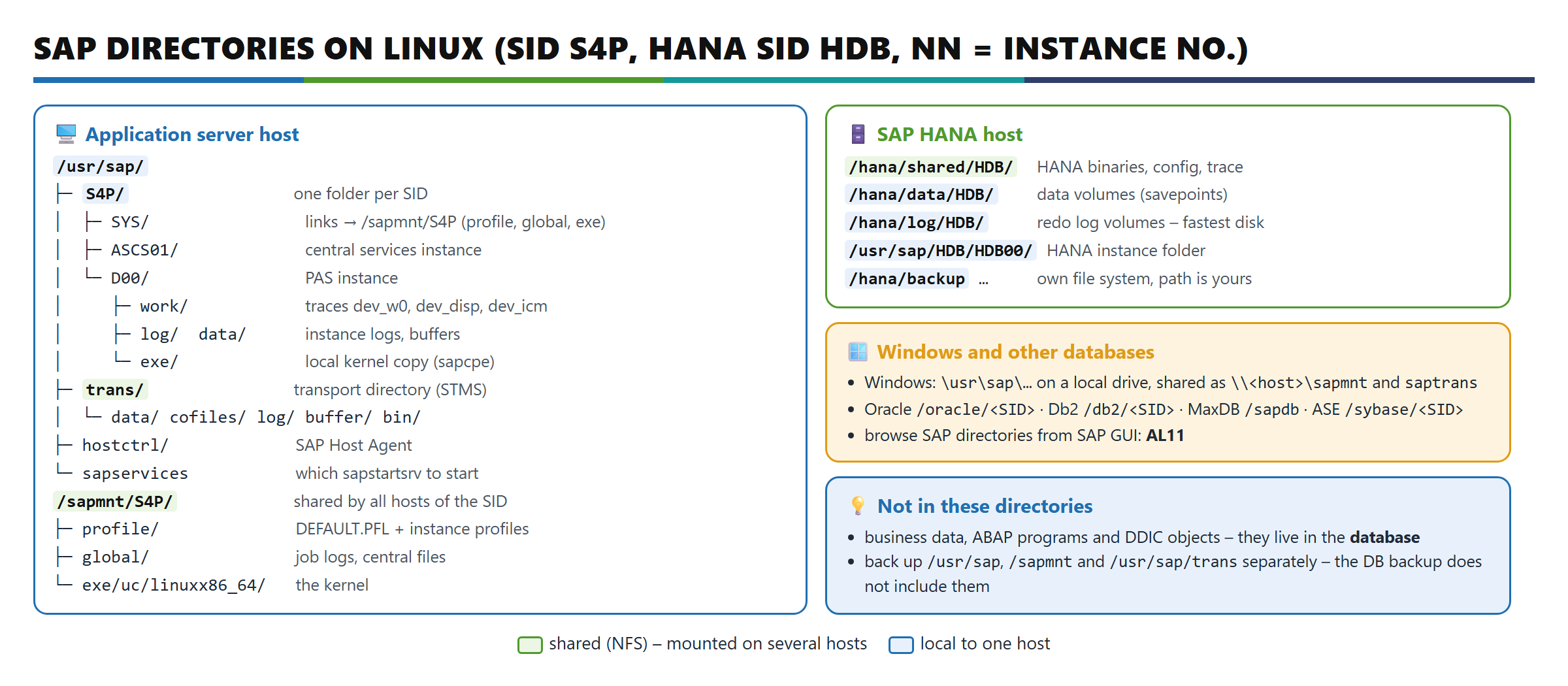
Directory | Purpose | Shared / local |
|---|---|---|
/usr/sap | Root SAP directory on every host | Local |
/usr/sap/<SID> | Instance folders (ASCS01, D00 …) with | Local |
/sapmnt/<SID> |
| Shared (NFS; Windows share sapmnt) |
/usr/sap/trans | Central transport directory: data, cofiles, log, buffer, bin … (page 03) | Shared by all systems of the transport group |
/usr/sap/hostctrl | SAP Host Agent | Local |
/hana/shared/<HANASID> | HANA binaries, configuration, traces | Shared (NFS in scale-out) |
/hana/data/<HANASID> | HANA data volumes | Local / fast storage |
/hana/log/<HANASID> | HANA log volumes – critical for recovery, need the lowest latency | Local / fastest storage |
| Software and files of MaxDB, Oracle, Db2 | Local |
- Business data and ABAP programs are not in these directories – they live in the database.
- Browse SAP directories from SAP GUI with AL11.
Part 7 – Profiles and parameters
Profiles are text files in /sapmnt/<SID>/profile that hold the system parameters. Each instance reads them at start-up to set up its environment.
Profile | Contains |
|---|---|
Default profile ( | Parameters for all instances of the system, e.g. database host, message server host, logon and security settings |
Instance profile ( | Parameters for one instance, e.g. number of work processes and memory limits – and as of AS ABAP 7.40 also the start commands |
Start profile ( | Which programs to start (older releases); as of AS ABAP 7.40 merged into the instance profile |
- Order of evaluation: kernel default →
DEFAULT.PFL→ instance profile. The last value wins, so an instance profile overrides the default profile. ReportRSPFPARshows the effective values.
|
Parameters
Parameters are the individual settings inside the profiles. They control, for example:
- Number and type of work processes
- Memory allocation and usage
- Logon restrictions
- Security and authorization settings
- Buffer sizes
- Timeout values
Change type | T-code | Effect |
|---|---|---|
Static (in the profile) | RZ10 | Change the profile file (RZ10 keeps versions in the database). Takes effect after the instance is restarted; permanent |
Dynamic (at runtime) | RZ11 | Shows documentation and current value of any parameter. Parameters flagged "dynamically switchable" can be changed immediately – lost at the next restart unless also put into the profile |
- Import the profiles into RZ10 once after installation; if a profile is edited at OS level, import it again so RZ10 and the file stay consistent.
Part 8 – Starting and stopping the system
Start order: database → ASCS (and ERS) → PAS → AAS. Stop in the reverse order. On Linux everything is done as <sid>adm with sapcontrol, which talks to sapstartsrv of an instance.
|
- Windows: SAP MMC (Microsoft Management Console snap-in) or sapcontrol; each instance has a Windows service
SAP<SID>_<NN>. - Legacy: the scripts
startsap/stopsapare deprecated – use sapcontrol.
Part 9 – Post-installation steps
Step | T-code / tool |
|---|---|
Install the permanent license key (hardware key from the system) | SLICENSE |
Installation check, system log, dumps | SM28, SM21, ST22 |
Import the profiles | RZ10 |
Configure the transport system | STMS (page 03) |
Create clients and logical systems | SCC4, BD54 (page 03) |
Update SPAM/SAINT, apply support packages, patch the kernel | SPAM, SUM (Parts 10–11) |
Generate ABAP loads so the first users do not wait | SGEN |
Schedule the standard housekeeping jobs | ECC: SM36 → Standard Jobs · S/4HANA: scheduled automatically by the Technical Job Repository (SJOBREPO) – only review / adjust |
Logon groups and operation modes | SMLG, RZ04 (page 01) |
Set up database and log backups | SAP HANA cockpit, DBACOCKPIT (page 04) |
Secure the default users: new passwords, lock SAP*, deactivate HANA SYSTEM | SU01, HANA cockpit |
Connect to SAP support and monitoring (SAProuter, EarlyWatch Alert) | Page 04 |
Part 10 – The SAP kernel and the kernel upgrade
The kernel is the set of C/C++ executables that run the SAP system – dispatcher, work processes, message and enqueue server, gateway, ICM, transport tools. It is specific to OS and database, lives in /sapmnt/<SID>/exe/uc/<platform> and is copied to each instance's exe folder by sapcpe at start-up. ABAP code, by contrast, is stored in the database.
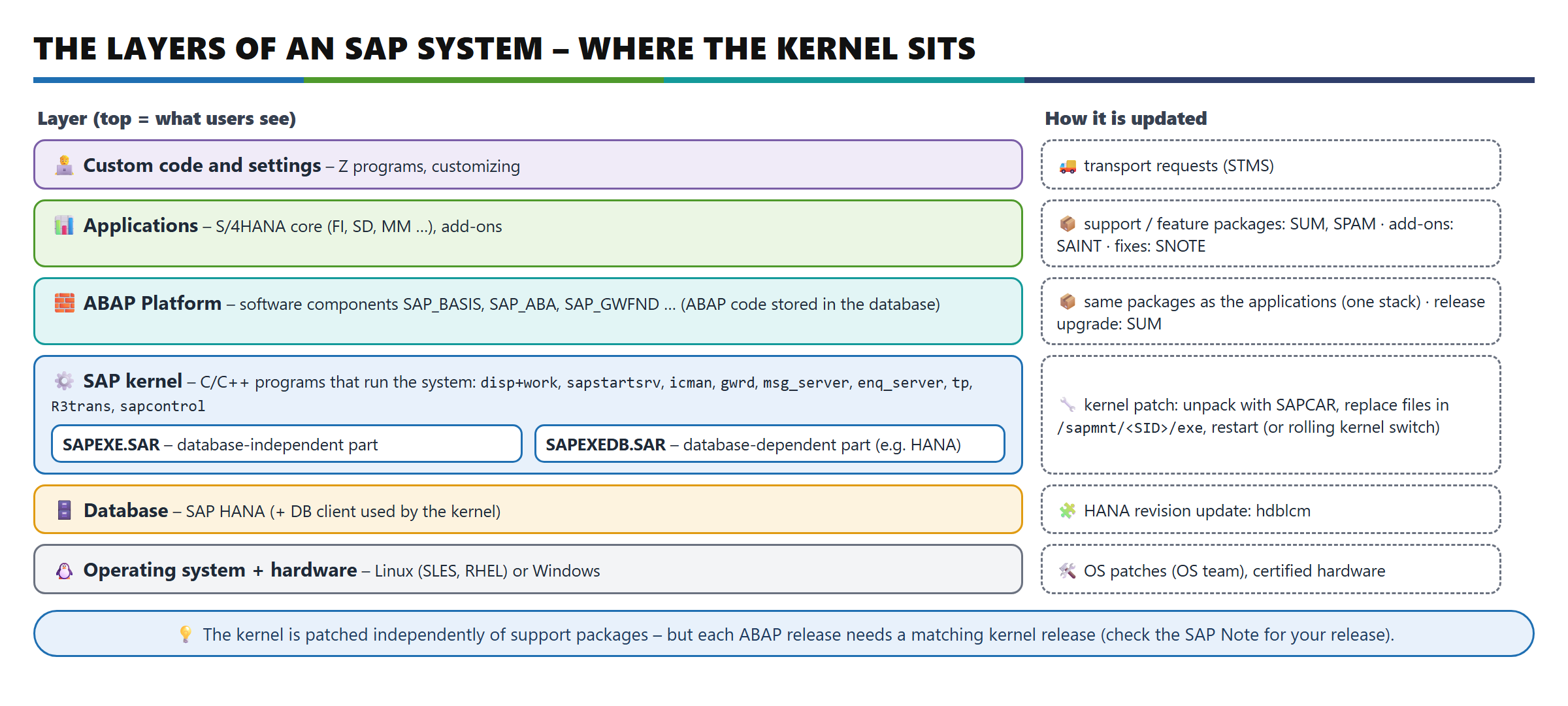
Executable | Role |
|---|---|
disp+work | Dispatcher and work processes |
| Message server, enqueue server (ENSA2) in the ASCS |
| Gateway, ICM |
| Start service of each instance and its command-line client |
| Transport control program and import/export tool (page 03) |
| Export/import of tables (installation, migration), archive tool |
Kernel release, patch level and archives
- A kernel has a release (e.g. 7.93) and a patch level. Each ABAP release supports specific kernel releases – the kernel SAP Note for your release tells which; sometimes a newer release is offered as a downward-compatible kernel.
- Check the current kernel:
disp+work -vas<sid>adm, SM51 → Release Notes, or System → Status. - Kernel archives: SAPEXE.SAR (database-independent part) and SAPEXEDB.SAR (database-dependent part, e.g. for HANA); IGS and the SAP Host Agent come as separate archives.
- The kernel is patched independently of support packages: new patches fix bugs and security issues; a new kernel release usually comes with an upgrade.
Kernel upgrade step by step
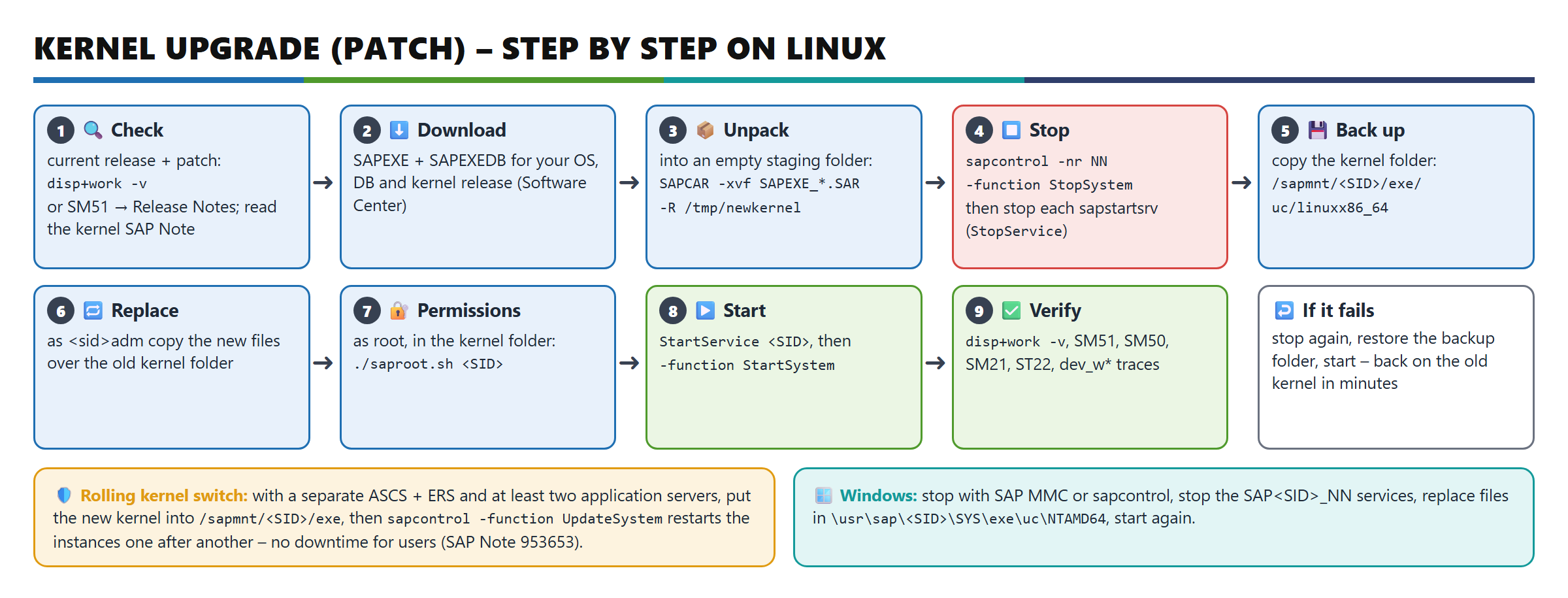
|
- Verify in SAP GUI: SM51 (release notes), SM50, SM21, ST22, and the traces dev_w* in the work directory.
- If something goes wrong: stop, put the backup folder back, start again – the old kernel is back in minutes.
- Rolling kernel switch (systems with a separate ASCS + ERS and at least two application servers, SAP Note 953653): put the new kernel into the central
/sapmnt/<SID>/exedirectory, thensapcontrol -nr <NN> -function UpdateSystemrestarts the instances one by one with the new kernel, without downtime for users. - Windows: stop with SAP MMC or sapcontrol, stop the
SAP<SID>_<NN>services, replace the files in\usr\sap\<SID>\SYS\exe\uc\NTAMD64, start again. - SAP Host Agent update:
saphostexec -upgrade -archive <SAPHOSTAGENT.SAR>(as root).
Part 11 – Support packages, add-ons, upgrades and SAP Notes
Tool | T-code / where | Used for |
|---|---|---|
Note Assistant | SNOTE | Implements the correction instructions of a single SAP Note; larger corrections come as TCI (transport-based correction instructions). Notes are downloaded from SAP over an HTTPS connection |
Support Package Manager | SPAM | Imports support packages for ABAP software components as a queue. Always import the latest SPAM/SAINT update first |
Add-On Installation Tool | SAINT | Installs and upgrades add-ons |
Software Update Manager | SUM (browser UI, runs on the host) | Release upgrades, enhancement packages, support / feature package stacks, conversion to S/4HANA – driven by the stack.xml |
SUM with DMO | SUM option | Database Migration Option: upgrade and migrate from any DB to SAP HANA in one run – see ABAP on HANA › 02 Migration to S/4HANA |
Maintenance Planner | SAP for Me / Support Portal | Plans the target stack, creates stack.xml and the download basket |
Modification adjustment | SPDD, SPAU | During SP import or upgrade: adjust modified DDIC objects (SPDD) and repository objects (SPAU) |
Terms
- Support package (SP): a bundle of corrections for one software component (e.g. SAP_BASIS).
- Support package stack (SPS): a tested combination of SPs for all components of a product. S/4HANA has a new on-premise release every two years (2023, 2025 …); in between come feature package stacks (FPS) with new features and fixes, and later SPS with fixes only.
- Apply complete stacks rather than single SPs. For S/4HANA, stacks are normally applied with SUM; SAP Note 1803986 explains when SPAM or SUM is to be used.
Importing support packages with SPAM
- 1. Download the SPs (Maintenance Planner) and load them: SPAM → Support Package → Load packages.
- 2. Import the latest SPAM/SAINT update.
- 3. Define the queue (SPAM calculates the dependencies).
- 4. Import the queue; adjust modifications in SPDD and SPAU when asked.
- 5. Confirm the queue; check logs, run SGEN, test; import into QAS and PRD in the same order.
Term | Meaning |
|---|---|
Update | New SP / FPS level within the same release (SPAM or SUM) |
Upgrade | Move to a new release, e.g. S/4HANA 2022 → 2023 (SUM) |
Conversion | ECC → S/4HANA (SUM, with DMO if the source DB is not HANA) |
Migration | Change of database or OS (SWPM export/import or SUM DMO) |
Part 12 – Interview questions
What do you check before installing an SAP system?
Landscape and sizing (Quick Sizer), supported OS/DB in the PAM, certified HANA hardware, storage layout, host names and DNS, OS patches and settings, swap, NTP, ports, SID and instance numbers, the installation guide and SAP Notes, the stack file from the Maintenance Planner – and SWPM's Prerequisites Check.
Which software do you need to install S/4HANA?
SWPM 2.0, SAPCAR, the S/4HANA exports, the kernel (SAPEXE + SAPEXEDB), SAP HANA database and client, the SAP Host Agent, SAP GUI, and the stack.xml from the Maintenance Planner.
What is the difference between a standard, distributed and HA installation?
Standard: everything on one host. Distributed: database, ASCS and application servers on separate hosts. HA: distributed plus a cluster for ASCS/ERS, HANA System Replication and several application servers, so that no single failure stops the system.
Which users does the installation create?
OS: <sid>adm and sapadm (plus <hanasid>adm for HANA). SAP: SAP* and DDIC in the clients. Database: SYSTEM and the ABAP schema user (SAPHANADB). TMSADM follows when STMS is configured.
Why is SAP* special?
It is hard-coded in the kernel. If its user record is deleted and login/no_automatic_user_sapstar is 0, anyone can log on with SAP* and password PASS. Therefore the parameter stays 1 and SAP* is locked, not deleted.
What are the SAP profiles?
DEFAULT.PFL for all instances and one instance profile per instance; the old start profile is merged into the instance profile as of AS ABAP 7.40. The instance profile overrides the default profile.
What is the difference between RZ10 and RZ11?
RZ10 maintains the profile files – static changes that need a restart and are permanent. RZ11 shows a parameter and changes dynamically switchable parameters at once – lost at the next restart.
What is the kernel and how do you check its version?
The OS- and DB-specific executables that run the system (disp+work, msg_server, gwrd, icman, tp …). Check with disp+work -v or SM51 → Release Notes.
Describe a kernel upgrade.
Download SAPEXE and SAPEXEDB for the right release, OS and DB; unpack with SAPCAR into a staging folder; stop the system and sapstartsrv; back up the kernel folder; copy the new files; run saproot.sh as root; start and verify with disp+work -v, SM51 and the logs. HA systems can use the rolling kernel switch.
What is the difference between SPAM, SAINT and SUM?
SPAM imports support packages, SAINT installs add-ons, SUM performs upgrades, stack updates and the conversion to S/4HANA (with DMO also the move to HANA). Always update SPAM/SAINT before using them.
How do you start and stop an SAP system?
With sapcontrol as <sid>adm: StartSystem / StopSystem, or Start / Stop for one instance; order DB → ASCS → PAS → AAS and reverse for stopping. On Windows also SAP MMC; startsap/stopsap are legacy.
What is SNOTE used for?
To implement the code corrections of a single SAP Note automatically, with dependency check and a transport request – instead of importing a whole support package.
🏠 Start Here · ◀ 01 · Architecture · 03 · Clients & Transports ▶ · Sections: CORE ABAP | OOPS ABAP | ABAP on HANA | Clean Core | RAP | ABAP Points | SAP Fiori | SAPUI5 | Mobile Development (MDK) | BTP Foundations | BTP Development | CAP | SAP Build | ABAP on BTP | Integration Suite | SAP Business AI | SAP BASIS | Security | SAP SDLC
Functional: FICO ABAP | TRM ABAP | VIM | SAP BIS | SD ABAP | MM ABAP | PP ABAP | QM ABAP | PM ABAP | PS ABAP | EWM | TM ABAP | GTM ABAP | EHS ABAP | HR ABAP | BW | SAP Datasphere | SAP Business Data Cloud | SAP MDG | SAP Analytics Cloud | SAP Ariba | SAP CX | SAP IBP