How an SAP system communicates (RFC, ICM, e-mail), how output reaches printers, how background jobs are run, and how Basis keeps the system healthy: performance t-codes, daily / weekly / monthly checks, EarlyWatch Alert and backups. The architecture behind it (gateway, ICM, work processes) is on page 01.
Part 1 – Communication channels at a glance
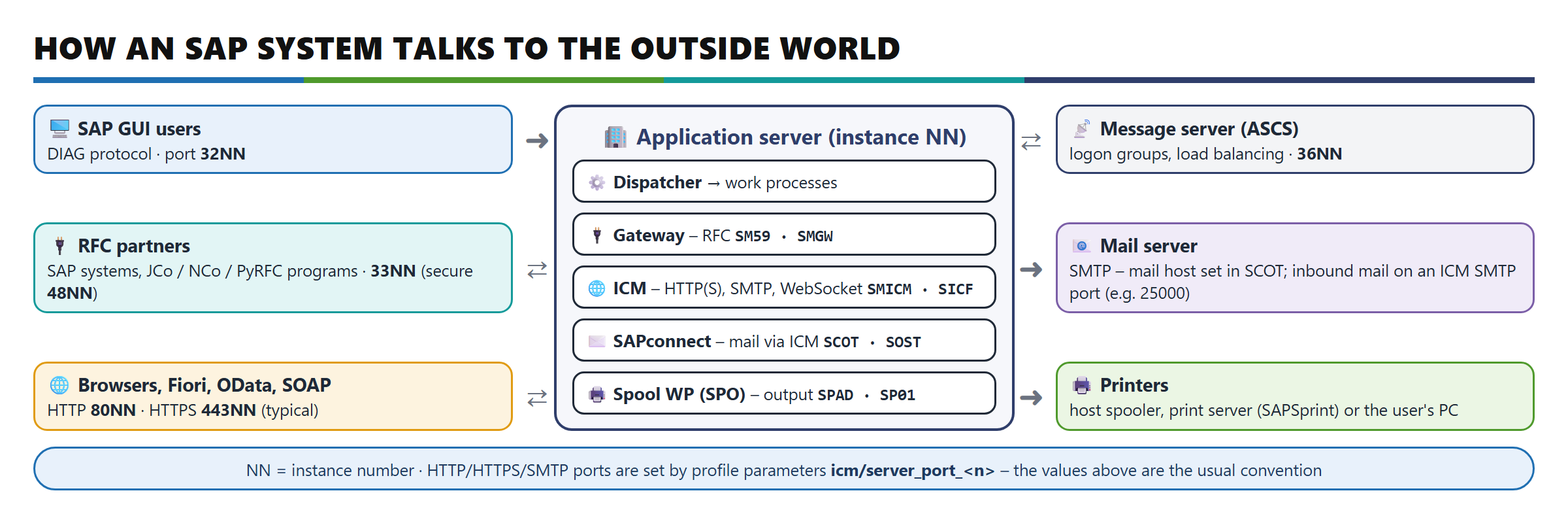
Channel | Component | Port (NN = instance number) | Admin t-codes |
|---|---|---|---|
SAP GUI | Dispatcher | 32NN | SM50, SM04 |
RFC | Gateway | 33NN, secure 48NN | SM59, SMGW, SM58, SMQ1/SMQ2 |
HTTP / HTTPS (Fiori, OData, SOAP) | ICM | Usually 80NN / 443NN – set in | SMICM, SICF, STRUST |
SAPconnect over the ICM SMTP plug-in | Mail server port in SCOT; inbound e.g. 25000 | SCOT, SOST | |
Printing | Spool work process | – | SPAD, SP01 |
Logon groups | Message server (ASCS) | 36NN | SMLG, SMMS |
Part 2 – RFC administration
RFC (Remote Function Call) is SAP's standard protocol for calling a function module in another system. How to write RFC calls in ABAP, with code for each type: CORE ABAP › 07 Interfaces (Part 2). This part is the Basis view: types, destinations, trust and monitoring.
2.1 The RFC types
Type | Caller waits? | Order | Delivery | Typical use | Monitor |
|---|---|---|---|---|---|
sRFC synchronous | Yes | – | Runs once, now; error if the target is down | Real-time reads, BAPI calls, SAP ↔ SAP and SAP ↔ non-SAP | SM59 test, SMGW |
aRFC asynchronous | No – result comes back in a callback | No | No guarantee | Parallel processing of large data volumes | SM50 / SM66 in the target; RZ12 server groups |
tRFC transactional | No | No | Exactly once; stored and retried if the target is down | IDocs (ALE), reliable postings | SM58 |
qRFC queued | No | Yes (named queue) | Exactly once, in order | Data replication where sequence matters (ALE serialization, BW, CRM) | SMQ1 out · SMQ2 in · SMQS / SMQR schedulers |
bgRFC background | No | Optional (queued units) | Exactly once | Recommended successor of tRFC and qRFC | SBGRFCMON; setup SBGRFCCONF |
- External programs (Java with JCo, .NET with NCo, C/C++ with the NW RFC SDK, Python with PyRFC) use the same RFC protocol – they are not a separate RFC type. They connect through the gateway, usually with an SM59 type T destination (registered server program).
- Which external programs may register at or be started by the gateway is controlled by the gateway ACL files reginfo and secinfo (SMGW → Goto → Expert functions).
2.2 RFC destinations in SM59
Type | Connection to | Notes |
|---|---|---|
3 | ABAP system | Target host + instance number (gateway 33NN) or load balancing via message server and logon group; client, user, password or trusted RFC |
T | TCP/IP – external program | Registered server program (program ID at the gateway) or a program started on a host |
H | HTTP to an ABAP system | Host, port, path prefix (e.g. |
G | HTTP to an external server | REST / SOAP calls; HTTPS needs the server certificate in STRUST |
L | Logical destination | Points to another destination, optionally with a different user |
I | Internal connection | Same system – created by SAP, not maintained |
W | WebSocket RFC to another ABAP system | RFC over HTTPS (port 443), e.g. to the SAP Business AI Platform, ABAP environment; newer releases only |
- Always run Connection Test and Utilities → Test → Authorization Test after creating a destination. Destinations are stored in table RFCDES.
- Use system (B) or communication (C) users in destinations, never dialog users, with only the authorizations needed (object S_RFC for the function groups called).
2.3 Trusted RFC
In a trusted relationship the called (trusting) system accepts the calling (trusted) system's logged-on user without a password – no passwords stored in destinations, single sign-on between systems.
- Set up in the trusting system with SMT1 (by RFC to the trusted system); then tick "Trust Relationship" in the SM59 destination of the calling system.
- The user must exist in both systems and needs authorization object S_RFCACL in the trusting system.
- Risk: whoever controls the trusted system can act in the trusting one – trust only from equally or more secure systems (e.g. PRD may trust PRD, never DEV).
2.4 Monitoring RFC
T-code | What to check |
|---|---|
SM58 | Failed tRFC calls (e.g. connection error, error in the target). Fix the cause, then execute the LUW again; report RSARFCEX resends in bulk |
SMQ1 / SMQ2 | Outbound / inbound qRFC queues. Status SYSFAIL blocks the queue: read the error, fix it, unlock and activate the queue |
SMQS / SMQR | Outbound / inbound queue schedulers – the destination or queue must be registered to be processed automatically |
SBGRFCMON | bgRFC units and their errors |
SMGW | Gateway monitor – active connections, registered programs, gateway log |
SM21 / ST22 | System log and short dumps caused by RFC calls |
Part 3 – ICM and SICF
The ICM (Internet Communication Manager) is a process of every application server that handles all web communication: HTTP, HTTPS, SMTP and WebSockets. It receives requests, answers from its cache where possible and passes the rest to the ABAP Internet Communication Framework (ICF) in a work process. Fiori, OData, SOAP web services and the SAP GUI for HTML all depend on it.
- SAP Web Dispatcher sits in front of the ICMs in larger landscapes: one entry URL, load balancing and an extra security layer for the Fiori and API traffic.
Tool | Use |
|---|---|
SMICM | ICM monitor: status, services (active ports), threads and connections, trace file |
SICF | Maintain and activate ICF services (e.g. |
STRUST | Certificates and PSEs – the SSL server PSE is needed for HTTPS |
RZ10 / RZ11 | ICM profile parameters (below) |
|
ICM troubleshooting
Issue | How to diagnose | Possible fix |
|---|---|---|
ICM does not start | SMICM status, trace file | Free the port or correct |
HTTP/HTTPS not responding | SMICM → Services (is the port active?), telnet / curl / browser to host:port | Open the port in the firewall; define the service in |
403 / 404 on an SAP URL | SICF – is the service active? Browser error page | Activate the ICF service (and its parent nodes) |
500 / 503 Service unavailable | SMICM log, SM50 (free dialog work processes?), ST22, SM21 | Add work processes or fix the dump; raise |
SSL certificate errors | Browser certificate details, SMICM trace (level 2) | Renew or import the certificate in STRUST, restart the ICM |
Slow or timed-out requests | SMICM connections and threads, ST03N (HTTP workload), ST06 | Raise threads or timeouts, reduce load, use the Web Dispatcher |
Fiori launchpad does not load | Browser developer tools (network tab), | Activate OData services ( |
- Launchpad configuration and security in depth: SAP Fiori › 02 Fiori Launchpad Configuration & Security.
Part 4 – SAPconnect (e-mail)
SAPconnect is SAP's interface for sending and receiving messages – e-mail over SMTP (the usual case), and fax, SMS or paging through external gateways. Programs hand a document to the Business Communication Services (BCS); SAPconnect delivers it.
- Flow: program (
CL_BCS) → send request → SAPconnect queue → send job (report RSCONN01) → ICM SMTP plug-in → company mail server → recipient. - Setup in SCOT: SMTP node with the mail host and port, address type INT (Internet mail), default domain, and the periodic send job (SCOT → Send jobs).
- Sending mail with attachments from ABAP: CORE ABAP › 11 Forms (Part 6 PDF and e-mail).
T-code / report | Purpose |
|---|---|
SCOT | SAPconnect administration – nodes, SMTP server, default domain, send jobs |
SOST | Overview of outgoing send requests – status, error message, resend |
SOIN | Overview of incoming send requests |
SBWP | SAP Business Workplace – the user's inbox and outbox |
RSCONN01 | Send job – processes the SAPconnect queue |
RSBCS_REORG | Reorganization – deletes old send requests and documents |
Part 5 – Spool and printing
When a program or form prints, the output becomes a spool request stored in the TemSe (temporary sequential objects). A spool work process (SPO) formats it for the printer's device type and creates an output request, which the output device's access method sends to the printer.
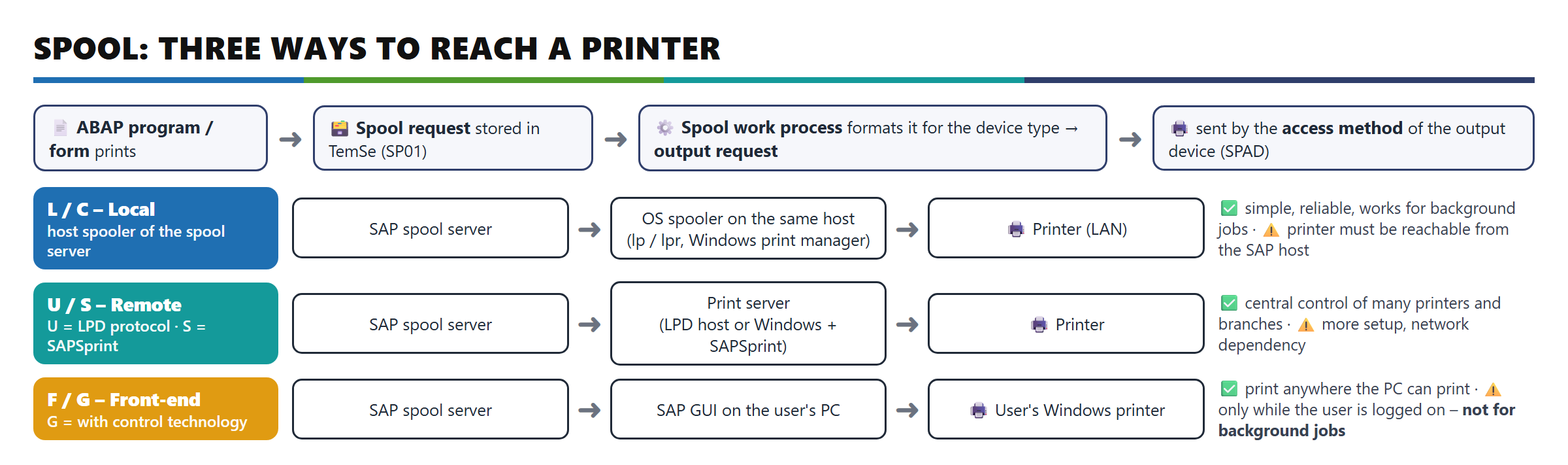
Access methods
Method | Name | How it prints |
|---|---|---|
L | Local | Host spooler on the same host as the spool server ( |
C | Direct OS call | Windows only – direct call to the Windows print API |
U | Remote – LPD | Berkeley LPD protocol to a remote print server |
S | Remote – SAP protocol | To SAPSprint on a Windows print server |
F | Front-end | Through SAP GUI to the user's PC printer |
G | Front-end with control technology | The current front-end method for SAP GUI for Windows / Java / HTML |
M | Sends the output as an e-mail | |
P | Device pool | Sends to a group of devices |
E | External output management | Hands the output to an external OMS |
Local, remote and front-end printing compared
Aspect | Local printing | Remote printing | Front-end printing |
|---|---|---|---|
Definition | From the SAP spool server to a printer it can reach directly | Through a print server that forwards the jobs | Through SAP GUI on the user's PC to their printer |
Access method | L (C on Windows) | U (LPD) or S (SAPSprint) | F or G |
OS print job created on | The SAP spool server host | The print server | The user's PC |
Use case | Printers close to the data centre | Central printing for offices and branches | Ad-hoc user printing, home office |
Advantages | Simple, reliable | Central control, scalability, load balancing | User can print wherever the PC can print |
Disadvantages | Printer must be reachable from the SAP host | More setup, network dependency | Depends on the PC and SAP GUI; little central control |
Background jobs | Yes | Yes | No – needs a logged-on SAP GUI |
Typical use | Batch output, formal documents | Organization-wide printing | Single, ad-hoc print jobs |
Spool administration
T-code / report | Purpose |
|---|---|
SPAD | Output devices (device type, access method, spool server), spool servers and logical servers (load balancing and failover) |
SP01 | Output controller – all spool and output requests; status, reprint, delete |
SP02 | Own spool requests |
SP12 | TemSe administration – consistency check, space |
RSPO1041 | Delete old spool requests (run as a periodic housekeeping job) |
RSTXPDFT4 | Convert a spool request to PDF |
- Common device types: SWINCF / SAPWIN for front-end printing via Windows, PDF1 for PDF output; LOCL is the usual name of the default front-end device.
- Spool request status in SP01: – (no output request yet), Waiting, Processing, Printing (in the host spooler), Complete, Error.
- Number of spool work processes: profile parameter
rdisp/wp_no_spo. Forms and output determination from the developer side: CORE ABAP › 11 Forms.
Part 6 – Background jobs
Background (batch) jobs run programs without a user session – long reports, interfaces, housekeeping. They run in BGD work processes (rdisp/wp_no_btc).
T-code | Use |
|---|---|
SM36 | Define a job: steps (ABAP program + variant, or external command) and start condition (immediately, date/time, after a job, after an event, periodic) |
SM37 | Job overview – status Scheduled, Released, Ready, Active, Finished, Canceled; job log and spool |
SM62 / SM64 | Define background events / trigger an event |
SJOBREPO | S/4HANA Technical Job Repository – SAP's housekeeping jobs are scheduled automatically (step user SAP_SYSTEM); deactivate a job here, not by deleting it in SM37 |
Application Jobs | Fiori app for business users to schedule jobs from job templates |
- In older systems the standard housekeeping jobs (SAP_REORG_JOBS, SAP_REORG_SPOOL, SAP_REORG_ABAPDUMPS, SAP_COLLECTOR_FOR_PERFMONITOR …) were scheduled with SM36 → Standard Jobs; S/4HANA replaces this with SJOBREPO.
- More job t-codes (SM69/SM49 external commands, JDBG): ABAP Points › T-Codes (Part 6).
Part 7 – Performance and monitoring t-codes
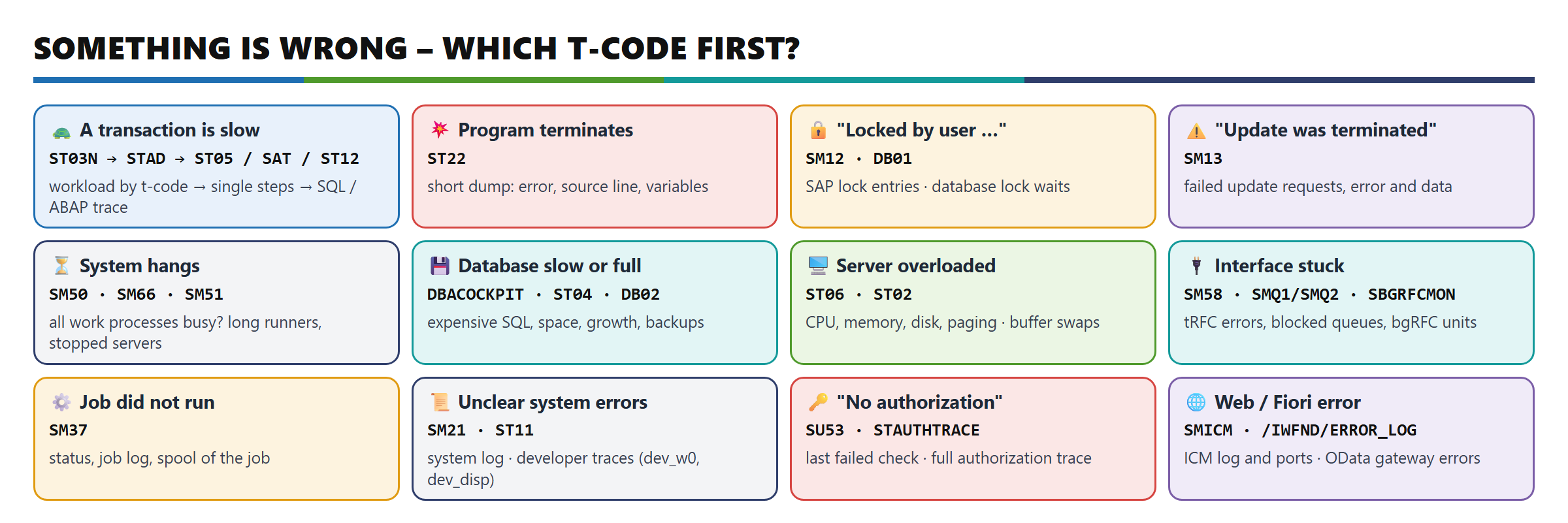
T-code | What it shows | Typical question |
|---|---|---|
ST01 | System trace – authorization, kernel, DB, RFC, lock calls | What happens inside? (for authorizations prefer STAUTHTRACE) |
ST02 | Buffer tune summary – hit ratio, swaps, free space; roll, extended and heap memory | Are buffers too small? |
ST03N | Workload monitor – response times per t-code, user, time of day (ST03 is the older name) | Where does the time go? |
STAD | Statistical records – one dialog step in detail | Why was this one step slow? |
ST04 / DBACOCKPIT | Database performance – expensive SQL, waits, cache; DBACOCKPIT is the central DB tool (also for SAP HANA) | Is the database the bottleneck? |
ST05 | Performance trace – SQL, buffer, enqueue, RFC, HTTP | Which SQL statements are slow? |
SAT / ST12 | ABAP runtime analysis (replaces SE30) / combined ABAP + SQL trace | Which ABAP code is slow? |
SQLM | SQL Monitor – SQL statistics over days in production | Which SQL costs most overall? |
ST06 | Operating system – CPU, memory, paging, disk, network | Is the server overloaded? |
ST07 | Application monitor – users per application area | Who uses which module? |
ST11 | Developer traces (dev_w0, dev_disp …) in the work directory | Low-level error details |
ST22 | ABAP runtime errors (short dumps) | Why did the program terminate? |
SM21 | System log | What errors did the system report? |
SM12 | SAP lock entries (enqueue table) | Who holds a lock? (delete only orphaned locks) |
SM13 | Update requests | Which updates failed? |
SM50 / SM66 | Work processes of this server / of all servers | What is running or hanging? |
DB01 | Exclusive lock waits in the database | Which DB locks block each other? |
DB02 | Database space, growth, table sizes | Is the database filling up? |
DB12 | Backup logs – last data and log backups | Did last night's backup run? |
DB13 | DBA Planning Calendar – schedule backups, statistics, checks | Are DB jobs planned? |
RZ20 | CCMS alert monitor | Which alerts are open? |
AL11 | Application server directories (read-only) | Where is that file / trace? |
- Developer-side performance analysis (SAT, ST05, SQLM, SCI/ATC checks): ABAP on HANA › 02 Migration to S/4HANA & Performance Tools.
Part 8 – Daily, weekly and monthly checks
Daily checks
Task | T-code | What to look for |
|---|---|---|
System and instances up | SM51, SMICM | All application servers active; ICM running |
Work processes | SM50 / SM66 | Long-running processes, stuck or hanging work processes |
Short dumps | ST22 | New or frequent dumps |
System log | SM21 | Errors and warnings |
Background jobs | SM37 | Canceled jobs, jobs running too long |
Update errors | SM13 | Failed or stuck update requests |
Old locks | SM12 | Lock entries older than a day |
Workload | ST03N | High response times (dialog steps > 1 s), peak hours, top users and programs |
Buffers and memory | ST02 | Buffer swaps, memory use, free space in table buffers |
Database and backups | DBACOCKPIT, DB12 / HANA cockpit | Expensive SQL, space, last data and log backups successful |
Interfaces | SM59, SM58, SMQ1 / SMQ2 | Critical destinations work; no tRFC errors or blocked queues |
Spool | SP01 | Spool backlog, devices down or slow |
File systems | ST06 / OS | Free space in /usr/sap, /sapmnt, /usr/sap/trans, log areas |
Weekly checks
Task | T-code | What to look for |
|---|---|---|
Long-term workload | ST03N → last week | Top transactions, trends, slow modules |
Database growth | DB02 / DBACOCKPIT | Tables growing fast; archiving candidates |
SQL analysis (targeted) | ST05 / SQLM | Slow t-codes and programs |
ABAP performance | SAT | Long-running reports |
Update monitoring | SM13 | Failed or stuck updates |
qRFC queues | SMQ1 / SMQ2 (schedulers SMQS / SMQR) | Queue bottlenecks or backlog |
Security and locks | SM12, SUIM, AL08 | Excessive locks, inactive users, long sessions |
Monthly or as needed
Task | T-code | What to analyse |
|---|---|---|
Housekeeping | SARA, SJOBREPO | Archive old business data; housekeeping jobs delete old logs, spool, dumps and IDocs |
Memory tuning | ST02, RZ10 (RZ11 to test) | Tune profile parameters |
Load distribution | SMLG | Balanced load across application servers |
Transaction profiling | STAD, ST03N | Slow or heavily used transactions |
EarlyWatch Alert review | SAP for Me, SAP Solution Manager or SAP Cloud ALM | Red and yellow findings, trends |
SAP security notes | SNOTE, System Recommendations | Notes from SAP Security Patch Day (second Tuesday of each month) |
User clean-up | SUIM, SU10 | Lock or delete users who have left or not logged on for months |
Part 9 – EarlyWatch Alert, SAP Solution Manager and SAP Cloud ALM
- EarlyWatch Alert (EWA) – an automatic report, usually weekly, on the health of a system: performance, workload, database growth, hardware, security, missing SAP Notes, with a red / yellow / green rating. Data is collected in the managed system by SDCCN (Service Data Control Center, add-ons ST-PI and ST-A/PI) and sent to SAP; read it in SAP for Me (EWA Workspace), SAP Solution Manager or SAP Cloud ALM.
- SAP Solution Manager 7.2 – SAP's on-premise application lifecycle tool: technical monitoring, change control (ChaRM), test suite, documentation. Mainstream maintenance ends on 31 December 2027; extended maintenance to 2030 covers only selected functions.
- SAP Cloud ALM – the cloud successor that SAP recommends: implementation (projects, tasks, tests, change and deployment) and operations (health, job and automation, integration and exception monitoring, real user monitoring).
Part 10 – Backup and recovery
Backups protect against hardware failure, logical errors (a wrong mass update) and disasters. Two numbers drive the design: RPO (how much data may be lost) and RTO (how long recovery may take).
Backup | Contains | Note |
|---|---|---|
Full data backup | The complete database | Basis of every recovery |
Incremental / differential | Changes since the last data backup of any type / since the last full backup | Shorter backups between full ones |
Log backups | Redo log segments | SAP HANA backs up logs automatically (by default every 15 minutes) – needed for point-in-time recovery |
Storage snapshot | Snapshot of the data volumes | Very fast; must be confirmed in the HANA backup catalog |
File system backup | /usr/sap, /sapmnt (profiles, kernel), /usr/sap/trans | The database backup does not include these |
SAP HANA
- Back up with the SAP HANA cockpit (schedules, backup catalog, recovery), SQL statements, or a third-party tool through the Backint interface. The system database and each tenant database are backed up separately.
- Keep
log_mode = normalin production – withoverwritethere are no log backups and no point-in-time recovery. - Recovery options: to the most recent state, to a point in time, or to a specific data backup. Needs a data backup plus all later log (and delta) backups.
- HANA System Replication keeps a second copy for high availability / disaster recovery – it does not replace backups (a logical error is replicated too).
|
- Classic tools DB13 (schedule) and DB12 (logs) still exist; for SAP HANA the cockpit is the main tool. Test restores regularly – an untested backup is not a backup.
Part 11 – Other admin t-codes
T-code | Purpose |
|---|---|
AL11 | Display application server directories and files (read-only) |
SM02 | System messages shown to all users (e.g. planned downtime) |
SM69 / SM49 | Define / execute external operating-system commands |
SWU3 | Automatic workflow customizing (RFC destination, background jobs, prefix numbers) – see CORE ABAP › 12 Workflow |
SFW5 | Switch Framework – activate business functions. Most activations cannot be undone: test in a sandbox first |
SE38 | Run reports such as RSSPACECHECK, RSPO1041, RSBCS_REORG |
Part 12 – Interview questions
Q1. Which RFC types exist and how do they differ?
sRFC waits for the result; aRFC continues and gets the result in a callback; tRFC delivers exactly once without a result (SM58); qRFC adds a queue for the order (SMQ1/SMQ2); bgRFC is the recommended successor of tRFC and qRFC (SBGRFCMON).
Q2. Which SM59 connection types do you know?
3 for ABAP systems, T for external TCP/IP programs, H for HTTP to ABAP, G for HTTP to external servers, L logical, I internal, and W for WebSocket RFC in newer releases.
Q3. What is a trusted RFC and what do you need for it?
The called system accepts the caller's user without a password. Set up the trust with SMT1 in the trusting system, tick trust in the SM59 destination, and give the user S_RFCACL in the trusting system; the user must exist in both.
Q4. tRFC calls are stuck. What do you do?
Open SM58, read the error (often the target is down, a user is locked or the FM failed), fix the cause and execute the LUWs again; RSARFCEX can resend in bulk. For qRFC, check SMQ1/SMQ2 for SYSFAIL queues.
Q5. What is the ICM and how do you configure it?
The Internet Communication Manager handles HTTP, HTTPS, SMTP and WebSockets for the application server. Ports are set with icm/server_port_<n>, monitored in SMICM; ICF services are activated in SICF and certificates managed in STRUST.
Q6. A Fiori URL returns 403. What do you check?
Whether the ICF service is active in SICF (and the OData service registered in /IWFND/MAINT_SERVICE), then the user's roles and SU53, and /IWFND/ERROR_LOG for gateway errors.
Q7. How is e-mail sent from SAP?
A program creates a send request with CL_BCS; SAPconnect (configured in SCOT with an SMTP node) sends it through the ICM to the mail server, triggered by the send job RSCONN01. SOST shows the status and allows resending.
Q8. Explain the spool access methods.
L local host spooler, C direct OS call on Windows, U remote via LPD, S remote via SAPSprint, F and G front-end printing through SAP GUI, M e-mail, P device pool, E external OMS. Front-end printing cannot be used by background jobs.
Q9. A transaction is slow. How do you analyse it?
ST03N for the response-time profile (DB, CPU, wait), STAD for the single step, then ST05 for SQL or SAT / ST12 for ABAP. Also check SM50 for busy work processes, ST02 for buffer swaps and ST06 for the server.
Q10. Name your daily checks.
Instances up (SM51), work processes (SM50/SM66), dumps (ST22), system log (SM21), canceled jobs (SM37), update errors (SM13), old locks (SM12), workload (ST03N), database and backups (DBACOCKPIT / DB12), interfaces (SM58, SMQ1/SMQ2), spool (SP01), file system space.
Q11. What is the EarlyWatch Alert?
An automatic, usually weekly report on system health with a red / yellow / green rating. SDCCN collects the data; the report is read in SAP for Me, SAP Solution Manager or SAP Cloud ALM.
Q12. How do you back up SAP HANA?
Full data backups plus incremental or differential ones, automatic log backups (default every 15 minutes), through the HANA cockpit, SQL or Backint tools. Log mode must be normal so that point-in-time recovery is possible; restores are tested regularly.
🏠 Start Here · ◀ 03 · Clients & Transports · 05 · Interview Questions ▶ · Sections: CORE ABAP | OOPS ABAP | ABAP on HANA | Clean Core | RAP | ABAP Points | SAP Fiori | SAPUI5 | Mobile Development (MDK) | BTP Foundations | BTP Development | CAP | SAP Build | ABAP on BTP | Integration Suite | SAP Business AI | SAP BASIS | Security | SAP SDLC
Functional: FICO ABAP | TRM ABAP | VIM | SAP BIS | SD ABAP | MM ABAP | PP ABAP | QM ABAP | PM ABAP | PS ABAP | EWM | TM ABAP | EHS ABAP | HR ABAP | BW | SAP MDG | SAP Analytics Cloud | SAP Ariba | SAP CX | SAP IBP