How one SAP system is split into clients, how clients are created, protected and copied, how users are administered, and how changes travel from DEV to QAS to PRD with the Transport Management System (STMS). The developer's view of clients and transport requests is in CORE ABAP › 01 SAP & ABAP Basics (Part 4); this page adds the Basis side.
Part 1 – Clients
A client is a self-contained business unit inside one SAP system. It separates data and settings so that different companies, subsidiaries or purposes (customizing, testing, training) can work independently in the same system.
- Identified by a three-digit number 000–999 (e.g. 000, 100, 800). The client list is table T000.
- Each client has its own master data, transaction data, most customizing and users – a user exists only in the client where it was created.
- All clients of a system share the same instance, database and repository (programs, classes, DDIC objects) and the cross-client customizing.
- Client-dependent tables have
MANDTas the first key field; ABAP SQL adds the logon client automatically. Client-dependent vs cross-client data: CORE ABAP › 01 (Part 4). - A new client needs a logical system (Part 4), an entry in SCC4 (Part 2) and data from a client copy (Part 3).
Standard clients
Client | Purpose | Today |
|---|---|---|
000 | SAP reference client: default settings and client-independent customizing; source for new clients | Delivered in every system. Used for admin tasks (TMS setup, SPAM/SAINT), never for business |
001 | Copy of 000 created by older installations (ECC / NetWeaver) | Not created by new S/4HANA installations; often deleted (SAP Note 1749142) |
066 | EarlyWatch client – SAP remote monitoring in the past | No longer used; deleted before an S/4HANA conversion (SAP Note 1749142) |
800 | IDES demo and training client (International Demonstration and Education System) | Only in IDES / training systems, not in customer systems |
100, 200, … | Customer clients | Numbers chosen by the project |
A typical client plan
System | Client | Role |
|---|---|---|
DEV | 100 | Golden customizing client – all customizing and development is done here |
DEV | 110 | Unit test – refreshed from 100, customizing arrives with SCC1 |
DEV | 120 | Sandbox – try things out, no transports |
QAS | 100 | Integration and user acceptance tests – imports only |
PRD | 100 | Production – imports only, no changes |
Part 2 – Client settings in SCC4 and creating a client
SCC4 maintains the client entries in T000 and controls what may be changed in each client. Creating an entry does not copy any data – the new client is empty until a client copy fills it.
SCC4 field | Options | Typical setting |
|---|---|---|
Client role | Production, Test, Customizing, Demo, Education/Training, SAP reference | DEV 100 Customizing · QAS Test · PRD Production |
Changes and transports for client-specific objects | Changes without automatic recording · Automatic recording of changes · No changes allowed · Changes without automatic recording, no transports allowed | DEV 100: automatic recording (every customizing change goes into a request) · QAS/PRD: no changes · sandbox: no transports |
Cross-client object changes | Repository and cross-client customizing allowed · no cross-client customizing · no repository changes · neither | DEV 100: allowed · all other clients: neither |
Protection: client copier and comparison tool | Level 0 no restriction · Level 1 no overwriting · Level 2 no overwriting, no external availability | PRD: level 1 or 2, so nobody overwrites it by mistake |
CATT and eCATT restrictions | Allowed / not allowed / only certain test cases | Not allowed in PRD |
Logical system, currency, city | Header data | Logical system from BD54 (Part 4) |
- SCC4 works per client. The system-wide counterpart is SE06 → System Change Option: global setting "modifiable / not modifiable" plus settings per software component and namespace. QAS and PRD are set to not modifiable.
Creating a new client – steps
- 1. BD54 – create the logical system, e.g.
S4DCLNT110. - 2. SCC4 → New entries – client number, name, city, logical system, currency, role and the settings above.
- 3. The new client has no users. Set profile parameter
login/no_automatic_user_sapstarto 0 for the time of the copy. - 4. Log on to the new client as
SAP*with password PASS.- SAP* is hard-coded in the kernel: when a client has no user master record for SAP* and the parameter is 0, the system accepts SAP* / PASS with full authorization. As soon as a SAP* record exists, its own password applies.
- 5. Start the local client copy (SCCLN, or SCCL in older releases) from client 000 or the golden client, profile e.g. SAP_CUST, in the background (Part 3).
- 6. After the copy: set the parameter back to 1, create the users, lock SAP* and remove its authorizations – keep the record, never delete it (otherwise the hard-coded logon is possible again).
Part 3 – Client copy
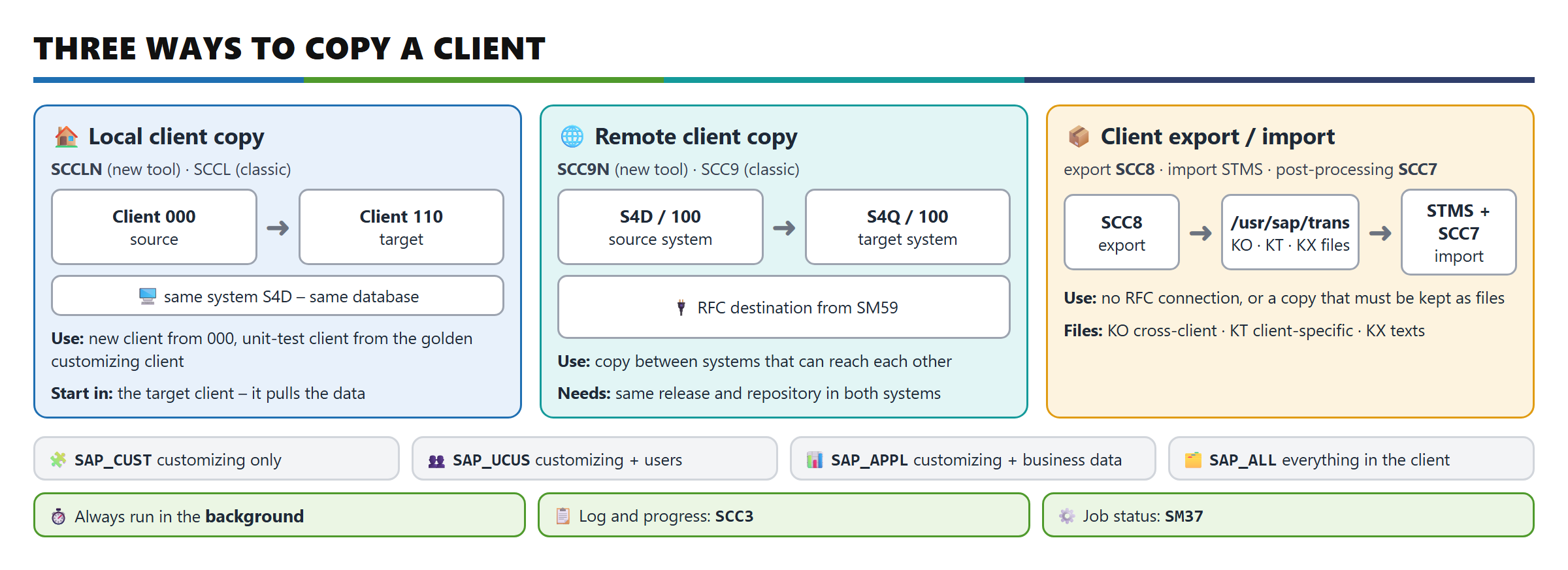
Type | T-code | How it works | Use it when |
|---|---|---|---|
Local client copy | SCCLN (new tool) · SCCL (classic) | Within one system. Started in the target client, which pulls the data from the source client | New client from 000; refresh a test client from the golden client |
Remote client copy | SCC9N (new tool) · SCC9 (classic) | Between two systems over an RFC destination (SM59). Started in the target system | Both systems can reach each other and have the same release and repository |
Client export / import | Export SCC8 · import with STMS · post-processing SCC7 | Writes transport files to | No RFC connection, or the copy is needed as files |
- The new client copy tool (SCCLN, SCC9N, and SCC5N for deletion) arrived with SAP_BASIS 7.54 (S/4HANA 1909). It is much faster than the classic tools and is the one to use in S/4HANA; SCC3 still shows the logs.
- Client export creates up to three requests in
/usr/sap/trans: KO (cross-client data), KT (client-specific data) and KX (client-specific texts). Import one of them into the new client with STMS – TMS adds the others in order – then run SCC7 for the post-processing. - System copy is a different tool: it copies the whole system (database, repository, all clients), e.g. to refresh QAS from PRD. Afterwards BDLS converts the logical system names.
Running a local client copy
- 1. Create the target client in SCC4 and log on to it (Part 2).
- 2. Start SCCLN (or SCCL): choose the profile, the source client and the source client for user masters.
- 3. Do a test run first (resource check) to see the space needed.
- 4. Run in the background – a copy can take hours; never in a dialog work process.
- 5. Monitor the job in SM37 and the progress and log in SCC3.
- Nobody should work in the source client during the copy, otherwise the copied data is inconsistent.
Copy profiles
Profile | What is copied | Typical use |
|---|---|---|
SAP_CUST | Client-specific customizing | New client from 000 or the golden client |
SAP_CUSV | Customizing + report variants | As SAP_CUST, keeping variants |
SAP_UCUS | Customizing + user master records | Test client with the same users |
SAP_UCSV | Customizing + variants + users | |
SAP_USER | User master records and authorization profiles / roles only | Copy only users |
SAP_APPL | Customizing + application data (master and transaction data), without users | Test client with business data |
SAP_ALL | All client-specific data, including users | Complete copy of a client |
SAP_APPX | Like SAP_ALL, but without authorization profiles and roles | Keep the target's authorizations |
How big is a client?
Report RSSPACECHECK (SE38) estimates the space a client needs per database area and shows the free space. The test run of the client copy gives the most reliable figure, especially on SAP HANA, where the report shows the uncompressed size. Table sizes per client: DB02 / DBACOCKPIT.
Other client tools
T-code | What it does |
|---|---|
SCC1 | Copy a customizing request into another client of the same system (DEV 100 → DEV 110) |
SCC3 | Logs and status of all client copies |
SCC5N / SCC5 | Delete a client (new / classic tool) |
SCU0 / SCMP | Compare customizing between clients / compare a table view across clients |
Part 4 – Logical systems
A logical system is the unique name of one client of one system. ALE, IDocs, workflow, BW extraction and change documents use it to know where data comes from or goes to. Naming convention: <SID>CLNT<client>, e.g. S4DCLNT100.
- Create it in BD54 or via SALE → Basic Settings → Logical Systems → Define Logical System (cross-client table TBDLS).
- Assign it to the client in SCC4 (field Logical system) or via SALE → Assign Logical System to Client. One logical system per client, unique across the landscape.
- Never change the logical system of a client that already has documents – they store the name. After a system copy, BDLS converts the old name to the new one in all tables.
- How interfaces use logical systems (distribution model, partner profiles): CORE ABAP › 07 Interfaces (Part 4).
Part 5 – User administration
Users are client-specific. Basis or a security team creates them and assigns roles; the authorization concept itself (roles, profiles, PFCG, user types A/B/C/S/L) is explained in Security › 01 Authorization Concept.
T-code | Use |
|---|---|
SU01 | Create, change, copy, lock/unlock a user; reset the password; assign roles, user group, validity, user type |
SU01D | Display a user only |
SU10 | Mass maintenance – change many users at once (add a role, lock, set validity) |
SU3 | Users maintain their own defaults (date format, printer, parameters) |
SUGR | User groups – used to control which admin may maintain which users |
PFCG | Role maintenance (Security › 01) |
SUIM | User information system – who has which role, transaction or authorization; inactive users |
SU53 | Last failed authorization check of a user |
SM04 / AL08 | Users logged on to this server / to all servers |
RSAU_CONFIG / RSAU_READ_LOG | Security audit log configuration and evaluation (older: SM19 / SM20) |
SCUA | Central User Administration – maintain users of several systems from one central system |
- Locks: an administrator lock (SU01) stays until removed; an incorrect-logon lock is set after too many wrong passwords (parameter
login/fails_to_user_lock). - Standard users (SAP*, DDIC, TMSADM, SAPCPIC, EARLYWATCH): change their initial passwords, lock what is not needed and keep
login/no_automatic_user_sapstar = 1. Default users created by the installation: page 02. - Background jobs, RFC and interface users are system (B) or communication (C) users, never dialog users.
- User data is stored in tables such as USR02 (logon data) and USR21 (user name ↔ address); read them only through SUIM or BAPIs (
BAPI_USER_GET_DETAIL).
Part 6 – Transport Management System: domain, group and setup
STMS manages, controls and monitors the movement of development objects (programs, DDIC changes) and customizing between the systems of a landscape, so that every system has the same, tested configuration and code.
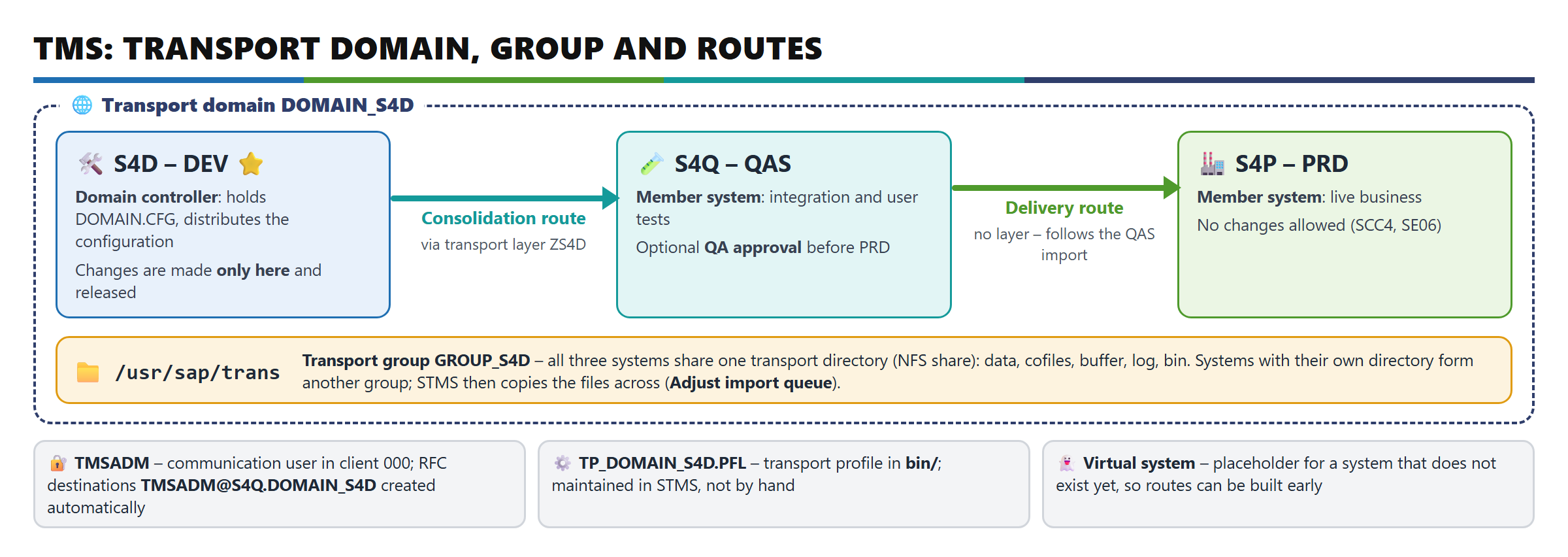
Component | Meaning |
|---|---|
Transport domain | All systems administered together in TMS. Name: |
Domain controller | The system that holds the master configuration (DOMAIN.CFG) and distributes it. All TMS changes are made here. Often DEV, or a highly available system (e.g. SAP Solution Manager or PRD) |
Backup domain controller | Takes over the controller role if the domain controller is unavailable |
Transport group | Systems that share one transport directory |
Member system | Every other system in the domain, managed from the domain controller |
Virtual system | Placeholder for a system that does not exist yet (e.g. PRD during the project), so routes and queues can be set up early |
Domain link | Connects two transport domains (e.g. after a merger) |
What TMS creates
- TMSADM – communication user (type system) in client 000 of every system, created automatically; TMS uses it for its RFC calls.
- RFC destinations TMSADM@<SID>.DOMAIN_<DC> between the systems.
- DOMAIN.CFG in
/usr/sap/trans/bin– the domain configuration. - Transport profile
TP_DOMAIN_<DC>.PFLin/usr/sap/trans/bin– parameters for tp (DB connection, directories, options). Maintain it in STMS → Overview → Systems → Transport Tool, not with an editor.
Configuration steps
- 1. Configure the domain controller: log on to the chosen system in client 000 (as an admin user), start STMS and define the domain. TMSADM, DOMAIN.CFG and the RFC destinations are created automatically.
- 2. Add the other systems: log on to each system (client 000), start STMS and request to join the domain – the system shows "waiting for inclusion". Approve it on the domain controller (STMS → Overview → Systems → Approve).
- 3. Define transport routes in the graphical or hierarchical editor (Part 8); save, distribute and activate the configuration from the domain controller.
- 4. Import requests through the import queues and check the logs (Part 8).
Part 7 – Transport directory, tp and R3trans
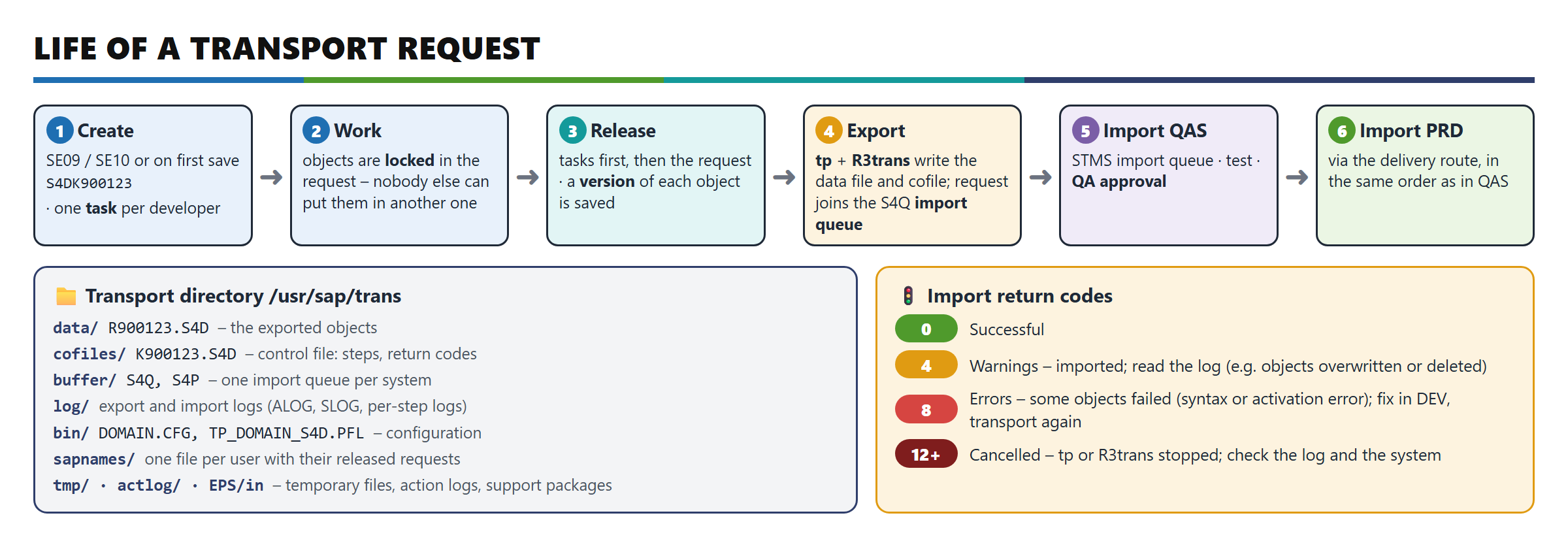
A request number has the form <SID>K9nnnnn. Request S4DK900123 produces the data file R900123.S4D and the cofile K900123.S4D.
Subdirectory | Contents |
|---|---|
data/ | Data files – the exported objects and table entries (R9nnnnn.SID) |
cofiles/ | Control files – which steps ran, for which systems, with which return code (K9nnnnn.SID) |
buffer/ | One import buffer per system (file named after the SID) – this is the import queue |
log/ | Export, import and step logs; ALOG and SLOG summary logs |
bin/ | DOMAIN.CFG and the transport profile TP_DOMAIN_<DC>.PFL |
sapnames/ | One file per user listing the requests they released |
tmp/ | Temporary files while a transport runs |
actlog/ | Action logs per request (who released, who imported) |
EPS/in | Inbox for unpacked support / add-on packages (SPAM / SAINT) |
olddata/ | Old files moved there by the transport directory cleanup |
tp and R3trans
Program | Role |
|---|---|
tp | Transport control program. Reads the transport profile, manages the import buffers and the order of requests, runs the steps (export, import, activation, generation, XPRA) and writes the logs. STMS calls tp for you. |
R3trans | Low-level program called by tp that actually reads objects from the database into a data file (export) and writes them into the target database (import). |
|
Return codes
RC | Meaning | Action |
|---|---|---|
0 | Successful | – |
4 | Warning – imported, e.g. objects overwritten or deleted | Read the log, usually fine |
8 | Error – some objects not imported or not activated (syntax error, missing object) | Fix in DEV, release a new request |
12 and higher | Cancelled – tp or R3trans terminated | Check the log, file system and database |
Part 8 – Transport routes, import queue and QA approval
Transport layers and routes
- Transport layer – assigned to every package (SE21/SE80). Customer objects use the layer
Z<SID>(e.g. ZS4D), SAP objects the layerSAP. The layer decides where a released request goes. - Consolidation route – from the development system to the consolidation (quality) system for a transport layer: DEV → QAS.
- Delivery route – from QAS onwards to PRD (and other targets). No layer: after the import into QAS the request is added to the PRD queue automatically.
- Standard configurations offered by STMS: single system, development + production, three-system group. Use the graphical editor (STMS → Overview → Transport Routes), then distribute and activate.
- Objects in package $TMP have no transport layer – they are local and never transported.
Import queue and options
STMS → Import Overview (or STMS_IMPORT in the target) shows the queue of each system in release order.
- Import all – imports the whole queue in the correct order. The safe standard, e.g. for PRD in an agreed import window.
- Import single requests – needed for urgent fixes. With "Leave transport request in queue for later import" the request is imported again with the rest of the queue, so the final order stays correct.
Option | What it does |
|---|---|
Target client | Client into which client-specific data is imported |
Start date | Immediately · at a start time · after an event · periodically |
Execution | Synchronous (dialog waits) or asynchronous (runs in the background – the default) |
Leave transport request in queue for later import | Preliminary import – the request stays in the queue |
Import transport request again | Re-import a request that was already imported |
Overwrite originals | Allow overwriting objects whose original system is the target system |
Overwrite objects in unconfirmed repairs | Overwrite objects that have open repairs in the target |
Ignore unpermitted transport type | Import although the target does not allow this request type |
Ignore invalid component version | Import although the software component versions differ |
- Forced options and single imports can overwrite newer versions with older ones (an older request imported after a newer one). Use them only with care, never routinely in PRD.
QA approval procedure
- Activated for the QA system in the TMS system settings. Approval steps can be defined: by the request owner, by the department, by the system administrator.
- After the import into QAS and testing, requests are approved or rejected in the QA worklist (STMS → QA Worklist, transaction STMS_QA). Only approved requests can be imported into PRD; rejected ones are not delivered.
- Larger projects put change control on top – ChaRM in SAP Solution Manager or change and deployment management in SAP Cloud ALM (page 04 Part 9).
Part 9 – Transport requests
A transport request collects changed objects; each user working on it gets a task. Release all tasks first, then the request – the release exports the objects and creates a version of each.
Type | Contains | Created / tool |
|---|---|---|
Workbench request | Repository objects (programs, classes, DDIC) and cross-client customizing | When an object in a transportable package is saved · SE09 |
Customizing request | Client-specific customizing | Automatically when SCC4 has automatic recording · SE10 |
Transport of copies | A copy of objects to any target system, without a route; ownership and locks stay with the original request | Manually · SE01 – e.g. to test in QAS before the real request is released |
Relocation | Moves objects to another system as their new original system | SE01 – rare, Basis task |
Transport Organizer t-codes
T-code | Use |
|---|---|
SE09 | Transport Organizer – own workbench requests and tasks; release |
SE10 | The same tool, opening with customizing requests |
SE01 | Transport Organizer extended view – all request types, transport of copies, transport logs |
SE03 | Transport Organizer tools – search objects in requests, change package, unlock objects |
SE06 | Transport Organizer setup and System Change Option |
STMS_IMPORT / STMS_QA | Import queue of the current system / QA worklist |
- Never repair directly in QAS or PRD. Fix in DEV and transport again – that keeps every system identical. Full developer t-code list: ABAP Points › T-Codes (Part 5).
Part 10 – Beyond ABAP transports: CTS+, gCTS and Cloud Transport Management
- CTS+ (enhanced Change and Transport System) – uses the ABAP TMS (often on SAP Solution Manager) to transport non-ABAP content (Java, SAP Process Orchestration, Enterprise Portal, BTP MTA files) through the same queues.
- gCTS (git-enabled CTS) – stores ABAP objects in Git repositories; available in newer S/4HANA releases for teams that want Git-based workflows.
- SAP Cloud Transport Management – SAP BTP service that moves BTP content (MTA archives, Integration Suite content) between subaccounts; can be combined with CTS+ for hybrid landscapes. MTAs and Cloud Transport Management: BTP Development › 01 Developing on BTP (Parts 5 and 8).
- S/4HANA Cloud Public Edition has no STMS for customers: changes move with Fiori apps for software collections and customizing transports.
Part 11 – T-code summary
T-code | Purpose |
|---|---|
SCC4 | Client administration – create clients, client role and change settings |
SCCLN / SCCL | Local client copy (new / classic) |
SCC9N / SCC9 | Remote client copy over RFC (new / classic) |
SCC8 / SCC7 | Client export / client import post-processing |
SCC1 | Copy a customizing request between clients of the same system |
SCC3 | Client copy logs |
SCC5N / SCC5 | Delete a client (new / classic) |
BD54 / SALE | Define logical systems / ALE customizing |
BDLS | Convert logical system names after a system copy |
SU01 / SU10 | User maintenance / mass user maintenance |
SUIM | User information system |
STMS | Transport Management System – domain, routes, import queues, QA approval |
SE01 / SE09 / SE10 | Transport Organizer |
SE06 | System Change Option |
SM37 | Job overview – client copy and import jobs |
Part 12 – Interview questions
Q1. What is a client, and what do clients share?
A client is a self-contained business unit in one SAP system with its own master data, transaction data, client-specific customizing and users. All clients share the instance, the database, the repository (programs, DDIC) and cross-client customizing.
Q2. Which standard clients do you know?
000 is SAP's reference client and the source for new clients. 001 is an old copy of 000 and is not needed in S/4HANA. 066 was the EarlyWatch client and is no longer used. 800 is the IDES demo client.
Q3. How do you create a new client?
Create a logical system in BD54, create the client entry in SCC4, log on to the empty client with SAP* / PASS (parameter login/no_automatic_user_sapstar = 0), run a local client copy (SCCLN) with a profile such as SAP_CUST in the background, check SCC3, then set the parameter back to 1 and secure SAP*.
Q4. Which client copy types exist?
Local client copy within one system (SCCLN / SCCL), remote client copy between systems over RFC (SCC9N / SCC9), and client export / import (SCC8 to export, import with STMS, SCC7 for post-processing).
Q5. What is the difference between SAP_CUST, SAP_UCUS and SAP_ALL?
SAP_CUST copies only client-specific customizing; SAP_UCUS customizing plus user masters; SAP_ALL everything in the client, including master and transaction data and users.
Q6. What does "automatic recording of changes" in SCC4 mean?
Every customizing change in that client must be saved in a customizing request, so it can be transported. It is set in the DEV customizing client; QAS and PRD clients allow no changes at all.
Q7. What is a transport domain controller?
The system that holds the TMS master configuration (DOMAIN.CFG) and distributes it to all systems of the domain. Systems join the domain and are approved there, and routes are defined there.
Q8. Consolidation route vs delivery route?
A consolidation route goes from DEV to QAS for a transport layer – released requests land in the QAS queue. A delivery route goes from QAS to PRD – requests imported into QAS are added to the PRD queue automatically.
Q9. What is in /usr/sap/trans?
data (exported objects), cofiles (control files), buffer (import queues), log, bin (DOMAIN.CFG and the transport profile), sapnames, tmp, actlog and EPS/in for support packages.
Q10. What is the difference between tp and R3trans?
tp controls the transport: buffers, order, steps and logs. R3trans does the actual export from and import into the database. STMS calls tp, and tp calls R3trans.
Q11. A transport ends with return code 8. What do you do?
Open the import log in STMS to see which objects failed (often a syntax or activation error or a missing dependent object). Fix it in DEV, release a new request and import it. Never repair in QAS or PRD.
Q12. What is a transport of copies?
A request created in SE01 that copies objects to a chosen target without a route and without releasing the original request's locks. It is used to test changes in QAS before the real request is released.
🏠 Start Here · ◀ 02 · Installation & Kernel · 04 · Communication & Monitoring ▶ · Sections: CORE ABAP | OOPS ABAP | ABAP on HANA | Clean Core | RAP | ABAP Points | SAP Fiori | SAPUI5 | Mobile Development (MDK) | BTP Foundations | BTP Development | CAP | SAP Build | ABAP on BTP | Integration Suite | SAP Business AI | SAP BASIS | Security | SAP SDLC
Functional: FICO ABAP | TRM ABAP | VIM | SAP BIS | SD ABAP | MM ABAP | PP ABAP | QM ABAP | PM ABAP | PS ABAP | EWM | TM ABAP | GTM ABAP | EHS ABAP | HR ABAP | BW | SAP Datasphere | SAP Business Data Cloud | SAP MDG | SAP Analytics Cloud | SAP Ariba | SAP CX | SAP IBP