SAP Business Integrity Screening for SAP S/4HANA (BIS) is a solution for detecting, investigating and analysing irregularities in data and for preventing fraud in ultra-high volume environments. It runs as an add-on on SAP S/4HANA, so it shares the S/4HANA database schema and lets SAP HANA scan millions of invoices, payments, claims or business partners. This page covers what BIS is used for, where it sits in SAP's assurance and compliance portfolio, its architecture, the deployment options and the roles. Detection is on page 02, investigation and reporting on page 03, development on page 04, the architect view on page 05.
Part 1 – What BIS is and what it is used for
BIS answers one question for very large data volumes: which of these business objects look irregular, and how risky are they? Rules or predictive models score each object, objects above a threshold become alerts, and investigators work through the alerts. It covers both detective controls (scan stored data in batch) and preventive controls (check one object online before the business process continues, e.g. before a payment leaves the company).
Fact | Value |
|---|---|
Full name | SAP Business Integrity Screening for SAP S/4HANA |
Application component | GRC-BIS (use it for SAP support incidents and SAP Notes searches) |
Delivery | Add-on on SAP S/4HANA (on-premise and SAP S/4HANA Cloud Private Edition); part of SAP Assurance and Compliance Software for SAP S/4HANA (Part 2) |
Engine | SAP HANA: detection logic runs as SQLScript (ABAP-managed database procedures), HANA fuzzy search for name and address matching, HANA machine learning for predictive methods |
Former name | SAP Fraud Management – renamed to SAP Business Integrity Screening as of release 1.2 SP08 (November 2017) |
1.1 Typical use cases
Area | Example scenario | Detection idea |
|---|---|---|
Fraud detection – procure-to-pay | Duplicate supplier invoices, supplier bank account changed shortly before a payment, supplier shares a bank account with an employee | Scripted rules on invoices, payments and supplier master data |
Payments (preventive) | Suspicious payments in the S/4HANA payment run (F110 / F111) or in SAP S/4HANA Finance for advanced payment management | Online detection blocks the payment before it reaches the bank (co-deployment only) |
Claims | Insurance or health-care claims: no witness, accident at night, young driver | Several weighted rules, or a predictive model trained on past decisions |
Tax and public sector | Tax declarations and benefit applications with unusual patterns | Rules and predictive models on very large volumes |
Compliance screening | Sanctioned-party screening of customers, suppliers, employees and of transactions such as payments and sales orders (OFAC, EU, PEP, adverse media lists) | Address screening methods with HANA fuzzy search (page 02 Part 6) |
Anomaly detection | Unknown patterns in master data or transactions | Predictive methods (supervised or unsupervised machine learning) |
- Industries named by SAP: public sector, banking, health care, utilities, high-tech – but the standard content (order-to-cash, procure-to-pay, record-to-report: suppliers, accounting documents, purchase orders, invoices, claims) fits any company running S/4HANA.
- Key capabilities: detection strategies over very large volumes, screening against lists, alert management, task-based remediation, integration into business processes (preventive), calibration and simulation to reduce false positives, deterministic rules plus predictive algorithms.
Part 2 – BIS in SAP Assurance and Compliance Software
BIS is one of four applications delivered together as SAP Assurance and Compliance Software for SAP S/4HANA (ACS). They are installed as one add-on on S/4HANA, share a common foundation and each brings its own SAP HANA application content (Part 4).
Product | Short | What it does |
|---|---|---|
SAP Business Integrity Screening | BIS | Fraud and irregularity detection with detection strategies, address screening, alerts, investigation and remediation tasks |
SAP Business Partner Screening | BPS | Screening of business partners and transactions against sanctions, PEP and other lists; uses the same address screening and alert management (alerts carry the solution BIS or BPS) |
SAP Audit Management | AUD | Plans, executes and reports internal audits; integrates with SAP Risk Management, SAP Process Control and BIS |
SAP Tax Compliance | TC | Screens tax-relevant transactions for compliance issues and drives their remediation |
- Not part of ACS: SAP Access Control, SAP Process Control and SAP Risk Management. They are the classic SAP GRC 12.0 solutions, a separate product installed on SAP NetWeaver or SAP S/4HANA. BIS complements them – e.g. a confirmed BIS alert creates an issue in SAP Process Control. SAP brings GRC and ACS solutions together in SAP GRC for SAP HANA 1.0 (solutions named “SAP GRC … for SAP HANA”) (GRC context and roadmap: page 05 Parts 2–3).
- BIS and BPS overlap on address screening: a company that only needs sanctioned-party screening uses BPS; a company that also needs rule-based or predictive fraud detection uses BIS.
Part 3 – The BIS process at a glance
The BIS process has three phases: Detection (detection methods, detection strategies, alerts) → Investigation (tasks, task lists, templates, worklists) → Reporting. SAP's course splits detection into design, set-up and detect, which gives five steps:
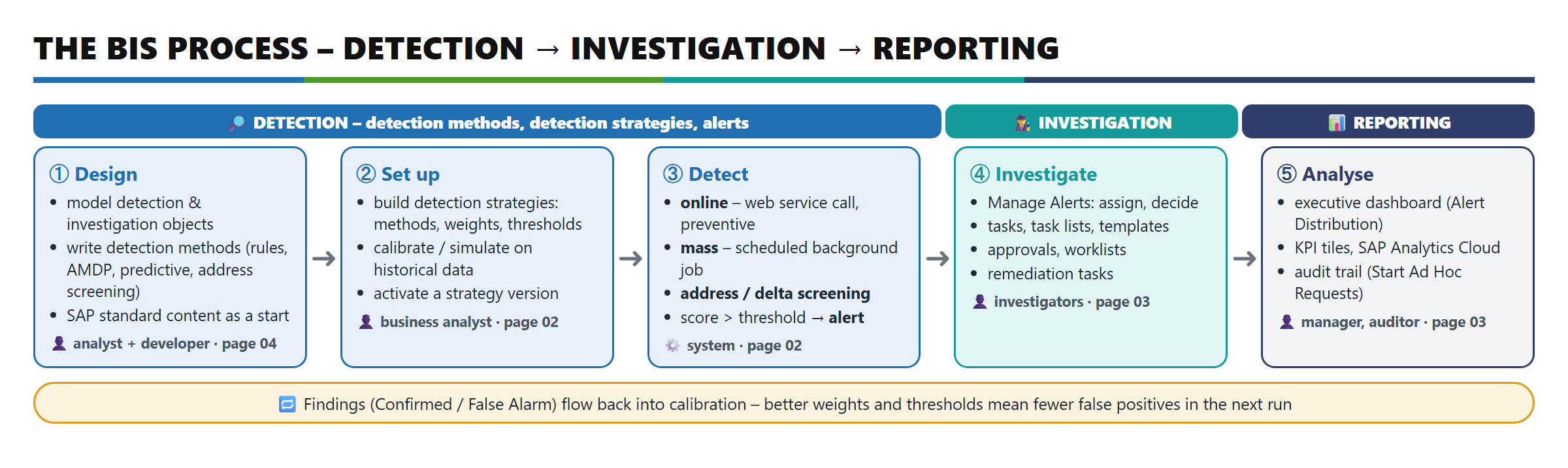
Phase | Key objects | Taught on |
|---|---|---|
Detection | Detection object types, detection methods, detection strategies, online / mass / address / delta address screening, risk score, alerts | page 02 |
Investigation | Alerts and statuses, decisions and approvals, tasks, task lists, templates, worklists, network analysis | page 03 |
Reporting | Executive dashboard, KPI apps, external tools, audit trail | page 03 Part 8 |
Part 4 – Architecture: an add-on that shares the S/4HANA database
BIS is deployed as an add-on on SAP S/4HANA and therefore shares the database schema with SAP S/4HANA. Detection methods can read invoices, payments or business partners directly in the HANA database – no extraction, no copy. The heavy work (scanning millions of rows) is pushed down to SAP HANA, the ABAP layer orchestrates runs, stores alerts and serves the apps.
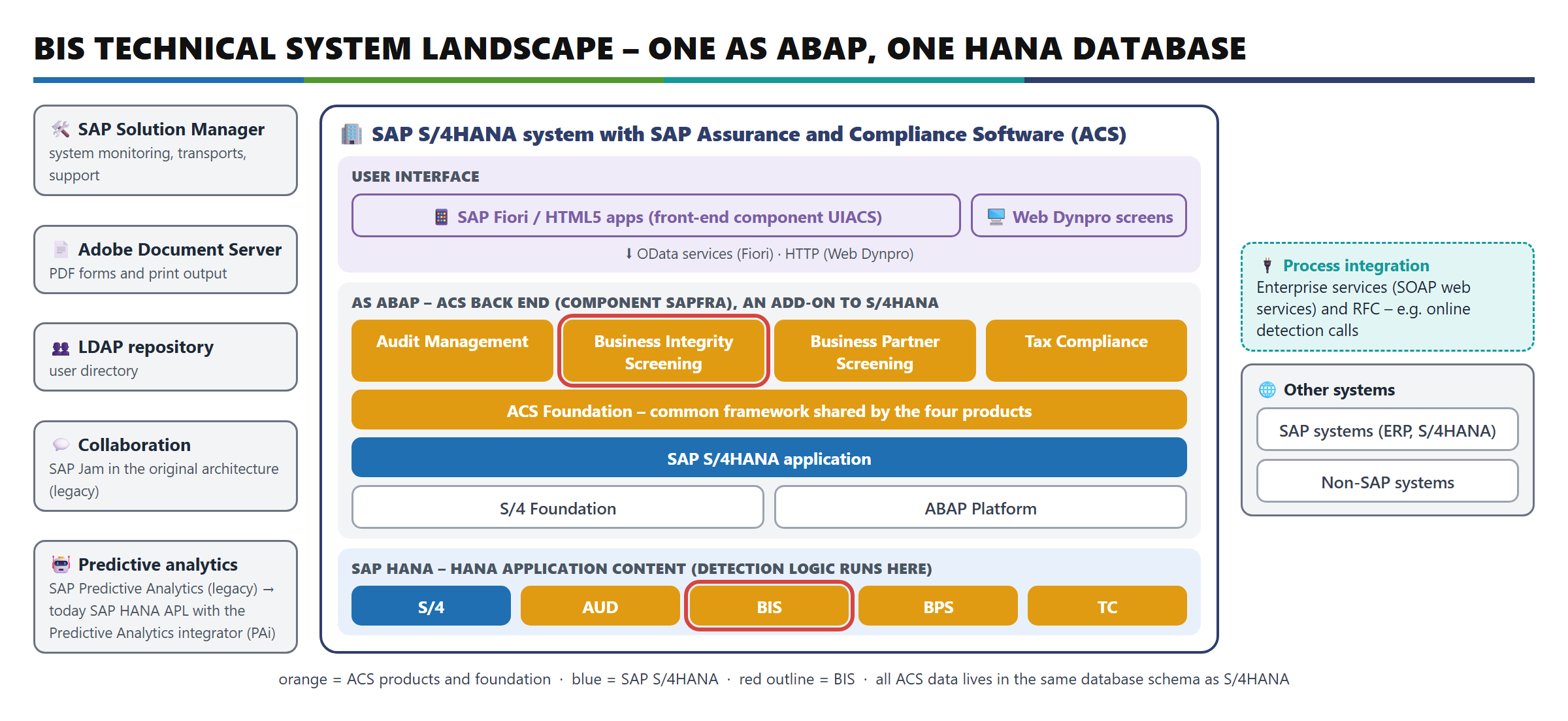
4.1 Layers
Layer | Content | Developer view |
|---|---|---|
User interface | SAP Fiori / HTML5 apps (front-end component UIACS) through OData; some screens in Web Dynpro | Extend apps with controller hooks, new tiles (page 04) |
AS ABAP | ACS back end (component SAPFRA) on the ACS foundation, on top of the S/4HANA application, S/4 foundation and ABAP platform | Alerts, strategies, runs, BAdIs; AMDP classes live here |
SAP HANA | HANA application content per product (S/4, AUD, BIS, BPS, TC); S/4HANA business data in the same schema | SQLScript of AMDP and CDS table functions runs here (ABAP on HANA › 06 AMDP & SQLScript) |
4.2 Connected systems
System | Purpose |
|---|---|
SAP Solution Manager | System monitoring, change and transport management, support |
Adobe Document Server | PDF forms and print output |
LDAP repository | Central user directory |
Collaboration | SAP Jam in the original architecture (legacy – SAP Jam is being retired; SAP Build Work Zone is the closest alternative) |
Predictive analytics | SAP Predictive Analytics in the original architecture (legacy); today the SAP HANA Automated Predictive Library (APL) with SAP Predictive Analytics integrator (PAi) – page 02 Part 3 |
Other SAP and non-SAP systems | Process integration through enterprise services (SOAP web services) and RFC – e.g. an external application calls online detection |
Part 5 – Deployment: co-deployment or product hub
SAP offers two architectures with feature parity; the difference is where the business data comes from and who shares upgrades and downtimes.
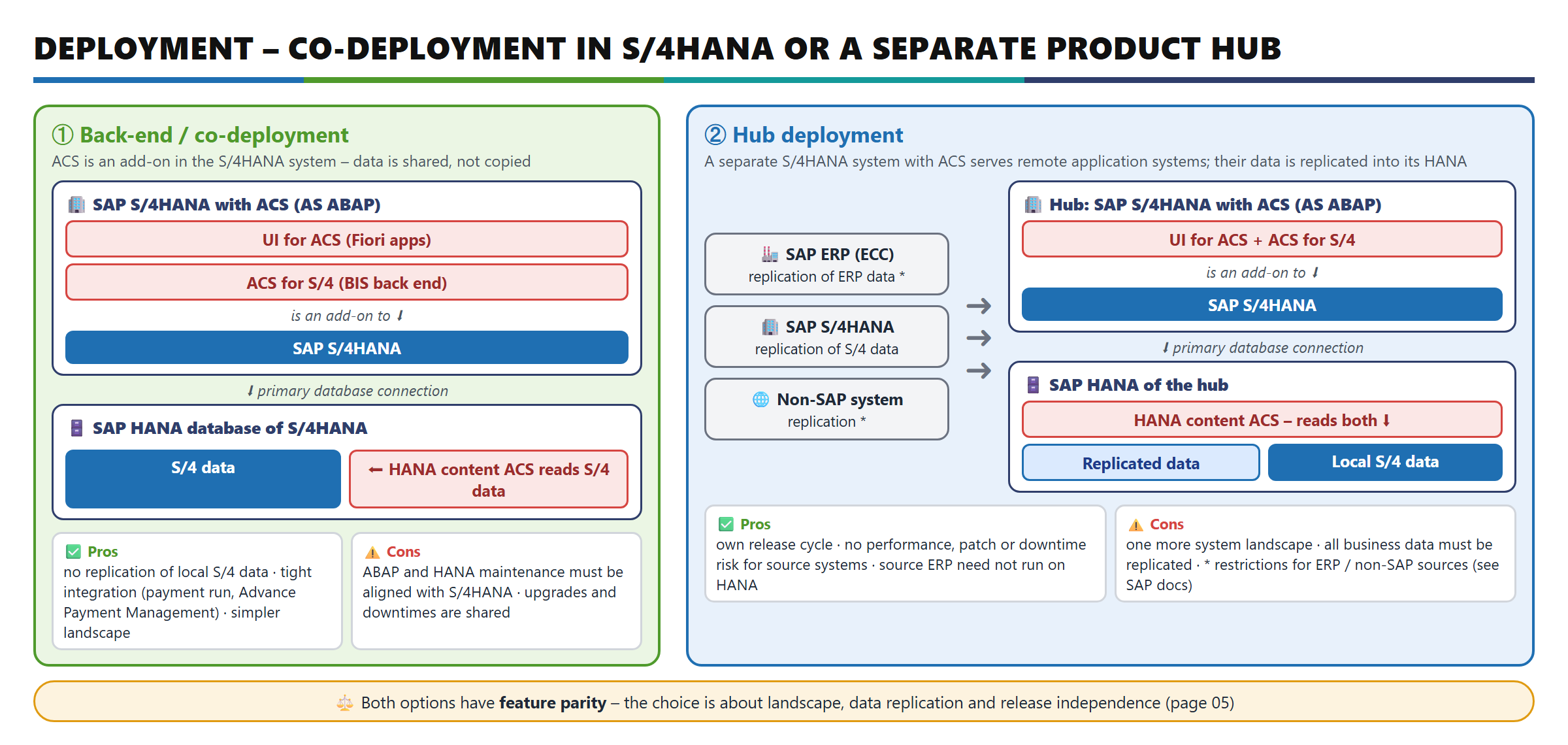
Back-end / co-deployment | Hub system deployment | |
|---|---|---|
Idea | Data is shared between SAP Assurance and Compliance Software and SAP S/4HANA on premise – ACS runs inside the productive S/4HANA | ACS is deployed as a product hub that serves remote application systems |
Business data | Read directly from the S/4HANA schema; other ERP or non-SAP data can be replicated in addition | All business data must be replicated into the hub's HANA database (restrictions apply to ERP and non-SAP sources) |
Integration | Tight: S/4HANA payment run, SAP S/4HANA Finance for advanced payment management, online checks in the process | Through web services and replicated data |
Pros | No replication of local S/4 data, simpler landscape | Own release cycle; no performance, patch or downtime risk for source systems; source ERP need not run on HANA |
Cons | ABAP and HANA maintenance must be aligned with S/4HANA | One more system landscape; replication effort |
Licence note | Replicating from a third-party source database needs a full-use database licence (a runtime licence is not enough) | Same |
Architect rule of thumb: co-deploy when the screened data is mainly in one S/4HANA system and preventive checks in its processes matter; choose a hub when many heterogeneous sources feed BIS or BIS must be upgraded independently. Design discussion: page 05.
Part 6 – SAP Fiori front-end deployment options
ACS has two technical parts: the front end UIACS (Fiori apps) and the back end SAPFRA. Where UIACS is installed follows the general S/4HANA front-end server choice.
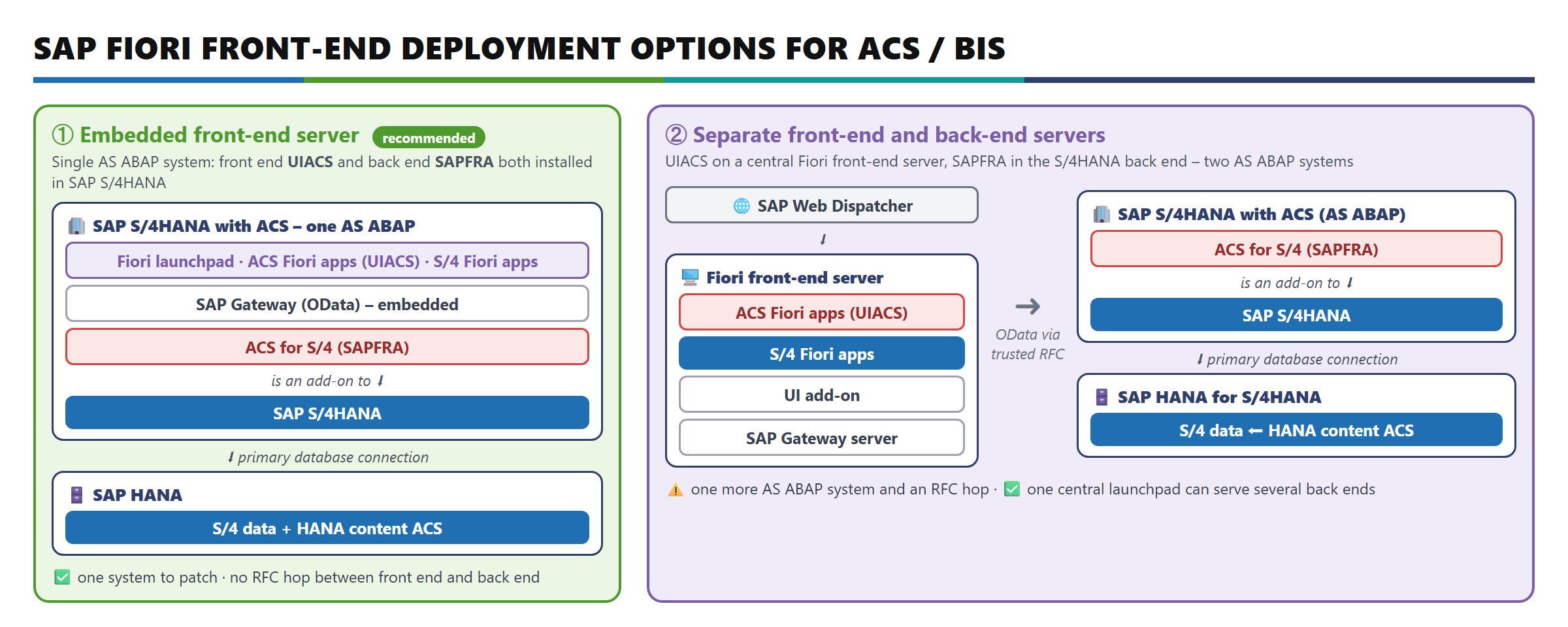
Option | Set-up | When |
|---|---|---|
Single system deployment with embedded front-end server (recommended) | Both the front-end (UIACS) and back-end (SAPFRA) components of SAP Assurance and Compliance Software for SAP S/4HANA are installed in SAP S/4HANA on a single AS ABAP system | Default for new S/4HANA landscapes – one system to patch, no RFC hop |
Deployment on separate front-end and back-end servers | UIACS and SAPFRA are installed on separate AS ABAP systems: a central Fiori front-end server (Gateway, UI add-on, S/4 and ACS Fiori apps, usually behind the SAP Web Dispatcher) calls the S/4HANA back end | An existing central front-end server (hub) already serves several back ends |
Part 7 – Roles, authorizations and the main apps
Role | Responsibility | Main apps / tools |
|---|---|---|
Business analyst / detection expert | Designs detection methods and strategies, sets weights and thresholds, calibrates, activates versions | Manage Detection Methods, detection strategy and calibration screens, Detection Runs |
Developer | Models detection and investigation objects, writes AMDP detection methods, BAdIs, UI extensions | ADT (Eclipse), Customizing – page 04 |
Manager | Creates and assigns task list templates, maintains user groups, monitors KPIs | Manage Task List Templates, Assign Task List Template, Manage User Groups apps, KPI tiles for alerts |
Chief risk officer | Watches the overall alert situation and the effectiveness of the team | Executive Dashboard (Alert Distribution app), KPI tiles for alerts |
Dispatcher / investigator | Assigns alerts, investigates, documents, decides | Manage Alerts, Open Screening Alerts |
Hit reviewer (often a shared service centre) | First review of address screening hits (Hit = Yes / No) | Process Address Screening Hits |
Approver | Approves or rejects alert decisions | My Approvals |
Task processor | Performs investigation or remediation tasks | My Inbox |
Auditor / compliance officer | Checks due diligence and screening history | Start Ad Hoc Requests (audit trail) |
- Technically each role is a PFCG role pair: a front-end business role for the launchpad catalogs (e.g.
SAP_BR_ACS_INVESTIGATOR) plus back-end roles for data access (e.g.SAP_FRA_FRAUD_INVESTIGATOR,SAP_FRA_FRAUD_DISPATCHER,SAP_FRA_FRAUD_MANAGER,SAP_FRA_CHIEF_RISK_OFFICER– the last one unlocks Alert Distribution). Copy them to Z roles; the full list per release is in the BIS security guide. - Alert access is controlled by authorization object FRA_ALERT with access groups; a detection strategy can carry an optional authorization group, so a user needs authorization for both the strategy and the group.
- Only users with an investigator role defined in Customizing can be assigned as alert processors (page 03 Part 3).
Part 8 – Interview questions
Q1. What is SAP Business Integrity Screening?
An add-on on SAP S/4HANA for detecting, investigating and analysing irregularities and preventing fraud in ultra-high volume environments. Detection strategies score business objects with weighted detection methods; objects above a threshold become alerts that investigators process. Component GRC-BIS; formerly SAP Fraud Management.
Q2. Why does it matter that BIS shares the database schema with S/4HANA?
Detection methods read invoices, payments and business partners directly in HANA without extraction or replication, the scan runs as SQLScript next to the data, and online checks can be built into S/4HANA processes such as the payment run.
Q3. Which products belong to SAP Assurance and Compliance Software for S/4HANA?
SAP Business Integrity Screening, SAP Business Partner Screening, SAP Audit Management and SAP Tax Compliance. SAP Access Control, Process Control and Risk Management are the separate SAP GRC 12.0 product (on SAP NetWeaver or S/4HANA) and not part of ACS; SAP GRC for SAP HANA 1.0 brings them together on SAP HANA.
Q4. Give three typical BIS use cases.
Duplicate or fake supplier invoices and suspicious bank account changes (procure-to-pay); blocking suspicious payments in the payment run; sanctioned-party screening of business partners against OFAC, EU or PEP lists; claims fraud in insurance or health care.
Q5. Describe the BIS process.
Detection (detection methods, strategies, alerts) → investigation (alerts with tasks, task lists, templates, worklists, approvals) → reporting (executive dashboard, KPI apps, external tools, audit trail). Findings feed back into calibration.
Q6. What are UIACS and SAPFRA?
The two technical components of ACS: UIACS is the front end (Fiori apps), SAPFRA the back end. With the recommended embedded deployment both are installed in the S/4HANA AS ABAP; otherwise UIACS sits on a separate Fiori front-end server.
Q7. Compare co-deployment and hub deployment.
Co-deployment: ACS runs in the productive S/4HANA and reads its data directly – simple landscape, tight preventive integration, but upgrades are coupled. Hub: a separate S/4HANA with ACS serves remote systems whose data is replicated – independent releases and no load on sources, but one more landscape and replication effort. Both have feature parity.
Q8. Which front-end deployment does SAP recommend and why?
Single system deployment with an embedded front-end server: front end and back end in one AS ABAP – one system to maintain, no RFC between front end and back end, matching the general S/4HANA recommendation.
Q9. Which systems does a BIS landscape connect to?
SAP Solution Manager, Adobe Document Server for PDF output, an LDAP directory, predictive analytics (today HANA APL with PAi), and other SAP and non-SAP systems through enterprise services and RFC – for example external applications calling online detection.
Q10. Which roles work with BIS?
Business analysts design strategies and calibrate them, managers maintain templates and user groups, the chief risk officer uses the Executive Dashboard, dispatchers and investigators process alerts, hit reviewers check address screening hits, approvers use My Approvals, task processors My Inbox, auditors the audit trail. Technically front-end business roles plus back-end FRA roles, alert access via FRA_ALERT.
Q11. How is BIS different from SAP Business Partner Screening?
BPS covers only screening of partners and transactions against lists. BIS includes the same address screening but adds rule-based, scripted and predictive fraud detection with weighted strategies, calibration and remediation tasks.
🏠 Start Here · 02 · Detection ▶ · Sections: CORE ABAP | OOPS ABAP | ABAP on HANA | Clean Core | RAP | ABAP Points | SAP Fiori | SAPUI5 | Mobile Development (MDK) | BTP Foundations | BTP Development | CAP | SAP Build | ABAP on BTP | Integration Suite | SAP Business AI | SAP BASIS | Security | SAP SDLC
Functional: FICO ABAP | TRM ABAP | VIM | SAP BIS | SD ABAP | MM ABAP | PP ABAP | QM ABAP | PM ABAP | PS ABAP | EWM | TM ABAP | GTM ABAP | EHS ABAP | HR ABAP | BW | SAP Datasphere | SAP Business Data Cloud | SAP MDG | SAP Analytics Cloud | SAP Ariba | SAP CX | SAP IBP