Detection means trying to identify irregularities as quickly as possible in order to avoid any loss or damage. In BIS a detection strategy bundles weighted detection methods (the rules); each method scores a business object, the strategy adds the scores into a risk score and creates an alert when the score passes its threshold. This page explains the building blocks, the method types, how detection runs (online, mass, address and delta address screening), the risk score with worked examples, calibration, and the procedures of scripted methods. Architecture: page 01; alerts: page 03; modelling objects and coding AMDP methods: page 04.
Part 1 – Building blocks: detection and investigation objects
Before anything can be scored, BIS must know what it scores and who is investigated. Both are modelled once as object types (how to model them: page 04).
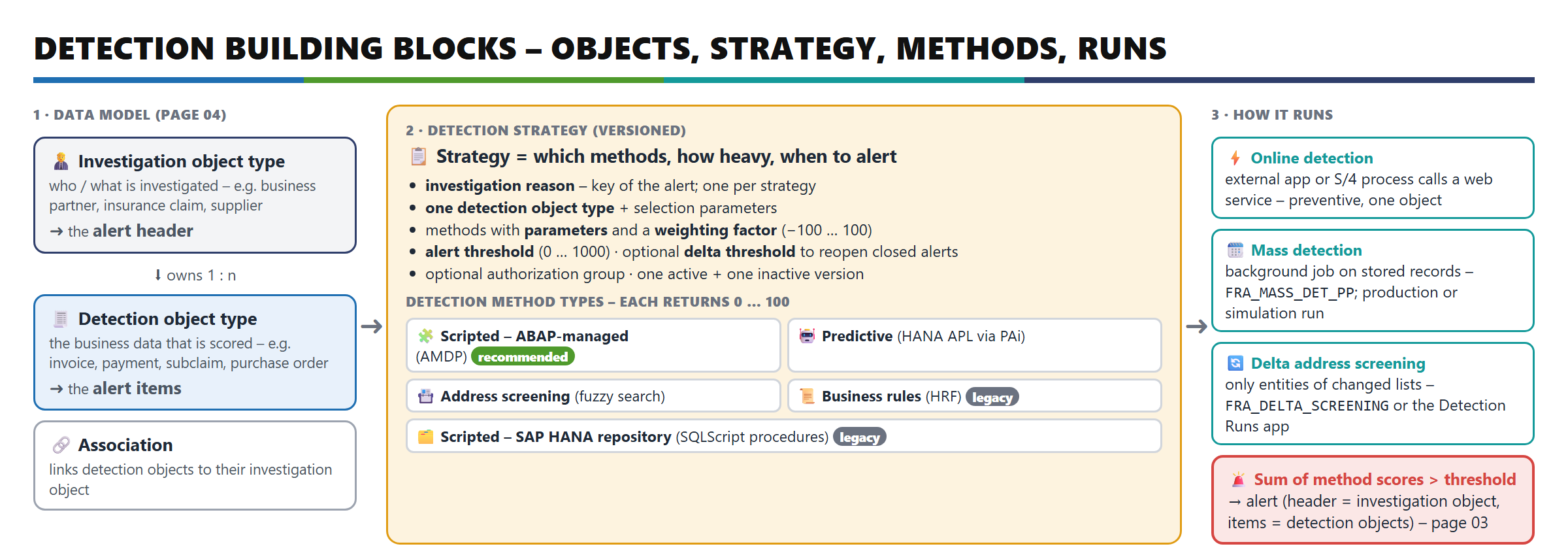
Object | Meaning | Example | In the alert |
|---|---|---|---|
Detection object type | The business data that is checked for signs of irregularity – one online object or a set in a mass run | Invoice, payment, purchase order, insurance subclaim | Alert item |
Investigation object type | The business object that is the subject of the investigation; the hierarchical owner of detection objects, may add its own data | Supplier, business partner, insurance claim | Alert header (what Manage Alerts lists) |
Association | Links detection objects to their investigation object | Invoice → supplier | Groups items under one alert |
- Example – outgoing payments: the payment is the detection object, the supplier (payee) the investigation object. Three suspicious payments to one supplier give one alert with three items.
Part 2 – Detection strategies
Detection is based on detection strategies that contain the rules used to evaluate the risk of a potential fraud and their respective weights. When you set up a strategy you assign a set of detection methods; each detection method contains the business logic that determines whether an incident – a claim, a tax declaration, a bank transfer – is a potential fraud. The thresholds defined in the strategy qualify the risk.
Strategy field | Meaning |
|---|---|
Detection strategy ID | Unique name of the strategy |
Investigation reason | Why the strategy exists; key value of the alert. Strategies with the same reason share one alert per investigation object, different reasons open separate alerts |
Detection object type | Exactly one per strategy – all its methods examine this kind of object |
Selection parameters | Restrict which detection objects the strategy processes (e.g. company code, document type) |
Authorization group | Optional; users then need authorization for strategies and for this group |
Detection methods + parameters | The rules; each method exposes input parameters (e.g. Start Time, End Time) set per strategy. One method can be added more than once with different parameters |
Weighting factor | Per method, from −100 to 100; negative weights lower the risk (e.g. a trusted long-term supplier) |
Alert threshold | Required, 0 to 1,000; lower values for strategies with few methods |
Delta threshold | Optional; reactivates a closed alert when a new score passes it (0 = never). Should be higher than the alert threshold |
Versions
- A new strategy is version 1 and inactive until you activate it. Only one version is active (not changeable) and only one is inactive (the editable one).
- Editing the active version creates a new inactive version (number + 1); editing the existing inactive version overwrites it. Activating a version sets the previous one to deactivated – old versions stay for traceability.
Alert logic
- Score above the alert threshold and no alert for the investigation object → a new alert.
- An active alert exists → a new alert item is added (or a new alert is created).
- Only a closed alert exists → the score is compared with the delta threshold; if it is passed the alert is reactivated. How an existing alert reacts to new results can be adjusted with BAdI FRA_BADI_ALERT_UPDATE_REACTION (Alert Update Determination).
Part 3 – Types of detection methods
A detection method is a single executable step that returns a detection result between 0 and 100 for each object, independent of the other methods in the strategy. One method can be reused in many strategies, for online and mass detection. The types that can be managed:
Type | How it works | Status |
|---|---|---|
Predictive detection methods | A machine learning model trained with HANA auto-classification of the SAP HANA Automated Predictive Library (APL), through SAP Predictive Analytics integrator (PAi), on a training view of past decisions; it scores each object. Quality: predictive power and prediction confidence (0–1). The score threshold is a method parameter (details: page 04 Part 6.2) | Current – finds unknown patterns |
Scripted detection methods (ABAP-managed) | Logic in ABAP-managed database procedures (AMDP) of a global ABAP class, SQLScript running in HANA; edited in ADT (Eclipse) only; can read CDS views and table functions | Recommended for new rules |
Scripted detection methods (SAP HANA Repository) | SQLScript procedures stored in the SAP HANA repository | Legacy – backward compatibility only; successor: ABAP-managed methods |
Address screening methods | Compare names and addresses with imported lists using HANA fuzzy search (Part 6) | Current, delivered by SAP – configure, don't code |
Business rule methods | Text rules or decision tables of the HANA Rules Framework (HRF); vocabulary set up in SAP HANA Studio | Legacy – backward compatibility only, not for new implementations; successor: ABAP-managed methods |
- Two design approaches produce methods: top-down (an expert writes the rule – scripted methods) and bottom-up (a model learns from past decisions – predictive methods). Both end up as a method in a strategy. A SAP HANA PAL algorithm (e.g. a decision tree) can also be wrapped in a scripted method: the selection procedure adds the predictive attributes, the execution procedure calls the PAL scoring procedure.
- As of BIS 1.3 SP01 customer content can be migrated completely off the HANA Rules Framework to ABAP-managed objects (investigation and detection objects, association views, methods).
Part 4 – How irregularities are identified: online, mass and delta runs
Run type | Trigger | Typical use | Technical |
|---|---|---|---|
Online detection | An external application or an S/4HANA process calls BIS via a web service for one object | Preventive: check a payment, claim or new supplier before the process continues | Synchronous call built into the calling process |
Mass detection | Background process that executes detection strategies on a scheduled basis over stored records | Detective: nightly scan of all new invoices | Transaction FRA_MASS_DET_PP (program FRA_MASS_DETECTION_PP) as a job with a variant and dynamic Date From / Date To; or Mass Detection on the strategy |
Address screening | Compares business partners (or transactions) with lists of certain parties to fulfil legal obligations – online or in mass runs | Sanctioned-party and PEP screening | Address screening methods (Part 6) |
Delta address screening | Screens the entities of address screening lists that have been changed since their initial import | After a provider delivers a delta list | Transaction FRA_DELTA_SCREENING (also as a background job) or the Detection Runs app; log in FRA_DELTA_SCREEN_LOG |
- Mass detection has a production run (creates alerts, active strategy versions only) and a simulation run (no alerts; also for inactive versions).
- Preventive integration in S/4HANA (co-deployment only): the payment run (F110 / F111) and SAP S/4HANA Finance for advanced payment management can call BIS online, so suspicious payments are blocked before they reach the bank.
Part 5 – How fraud is determined: the risk score
During detection the system checks, for the selected detection strategies, whether the detection methods (rules) apply. For a method based on a SQLScript procedure, the execution procedure returns a detection result – an integer between 0 and 100 – and passes it to the strategy.
Step | Formula | Meaning |
|---|---|---|
① Method | Risk score (method) = (detection result ÷ 100) × weighting factor | The result is normalised to 0–1 and multiplied by the method's weight in this strategy |
② Strategy | Risk score (strategy) = sum of the risk scores of all methods | The total for one detection object |
③ Alert | Risk score (strategy) > alert threshold | Then an alert (item) is created; the threshold qualifies the risk |
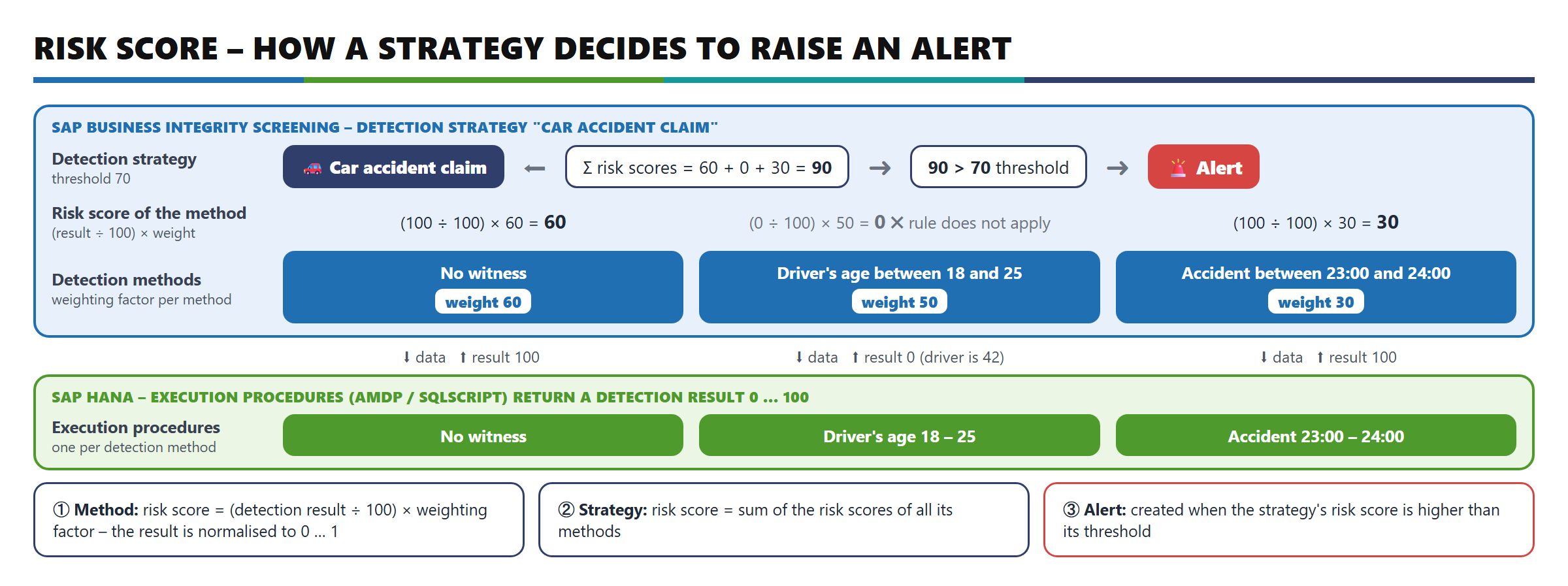
Example 1 – car accident claim (threshold 70)
Detection method | Result | Weight | Risk score |
|---|---|---|---|
No witness | 100 | 60 | 100 ÷ 100 × 60 = 60 |
Driver's age between 18 and 25 | 0 (rule does not apply) | 50 | 0 ÷ 100 × 50 = 0 |
Car accident between 23:00 and 24:00 | 100 | 30 | 100 ÷ 100 × 30 = 30 |
Strategy | 60 + 0 + 30 = 90 > 70 → alert |
Example 2 – supplier payment with graded results and a negative weight (threshold 50)
Detection method | Result | Weight | Risk score |
|---|---|---|---|
Bank account changed in the last 7 days | 80 | 50 | 0.8 × 50 = 40 |
Amount just below the approval limit | 40 | 30 | 0.4 × 30 = 12 |
Payee bank in a high-risk country | 0 | 40 | 0 |
Supplier active for more than 10 years | 100 | −20 | 1.0 × (−20) = −20 |
Strategy | 40 + 12 + 0 − 20 = 32 ≤ 50 → no alert |
Without the negative weight the score would be 52 and an alert would be created – negative weights are how a strategy expresses "this lowers the risk". The same arithmetic in ABAP (illustration only – BIS computes it internally):
|
- Risk factor and risk rating in the alert are derived from this: risk factor = risk score ÷ threshold (score 7, threshold 2 → 3.5). The 0–5 star risk rating is the risk factor as a percentage of the maximum risk factor set per investigation object type in Customizing (60 % → 3 stars; page 03 Part 1).
Part 6 – Address screening and delta address screening
Address screening compares business partners (customers, suppliers, employees) or transactions (payments, sales orders) with lists of certain parties to fulfil legal obligations – sanctions lists such as OFAC or EU, politically exposed persons (PEP), adverse media, state-owned companies or your own lists. Matching uses the HANA fuzzy search, so typos, accents and word order do not hide a hit.
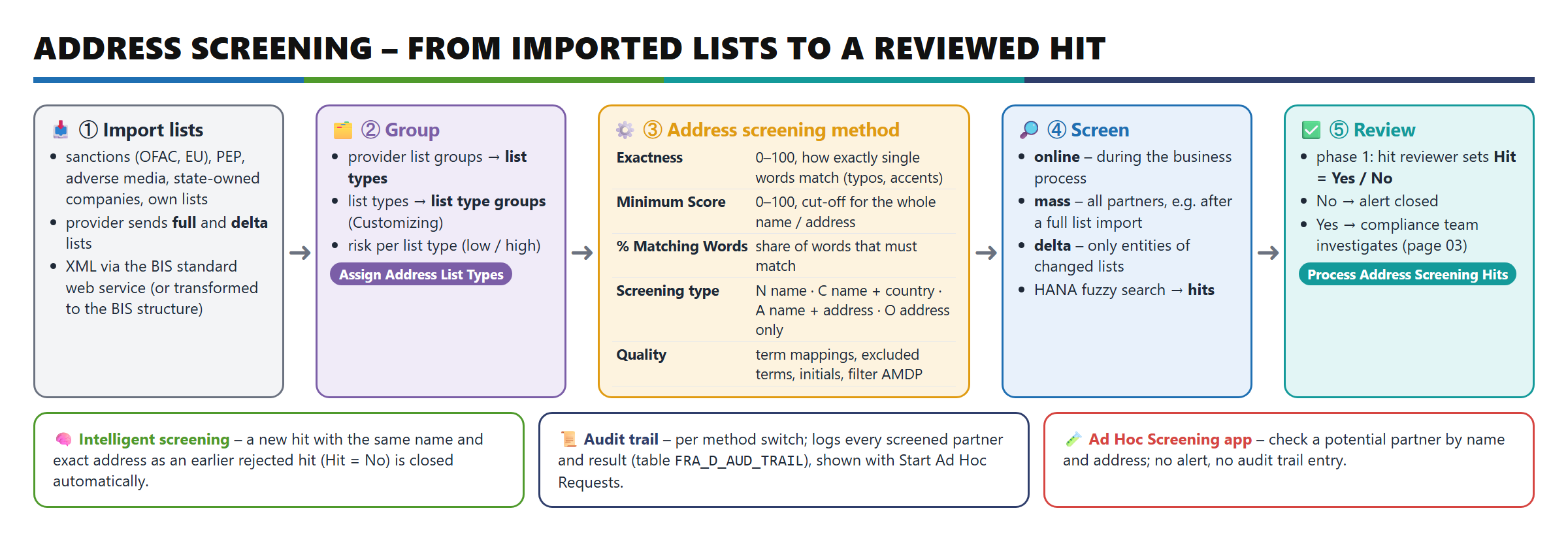
6.1 Lists and list type groups
- Lists come from data providers, government websites or are created manually. Providers usually deliver a full list and delta lists; both must be fetched regularly and imported (XML through the BIS standard web service, or transformed into the BIS XML structure first).
- Provider list groups map to list types; list types are combined into list type groups in Customizing. A strategy screens against a list type group, so different strategies can use different lists (e.g. PEP with a very high threshold for all systems, sanctions with a low threshold for e-commerce). The Assign Address List Types app shows lists, types and strategies.
6.2 Parameters of an address screening method
Parameter | Technical name | Effect |
|---|---|---|
Exactness | FUZZINESS | 0–100, how exactly single words must match; at 70 Jane matches June, at 90 not |
Minimum Score | MINIMATCH | 0–100 for the whole name or address; cuts off low-quality hits |
Percentage of Matching Words | ANDTHRESHOLD | Share of words that must match |
Address Screening Type | SCREENING_TYPE | N name only · C name + country/region · A name + address · O address only |
List Type Group | LIST_TYPE_GROUP | Which lists are compared |
Include Term Mappings / Use Excluded Terms | ALIASES / EXCLUSION_TERMS | Map "St." to "Street"; ignore terms like "Ltd." (apps Manage Term Mappings, Manage Excluded Terms) |
Use Initials of Name | INITIALS | "J." can match "James" |
Address Screening Filter | ADDRESS_SCREENING_FILTER | AMDP class that removes hits by extra attributes (date of birth, gender) |
6.3 Delta screening, review and evidence
- Delta address screening screens only the list entities that changed since the initial import – far cheaper than re-screening all partners after every list update. Only address screening methods use it.
- Hits are reviewed in two phases (page 03 Part 3): a reviewer sets Hit = Yes / No in Process Address Screening Hits, confirmed hits go to the compliance team.
- Intelligent screening: a new hit with the same name and exact address as an earlier rejected hit is closed automatically (closing reason from Customizing).
- Audit trail: switched on per method; logs every screened object and result (table FRA_D_AUD_TRAIL, CDS FRA_CV_AUDITTRAIL) – shown with Start Ad Hoc Request (page 03 Part 8).
- Ad Hoc Screening app: check a potential partner by name and address; creates no alert and no audit trail entry.
Part 7 – Calibration and simulation
Calibration simulates a strategy on historical data before (or after) it goes live, to balance found fraud against false positives. It works on active and inactive versions.
- On the Calibration screen you change the threshold, weighting factors and method parameters, choose a selection period and compare the result with a reference strategy of the same detection object type.
- Find Best Values fits the weighting factors mathematically from past decisions (Confirmed and False Alarm) using a profit factor (value of finding a real case) and a cost factor (cost of clearing a false positive). It needs at least two methods and enough history – e.g. about 100 classified findings for a strategy with 10 methods.
- Saving a calibration creates a new inactive strategy version (an existing inactive version is overwritten) – the live strategy is never changed silently.
- Address screening strategies cannot be calibrated: use the simulation option of a mass detection run instead (results in views FRA_V_MD_S2_OVW, FRA_V_MD_S2_RES, FRA_V_MD_S2_TXT).
Calibration KPI | Meaning |
|---|---|
Efficiency (actual) | Confirmed ÷ (Confirmed + False Positive) of the real alerts |
Efficiency (simulation) | The same ratio for the simulated strategy |
New / Missed / Found alert items | Alerts only in the simulation / only in the past / in both |
Risk value of new, found, missed items | Sum of the risk values of each group |
Part 8 – Scripted detection methods: the three procedures
Scripted detection methods use ABAP-managed database procedures that contain the detection logic needed to examine business data and produce a detection result. The procedures are defined in ABAP and may contain SQLScript that is executed in the SAP HANA database. The following procedures can be used:
Procedure | Required | Does | Called in |
|---|---|---|---|
Execution procedure | Mandatory | Contains the business logic of the method and returns the detection result 0–100 per object | Mass detection, online detection, calibration |
Selection procedure | Mandatory | Selects the necessary data objects (the detection objects) from the database tables | Mass detection, calibration |
Additional information procedure | Optional | Determines risk values and texts that explain the detection result – more detail in the alert | Online and mass detection – not in calibration |
What to read where: data that does not belong to the current detection object – historical data, business partner and other master data – should be read in the execution procedure, not in the selection procedure. Online detection does not call the selection procedure (the caller passes the object), so logic placed there would be missing online; the execution procedure is the only place that runs in every mode.
- Coding an execution procedure as AMDP, the data model and extension BAdIs: page 04. AMDP syntax: ABAP on HANA › 06 AMDP & SQLScript.
Part 9 – Interview questions
Q1. What is the difference between a detection method and a detection strategy?
A method is one rule that returns a detection result 0–100 for an object. A strategy combines several methods for one detection object type, gives each a weighting factor and parameters, and defines the alert threshold that decides when an alert is created.
Q2. How is the risk score calculated?
Per method: detection result ÷ 100 × weighting factor. The strategy's risk score is the sum over all methods; if it is higher than the threshold an alert is created. Example: 60 + 0 + 30 = 90 > 70 → alert.
Q3. Why would you use a negative weighting factor?
To lower the risk when a mitigating rule applies, e.g. a long-standing trusted supplier. Weights range from −100 to 100.
Q4. What are detection object types and investigation object types?
Detection objects are the data that is scored (invoice, payment, subclaim) and become alert items. Investigation objects own them (supplier, claim, business partner) and form the alert header. An association links the two.
Q5. Name the types of detection methods and which to use for new rules.
Predictive, scripted ABAP-managed (AMDP), scripted SAP HANA repository (legacy), address screening and business rule methods (HRF, legacy). New rules: ABAP-managed scripted methods; unknown patterns: predictive.
Q6. Online versus mass detection?
Online: an external application or S/4HANA process calls a web service for one object – preventive, e.g. in the payment run. Mass: a scheduled background job (FRA_MASS_DET_PP) over stored records – detective; with production or simulation runs.
Q7. What is delta address screening?
Screening only the list entities that changed since their initial import, run with transaction FRA_DELTA_SCREENING or the Detection Runs app after a provider's delta list was loaded – instead of re-screening every partner against the full list.
Q8. Which parameters tune an address screening method?
Exactness (word-level fuzziness), Minimum Score (whole name or address), Percentage of Matching Words, screening type (name, name + country, name + address, address only), list type group, term mappings, excluded terms, initials and an optional AMDP filter.
Q9. What does calibration do and what does saving it change?
It simulates a strategy on historical data with changed thresholds, weights or parameters and compares efficiency and new / missed / found alerts; Find Best Values proposes weights from past decisions. Saving creates a new inactive version – the active one is untouched.
Q10. Which procedures does a scripted detection method have and where are they called?
Execution (mandatory: logic and result; mass, online, calibration), selection (mandatory: selects detection objects; mass and calibration) and additional information (optional: risk values and texts for the alert; online and mass, not calibration).
Q11. Why must historical and master data be read in the execution procedure?
Because online detection does not run the selection procedure. Only the execution procedure runs in every mode, so all data beyond the detection object itself must be read there.
Q12. How do strategy versions work?
One active (read-only) and at most one inactive (editable) version. Editing the active version creates a new inactive one; activating it deactivates the previous version, which is kept for traceability.
🏠 Start Here · ◀ 01 · Overview & Architecture · 03 · Investigation ▶ · Sections: CORE ABAP | OOPS ABAP | ABAP on HANA | Clean Core | RAP | ABAP Points | SAP Fiori | SAPUI5 | Mobile Development (MDK) | BTP Foundations | BTP Development | CAP | SAP Build | ABAP on BTP | Integration Suite | SAP Business AI | SAP BASIS | Security | SAP SDLC
Functional: FICO ABAP | TRM ABAP | VIM | SAP BIS | SD ABAP | MM ABAP | PP ABAP | QM ABAP | PM ABAP | PS ABAP | EWM | TM ABAP | GTM ABAP | EHS ABAP | HR ABAP | BW | SAP Datasphere | SAP Business Data Cloud | SAP MDG | SAP Analytics Cloud | SAP Ariba | SAP CX | SAP IBP