SAP Build is SAP's offering for building applications, extensions, processes, automations, business sites and AI assistants on SAP BTP – from drag-and-drop low-code to pro-code with Joule. Since April 2025 it is sold as one unified offering (one plan, four licence types) instead of separate products, and every capability is reached through the SAP Build lobby. This page explains the portfolio and its history, the lobby and the Store, how SAP Build is provisioned on BTP, the Control Tower (tenants, environments, destinations, governance), transports, licensing and metering, Joule across SAP Build, and how an architect chooses the right capability. Running example: the Sales Order Approval scenario – orders above the customer's credit limit go to a sales manager. Each capability has its own page: SAP Build Apps page 02, SAP Build Process Automation pages 03–07, SAP Build Work Zone page 08, SAP Build Code page 09, Joule Studio page 10. Facts on plans and licences are as of November 2026.
Part 1 – What SAP Build is: portfolio, names and history
Why it matters: an S/4HANA landscape always needs small apps, approvals, launchpads and assistants around the core. Building each of them as a full CAP or RAP project is slow; leaving them as e-mail and Excel breaks clean core and audit rules. SAP Build gives business experts (citizen developers) and professional developers one set of tools that share the same BTP identity, destinations, lobby, transport path and licence.
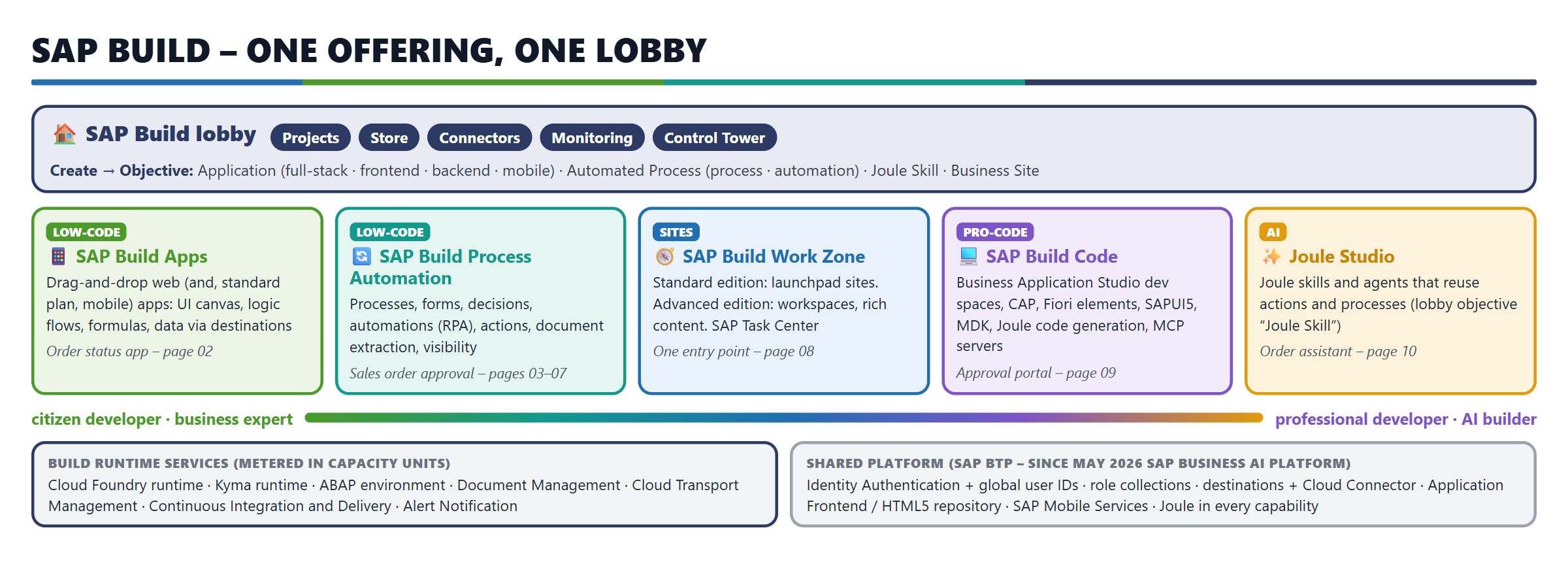
Capability | Who builds | What you build | Runs where | Page |
|---|---|---|---|---|
SAP Build Apps | Citizen developer, developer | Web apps (mobile apps and no-code back ends in the standard plan) with drag-and-drop UI and visual logic | HTML5 app in SAP Build Work Zone; native iOS / Android app | 02 |
SAP Build Process Automation | Business process expert, developer | Processes (workflows), forms, decisions, actions, automations (RPA), document extraction, visibility scenarios | SAP-managed SaaS + Desktop Agent for bots | 03–07 |
SAP Build Work Zone | Administrator, content manager | Business sites: standard edition (launchpad) or advanced edition (workspaces, rich content); SAP Task Center | SAP-managed SaaS | 08 |
SAP Build Code | Professional developer | CAP services, Fiori elements / SAPUI5 apps, MDK mobile apps, HANA Cloud apps – with Joule | Your app on Cloud Foundry or Kyma | 09 |
Joule Studio | Developer, AI builder | Joule skills and Joule agents that reuse actions and processes | Joule runtime | 10 |
SAP Build also bundles the services these capabilities depend on: SAP Task Center, SAP Mobile Services, the Application Frontend service (hosting and serving front-end apps), SAP Business Application Studio, and the Build Runtime services – Cloud Foundry runtime, Kyma runtime, ABAP environment, SAP Document Management service, SAP Cloud Transport Management, SAP Continuous Integration and Delivery and SAP Alert Notification service. SAP Build runs in the Cloud Foundry environment on SAP, AWS, Azure, Google Cloud and Alibaba Cloud data centres; available regions are listed in the SAP Discovery Center.
1.1 Names you will hear
Current name | Earlier name(s) | Note |
|---|---|---|
SAP Build Apps | SAP AppGyver (acquired by SAP in 2021) | Standalone product deprecated since 23 March 2026 – existing contracts keep access for their term (page 02) |
SAP Build Process Automation | SAP Workflow Management + SAP Intelligent RPA (+ business rules, process visibility) | Workflow and RPA merged into one no-code tool |
SAP Build Work Zone, standard / advanced edition | SAP Launchpad service / SAP Work Zone | Standard = launchpad sites; advanced = digital workplace |
SAP Build Code | SAP Business Application Studio (still the IDE inside) | BAS plus services, generators, Storyboard and Joule |
Joule Studio, classic edition | Joule Studio (first release in SAP Build) | The lobby objective “Joule Skill”; the newer Joule Studio is reached via Joule Work (page 10) |
SAP Business AI Platform | – (umbrella that includes SAP BTP) | Announced at SAP Sapphire, May 2026, as the umbrella that unites SAP BTP, SAP Business Data Cloud and SAP Business AI; existing BTP services and contracts carry forward, and the cockpit, CLI and most technical names are unchanged, so docs and these notes still say BTP |
1.2 Timeline
When | Milestone |
|---|---|
2021 | SAP acquires AppGyver (low-code app builder) |
November 2022 | SAP Build launched at SAP TechEd: SAP Build Apps, SAP Build Process Automation, SAP Build Work Zone |
March 2024 | SAP Build Code generally available (announced at SAP TechEd 2023) |
April 2025 | Unified SAP Build pricing and packaging: one offering, licence types Base, Premium, Developer and Runtime; SAP Build and SAP HANA Cloud included in SAP Cloud ERP Private packages |
August 2025 | SAP partners get SAP Build (incl. Joule Studio and ABAP Cloud) for test, demo and development within fair-use limits |
23 March 2026 | SAP Build Apps deprecated as a standalone product (existing contracts run to their end) |
May 2026 | SAP Business AI Platform announced as the umbrella that unites SAP BTP, BDC and SAP Business AI |
30 September 2026 | Community Edition and Free Edition of SAP Build Apps deprecated – remaining data deleted |
1.3 Sales Order Approval with SAP Build
The same business scenario as in the RAP section, seen from the SAP Build side – each need maps to one capability and one page of this section:
Need | SAP Build piece | Page |
|---|---|---|
Sales manager approves orders above the credit limit | Business process with API or event trigger, approval form and decision | 03, 04 |
Read the order and customer credit from S/4HANA, write the result back | Action project on the released sales order API, through a destination | 06 |
Copy order data into a legacy desktop tool that has no API | Automation (RPA bot) on a Desktop Agent | 05 |
Approver sees all tasks in one place; process owner sees KPIs | My Inbox / SAP Task Center; visibility scenario | 07, 08 |
Sales rep checks order status in the browser | SAP Build Apps web app reading the sales order API | 02 |
Side-by-side approval portal with own data and logic | CAP + Fiori elements project in SAP Build Code | 09 |
“Show me my blocked orders and approve the small ones” | Joule agent that calls the action and the process | 10 |
One entry point for all these apps and tasks | SAP Build Work Zone site | 08 |
Part 2 – The SAP Build lobby
The SAP Build lobby is the central page for creating, accessing and managing SAP Build projects. It opens when you launch SAP Build (or SAP Build Apps, SAP Build Code or SAP Build Process Automation) from the BTP cockpit under Services › Instances and Subscriptions. The lobby is the shared design-time entry point; the editors themselves (app builder, process editor, BAS dev space, Site Manager) open from it.
2.1 Areas of the lobby
Area | What you do there |
|---|---|
Home / Quick Start | Start points, recent projects, links to learning content |
Projects (the lobby list) | Create, open, search and filter projects; import / export, clone from Git, publish, rename, save as new project, delete |
Store | Pre-built content packages from SAP and partners – processes, automations, actions, applications (2.4) |
Connectors | Actions (APIs wrapped as reusable actions), Events (asynchronous, real-time), Automation SDK packages (2.5) |
Monitoring | Process instances, automation jobs, errors (page 07) |
Control Tower | Tenant configuration, environments, destinations, generative AI switch, governance (Part 4) |
Shell bar | Built-In Support (support content and channels), user settings (profile, theme), product feedback |
2.2 Creating a project
Create opens a wizard: choose an objective, then a category and a type, enter a name (up to 64 characters) and description, and – for code-based types – a new or existing dev space. The Create drop-down also offers Clone from Git (SAP Build Code projects), Add from Dev Space (move an existing BAS project into the lobby) and Recent Project Types.
Objective | Category / type | Opens |
|---|---|---|
Application | Full-Stack (CAP + Fiori), Frontend (SAP Fiori application, Web & Mobile Application = SAP Build Apps), Backend (SAP HANA Cloud intelligent data application, Application Backend = SAP Build Apps Visual Cloud Functions), Mobile (MDK) | BAS dev space or the SAP Build Apps editor |
Automated Process | Process (business process) or Automation (RPA) | Process editor / automation designer |
Joule Skill | Joule skills and agents (Joule Studio, classic edition) | Joule Studio editor |
Business Site | Admin Console, Manage Workspaces and Workpages, Business Content Management | SAP Build Work Zone Site Manager (new tab) |
2.3 Project list, versions and members
- Views: All Projects, My Projects, Projects to Work On (still editable) and Projects to Deploy (released, ready for deployment); quick filters on project type, status, created by, members and system.
- Opening a project row shows General (description, type, created on / by, source – for example the Store –, line of business, product), Versions (export, save as new version, transport, delete) and Members.
- Project authorizations: Viewer (read, deploy), Developer (modify, release, publish) and Administrator (manage members); the creator is always administrator. Grants go to a named user (e-mail) or a wildcard for all tenant users.
- Import accepts up to 50 exported projects at a time, each up to 400 MB; the same export can be imported several times to create identical projects.
2.4 The Store
The Store offers prebuilt content created and curated by SAP and authorised partners, free or paid, for many industries and lines of business. A package contains a description, artifact details and a configuration guide. SAP does not warrant store content, can retire it, and only the latest version can be downloaded; Update brings a project added from the Store to the newest version.
Project type in the Store | Content |
|---|---|
Business Process | Built with SAP Build Process Automation – all process artifacts |
Task Automation | Built with SAP Intelligent RPA – automation artifacts only |
Live Process | Built with SAP Workflow Management – usable with additional configuration |
Application | Built with SAP Business Application Studio |
Actions | APIs wrapped as actions for your processes and apps |
- Format tags: Ready to use (add and configure) or Template (create your own project from it). Versions follow major.minor.patch, for example 1.19.33.
- The public SAP Build Content Catalog lists the same content (for SAP S/4HANA, SAP ECC, SAP SuccessFactors, SAP Ariba and more) without logging on.
2.5 Connectors and MCP servers
- Actions wrap a REST or OData API (from SAP Business Accelerator Hub, a CAP or RAP service, an integration flow or the Developer Hub API catalog of SAP Integration Suite) as an action with typed inputs and outputs; processes, SAP Build Apps and Joule reuse them – page 06.
- Events let processes start or continue on business events (for example from SAP S/4HANA through SAP Event Mesh) – pages 03 and 06.
- Automation SDK packages provide the activities used in automations – page 05.
- SAP MCP servers in SAP Build – CAP MCP server, SAP Fiori MCP server, UI5 MCP server and MDK MCP server – give AI coding assistants secure access to SAP documentation, templates and project tools – page 09.
Part 3 – Setting up SAP Build on SAP BTP
SAP Build products are BTP services: they need entitlements in the global account, a subaccount with the Cloud Foundry environment and subscriptions, plus a trust to SAP Cloud Identity Services – Identity Authentication (→ see BTP Foundations › 02 · SAP BTP – Overview & Account Model and 03 · BTP Services, Identity & Connectivity). There are two onboarding models.
Unified SAP Build (single SKU) | Individual subscriptions (standalone services) | |
|---|---|---|
Commercial basis | One SAP Build contract: plans build-default and build-runtime | Each product licensed and subscribed separately (older contracts) |
Setup tool | Cloud Integration Automation service – guided workflow with automated and manual tasks | One booster per product in the BTP cockpit |
Documentation | help.sap.com › SAP Build | SAP Build: Service Guide for Standalone Services and each product's guide |
Fits | New customers, customers moving to the unified offering | Customers who adopt single services on an as-needed basis |
3.1 Provisioning the unified SAP Build
- Prerequisites: a BTP global account with SAP Build entitlements, Identity Authentication as identity provider, global user IDs for all users (needed for correct billing), and a subscription to the free Cloud Integration Automation service with its role collections.
- In Cloud Integration Automation: Plan for Integration → choose a scenario – Provision SAP Build on SAP BTP, Provision SAP Build on SAP BTP with S/4PCE Integration (SAP S/4HANA Cloud Private Edition), Provision SAP Joule Studio on SAP BTP, or the China (Shanghai) variant.
- Select Scope (which SAP Build services), Select System (BTP global account, Identity Authentication tenant), Add Task Parameters: initial SAP Build Developer and SAP Build Administrator users, new or existing subaccount (region, subdomain), Kyma entitlements with a build-runtime plan per hyperscaler, a default SAP Build Work Zone site.
- The service runs the tasks in the background; manual tasks appear in its Inbox. Services already on an older plan in a reused subaccount are migrated to build-default.
- After provisioning, switch SAP Business Application Studio from XSUAA to Identity Authentication manually – this step is not automated.
3.2 Boosters for standalone subscriptions
Booster | What it sets up |
|---|---|
Get Started with SAP Build Apps (Quick Account Setup or Detailed Account Setup) | Subaccount, entitlement and subscription, SAP Build Work Zone subscription, trust to the custom Identity Authentication tenant, role collections for the first users |
SAP Build Process Automation service booster | Entitlements, subscription, role collections (ProcessAutomationAdmin, ProcessAutomationDeveloper, …); recommended over manual subscription |
Get started with SAP Build Code | Subscriptions to SAP Build Code and its services, role collections; does not create an SAP HANA Cloud instance – create it manually |
Booster rule of thumb: boosters are idempotent setup scripts for a trial or a first subaccount; in a real landscape the BTP administrator still owns entitlements, subaccount design and the IdP group mapping.
3.3 Users, role collections and project members
Access is granted on two levels: role collections in the subaccount decide what a user may do in a service, project membership decides which projects a user may open. Assign role collections to Identity Authentication groups, not to single users. The role decides the licence type that is billed (Part 5).
Service | Key roles | Purpose |
|---|---|---|
SAP Build Process Automation | ProcessAutomationAdmin, ProcessAutomationDeveloper, ProcessAutomationExpert, ProcessAutomationDelegate, ProcessAutomationParticipant | Admin (Control Tower, environments), build, expert functions, delegate, take part in processes (My Inbox, forms) |
SAP Build Apps / lobby | RegistryAdmin, RegistryDeveloper, BuildAppsAdmin, BuildAppsDeveloper | Lobby administration and project creation; editing still needs project-level Developer / Administrator |
SAP Build Work Zone | Launchpad_Admin, Workzone_Admin and more | Site and content administration (page 08) |
SAP Task Center | No predefined role collections – build them from the roles of application one-inbox-lservice | Task Center administration (page 07, 08) |
SAP Business Application Studio | Developer, Administrator roles | Dev spaces for SAP Build Code (page 09) |
3.4 Destinations for SAP Build
All connections to S/4HANA and other systems go through BTP destinations created by the BTP administrator in the subaccount; credentials, certificates and the Cloud Connector location stay in the destination, never in an app or process. Each SAP Build capability discovers a destination through its own additional properties:
Consumer | Additional properties (examples) |
|---|---|
SAP Build Apps |
|
SAP Build Process Automation actions |
|
SAP Build Code / BAS |
|
SAP Mobile Services builds | MobileEnabled = true |
- The Control Tower › Destinations list shows all destinations added to SAP Build, their authentication type (only HTTP destinations are supported) and the environments that may use them, with a warning if a destination was deleted in BTP.
- Prefer principal propagation (OAuth2SAMLBearerAssertion, OAuth2UserTokenExchange or on-premise principal propagation through the Cloud Connector) so that S/4HANA checks the business user's own authorisations; technical users only for system-to-system steps.
Part 4 – Control Tower, governance and transports
Low-code without governance becomes the next shadow IT. Plan who may build, where it runs and how it reaches production before the first project. The Control Tower in the lobby is the administrator's place for this; it needs the Administrator / ProcessAutomationAdmin role collection.
4.1 Tenant configuration
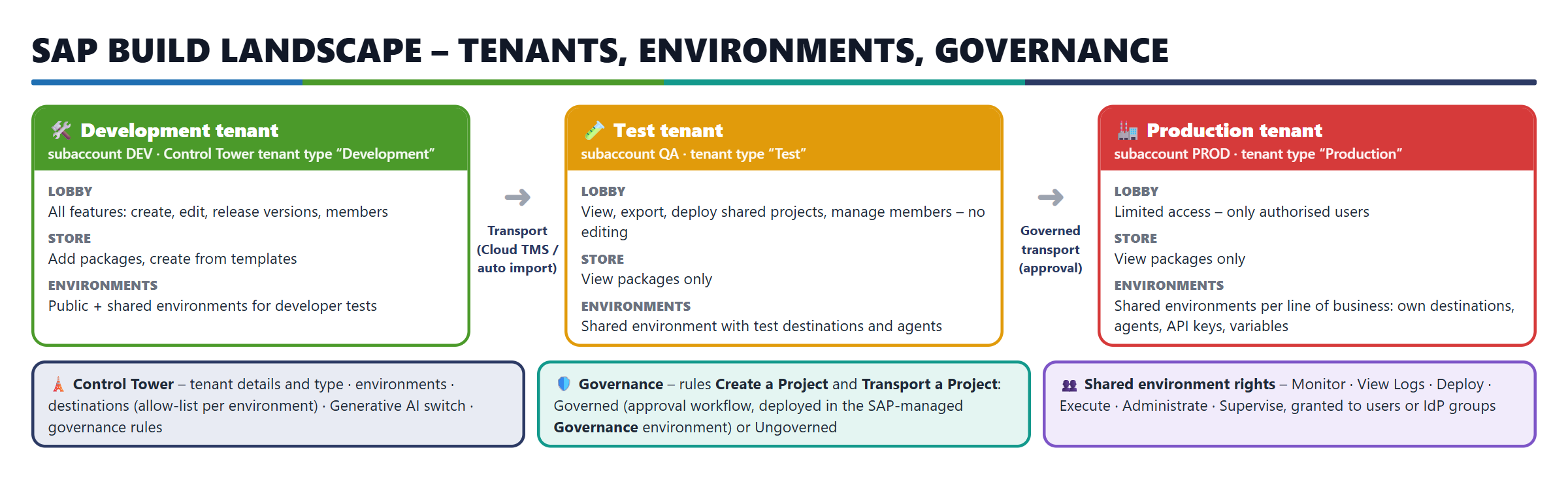
Each SAP Build subaccount (tenant) is classified as Development, Test or Production under Control Tower › Tenant Configuration › Tenant Details, with a name, description, links (for example the company's development policy) and an optional custom identity provider. The type changes what users can do:
Feature | Development tenant | Test tenant | Production tenant |
|---|---|---|---|
Lobby | All features | View, export, deploy, manage members of shared projects | Limited access |
Store | Add packages, create from templates | View packages | View packages |
Control Tower | By authorisation | By authorisation | By authorisation |
4.2 Environments
An environment is the functional area in which process automation projects are deployed and run. The public environment holds all projects deployed without a specific environment and is open to every tenant user. Shared environments are created by a ProcessAutomationAdmin and shared with users or IdP groups; they isolate projects or versions so the same project can run with different configurations for different lines of business.
- Contents of an environment: projects, automation launchers, triggers, agent management (machines that run bots), alert handlers, variables, API keys, visibility scenarios, processes and workflows.
- Authorisations when sharing: Monitor, View Logs (logs may contain sensitive data), Deploy, Execute (start forms, processes, visibility scenarios; Run Now needs Execute + Deploy + Monitor), Administrate, Supervise (process visibility dashboards).
- Details on deploying into environments: page 07; availability of environments: SAP Note 3394899.
4.3 Governance rules
Governance lets IT administrators require approval for key development activities. Two rules exist under Control Tower › Tenant Configuration › Governance Rules:
Rule | Governed | Ungoverned |
|---|---|---|
Create a Project | Creating a project needs approval (questionnaire + approval workflow) | Anyone with the role creates projects freely |
Transport a Project | Moving content between tenants needs approval | Unrestricted transports |
- The approval workflow is itself a SAP Build Process Automation project created from a governance template (you add approvers) and must be deployed in the SAP-managed environment named Governance.
- Prerequisites: a Process Automation service instance and key, a destination such as
sap_process_automation_service_user_token_exchange(OAuth2UserTokenExchange,sap.processautomation.enabled = true) allowed in the Governance environment, and the ProcessAutomationParticipant role for requesters so they can answer the questionnaire in My Inbox. - Administrators approve or reject the resulting governance requests.
4.4 Generative AI switch
Control Tower › Tenant Configuration › Generative AI switches the AI features of the tenant on or off after accepting the AI usage terms: generating and summarising processes, AI-generated forms, decision support, AI-driven UI generation in SAP Build Apps. Many AI features (for example Generate Pages in SAP Build Apps) stay hidden until this switch is on.
4.5 Transports and lifecycle
Content | How it moves from DEV to QA / PROD |
|---|---|
SAP Build Apps project | Create a release version → Transport from the lobby → queue in SAP Cloud Transport Management → import into the target lobby → build and deploy there (apps must be built in the subaccount they are deployed from) |
SAP Build Process Automation project | Release and transport with Cloud TMS; optional Auto Import and Deploy – the system imports the version and redeploys it to the shared environments where a previous version runs (not the public environment); only admins see an auto-imported project until they share it |
SAP Build Code project | Git repository + SAP Continuous Integration and Delivery, MTA deployed per subaccount; Cloud TMS for MTAs |
SAP Build Work Zone content | Content packages and Cloud TMS (page 08) |
Any project (manual) | Export from the lobby, import into the target lobby |
Release, deploy and transport in depth: page 07 (Process Automation), page 02 (Apps), page 09 (Code); Cloud TMS and CI/CD: BTP Development › 05 · DevOps, Operations & Observability.
4.6 Centre of excellence
Topic | What to set up |
|---|---|
Landscape | Separate DEV / TEST / PROD subaccounts with tenant types, a transport route and governed transports into production |
Roles | Role collections per persona mapped to IdP groups; few administrators; participants get only ProcessAutomationParticipant (Base licence) |
Destinations | Created and owned by IT, exposed to SAP Build with additional properties, allowed per environment; developers pick a destination, never type credentials |
Reuse | Shared action projects on released APIs, Store templates, naming conventions, a component and process catalogue |
Review | A quality gate before a citizen project goes live: data protection, authorisations, error paths, volume; complex or high-volume logic moves to CAP or RAP |
Operations | Who monitors process instances, bots and agents, who answers business users, who renews certificates |
Part 5 – Licensing and metering
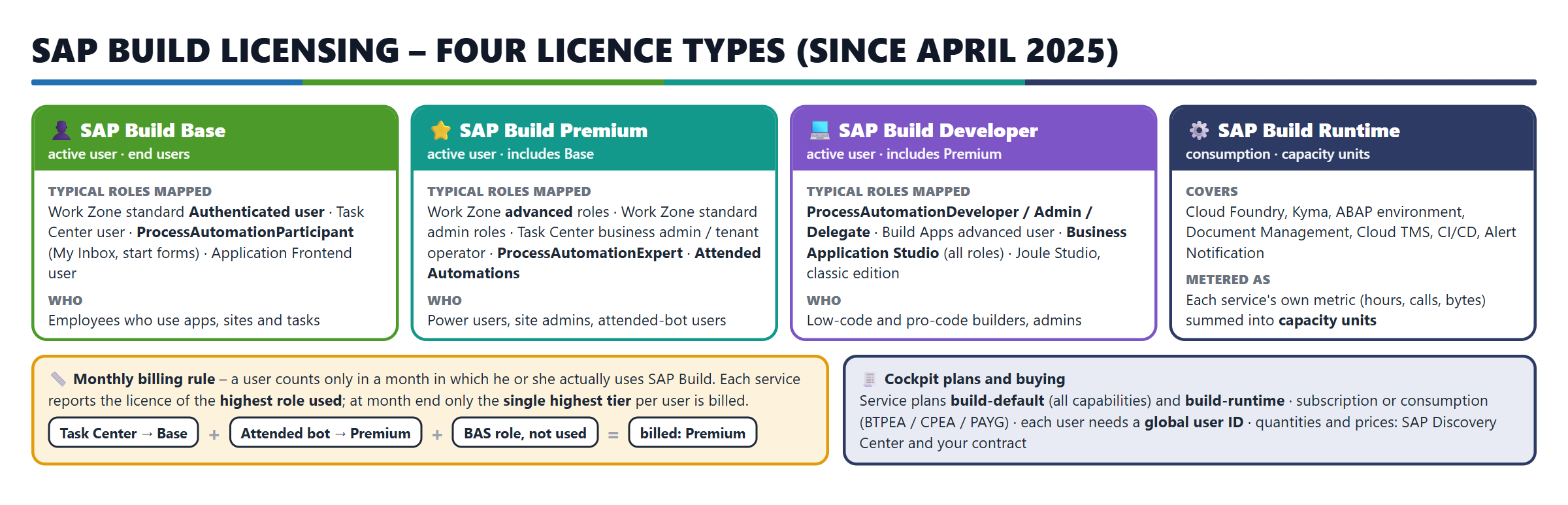
Since April 2025 SAP Build is licensed as one offering with four licence types. You no longer buy SAP Build Apps, Process Automation, Work Zone and Build Code separately; users get role collections, and the roles a user actually uses decide which licence type is counted. Prices, block sizes and contract terms are in the SAP Discovery Center and your order form – never quote numbers you have not seen in the contract.
5.1 The four licence types
Licence | Metric | Covers (examples of mapped roles) |
|---|---|---|
SAP Build Base | Active user / month | End users: SAP Build Work Zone standard edition authenticated user, SAP Task Center user, ProcessAutomationParticipant, Application Frontend authenticated user, users of SAP Mobile Services apps built with SAP tools |
SAP Build Premium | Active user / month (includes Base) | SAP Build Work Zone advanced edition roles and standard edition admin roles, Task Center business administrator / tenant operator, ProcessAutomationExpert, attended automations, users of custom Mobile Services apps |
SAP Build Developer | Active user / month (includes Premium) | Builders and admins: ProcessAutomationDeveloper, ProcessAutomationAdmin, ProcessAutomationDelegate, SAP Build Apps advanced user, all SAP Business Application Studio roles; required for Joule Studio, classic edition |
SAP Build Runtime | Capacity units (consumption) | Build Runtime services: Cloud Foundry, Kyma, ABAP environment, Document Management, Cloud TMS, CI/CD, Alert Notification – each measured in its own metric and shown in total as capacity units |
- At least one Developer licence is needed to run SAP Build at all (someone must administer it); Runtime can also be used on its own.
- In the BTP cockpit the capabilities are subscribed with the plan build-default; runtime services use build-runtime plans (for Kyma one per hyperscaler, for example build-runtime-aws).
5.2 How a user is billed
- Active user: an individual who accesses the service at any time during a calendar month. Users who have roles but do not use SAP Build in that month cost nothing.
- Tier 1 – per service: each service reports the licence type mapped to the highest role the user used there. Tier 2 – monthly consolidation: only the single highest tier across all services is billed.
- Example: a user opens SAP Task Center (Base) and runs an attended bot (Premium) and also has a BAS role but does not open BAS that month → billed as Premium.
- Correct billing needs a global user ID per user in Identity Authentication; usage is monitored in the BTP cockpit (usage and consumption costs).
- Licence hygiene is a design task: a Base user must not get developer roles "just in case" – that both breaks least privilege and moves the user to a higher tier as soon as the role is used.
5.3 Commercial models and other ways to get SAP Build
Route | What you get |
|---|---|
Subscription | Fixed quantities of Base / Premium / Developer users and runtime capacity for the contract term |
Consumption (BTPEA, CPEA, Pay-As-You-Go) | SAP Build used against cloud credits or monthly billing |
SAP Cloud ERP Private / SAP S/4HANA Cloud packages | SAP Build capabilities and SAP HANA Cloud included (announced April 2025) – quantities depend on the package |
SAP partners | Test, demo and development entitlements incl. Joule Studio and ABAP Cloud (fair-use limits in the SAP Partner Portal) |
Trial | 30-day trial of all SAP Build capabilities; BTP trial accounts for learning |
Legacy standalone contracts | Remain valid until they end; SAP Build Apps standalone can no longer be provisioned after the contract ends (page 02) |
Part 6 – Joule and generative AI across SAP Build
Joule is built into each SAP Build capability; SAP's feature scope describes it as generating processes, decisions, forms, scripts, data models, services, business logic, UI and sample data from natural language. What exactly Joule does differs per capability and grows with each release, so always name the capability when you describe a Joule feature. The tenant-level Generative AI switch in the Control Tower must be on.
Capability | Joule / AI helps with | Developer still owns |
|---|---|---|
SAP Build Process Automation | Generates a process draft (steps, forms, decisions) from a description; summaries; AI-generated forms; scripts | Recipients, data types, error paths, testing (page 03, 04) |
SAP Build Code | CDS models, sample data, service logic, unit tests, Fiori annotations, code explanations; MCP servers for agentic coding tools | Review, security annotations, performance (page 09) |
SAP Build Apps | Generate Pages – CRUD pages from an integrated data entity (100 requests per user per month) | Binding to the right destination, UX (page 02) |
Document information extraction in processes | Extracts fields from invoices, orders and custom documents, also with generative AI templates | Confidence thresholds, human review step (page 05) |
Joule Studio | Custom Joule skills and Joule agents that use actions and processes as tools | Grounding, authorisation, testing (page 10; SAP Business AI › 03) |
Sales Order Approval with AI: a process step can call a generative AI service (through an action on a CAP or SAP AI Core API) to summarise the order and the customer's open items for the approver; the approver still decides. A Joule agent can list blocked orders and start the approval process on request. Generative AI on BTP: BTP Development › 04 · Data & AI on BTP.
Part 7 – Architect view: choosing the right capability
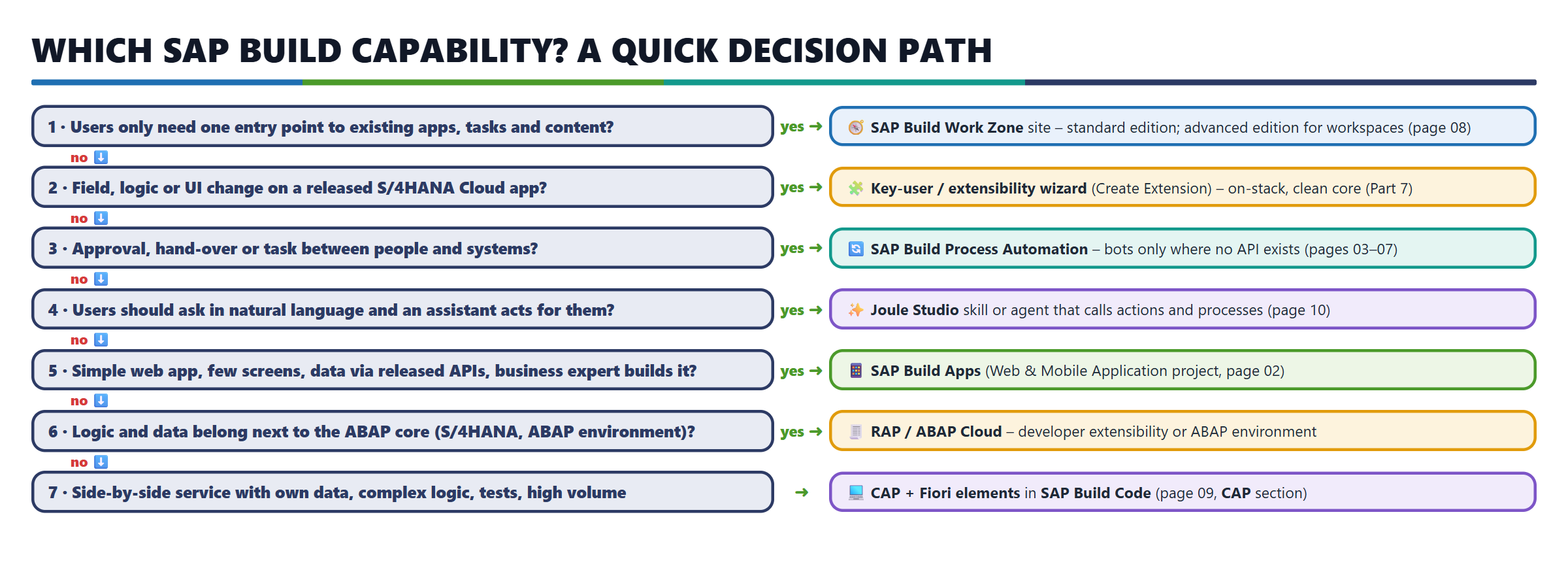
Criterion | Points to low-code (Apps, Process Automation) | Points to pro-code (Build Code, RAP) |
|---|---|---|
Builder | Business expert with IT guardrails | Professional developers, code reviews |
Logic | Simple validations, approvals, routing | Complex calculations, transactions, own persistence |
Volume | Moderate users and instances | High volume, performance targets |
Lifecycle | Lobby versions, Cloud TMS | Git, CI/CD, automated tests |
Data | Released APIs through destinations | Own data model, multitenancy, events |
7.1 Clean core and the extensibility wizard
SAP Build supports SAP's clean-core extensibility model: on-stack key-user and developer extensions stay in S/4HANA, side-by-side extensions run on BTP and call released APIs and events only. In SAP S/4HANA Cloud Public Edition the extensibility wizard opens from a Fiori app (user menu › Create Extension):
- Custom Field and Custom Logic – on-stack key-user extensions.
- Custom Process – a side-by-side process in SAP Build Process Automation, for example an approval after the business document is saved.
- User Interface Extension – SAPUI5 adaptation of the app or a new custom Fiori app, created in SAP Build Code.
- Prerequisites: the S/4HANA Cloud system registered in the BTP global account and placed in a formation of type Integration with SAP Build, communication arrangements and destinations, the business catalog SAP_CORE_BC_EXT_BLD_PC (Extensibility – SAP Build), a Horizon or Quartz theme. SAP announced the wizard for the Private Edition for the second half of 2025.
Clean core in depth: ABAP on HANA › Clean Core; key-user and developer extensibility: ABAP on BTP; events and APIs behind actions: Integration Suite › 01; classic SAP Business Workflow vs Process Automation: CORE ABAP › 12 Workflow.
Part 8 – Interview questions
Q1. What is SAP Build and which capabilities belong to it?
SAP's offering on BTP for low-code and pro-code development: SAP Build Apps (visual apps), SAP Build Process Automation (processes, forms, decisions, RPA, document extraction), SAP Build Work Zone (business sites, with SAP Task Center), SAP Build Code (CAP, Fiori, MDK with Joule in BAS) and Joule Studio (Joule skills and agents), plus runtime services such as Cloud Foundry, Kyma, the ABAP environment and Cloud TMS. Since April 2025 it is sold as one unified offering.
Q2. What is the SAP Build lobby and what can you do there?
The central page to create, open and manage SAP Build projects, opened from the subscription in the BTP cockpit. Create projects by objective (Application, Automated Process, Joule Skill, Business Site), import / export, clone from Git, manage versions, transports and members; plus the Store, Connectors (actions, events, automation SDK), Monitoring and the Control Tower.
Q3. Explain the SAP Build licence types.
Base (end users of sites, tasks, processes), Premium (includes Base; advanced Work Zone, admin and expert roles, attended automations), Developer (includes Premium; builders, admins, BAS, Joule Studio) – all counted as active users per month – and Runtime, consumed in capacity units for runtime services. Each user is billed once per month at the highest tier actually used.
Q4. A user has developer roles but only approved tasks this month. What is billed?
Base. Only roles actually used in the month count: the user only used My Inbox / Task Center, which maps to Base. Unused roles cost nothing – but a developer role used once moves the user to Developer for that month, so roles should still follow least privilege.
Q5. How is SAP Build provisioned for a new customer?
With the unified offering through the Cloud Integration Automation service scenario Provision SAP Build on SAP BTP: prerequisites Identity Authentication and global user IDs, choose scope, global account and IAS tenant, initial developer and administrator users, subaccount and runtime entitlements; manual tasks appear in its inbox. Standalone subscriptions use one booster per product.
Q6. What does the Control Tower do?
Administration of an SAP Build tenant: tenant type (development, test, production) and details, environments for deploying and running process automation projects, destinations allowed per environment, the generative AI switch, and governance rules for creating and transporting projects.
Q7. What are environments and why use shared environments?
An environment is the area where process automation projects are deployed and run, with its own triggers, agents, variables, API keys, alert handlers and visibility scenarios. The public environment is open to every tenant user; shared environments isolate projects or configurations per line of business and grant Monitor, View Logs, Deploy, Execute, Administrate or Supervise rights to specific users or groups.
Q8. How do you stop shadow IT when business users build with SAP Build?
Separate DEV / TEST / PROD tenants with tenant types; governed rules for project creation and transport (approval workflows in the Governance environment); role collections via IdP groups; destinations owned by IT and allowed per environment; a centre of excellence with reusable actions, reviews and monitoring ownership; complex logic moved to CAP or RAP.
Q9. How does SAP Build content get from development to production?
Release a version in the lobby and transport it with SAP Cloud Transport Management (optionally governed by approval); Process Automation can auto-import and redeploy into shared environments; SAP Build Apps projects are rebuilt and deployed in the target subaccount; SAP Build Code uses Git and CI/CD with MTAs. Export / import is the manual fallback.
Q10. How do SAP Build capabilities connect to S/4HANA securely?
Only through BTP destinations created by IT – with the Cloud Connector for on-premise and principal propagation where the user's own authorisations matter. Each capability discovers destinations through properties (BuildApps.Enabled, sap.processautomation.enabled, WebIDEEnabled), and Process Automation additionally needs the destination added in the Control Tower for the environment.
Q11. Scenario: a customer on SAP S/4HANA Cloud Public Edition wants an approval after saving a supplier invoice. How would you build it?
Use the extensibility wizard (Create Extension › Custom Process) to create a SAP Build Process Automation process triggered by the S/4HANA business event, with an approval form and a decision; read and update data through actions on released APIs; tasks appear in My Inbox. The core stays clean because only released events and APIs are used.
Q12. Where does Joule help in SAP Build, and what stays your job?
It drafts processes, forms and decisions in Process Automation, generates CDS models, logic, tests and Fiori annotations in SAP Build Code, generates CRUD pages in SAP Build Apps, and Joule Studio builds custom skills and agents. The tenant's generative AI switch must be on. You still review, secure, test and own the result.
🏠 Start Here · 02 · SAP Build Apps ▶ · Sections: CORE ABAP | OOPS ABAP | ABAP on HANA | Clean Core | RAP | ABAP Points | SAP Fiori | SAPUI5 | Mobile Development (MDK) | BTP Foundations | BTP Development | CAP | SAP Build | ABAP on BTP | Integration Suite | SAP Business AI | SAP BASIS | Security | SAP SDLC
Functional: FICO ABAP | TRM ABAP | VIM | SAP BIS | SD ABAP | MM ABAP | PP ABAP | QM ABAP | PM ABAP | PS ABAP | EWM | TM ABAP | GTM ABAP | EHS ABAP | HR ABAP | BW | SAP Datasphere | SAP Business Data Cloud | SAP MDG | SAP Analytics Cloud | SAP Ariba | SAP CX | SAP IBP