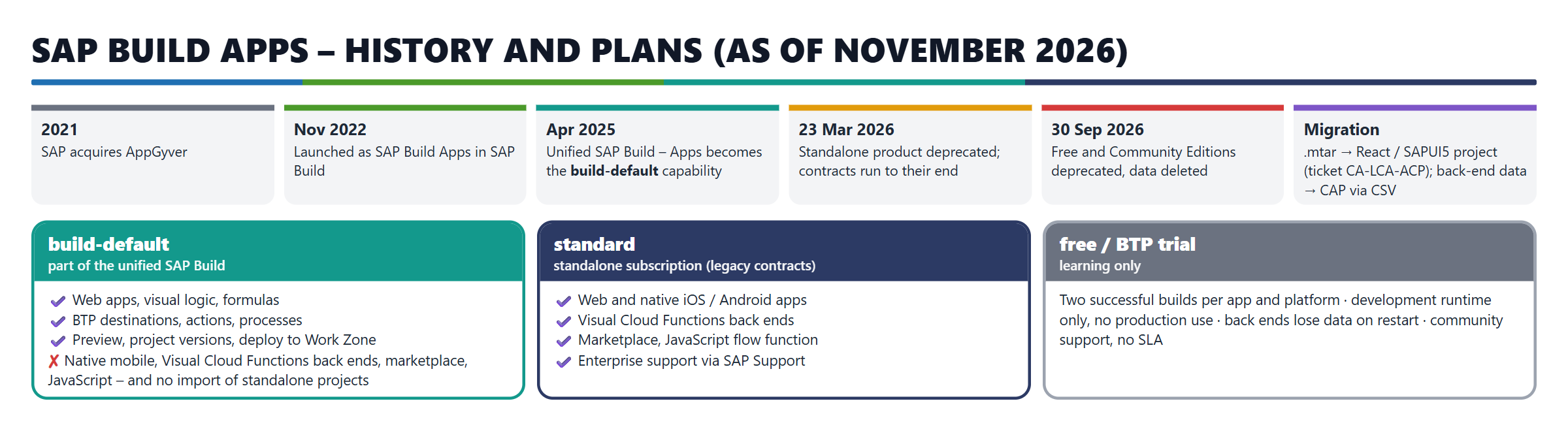
SAP Build Apps (formerly SAP AppGyver) is the low-code app builder of SAP Build: you draw pages from components, add behaviour as visual logic flows, transform data with Excel-like formulas and read business data through BTP destinations – no JavaScript needed. Since 23 March 2026 SAP Build Apps is no longer sold as a standalone product; existing contracts keep access for their term – check SAP's guidance for the Web & Mobile Application project type (plan build-default, web apps). This page covers its status and plans, the app builder, UI and components, logic, variables and formulas, data integrations (destinations, actions, processes, Visual Cloud Functions), authentication and security, preview, build and deploy, transport and the path forward, and a worked example: an order status app for the Sales Order Approval scenario. Lobby, roles and licences: page 01; processes the app can start: page 03; actions: page 06; Work Zone sites: page 08; pro-code alternative: page 09. Facts as of November 2026.
Part 1 – SAP Build Apps at a glance: status, plans and fit
SAP Build Apps targets apps for a well-defined group of users: a few screens, simple validations, data through released APIs. Business users build without code; professional developers save effort on UI, logic and formulas. The runtime handles state management and re-rendering, the build service packages the app. Complex transactional apps, heavy validation or posting logic and large offline data belong in Fiori elements with CAP or RAP (page 09) – interview line: "SAP Build Apps = UI plus light logic, data always through destinations".
Plan | Where you get it | Scope |
|---|---|---|
build-default | Unified SAP Build (single SKU, page 01) | Web apps in drag-and-drop fashion, visual logic, formula functions, BTP destinations, SAP Build Process Automation and actions, real-time preview, project versions, deploy to SAP Build Work Zone; enterprise support |
standard | Standalone subscription (existing contracts only) | Web and native mobile apps, Visual Cloud Functions back ends, the marketplace, custom JavaScript, further design-time functions; enterprise support |
free / BTP trial | Learning | Two successful builds per app and platform, development runtime only (no production), back ends without persistence between restarts, community support only |
- Because native mobile builds, back ends, marketplace items and JavaScript are only in the standard editor, projects from the standalone offering cannot be imported into a build-default tenant.
- Existing standalone customers (BTPEA, CPEA, PAYG or subscription) keep full access, SLAs and maintenance until their contract ends; afterwards no new instances can be provisioned.
- Community Edition and Free Edition were deprecated on 30 September 2026; data left after that date is deleted.
- Each subaccount can have only one SAP Build Apps subscription; different plans need separate subaccounts.
Part 2 – Projects and the app builder
Projects are created in the SAP Build lobby: Create › Application › Frontend › Web & Mobile Application opens the app builder; Backend › Application Backend creates a Visual Cloud Functions project (standard plan). Older docs describe the same as Create › Build an Application › SAP Build Apps. Project members (Viewer, Developer, Administrator) are managed in the lobby; several developers can edit at the same time – their initials appear in the toolbar.
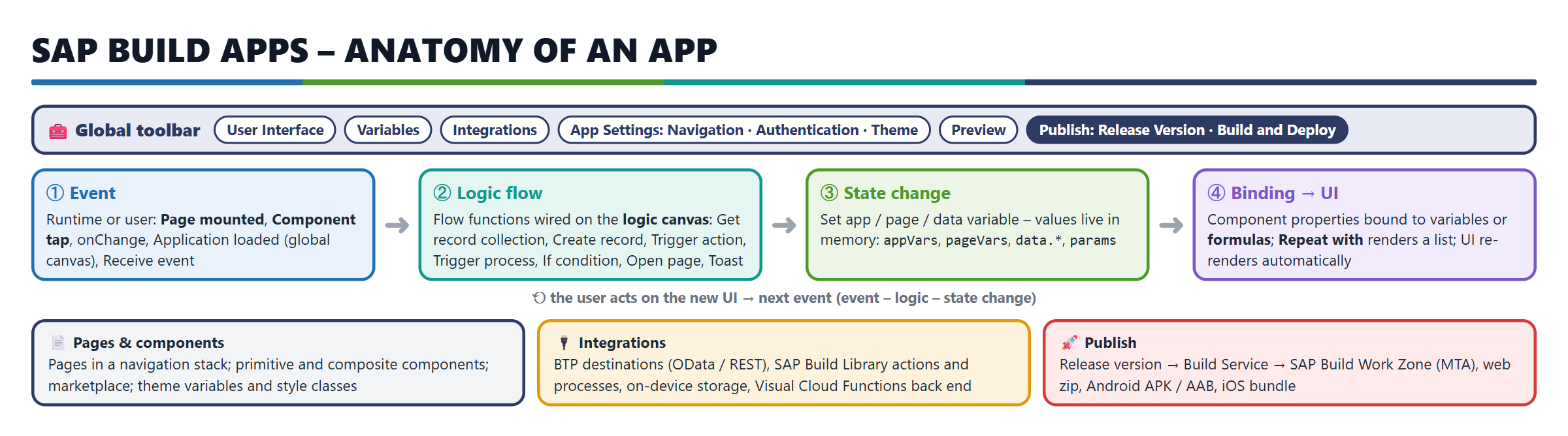
Toolbar entry | What it contains |
|---|---|
User Interface | UI canvas, component library, page and component properties, the logic canvas for the selected element |
Variables | App, page, data and translation variables and page parameters |
Integrations | Data resources: BTP destinations, SAP Build Library (actions, processes), on-device storage, cloud functions, classic data entities |
App Settings | Navigation (native navigation menu, header bar), Authentication (SAP BTP authentication), Theme (colours, theme variables, fonts), Help |
Preview | Preview portal: web preview and the SAP Build Apps preview app for phones |
Publish | Create a Release Version (numbered version with release notes) and Build and Deploy (Build Service) |
- Undo / Redo reverses up to 100 changes; a context menu on the canvas or layout tree offers cut, copy, paste, duplicate, wrap in container and select parent.
- Team rule: when several developers work on one app, each works on a different page – changes on a page do not appear for others in real time and can overwrite each other.
Part 3 – User interface: pages, components, binding and theming
Concept | What it is | ABAP / Fiori analogy |
|---|---|---|
Page | One screen with its own components, page variables, data variables and logic; pages form a navigation stack | Dynpro / Fiori view |
Primitive component | Single UI element mapped to one runtime control: text, input field, button, image, icon, container | Control |
Composite component | Built from primitives (for example a list item or card); editable in the component template editor, styles in the style editor; can define custom events | Reuse component / fragment |
Marketplace | View components, flow functions and data resources from the SAP Build Apps team; installed items appear on the Installed tab (standard plan) | Reuse library |
Data component | Component with data logic built in, mapped to a data resource – no page data variable needed | Smart control |
Binding | A property is bound to a static value, variable, formula or data field; changes flow both ways for inputs | UI5 model binding |
3.1 Binding in practice
- Choose the binding icon next to a property → binding editor → binding type (static text / number, app or page variable, data variable, formula, output of another node, currently repeated value).
- Repeat with renders one component instance per list item; inside it the currently repeated property value (in formulas
repeated.current) points to the current item. On the canvas three striped placeholder instances show that the component repeats. - A preview value shows realistic text on the canvas while the real value comes from a binding at runtime.
- Style properties bind only to theme variables; using theme variables and style classes instead of fixed values keeps the app consistent and easy to re-theme.
3.2 Navigation and page state
- Open page pushes a page onto the stack, Navigate back removes the top page, Replace page swaps it. Pages kept in the stack keep their page and data variables; a page opened twice has two independent instances.
- Plan the app before building: SAP's guideline is that much more than about 20 pages usually means static instead of dynamic content (one detail page fed by an ID instead of one page per record) or too many functions in one app.
Part 4 – Logic: events, flow functions and the logic canvas
All logic follows the pattern event → logic → state change: an event fires (Page mounted, Component tap), wired flow functions run (Get record collection, Take photo), their result changes the app state (Set page variable), and bindings re-render the UI. The logic canvas opens at the bottom of the UI canvas for the selected page or component (Add logic to …); wires go from outputs (right) to inputs (left), and one output can trigger several nodes.
Event category | Events |
|---|---|
Application lifecycle | Application loaded (global canvas) |
Page lifecycle | Page mounted (page added to the stack, also on browser refresh), Page focused, Page blurred, nav-bar item clicked |
Component | Component tap, onChange, onFocus, onBlur; custom events of composite components |
Variable / other / custom | Variable events, App brought to foreground via URL, Receive event triggered by Trigger event |
Core flow function group | Flow functions |
|---|---|
Navigation | Open page, Navigate back |
Variables | Set app variable, Set page variable, Set data variable |
Dialog / View | Toast, Alert, Confirm; Show spinner, Hide spinner |
Data | Get record, Get record collection, Create record, Update record, Replace record, Delete record; HTTP Destination request (any request to an integrated destination, also multipart file upload) |
Device | Scan QR / barcode, Take photo, GPS location |
Utility / Advanced | Delay, If condition; JavaScript, Receive event, Trigger event |
Integration | Trigger action; Trigger process, Get process attributes, Retrieve instances, Update instance; Run cloud function; Authenticate with SAP BTP |
4.1 Good logic practice
- DRY with events: put reusable logic once on the page's main logic canvas behind a Receive event named after its purpose ("Refresh data") and call it with Trigger event; logic needed on every page goes to the global canvas, which is always active.
- Error handling as you go: every data node has a success and an error output – show a toast or an error text, and use a page variable such as
showSpinnerto show progress and disable buttons while a request runs. - Debugging: in the web preview use the browser developer tools (Network tab for failing requests, Console for Debug log output); on Android read logs with
adb logcat, on iOS use Toast or Alert. Remove debug logs that expose data before release – they also run in the built app. - Own flow functions (By me tab) and composite flow functions can be edited in isolation mode; marketplace flow functions show a badge when updates exist.
Part 5 – Variables and formulas
Variable type | Scope and use | Formula reference |
|---|---|---|
App variable | Whole app – settings, logged-on user info, environment flag | appVars.name |
Page variable | One page instance – inputs, visibility flags, spinners | pageVars.name |
Data variable | One page; schema from the data resource, default logic included. Types: collection of data records (GET all), single data record (GET one, needs an ID), new data record (empty object for a create form) | data.SalesOrders |
Page parameter | Read-only text values passed with Open page, usually an ID; on the web they appear in the URL, so a refresh re-opens the page correctly | params.orderId |
Translation variable | Texts per language (needs the paid edition) | translation reference |
System / sensor / theme variables | Predefined: device, runtime ( | systemVars.runtime |
- Keep each value in the smallest scope; more than 20–30 app variables is a design smell. Group related values into one object or list variable.
- A new app or page variable can copy the schema of another variable, an action, a data entity or a process (From existing schema).
- Do not change a data variable's type after you start using it; Reset data variable logic restores the generated fetch logic.
5.1 Formulas
Formulas are an Excel-like expression language usable almost anywhere a value is bound. Operators: + - * /, %, &&, ||, !, comparisons, and the conditional cond ? a : b. Function groups include text, math, statistics, date and time, lists and objects, utility, colour and cryptography. Names with spaces need brackets (data["Job List"]), so use CamelCase.
|
Part 6 – Data and integrations
The Integrations tab defines where records come from. Each enabled source becomes a data entity (or action / process) with a schema; logic reads and writes it with the data flow functions or data variables.
Integration type | Use it for | Notes |
|---|---|---|
BTP destination – OData | S/4HANA and other OData services: entity sets and fields read from | Needs SAP BTP authentication; production choice |
BTP destination – REST API | REST services: install the integration, then add REST API data entities with entity path and capabilities (list, retrieve, create, update, delete) | Also for uncategorised destinations and functions |
SAP BTP Destination REST API (classic data entity) | Configure each API call (list, retrieve, create, update, replace, delete) on a destination | Same pattern as Universal REST API |
SAP Build Library – actions | Actions published from an action project (page 06); call with Trigger action | Reuse the same API wrapper as processes and Joule |
SAP Build Library – processes | Start and query SAP Build Process Automation processes | Only the latest published version is visible |
Cloud functions | Visual Cloud Functions back end of an Application Backend project | Standard plan |
On-device storage | Per-user data on the phone or in the browser, works offline | Users sharing a browser share the data |
Universal REST API integration | Quick tests against public APIs | Direct call from the client – credentials would be visible; not for business data |
6.1 Destinations for SAP Build Apps
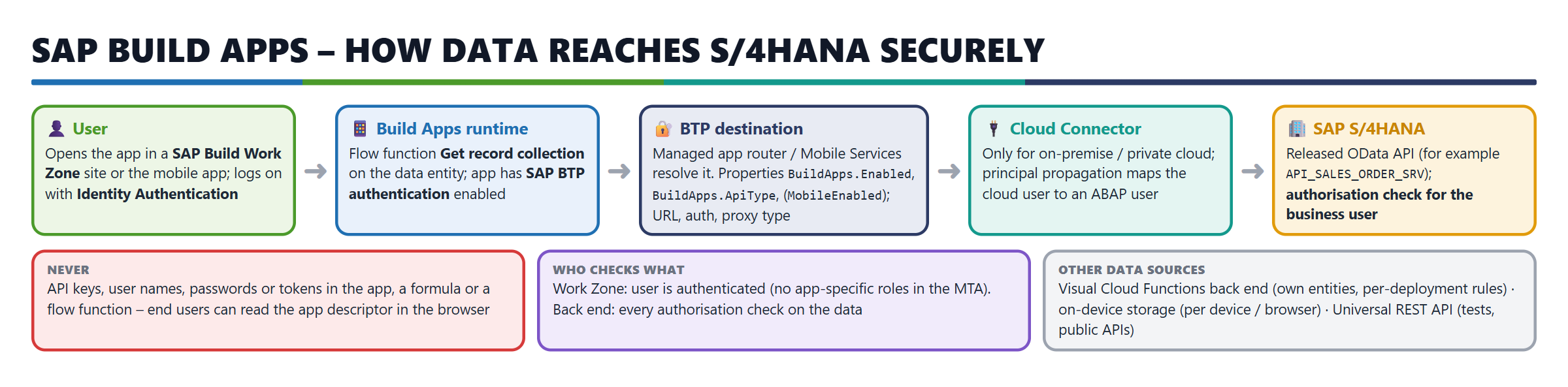
The destination is created by the BTP administrator in the subaccount (→ see BTP Foundations › 03 · BTP Services, Identity & Connectivity) and made discoverable with additional properties (values in lower case). Typical destination for the S/4HANA sales order API:
|
- Other properties per scenario:
isCatalog = truefor catalog-type destinations such as S/4HANA; custom HTTP request headers can be configured for OData and REST destinations and bound in the data flow functions. - On-premise systems are reached through the Cloud Connector; the SAP Build Apps connectivity proxy endpoints for your region may need an allow list on the customer network.
- Never hard-code API keys, user names, passwords or tokens in the app, a formula or a flow function – the app descriptor is readable by end users. Keys belong in the destination service.
6.2 Starting processes and calling actions
- Processes: release a business process, publish the version to the library in the lobby, enable SAP BTP authentication, then Integrations › Add Integration › SAP Build Library and Enable Process. The Process Automation service destination (
sap_process_automation_service_user_access) needsBuildApps.Enabled = true(andMobileEnabled = truefor mobile). - All trigger types (API, form, event) can be integrated, but Trigger process and Get process attributes work only for processes with an API trigger; Retrieve instances filters by status, subject, business key, started by and more; Update instance changes an instance status.
- Actions: enable a published action from the SAP Build Library, add Trigger action to the logic, choose the action, the BTP destination to run it on and the input parameters; the node's output carries the action result.
6.3 Visual Cloud Functions (no-code back end)
An Application Backend project creates a cloud-deployed back end without code: entities with fields (and virtual fields calculated by formulas), functions with visual logic, deployments, a data browser and version control. Apps use it via Integrations › Cloud Functions and the flow function Run cloud function (output: outputs["Execute cloud function"]).
- Authorisation rules per deployment are based on the logged-in user and groups from Identity Authentication; data is stored in a tenant-specific database with encryption at rest.
- Not designed for large payloads such as binary files; versioning of back-end projects is not supported.
- Standard plan only. For business data and logic prefer a CAP or RAP back end behind a destination; to move off, export each entity as CSV in the data browser and import it into a CAP project.
Part 7 – Authentication and security
7.1 SAP BTP authentication in the app
- Enabled by default for new apps (App Settings › Authentication). An authentication page with preconfigured logic is added automatically and opens for unauthenticated users; it uses the flow functions Authenticate with SAP BTP and Dismiss initial view.
- Required for BTP destinations, actions, processes, cloud functions and generated pages. For mobile users it additionally needs SAP Mobile Services (Part 8).
- Plain Web builds (zip download) are disabled while SAP BTP authentication is on – authenticated web apps are deployed to SAP Build Work Zone.
7.2 Who controls what
Layer | Mechanism |
|---|---|
Lobby (design time) | XSUAA roles RegistryAdmin (full lobby administration, all projects), RegistryDeveloper (create and view projects), BuildAppsAdmin, BuildAppsDeveloper (create SAP Build Apps projects) – grouped into role collections |
Project | Viewer, Developer, Administrator per project; creator is always administrator; grants to e-mail or wildcard |
Design time login | Identity Authentication; the ID token must carry |
Deployed web app | Authentication by SAP Build Work Zone; the generated MTA has no app-specific roles – every authenticated Work Zone user can open the app |
Data | Destinations with principal propagation; the back end does all authorisation checks |
Back end (VCF) | Authorisation rules per deployment, enforced at runtime |
- Audit log (SAP Audit Log service): project creation, deletion and access changes, import / export, subscription events, Visual Cloud Functions deployments and access-list changes. SAP Build Apps itself offers no functions for processing personal data.
- Multitenant SaaS: customer apps isolated at schema level; builds run in short-lived isolated containers; assets in tenant-specific paths.
- The preview app uses the developer's own session – any destination call runs with the developer's identity, so never share the preview with other users.
- Built apps contain open-source components: rebuild regularly with the latest runtime version in the Build Service to pick up security fixes (back-end runtimes update automatically).
Part 8 – Preview, build and deploy
- Preview: Preview button → web preview in the browser, or install the SAP Build Apps preview app (iOS / Android) and log on by scanning the QR code / PIN of the preview portal. Saved changes appear immediately. Preview is for testing only.
- Release version: Publish › Create a Release Version saves a numbered version with release notes – the unit that is built, transported and restored.
- Build Service: Publish › Build and Deploy → create a build configuration per target, choose the runtime version and a build version number, start the build.
Target | How | Result / prerequisites |
|---|---|---|
SAP Build Work Zone | Configuration with image assets, optional title, subtitle, icon, supported devices, launch behaviour and up to 20 custom HTTP response headers (security, caching) → Build → Deploy (CF API endpoint, org, space) | MTA deployed to the HTML5 Application Repository, served by the managed app router; needs SAP BTP authentication, a Work Zone subscription, CF environment and Space Manager role |
Web (zip) | Configuration target Web → build → download | Static web app for your own hosting; only without SAP BTP authentication |
Android | Package identifier, URL scheme, APK (testing) or AAB (Google Play), keystore for signing | Android SDK 34+, devices Android 14+ with 64-bit CPU (as of 2026) |
iOS | Bundle identifier, URL scheme, Apple Team ID; download and sign on a Mac | Apple Developer Program; devices iOS 18+ (as of 2026) |
8.1 Mobile apps and SAP Mobile Services
- Mobile apps that use BTP connectivity need SAP Mobile Services: entitlement of at least one unit of the Mobile Services resources plan,
MobileEnabled = trueon every destination (and onSAP-Build-Apps-Runtime), then Enable SAP Mobile Services in the Build Service with CF API endpoint, org and space. - If the app uses cloud functions, add a dependency in Identity Authentication: application
{app id}→ dependencysap-build-apps-api→ API SAP Build Apps backend projects. - End users see a first-time setup: EULA, logon with Identity Authentication, an app passcode, notifications.
8.2 Manual deployment and adding the app to a Work Zone site
|
- Find the app under HTML5 Applications in the BTP cockpit and copy its URL (remove the version suffix).
- In the Work Zone Content Manager create an App (URL, semantic object
default, actionopen, title, icon), a Catalog, a Group and a Role; assign the role to a site and to users (role collection); optionally enable SAP Mobile Start. Work Zone content in depth: page 08. - Apps must be built in the subaccount they are deployed from – the build contains URLs to that subaccount's destinations. Import the project into the target subaccount first.
Part 9 – Lifecycle, transport and the path forward
- Transport: integrate SAP Build Apps with SAP Cloud Transport Management, create a release version in DEV, choose Transport on the version in the lobby, approve the import in the TMS queue into the target lobby, then build and deploy there. Back-end projects have no versioning yet.
- Export / import from the lobby moves projects between tenants manually (for example from a free to a standard subaccount).
- Migration off the standalone product: SAP offers a transformation of the exported web app
.mtarinto a React or SAPUI5 project (ticket on component CA-LCA-ACP); the result covers the UI only, needs review and back-end wiring, and is continued in SAP Business Application Studio / SAP Build Code. - Back-end data from Visual Cloud Functions moves to CAP through CSV export and import (Part 6.3).
- Architect decision today: new low-code web apps → SAP Build Apps on build-default; new mobile apps → MDK or native SDKs in SAP Build Code; transactional Fiori apps → Fiori elements on CAP or RAP.
Part 10 – Worked example: the order status app
Sales reps want to check the status of their sales orders in the browser and from the Work Zone site, and start the approval process for an order that is blocked by the credit check.
- Lobby → Create → Application → Frontend → Web & Mobile Application → name
OrderStatus. - Integrations → Add Integration → BTP Destinations →
S4H_SALES_ORDER→ enable theA_SalesOrderentity → test it with Browse data. - Variables → add a data variable
SalesOrdersof type collection of data records on the list page; its default logic fetches the records when the page is mounted. Add a filter property, for example the sales organisation. - User Interface → list item with Repeat with
data.SalesOrders; title bound torepeated.current.SalesOrder, description to the formula"Net value: " + repeated.current.TotalNetAmount. - Component tap → Open page
OrderDetailwith page parameterorderId; the detail page uses a single data record variable keyed byparams.orderId. - On the detail page a button Request approval → Trigger process for the API-triggered Sales Order Approval process (page 03) with the order number; toast on success, error text on failure.
- Preview in the browser, then Publish → Create a Release Version → Build and Deploy → SAP Build Work Zone; add the app to the sales site (page 08) and transport it to production with Cloud TMS.
10.1 Common mistakes and tips
- Calling S/4HANA through the Universal REST API with basic authentication in the app – use a destination with principal propagation so the user's own authorisations apply.
- Building validation and posting logic in the client – keep it in the back end (RAP / CAP) and let SAP Build Apps only call the API.
- Destination created in the cockpit but not visible:
BuildApps.Enabled/BuildApps.ApiTypemissing or not in lower case; for processes the property is missing on the Process Automation destination. - Process not offered in the library: the version was released but not published; or Trigger process used on a form-triggered process.
- Forgetting role collections: developers need the lobby / Build Apps roles (via IdP groups) before the first logon, and Work Zone users need the app's role.
- Generate Pages missing: the tenant's Generative AI switch in the Control Tower is off, or the app has no enabled destination entity (limit: 100 requests per user per month).
Part 11 – Interview questions
Q1. What is SAP Build Apps and what is its status today?
SAP's low-code builder for web and native mobile apps (formerly SAP AppGyver): drag-and-drop UI, visual logic flows, formulas, data through BTP destinations. Since 23 March 2026 it is deprecated as a standalone product; existing contracts keep access for their term – check SAP's guidance for the Web & Mobile Application project type (build-default plan: web apps). Standalone contracts run until they end; the free editions ended on 30 September 2026.
Q2. What can the build-default plan not do compared with the standard plan?
Native mobile builds, Visual Cloud Functions back ends, the marketplace, custom JavaScript and some design-time functions are standard-plan only – which is also why standalone projects cannot be imported into a build-default tenant.
Q3. Explain how logic works in SAP Build Apps.
Event → logic → state change: an event such as Page mounted or Component tap triggers flow functions wired on the logic canvas; their results are written to variables; component properties bound to those variables re-render automatically. Reusable logic sits behind Receive event nodes, app-wide logic on the global canvas.
Q4. Which variable types exist and when do you use which?
App variables (whole app), page variables (one page instance), data variables (page-scoped, schema from a data resource: collection, single record, new record), page parameters (read-only text passed on navigation, in the URL on the web), translation, system and theme variables. Keep values in the smallest scope.
Q5. How does SAP Build Apps connect to S/4HANA securely?
Through an SAP BTP destination with BuildApps.Enabled and BuildApps.ApiType, the Cloud Connector for on-premise and principal propagation, with SAP BTP authentication enabled in the app. Credentials stay in the destination; the back end performs the authorisation checks.
Q6. A deployed SAP Build Apps app in Work Zone – who can open it and who protects the data?
Every authenticated user of the Work Zone tenant who sees the app's tile can open it; the generated MTA carries no app-specific roles. Visibility is steered through Work Zone roles, and the data is protected by the back end through principal propagation.
Q7. How do you start an SAP Build Process Automation process from an app?
Release the process and publish the version to the library, add BuildApps.Enabled to the Process Automation destination, enable SAP BTP authentication, integrate the process from the SAP Build Library and call Trigger process – which works only for API-triggered processes; Retrieve instances and Update instance query and change instances.
Q8. What are Visual Cloud Functions and when would you avoid them?
A no-code back end (entities, functions, deployments, authorisation rules) for SAP Build Apps, standard plan only. Avoid them for business data that belongs in S/4HANA, for large or binary payloads and where you need versioning – use CAP or RAP behind a destination.
Q9. How is an SAP Build Apps app deployed and moved to production?
Create a release version, build it in the Build Service for SAP Build Work Zone (MTA into the HTML5 Application Repository, served by the managed app router) and add it to a site; mobile targets produce APK / AAB or an iOS bundle. Transport the release version with Cloud TMS and build it again in the target subaccount, because builds point to that subaccount's destinations.
Q10. What does a mobile SAP Build Apps app need to reach SAP systems?
SAP Mobile Services: the resources plan entitlement, MobileEnabled on the destinations, Mobile Services enabled in the Build Service, and for cloud functions a dependency to the SAP Build Apps API in Identity Authentication; users log on with IAS and set a passcode.
Q11. Scenario: the sales team wants a quick app to check order status. Which tool and why?
SAP Build Apps on the build-default plan: few screens, read-only plus one action to start the approval process, data through the released sales order API via a destination with principal propagation, deployed to the Work Zone site. If it needed complex posting logic, offline sync of large data or a native mobile app, CAP / RAP with Fiori elements or MDK in SAP Build Code would fit better.
Q12. A customer has many apps in SAP Build Apps standalone. What do you advise?
Inventory the apps by type: web apps without back ends can be rebuilt in a build-default tenant or transformed from the .mtar into React / SAPUI5 code through SAP support; mobile apps move to MDK or native SDKs; Visual Cloud Functions data moves to CAP via CSV. Plan before the contract ends, because afterwards no new standalone instances can be provisioned.
🏠 Start Here · ◀ 01 · Overview & Lobby · 03 · Processes & Triggers ▶ · Sections: CORE ABAP | OOPS ABAP | ABAP on HANA | Clean Core | RAP | ABAP Points | SAP Fiori | SAPUI5 | Mobile Development (MDK) | BTP Foundations | BTP Development | CAP | SAP Build | ABAP on BTP | Integration Suite | SAP Business AI | SAP BASIS | Security | SAP SDLC
Functional: FICO ABAP | TRM ABAP | VIM | SAP BIS | SD ABAP | MM ABAP | PP ABAP | QM ABAP | PM ABAP | PS ABAP | EWM | TM ABAP | GTM ABAP | EHS ABAP | HR ABAP | BW | SAP Datasphere | SAP Business Data Cloud | SAP MDG | SAP Analytics Cloud | SAP Ariba | SAP CX | SAP IBP