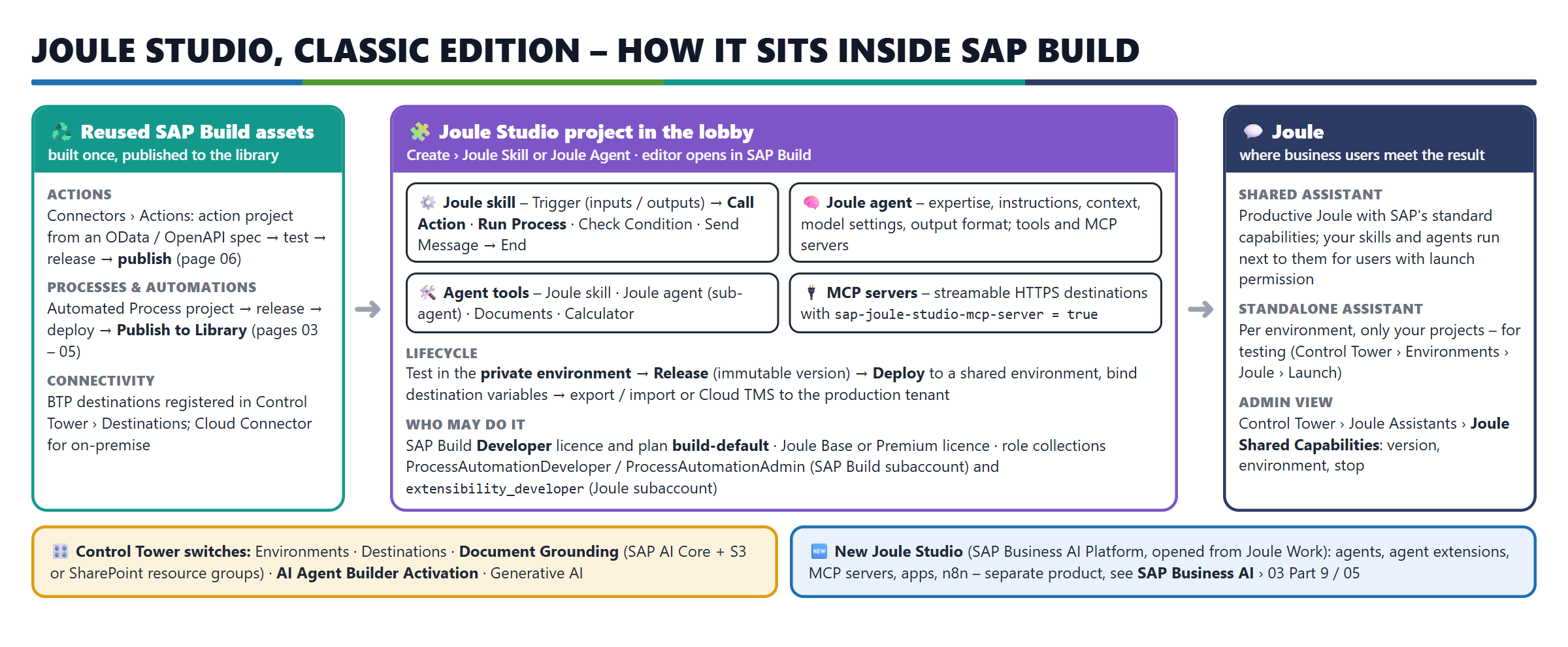
Joule Studio is where you extend Joule, SAP's AI assistant, with your own Joule skills (deterministic flows) and Joule agents (LLM-driven, goal-oriented). The edition that is part of SAP Build – today called Joule Studio, classic edition – lives in the SAP Build lobby, uses SAP Build projects, environments and the Control Tower, and reuses what you already built in SAP Build: actions (page 06) and processes and automations of SAP Build Process Automation (pages 03 – 05). This page explains Joule Studio as part of SAP Build: set-up and licences, projects and building blocks, how skills and agents reuse actions and processes, a worked example for the Sales Order Approval scenario, the lifecycle from private environment to the productive Joule, and the commercial status and the move to the new Joule Studio. The skill and agent editors in full detail, two more worked examples and governance: SAP Business AI › 03 Joule Studio; the new Joule Studio and the C_JSD certification: SAP Business AI › 03 Part 9 and › 05. Joule across all SAP Build capabilities: page 01 Part 6. Facts are as of November 2026.
Part 1 – Joule Studio in SAP Build: editions, set-up and licences
Why it matters: users already talk to Joule in SAP S/4HANA, SuccessFactors or SAP Build Work Zone. When Joule cannot do a company-specific task – "show my blocked orders", "start the approval for order 4711" – Joule Studio adds it without a new app: the skill or agent is deployed into the same Joule, next to SAP's delivered capabilities.
Joule Studio, classic edition | Joule Studio (new) | |
|---|---|---|
Where | SAP Build lobby, objective Joule Skill (page 01 Part 2.2) | Build layer of the SAP Business AI Platform, opened from Joule Work |
What you build | Joule skills (skill builder) and Joule agents (agent builder) | Agents, agent extensions, MCP servers, apps, n8n workflows |
How | Visual editors; AI-assisted agent configuration ("vibe coding"); a CLI in the Joule development guide | Intent-based development, low-code builder or pro-code ( |
Runtime | Customer-managed, with your SAP Build tenant and Joule instance | SAP-managed Joule Studio runtime |
Status (Nov 2026) | Fully supported; existing projects keep running; migration optional | General availability rolling out in phases |
- Older material (2025) says just "Joule Studio in SAP Build" with a skill builder and an agent builder – that is today's classic edition. Everything below is about the classic edition unless it says "new Joule Studio".
1.1 Prerequisites
Prerequisite | Detail |
|---|---|
SAP Build with plan build-default | SAP Build Process Automation in the build-default plan; a tenant on the older standard plan of Process Automation cannot host Joule Studio – a new build-default subscription is needed |
SAP Build Developer licence | Active user (developer) licence to build, test and deploy; available in all four commercial models (subscription, BTPEA, Pay-As-You-Go, CPEA) – page 01 Part 5 |
Joule licence | Joule Base or Joule Premium (Premium includes AI units). Joule for Developers and Joule for Consultants are different licences and do not activate Joule Studio |
Joule set up | Joule in the target landscape with SAP Cloud Identity Services – Identity Authentication; Joule and SAP Build may sit in different global accounts but must use the same IAS tenant |
Formation / booster | Joule Studio is provisioned through the formation that links Joule, the IAS tenant and the SAP Build Process Automation tenant; SAP offers a booster for it (page 01 Part 3) |
Browser | Google Chrome or Microsoft Edge only |
Partners | Test, demo and development: Pay-As-You-Go for SAP BTP TDD with fair-use limits (recommended) or a subscription TDD developer licence, plus a TDD Joule Base licence |
1.2 Roles
Role | Subaccount | Needed for |
|---|---|---|
ProcessAutomationDeveloper | SAP Build | Create, edit and release Joule Studio projects (and processes) |
ProcessAutomationAdmin | SAP Build | Environments, Control Tower, permissions |
ProcessAutomationParticipant / Expert / Delegate | SAP Build | Only when skills start processes whose tasks users work on or monitor |
extensibility_developer | Joule | Develop, compile and deploy Joule custom capabilities |
end_user | Joule | Use Joule |
- Assign roles to IAS groups, not to single users. A deployed skill becomes visible only for users or groups with whom the environment is shared (Control Tower › Environments).
1.3 Control Tower settings that matter for Joule Studio
Control Tower area | Purpose |
|---|---|
Environments | Private environment per developer for tests; shared environments (created by ProcessAutomationAdmin) for deployment; Joule tab to launch the standalone Joule |
Destinations | Register the BTP destinations that actions, MCP servers and grounding use |
Document Grounding | Resource groups that index documents for the agent's Documents tool |
AI Agent Builder Activation | Must be on before a project that contains an agent can be deployed |
Generative AI | Tenant switch for generative AI design-time features in SAP Build (page 01 Part 6) |
Joule › Joule Assistants | Tab Joule Shared Capabilities: all custom skills and agents deployed across environments (Part 5) |
Part 2 – Projects and building blocks
2.1 Creating a project
- Lobby › Create › project type Joule Skill or Joule Agent › Next › name and description › Review › Create. The project description is for information only – Joule routes by the description of each skill and agent, not of the project.
- Inside the project: Create › Joule Skill or Create › Joule Agent. One project can hold several skills and agents; sub-agents must be in the same project (Part 3).
- Project members, versions, export / import work as for every SAP Build project (page 01 Part 2.3).
2.2 Skill or agent?
Criterion | Joule skill | Joule agent |
|---|---|---|
Purpose | One predefined, often repetitive operation | Multi-step, adaptive problem solving |
Logic | Deterministic flow you draw | LLM plans which tools to call (reason – act – reflect – adjust) |
Integration | APIs through SAP Build actions; processes | Several tools: skills, sub-agents, documents, calculator, MCP servers |
Resource use | Minimal | Higher – LLM calls |
Patterns | Navigation, data access, system transactions, workflow start, decision assistance | Goals that need judgement, documents or several systems |
- Rule of thumb: if you can draw the flow, build a skill; build an agent only when the steps depend on reasoning, and let it orchestrate small skills. In depth: SAP Business AI › 03 Part 2.
2.3 Building blocks at a glance
Block | Elements (classic edition) | Details |
|---|---|---|
Skill | Trigger (skill inputs and outputs, Allow Joule to generate a response, Allow skill to be started directly by a user) → steps Call Action, Run Process, Check Condition, formulas, Send Message → End | SAP Business AI › 03 Part 3 |
Agent | Name and description (routing), Expertise, Instructions, Additional Context (sections start with | SAP Business AI › 03 Part 4 |
Agent tools | Joule skill, Joule agent (sub-agent), Documents, Calculator | Part 3 |
MCP servers | Separate tab of the agent: external tools exposed through Model Context Protocol | Part 3 |
- Model names with the postfix
-minimal,-lowor-autotell the reasoning effort: nearly none, very basic, or decided by the model. The base model writes the answer, the advanced model plans and selects tools.
2.4 AI-assisted agent configuration ("vibe coding")
- Describe the agent in natural language; Joule's assistant fills expertise, instructions and additional context, adds or removes existing skills, the calculator and the document grounding tool, and can start test mode.
- It cannot create, change or delete skills or data types, add MCP servers, change model settings, output format or triggers, and it cannot release, deploy or transport – lifecycle stays in the visual editor.
- Deprecated: SAP's documentation states that the generative AI features in Joule Studio, classic edition are deprecated and no longer available from January 2027. Plan agents so that they can be maintained in the visual editor.
Part 3 – Reusing SAP Build assets: actions, processes, documents and MCP servers as tools
Joule Studio does not have its own connectivity layer: it reuses the SAP Build assets of the same tenant. That is the main reason it sits in SAP Build – an action written for a process is the same action a skill calls.
3.1 Actions – the API calls
- An action project (Connectors › Actions) wraps an OData or OpenAPI specification as actions with typed inputs and outputs – created, tested, released and published to the library exactly as for processes (page 06).
- In a skill, Call Action › Browse All Actions › choose the published action; map inputs from skill inputs and read the outputs. A destination variable stands in for the real destination; it is bound when you test (private environment) and when you deploy (shared environment), so one released version can point at DEV, QA or PROD back ends.
- Destinations must be registered in Control Tower › Destinations. Prefer principal propagation for user requests so that S/4HANA authorisations apply (page 06 Part 4).
3.2 Processes and automations – Run Process
- Build the process in an Automated Process project (page 03) with process inputs, then Release → Deploy → in the lobby's Versions tab Publish to Library. Only published processes are visible in Joule Studio.
- In the skill: + › Run Process › Browse All Processes › map each process input from a skill input.
- Fire and forget: the skill passes input values to the process but cannot read process outputs back. Confirm with a Send Message step ("Approval started") and check the instance in Monitoring › Process and Workflow Instances.
- Good fit for long-running work: start an approval or an automation asynchronously instead of waiting in the skill (SAP's guidance for operations that take more than a few seconds).
- When a skill contains processes or automations, the environment also shows their artefacts: automation launchers, triggers, agent management, alert handlers, variables, API keys, visibility scenarios, processes and workflows.
3.3 Skills and agents as agent tools
- Joule skill as a tool: add existing skills or create one from the Add Tool dialog; a skill can call another skill of the agent. Messages defined in the skill builder do not run when the skill is used as a tool – the agent writes the answer. Switch off Allow skill to be started directly by a user for skills only the agent should use.
- Human in the loop per skill tool: Edit Tool › Require user confirmation before running, plus a Prompt for Generated Response that tells the LLM how to phrase the request; the user answers with the quick replies Yes, proceed / No, cancel (text only). Independently of this switch, the agent can ask for missing inputs if the instructions say so.
- Joule agent as a tool (sub-agent): a main agent delegates to specialised agents. Limits: no cyclic calls, sub-agents run synchronously one after the other, at most 5 direct and 25 sub-agents in total, all in the same project; an agent can only be deleted when it has no parent.
- Calculator: arithmetic, comparisons, logical and mathematical functions – use it instead of letting the LLM calculate amounts.
3.4 Documents – grounding in company documents
- Control Tower › Document Grounding › Add resource group: choose an SAP AI Core destination (additional property
sap-joule-studio-document-grounding-ai-core = true) and an object store destination (sap-joule-studio-document-grounding-object-store = true) for Amazon S3 or Microsoft SharePoint. - Statuses: Completed (usable), Pending, Error; Refresh re-runs the grounding pipeline. The same destination names must exist in the SAP Build and the Joule subaccount.
- In the agent: Add Tool › Documents › name, description, resource group.
3.5 MCP servers in the classic edition
Topic | Rule |
|---|---|
Destination | Streamable HTTPS destination registered in the Control Tower, additional property |
Authentication | Client credentials (recommended), basic, JWT bearer; OAuth2 client credentials only without redirect. Not supported: interactive OAuth authorisation code, SAML bearer, principal propagation |
Configuration | Agent › MCP Servers › Add MCP Server: name and description (the agent decides by it), optional path (default |
Security | Connect only trusted, explicitly authorised MCP servers; restrict data to what the agent needs; control changes to endpoints |
- Consequence for design: an MCP tool runs with a technical identity, not as the business user. Keep user-specific S/4HANA access in skills with actions and principal propagation.
Part 4 – Worked example: a Sales Order Approval assistant
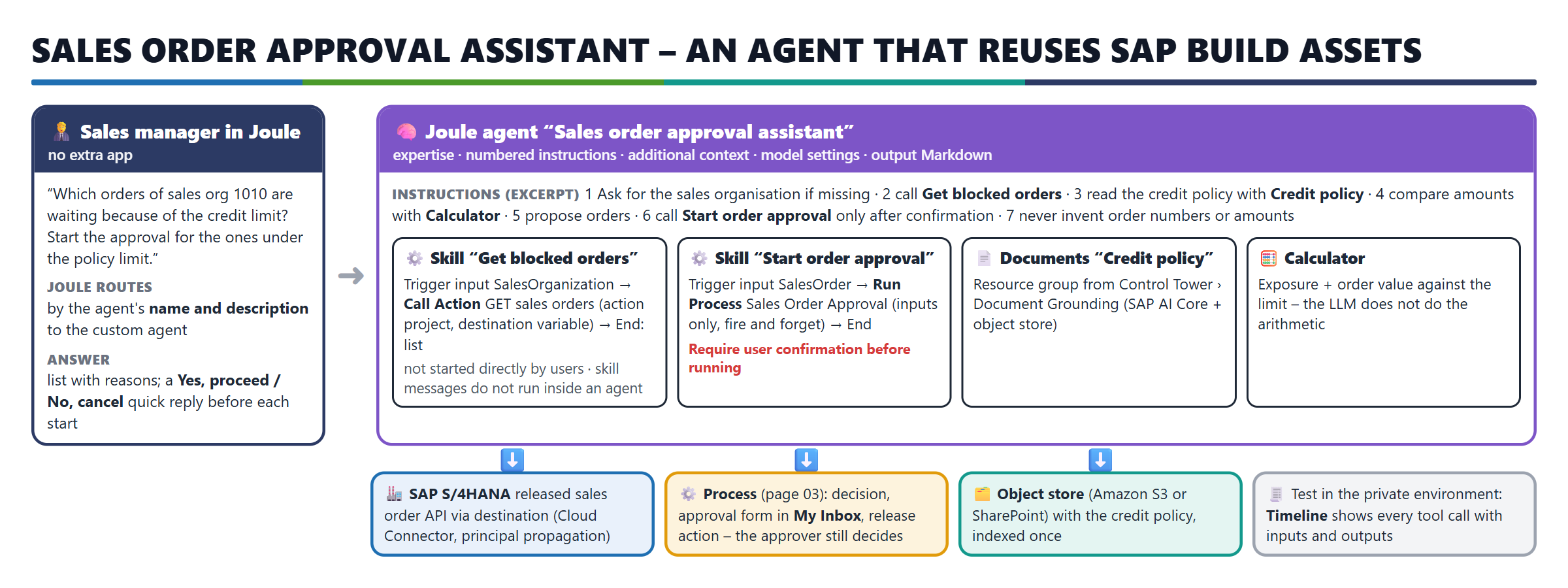
Requirement: a sales manager asks Joule which orders of a sales organisation wait because of the credit limit and starts the approval process (page 03 Part 8) for those the credit policy allows – without opening another app. The decision itself stays in the process and its approval form in My Inbox.
Artifact | Built in | Configuration |
|---|---|---|
Action project Sales Order | Connectors › Actions (page 06) | GET on |
Process Sales Order Approval | Automated Process project (page 03) | Process inputs SalesOrder, SalesOrganization; decision, approval form, release action; released, deployed, published to library |
Skill Get blocked orders | Joule Studio project | Input SalesOrganization (required); Call Action with destination variable |
Skill Start order approval | Same project | Input SalesOrder; Run Process Sales Order Approval; as agent tool with Require user confirmation before running |
Documents Credit policy | Control Tower › Document Grounding | Resource group on the policy PDF in the object store |
Agent Sales order approval assistant | Same project | Expertise, numbered instructions, the two skills, Documents and Calculator as tools, output Markdown |
4.1 Agent instructions (excerpt)
|
4.2 Test scenarios
- No blocked orders; one order; many orders; sales organisation missing; user says No, cancel; back end not reachable; policy document not grounded (status Pending).
- In the private environment check the Timeline: right tools in the right order, no Start order approval without confirmation, process instance visible in Monitoring.
- Without an agent: the two skills alone already cover "list" and "start" deterministically. The agent adds value only through the policy reading and the recommendation – an example of "skills first, agent on top".
Part 5 – Lifecycle: test, release, deploy, transport, operate
Step | What happens | Watch out |
|---|---|---|
Test | Test button in the skill or agent editor › choose the private environment and destinations › chat; agents show a Timeline of every tool call | Activate the private environment first (Control Tower › Environments) |
Release | Creates an immutable project version; Show Project Version switches to it | You deploy versions, never the draft |
Deploy | Project Overview › released version › Deploy › environment › set variable values (destination variables) › Deploy | Needs the Joule role Extensibility_Developer; agents need AI Agent Builder Activation on |
Shared vs standalone Joule | Depending on the environment: the Shared assistant (productive Joule with SAP's standard capabilities, for users with launch permission) or a Standalone assistant (only this environment's projects) | Deploying to Shared without testing can create conflicts with SAP's standard capabilities |
Share | Share the environment with user groups or users | Max. 10 user groups or 5 users, not a mix of both |
Try | Control Tower › Environments › environment › Joule tab › Launch › New Conversation | Deployment to production Joule takes some time |
Transport | Test tenant → production tenant with SAP Cloud Transport Management, or export the validated project and import it; then create shared environments in production and redeploy | Destinations with the same names in the target |
Operate | Control Tower › Joule › Joule Assistants › Joule Shared Capabilities: name, type, environment, version, last update, Stop; warnings for capabilities only in Joule (Undeploy) or only in Joule Studio (Redeploy) | Support component CA-BLD-JLE |
5.1 Governance in an SAP Build centre of excellence
- Descriptions are routing: unique, business-language descriptions per skill and agent; review them like API names so that custom capabilities do not overlap with each other or with SAP's.
- Ownership: every skill and agent has an owner, test cases and a change log; agents also a fixed set of evaluation prompts that are re-run after every change of instructions, tools or model.
- Reuse first: one action project per API and published processes are shared by processes, apps and Joule; do not duplicate API logic in skills.
- Least privilege: developer roles only for builders, environments shared only with the target groups, write operations behind confirmation and back-end authorisations.
Part 6 – Commercials, status and the move to the new Joule Studio
Topic | State (November 2026) |
|---|---|
Skill builder | A base AI feature (SAP News, AI release highlights Q3 2026) |
Agent builder | Generally available since December 2025; free until December 2026, then a premium AI feature consumed in AI units |
Licences | SAP Build Developer licence + Joule Base or Premium (Part 1.1) |
AI-assisted design time | Generative AI features of the classic edition (vibe coding) deprecated, not available from January 2027 (Part 2.4) |
New Joule Studio | Announced at SAP Sapphire (May 2026); general availability in phases; SAP-managed runtime, consumption-based on runtime usage; design time free under fair-use limits; running custom agents free through December 2026 for selected customers |
Transition | SAP: new AI-first use cases should use the new Joule Studio; classic-edition projects keep running and can be migrated when the customer wants; SAP announced guided transition support for customers that built on SAP Build and the classic edition |
- Prices, promotions and their end dates change often – check the SAP Discovery Center and the contract instead of quoting numbers.
6.1 Classic or new – how an architect decides in 2026
Situation | Recommendation |
|---|---|
Existing skills and agents that work | Keep them on the classic edition; plan maintenance in the visual editor (vibe coding ends January 2027) |
Simple deterministic tasks on SAP Build actions and processes | Classic skill builder – base AI, reuses the SAP Build assets directly |
New complex agent solution, pro-code team, agent extensions of SAP-delivered agents | New Joule Studio (SAP Business AI › 03 Part 9; certification C_JSD: › 05) |
Data residency or sovereign-cloud requirements | Check which runtime is available where: classic runs with your SAP Build and Joule tenants, the new runtime is SAP-managed |
- Whatever the edition: the back end decides quality. Released, narrow APIs (RAP or CAP services, S/4HANA APIs), principal propagation and deterministic business logic in S/4HANA or a process stay the ABAP and CAP developer's job.
Part 7 – Interview questions
Q1. What is Joule Studio and how does it relate to SAP Build?
The environment for extending Joule with custom skills and agents. The classic edition is a component of SAP Build: it is opened from the SAP Build lobby, uses SAP Build projects, environments and the Control Tower and reuses SAP Build actions and processes. The new Joule Studio is a separate build layer of the SAP Business AI Platform, opened from Joule Work.
Q2. What do you need before a developer can build a Joule skill?
SAP Build with the build-default plan (not the old Process Automation standard plan), an SAP Build Developer licence, a Joule Base or Premium licence, Joule set up with the same IAS tenant, the formation that provisions Joule Studio, roles ProcessAutomationDeveloper in SAP Build and extensibility_developer in Joule, registered destinations, and Chrome or Edge.
Q3. How does a Joule skill call SAP S/4HANA?
Through a Call Action step on a published action project for the released API. The skill uses a destination variable that is bound to a registered BTP destination at test and deployment time; for on-premise via the Cloud Connector, ideally with principal propagation so the user's S/4HANA authorisations apply.
Q4. How can a skill start an SAP Build Process Automation process, and what is the limitation?
With the Run Process step on a process that was released, deployed and published to the library; skill inputs are mapped to process inputs. It is fire and forget: the skill cannot read process outputs, so it confirms the start and the process continues on its own (approval in My Inbox).
Q5. Which tools can a classic-edition agent use?
Joule skills, other Joule agents as sub-agents (max. 5 direct, 25 in total, same project, no cycles), the Documents tool for grounding, the Calculator, and MCP servers configured on their own tab.
Q6. How do you add human in the loop to an agent?
Edit the skill tool and switch on Require user confirmation before running, with a prompt that tells the LLM how to phrase the request; the user answers Yes, proceed or No, cancel. In addition the instructions say when to ask for missing inputs and forbid write actions without confirmation.
Q7. How is document grounding set up?
In Control Tower › Document Grounding you add a resource group with an SAP AI Core destination and an object store destination (Amazon S3 or SharePoint), each with its Joule Studio property; when the status is Completed you add a Documents tool with that resource group to the agent.
Q8. What are the rules for MCP servers in the classic edition?
A streamable HTTPS destination with sap-joule-studio-mcp-server = true, URL not ending in /mcp, the same name in the SAP Build and Joule subaccounts, preferably client-credentials authentication; principal propagation, interactive OAuth and SSE are not supported. Only trusted servers, clear descriptions, a namespace and a suitable timeout.
Q9. Describe the lifecycle of a Joule Studio project.
Test in the private environment (timeline for agents), release an immutable version, deploy it to a shared environment with variable values (Extensibility_Developer role, AI Agent Builder Activation for agents), share the environment with groups, try it in the standalone Joule, move to production with Cloud Transport Management or export / import, and monitor in Joule Shared Capabilities.
Q10. What is the difference between the shared and a standalone Joule assistant?
The shared assistant is the productive Joule with SAP's standard capabilities; custom skills deployed there are available to all users with launch permission and can conflict with standard capabilities if not tested. A standalone assistant belongs to one environment and contains only its projects – for testing.
Q11. Scenario: sales managers want to start credit approvals from Joule. How do you design it?
Reuse the Sales Order action project and the published Sales Order Approval process. Build a skill Get blocked orders (Call Action) and a skill Start order approval (Run Process, user confirmation), then an agent that reads the credit policy (Documents), compares amounts with the Calculator and calls the start skill only for selected orders. The approval decision stays in the process.
Q12. What changes for Joule Studio customers at the end of 2026?
The agent builder becomes a premium AI feature after its free period until December 2026 (the skill builder stays base AI), the classic edition's generative AI design-time features are no longer available from January 2027, and the new Joule Studio rolls out in phases with an SAP-managed, consumption-based runtime. Existing classic projects keep running; new AI-first use cases go to the new Joule Studio, with guided transition support from SAP.
🏠 Start Here · ◀ 09 · SAP Build Code · 11 · Interview Questions ▶ · Sections: CORE ABAP | OOPS ABAP | ABAP on HANA | Clean Core | RAP | ABAP Points | SAP Fiori | SAPUI5 | Mobile Development (MDK) | BTP Foundations | BTP Development | CAP | SAP Build | ABAP on BTP | Integration Suite | SAP Business AI | SAP BASIS | Security | SAP SDLC
Functional: FICO ABAP | TRM ABAP | VIM | SAP BIS | SD ABAP | MM ABAP | PP ABAP | QM ABAP | PM ABAP | PS ABAP | EWM | TM ABAP | GTM ABAP | EHS ABAP | HR ABAP | BW | SAP Datasphere | SAP Business Data Cloud | SAP MDG | SAP Analytics Cloud | SAP Ariba | SAP CX | SAP IBP