SAP Build Code is the pro-code part of SAP Build: an AI-assisted cloud development environment for SAP Cloud Application Programming Model (CAP), SAP Fiori / SAPUI5 and mobile (MDK) developers. It combines SAP Business Application Studio (BAS) with the most-used SAP BTP services and SDKs, opens from the SAP Build lobby and adds Joule and the agentic AI Chat that generate data models, services, logic, tests, UIs and sample data. It does not replace CAP or Fiori – it is a faster way to create the same projects, and the generated code is yours to review and own. This page covers what is in the product, set-up and plans, creating a project, the three kinds of AI help, a worked example (the Sales Order Approval portal), agentic coding with VS Code and MCP servers, and the architect's view. Portfolio, lobby and licensing: page 01; Work Zone, where the app is published: page 08; Joule Studio: page 10. CAP in depth: the CAP section; Fiori elements: SAP Fiori. Facts on plans and AI quotas are as of November 2026.
Part 1 – What SAP Build Code is (and is not)
Why it matters: a side-by-side extension of SAP S/4HANA normally needs a dev space, a CAP project, a Fiori app, an MTA, a HANA Cloud container, destinations, CI/CD and a transport route – a lot of set-up before the first line of business logic. SAP Build Code delivers these pieces pre-wired and adds AI generation on top. SAP announced it at SAP TechEd 2023; it has been generally available since March 2024 (page 01).
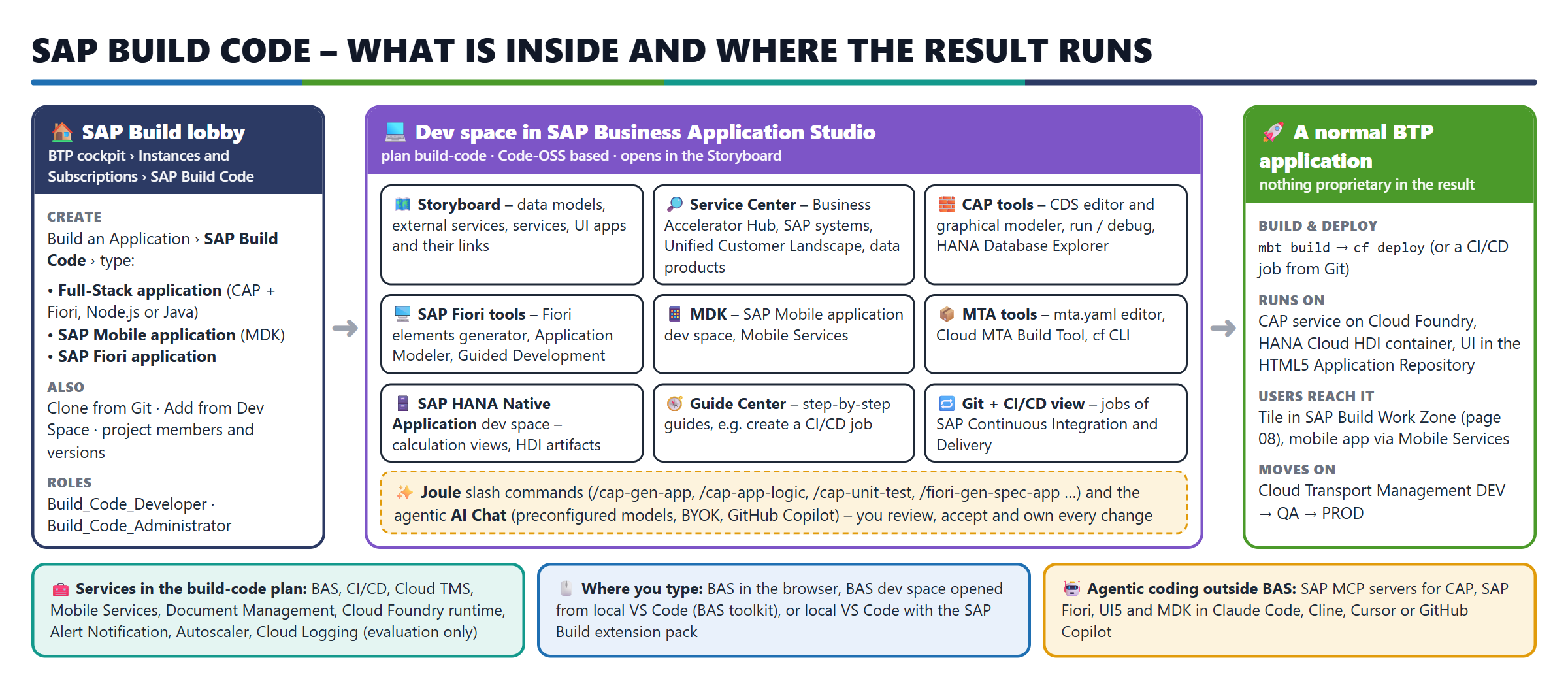
Part of SAP Build Code | What it gives you |
|---|---|
SAP Business Application Studio (plan build-code) | Code-OSS based cloud IDE; dev spaces with CAP tools, SAP Fiori tools, MTA tools, |
SAP Build lobby | Create, open, clone from Git, share and version projects next to Process Automation and Joule Studio projects (page 01 Part 2) |
Project types | Full-Stack application (CAP + Fiori, Node.js or Java), SAP Mobile application (Mobile Development Kit), SAP Fiori application – names of the tiles change between releases |
Storyboard | Graphical view of data models, external data models, services and UI apps and their connections; starting point for editors and wizards |
Service Center | Explore services of SAP Business Accelerator Hub, connected SAP systems, the Unified Customer Landscape and data products; add them to the project as external services |
Joule and AI Chat | Generate and edit CDS models, sample data, logic, unit tests, Fiori apps and SAPUI5 pages; agentic chat that explores services and builds whole apps (Part 4) |
Bundled BTP services | SAP Continuous Integration and Delivery, Cloud Transport Management, SAP Mobile Services, SAP Document Management, Cloud Foundry runtime, Alert Notification, Application Autoscaler, Cloud Logging (evaluation only); Destination, Connectivity, XSUAA, HTML5 Application Repository, Event Broker, Feature Flags and SAP Build Work Zone, foundation come with the BTP contract |
1.1 Typical use cases
- Side-by-side extensions of SAP S/4HANA and other SAP cloud solutions on released APIs and events (clean core) – for example a portal with its own data next to the sales order.
- SAP Fiori elements and freestyle SAPUI5 apps, including UIs on existing OData services of an ABAP system; the S/4HANA Cloud extensibility wizard creates User Interface Extensions in SAP Build Code (page 01 Part 7.1).
- Cross-platform mobile apps with MDK and SAP Mobile Services.
- SAP HANA native applications (calculation views, HDI artifacts) in the SAP HANA Native Application dev space.
- Multitenant SaaS applications with the SaaS Provisioning service.
1.2 SAP Build Code vs plain SAP Business Application Studio
Aspect | SAP Build Code | BAS standard-edition plan |
|---|---|---|
IDE | BAS with plan build-code (or build-default inside the unified SAP Build offering) | BAS with plan standard-edition |
Entry | SAP Build lobby, project templates, Guide Center | Dev Space Manager, template wizard |
Generative AI | Joule commands and AI Chat with preconfigured models (fair use, see Part 4) | AI Chat only with your own key (SAP AI Core, third-party LLM) or GitHub Copilot |
Services | CI/CD, Cloud TMS, Mobile Services, Document Management … entitled by the booster | Subscribe and configure each service yourself |
Result | The same CAP / Fiori / MDK projects and MTAs | The same |
- Not a new programming model: CAP stays CAP, Fiori elements stay Fiori elements. Everything you learned in the CAP and SAP Fiori sections applies unchanged.
- Not an ABAP tool: ABAP Cloud is developed in ABAP Development Tools (Eclipse, and ADT for VS Code); BAS also offers a Full-Stack ABAP Application dev space for RAP-based apps – ABAP on BTP and RAP sections.
Part 2 – Set-up, plans, roles and ways to work
2.1 Subscribing with the booster
- Global account › Boosters › Get started with SAP Build Code › Start. SAP recommends the booster over a manual set-up; each plan has its own booster.
- Scenario Create Subaccount → choose provider, region and entitlements → Add Users with the custom Identity Authentication tenant for platform users and applications (another identity provider breaks some services) → Finish → Navigate to Subaccount.
- Result: subscriptions to SAP Business Application Studio and SAP Build Code, a Cloud Foundry org and space, role collections assigned, a Cloud Logging entitlement (the instance is created at the first deployment).
- The booster does not create an SAP HANA Cloud instance – create it in SAP HANA Cloud Central before the first deployment of a CAP app with a database.
- Open it: subaccount › Services › Instances and Subscriptions › SAP Build Code → the SAP Build lobby.
2.2 Plans and roles
Plan (SAP Build Code) | Use | Notes |
|---|---|---|
standard | Productive development with pre-configured services | BAS plan build-code |
free | Evaluation | Restricted dev spaces, community support only, no SLA (BAS plan build-code-free) |
trial | Personal exploration for about 3 months | US10 region; own booster; not for team development |
Role collection | Assigned by the booster to | Allows |
|---|---|---|
Build Code Developer | Developers (plus Subaccount Viewer and Cloud Foundry space developer) | Develop in SAP Build Code |
Build Code Administrator | Administrators (plus Subaccount Administrator, org and space manager) | Administration such as exporting and deleting user data |
- Inside the unified SAP Build offering the same tools run with BAS plan build-default; all BAS roles map to the SAP Build Developer licence (page 01 Part 5). Since 2026 the build-default plan requires SAP Cloud Identity Services – Identity Authentication; subaccounts still on XSUAA log-on are asked to migrate.
2.3 Ways to work
Way | How | Good for |
|---|---|---|
Browser | BAS dev space opened from the lobby | Standard; nothing to install |
Local VS Code → cloud dev space | Extension SAP Business Application Studio toolkit (installs Remote Access for SAP Business Application Studio) › Connect Landscape › open the dev space | Your local editor, the dev space's tools and destinations; up to 2 dev spaces running at a time |
Local VS Code only | SAP Build, full-stack extension pack from the VS Code Marketplace (also on Open VSX) | Offline-style CAP / Fiori work with your own coding agent (Part 6) |
Part 3 – Creating a project: lobby, dev space, Storyboard and Service Center
3.1 From the lobby
- Lobby › Create › Build an Application › SAP Build Code › choose the type: Full-Stack application, SAP Mobile application or SAP Fiori application (the full-stack tiles distinguish Node.js and Java).
- Enter a name, pick the dev space SAP Build Code recommends (or another one from the Dev Space Manager) → Create → open the project: it starts in the Storyboard of BAS.
- Alternatives: Clone from Git for an existing repository, Add from Dev Space to bring an existing BAS project into the lobby (page 01 Part 2.2).
3.2 Dev space types
Dev space type | Use it for |
|---|---|
Full Stack Cloud Application | CAP (Node.js or Java) + Fiori; CAP tools, CDS graphical modeler, HANA Database Explorer, Java tools, MTA tools, Service Center |
Full-Stack Application Using Productivity Tools | Guided, more visual full-stack development with the Storyboard |
SAP Fiori | Fiori elements and SAPUI5 apps on Cloud Foundry, ABAP Cloud or SAP S/4HANA back ends |
SAP Mobile Application | MDK apps for iOS and Android with SAP Mobile Services |
SAP HANA Native Application | Calculation views, tables, SQLScript procedures, HDI deployment |
Full-Stack ABAP Application | RAP business objects with the ABAP Cloud model, remote ABAP modeling, local UI |
Basic | Basic tools only; add extensions yourself |
3.3 Storyboard and Service Center
- Storyboard – shows data models, external data models, services and UI apps with their links; from here you add entities, logic (Add Logic on a service: phase, standard events Create / Update), UI apps and open the Data Editor for initial data.
- Service Center – explores providers: SAP Business Accelerator Hub, SAP systems defined as destinations, the Unified Customer Landscape (systems of your formations) and data products shared with SAP HANA Cloud. Selecting a service adds its EDMX as a CAP remote service; authentication comes from the destination, never from the project.
- Guide Center – step-by-step guides, for example "Develop an Incident Management App" or "Create a CI/CD Job".
- Destinations for design time need
WebIDEEnabled = trueand aWebIDEUsagesuch asodata_genso BAS lists them (page 01 Part 3; set-up of destinations: BTP Foundations › 03).
Part 4 – AI in SAP Build Code: Joule commands and AI Chat
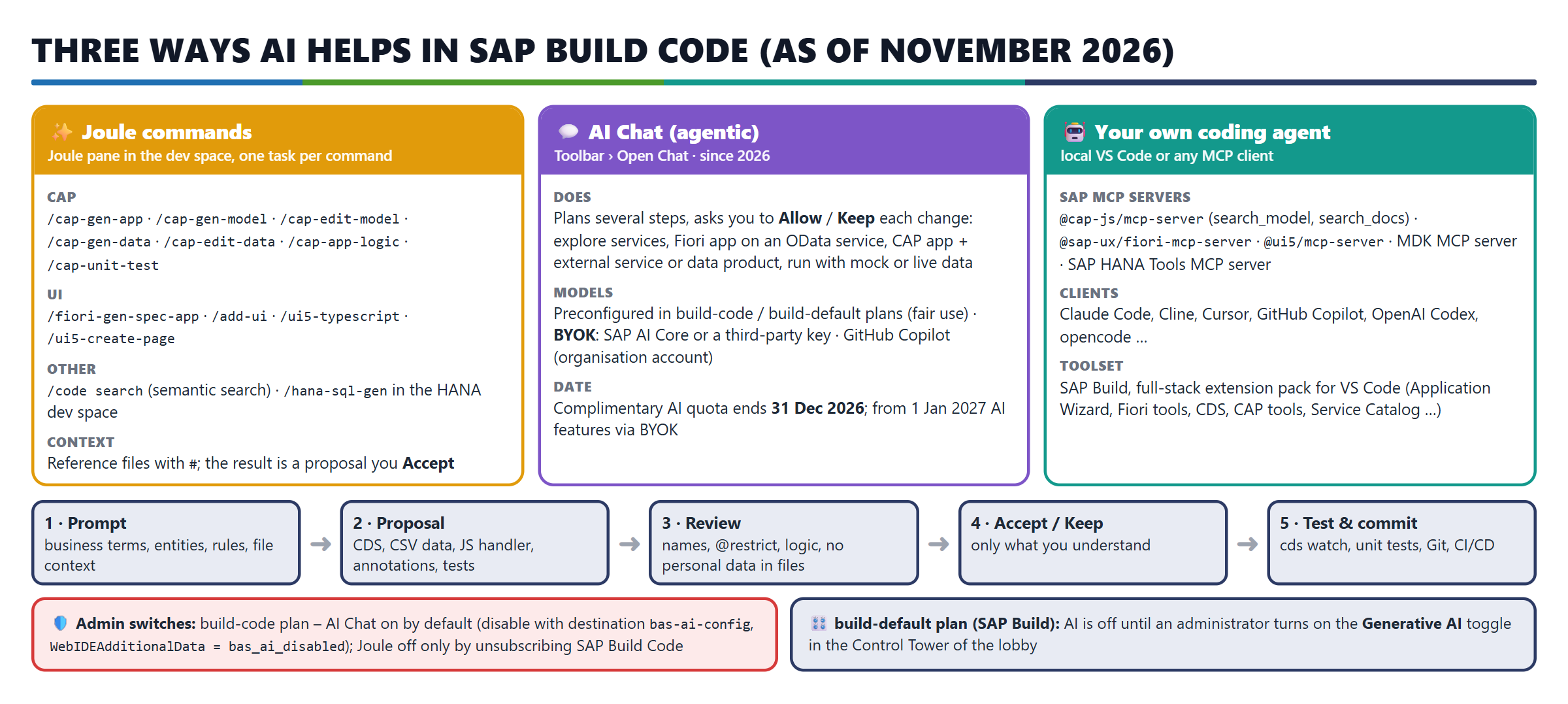
SAP Build Code offers AI help in three forms: Joule commands (one generator task per slash command), the agentic AI Chat (plans several steps and changes files after your approval) and – outside BAS – your own coding agent that uses SAP's MCP servers (Part 6). Whatever produces the code, the review loop is the same.
4.1 Joule commands
Command | What it does |
|---|---|
/cap-gen-app | Creates a CAP project from a description: |
| Creates only the data model and service · changes or reviews an existing model (reference the file with |
| Generates realistic sample data (CSV) · edits existing sample data |
/cap-app-logic | Adds or changes application logic such as validations and calculations in the service handler |
/cap-unit-test | Generates unit tests for the logic, positive and negative cases |
/cap-gen-fiori | Generates a project with sample data and one Fiori elements app |
/fiori-gen-spec-app | Fiori elements app from business requirements given as text or an image |
/add-ui | Adds a Fiori web or mobile UI to existing CAP services |
| Converts SAPUI5 code to TypeScript step by step · scaffolds a page with view, controller and route |
/code search | Semantic search over the indexed workspace |
/hana-sql-gen | SQL from natural language in the SAP HANA Native Application dev space |
- Command names come from SAP Learning and SAP tutorials (2025 – 2026) and change between releases – type
/in the Joule pane to see the current list. - Joule proposes; you choose Accept to write the code into the project. Joule uses your project files as context, so they must not contain personal data.
4.2 AI Chat – the agentic assistant (2026)
- Toolbar › chat menu › Open Chat. AI Chat shows a plan of actions and asks you to Allow or Keep each step (auto-approval of terminal commands can be switched on in Settings › Chat › Tools).
- SAP-documented scenarios: explore services and live data of a connected system; create an SAP Fiori app on an existing OData service and run it with live data; create a CAP app with a List Report and connect an external service; create a CAP app on a data product shared with SAP HANA Cloud and deploy it.
Model source | How | Notes |
|---|---|---|
Preconfigured models | Included in plans build-code and build-default | Limited use, per-user fair-use limits, may change or be withdrawn – not for production scenarios |
Bring your own key (BYOK) | Manage Models › Add Models › SAP AI Core or a third-party LLM provider, paste the service key | SAP AI Core needs the extended plan; model groups such as Claude Sonnet / Opus, GPT, Gemini Pro |
GitHub Copilot | Sign in with the organisation's GitHub account | Personal GitHub accounts are not supported |
- Date to remember: the complimentary AI usage quota of BAS in SAP Build Code and SAP Build expires on 31 December 2026; from 1 January 2027 AI features continue through BYOK (SAP BAS What's New, October 2026). Since October 2026 the generative AI features of the HANA Database Explorer in SAP Build Code run on GitHub Copilot.
4.3 Administration of AI features
Plan | Default | How to change it |
|---|---|---|
build-code (SAP Build Code) | AI Chat and Joule on | AI Chat off: destination |
build-default (SAP Build) | AI off | Administrator turns on the Generative AI toggle in the Control Tower of the lobby |
Other BAS plans | AI Chat on, but needs a key or Copilot | Same |
Part 5 – Worked example: the Sales Order Approval portal
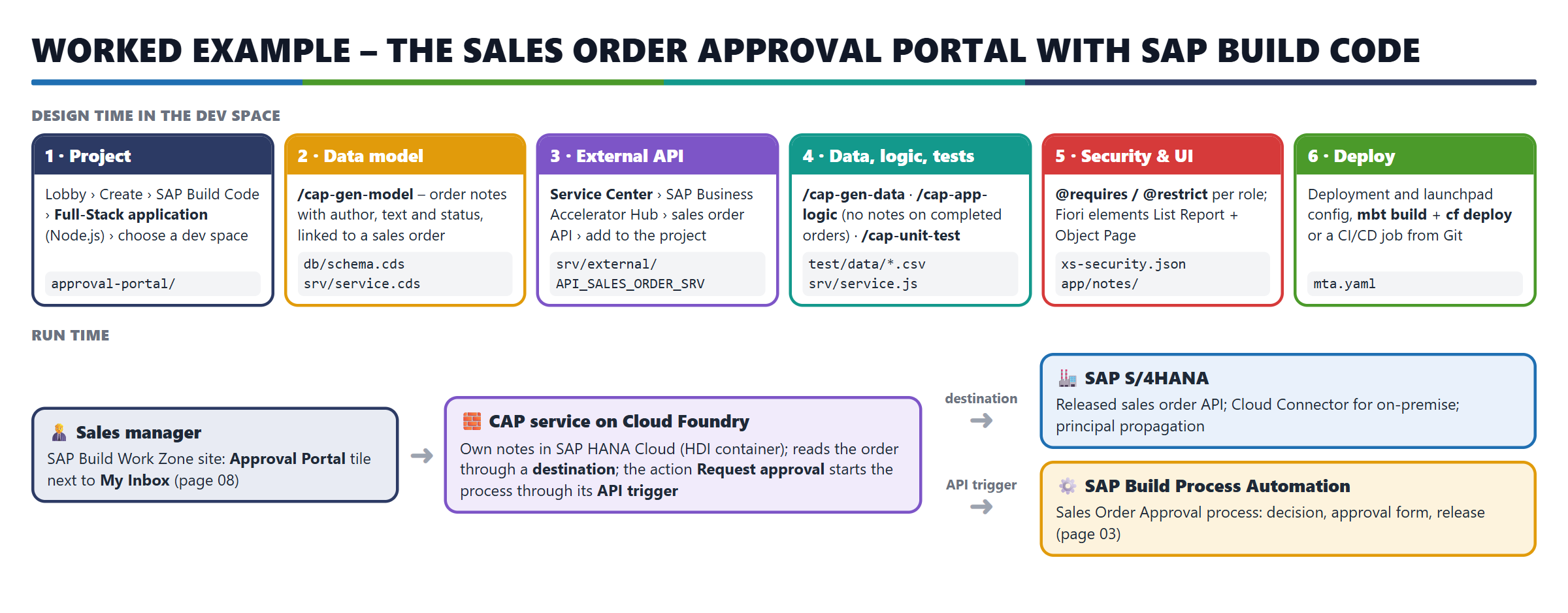
Requirement: sales managers want an Approval Portal where they keep notes on sales orders that wait for credit approval, see the order data from S/4HANA and start the approval process of page 03 with one action. Notes on completed orders are not allowed. The portal is published in the Work Zone site next to My Inbox.
5.1 Steps
- Project: Lobby › Create › Build an Application › SAP Build Code › Full-Stack application (Node.js) › dev space.
- Data model:
/cap-gen-modelwith the prompt "Create a data model for order notes linked to S/4HANA sales orders with author, text, created at and approval status." Reviewdb/schema.cdsbefore you accept it – names, types, keys, the use ofcuidandmanaged. - External API: Storyboard › Service Center › SAP Business Accelerator Hub › the released sales order API (
API_SALES_ORDER_SRV) › add it; CAP creates a remote service, the destination is bound at deployment (CAP section; actions on the same API in Process Automation: page 06). - Sample data, logic, tests:
/cap-gen-datafor notes;/cap-app-logicwith "Reject a note when the sales order is completed";/cap-unit-test; run the app withcds watchand mocked users. - Security and UI:
@requires/@restrictfor the roles SalesRep and SalesManager; a Fiori elements List Report + Object Page on the service (/add-uior the Fiori generator). - Deploy: add deployment and launchpad configuration,
mbt buildandcf deploy(or a CI/CD job), refresh the HTML5 content provider and add the app to a role and the Work Zone site (page 08). - Process start: an action
requestApprovalon the service calls the API trigger of the Sales Order Approval process through a destination (page 03 Part 8, page 06 Part 8).
5.2 The core files after review
|
|
- Review rule: Joule's output is a proposal. Check CDS names,
@requires/@restrict, handler logic, error codes and the fields read from S/4HANA exactly as you would review a colleague's commit – AI-generated code is your code. - Typical generated mistakes: missing authorisation annotations, reading the whole remote entity instead of the needed columns, sample data with real-looking personal names, tests that only cover the happy path.
Part 6 – Agentic coding outside BAS: VS Code and SAP MCP servers
At SAP TechEd 2025 (November 2025) SAP released an SAP Build extension pack for VS Code and local MCP servers so that professional developers can use their own AI coding assistants on SAP frameworks with the same guardrails.
Tool | What it is | Typical use |
|---|---|---|
SAP Build, full-stack extension pack | Free VS Code extension pack: Application Wizard, SAP Fiori tools, SAP CDS Language Support, CDS Graphical Modeler, CAP tools, Service Catalog (OData V2 / V4), Connection Manager for SAP Systems; also on the Open VSX registry | CAP and Fiori development on the laptop |
CAP MCP server ( | Open-source MCP server; tools | Agent understands services, entities and correct CAP APIs |
SAP Fiori MCP server ( | Part of SAP's open-ux-tools | Generate and change Fiori elements apps from prompts |
UI5 MCP server ( | UI5-aware tools and API knowledge | Fewer invented SAPUI5 APIs |
MDK MCP server | Listed by SAP for SAP Build next to the three above (page 01 Part 2.5) | Mobile Development Kit projects |
SAP HANA Tools MCP server | In the SAP HANA Native Application dev space (September 2026): validate SQL, deploy HDI artifacts, create virtual tables | Use with GitHub Copilot in BAS or VS Code |
- Registration example from the CAP MCP server documentation:
claude mcp add --scope user cds-mcp -- npx -y @cap-js/mcp-server(Claude Code); the samenpx -y @cap-js/mcp-servercommand is entered in Cline, opencode, GitHub Copilot or OpenAI Codex. - The MCP servers give the agent context, not authority: deployment, destinations and authorisations stay in BTP. Keep secrets out of prompts and of
.cdsrc/package.jsonfiles the agent can read. - ABAP counterpart: the ADT MCP server and ADT for VS Code – SAP Business AI › 04 Joule for Developers.
Part 7 – Lifecycle, governance and the architect's view
7.1 Lifecycle
Step | Tool |
|---|---|
Source control | Git in BAS (clone, commit, push, pull requests); the lobby project points to the repository |
Build |
|
CI/CD | SAP Continuous Integration and Delivery: CI/CD view in BAS, job created with the Guide Center guide "Create a CI/CD Job", configuration in .pipeline/config.yml in the repository, builds triggered by Git webhooks |
Deploy |
|
Transport | SAP Cloud Transport Management: the pipeline uploads the MTA to DEV → QA → PROD nodes |
Operate | Cloud Logging (evaluation in SAP Build Code – productive use needs its own subscription), Alert Notification, Application Autoscaler |
7.2 Which tool for which job
Need | Choose | Why |
|---|---|---|
Own data, logic and Fiori UI next to S/4HANA | SAP Build Code (CAP + Fiori) | Side-by-side, clean core, full code control |
Logic that must run inside the ABAP core (own BO with S/4HANA data) | RAP in ADT (on-stack developer extensibility) | Same LUW and authorisations as the standard – RAP section |
Approvals, forms, rules, bots | SAP Build Process Automation (pages 03 – 07) | Low-code, business can maintain decisions |
A few simple screens for a known user group | SAP Build Apps (page 02) – check its standalone status first | Quick visual app; SAP deprecated the standalone product in 2026 |
Conversational task in Joule | Joule Studio (page 10) | Skills and agents call your CAP or S/4HANA APIs |
New AI-first app (agents, React front end, n8n) | New Joule Studio (SAP Business AI › 03 Part 9) | SAP positions it for new AI-first use cases; existing SAP Build projects keep running |
7.3 Governance tips
- Treat SAP Build Code projects like any professional code base: branch rules, code reviews, unit tests in the pipeline, security scans; the lobby does not replace Git.
- Decide the AI model strategy before 2027: who pays for BYOK keys (SAP AI Core extended plan or a third party), which models are approved, and whether AI Chat is disabled in sensitive subaccounts.
- Clean core: call only released APIs and events of S/4HANA; never write directly to ERP tables from BTP.
- Licence hygiene: BAS roles count as SAP Build Developer usage in the unified model – give them only to developers (page 01 Part 5).
Part 8 – Interview questions
Q1. What is SAP Build Code and how is it different from plain SAP Business Application Studio?
An AI-assisted development environment for CAP, Fiori, SAPUI5 and mobile developers: BAS with the build-code plan plus pre-configured BTP services (CI/CD, Cloud TMS, Mobile Services …), SAP Build lobby project templates, the Storyboard and Joule / AI Chat with preconfigured models. The result is a normal CAP / Fiori MTA that you review, test and deploy as usual.
Q2. How do you set up SAP Build Code?
Run the booster Get started with SAP Build Code (create subaccount, entitlements, users with the custom IAS tenant), check the subscriptions to BAS and SAP Build Code and the role collections Build Code Developer / Build Code Administrator, create an SAP HANA Cloud instance yourself, then open SAP Build Code from Instances and Subscriptions – the SAP Build lobby opens.
Q3. Which project types can you create and where do they open?
Full-Stack application (CAP + Fiori, Node.js or Java), SAP Mobile application (MDK) and SAP Fiori application, created in the lobby under Build an Application › SAP Build Code. The project opens in the Storyboard of a BAS dev space of the matching type.
Q4. Name some Joule commands and what they generate.
/cap-gen-app (schema, services and annotations), /cap-gen-model and /cap-edit-model (data model), /cap-gen-data (sample data), /cap-app-logic (handler logic), /cap-unit-test (tests), /fiori-gen-spec-app and /add-ui (Fiori UIs), /ui5-typescript (SAPUI5 to TypeScript). Joule proposes and you accept.
Q5. What is AI Chat and where do its models come from?
The agentic assistant in BAS that plans several steps – explore services, generate a Fiori or CAP app, add an external service or data product, run it – and asks you to allow each change. Models: preconfigured in the build-code / build-default plans under fair use, your own key for SAP AI Core or a third-party LLM, or GitHub Copilot with an organisation account. The complimentary quota ends on 31 December 2026; BYOK continues.
Q6. How do you treat code that Joule generates?
As a proposal: review CDS names, keys, @requires / @restrict annotations and handler logic like a colleague's commit, check what data is read from remote systems, run the generated and your own tests, keep personal data out of project files. AI-generated code is your code.
Q7. How does a SAP Build Code app reach SAP S/4HANA?
The Service Center adds the released API (for example API_SALES_ORDER_SRV) as a CAP remote service; at run time CAP calls it through a BTP destination, via the Cloud Connector for on-premise, ideally with principal propagation so the user's S/4HANA authorisations apply. No credentials in the project.
Q8. Scenario: build the Approval Portal for sales managers quickly. How?
SAP Build Code full-stack project: Joule drafts the notes data model and sample data, the Service Center adds the sales order API as a remote service, a reviewed handler blocks notes on completed orders, @restrict protects the roles, a Fiori elements List Report is generated; an action starts the Process Automation approval via its API trigger. Deploy the MTA and add the app next to My Inbox in the Work Zone site.
Q9. How can developers use their own AI coding agents with SAP frameworks?
With the SAP Build extension pack for VS Code and SAP's MCP servers – CAP (@cap-js/mcp-server with search_model and search_docs), SAP Fiori, UI5 and MDK – registered in Claude Code, Cline, Cursor, GitHub Copilot or similar. The servers add project and documentation context; deployment and authorisations stay in BTP.
Q10. How do you switch AI off in SAP Build Code for a sensitive subaccount?
AI Chat: create the destination bas-ai-config with WebIDEEnabled = true and WebIDEAdditionalData = bas_ai_disabled. Joule in the build-code plan can only be switched off by unsubscribing from SAP Build Code. In the SAP Build build-default plan AI is off until the Generative AI toggle in the Control Tower is turned on.
Q11. How do SAP Build Code projects move to production?
Git repository, SAP Continuous Integration and Delivery job (created from the Guide Center, .pipeline/config.yml, webhooks), MTA build, deployment to Cloud Foundry, and SAP Cloud Transport Management for DEV → QA → PROD. The lobby versions do not replace Git and the pipeline.
Q12. As an architect, when do you choose SAP Build Code instead of RAP, SAP Build Apps or Joule Studio?
SAP Build Code (CAP + Fiori) for side-by-side extensions with own data, logic and UI on released APIs; RAP when the logic must run in the ABAP core; SAP Build Apps only for a few simple screens; Process Automation for approvals and rules; Joule Studio for conversational tasks; the new Joule Studio for new AI-first agent apps. Often they combine – the portal in Build Code, the approval in Process Automation, a Joule skill on top.
🏠 Start Here · ◀ 08 · SAP Build Work Zone · 10 · Joule Studio ▶ · Sections: CORE ABAP | OOPS ABAP | ABAP on HANA | Clean Core | RAP | ABAP Points | SAP Fiori | SAPUI5 | Mobile Development (MDK) | BTP Foundations | BTP Development | CAP | SAP Build | ABAP on BTP | Integration Suite | SAP Business AI | SAP BASIS | Security | SAP SDLC
Functional: FICO ABAP | TRM ABAP | VIM | SAP BIS | SD ABAP | MM ABAP | PP ABAP | QM ABAP | PM ABAP | PS ABAP | EWM | TM ABAP | GTM ABAP | EHS ABAP | HR ABAP | BW | SAP Datasphere | SAP Business Data Cloud | SAP MDG | SAP Analytics Cloud | SAP Ariba | SAP CX | SAP IBP