Joule is SAP's generative AI assistant: one conversational entry point that understands a request in natural language, finds the right SAP application, data or document, and acts in the user's name. Since 2025 it is also the layer through which Joule Assistants and Joule Agents carry out multi-step work. This page covers what Joule does, where it runs, how agents work, how Joule is set up on SAP BTP, grounding with your own documents, security, limits and what developers and consultants do in a rollout. Building your own skills and agents: page 03 Joule Studio. Joule for developers: page 04. Status: November 2026.
Part 1 – What Joule does: the capability types
SAP groups Joule's abilities into four capability types. Agents (Part 3) come on top.
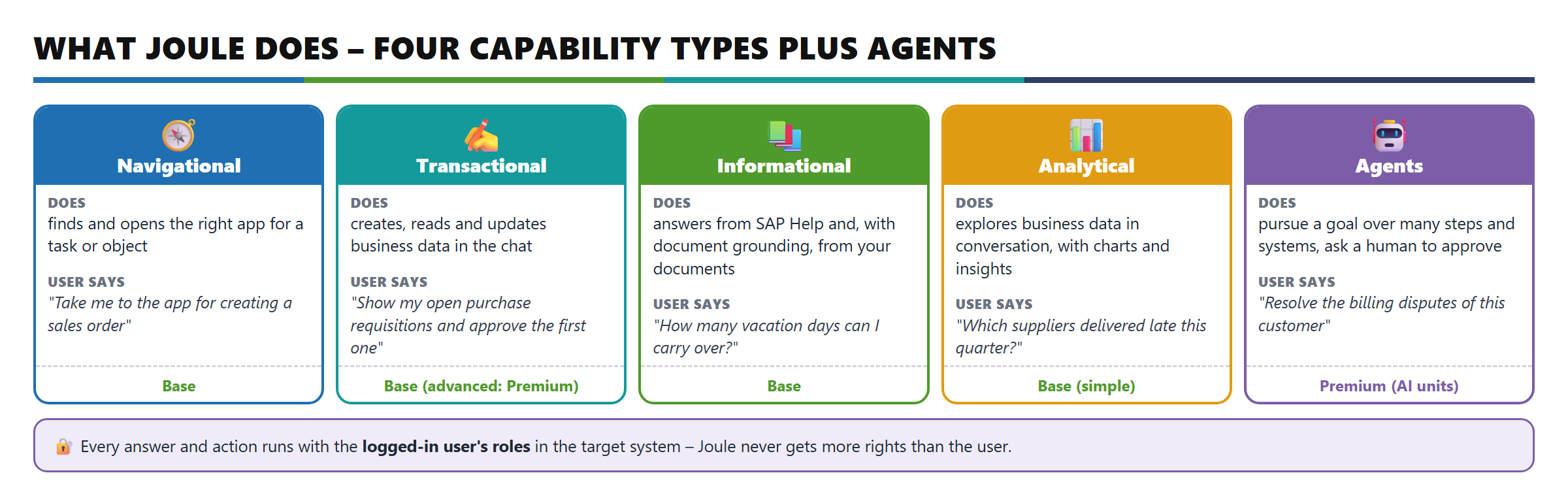
Type | What happens | Example prompt | Behind it |
|---|---|---|---|
Navigational | Joule proposes and opens the right Fiori app or page for a task or business object | "Where do I post a supplier invoice?" | App intents resolved through SAP Build Work Zone navigation |
Transactional | Create, read and update business data in the chat; results come back as UI cards with buttons | "Show my purchase requisitions waiting for approval" | Skills calling APIs (OData) of the connected system |
Informational | Answers questions from SAP Help documentation and, with document grounding, from the company's own documents | "What is our travel policy for hotels?" | Conversational search / retrieval-augmented generation |
Analytical | Explore business data in conversation; summaries, insights and charts | "Which cost centers are over budget this quarter?" | Analytical services of the application (e.g. SAC, embedded analytics) |
- Base vs Premium: navigational, informational, transactional and simple analytical capabilities are Joule Base (included in the cloud subscription). Advanced transactional features and agent actions are Premium and consume AI units (page 01 Part 5).
- Context awareness: Joule knows which app the user is in and which object is open, so "summarise this supplier's open items" works without typing the supplier number.
- Confirmation: for changes, transactional skills typically show the prepared data in a card and let the user confirm or edit it before anything is saved.
Part 2 – Joule across SAP products and channels
Joule is built into the SAP cloud portfolio – about 35 solutions in early 2026 by SAP's count. One Joule instance can serve several products for the same user ("unified Joule", Part 5).
Product | Typical Joule use | Notes |
|---|---|---|
S/4HANA Cloud Public Edition | Navigation to Fiori apps, transactional skills (e.g. sales orders, purchase requisitions), help answers | Natively integrated; most features arrive here first |
S/4HANA Cloud Private Edition | Navigational and transactional features listed in SAP Note 3523238 | RISE customers; connected through SAP BTP and Cloud Connector; more customer-managed setup |
SAP SuccessFactors | Employee and manager self-service, HR questions, assistants such as the Payroll or Recruiting Assistant (announced 2026) | First product with Joule (2023) |
SAP Ariba, Concur, Fieldglass | Procurement and expense tasks, sourcing and contract help | Spend management domain |
SAP Analytics Cloud, Datasphere | Natural-language analytics, modelling help | Joule in Datasphere GA Q1 2026 |
SAP Build, Work Zone | Joule in SAP Build for developers (page 04); Joule in Work Zone sites | Work Zone also provides Joule's navigation service |
More | IBP, Signavio, Integrated Product Development, Digital Manufacturing, Cloud ALM … | The list grows every quarter |
Channels
- Inside the application UI (Fiori launchpad, SuccessFactors home page, Ariba …), in SAP Build Work Zone sites and on mobile in the Joule Work mobile app (formerly SAP Mobile Start).
- Joule Work (announced at Sapphire 2026): a separate intent-based workspace for desktop, mobile and voice where users state goals and assistants delegate the steps to agents. The mobile app is generally available; the desktop app started in Early Adopter Care and is rolling out in phases.
- Microsoft 365: Joule is available inside Microsoft 365 Copilot and Microsoft Teams, and Joule can draw on Microsoft 365 information through Copilot (bidirectional integration, connected through SAP Cloud Identity Services and Microsoft Entra ID).
Part 3 – Skills, agents and assistants
Term | What it is | Who decides the steps | Example |
|---|---|---|---|
Skill | One defined task with clear inputs and a fixed sequence (call an API, show a card) | The designer of the skill | "Create a leave request for next Friday" |
Joule Agent | Goal + instructions + tools (skills, APIs, knowledge, other agents); an LLM plans and executes several steps and checks the result | The agent (LLM reasoning), within its tools and guardrails | Dispute Resolution Agent analyses an invoice dispute and proposes a fix |
Joule Assistant | Role-based coordinator (introduced Oct 2025) that works with one business role and orchestrates a team of agents | The assistant splits the goal and delegates | Payroll Assistant coordinates agents to prepare payroll runs and flag issues early |
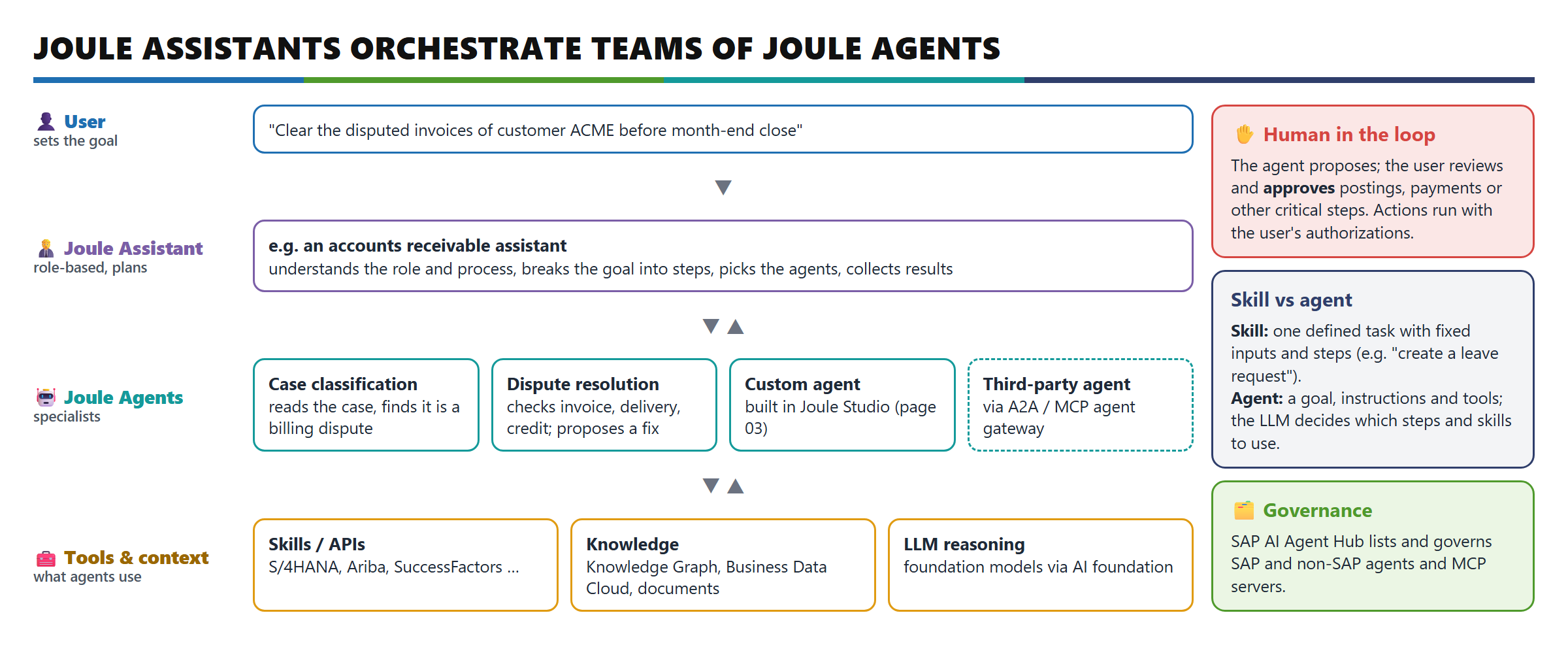
SAP-delivered agents and assistants (examples SAP has published)
- Finance: cash collection agent (announced Feb 2025), Dispute Resolution Agent (beta in S/4HANA Cloud Public Edition Q1 2026), Project Billing Price Verification Agent (beta Q2 2026).
- Service: case classification, Q&A and knowledge creation agents (announced Feb 2025).
- Spend: Expense Automation Agent (GA Q2 2026), Expense Report Validation Agent (GA).
- HR (SuccessFactors, announced May 2026): Payroll, Time, Core HR, Recruiting, Onboarding, HR Service and Workforce Upskilling Assistants.
- IT: S/4HANA custom code migration agent in Joule for Developers (GA Q2 2026, page 04).
SAP's figure at Sapphire 2026: more than 50 domain-specific assistants drawing on over 200 specialised agents, rolling out through 2026 and into 2027. Release status changes every quarter – the SAP Business AI release highlights on SAP News and the SAP Roadmap Explorer track it.
Part 4 – Agentic AI: multi-agent orchestration and interoperability
Agentic AI means AI that does not only answer but pursues a goal: it plans, uses tools, checks results and adapts. SAP's design is collaborative: specialised agents work together and with people in different roles, with Joule as the orchestrator.
- SAP's own example: a case classification agent recognises that a customer case is a billing dispute and hands it to the cash collection agent, which runs the dispute resolution – across customer service, finance and operations.
- Human in the loop: agents propose, people approve critical steps; every action runs with the user's authorizations (Part 6).
- Interoperability: Joule supports bidirectional agent-to-agent communication with external agent frameworks (SAP named Google Cloud and Microsoft). The open protocols are A2A (agent ↔ agent) and MCP (agent ↔ tool). SAP planned GA of bidirectional A2A for Q4 2026.
- Agent gateway (TechEd 2026): third-party agents can call Joule Agents through a governed gateway that enforces access control.
- Governance: SAP AI Agent Hub inventories and governs SAP and non-SAP agents and MCP servers (page 01 Part 3).
- Custom agents: built in Joule Studio – no-code or pro-code, deployed on the SAP-managed Joule Studio runtime (page 03).
Copilot (classic Joule) | Agent / assistant | |
|---|---|---|
Unit of work | One question or task | A goal with several steps |
Planning | Fixed skill flow | LLM plans and re-plans |
Scope | Usually one system | Across systems, SAP and non-SAP |
Human | Asks and confirms | Sets goal, approves critical steps |
Licence | Base (mostly) | Premium – agent actions consume AI units |
Part 5 – Architecture and setup on SAP BTP
5.1 Architecture
Joule is a SaaS application on SAP BTP. The customer subscribes to it in a BTP subaccount; SAP runs the AI behind it. The connected products contribute their Joule content (skills, navigation targets, agents).
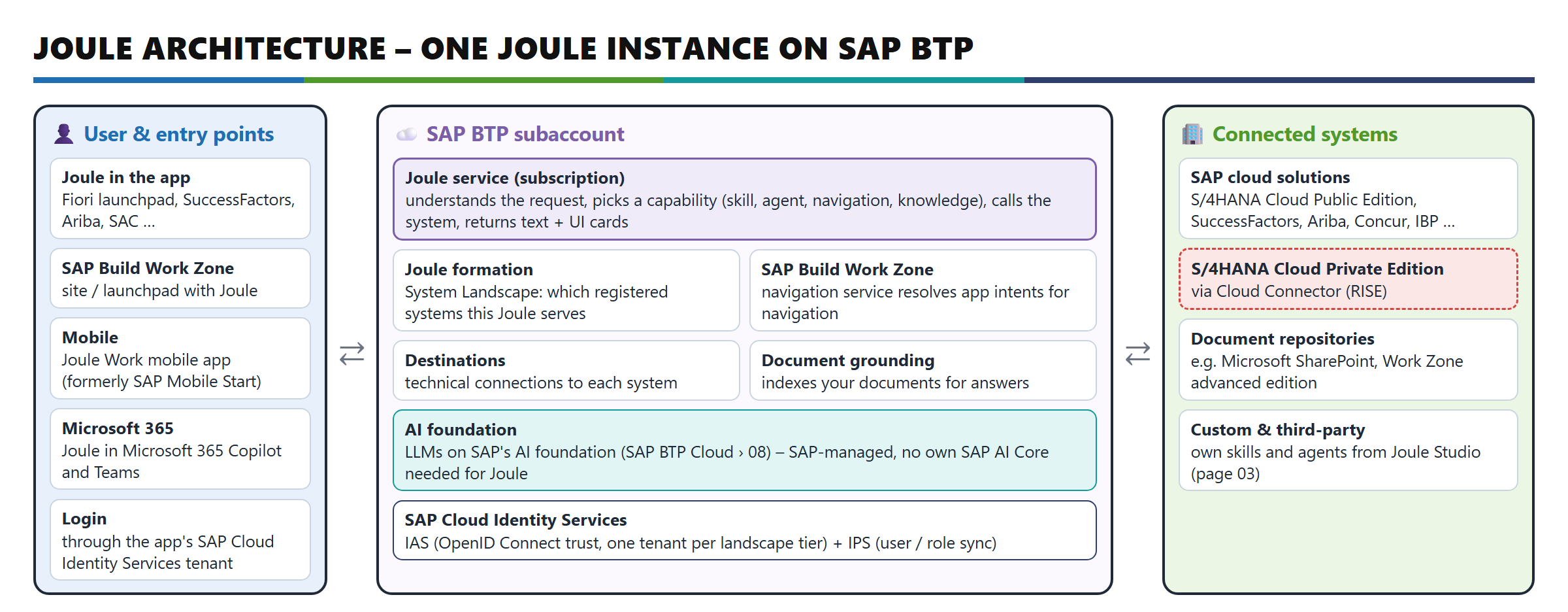
Component | Role |
|---|---|
Joule (BTP subscription) | Understands the request, selects the capability (navigation, skill, agent, knowledge), calls the system, renders the answer and UI cards |
SAP Cloud Identity Services | Identity Authentication (IAS) for login and SSO – Joule reuses the product's IAS setup; trust from BTP to IAS uses OpenID Connect (SAML trust is not supported for Joule); Identity Provisioning (IPS) syncs users and roles |
SAP Build Work Zone | Mandatory: its navigation service resolves intent-based targets for navigational answers; one Joule instance connects to one Work Zone edition (standard, advanced or the SuccessFactors one) |
Joule formation | In the BTP System Landscape: groups the registered systems that one Joule instance serves |
Destinations / connectivity | Technical connections to each system; Cloud Connector for S/4HANA Cloud Private Edition |
Document grounding | Optional service that indexes customer documents for informational answers (Part 7) |
5.2 Setup steps
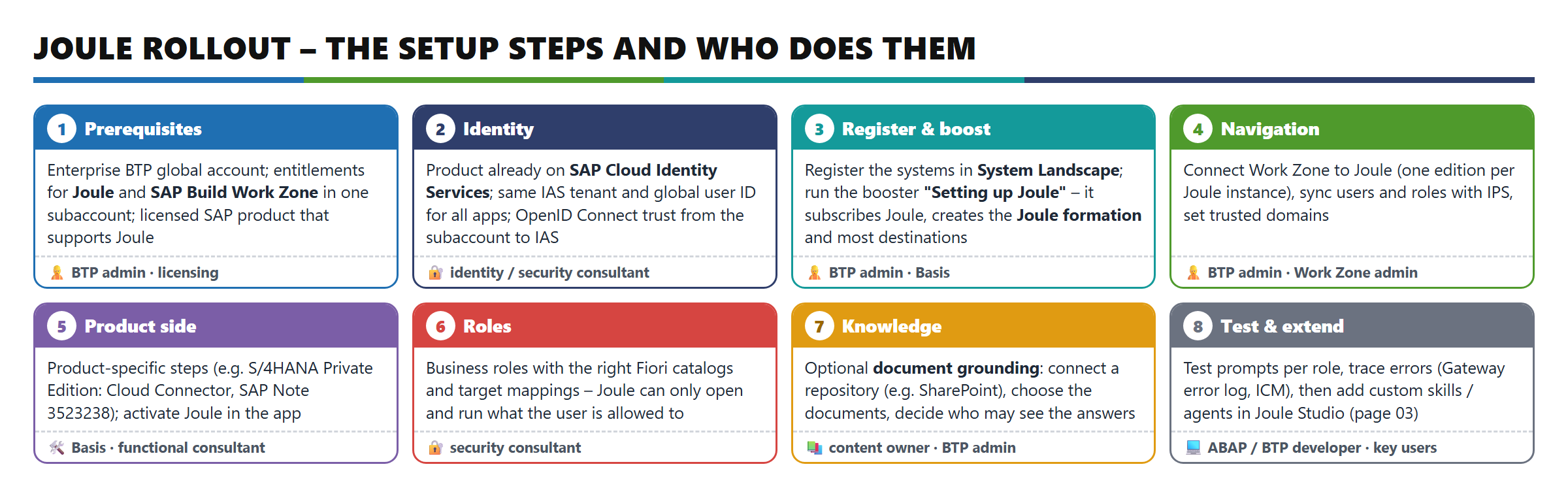
- 1. Prerequisites: enterprise SAP BTP global account with entitlements for Joule and SAP Build Work Zone; Joule must be subscribed in the same subaccount as Work Zone; a licensed SAP product that supports Joule.
- 2. Identity: each product already integrated with SAP Cloud Identity Services; all products of one landscape tier on the same IAS tenant with a consistent global user ID; trust from the subaccount to IAS via OpenID Connect.
- 3. Register the systems in SAP BTP System Landscape and run the booster "Setting up Joule" in the BTP cockpit. It provisions Joule and creates the Joule formation with the selected systems (it fails if no system of the required type is registered). For S/4HANA Cloud Public Edition the booster creates most of the required destinations; one is created manually.
- 4. Work Zone integration: enable Joule in Work Zone, run user and role synchronisation, configure trusted domains for IAS and BTP.
- 5. Product-specific steps: e.g. for Private Edition – Cloud Connector connectivity, the Fiori content and the features in SAP Note 3523238; for SuccessFactors – register the system in the formation.
- 6. Roles, 7. document grounding (optional), 8. test with real users per role.
5.3 Landscape rules an architect must know
- One unified Joule per landscape tier: different IAS tenants produce separate Joule instances and break the unified experience. Production systems share one production IAS tenant.
- Tiers: test and production Joule instances are enough unless you build custom agents – then add a development instance (Joule Studio, page 03).
- Multi-system: since 2026 one Joule formation can connect several S/4HANA Cloud Public and Private Edition systems.
- Private Edition and on-premise: Joule for S/4HANA Cloud Private Edition is for RISE customers and needs more customer-managed configuration than Public Edition. Classic on-premise S/4HANA and ECC get only selected AI scenarios under the cloud-commitment conditions SAP set at Sapphire 2026; a custom route is Joule Studio skills calling on-premise APIs through Cloud Connector (page 03).
Part 6 – Security and authorizations
Topic | How Joule handles it |
|---|---|
User authorizations | Joule works on behalf of the logged-in user. Reads and changes run with the user's roles in the target system – a user who may not post invoices cannot post them through Joule. |
Navigation | Joule only offers apps that are in the user's Fiori role: business catalogs, semantic objects and target mappings decide what it can open. |
Authentication | SSO through SAP Cloud Identity Services; same global user ID across products. |
Confirmation | Transactional skills typically show the prepared change for the user to confirm; agents ask for approval before critical steps. |
Data protection | Customer data is not passed to LLM providers for training; processing follows SAP's AI ethics and data protection rules (page 01 Part 6). |
Grounded documents | Only documents an administrator connects are indexed; plan who may see answers drawn from them. |
Agents | Run with the user's permissions, are inventoried in SAP AI Agent Hub, external agents come in through the governed agent gateway. |
- Consequence for projects: a Joule problem is often a role problem. If Joule says it cannot find an app or action, first check the user's business role, catalog and target mapping.
Part 7 – Document grounding with customer content
Document grounding lets Joule answer from the company's own documents – policies, manuals, process guides – instead of only from SAP Help. It is retrieval-augmented generation (RAG, see BTP Development › 04 Part 6) managed for you: documents are split, embedded and indexed; at question time the best passages are retrieved and the answer cites its sources.
- Sources: connected repositories, e.g. Microsoft SharePoint and SAP Build Work Zone advanced edition.
- Setup: add the document grounding capability to the Joule subaccount, connect the repository with an administrator account, select folders, let the index build. Content is refreshed on a schedule, not instantly.
- Limits to plan for: supported file types (PDF, Word, HTML, text and others), text is used rather than images and complex tables, supported languages and index refresh frequency – they differ by release.
- Quality rule: grounding is only as good as the documents – remove outdated versions, give documents clear titles and owners, and test typical questions before go-live.
- Joule for Consultants offers similar custom knowledge grounding for project knowledge (enhanced in Q2 2026).
Part 8 – Languages, limits and troubleshooting
- Languages: Joule supports a defined set of languages (English, German and several others); the list grows and differs by product and by capability (e.g. document grounding). In an unsupported language Joule may fall back to the application language.
- Scope limits: Joule can only do what a connected product exposes as a skill, navigation target or agent – it is not a general chatbot over every table. Custom gaps are closed with Joule Studio.
- Availability: features differ per product, edition, region and data centre; Private Edition has a subset of the Public Edition features.
- LLM behaviour: answers can vary; transactional skills therefore use fixed flows and confirmations, and grounding reduces hallucinations without eliminating them.
Troubleshooting tools
Symptom | Where to look |
|---|---|
Joule icon missing / login loops | IAS trust (OpenID Connect), trusted domains, same IAS tenant for product and BTP |
"I cannot find an app for that" | User's Fiori role, catalog, target mapping; Work Zone content and role sync |
Transactional skill fails | BTP destination, Cloud Connector (Private Edition), SAP Gateway error log ( |
Formation / booster errors | System registered in System Landscape, correct system type, entitlements |
Wrong or empty document answers | Grounding index status, file types, document permissions |
- SAP also provides a Joule debugging tool and health checks for the Work Zone integration – see the SAP Community Joule topic pages.
Part 9 – The developer's and consultant's role in a Joule rollout
Role | Typical tasks |
|---|---|
BTP / Basis admin | Global account, entitlements, subaccount, booster, formation, destinations, Cloud Connector, transports between tiers |
Identity / security consultant | IAS tenants per tier, OpenID Connect trust, IPS user and role sync, business roles, catalogs, target mappings |
Functional consultant | Select scenarios and assistants, define the use cases per business role, test with key users, change management |
ABAP developer | Make custom apps reachable (semantic objects, target mappings, released OData / RAP services); build APIs and RFC-enabled actions for custom skills; analyse Gateway errors; later build skills and agents in Joule Studio (page 03) and use Joule for developers (page 04) |
Architect | Landscape (IAS per tier, dev instance for custom agents), Base vs Premium cost, governance of agents, data readiness |
- Practical developer checklist: every custom Fiori app has a semantic object + action and is in a business catalog; business logic is behind released APIs (RAP, OData V4) with proper authorization checks; error messages are clear text (Joule shows them to the user).
- Why authorization checks in custom code matter even more with Joule: an agent calls the same API a user would – if the API forgets
AUTHORITY-CHECKor RAP authorization control, Joule inherits the hole.
Part 10 – Interview questions
Q1. What are Joule's capability types?
Navigational (find and open the right app), transactional (create, read, update data in the chat), informational (answers from SAP Help and grounded customer documents) and analytical (explore data conversationally). Agents add multi-step goal-driven work on top.
Q2. Skill vs Joule Agent vs Joule Assistant?
A skill is one defined task with fixed steps. An agent has a goal, instructions and tools and lets the LLM plan the steps. An assistant is role-based and orchestrates a team of agents for one business role.
Q3. What does SAP mean by collaborative multi-agent AI?
Specialised agents that work together and with people across functions, coordinated by Joule – e.g. a case classification agent passes a billing dispute to the cash collection agent, which resolves it and asks for approval.
Q4. Which components do you need to set up Joule?
An enterprise BTP global account with Joule and SAP Build Work Zone entitlements in one subaccount, SAP Cloud Identity Services (IAS with OpenID Connect trust, IPS), the booster "Setting up Joule" that creates the Joule formation with the registered systems, destinations, and the product-specific configuration.
Q5. Why is SAP Build Work Zone required?
Its navigation service resolves intent-based navigation targets so Joule can open the right app with the user's roles; Work Zone sites are also a Joule channel. One Joule instance connects to one Work Zone edition.
Q6. What happens if two products use different IAS tenants?
They get separate Joule instances – no unified Joule across them. Rule: one IAS tenant per landscape tier with a consistent global user ID.
Q7. How does Joule respect authorizations?
It acts as the logged-in user: navigation only to apps in the user's Fiori role, reads and changes with the user's back-end authorizations, confirmation before saving, approval for critical agent steps.
Q8. How do you connect Joule to S/4HANA Cloud Private Edition?
Through SAP BTP: Joule and Work Zone subscriptions, IAS, Cloud Connector for connectivity, destinations and the features and Fiori content described in SAP Note 3523238. It is for RISE customers and needs more customer-managed configuration than Public Edition.
Q9. What is document grounding?
Managed RAG for Joule: administrator-connected repositories such as SharePoint or Work Zone advanced edition are indexed; Joule retrieves matching passages and answers with sources. Quality depends on curated, current documents.
Q10. Is Joule free?
Joule Base (navigational, informational, transactional, simple analytical) is included in SAP cloud subscriptions. Premium features and agent actions consume AI units.
Q11. How do Joule agents work with non-SAP agents?
Through open protocols – A2A between agents and MCP to tools. Joule supports bidirectional agent interoperability (e.g. with Google Cloud and Microsoft frameworks); third-party agents call Joule Agents through a governed agent gateway, and SAP AI Agent Hub governs all of them.
Q12. As an ABAP developer, what do you do in a Joule project?
Make custom apps reachable (semantic objects, target mappings, catalogs), expose logic through released OData / RAP APIs with correct authorization checks, analyse Gateway errors when skills fail, and build custom skills or agents in Joule Studio where SAP content has gaps.
🏠 Start Here · ◀ 01 · Overview & Strategy · 03 · Joule Studio ▶ · Sections: CORE ABAP | OOPS ABAP | ABAP on HANA | Clean Core | RAP | ABAP Points | SAP Fiori | SAPUI5 | Mobile Development (MDK) | BTP Foundations | BTP Development | CAP | SAP Build | ABAP on BTP | Integration Suite | SAP Business AI | SAP BASIS | Security | SAP SDLC
Functional: FICO ABAP | TRM ABAP | VIM | SAP BIS | SD ABAP | MM ABAP | PP ABAP | QM ABAP | PM ABAP | PS ABAP | EWM | TM ABAP | GTM ABAP | EHS ABAP | HR ABAP | BW | SAP MDG | SAP Analytics Cloud | SAP Ariba | SAP CX | SAP IBP