How you extend Joule yourself: Joule Studio – what it is today (two editions), the difference between a Joule skill and a Joule agent, every building block of both, the end-to-end build flow from project to the user's Joule, two worked examples against S/4HANA, and the governance, limits and licensing an architect has to explain. Joule itself (capabilities, set-up, SAP-delivered agents) is on page 02; SAP AI Core and the generative AI hub are in BTP Development › 04 (Data & AI); SAP Build in general – including Joule Studio as part of SAP Build (lobby, projects, actions and processes as tools, lifecycle) – is in the SAP Build section, pages 01 and 10; BTP basics in BTP Development › 01, Part 7.
Product status changes fast in this area. This page describes the state in November 2026 and marks announcements as 📣 announcements.
Part 1 – What Joule Studio is: classic edition and the new Joule Studio
Joule Studio is SAP's environment for building your own extensions of Joule – deterministic skills and AI agents – that then appear in the same Joule the users already have, next to SAP's delivered skills and agents. Since SAP Sapphire 2026 there are two products with this name, and you must keep them apart:
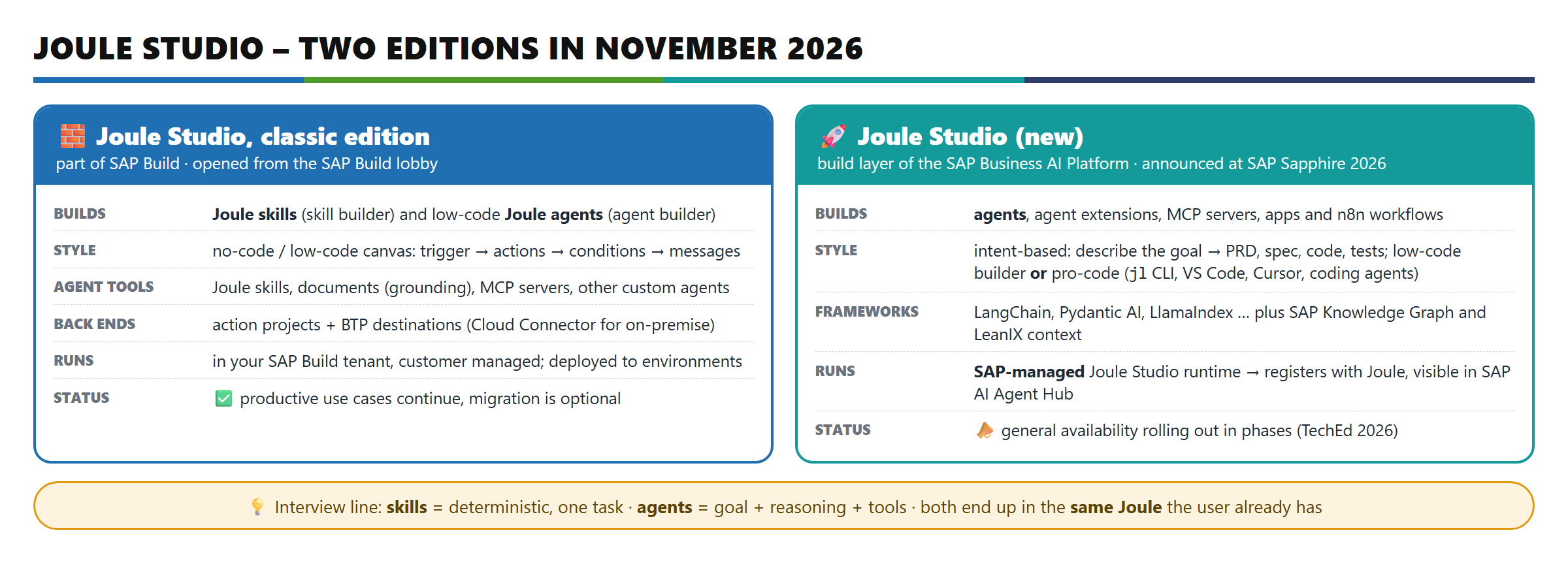
Joule Studio, classic edition | Joule Studio (new) | |
|---|---|---|
Where | Inside SAP Build – opened from the SAP Build lobby, uses SAP Build's lifecycle (projects, versions, environments) | Build layer of the SAP Business AI Platform |
What you build | Joule skills (skill builder) and low-code Joule agents (agent builder) | Agents, agent extensions, MCP servers, apps and n8n workflows |
How | No-code / low-code editors; AI-assisted agent configuration (vibe coding, deprecated – not available from January 2027); a Joule Studio CLI in the Joule development guide for pro-code build and deploy | Intent-based development; low-code builder or pro-code (CLI, VS Code, Cursor, coding agents, agent frameworks) |
Runtime | Customer-managed, runs with your SAP Build tenant | SAP-managed Joule Studio runtime |
Commercial model | SAP Build licence + Joule; agents consume AI units | Consumption-based on runtime usage |
Status (Nov 2026) | Existing use cases continue with full support; migration is optional | 📣 Announced May 2026; general availability rolling out in phases |
- The classic edition is what most tutorials, courses and existing projects use – Parts 2 – 8 and 10 describe it. The new Joule Studio is SAP's strategic tool for new AI-first use cases – Part 9.
- Naming in the documentation: "Joule Studio, classic edition" (tutorials) or "Joule Studio Classic" (reference architectures). Older material from 2025 just says "Joule Studio in SAP Build" with a skill builder and an agent builder – that is today's classic edition.
- SAP Build itself continues (SAP Build Process Automation, SAP Build Code, SAP Build Work Zone). Workflows, business rules and automations from SAP Build Process Automation can be reused as tools for skills and agents.
Part 2 – Joule skills vs Joule agents
The single most important design decision. SAP's guidance: a skill automates one rule-based task through APIs; an agent handles goal-oriented work that needs planning and reasoning, across SAP and non-SAP systems, and can use skills as tools.
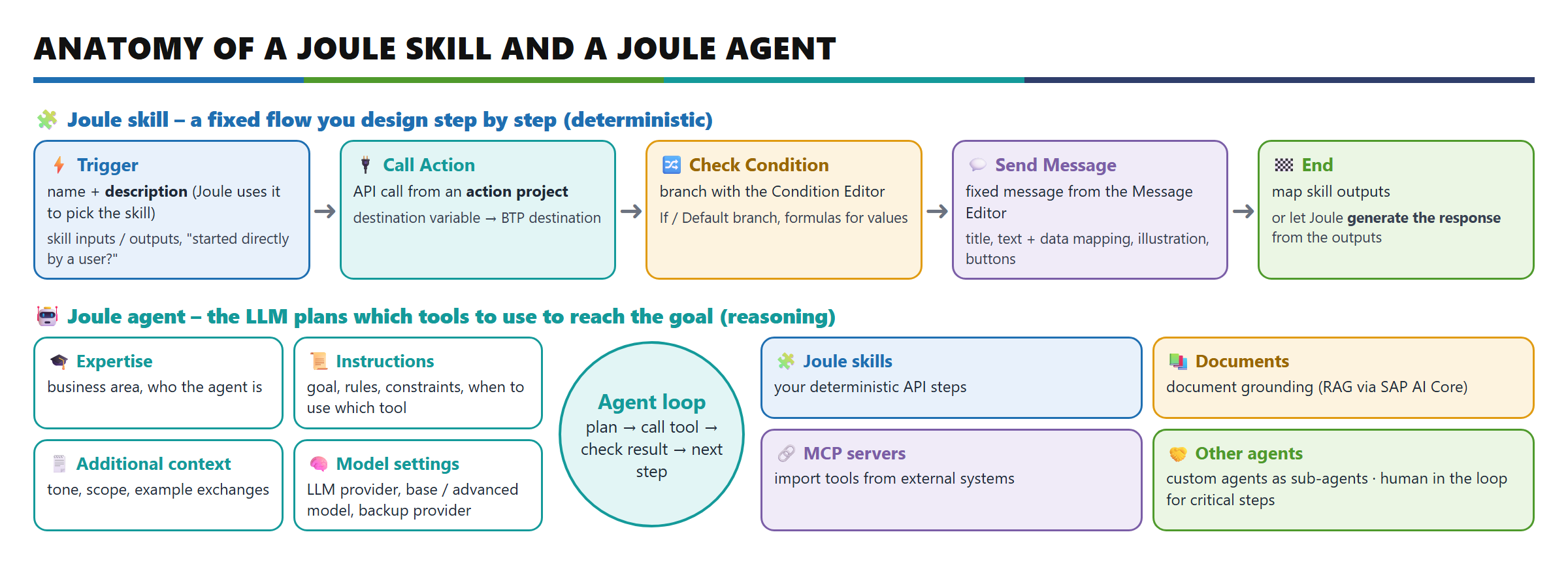
Joule skill | Joule agent | |
|---|---|---|
Logic | Deterministic flow you draw: trigger → actions → conditions → messages | LLM-driven: the model plans which tools to call in which order |
Best for | Low complexity, high frequency, rule-based: look up, create, update, navigate | Multi-step goals, judgement, combining data and documents, drafting text |
Inputs | Typed skill inputs that Joule collects from the conversation | The user's goal in natural language |
Back-end access | Actions (API calls) via destinations | Tools: skills, documents, MCP servers, other agents |
Same input → same result? | Yes | Not guaranteed – responses vary between runs |
Cost driver | API calls | LLM calls (tokens / AI units) plus the tool calls |
Testing | Like a program: paths and branches | Like a person: scenarios, evaluation, timeline review |
💡 Rule of thumb: if you can draw the flow, build a skill. Use an agent only when the steps really depend on reasoning. A good agent design is usually several small, well-described skills plus an agent that orchestrates them.
Part 3 – Building blocks of a Joule skill
A skill is a flow on a canvas between Trigger and End. You add steps with + between two existing steps.
Building block | What you configure | Why it matters |
|---|---|---|
Name and description | Entered when you create the skill (Create → Joule Skill) | Joule picks the skill by its description – write it in business language, one clear purpose |
Trigger | Parameters tab: Skill Inputs (name, description, type, required) and Skill Outputs (name, description, type, list or single) | Joule asks the user for missing required inputs; outputs return data to Joule or to a calling agent |
Trigger options | Allow Joule to generate a response – Joule phrases the answer from the outputs; Allow skill to be started directly by a user – switch off for skills only an agent should call | Generated answers read naturally; fixed messages give exact wording |
Action activity | Browse All Actions → pick an action from a published action project; choose a destination variable; map action inputs from skill inputs (Skill Content pane) and read its outputs | This is the API call to the back end |
Check Condition | Condition Editor (field, operator such as "is empty", value); If and Default branches | Different paths, e.g. create vs update |
Formulas | Formula editor for input values, e.g. concatenate strings | Small data transformations without code |
Send Message | Message Editor: message type (e.g. Illustrated Message), title, text with data mapping, illustration, buttons with a URL | Exact, predefined wording – use for confirmations and results |
End | Map values to the skill outputs | What Joule or the agent gets back |
3.1 Action projects – how a skill reaches an API
- An action project (SAP Build lobby › Connectors › Actions) wraps an API as reusable actions: you create it from an API specification (OData or OpenAPI – from the SAP Business Accelerator Hub, an uploaded file or built from scratch), choose the operations you need, define inputs (e.g. a
$filterbuilt in the Condition Editor), test it, release it and publish it to the library. - Only published actions can be added to a skill. One action project can serve many skills.
- A destination variable in the skill is only a placeholder. The real BTP destination is chosen when you test (environment variables) and when you deploy – so the same project can point to DEV, QA and production back ends.
- Source options SAP lists for actions: SAP Business Accelerator Hub, API Business Hub Enterprise, OData destinations, CAP and RAP services, SAP systems, and uploaded specifications.
3.2 Design tips for skills
- Always add a confirmation before create, update or delete – SAP's guidance ties this to its AI ethics rules.
- Turn technical API errors into user-friendly messages; never show raw error payloads.
- Long-running back-end work: start it asynchronously (e.g. an SAP Build Process Automation process) instead of waiting in the skill.
- A skill used by an agent should not send its own confirmation or status messages – the agent interprets the outputs. SAP's CodeJam notes that a skill with a confirmation message fails when an agent triggers it.
- Simple chaining of skills: scenario dependencies. Complex reasoning or state across steps: an agent.
Part 4 – Building blocks of a Joule agent
In the classic edition you create an agent inside a project with Create → Joule Agent (name and description – again, Joule routes to the agent by its description). The agent editor has these sections:
Section | What you enter | Tip |
|---|---|---|
Expertise | Short summary of the business area – who the agent is | One or two sentences |
Instructions | Goal, process, rules and constraints, when to use which tool, how to report the outcome | The operational playbook – most quality problems are fixed here |
Additional Context | Tone, scope, example exchanges | Show one good answer |
Model Settings | LLM provider, base model and advanced model, optional backup LLM provider; agent execution steps (pre- and post-processing to help planning) | Keep defaults first, change models only with evaluation results |
Tools | Add Tool → four tool types: Joule Skill, Joule Agent (other custom agents as sub-agents), Documents (document grounding) and Calculator; MCP servers are added on the agent's own MCP Servers tab | At least one tool; describe each tool clearly |
Output option | Allow Joule to interpret the output of the agent | Joule formats the final answer |
4.1 Tools in detail
- Joule skills – the agent's deterministic hands. Set them to "not started directly by a user" if only the agent should call them.
- Documents – document grounding (RAG) through SAP AI Core. Set up once in Control Tower › Document Grounding (needs an SAP AI Core destination and an object store destination with the files); the set-up creates the resource group and pipeline. Then Add Tool → Documents and pick the resource group.
- MCP servers – import tools from systems that offer a Model Context Protocol server (SAP's CodeJam uses an MCP server for currency conversion in a sub-agent).
- Other agents – custom agents can be assigned as tools, so one agent orchestrates specialised sub-agents.
- Human in the loop – set per skill tool – Edit Tool › Require user confirmation before running, plus a Prompt for Generated Response; the user answers with the quick replies Yes, proceed / No, cancel. Switch it on for every write or business-critical skill; independently, the agent can ask for missing inputs when its instructions say so.
4.2 What the user sees
- The user talks to the normal Joule. Joule chooses SAP's capabilities, your skills or your agent based on the descriptions – there is no separate "agent app".
- During testing the agent editor shows a timeline with every tool call and its inputs and outputs – the most important debugging aid.
Part 5 – Prerequisites and set-up
Prerequisite | Why | Who |
|---|---|---|
Joule set up in the target landscape | Skills and agents are deployed into the central Joule instance | BTP / Joule admin (page 02) |
SAP Build Process Automation in the SAP Build tenant, plan build-default | Joule Studio classic is part of this SAP Build tenant | BTP admin |
SAP Cloud Identity Services – Identity Authentication (IAS) | Common user identity for Joule, SAP Build and the back ends; federation with the corporate IdP | Identity admin |
Formation in the BTP cockpit | Joule Studio classic is provisioned automatically through the formation that links Joule and SAP Build | BTP admin |
BTP destinations | One per back end (URL + authentication), registered for Joule Studio in Control Tower › Destinations | BTP admin |
Cloud Connector | Only for on-premise / Private Edition back ends: secure tunnel from BTP to the internal network | Basis |
Released APIs in the back end | E.g. S/4HANA OData services activated and authorised | Developer / Basis |
SAP AI Core + object store (optional) | Only for document grounding | BTP admin |
Developer role in SAP Build | To create projects and deploy | SAP Build admin |
- Authentication to S/4HANA: prefer principal propagation (the call runs as the business user, so S/4HANA authorizations apply) over a technical user with broad rights. Set-up of trust, IAS and the Cloud Connector: BTP Foundations › 03.
- Environments are managed in Control Tower › Environments: activate your private environment for tests; admins provide shared environments for deployment.
Part 6 – The end-to-end build flow
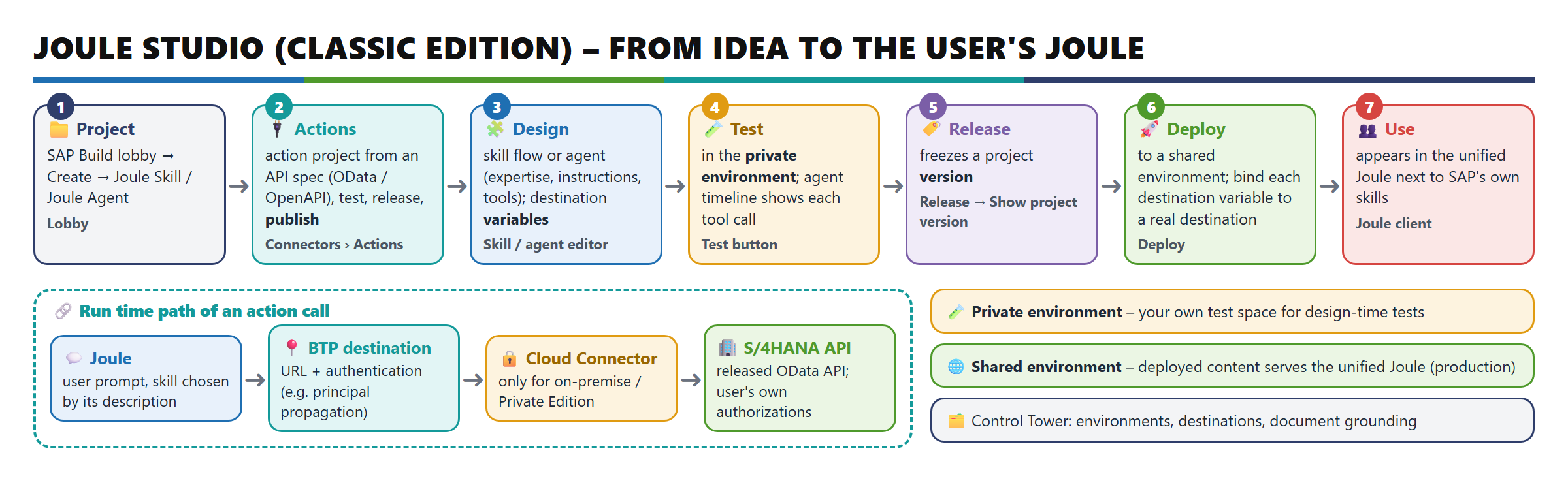
- 1. Project – SAP Build lobby → Create → Joule Skill (or open a project and Create → Joule Agent). A project can hold several skills and agents.
- 2. Actions – create or reuse an action project for each API, test it with real data, release and publish it.
- 3. Design – build the skill flow or the agent; create destination variables.
- 4. Test – the Test button runs the project in your private environment; you map destination variables to real destinations for the test.
- 5. Release – creates an immutable project version; Show Project Version switches to it.
- 6. Deploy – choose a shared environment and bind each destination variable to a destination of that landscape.
- 7. Use – the content now serves the unified Joule across the connected SAP applications. Before that you can try it in the environment's standalone Joule (Control Tower → Environments → Joule tab → Launch).
Deployment to production tenants takes some time; plan it like any other release, not as a live edit.
Part 7 – Worked example 1: skill "Show open purchase orders"
Goal: a buyer asks Joule "Show my open purchase orders for supplier 17300001" and gets a list from S/4HANA. No code is written – everything is configuration.
7.1 Back end
- Released OData V2 API Purchase Order (
API_PURCHASEORDER_PROCESS_SRV, entity setA_PurchaseOrder) – find it on the SAP Business Accelerator Hub. In S/4HANA Cloud Public Edition activate it with a communication arrangement; on-premise / Private Edition activate the service and authorise the users. - BTP destination
S4_POto the S/4HANA host; for on-premise via the Cloud Connector, authentication with principal propagation so the buyer only sees what S/4HANA allows.
7.2 Action project
- Create an action project from the API specification; keep only the GET operation on
A_PurchaseOrder. - Add an input field
Supplierand build the$filterwith the Condition Editor (Supplier equal to${Supplier}); add the purchasing processing status to the filter so only open orders come back – which status values count as "open" depends on your configuration, so agree them with the MM consultant. - Restrict
$selectto the fields you show (order number, supplier, order date, net amount, currency) and set$top– smaller responses are faster and cheaper for Joule to process. - Test with a real supplier, then Save → Release → Publish.
7.3 Skill
Step | Configuration |
|---|---|
Create | Name "Show open purchase orders"; description "Lists open purchase orders of a supplier from SAP S/4HANA" |
Trigger | Skill input |
Action activity | GET purchase orders from the action project; destination variable |
Check Condition | Result list is empty → Send Message "No open purchase orders for this supplier" (Default branch continues) |
End | Map the result list to |
Test / deploy | Test in the private environment with destination |
- "My" orders: with principal propagation S/4HANA already restricts the result to what the user may see. If you need only the orders the user created, add a filter on the creator field – and test it, because the user ID in S/4HANA is not always the IAS login name.
- Follow-up questions such as "and for supplier 17300002?" re-use the same skill with a new input.
Part 8 – Worked example 2: agent "Overdue invoice reminders"
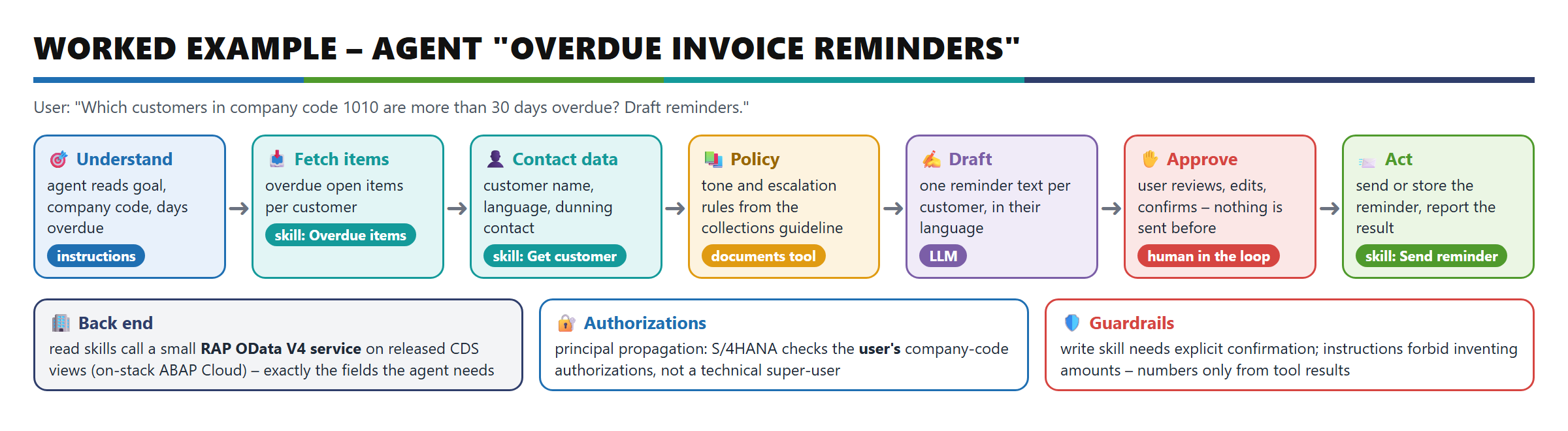
Goal: an accounts receivable clerk asks "Which customers in company code 1010 are more than 30 days overdue? Draft reminders." The agent collects the data, applies the company's collection policy, drafts one reminder per customer and sends nothing until the clerk approves.
8.1 Back end – an API made for the agent
- Build a small RAP OData V4 Web API on-stack in S/4HANA (ABAP Cloud) on released CDS views of the operational accounting items (e.g.
I_OperationalAcctgDocItem), with parameters company code and days overdue and only the fields the agent needs. Why not the raw journal entry API: a narrow, purpose-built API is faster, cheaper (fewer tokens) and easier to authorise. RAP basics: RAP › 00 · Start Here. - Read customer contact data from the released Business Partner API (
API_BUSINESS_PARTNER). - The reminder itself: either store it as a draft (e.g. a note or a task in your own RAP BO) or hand it to an SAP Build Process Automation process that sends the e-mail – decided by the business, not by the LLM.
8.2 Skills (tools)
Skill | Action | Started directly by user? |
|---|---|---|
Overdue items | GET on the custom RAP service (company code, days overdue) | No – agent only |
Get customer | GET business partner with address and language | No – agent only |
Send reminder | POST to the process or RAP BO; no own messages (the agent reports) | No – agent only |
8.3 Agent configuration
- Expertise: "Accounts receivable assistant for collections in SAP S/4HANA."
- Instructions (excerpt): 1. Ask for company code and days overdue if missing. 2. Use Overdue items, then Get customer for each customer. 3. Read the collection guideline with the documents tool and choose the reminder level. 4. Draft one reminder per customer in the customer's language. 5. Show all drafts and ask for approval. 6. Call Send reminder only for drafts the user approved. 7. Never invent amounts, invoice numbers or dates – use only values returned by the tools. 8. Never call Send reminder without approval.
- Additional Context: polite, factual tone; an example of a good first-level reminder.
- Tools: the three skills plus Documents (collection guideline, uploaded to the object store and grounded once in Control Tower).
- Test scenarios: no overdue items; one customer; many customers; missing language; user rejects one draft; back end not reachable. Check the timeline: right tools, right order, no send without approval.
Part 9 – The new Joule Studio: intent-based, pro-code, managed runtime
📣 Announced at SAP Sapphire in May 2026 as a fully managed offering for the whole lifecycle of AI agents, apps and workflows; at SAP TechEd 2026 SAP said general availability is rolling out in phases. SAP's reference architecture names Joule Work as the main interface for end users of these agents and SAP AI Agent Hub for managing deployed agents.
Element | What SAP describes |
|---|---|
Intent-based development | Describe the goal in natural language; Joule Studio produces a requirements document, technical specification, code scaffolding, tests and a working preview, using context from SAP Knowledge Graph, SAP Domain Models, SAP LeanIX and SAP Signavio |
Low-code flow | Browser-based builder: instructions, tools, human-in-the-loop steps – no local set-up |
Pro-code flow | Joule Studio CLI |
Assets | Agents; agent extensions (add instructions, MCP servers or pre- and post-execution hooks to an SAP-delivered agent without modifying it, so it keeps receiving SAP updates); MCP servers generated from SAP OData or REST APIs; apps; n8n workflows (early adopters) |
Managed runtime | SAP runs configuration, clusters, storage and model access; agents run sandboxed and get long-term memory on SAP HANA Cloud; deployed agents register with Joule and are managed in SAP AI Agent Hub |
Interoperability | Agents you run in your own BTP subaccount (bring your own agent) connect to Joule via the A2A protocol; a governed agent gateway lets third-party agents call Joule agents |
Architect's choice in 2026: existing skills and agents stay on the classic edition (no forced migration); new, complex agent solutions – especially pro-code ones – are candidates for the new Joule Studio.
Part 10 – Governance: lifecycle, testing, instruction design, guardrails
10.1 Lifecycle and transport
- Versions: Release freezes a project version; you deploy versions, not the editable draft.
- Environments replace the transport route: private (developer test) → shared environments (e.g. QA, production) in the landscape's Control Tower. Destination variables make one version deployable to several landscapes.
- Moving between tenants: projects are moved from the test to the production tenant with SAP Cloud Transport Management, or exported and imported as an
.mtararchive (SAP's tutorials import prepared projects this way). - Ownership: treat a skill like an interface – owner, documentation, test cases, change log.
10.2 Testing
- Skills: every branch, missing and wrong inputs, empty results, back-end errors.
- Agents: a fixed set of evaluation scenarios run after every change of instructions, tools or model; check the timeline, not only the final text. Responses vary between runs – judge behaviour, not wording.
10.3 Instruction and description design
- Descriptions are routing: specific, business words, no overlap between skills ("Lists open purchase orders of a supplier" beats "PO skill").
- Instructions as numbered steps, explicit tool choice, explicit prohibitions, and what to do when data is missing.
- Keep tool outputs small – fewer fields mean fewer tokens, lower cost and fewer mistakes.
10.4 Responsible-AI guardrails
- Authorizations stay in the back end: principal propagation, no super-user destinations.
- Confirmation for every write action; human in the loop for business-critical decisions.
- Grounding (documents, tool results) instead of model knowledge for business facts.
- The generative AI hub's trust layer applies to the LLM calls (data masking, content filters – SAP BTP Integration Suite › 02); SAP's AI ethics policy applies to SAP-delivered and partner content.
- Monitoring: usage and cost visibility for agents; in the new Joule Studio, integration with SAP Cloud ALM, Signavio and LeanIX is announced for usage, cost and impact monitoring.
Part 11 – Limits and licensing
11.1 Practical limits
- A skill is only as good as its API – Joule Studio does not replace a missing released API.
- Agents are non-deterministic, slower and more expensive than skills; never use them for a fixed, auditable posting logic.
- Large API responses hurt quality and cost – filter in the back end.
- Classic edition skills and agents run in the SAP Build / Joule landscape you operate; the new Joule Studio runtime is SAP-managed – data residency and sovereign-cloud requirements decide what is possible.
11.2 Licensing at a conceptual level
Component | Commercial idea |
|---|---|
Joule Studio, classic edition | Requires SAP Build (developer licence / SAP Build Process Automation tenant) and a Joule entitlement for production; the agent builder is a premium AI feature consumed in AI units – free until December 2026, then premium; the skill builder is a base AI feature |
Joule Studio (new) | Consumption-based on runtime usage, not per user. 📣 SAP announced free design-time access through the end of 2026 under fair-use limits, and a time-bound promotion for running custom agents for selected customers |
LLM and grounding | Tokens in SAP AI Core / generative AI hub (or included in the AI-unit price, depending on the offering) |
Back-end calls | Normal licences of the called systems (e.g. S/4HANA users and APIs) |
Prices, promotions and their end dates change often – always check the SAP Discovery Center and the customer's contract instead of quoting numbers.
Part 12 – Interview questions
Q1. What is Joule Studio?
SAP's environment for extending Joule with custom skills and agents. The classic edition is part of SAP Build (skill builder, agent builder); the new Joule Studio, announced at Sapphire 2026, is the build layer of the SAP Business AI Platform with low-code and pro-code options and an SAP-managed runtime.
Q2. Joule skill or Joule agent – how do you decide?
If the flow can be drawn and must always behave the same, build a skill (deterministic, cheaper, testable). If the task needs planning, judgement or combining data and documents, build an agent that uses skills as tools.
Q3. What are the building blocks of a skill?
Trigger with skill inputs and outputs, Action activities (API calls from published action projects via destination variables), Check Condition branches, formulas, Send Message steps, and End with the output mapping – or Joule generates the response.
Q4. What do you configure in a Joule agent?
Name and description (routing), expertise, instructions, additional context, model settings (provider, base and advanced model, backup provider) and tools: Joule skills, other Joule agents, documents for grounding and the Calculator; human in the loop for critical steps.
Q5. How does a skill call S/4HANA on-premise?
Through an action project for the released OData API, a destination variable in the skill bound to a BTP destination at deploy time, and the Cloud Connector into the network – ideally with principal propagation so the user's S/4HANA authorizations apply.
Q6. Why is the description of a skill so important?
Joule uses it to decide which skill or agent handles a request. Vague or overlapping descriptions lead to the wrong skill being called.
Q7. What are the prerequisites for Joule Studio classic?
Joule in the landscape, SAP Build Process Automation (build-default plan) in the SAP Build tenant, IAS, the formation that provisions Joule Studio, destinations (plus Cloud Connector for on-premise) and released APIs; SAP AI Core and an object store for document grounding.
Q8. How do skills move from development to production?
Test in the private environment, release a project version, deploy it to a shared environment and bind the destination variables to that landscape's destinations; projects can be exported and imported as MTA archives between tenants.
Q9. How do you make an agent safe?
Back-end authorizations via principal propagation, confirmation and human approval before write actions, instructions that forbid invented values, grounding, small tool outputs, evaluation scenarios after every change, and the generative AI hub's masking and filters.
Q10. What is document grounding in Joule Studio?
RAG through SAP AI Core: documents in an object store are indexed once (Control Tower › Document Grounding) and added to an agent as a Documents tool, so answers come from company documents.
Q11. What does the new Joule Studio add?
Intent-based development, a pro-code path (jl CLI, coding agents, LangChain and other frameworks), agent extensions for SAP agents, MCP servers generated from APIs, n8n workflows and an SAP-managed runtime whose agents register with Joule and are managed in SAP AI Agent Hub.
Q12. Where does an ABAP developer fit into Joule Studio projects?
By providing the back end: clean, narrow, released APIs – RAP OData V4 services on released CDS views – with proper authorizations, plus the business logic that must stay deterministic in S/4HANA.
🏠 Start Here · ◀ 02 · Joule · 04 · Developer AI ▶ · Sections: CORE ABAP | OOPS ABAP | ABAP on HANA | Clean Core | RAP | ABAP Points | SAP Fiori | SAPUI5 | Mobile Development (MDK) | BTP Foundations | BTP Development | CAP | SAP Build | ABAP on BTP | Integration Suite | SAP Business AI | SAP BASIS | Security | SAP SDLC
Functional: FICO ABAP | TRM ABAP | VIM | SAP BIS | SD ABAP | MM ABAP | PP ABAP | QM ABAP | PM ABAP | PS ABAP | EWM | TM ABAP | GTM ABAP | EHS ABAP | HR ABAP | BW | SAP Datasphere | SAP Business Data Cloud | SAP MDG | SAP Analytics Cloud | SAP Ariba | SAP CX | SAP IBP