From notebook to production: how a pro-code generative AI app or agent on SAP BTP is built and run – reference architecture, a Python backend with FastAPI and a Streamlit prototype UI, a LangGraph agent whose tools read and create SAP S/4HANA data through a BTP destination with human approval, AI in CAP, multimodal input, observability with LangSmith, deployment to Cloud Foundry with an MTA, app router and XSUAA, and the governance controls a production AI app needs. SAP AI Core set-up is on page 06, the generative AI hub SDK and orchestration in Python on page 07, RAG and knowledge graphs on HANA Cloud on page 08; CAP, MTA and debugging in general in BTP Development › 06, security (XSUAA, app router, destinations) in BTP Foundations › 04.
Status of facts: November 2026 (PyPI: langgraph 1.2, langchain 1.5, sap-ai-sdk-gen 7.4, sap-xssec 4.5; npm: @sap-ai-sdk/orchestration 2.18; SAP Business Accelerator Hub). S/4HANA APIs differ by product and release – always check the API on the Business Accelerator Hub for your system.
Part 1 – Reference architecture of a pro-code SAP GenAI app
SAP's reference architecture for pro-code AI agents on BTP uses the same building blocks as any BTP app: a UI, a backend on Cloud Foundry or Kyma, the generative AI hub for models, HANA Cloud for vectors and knowledge graphs, and the Destination and Connectivity services to reach SAP systems.
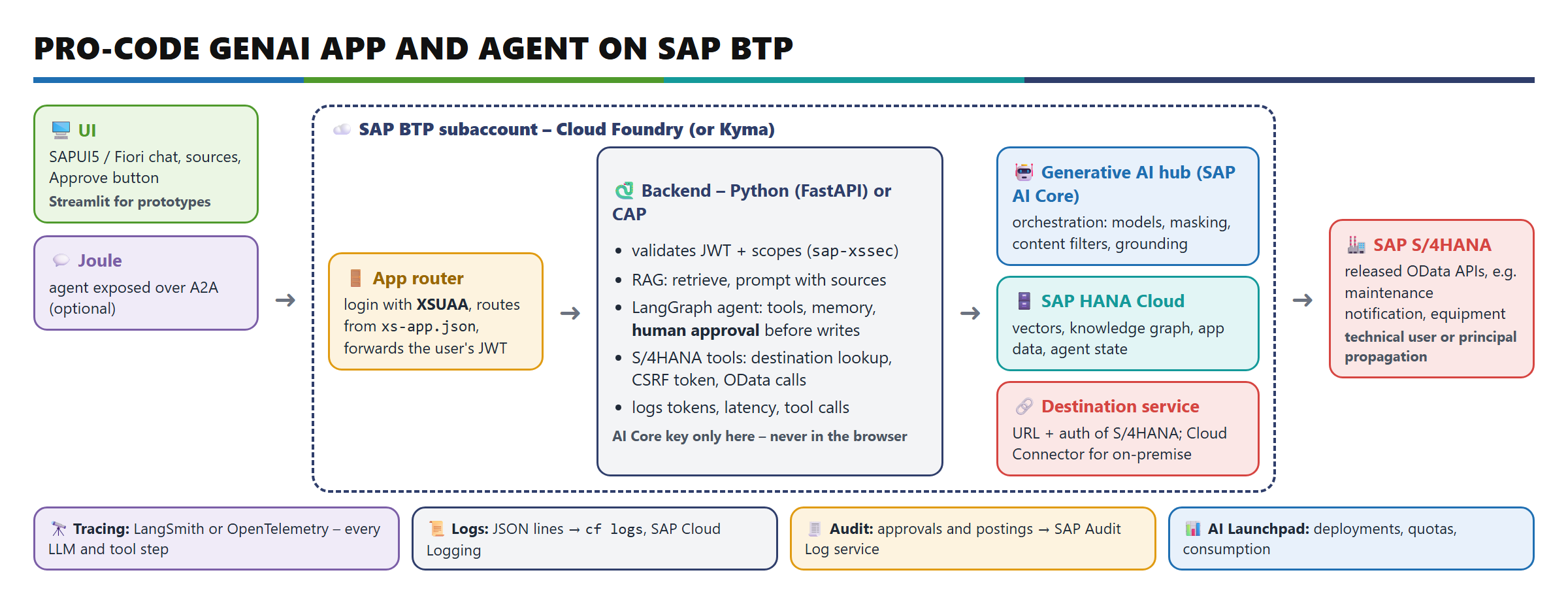
Layer | Typical choice | Responsibility |
|---|---|---|
UI | SAPUI5 / Fiori app, Streamlit for prototypes, Joule (agent exposed over A2A) | Chat, show sources, ask for approval |
Entry point | App router + XSUAA (or IAS) | Login, routes, forwards the user's JWT to the backend |
Backend | Python (FastAPI + LangChain / LangGraph) or CAP (Node.js / Java) | Prompts, RAG, agent loop, tool calls, validation, logging |
Models | Generative AI hub in SAP AI Core – preferably the orchestration service | LLM and embeddings, masking, content filters, grounding |
Data | SAP HANA Cloud | Vectors, knowledge graph, app data, conversation state |
SAP back ends | Destination service (+ Cloud Connector for on-premise) | Released OData / REST APIs of S/4HANA with a technical or the user's identity |
Operations | LangSmith or OpenTelemetry, SAP Cloud Logging, SAP Audit Log service, AI Launchpad | Traces, token cost, audit of write actions |
- Keys never reach the browser: only the backend holds the SAP AI Core binding; the UI calls the backend through the app router with the user's token.
- Configuration, not code: model names, prompt template versions and destination names are environment properties or registry entries – switching a model must not need a rebuild.
- Agents are API consumers: they call released S/4HANA APIs with proper authorization – never database tables (clean core, page 04 Part 10).
Part 2 – Python backend, Streamlit prototype and a coding-assistant project
2.1 Project layout
|
2.2 Configuration from environment variables and VCAP_SERVICES
On Cloud Foundry every bound service instance appears in the environment variable VCAP_SERVICES (JSON, grouped by service label). Locally you set the same values as normal environment variables.
|
- SAP AI Core: the SAP Cloud SDK for AI finds credentials itself in this order: arguments →
AICORE_CLIENT_ID,AICORE_CLIENT_SECRET,AICORE_AUTH_URL,AICORE_BASE_URL,AICORE_RESOURCE_GROUP→~/.aicore/config.json→ the boundaicoreservice inVCAP_SERVICES. On CF you just bind the instance (page 07 for the details). - HANA Cloud: from the bound
hanaservice (host,port,user,password,certificate) – SAP's Python tutorial reads it with thecfenvpackage; the helper above does the same.
2.3 FastAPI service with JWT check
|
- Start command:
uvicorn main:app --host 0.0.0.0 --port $PORT– Cloud Foundry tells the app its port in$PORT. - Validate the token in the backend too. The backend gets its own public CF route; anyone who knows it can call it directly, bypassing the app router.
- Plain
defendpoints run in a thread pool – fine for blocking SDK calls. For streaming answers useStreamingResponseand the streaming methods of the client.
2.4 Streamlit prototype UI
|
- Streamlit reruns the whole script on every interaction – state lives in
st.session_state. - Prototype only: great for demos and for business users testing prompts. For production use a Fiori / UI5 app behind the app router. If a Streamlit app must run on BTP behind the app router, it needs WebSockets –
"websockets": {"enabled": true}inxs-app.json.
2.5 The coding-assistant project at a high level
A typical training project: an assistant that explains, reviews or generates code (e.g. ABAP Cloud or CAP) following team rules. Four pieces:
Piece | What you build | Tip |
|---|---|---|
Prompt | System message with language, release and style rules ("ABAP Cloud only, released APIs, inline declarations"), output format (explanation + code block), few-shot examples | Store it in the prompt registry with a version (page 07) |
Model | A strong coding model from the generative AI hub, temperature 0–0.2, enough max tokens | Compare 2–3 models on the same test inputs |
API | FastAPI endpoints | Size limits; never send credentials or customer data in code snippets |
UI | Streamlit: code text area, language select, result with | Show a disclaimer: review before use |
|
- Unit tests mock the LLM and test your code (routing, validation, error handling). Quality tests call the real model with a fixed set of inputs and score the output (golden answers, LLM-as-judge) – run them before every model or prompt change.
Part 3 – Agents with LangGraph: tools on S/4HANA, memory, human approval
Example: a field service agent for maintenance technicians. The technician writes "Pump 10000045 leaks at the seal – check it and report it". The agent reads the equipment and its open notifications in S/4HANA, searches the manual (RAG, page 08), proposes a maintenance notification and creates it only after the technician approves.
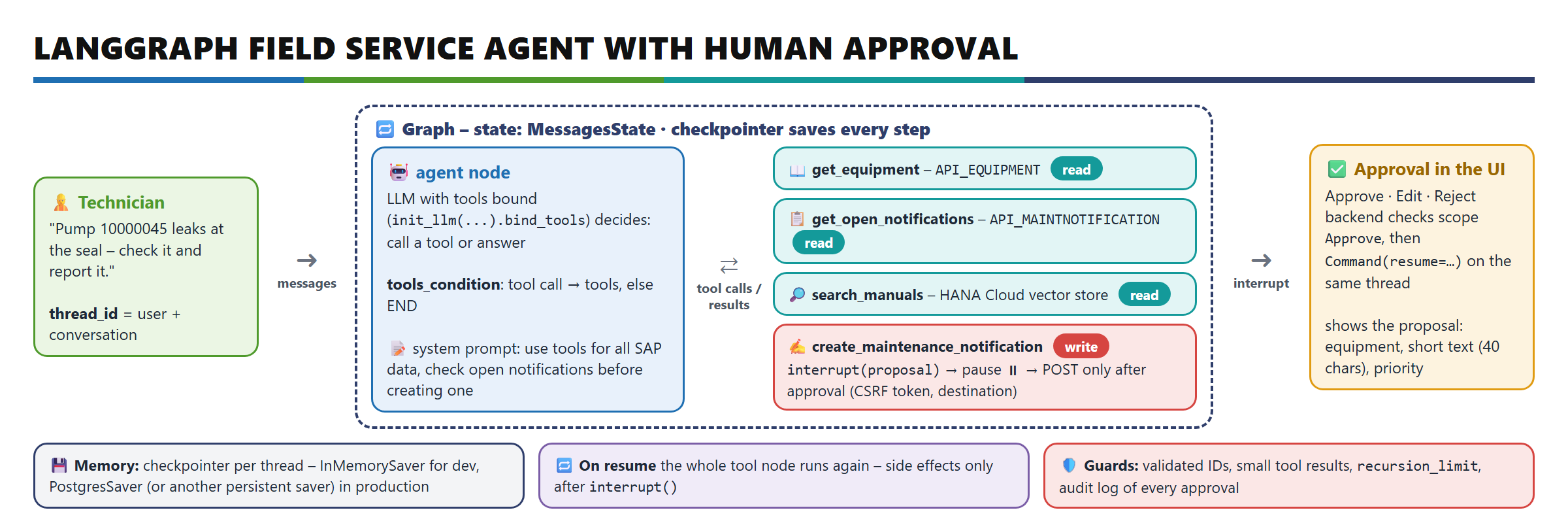
3.1 LangGraph concepts
Concept | Meaning | In the example |
|---|---|---|
State | The data that flows through the graph; | User request, LLM answers, tool calls and results |
Node | A Python function that reads the state and returns updates |
|
Edge / conditional edge | Which node runs next; conditional = decided by a function |
|
Tool | A function the LLM may call; name, docstring and typed arguments are sent to the model |
|
Checkpointer | Saves the state after every step, per | Conversation memory, resume after approval |
Interrupt |
| Approval before the notification is posted |
3.2 Reaching S/4HANA through a BTP destination
The destination S4_MAINT (URL of the S/4HANA system, authentication – e.g. OAuth with a communication arrangement in S/4HANA Cloud, or principal propagation) is maintained by an administrator in the BTP cockpit. The Python app asks the Destination service for it at run time – no S/4HANA password in the app.
|
- The response contains
destinationConfiguration(URL, type, authentication) andauthTokenswith a ready-to-usehttp_header– the Destination service did the OAuth flow for you. - User identity: for principal propagation the find-destination call also needs the user's JWT (header
X-user-token), so S/4HANA checks the technician's own authorizations. Flows and set-up: BTP Foundations › 04 Part 5.4. - On-premise S/4HANA (Cloud Connector): the request must also go through the Connectivity service proxy. CAP and the SAP Cloud SDK for JavaScript / Java handle that for you – a common design is a small CAP service as "S/4HANA adapter" that the Python agent calls (BTP Development › 06 Part 3).
- Cache the destination for a few minutes instead of looking it up for every call (respect token expiry).
3.3 The tools
Tool | S/4HANA API (Business Accelerator Hub) | Type |
|---|---|---|
get_equipment |
| Read |
get_open_notifications |
| Read |
search_manuals | Your HANA Cloud vector store (page 08) | Read |
create_maintenance_notification |
| Write – needs approval |
|
|
- Docstrings are prompts: the LLM decides from the name, docstring and argument types when to call a tool – write them precisely, including limits (40 characters) and allowed values.
- OData V2 writes need a CSRF token: fetch it with
X-CSRF-Token: Fetchand send it back with the POST in the same session (cookies). - Which fields are mandatory (notification type, technical object category, planning plant, catalog codes) depends on the system's configuration – check the API documentation and test in a sandbox. Some older order APIs on the hub are marked deprecated with a successor; check the status before you build on one.
- Return small, structured results (selected fields, top 10) – everything a tool returns goes into the next prompt and costs tokens.
3.4 The graph
|
|
- Interrupt rules: on resume LangGraph re-runs the whole node from the start – so the side effect (POST) must come after
interrupt(), and read tools in the same step must be harmless to repeat. Don't wrapinterrupt()in a baretry/except; pass only JSON-serialisable values. recursion_limitcaps the number of steps – a cheap guard against an agent looping on a failing tool.- Shortcut:
langchain.agents.create_agent(model, tools, system_prompt=..., checkpointer=..., middleware=[HumanInTheLoopMiddleware(interrupt_on={"create_maintenance_notification": True})])builds the same loop; the user then answers with approve / edit / reject decisions.langgraph.prebuilt.create_react_agentis deprecated since LangGraph 1.0.
3.5 Conversation memory
Kind | How | Notes |
|---|---|---|
Short-term (per conversation) | Checkpointer + |
|
Persistent savers |
| PostgreSQL on SAP BTP, hyperscaler option; for HANA Cloud only community savers exist (Nov 2026) – review before use |
Long-term (across conversations) | A LangGraph store ( | Decide what may be stored; retention and deletion (GDPR) |
Context size | Trim or summarise old messages before the LLM call | Long threads cost tokens on every step |
- Bind the thread to the user: build the
thread_idon the server from the logon name (ctx.get_logon_name()) plus a conversation ID – never accept a raw thread ID from the browser, or users could read other users' conversations.
Part 4 – CAP + AI: SAP Cloud SDK for AI, vectors in CDS, the CAP LLM plugin
A CAP handler that calls the orchestration service with the SAP Cloud SDK for AI is on page 04 Part 8. Here: exposing an AI action in a CAP service with retrieval from HANA Cloud vectors, and which library to use.
4.1 Model and service
|
|
Vectoris CAP's built-in type (mapped toREAL_VECTORon HANA); CQL offerscosine_similarity,l2distanceandvector_embedding(HANA NLP models or an SAP AI Core remote source). Embeddings can be a stored calculated element (embedding : Vector = vector_embedding(...) stored;) so CAP recalculates them on create and update – see the CAP guide on vector embeddings.- The
whereabove keeps CAP's documented pattern (threshold + limit); add ordering by similarity for real ranking (check the CQL syntax of your CAP version). - Locally, the experimental
@cap-js/aiplugin can runVECTOR_EMBEDDINGon SQLite with a local ONNX model (needs@sap/cds10.1+); production vector workloads belong in HANA Cloud.
4.2 Which library?
Library | Status (Nov 2026) | Use it for |
|---|---|---|
SAP Cloud SDK for AI – | Official SDK, aligned with the SAP AI Core roadmap; JS 2.18 | All new CAP and Node.js / Java work: orchestration, embeddings, LangChain clients ( |
CAP LLM plugin ( | Community plugin, provided "as-is", last release 1.5.1 (Sept 2025); SAP: limited scope | Older, narrower plugin (anonymisation with HANA, embeddings, simple RAG helpers) |
@cap-js/ai | CAP plugin, 1.3 (Oct 2026) | SAP-RPT-1 field recommendations on draft entities, an |
- Python and CAP together: the agent can call a CAP OData service as a tool (through a destination), or CAP calls a Python AI service – choose CAP when the logic is mostly business data and Fiori, Python when it is mostly LLM / agent logic.
Part 5 – Multimodal: images and audio
5.1 Images (vision)
Vision-capable chat models in the generative AI hub accept images next to text. Which models do: the model card in AI Launchpad's Model Library lists the input types (page 06 Part 6), the model list is in SAP Note 3437766. GPT, Gemini and Claude families include vision models.
|
- This OpenAI-style content format works with GPT models through the proxy; with orchestration you pass images as
ImageItem(URL, data URL or file) in the user message (page 07). - Field service use cases: read a nameplate or barcode to identify the equipment, describe a damage photo as a proposal for the notification text, check a photo against a checklist. For structured extraction from invoices or delivery notes use SAP Document AI instead of a free prompt.
- Images cost many tokens and add latency – downscale them; never trust a number read from a photo without checking it against S/4HANA (the agent calls
get_equipment).
5.2 Audio
- Usual pattern: speech-to-text first, then the normal text pipeline (and text-to-speech for the answer if needed).
- Options: a hub model that accepts audio (SAP describes its Gemini models as handling text, image, audio and video – check the model card and whether the orchestration API accepts audio for it), or your own open-source speech model (e.g. Whisper) deployed as a serving executable in SAP AI Core (bring your own model, page 06 Part 2.4), or speech recognition on the device.
5.3 Open-source models
- Open models hosted by SAP AI Core run under SAP-hosted aicore-… executables (earlier aicore-opensource; current e.g. aicore-mistralai, aicore-sap) with an OpenAI-compatible API (page 06 Part 4.2) – you call them like any other hub model; capabilities (vision, context size, languages) per model card.
- Fully custom models (fine-tuned, speech, vision) need your own Docker image and serving template – more control, but you own updates, scaling and security patches.
- Privacy: photos and recordings can contain faces, names and voices. Data masking in orchestration is built for text – crop or blur images and get consent rules clear before you send them.
Part 6 – Observability: tracing, token usage and cost
An agent run is a chain of LLM calls, tool calls and retrievals. Without tracing you cannot explain why it answered something, why it was slow or why it cost so much.
Log per request | Why |
|---|---|
Request / correlation ID, pseudonymised user, conversation ID | Find a run when a user reports a problem |
Model name and version, prompt template version | Explain changes in behaviour after an upgrade |
Input / output tokens per LLM call, latency per step | Cost and performance per feature |
Tool calls with arguments, status and duration | See failing or slow back-end calls |
Retrieved chunk IDs and scores | Debug RAG answers (page 08 Part 7) |
Approvals and rejections with approver | Audit of write actions (Part 8) |
User feedback (thumbs up / down, comment) | Next test cases |
6.1 LangSmith tracing
LangSmith records every LangChain / LangGraph step (inputs, outputs, tokens, latency) as a trace. The first set-up with the SDK is on page 07; for a deployed app:
Environment variable | Value |
|---|---|
LANGSMITH_TRACING | true |
LANGSMITH_API_KEY | From a user-provided service or credential store – never in |
LANGSMITH_PROJECT | e.g. |
LANGSMITH_ENDPOINT | Only outside the US region, e.g. |
|
- Data protection: LangSmith is an external SaaS – traces contain prompts, documents and tool results. Get the data-protection approval, use a region that fits (EU endpoint), mask or exclude personal data, set retention – or use a self-hosted / OpenTelemetry-based alternative.
6.2 Token usage and cost in your own logs
|
- JSON lines on stdout end up in
cf logsand in SAP Cloud Logging (if bound) where you can build dashboards. Cost = tokens × the model's rate (GenAI tokens → capacity units, page 06 Part 7.2). - OpenTelemetry is the vendor-neutral option: instrument FastAPI, HTTP calls and LangChain, export to a backend that accepts OTLP. SAP's new SAP Cloud SDK for Python (
sap-cloud-sdk, pre-1.0 in 2026) bundles OpenTelemetry instrumentation, destination and audit-log clients – check its maturity before production use. - SAP AI Launchpad / AI Core: deployment status, quotas, optional inference observability; BTP cockpit usage views for the consumed capacity units (page 06 Part 7).
Part 7 – Deploying to Cloud Foundry: manifest or MTA, bindings, security
MTA concepts, module and resource types, deployment order and cf deploy options are in SAP BTP BTP Foundations › 04 Part 5; app router and XSUAA in BTP Foundations** › 04 Parts 3–4. Here: what is specific for a Python AI app.
7.1 Quick deploy: manifest.yml and cf push
|
runtime.txtpins the Python version (e.g.python-3.13.x, SAP's tutorial); supported versions are listed per buildpack release in SAP Help ("Developing Python in the Cloud Foundry Environment").- Pin every package in
requirements.txt– an unpinnedlangchaincan change behaviour on the next staging.
7.2 Production: mta.yaml with app router, XSUAA, destination and AI Core
|
|
|
- The MTA module type
pythonwithbuildpack: python_buildpackis what SAP's community examples use; the folder is packaged as it is – runmbt buildonce and check the archive. - AI Core as
existing-service: one instance (with its resource groups and deployments) is usually shared and must survive anundeployof the app.
7.3 What goes where
Item | Where | Never |
|---|---|---|
SAP AI Core, HANA, XSUAA, destination credentials | Service bindings → | In code, Git, |
Third-party secrets (LangSmith key) | User-provided service ( | As a plain |
S/4HANA URL and authentication | BTP destination (cockpit, per landscape) | Hard-coded URLs or passwords |
Model names, prompt version, feature flags | MTA | Spread through the code |
Prompt templates | Prompt registry (page 07) or versioned files | Edited in production without a version |
- After changing an environment variable with
cf set-env, runcf restartso the app reads it.
7.4 Security checklist
- App router in front, XSUAA login, scopes in
xs-security.json; role collections assigned to users. - Backend validates every JWT and checks scopes itself (check_scope); the approve action needs its own scope (
Approve), checked server-side before resuming the agent. - SAP AI Core keys only in the backend – the browser never calls AI Core directly, and model responses are not proxied unfiltered to other systems.
- Input limits (length, file size), rate limits per user, timeouts on every outbound call.
- No secrets or personal data in logs and traces; CSRF protection of the app router stays on for browser routes.
Part 8 – Governance and responsible AI in production
SAP's AI ethics principles and data-protection commitments are on page 01 Part 6. This is how they turn into concrete controls in your app:
Control | How in an SAP AI app |
|---|---|
Content filtering | Orchestration input and output filters (hate, violence, sexual, self-harm, prompt attacks) – configured per request (page 07) |
Data masking | Orchestration anonymisation / pseudonymisation of personal data before the LLM sees it; minimise what you send at all |
Prompt injection defence | Instructions in the system message, retrieved text and tool results labelled as data, tool allow-list, input filter for prompt attacks |
Least privilege for tools | Separate read and write tools; write tools only with approval; technical users with minimal roles or principal propagation so S/4HANA authorizations apply |
Human approval for write actions | LangGraph |
Audit | Write actions and approvals to the SAP Audit Log service: who, what, when, which model and prompt version |
Model and version pinning | Pinned model versions, prompt templates with versions; evaluate the successor before switching (page 06 Part 7.4) |
Evaluation gate | RAG / agent test set runs in the pipeline before every deployment (page 08 Part 7) |
Transparency | Mark AI-generated content, show sources, allow feedback and correction |
Retention | Conversation memory and traces have a retention period and can be deleted per user |
Cost guardrails |
|
Inventory and regulation | Register agents (SAP AI Agent Hub, page 01) and classify use cases under the EU AI Act where relevant |
- Rule of thumb for interviews: "The LLM proposes, deterministic code validates, a human approves anything that changes business data, and everything is logged."
Part 9 – Interview questions
Q1. Describe the architecture of a GenAI app on SAP BTP.
UI (Fiori / UI5) → app router with XSUAA → backend on Cloud Foundry (Python with LangChain / LangGraph or CAP) → generative AI hub orchestration for models, masking and filters; HANA Cloud for vectors, knowledge graph and state; Destination service (and Cloud Connector) to released S/4HANA APIs; LangSmith / OpenTelemetry, Cloud Logging and Audit Log for operations.
Q2. How does a Python app on Cloud Foundry get its SAP AI Core credentials?
By binding the AI Core instance – credentials appear in VCAP_SERVICES and the SAP Cloud SDK for AI reads them automatically. Locally AICORE_* variables or ~/.aicore/config.json. Never in code or in the browser.
Q3. Why must the backend validate the JWT although the app router already logs the user in?
The backend has its own public route and can be called directly. It validates the forwarded token with sap-xssec and checks scopes such as $XSAPPNAME.Use for every request.
Q4. Explain state, nodes, edges and checkpointers in LangGraph.
State is the data passed through the graph (e.g. messages); nodes are functions that update it; edges and conditional edges decide the next node; the checkpointer saves the state per thread_id, which gives memory and allows pausing and resuming.
Q5. How does your agent call S/4HANA?
Through tools that call released OData APIs (e.g. API_EQUIPMENT, API_MAINTNOTIFICATION). The URL and authentication come from a BTP destination looked up at run time; writes fetch a CSRF token first; inputs are validated against injection.
Q6. How do you implement human-in-the-loop approval?
The write tool calls interrupt() with the proposal; the graph pauses and the state is checkpointed. The UI shows Approve / Edit / Reject, and the backend resumes with Command(resume=...) on the same thread after checking the approver's scope. The POST happens only after the interrupt.
Q7. Which conversation memory would you use in production?
A persistent checkpointer such as PostgresSaver, because InMemorySaver is lost on restart and not shared between instances; thread IDs built server-side from the user, plus trimming and a retention policy.
Q8. Principal propagation or technical user for agent tools?
Principal propagation when the S/4HANA authorizations of the actual user must apply and be audited; a technical user with minimal roles for system-level reads. Either way the agent can never do more than that identity.
Q9. SAP Cloud SDK for AI or the CAP LLM plugin in a CAP project?
The SAP Cloud SDK for AI – it is SAP's official SDK aligned with the AI Core roadmap. The CAP LLM plugin is an older community plugin with a narrower scope (anonymisation, embeddings, RAG).
Q10. How do you handle images in a GenAI app?
Use a vision-capable model (check the model card), send the image as a data URL or ImageItem, downscale it, never trust extracted values without checking them against the system, and use SAP Document AI for structured document extraction.
Q11. What do you monitor in a production agent?
Traces of LLM and tool calls, tokens and latency per step, model and prompt versions, tool errors, retrieved sources, approvals and user feedback – in LangSmith or OpenTelemetry plus structured logs; AI Core quotas and consumption.
Q12. manifest.yml or mta.yaml?
cf push with a manifest is quick for a single app in a dev space. An MTA describes the whole solution – backend, app router, XSUAA, destination, existing AI Core and HANA – deployed together with dependencies and landscape-specific extension descriptors; that is the production choice.
Q13. Which governance controls does a production AI app on SAP need?
Content filters, data masking, prompt-injection defences, least-privilege tools, human approval for writes, audit logging, pinned model and prompt versions, an evaluation gate before deployment, transparency to users, retention rules and cost limits.
🏠 Start Here · ◀ 08 · RAG & Knowledge Graphs · 10 · Interview Questions ▶ · Sections: CORE ABAP | OOPS ABAP | ABAP on HANA | Clean Core | RAP | ABAP Points | SAP Fiori | SAPUI5 | Mobile Development (MDK) | BTP Foundations | BTP Development | CAP | SAP Build | ABAP on BTP | Integration Suite | SAP Business AI | SAP BASIS | Security | SAP SDLC
Functional: FICO ABAP | TRM ABAP | VIM | SAP BIS | SD ABAP | MM ABAP | PP ABAP | QM ABAP | PM ABAP | PS ABAP | EWM | TM ABAP | GTM ABAP | EHS ABAP | HR ABAP | BW | SAP Datasphere | SAP Business Data Cloud | SAP MDG | SAP Analytics Cloud | SAP Ariba | SAP CX | SAP IBP