The hands-on page for retrieval-augmented generation (RAG) and knowledge graphs on SAP HANA Cloud: the vector engine in depth (data types, inserts, similarity search, in-database embeddings, HNSW index, SQL filters), a complete RAG pipeline in Python with LangChain's SAP HANA vector store, when to use the orchestration service's document grounding instead, the HANA Cloud knowledge graph engine (RDF triples, SPARQL), graph RAG, and how to evaluate and tune it all. The RAG idea and a first SQL example are in BTP Development › 04 Part 6; SAP AI Core set-up on page 06; the generative AI hub SDK and orchestration in Python on page 07; turning this into a deployed app or agent on page 09.
Status of facts: November 2026 (SAP Help Portal, SAP Developers tutorials, PyPI: langchain-hana 1.2.0, sap-ai-sdk-gen 7.4, hdbcli 2.30). SQL details can differ between HANA Cloud releases – check the vector engine and knowledge graph guides for your instance version.
Part 1 – Why RAG on SAP data, and the end-to-end flow
An LLM knows the public internet up to its training date – not your maintenance manuals, your purchasing policy or last week's service reports. Fine-tuning is expensive, gets stale and cannot respect who may see what. RAG fetches the matching passages at question time and puts them into the prompt, so the answer is current, can cite its sources and only uses what the user may read.
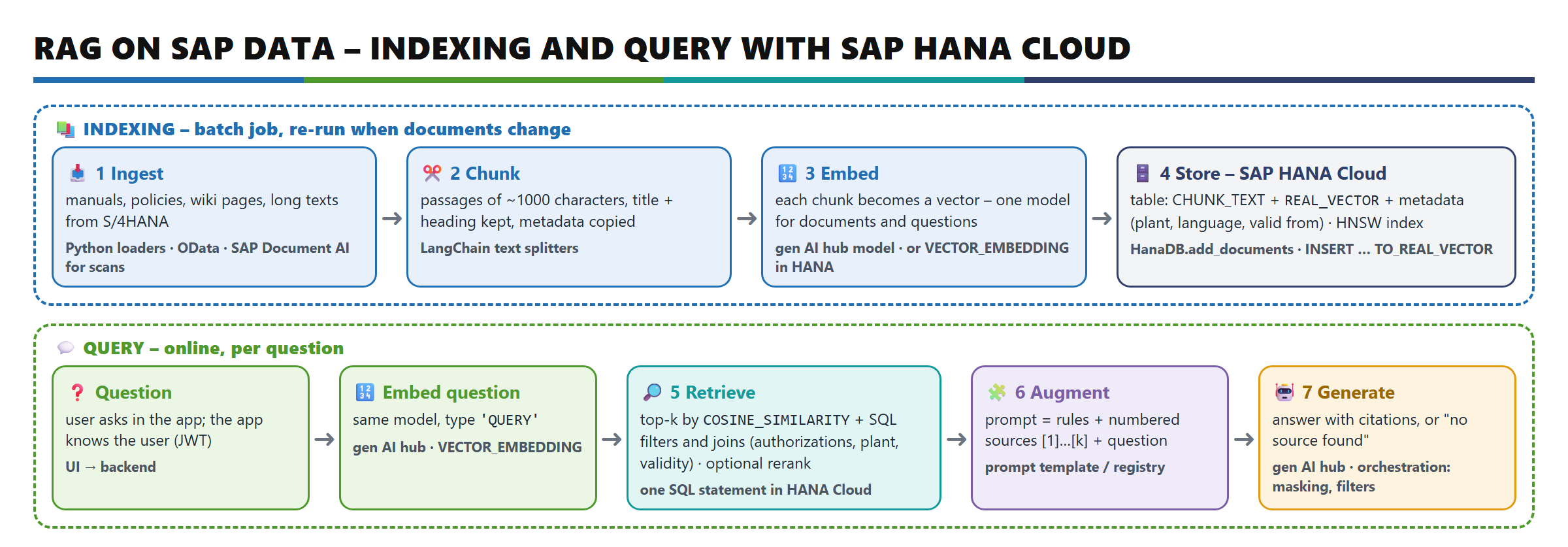
Step | What happens | SAP service / tool | Your decision |
|---|---|---|---|
1 Ingest | Load PDFs, Word, HTML, wiki pages, long texts from S/4HANA (OData) | Python loaders, document grounding pipelines (Part 4), SAP Document AI for scanned documents | Sources, owner, refresh cycle, what is out of scope |
2 Chunk | Split documents into passages | LangChain text splitters | Size, overlap, split on structure (Part 3.2) |
3 Embed | Turn each chunk into a vector | Embedding model in the generative AI hub, or | One model for documents and questions |
4 Store | Chunk text + vector + metadata in a table | HANA Cloud: | Metadata columns you will filter on (plant, language, validity, confidentiality) |
5 Retrieve | Top-k most similar chunks for the question |
| k, filters, reranking |
6 Augment | Build the prompt: instructions + numbered chunks + question | Prompt template (prompt registry, page 07) | "Answer only from the sources, cite them" |
7 Generate | LLM writes the answer with citations | Generative AI hub, ideally through orchestration (masking, filters) | Model, temperature 0, max tokens |
- Two phases: steps 1–4 are indexing (batch, a scheduled job, re-run when documents change); steps 5–7 are the query path (online, per question, must be fast).
- Typical SAP use cases: technician questions on equipment manuals, policy Q&A for employees, finding similar past incidents or notifications and how they were solved, product specification search, support for consultants on project documentation.
- RAG is not a database query. "How many open notifications does plant 1010 have?" is a question for an API or SQL (an agent tool, page 09) – not for similarity search over text.
Part 2 – The HANA Cloud vector engine in depth
The vector engine is part of every SAP HANA Cloud database – no extra product. Vectors live in normal column tables next to business data and are queried with SQL.
2.1 Data types
Type | Element | Notes |
|---|---|---|
REAL_VECTOR(n) | 32-bit float | 1 to 65,000 dimensions. With a fixed |
HALF_VECTOR(n) | 16-bit float | Half the memory, slightly less precision; available in newer HANA Cloud releases (check yours); convert with |
- No implicit conversion: a string or a list from Python becomes a vector only through
TO_REAL_VECTOR(...)(orTO_HALF_VECTOR). - Vectors have no order – you cannot
GROUP BYorORDER BYa vector column; you order by the result of a similarity function.
2.2 Create a table and insert vectors
|
- From Python use a parameter:
INSERT ... VALUES (?, ?, ..., TO_REAL_VECTOR(?))and passstr(vector)(the list as text).executemanyinserts a batch in one round trip. - Dimensions of common models: 1536 for OpenAI
text-embedding-3-smallandtext-embedding-ada-002, 3072 fortext-embedding-3-large– check the model card in AI Launchpad for the model you use.
2.3 Similarity search with SQL
|
Function | Result | Sort | When |
|---|---|---|---|
COSINE_SIMILARITY(v1, v2) | -1 … 1 (angle between the vectors) | DESC | Default for text embeddings |
L2DISTANCE(v1, v2) | ≥ 0 (Euclidean distance) | ASC | When the model or a tool expects it; for normalised vectors (length 1, as OpenAI embeddings are) it gives the same ranking as cosine |
2.4 In-database embeddings with VECTOR_EMBEDDING
VECTOR_EMBEDDING(text, 'DOCUMENT' | 'QUERY', model_id) creates the embedding inside HANA Cloud – no call to an external embedding service, no vector travelling through your app.
|
- Prerequisite: the natural language processing (NLP) feature must be enabled for the HANA Cloud instance (instance configuration in SAP HANA Cloud Central).
- Models: model IDs are versioned, e.g.
SAP_NEB.20240715andSAP_GXY.20250407(used in SAP's CAP documentation). The current list, languages and token limits are in theVECTOR_EMBEDDINGreference of the vector engine guide – text beyond a model's token limit is ignored, which is another reason to chunk. 'DOCUMENT'vs'QUERY': the model embeds stored passages and questions slightly differently; always use'QUERY'for the question.- Remote models: an optional variant uses a remote source that points to SAP AI Core, so HANA calls a generative AI hub embedding model (signature in the guide).
- Never mix vectors of two models in one column – the numbers are not comparable. Changing the model means re-embedding everything.
2.5 HNSW vector index
Without an index, a similarity query compares the question with every row (exact, but cost grows with the table). An HNSW (Hierarchical Navigable Small World) index builds a graph of neighbouring vectors and answers top-k queries much faster – approximately, trading a little recall for speed.
|
Parameter | Meaning | Effect |
|---|---|---|
M | Max neighbours per graph node (4 – 1000) | Higher = better recall, more memory, slower build |
efConstruction | Candidates considered while building (1 – 100,000) | Higher = better graph, slower build |
efSearch | Candidates considered per query (1 – 100,000) | Higher = better recall, slower query |
- The statement above has the same shape that SAP's
langchain-hanapackage generates inHanaDB.create_hnsw_index(m=..., ef_construction=..., ef_search=...); the ranges are the ones it validates. Parameters you leave out are omitted from the statement, so the database defaults apply (the LangChain docs name 64 / 128 / 200). - The index serves top-k queries (
TOP k … ORDER BYthe matching similarity function). One index per vector column and similarity function; it costs memory, so create it when the table is large enough that the exact scan becomes slow – measure first. - Release availability and the full grammar:
CREATE VECTOR INDEXin the SAP HANA Cloud SQL reference (check that your instance version supports it).
2.6 Filtering and joining with normal SQL
This is the reason to keep vectors in HANA Cloud: one statement filters by business data and ranks by meaning – and can enforce what the user may see.
|
- Authorization belongs in retrieval: once a confidential chunk is in the prompt, the LLM may repeat it. Filter before ranking, never ask the LLM to "ignore what the user may not see".
- Hybrid search: codes, part numbers and error IDs ("E-4711") are matched badly by embeddings – combine the vector score with an exact
WHEREor HANA full-text search (CONTAINS, needs a full-text index). - Threshold: add
AND COSINE_SIMILARITY(...) > 0.75(tune the value on your data) so weak matches do not reach the prompt – then the app can answer "no source found".
Part 3 – RAG in Python with LangChain and the generative AI hub
The same pipeline in Python, as in the SAP generative AI training projects. Credentials for SAP AI Core and the SDK basics (AICORE_* variables, init_llm) are on page 07; here the RAG-specific parts.
3.1 Packages
Package (PyPI) | Import | Role |
|---|---|---|
| from langchain_hana import HanaDB, HanaInternalEmbeddings, HanaReranker, HanaRdfGraph, HanaSparqlQAChain | LangChain vector store, in-DB embeddings and reranking, RDF graph and text-to-SPARQL (Part 5–6) |
| from gen_ai_hub.proxy.langchain import init_llm, init_embedding_model | LangChain chat and embedding models from the generative AI hub; replaces the deprecated |
hdbcli | from hdbcli import dbapi | SAP HANA Python client (connection for |
langchain-text-splitters | from langchain_text_splitters import RecursiveCharacterTextSplitter | Chunking |
langchain-hana1.x requires LangChain 1.x. The older classlangchain_community.vectorstores.HanaDBis superseded by this package – uselangchain_hanain new code.
3.2 Chunking strategies
Strategy | How | Good for |
|---|---|---|
Fixed size + overlap |
| Default starting point for prose |
Structure-aware | Split on headings / sections (e.g. Markdown or HTML header splitters), keep the heading in each chunk | Manuals, policies, help pages |
One record = one chunk | Each notification, incident or long text is a chunk with its own metadata | Business texts from S/4HANA |
Parent–child | Retrieve small chunks, pass their larger parent section to the LLM | Precise retrieval with enough context |
Tables and scans | Extract tables row-wise or as Markdown; OCR scans first (e.g. SAP Document AI) | Spec sheets, forms |
- Put the document title and section heading into the chunk text – "Pump P-200 › Seal replacement › step 3" embeds far better than "step 3" alone.
- Store metadata for every chunk: document ID, title, page, URL, language, plant / company code, valid from, confidentiality. You need it for filters and citations.
3.3 Indexing: load, split, embed, store
|
HanaDBcreates the table with the columnsVEC_TEXT,VEC_META(JSON metadata) andVEC_VECTORunless you pass your own column names (content_column,metadata_column,vector_column). It does not createspecific_metadata_columns– it raises an error if they are missing. So create the table yourself first (VEC_TEXT NCLOB, VEC_META NCLOB, VEC_VECTOR REAL_VECTOR, PLANT NVARCHAR(4), LANGU NVARCHAR(2)), or letHanaDBcreate it without them and thenALTER TABLE SERVICE_DOCS_LC ADD (PLANT NVARCHAR(4), LANGU NVARCHAR(2)). The columns are filled from the metadata keys of the same name.- In-database embeddings instead:
embeddings = HanaInternalEmbeddings(internal_embedding_model_id="SAP_GXY.20250407")–HanaDBthen generatesVECTOR_EMBEDDINGSQL, no AI Core call for embeddings (needs NLP enabled, Part 2.4). - Re-indexing: delete a document's chunks with
store.delete(filter={"DOC_ID": "PUMP-MAN-0042"})before adding the new version – otherwise old and new text compete.
3.4 Retrieval with metadata filters
|
Filter operator | Example |
|---|---|
Equality (implicit | {"LANGU": "EN"} |
| {"page": {"$between": [10, 20]}} |
| {"PLANT": {"$in": ["1010", "1020"]}} |
| {"title": {"$like": "%P-200%"}} |
| {"$or": [{"PLANT": "1010"}, {"PLANT": "1020"}]} |
- Reranking in HANA:
similarity_search(..., rerank_config={"query": question, "model_id": "<cross-encoder model>", "top_n": 3})re-scores the hits with HANA's in-database cross-encoder (CROSS_ENCODE);HanaRerankerdoes the same as a LangChain document compressor. Model IDs: see the PAL cross-encoder documentation of your release (e.g.SAP_CER.20250701).
3.5 Building the prompt with sources (citations)
|
- Return the sources as data (title, page, URL), not only inside the text – the UI renders them as links and you can check that every cited number really exists.
- Put instructions in the system message and documents in the human message; label documents clearly as data. A document may contain text like "ignore your instructions" (indirect prompt injection) – the LLM must treat it as content, and the orchestration input filter helps (page 07).
init_llmcalls the model deployment directly through the generative AI hub proxy. If you need data masking or content filtering, send the final prompt through the orchestration service instead (page 07).
Part 4 – Grounding alternatives: document grounding service vs your own HANA RAG
The orchestration service has a grounding module backed by SAP's document grounding service: pipelines read documents from Microsoft SharePoint, AWS S3 or SFTP, chunk and embed them into a SAP-managed HANA vector store, and the grounding module retrieves passages into the prompt (placeholders in the template). A Vector API lets you upload your own pre-chunked content instead of a pipeline. Configuration in code: page 07; Joule's own document grounding: page 02 Part 7.
Question | Document grounding (managed) | Own RAG on HANA Cloud |
|---|---|---|
Effort | Low – configure a pipeline, reference it in the orchestration config | Higher – you build ingestion, chunking, tables, retrieval |
Sources | SharePoint, S3, SFTP; or your chunks via the Vector API | Anything you can read, incl. S/4HANA texts and HANA tables |
Chunking / embedding control | SAP's defaults (limited options) | Full control (strategy, model, in-DB embeddings) |
Filters | Metadata filters on the grounding request | Any SQL: joins with business and authorization tables |
Same call as masking / filtering | Yes – one orchestration request | Combine: retrieve yourself, then call orchestration with the chunks |
Cost | Grounding storage and retrieval metered (page 06 Part 7.2) | HANA Cloud memory and compute; embedding calls |
Best for | Document Q&A over file repositories, quick start | Business-data-aware retrieval, strict authorizations, graph RAG, custom ranking |
- Set-up of document grounding (summary): a resource group with the document grounding label, a generic secret with the repository credentials, a pipeline, then the grounding module in the orchestration configuration referencing the data repository.
- Interview answer in one line: "Managed grounding for documents in repositories; own HANA RAG when retrieval must understand business data or authorizations."
Part 5 – The HANA Cloud knowledge graph engine: RDF and SPARQL
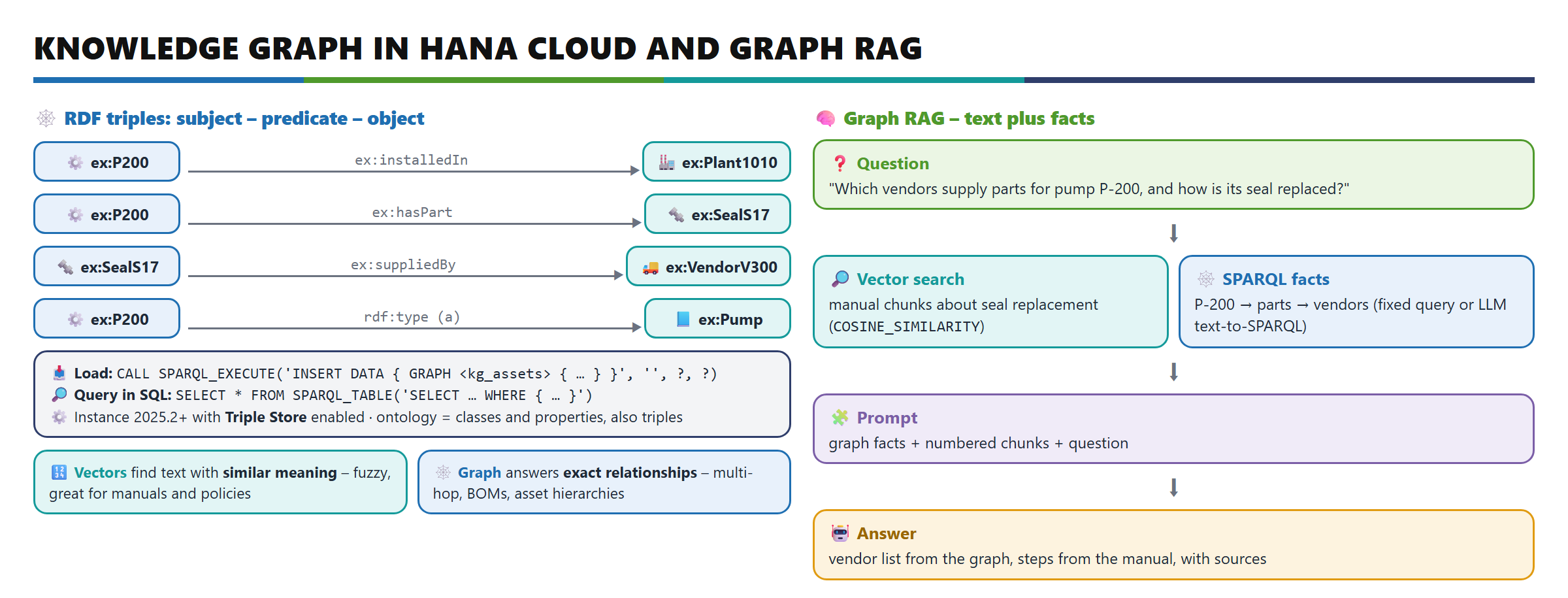
Vectors find text with similar meaning. A knowledge graph stores facts and relationships explicitly – "pump P-200 is installed in plant 1010", "P-200 has part seal S-17", "S-17 is supplied by vendor V-300" – so a query can follow them exactly and without guessing.
5.1 RDF in five minutes
Term | Meaning | Example |
|---|---|---|
Triple | One fact: subject – predicate – object | ex:P200 ex:installedIn ex:Plant1010 |
IRI | Global identifier of a thing or relation | |
Literal | A value (string, number, date) |
|
Prefix | Short form for an IRI namespace | PREFIX ex: < http://example.org/> |
Named graph | A set of triples with its own name | <kg_assets> |
Ontology | The vocabulary: classes ( | ex:Pump rdfs:subClassOf ex:Equipment |
SPARQL | W3C query and update language for RDF | SELECT ?part WHERE { ex:P200 ex:hasPart ?part } |
5.2 Enabling the engine
- SAP HANA Cloud instance version 2025.2 or later with the Triple Store option switched on: SAP HANA Cloud Central → instance → Manage Configuration → Advanced Settings → Triple Store (steps from SAP's multi-model tutorial).
- Not available in free tier instances.
- To browse graphs in the SQL console / Database Explorer, enable RDF Named Graphs in the database objects preferences; triples without a graph name land in the DEFAULT graph.
5.3 Loading triples with SPARQL_EXECUTE
|
- Signature as used by SAP's tutorial and by
langchain-hana:SPARQL_EXECUTE(<SPARQL text>, <request headers>, ?, ?)– the headers string can setAccept:(result format, e.g.application/sparql-results+csvor+json) andContent-Type:; the two?are output parameters (response and metadata). - Bulk loads: generate Turtle files (e.g. with Python
rdflibfrom S/4HANA master data) and load them through the same procedure – formats such as Turtle and JSON-LD are supported for import and export (exact headers in the knowledge graph guide). - Use stable IRIs derived from business keys (
…/equipment/10000045) so a triple can be linked back to the S/4HANA object and to relational rows.
5.4 Querying: SPARQL_TABLE inside SQL
|
SPARQL_TABLEreturns a SPARQLSELECTresult as a table – you can join it with relational tables, e.g. vendor ratings or stock, in the same SQL statement. The inverse direction (SQL_TABLEinside SPARQL) exists too.- From Python:
HanaRdfGraph(connection=conn, graph_uri="kg_assets", auto_extract_ontology=True)andgraph.query(sparql)– it callsSYS.SPARQL_EXECUTEand returns CSV by default.
5.5 Three "graphs" you must not confuse
HANA Cloud knowledge graph engine | HANA Cloud property graph engine | SAP Knowledge Graph | |
|---|---|---|---|
What | RDF triple store inside your HANA Cloud database | Graph view over your own vertex and edge tables ( | SAP-delivered map of SAP business entities, processes and APIs |
Data model | Triples, IRIs, ontologies (W3C standards) | Vertices and edges with properties | Managed by SAP (semantic layer over SAP metadata) |
Query | SPARQL ( | openCypher ( | Used by Joule, Joule Studio and agents; not a database you load yourself |
Strength | Semantics, shared vocabularies, integrating heterogeneous data, reasoning over meaning | Network analytics on existing tables (routes, dependencies) | Grounding agents in SAP business context, API discovery |
Where in the notes | This page | – | Page 01 Part 4.3, page 05 Part 5 |
Part 6 – Graph RAG: vectors plus knowledge-graph facts
Plain RAG finds passages that sound similar. It fails when the answer needs several hops ("which vendors supply parts for pumps that failed in plant 1010?"), exact relationships or aggregation. Graph RAG adds facts from the knowledge graph to the retrieved text.
6.1 Three patterns
Pattern | How it works | Example |
|---|---|---|
Entity linking + graph expansion | Find the entities in the question (or in the top chunks), fetch their neighbourhood from the graph with a fixed SPARQL query, add those facts to the prompt next to the chunks | Question names P-200 → add its parts, plant, vendors |
Text-to-SPARQL | The LLM writes a SPARQL query from the question and the ontology; the engine runs it; the LLM phrases the answer from the result | "List all pumps in plant 1010 with seal S-17" |
Graph-filtered vector search | SPARQL returns the allowed or relevant object IDs; vector search runs only over chunks of those objects (SQL | Manual passages only for equipment the graph links to the failed asset |
6.2 Text-to-SPARQL with langchain-hana
|
- Ontology quality decides accuracy: the LLM only sees the class and property names. Clear names (
ex:suppliedBy, notex:p17), labels and comments in the ontology matter more than the prompt. - Security: the LLM generates the query – connect with a database user that can only read the graph (the package's own security note says the same). Never let generated SPARQL run
INSERTorDROP. - Validate before running: parse the query, allow
SELECTonly, add aLIMIT, log query and result for review.
6.3 Combining both in one prompt
|
equipment_iricomes from your app (selected object, entity linking against known IDs) – never interpolate free user text into a query string.
6.4 When graph RAG beats plain RAG
Use plain RAG when | Use graph RAG when |
|---|---|
Answers are in one or two passages of text | Answers need relationships across objects (multi-hop) |
Documents are the source of truth (manuals, policies) | Structured facts are the source of truth (bills of material, org structures, asset hierarchies) |
Fast start, little modelling | You can maintain an ontology and keep the graph in sync |
"How do I replace the seal?" | "Which plants are affected if vendor V-300 cannot deliver S-17?" |
- Counts and totals ("how many") belong to SQL / OData or SPARQL aggregates – not to an LLM reading chunks.
Part 7 – Evaluating and tuning RAG: a practical checklist
RAG quality is measured, not guessed. Build a small test set first: 30–100 real questions with the expected answer and the document / page that contains it.
Measure | Question it answers | How to check |
|---|---|---|
Retrieval hit rate / recall@k | Is the right chunk in the top k? | Automatic: compare retrieved chunk IDs with the expected source |
Precision / MRR | How high is the right chunk ranked? | Automatic, from the same data |
Faithfulness (groundedness) | Is every statement supported by the sources? | LLM-as-judge with a rubric + human spot checks |
Answer relevance / correctness | Does it answer the question correctly? | Compare with the expected answer (judge or human) |
Citation accuracy | Do the cited sources really contain the statement? | Check cited numbers exist and contain the facts |
Refusal rate | Does it say "no source found" when it should? | Include questions without an answer in the test set |
Latency and cost | Fast and cheap enough? | Log time per step and tokens per request (page 09 Part 6) |
Knob | Typical start | Tune when |
|---|---|---|
Chunk size / overlap | ~1000 characters / 10–20 % | Answers miss context → larger or parent–child; retrieval imprecise → smaller |
Top-k | 4–6 | Recall low → raise k (and rerank); answers confused → lower k |
Similarity threshold | Measure on your data (e.g. 0.7–0.8 cosine) | Too many "no source" → lower; irrelevant sources → higher |
Reranking | Off | Right chunk often in top 20 but not top 5 → fetch 20, rerank to 5 |
Hybrid search | Off | Questions contain codes, IDs, part numbers |
Embedding model | One general model | Domain language or other languages perform badly |
Prompt | Answer-only-from-sources + citations | Hallucinations or missing citations |
Temperature | 0 | Keep 0 for factual answers |
- Change one knob at a time and re-run the whole test set – a fix for one question often breaks another.
- Tools: the generative AI hub has an evaluation capability (page 06;
gen_ai_hub.evaluationsin the SDK), LangSmith datasets and evaluators (page 09 Part 6), or open-source frameworks such as Ragas. Keep the test set under version control. - Data hygiene beats tuning: remove outdated versions and duplicates, give documents owners and validity dates, and re-index on change. Most "wrong answers" are old documents.
- In production: log question, retrieved chunk IDs, scores, model, prompt version and user feedback (thumbs up / down) – this becomes your next test set. Mind personal data in those logs.
Part 8 – Interview questions
Q1. Explain the RAG flow and where SAP services fit.
Indexing: ingest, chunk, embed (generative AI hub model or VECTOR_EMBEDDING), store in a HANA Cloud REAL_VECTOR table with metadata. Query: embed the question, retrieve top-k with COSINE_SIMILARITY plus SQL filters, build a prompt with numbered sources, generate through the generative AI hub (ideally orchestration for masking and filters).
Q2. Why store vectors in HANA Cloud instead of a separate vector database?
Vectors sit next to the business data, so one SQL statement can join authorization and master data and rank by similarity; no extra system to secure, sync and operate; HANA also offers in-database embeddings, reranking and a knowledge graph engine.
Q3. COSINE_SIMILARITY vs L2DISTANCE?
Cosine measures the angle (-1 to 1, higher is more similar, order descending); L2 is the Euclidean distance (0 or more, smaller is closer, order ascending). For normalised embeddings both give the same ranking; the HNSW index must use the same function as the query.
Q4. What does VECTOR_EMBEDDING do and what do you need for it?
It creates embeddings inside HANA Cloud with an SAP model such as SAP_GXY.20250407 (older ID: SAP_NEB.20240715) – 'DOCUMENT' for stored text, 'QUERY' for questions. It needs the NLP feature enabled on the instance; a variant can call an SAP AI Core model through a remote source.
Q5. What is an HNSW index and when do you create one?
An approximate nearest-neighbour graph index (CREATE HNSW VECTOR INDEX … SIMILARITY FUNCTION …) that speeds up top-k queries at the cost of memory and a little recall. Create it when exact scans become too slow; tune M, efConstruction, efSearch.
Q6. How do you make sure RAG respects authorizations?
Filter in retrieval, before anything reaches the prompt: metadata columns such as plant or confidentiality, joined with the user's assignments taken from the JWT. Never rely on the LLM to hide content it has already seen.
Q7. Which chunking strategy would you choose for SAP maintenance manuals?
Structure-aware chunks along headings with the title and section path in each chunk, about 1000 characters with overlap, metadata for equipment, plant, language and page – then measure recall on a test set and adjust.
Q8. How do you build the LangChain vector store on HANA?
langchain-hana: HanaDB(connection=hdbcli_connection, embedding=init_embedding_model(...), table_name=...), add_documents, similarity_search_with_score(question, k, filter=...), as_retriever; HanaInternalEmbeddings for in-database embeddings and create_hnsw_index for the index.
Q9. Document grounding service or your own HANA RAG?
Managed document grounding for documents in SharePoint, S3 or SFTP with little effort, in the same orchestration call as masking and filters. Own HANA RAG when retrieval must use business data, custom chunking, strict authorization joins or a knowledge graph.
Q10. What is an RDF triple and how do you query the HANA Cloud knowledge graph engine?
A fact as subject – predicate – object with IRIs. You load and change data with SPARQL through SPARQL_EXECUTE, and embed SPARQL SELECT results in SQL with SPARQL_TABLE; the instance needs version 2025.2+ with the triple store enabled.
Q11. Knowledge graph engine vs property graph engine vs SAP Knowledge Graph?
The knowledge graph engine is an RDF store with SPARQL in your HANA Cloud database; the property graph engine runs openCypher and graph algorithms over your own vertex and edge tables; SAP Knowledge Graph is SAP's managed semantic map of SAP entities and APIs used by Joule and agents.
Q12. When does graph RAG beat plain RAG?
When answers need multi-hop relationships, exact structured facts or aggregation – e.g. which plants depend on a vendor's part. Plain RAG is enough when the answer sits in one or two text passages.
Q13. What are the risks of text-to-SPARQL and how do you control them?
Wrong or harmful generated queries. Use a read-only database user, allow only SELECT, add limits, validate and log the query, keep a clear ontology, and prefer fixed queries for known patterns.
Q14. How do you evaluate a RAG system?
A test set of real questions with expected answers and sources; measure retrieval recall@k, faithfulness, answer correctness, citation accuracy, refusal behaviour, latency and cost; change one parameter at a time and keep production feedback as new test cases.
🏠 Start Here · ◀ 07 · SDK & Orchestration · 09 · Build & Deploy Apps ▶ · Sections: CORE ABAP | OOPS ABAP | ABAP on HANA | Clean Core | RAP | ABAP Points | SAP Fiori | SAPUI5 | Mobile Development (MDK) | BTP Foundations | BTP Development | CAP | SAP Build | ABAP on BTP | Integration Suite | SAP Business AI | SAP BASIS | Security | SAP SDLC
Functional: FICO ABAP | TRM ABAP | VIM | SAP BIS | SD ABAP | MM ABAP | PP ABAP | QM ABAP | PM ABAP | PS ABAP | EWM | TM ABAP | GTM ABAP | EHS ABAP | HR ABAP | BW | SAP Datasphere | SAP Business Data Cloud | SAP MDG | SAP Analytics Cloud | SAP Ariba | SAP CX | SAP IBP