An architect who designs an SAP Business Data Cloud (BDC) landscape must answer four questions besides "which data products?": how is it licensed and paid, how is it provisioned and wired together, how are users, data and content governed, and which design decisions are hard to reverse. This page covers the commercial model (capacity units and intelligent packages – stated conceptually, as SAP publishes it in the Service Description Guide and its commercial presentations), provisioning in SAP for Me with formations, regions and EU Access, identity, roles and security, data governance and content lifecycle, the architect decisions and the roadmap. Architecture and components are on page 01, data products on page 02, SAP Databricks and partners on page 04, BW on page 05. BDC changes fast – facts are marked "as of <month year>"; exact prices and capacity unit values are not reproduced here and always come from SAP.
Part 1 – Commercial model: capacity units and intelligent packages
BDC is a cloud subscription with two building blocks: SAP Business Data Cloud, core capacity – a pool of capacity units (CU) that can be spent on any of the underlying services – and intelligent packages that bring the SAP-managed data products and intelligent content of one SAP business application. The contract terms are in the SAP Business Data Cloud Service Description Guide (version v.9-2026 as of November 2026) and the BDC Supplement.
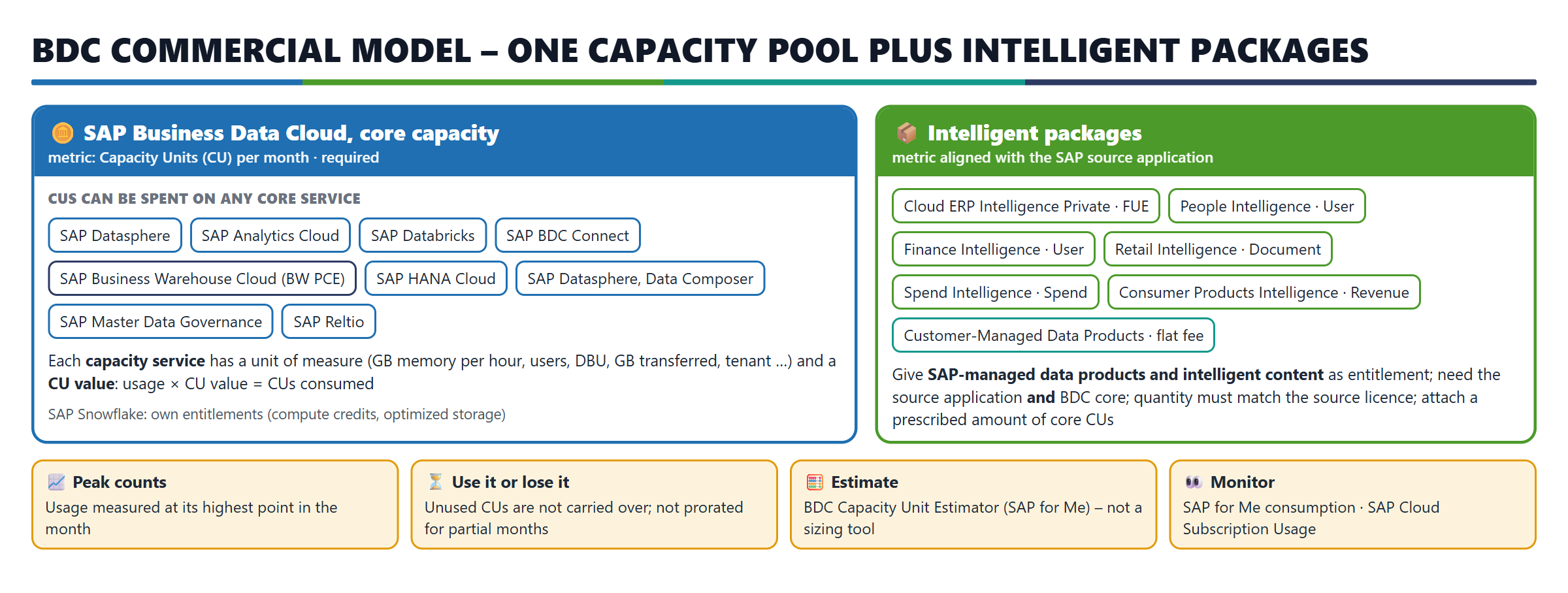
Aspect | SAP Business Data Cloud, core capacity | Intelligent packages |
|---|---|---|
Metric | Capacity units (CU) per month | Same metric as the SAP source application (FUE, user, document, revenue, spend) – or a flat fee |
What you get | The right to consume the BDC services – Datasphere, SAC, SAP Databricks, SAP BDC Connect, SAP BW Capacity Services (BW PCE), SAP HANA Cloud, Datasphere Data Composer, MDG, SAP Reltio – in varying quantities | SAP-managed data products and intelligent content as an entitlement, plus a prescribed amount of core CUs that is attached automatically |
Prerequisite | Required for every BDC landscape | A subscription to the source application and BDC core capacity; the package quantity must match the source licence |
Sold | Together with at least one intelligent package (SAP commercial presentation, April 2026) | Per line of business |
1.1 How capacity units are counted (Service Description Guide v.9-2026)
- Each capacity service has a capacity unit of measure (e.g. 16 GB memory per hour, tenant per hour, user, DBU, GB transferred) and a capacity unit value: units used in the month × CU value = CUs consumed. SAP's own example: 16 blocks of disk storage for 730 hours × 0.004 = 46.72 CUs.
- The order form states the CUs per month. Usage is measured at its highest point in the month; CUs are not prorated for partial months and unused CUs are not carried over.
- Storage or memory entitlements in GB are not time-bound and do not deplete with use, unless stated otherwise.
- After BDC core is enabled, every service in the package gets a CU quota in SAP for Me – the architect decides how the monthly pool is split.
- Included without extra CUs: 16 GB of catalog storage per month.
1.2 What drives consumption per service
Service | Measured by (concept) | Notes |
|---|---|---|
SAP Datasphere | Tenant foundation; compute memory blocks per hour (memory- or CPU-optimised, elastic, Spark); object store storage and requests; disk storage; data integration hours; premium outbound integration in GB blocks; BW bridge | Fair-use limits per GB of compute memory for OData API calls and the Open SQL interface; SLT may be used only to load data into Datasphere |
SAP Analytics Cloud | Users per month in quantity tiers – business intelligence, planning standard, planning professional; test tenant | Users are counted per instance; SAC planning capacity requires a separate SAP Enterprise Planning subscription (SDG v.9-2026) |
SAP Databricks | Databricks Units (DBU) for serverless, SQL and model serving / training compute; Databricks Storage Units (DSU); egress and connectivity per GB or hour | CU values differ by hyperscaler and region |
SAP BDC Connect | Data transferred between regions (per GB) and processing requests (per block of API calls) | For Databricks, Snowflake, Google BigQuery … outside BDC (page 04) |
SAP BW Capacity Services | System tiers per tenant and GB memory of scale-out systems (Table 4 of the SDG, many line items) | Sized with an SAP Cloud Architect Advisor; promotional CU values for order forms signed in the promotion periods 2025 and 2026 apply for the initial term (page 05) |
SAP Snowflake | Own entitlements: compute credits and optimized storage | Both are needed to use SAP Snowflake |
HANA Cloud, MDG, Data Composer, Reltio | Own capacity service tables in the SDG | Added to BDC core during 2026 |
1.3 Intelligent packages (SDG v.9-2026)
Package | Requires (source application) | Metric |
|---|---|---|
Cloud ERP Intelligence Private (earlier name: Core Enterprise Analytics) | RISE with SAP S/4HANA Cloud Private Edition or SAP Cloud ERP Private | FUE – at least the FUEs of the ERP subscription |
People Intelligence | SAP SuccessFactors Employee Central (core HR option) or SAP Core HR package | User – at least the users of the HR subscription |
Finance Intelligence | SAP Finance Base / Premium or GROW with SAP S/4HANA Cloud Public Edition | User |
Retail Intelligence | SAP S/4HANA Cloud foundation for retail and fashion, private edition | Document (forecasts, order plan items, supply network nodes) |
Spend Intelligence | Spend Analysis and Insights and External Workforce Insights applications included | Spend in blocks |
Consumer Products Intelligence | SAP Cloud ERP Private | Revenue (planned sales revenue) |
Customer-Managed Data Products | Any enterprise data source – no SAP-managed content | Flat fee; adds 1,000 core CUs per month for building own data products |
- Availability differs per package – in April 2026 Finance and Retail Intelligence were in controlled availability for early adopters; check the SDG version and your account team.
- Non-RISE SAP ERP systems can be onboarded to build own data products with the Datasphere object store and integration capacity – this gives no access to SAP-managed intelligent content and data products.
- To see what an organisation bought: SAP for Me → Portfolio & Products → My Product Portfolio.
1.4 Existing SAP Datasphere and SAP Analytics Cloud customers
- The account executive updates the standalone subscriptions to BDC; the SAP for Me account then holds BDC capacity units.
- Existing systems are rewired instead of re-implemented: SAP-managed subscription systems automatically; self-service systems (BTP global account, also CPEA / BTPEA / pay-as-you-go) by an update of the service instance with the parameter
rewire_tenant– this can take up to 12 hours. - Rewiring needs the SAC public option (not dedicated) and paid plans; data stays unchanged, catalog content is migrated after the Datasphere system joins a BDC formation.
- Datasphere CUs move 1:1 to BDC CUs; SAC user licences are converted into BDC CUs.
1.5 Estimating and monitoring
- SAP Business Data Cloud Capacity Unit Estimator (in SAP for Me): choose hyperscaler and data center, add systems, configure resources – it shows CUs per system per month and for the landscape per month and year. It is not a sizing tool; sizing comes from SAP pre-sales.
- Consumption: SAP for Me consumption view / Public Cloud Consumption card and SAP Cloud Subscription Usage ("Capacity Units – SAP Business Data Cloud").
- Cost levers: share zero-copy instead of replicating out (premium outbound integration), keep large volumes in the object store, right-size compute, set CU quotas per service, downsize BW PCE when use cases move out (page 05), review consumption monthly – unused CUs are lost.
Part 2 – Provisioning: SAP for Me, systems and formations
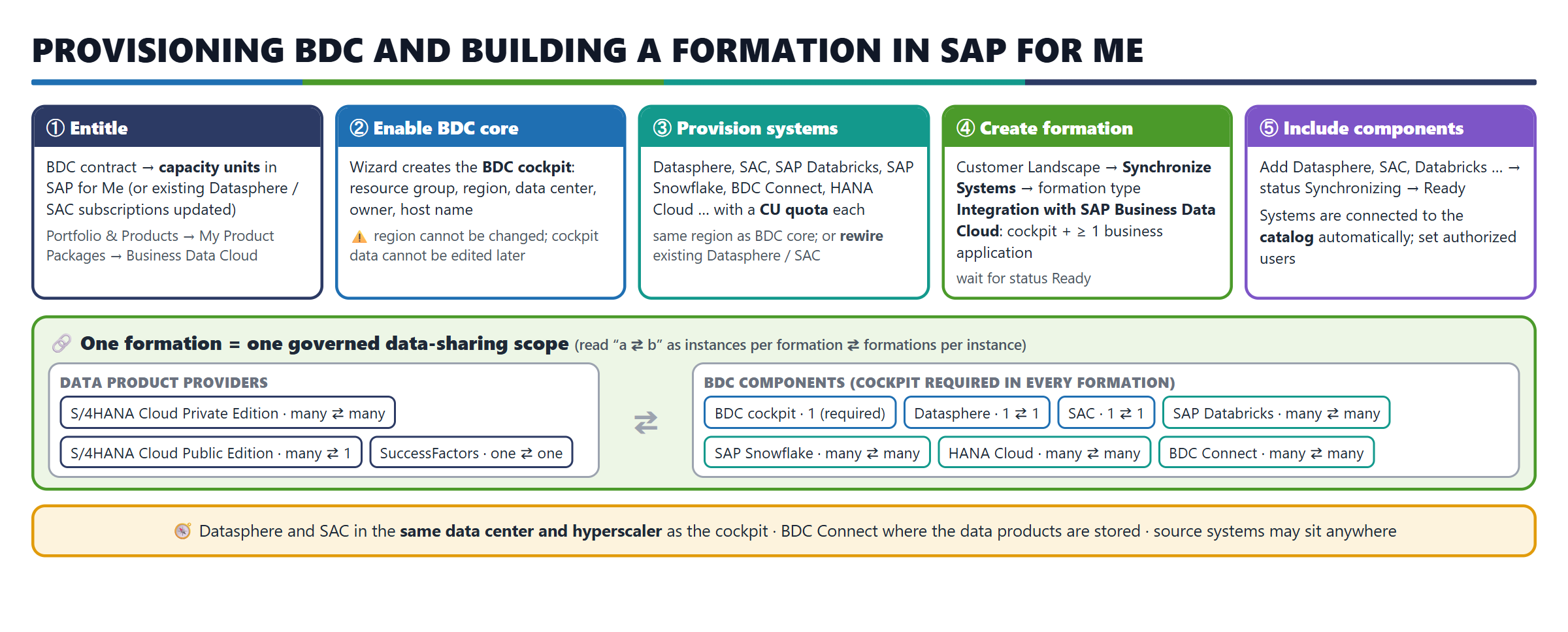
Everything is provisioned in SAP for Me (Portfolio & Products → My Product Packages → Business Data Cloud). A formation of type Integration with SAP Business Data Cloud then wires the data product providers (SAP applications) to the BDC components that consume them.
2.1 Steps
- 1. Enable SAP Business Data Cloud Core – the wizard creates the BDC cockpit system: resource group, region, data center (or "default"), owner and tenant host name. The region cannot be changed and the cockpit data cannot be edited after provisioning.
- 2. Provision the systems offered with BDC core – Datasphere, SAC, SAP Databricks, SAP Snowflake, BDC Connect, Data Composer, HANA Cloud (database and data lake), SAP Reltio – each with its CU quota.
- 3. Synchronize systems in the Customer Landscape tab – newly provisioned systems can take several hours (usually 2–4) to appear.
- 4. Create the formation with the BDC cockpit and at least one business application; wait for status Ready.
- 5. Include the BDC components (Datasphere, SAC, SAP Databricks …); status goes from Synchronizing to Ready. All systems are connected to the catalog automatically.
- Use only SAP for Me for BDC formations – other tools such as the BTP cockpit lack the full function set.
2.2 Formation rules (as of November 2026)
System | Instances per formation | Formations per instance |
|---|---|---|
BDC cockpit | Exactly one (required in every formation) | Every formation |
SAP S/4HANA Cloud Private Edition (needs Cloud ERP Intelligence for SAP content) | One or more | One or more |
SAP S/4HANA Cloud Public Edition | One or more | One |
SAP SuccessFactors (needs People Intelligence for SAP content) | One | One |
Other SAP business applications that produce data products | One | One |
SAP Datasphere · SAP Analytics Cloud · SAP Reltio | One | One |
SAP Datasphere, Data Composer | One | One or more |
SAP Databricks · SAP Snowflake · BDC Connect · HANA Cloud · SAP Customer Data Platform | One or more | One or more |
- Consent requests: an SAP application assigned to a different CRM customer ID is requested with scope System Sharing; the administrator approves it in the BTP cockpit (System Landscape → Consent Requests).
- Removing a system requires that its BDC content is uninstalled first (spaces from intelligent content in Datasphere, dependent SAC stories); otherwise the removal fails.
- Contract end: the customer must clear all BDC data – delete all BDC formations before the contract expires.
- SAP BW PCE is not a formation member; it pushes data to the formation's Datasphere tenant through its own target (page 05 Part 4.4).
2.3 Development, test and production
- Option A – one formation per tier: DEV, TEST and PROD formations, each with its own S/4HANA tenant, Datasphere and SAC.
- Option B – fewer formations: a non-production formation with DEV and TEST sources feeding one Datasphere tenant in separate ingestion, preparation and model spaces, plus a PROD formation. The business landscape does not have to be duplicated one to one.
- System mapping: the BD Administrator pairs data-product provider instances (e.g. S/4HANA DEV → TEST, DEV → PROD) so that Datasphere content transported between tenants automatically connects to the right provider; unmapped providers make the transport fail.
Part 3 – Regions, data centers and EU Access
Rule | Consequence |
|---|---|
BDC core and the solutions in its package are provisioned in the same region | Choose the region once – it cannot be changed |
SAP Datasphere and SAC must sit in the same data center and hyperscaler as the BDC cockpit | Rewired systems: enable BDC core in the data center of the existing Datasphere / SAC |
BDC Connect is provisioned in the data center that hosts the data products | Check where the data products are stored before ordering |
Data product storage region: chosen by the Optimal Data Center Selection service (the producer tenant or closest to it); for S/4HANA Cloud Private Edition it is the cockpit region | Fixed once provisioned |
Source systems may run in any data center and hyperscaler | SAP recommends a data center close to the sources and users (e.g. S/4HANA in US10 → BDC in US10) |
Not every data center offers every solution | E.g. EU Access data centers Frankfurt EU11 and Switzerland CH20 offer neither SAP Databricks nor BDC Connect; several others lack SAP Databricks (as of November 2026 – check Data Center Availability) |
3.1 EU Access
- EU Access keeps SAP's processing of personal data within the EEA and Switzerland. It is a contract option with its own uplift in the SDG; pick a provider and region labelled EU Access when provisioning.
- Full EU Access support: BDC cockpit, SAP Datasphere and SAP Analytics Cloud. Other BDC components are not provided in EU Access context today; data shared to them – or to external partner platforms – may leave the EU Access principles. The customer must assess the data protection impact.
Part 4 – Identity, roles and security
4.1 Authentication
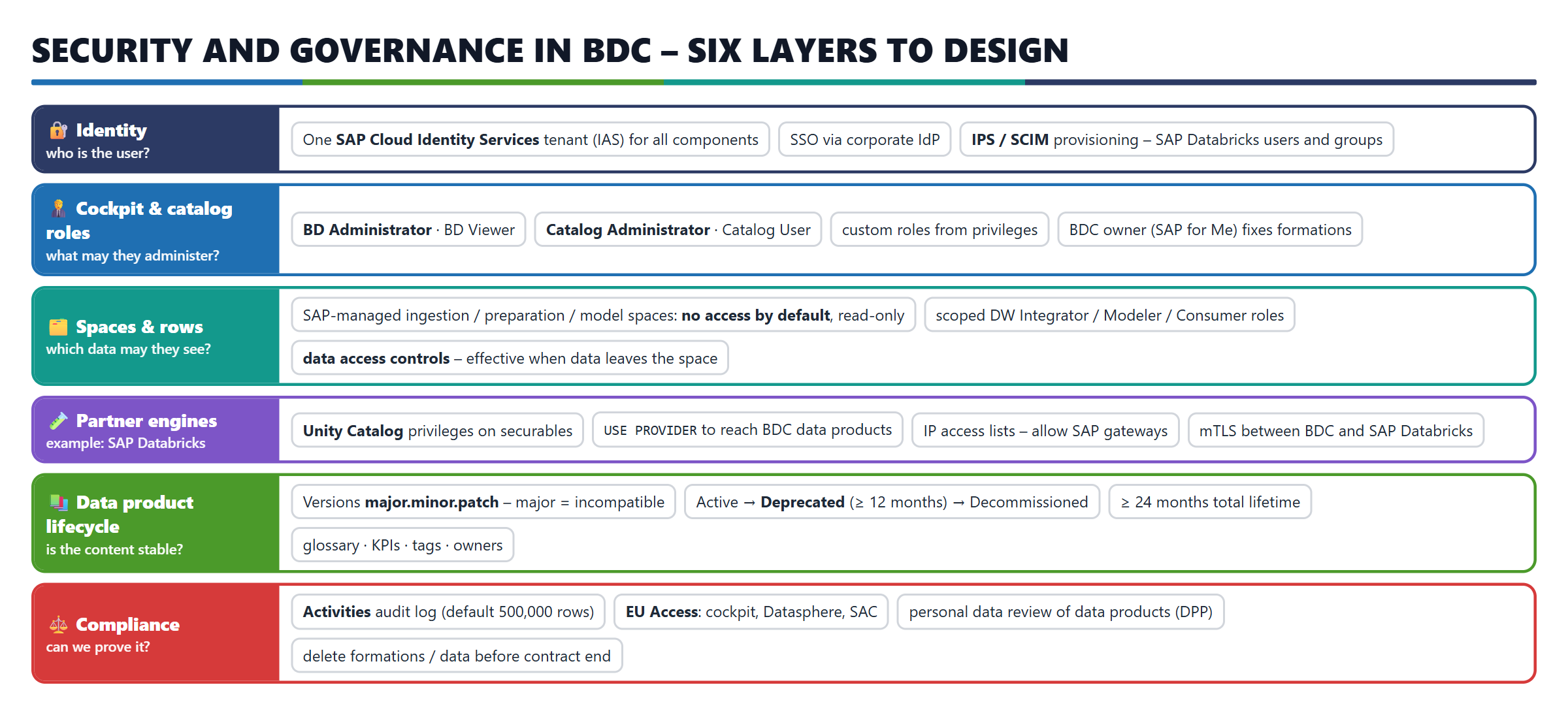
- Default: SAP Cloud Identity Authentication – users sign in to BDC, but not automatically to other SAP products.
- Bundled SAP Cloud Identity Services tenant: SSO across BDC and other SAP products; forwards requests to the corporate IdP. New tenants can use only the default or the bundled option; a legacy custom SAML IdP remains for existing tenants.
- SAP recommends one Identity Authentication (IAS) tenant for all BDC components. Identity Provisioning (IPS) provisions users and groups to SAP Databricks via SCIM; groups synchronise bidirectionally and roles in SAP Databricks are assigned through group membership.
4.2 Roles
Role | Scope |
|---|---|
BD Administrator | Full privileges in the BDC cockpit – install intelligent content, activate data packages, system mapping, activity log |
BD Viewer | Read access to the cockpit, System Landscape and Monitoring apps |
Catalog Administrator | Sets up data governance in the catalog – source systems, glossaries, tags, publishing enriched assets |
Catalog User | Searches and discovers governed content in the catalog |
BDC owner (named at provisioning) | Only user who can fix the formation set-up in SAP for Me |
- Standard roles cannot be edited; use them as templates for custom roles. The DW Support User role is reserved for SAP Support.
4.3 Data access in Datasphere
- SAP-managed spaces created by intelligent content are read-only and, by default, nobody has access: give the ingestion space (named after the source, e.g. SAP_S4H) to a few monitoring users with a scoped DW Integrator role, the preparation space to the users who upload permission records (scoped DW Modeler), the model space to the business users of the intelligent content (scoped DW Consumer).
- Data access controls give row-level security only when the view leaves the space (shared or exposed for consumption) – inside the space they can be circumvented. Design spaces accordingly (SAP Datasphere › 04).
4.4 SAP Databricks
- Authorization is governed by Unity Catalog privileges on securable objects; users need the USE PROVIDER privilege to reach BDC data products.
- Data moves between BDC and SAP Databricks with mTLS; shared data products are stored in SAP-managed, Unity-governed storage. IP access lists must allow the SAP network gateways, otherwise the BDC connection breaks.
- Overwritten or deleted data is kept in snapshots for 14 days; compute storage (e.g. notebooks) is not backed up – keep notebooks in Git.
4.5 Personal data
- Sensitive personal data entered in source systems through uncontrolled channels (generic containers, custom extensions) can appear in data products – review data products against data protection rules.
- Depending on access control, personal data can become visible in consuming systems such as Datasphere and SAP Databricks – enforce role restrictions and data protection policies there.
Part 5 – Data governance and content lifecycle
5.1 Catalog governance
- Systems added to a formation become catalog source systems automatically. Set an authorized user for each Datasphere and SAC system – objects are harvested with that user's permissions; without it, nothing from the system is discoverable.
- Synchronise source systems manually after big changes; build business glossaries, KPIs and hierarchical tags; publish enriched assets so all catalog users find them (page 02).
- For custom data products: one owner / data steward each, a documented data provider profile and the narrowest visibility (e.g. Formations).
5.2 Versioning of data products and intelligent content
Level | Compatibility | Examples | What you do |
|---|---|---|---|
Major (X.0.0) | Incompatible | Column deleted, field length changed, data product removed from intelligent content | New major version is installed manually next to the old one; adapt derived products and extensions; the old version is deprecated |
Minor (1.X.0) | Backward compatible | Column added or renamed, intelligent content renamed | Update; integrations keep working |
Patch (1.0.X) | Backward compatible | Defect fixes, metadata updates only | Update |
5.3 Release states
State | Meaning | Timeline |
|---|---|---|
Active | Stable and production ready | Major versions stay supported for a transition period |
Deprecated | Fully functional, scheduled for removal – typically a successor exists; replace it | At least 12 months before decommissioning; support continues |
Decommissioned | No longer functional, kept for reference; no more updates or data loads in Datasphere; dependent Datasphere / SAC artifacts stay until uninstalled | Total lifetime from Active at least 24 months; SAP support ends |
- Before installation, activation or update the cockpit runs a validation check that separates non-blocking findings (review and confirm) from blocking issues (must be fixed).
5.4 Monitoring and audit
- Monitoring app (BD Viewer): status of lifecycle actions, connectivity of formation systems, data pipeline health per data product (runtime, records, dropped records). Pipeline issues inside BDC are fixed by SAP Support – the data processes are SAP-managed.
- System Landscape page: all formations and systems with links; Test Connection for source systems.
- Activities page (Security): audit log of intelligent content and data package actions, catalog administration, role changes and log-ins. Default limit 500,000 rows (can be raised or set to a one-year rolling period by ticket); download as CSV, delete with the Delete permission.
Part 6 – Architect decisions
Decision | Options | Guidance |
|---|---|---|
Region and data center | Default or specific data center per hyperscaler | Near the main sources and users; check that every needed solution (SAP Databricks, BDC Connect, EU Access) exists there – the region is final |
Formations | One per tier · combined non-production · per business area | Mirror DTAP where change control needs it; respect the one-Datasphere / one-SAC-per-formation rule; plan system mappings for content transport |
Existing Datasphere / SAC | Rewire · new tenants | Rewire keeps data and models; a new SAC tenant means moving content via the content network and redefining connections |
Content strategy | SAP-managed data products + intelligent content · customer-managed data products · BW data products | Start with SAP content where an intelligent package exists (clean core); build custom data products for gaps and non-SAP data; keep BW history as data products (page 05) |
Where to transform and run AI / ML | Datasphere · SAP Databricks · SAP Snowflake · HANA Cloud | Semantic modelling and SAC consumption in Datasphere; pro-code data science in SAP Databricks or SAP Snowflake (page 04) |
Share or copy | Zero-copy Delta Sharing (BDC Connect) · replication flows | Prefer zero-copy; replication out costs premium outbound integration and creates ungoverned copies |
Identity | Default IdP · bundled Cloud Identity Services + corporate IdP | One IAS tenant for all components, IPS for provisioning, group-based roles |
Data protection | EU Access · standard | If EU Access is mandatory, limit to cockpit, Datasphere and SAC – or accept and document the exceptions |
Cost control | CU quotas per service · monthly review | Estimator for planning, SAP for Me for actuals; owners per quota; downsizing paths (BW PCE once a year) |
BW future | Lift · convert · replace | Lift BW 7.5 to BW PCE for time, replace use cases with data products, decommission before 2031 / 2033 (page 05) |
6.1 Typical pitfalls
- Provisioning BDC core in the wrong region – it cannot be moved, and Datasphere / SAC must follow it.
- Assuming every package or partner engine is available everywhere – check data center availability and the SDG version on the order date.
- Forgetting authorized users in the catalog – the catalog stays empty for those systems.
- Opening SAP-managed spaces to everybody, or relying on data access controls inside the same space.
- Installing a new major data product version in place of the old one – it is a new object; plan the switch of derived products during the 12-month deprecation window.
- Treating CUs like a bank account – unused monthly CUs are lost, peaks drive consumption.
Part 7 – Roadmap and timeline
When | What (official SAP sources) |
|---|---|
13 Feb 2025 | SAP Business Data Cloud announced and released (with SAP Databricks as a partner component) |
Apr 2025 | SAP Databricks released in BDC |
Autumn 2025 | SAP BDC Connect: zero-copy Delta Sharing with external Databricks and other platforms on AWS, Google Cloud and Azure; BDC Connect added to the Capacity Unit Estimator |
2026 (Sapphire, May) | SAP HANA Cloud and SAP Master Data Governance as core components; Reltio acquisition completed; SAP AI Core integration; Joule agents for the business data fabric; BDC Connect for Amazon Athena planned for H2 2026 |
May 2026 | SAP Snowflake available as a solution extension; bidirectional sharing with Snowflake |
Jul 2026 | SAP BDC Connect for Google BigQuery |
Oct 2026 (TechEd Berlin) | SAP Reltio generally available in BDC; Apache Iceberg support; universal catalog based on Apache Polaris; Dremio query engine (acquisition completed); BDC Ontology Manager introduced; SAP Application Data Foundation; more Databricks capabilities in SAP Databricks |
Nov 2026 | Private Link for Snowflake in BDC Connect; further data center roll-outs |
Planned | More intelligent packages (SAP commercial roadmap April 2026: e.g. Travel & Expense, Supply Chain and Revenue Intelligence); BW Migration Assistant (page 05) |
- Where to check: SAP Roadmap Explorer (SAP Business Data Cloud), What's New in the BDC and Datasphere help, the latest Service Description Guide version, news.sap.com and the SAP Learning journeys.
- Names change: intelligent applications are now delivered as intelligent content in intelligent packages (e.g. Core Enterprise Analytics → Cloud ERP Intelligence).
Part 8 – Interview questions
Q1. How is SAP Business Data Cloud licensed?
With two building blocks: SAP Business Data Cloud, core capacity – a monthly pool of capacity units that can be spent on any BDC service (Datasphere, SAC, SAP Databricks, BDC Connect, BW PCE, HANA Cloud …) – and intelligent packages per SAP application with a metric aligned to that application (FUE, user, document …) that bring SAP-managed data products and intelligent content and attach core CUs. Terms are in the Service Description Guide.
Q2. How are capacity units consumed?
Each capacity service has a unit of measure and a CU value; usage × CU value gives the CUs consumed. Usage is measured at its monthly peak, CUs are not prorated and unused CUs are not carried over. Each service gets a CU quota in SAP for Me; the Capacity Unit Estimator helps plan, SAP for Me shows actual consumption.
Q3. A customer has standalone Datasphere and SAC. How do they move to BDC?
The account team updates the subscriptions to BDC, BDC core and the cockpit are enabled in the same data center, and the existing systems are rewired – automatically for SAP-managed systems, via a service instance update for self-service systems. Data stays, Datasphere CUs move 1:1, SAC licences are converted, and the systems are then added to a BDC formation.
Q4. What is a formation and what must it contain?
A formation of type Integration with SAP Business Data Cloud is a logical group of provisioned systems in SAP for Me that enables automated integration: it must contain the BDC cockpit and at least one business application providing data products, and then the consuming components such as Datasphere, SAC or SAP Databricks. Only one Datasphere and one SAC per formation.
Q5. How would you set up development, test and production?
Either one formation per tier, or a non-production formation with DEV and TEST sources in separate spaces of one Datasphere tenant plus a production formation. System mappings pair the provider instances so that Datasphere content transported between tenants connects to the right source.
Q6. Which region and data center rules matter?
The BDC core region is fixed at provisioning; Datasphere and SAC must be in the cockpit's data center and hyperscaler; BDC Connect goes where the data products are stored; sources can be anywhere. Not every data center offers every solution, and EU Access covers only the cockpit, Datasphere and SAC.
Q7. How do you design identity for BDC?
One SAP Cloud Identity Services tenant for all components – IAS for SSO forwarding to the corporate IdP, IPS for SCIM provisioning of users and groups, including to SAP Databricks. Roles are assigned through groups so the same person has consistent rights in the cockpit, Datasphere, SAC and Unity Catalog.
Q8. Who can see data in the SAP-managed spaces?
Nobody by default. They are read-only; an administrator gives the ingestion space to monitoring users (scoped DW Integrator), the preparation space to users maintaining permission records (scoped DW Modeler) and the model space to business users (scoped DW Consumer). Row-level security with data access controls applies when data leaves the space.
Q9. What happens when SAP releases a new major version of a data product?
A major version is incompatible and does not overwrite the old one: it is installed or activated manually, derived products and extensions are adapted, and the old version becomes deprecated – functional for at least 12 months – before it is decommissioned; total lifetime is at least 24 months. Minor and patch versions are compatible updates.
Q10. Which governance tasks follow right after creating a formation?
Set authorized users for Datasphere and SAC so their objects are harvested into the catalog, synchronise source systems, set up glossaries, KPIs and tags, assign roles (BD Administrator / Viewer, Catalog Administrator / User), open SAP-managed spaces only to the right users and define owners for custom data products.
Q11. A customer must comply with EU Access but wants SAP Databricks. What do you advise?
EU Access is fully supported only for the BDC cockpit, Datasphere and SAC, and the EU Access data centers do not offer SAP Databricks or BDC Connect (as of November 2026). Either keep the personal data scope in the EU Access components, or assess and document what may be shared to SAP Databricks in another region – it is a data protection decision, not a technical toggle.
Q12. What are the top cost-control measures in BDC?
Size the monthly CU pool with the estimator and real consumption, set quotas per service, share zero-copy instead of replicating out (premium outbound integration), keep large volumes in the object store, right-size compute, downsize BW PCE as use cases move out, and review consumption every month because unused CUs are lost.
🏠 Start Here · ◀ 05 · BW in BDC · 07 · Interview Questions ▶ · Sections: CORE ABAP | OOPS ABAP | ABAP on HANA | Clean Core | RAP | ABAP Points | SAP Fiori | SAPUI5 | Mobile Development (MDK) | BTP Foundations | BTP Development | CAP | SAP Build | ABAP on BTP | Integration Suite | SAP Business AI | SAP BASIS | Security | SAP SDLC
Functional: FICO ABAP | TRM ABAP | VIM | SAP BIS | SD ABAP | MM ABAP | PP ABAP | QM ABAP | PM ABAP | PS ABAP | EWM | TM ABAP | GTM ABAP | EHS ABAP | HR ABAP | BW | SAP Datasphere | SAP Business Data Cloud | SAP MDG | SAP Analytics Cloud | SAP Ariba | SAP CX | SAP IBP