Most SAP customers who buy SAP Business Data Cloud (BDC) already run an SAP BW – BW 7.5 on SAP NetWeaver or SAP BW/4HANA – that holds years of trusted, harmonised and historised data. BDC does not ask them to throw it away. SAP's path is lift – shift – innovate: lift the BW system as it is into SAP BW, private cloud edition (BW PCE) inside BDC, shift BW data out as data products with the Data Product Generator, and innovate on them with SAP Datasphere, SAP Databricks, SAP Analytics Cloud and SAP-managed data products until BW can be switched off. This page explains BW PCE, the entry paths per starting release, the Data Product Generator and the Query Template Generator in technical detail, the migration options compared, and how BW objects are replaced step by step. The BW/4HANA conversion itself is on BW › 06; the SAP BW bridge in detail on SAP Datasphere › 06. Facts that change with releases are marked "as of <month year>".
Part 1 – BW in the BDC picture
In BDC, BW is one more data producer next to the SAP applications. SAP describes the most important change as conceptual: the centre is no longer "BW objects" but "business data products". Data products created from BW data are customer-managed (custom) data products; data products that SAP builds and maintains for SAP S/4HANA, SAP SuccessFactors and other applications are SAP-managed data products (page 02).
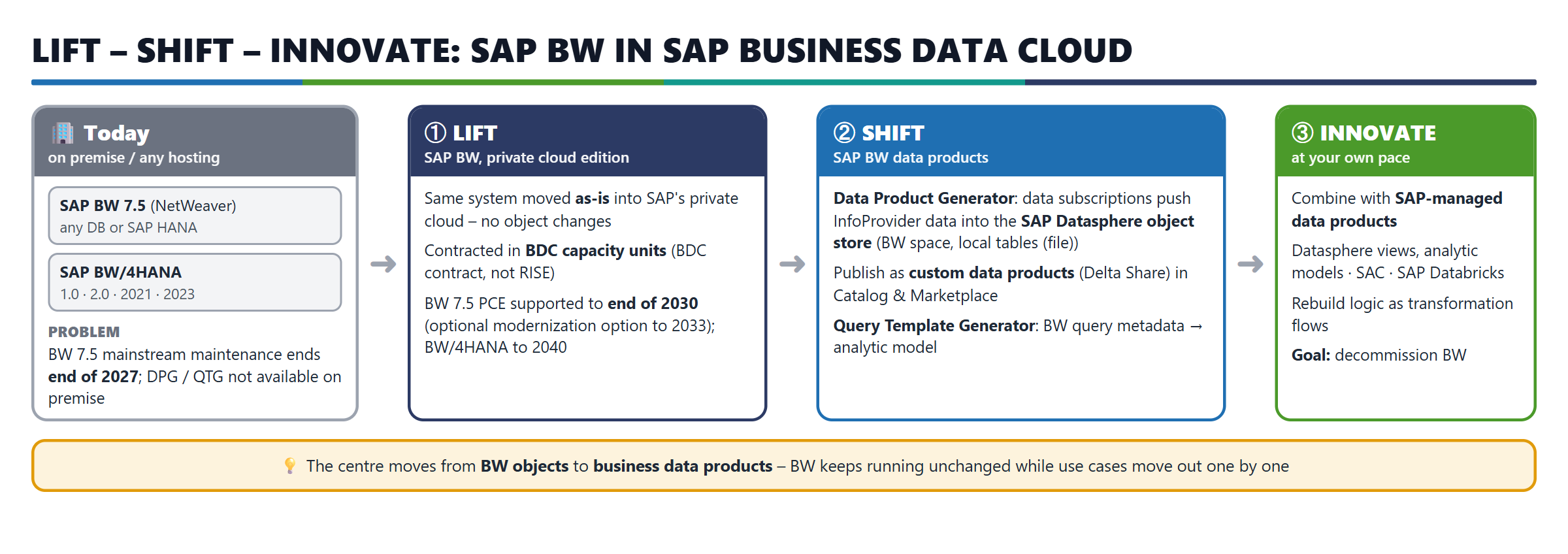
Step | What happens | Main tools | Result |
|---|---|---|---|
1 · Lift | Move BW 7.5 or BW/4HANA as it is into BW PCE – SAP provisions and runs the infrastructure; models, flows and queries keep working unchanged | SAP-run cloud migration (incl. security notes, DMIS add-on installation / update, SP updates), SAP or partner services | BW inside BDC, maintenance extended, BW capacity paid with BDC capacity units |
2 · Shift | Push chosen InfoProviders into the Datasphere object store and publish them as BW data products; push query metadata to Datasphere | Data Product Generator, Query Template Generator, Data Sharing Cockpit | BW data usable in Datasphere, SAC, SAP Databricks and partner platforms without new extraction |
3 · Innovate | Combine BW data products with SAP-managed data products and intelligent content; rebuild logic in Datasphere; move use cases out of BW one by one | Datasphere (transformation flows, analytic models), SAP Databricks, SAC | BW shrinks; long-term goal: BW decommissioned at the customer's pace |
1.1 Why BW stays relevant for a while
- It contains exact historic values and reconciled financial and legal reporting that auditors trust; rebuilding it is risky and expensive.
- Its staging logic (transformations, ABAP routines, process chains, authorizations) encodes business rules that are often undocumented.
- SAP-managed data products do not yet cover every source and every extractor-based scenario – coverage grows quarter by quarter (check the data product catalog on SAP Business Accelerator Hub and SAP Roadmap Explorer).
1.2 Why customers still move
- Maintenance pressure: SAP BW 7.5 on premise leaves mainstream maintenance at the end of 2027 (Part 2.4).
- Innovation only in the cloud: new features, business content and AI capabilities are shipped in Datasphere and BDC; business content comes mainly as data products and intelligent content.
- New requirements BW was not built for: federated and zero-copy access, self-service, AI / ML on business data, an open ecosystem (Databricks, Snowflake, Google BigQuery …), cheaper storage in an object store separated from compute.
Name you will hear | Meaning |
|---|---|
SAP BW, private cloud edition (BW PCE) | Learning / marketing name for a BW system run by SAP in the private cloud as part of BDC – two flavours: BW 7.5 ("for SAP NetWeaver") and BW/4HANA |
SAP BW NetWeaver Cloud, private edition / SAP BW/4HANA Cloud, private edition | The names of the BW capacity services in the BDC Service Description Guide (contract wording) |
SAP BW Capacity Services | SAP's commercial name for the BW services inside BDC core capacity (page 06) |
SAP Datasphere, SAP BW bridge | A different thing: a BW-style ABAP staging environment inside Datasphere (public cloud) – SAP Datasphere › 06 |
Part 2 – SAP BW, private cloud edition (BW PCE)
BW PCE is the customer's own BW system – same software, same objects, same ABAP – running on SAP HANA in a private cloud landscape that SAP provisions and operates. It is not a new product with a reduced scope and not a multi-tenant SaaS: it is a single-customer system, contracted through BDC.
2.1 What BW PCE is – and what it is not
BW PCE is … | BW PCE is not … |
|---|---|
The existing BW 7.5 or BW/4HANA system moved as-is – no object changes required | A conversion to BW/4HANA (BW 7.5 stays BW 7.5; converting later is optional) |
Contracted under the same cloud contract as BDC in capacity units – not under RISE with SAP | SAP Datasphere, SAP BW bridge (a public-cloud ABAP environment inside Datasphere) |
The prerequisite for the Data Product Generator and Query Template Generator – the Service Description Guide allows both only under a subscription to the BW capacity services | A licence to run the Data Product Generator from an on-premise BW |
Full BW functionality: modelling, process chains, BW queries, BW-IP, BPC for NetWeaver / BW/4HANA | Exempt from upgrades – the system must stay on supported releases and support packages |
2.2 What the BW capacity services contain (Service Description Guide v.9-2026)
- System tiers: base package (productive plus non-productive tier), optional additional non-productive systems, scale-out systems in 1 / 2 / 4 / 6 TiB node sizes and additional nodes.
- Included infrastructure: SAP Web Dispatcher, SAP Cloud Connector per customer virtual network, a common transport folder, and – on request – an SAP Analytics Cloud agent and an SAP Data Provisioning Agent on dedicated servers; connection packages (VPN, direct line, SAP Router …) are added per tier.
- Options: SAP BI Java Server, SAP BPC standard / professional edition, SAP IQ cold store, large memory extension above 12 TiB (the standard maximum HANA server size), disaster recovery, long-term backup, GxP qualification.
- Service level: standard system availability 99.7 % for productive environments, upgradeable to 99.9 % with the RISE with SAP private edition SLA service.
- Downsizing: at most once a year – for HANA servers up to 12 TB after the first subscription year, above 12 TB after the third; freed capacity units can be reassigned to other BDC services.
2.3 Benefits for a BW customer
- Keep everything: all BW features and objects stay as they are – no redesign before the move.
- Cheaper storage: large data volumes can be moved to the object store (SAP HANA Cloud, data lake files) instead of being held in HANA memory.
- One commercial pool: BW, Datasphere, SAC and SAP Databricks draw from the same BDC capacity units; when BW is downsized, the capacity moves to the new services in self-service – without changing a RISE contract.
- Same innovation path for BW 7.5 as for BW/4HANA: before BDC, hybrid scenarios such as the BW bridge or model transfer required a full or partial conversion to BW/4HANA; BW 7.5 PCE reaches the data product world directly.
2.4 Maintenance dates (as of November 2026)
Deployment | Maintenance | Note |
|---|---|---|
SAP BW 7.5 on premise | Mainstream to end of 2027; extended maintenance (extra fee) to end of 2030 | Not part of BDC – no Data Product Generator |
SAP BW 7.5 as BW PCE in BDC | Extended to end of 2030 instead of 2027 – the subscription to these capacity services cannot run beyond 31 Dec 2030 | Also the end for the SAP BI Java Server and BPC for NetWeaver |
SAP BW NetWeaver Cloud modernization option | Optional for BW 7.5 PCE subscribers: keep operating from 1 Jan 2031, for at least 12 months, until 31 Dec 2033 at the latest | ABAP stack – the Java application server is not included beyond 2030; check SAP Note 3768400 |
SAP BW/4HANA (on premise or PCE) | Product line maintained until at least 2040 | Each release has its own, earlier mainstream end – check the Product Availability Matrix and stay current |
So a BW 7.5 customer who lifts to BW PCE wins three years (2027 → 2030) – up to six with the modernization option – without a BW/4HANA conversion project. A customer who needs BW beyond 2033 must convert to BW/4HANA (before, during or after the move) or have replaced BW by then.
Part 3 – Getting to BW PCE: entry paths per starting release
Two things must be true before the lift: the system runs on SAP HANA, and it is on the minimum release – BW 7.5 SPS 24, BW/4HANA 2021 SP04 or BW/4HANA 2023.
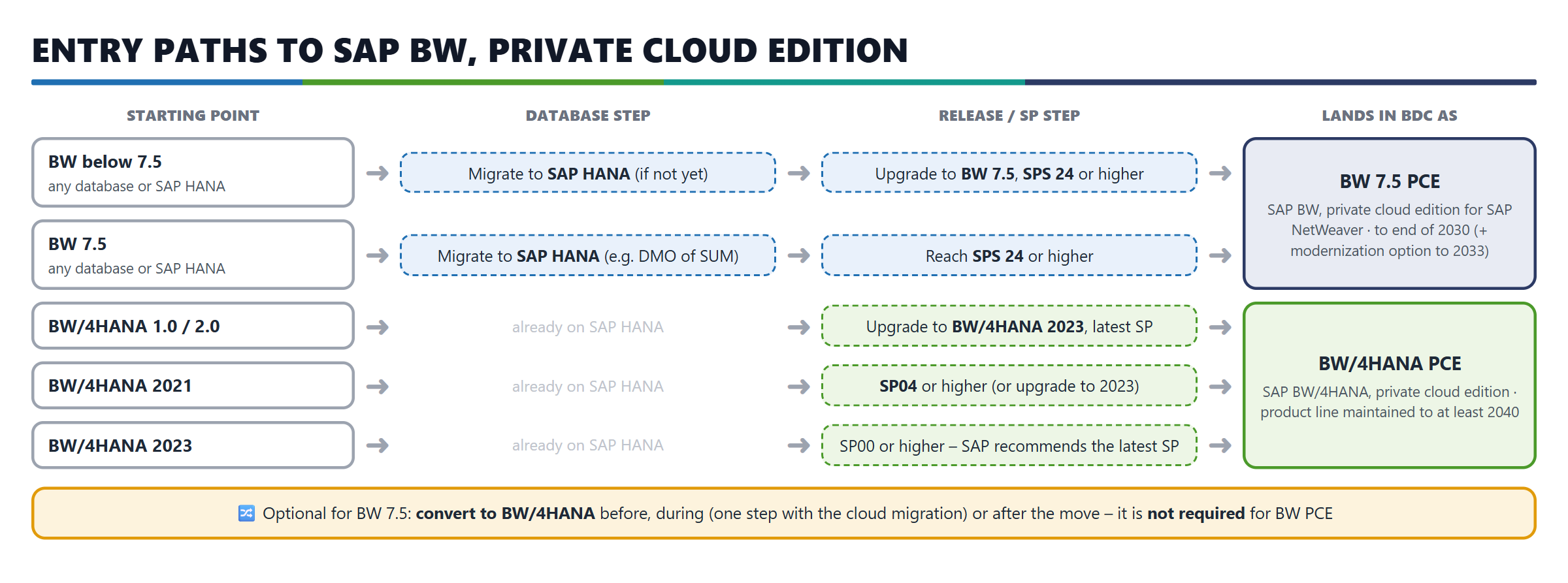
Starting point | What must happen before / during the lift | Lands as |
|---|---|---|
BW below 7.5 (any database) | Migrate to SAP HANA, upgrade to BW 7.5 SPS 24 or higher | BW 7.5 PCE (or convert to BW/4HANA PCE) |
BW 7.5 on a non-HANA database | Database migration to SAP HANA (e.g. with DMO of SUM) and SPS 24 or higher | BW 7.5 PCE |
BW 7.5 on SAP HANA | SPS 24 or higher | BW 7.5 PCE – or BW/4HANA PCE if converted in the same step |
BW/4HANA 1.0 or 2.0 | Upgrade to BW/4HANA 2021 SP04 or higher, or to BW/4HANA 2023 | BW/4HANA PCE |
BW/4HANA 2021 | SP04 or higher (or upgrade to 2023) | BW/4HANA PCE |
BW/4HANA 2023 | SP00 or higher; SAP recommends the latest support package | BW/4HANA PCE |
3.1 Conversion to BW/4HANA – before, during or after the move
- Lift as-is (BW 7.5 PCE): fastest, lowest risk; the Data Product Generator works on classic objects too (InfoCubes, classic DSOs, MultiProviders).
- Convert during the move: the BW/4HANA conversion is executed as part of the cloud migration in a single step – one test cycle instead of two.
- Convert later in BW PCE: start with BW 7.5 PCE, convert to BW/4HANA PCE afterwards (conversion approaches – BW › 06 Part 4).
- Continue a running BW/4HANA conversion and lift the result – sensible when the project is already far advanced; BW/4HANA brings simpler modelling objects and longer maintenance.
3.2 Typical lift project tasks
- Readiness: release / SP check, HANA sizing, custom code and add-ons, interfaces (source systems, Open Hub destinations, third-party tools), BI Java and BPC usage.
- Contract: BW capacity services (Table 4 of the Service Description Guide, many line items) are tailored to the landscape together with an SAP Cloud Architect Advisor (page 06 Part 1).
- Move: SAP-run cloud migration; security notes, DMIS add-on installation / update and SP updates are part of the cloud migration support.
- Reconnect: source systems (S/4HANA, ECC, files, non-SAP) through the SAP Cloud Connector or the connection packages; reporting clients (Analysis for Office, SAC live connection, BI platform).
- Connect BW to Datasphere for the generators: OAuth client in the Datasphere tenant, OAuth configuration and a BW target in BW PCE – semi-automated with the task list
SAP_BW_BDC_CONFIGURATION(Part 4.4).
Part 4 – Data Product Generator: architecture and data subscriptions
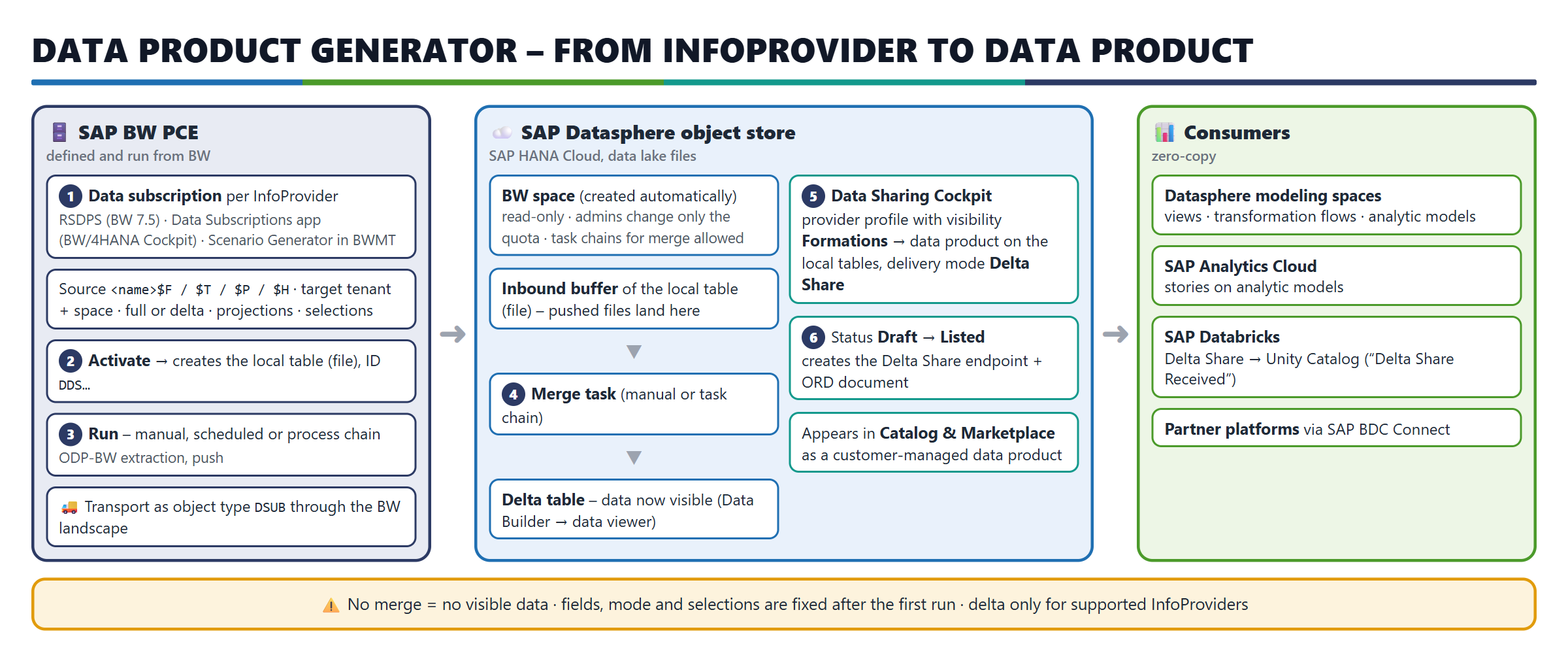
The Data Product Generator for SAP Business Data Cloud (DPG) replicates data from BW InfoProviders into the object store of an SAP Datasphere tenant (SAP HANA Cloud, data lake files). It is defined and run from BW: the customer creates a data subscription per InfoProvider, BW pushes the data, and the result is a local table (file) in an automatically created SAP BW space in Datasphere that can be published as a data product. Requirements (as of November 2026): BW 7.5 SPS 24+, BW/4HANA 2021 SP04+ or BW/4HANA 2023, running as BW PCE.
4.1 Supported InfoProviders and delta support
Supported sources: InfoObject, DataStore object (classic), DataStore object (advanced), InfoCube, CompositeProvider, MultiProvider and query as InfoProvider. Extraction uses the ODP-BW source type. Semantics are kept: entity usage (dimension, text, hierarchy) and field-level semantic types (currency, text, business date to …). Source type ODP or Snapshot; extraction mode Full or Delta (hierarchies Full only).
InfoProvider | Delta in BW/4HANA | Delta in BW 7.5 |
|---|---|---|
Standard ADSO, ADSO of type data mart | Yes | Yes |
Staging ADSO (inbound queue only, compress data, reporting-enabled) | Yes | Yes |
InfoObject with enhanced master data update | Yes | n/a |
Standard and write-optimized DSO (classic), InfoCube | n/a | Yes |
CompositeProvider | Yes – only if all part providers are of one type (InfoCubes, standard or cube-like ADSOs) and no SAP HANA views are included | Yes – same rule |
MultiProvider | n/a (no MultiProviders in BW/4HANA) | Yes – only if it contains InfoCubes only |
- Everything else is full extraction (snapshot or regular reload).
- Near-line storage: data can be extracted directly from NLS on both releases; data archived with the ADK-based data archiving process (BW 7.5 only) cannot.
4.2 Defining a data subscription
Setting | Meaning |
|---|---|
Tool | BW/4HANA PCE: app Data Subscriptions in the SAP BW/4HANA Cockpit (transaction |
Source name | BW object as ODP provider with a suffix: |
Target name | The Datasphere tenant and space as defined by the BW administrator – several targets (tenants or spaces) are possible |
Extraction mode | Full or delta, depending on what the InfoProvider supports |
Subscription ID | Generated on the first save, starts with DDS; it becomes the name of the local table in Datasphere |
Projections | Which fields are extracted – key fields are always included |
Selections | Filter conditions on field values |
Process chain variant | For process type Load Process and Postprocessing – Data Subscription, to run the subscription inside BW process chains |
- Templates: copy an existing subscription – source and target are set at creation, description, mode, selections, process chain variant and projections can be changed after saving.
- Scenario Generator (BW Modeling Tools 1.27 or later, perspective "BW Data Product Generator"): select core objects (e.g. an ADSO or CompositeProvider), Collect the scenario tree with its associated InfoObjects (association levels, default 4), preview, then Generate – activation in the background is recommended. It keeps dependencies and semantic relations intact.
- Checks before activation: source, target, consistency, local table, Datasphere credentials and partition information for ADSOs.
4.3 Activation, run and merge
Step | Technical effect | Status (Active version / Local table / Has data) |
|---|---|---|
Save | Subscription exists in the M version | Does not exist / Not created / No |
Activate | Local table (file) of type SAP HANA data lake files created in the BW space, named by the subscription ID | Executable / Deployed / No |
Run (manual, scheduled or in a process chain) | BW extracts via ODP and pushes the data into the inbound buffer of the local table; transferred records are shown in the Subscription Logs app | Executable / Deployed / Yes |
Merge (manual or Merge Task in a Datasphere task chain) | Buffered files are consolidated into the local table's delta table – only now is the data visible in Datasphere | – |
- A BW process chain can start the Datasphere task chain with process type General Services – Task Chain – push and merge then run in one schedule.
- Check the result in Datasphere: Data Builder → BW space → local table (file) → data viewer.
- Change after the first run: only the description stays editable; projections, selections, mode and process chain variant are read-only once the local table is deployed. After any change, re-activate so that the A version matches the M version.
4.4 Administration and transport
- Connection: OAuth client in Datasphere, OAuth configuration and a target in BW (task list
SAP_BW_BDC_CONFIGURATION). BW PCE is not one of the systems added to a BDC formation in SAP for Me – it reaches the formation's Datasphere tenant through this target. - BW space: created automatically, storage type SAP HANA data lake files; administrators can change only the space quota; assigned users can monitor the tables and create task chains for the merge.
- Delete one subscription: in the app or RSDPS (one per operation). Mass deletion by target: program
RSDDS_DELETE_BY_SOURCE(or RSDPS → Goto → Delete Data Subscriptions by Target) with Simulate Deletion and Force Deletion for targets that no longer exist. - Deleting a subscription does not delete the local table – it becomes editable and is removed manually; the Datasphere connection must work, otherwise the table stays read-only.
- Transport: only subscriptions of object type DSUB are transportable (assigned to a package and a transport request, active); older local subscriptions of type SUBS are converted with report
RSDDS_DSUB_MIGRATION.
Part 5 – From local table to custom data product
A local table is data, not yet a data product. Publishing it makes it discoverable, governed and shareable – zero-copy – with Datasphere spaces, SAP Databricks and partner platforms.
5.1 Steps in the Data Sharing Cockpit (Datasphere)
- 1. Data provider profile (once): company and contact data, industry, related SAP applications and the data product visibility – Public, Private, Internal or Formations. For BW data Formations is required: such products can be published only within the BDC formation.
- 2. Create the data product: business name, technical name, description, data category; select the BW space and one or more local tables (file); context = formation, delivery mode = Delta Share. Lifecycle status: Draft (not visible in the catalog).
- 3. Switch status to Listed: a Delta Share endpoint and an ORD document (Open Resource Discovery) are created and shared with the Unified Customer Landscape; the data product appears in Catalog & Marketplace of Datasphere and BDC as a customer-managed data product with an ORD ID.
- 4. Consume: install it into a Datasphere modeling space (it passes through the tenant's single "local" ingestion space) to build views and analytic models, or share it from the BDC catalog to SAP Databricks (target system, workspace, share name in lower case) – it appears as a Delta table in Unity Catalog under "Delta Share Received" (page 04). Access follows the catalog governance (page 06).
5.2 Data product tiers built from BW data
Tier | Content | Consumption | Status (SAP reference architecture, May 2026) |
|---|---|---|---|
Primary | Flattened transaction data of the InfoProvider including master data | Delta Share – e.g. SAP Databricks | Available |
Derived | Local tables with transaction data and associated dimensions (master data) | SQL share | "To be available" |
Analytical | Builds on the refined data product with measures, key figures and filters | OData | "To be available" |
5.3 Flattened BW data for SAP Databricks
- Push the InfoProvider and its associations (InfoObjects with attributes and texts) with the DPG – the Scenario Generator does this in one go.
- Share the local tables to a customer space and use them in a transformation flow (Spark).
- Use the flattening operator to select the associated attributes and transaction data into one wide delta table – the shape ML models need.
- Expose the flattened table as a data product via Delta Share to SAP Databricks; results can be shared back to BDC.
5.4 Rules that matter
- The BW space is read-only – no modelling there; model in your own spaces on top of shared tables.
- SAP positions the object store as the place for consumption and exposure of BW data, not as a cold-store alternative to NLS; moving history there still lets you shrink HANA memory later.
- Zero-copy sharing via Delta Share avoids copies; replicating data to external targets with replication flows consumes Datasphere premium outbound integration capacity (page 06 Part 1).
Part 6 – Query Template Generator, planning and the BW roadmap
6.1 Query Template Generator (QTG)
The QTG transfers a BW query's metadata – not its data – and its dependent objects to Datasphere and generates the equivalent semantic model, so queries do not have to be rebuilt by hand. It shipped in 2026 (roadmap Q2 2026; SAP configuration guide June 2026) for BW PCE.
- Step 1 – query template: created from an existing query; stores the mapping information and the target SAP HANA space in Datasphere. Several templates per query are possible, each with its own ID.
- Step 2 – generate: creates the objects in the target space from the query definition.
Generated in Datasphere | From BW |
|---|---|
Dimension (with texts / hierarchies) | Each InfoObject in the query that has texts or hierarchies – an existing compatible dimension in the space is reused |
Fact view | Exposes the query's key figures as measures, plus the join keys to the dimensions |
Analytic model | The semantic layer over fact view and dimensions: measures and dimension associations mirror the source query – ready for SAC stories |
- Tools: BW Modeling Tools view "Query Template Generator" (BWMT 1.27 PL3 or later) or SAP GUI transaction
RSDWCTG_ADMIN– both share one lock per template. - Authorization: object
S_ADT_RESfor the generator, plus the normal check per transferred query. - Connectivity: needs only a connection to the Datasphere tenant (BW target of type
DATASPHERE, no space) and does not use the object store; the OAuth client must have the purpose Interactive Usage. QTG and DPG targets are separate. Administrator details: SAP Note 3590400. - Data foundation: the generated models can sit on BW data products from the DPG or on SAP-managed data products – the query semantics move, the data source can be swapped later. Review and refine the generated models in the Data Builder.
6.2 BW planning use cases
- For teams working with BPC planning, SAP recommends seamless planning in BDC: SAC planning models store their data in Datasphere, so other models can use it (SAC › 06).
- BW-based data products are integrated into Datasphere views for hybrid planning; planning periods can be moved from BPC to BDC one period at a time.
- If a new SAC tenant is deployed instead of rewiring the existing one, the SAC–Datasphere connection is redefined and models, stories and data actions are moved with the content network.
6.3 BW Migration Assistant (planned)
A tool that translates BW data flows (transformations, DTPs, routines) into Datasphere artifacts such as transformation flows, using AI. An SAP Community blog citing the roadmap (2026) places it in Q4 2026; treat it as planned until it appears in What's New.
6.4 BW modernization roadmap in BDC (SAP roadmap, as presented February 2026)
Item | What it adds | Planned |
|---|---|---|
Enhanced delta capability | Delta for CompositeProviders and MultiProviders whose part providers are loaded by delta DTP | Q1 2026 |
Custom technical name | Own technical names for subscriptions instead of DDS… | Q1 2026 |
Primary data products | Push of primary data products directly via the DPG | Q2 2026 |
Hierarchy support | Hierarchy semantics transferred to the object store | Q2 2026 |
BW entities in Data Product Studio | Use BW local tables (file) to build customer-managed data products (page 02) | Q2 2026 |
Flattening operator | Dedicated transformation flow operator for ML-ready wide tables | Q2 2026 |
Query Template Generator | Push of query metadata as a template | Q2 2026 (shipped) |
BW Migration Assistant | AI-assisted translation of BW data flows to Datasphere | Q4 2026 |
Roadmap items move; always confirm in SAP Roadmap Explorer (product SAP Business Data Cloud, business capability Business Warehouse Modernization) and the What's New notes of SAP Datasphere.
Part 7 – Migration paths compared and the phased strategy
Path | What it means | Best when | Watch out |
|---|---|---|---|
Stay on premise | Keep BW 7.5 / BW/4HANA on own infrastructure | BW/4HANA on a current release, no cloud plans | Not part of BDC – no DPG / QTG; BW 7.5 mainstream ends 2027 |
Lift to BW PCE as-is | Same system in SAP's private cloud inside BDC | BW 7.5 near end of maintenance, budget for a big conversion missing, BDC adoption planned | Still a BW to run and upgrade; plan the next step before 2030 / 2033 |
Convert to BW/4HANA (BW › 06) | Modernise BW itself | BW will remain strategic for many years (maintenance to at least 2040) | Large project; can be combined with the lift |
SAP BW bridge in Datasphere | Reuse BW staging (ADSOs, transformations, ABAP routines, process chains) in a public-cloud ABAP environment – SAP Datasphere › 06 | Extractor-based staging that should move to the public cloud | Staging only – queries and reporting move to Datasphere / SAC; objects are converted |
Rebuild natively in Datasphere | Redesign with replication / transformation flows, views, analytic models | Models are outdated; clean-core sources available | Highest effort; history must be migrated (DPG helps) |
Replace with SAP-managed data products & intelligent content | Switch use cases to SAP content | Standard content matches the requirement (e.g. finance, HR) | Coverage depends on what SAP delivers |
In practice the answer is a combination: lift first, then move use case by use case to the cheapest fitting target – SAP-managed data products where SAP content exists, native Datasphere where custom logic is needed, BW data products for history and for what is not yet moved. For new sources SAP recommends a greenfield approach that starts directly with SAP-delivered data products.
7.1 SAP's phased innovation strategy for BW
- 1. Strategy: decide which use cases move and which stay in BW; check SAP-managed data product coverage and the roadmap; plan governance.
- 2. Foundation and connectivity: set up BDC (cockpit, Datasphere, SAC), connect sources, define users and roles (page 06).
- 3. Quick wins: install SAP-managed data products, generate BW data products, adopt a semantic layer, consume in SAC.
- 4. Enhancement: rebuild complex transformations in Datasphere; bring in SAP Databricks, SAP Snowflake or hyperscaler tools for feature engineering and predictive models.
- 5. Expansion and optimisation: add data products as SAP ships them, grow the catalog, enable self-service and AI use cases.
- 6. Full replacement: replicate remaining BW data (history) to BDC, restructure the data provisioning to the sources, decouple and decommission BW.
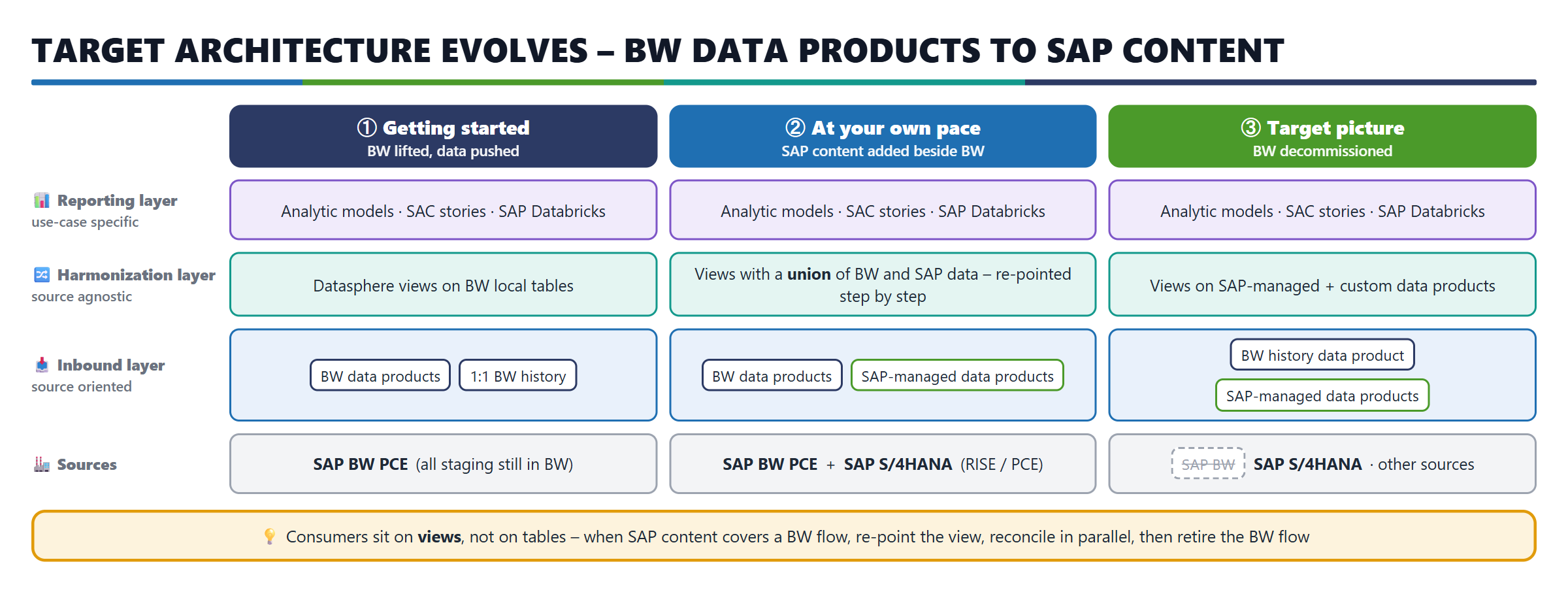
Part 8 – Replacing BW objects step by step
BW object / function | Replacement in BDC | Helper |
|---|---|---|
Query (BW query) | Analytic model in Datasphere + SAC story (or the story of intelligent content) | Query Template Generator |
CompositeProvider with its InfoObjects | Fact view with associated dimension views and data access controls; analytic model on top | QTG (fact view), DPG |
InfoObject, ADSO, InfoCube, DSO (persisted data) | Local tables (file) in the object store → BW data products; later SAP-managed data products | Data Product Generator |
DataSource (extractors on ECC / S/4HANA) | SAP-managed data products (S/4HANA via the foundation services) or customer-managed data products; non-SAP via replication flows | Data product catalog |
Transformation, DTP, ABAP routine | Datasphere transformation flows, views | BW Migration Assistant (planned) |
Process chain | Datasphere task chains (and SAP-managed data product updates) | – |
Analysis authorizations | Datasphere data access controls; analysis authorizations can be imported as a permissions table for objects imported via SAP BW / SAP ABAP / model transfer connections (SAP Note 3062381) | Permissions import wizard |
History in BW | Replicated once to the object store and kept as a data product | DPG / Scenario Generator, full load |
8.1 Four replacement approaches – from BW-focused to Datasphere-focused
- 1. Keep harmonisation and transformation in BW; generate data products at CompositeProvider level, replace queries with analytic models, rebuild SAC stories.
- 2. Keep BW only for primary staging and the first transformation (e.g. delta logic for classic 2LIS extractors); replace CompositeProviders and queries with views and analytic models.
- 3. Re-route provisioning to S/4HANA and the foundation services: replace DataSources with data products, translate BW transformations into transformation flows, re-point the BW local tables to tables fed from S/4HANA, load non-SAP sources with replication flows.
- 4. Enrich the data sets, for example by associating dimension data products.
8.2 Re-pointing without breaking consumers
- Build SAC stories and Datasphere models on views over the BW local tables, not on the tables directly; a union node in the harmonisation view combines BW-derived and SAP-managed data.
- When a DTP load is replaced by a replication from the same source, each record must be loaded exactly once: use a cut-over date on the modification timestamp – BW takes records changed before it, the new replication those changed on or after it.
- Keep the BW history as its own data product in a topic space (e.g. Finance) and combine it with the SAP-managed data products installed into the same space.
- Retire the BW flow only when the replacement has run in parallel and reconciled for at least one closing period; once the history is in the object store, BW can be decommissioned.
Part 9 – Project checklist and pitfalls
Area | Check | Why |
|---|---|---|
Release | BW 7.5 SPS 24+ / BW/4HANA 2021 SP04+ / 2023, on SAP HANA | Required for BW PCE and the DPG |
Java | BI Java scenarios (BEx Web, portal integration) identified; SAP Note 3768400 read | No Java application server beyond 2030, not in the modernization option |
Delta design | Which InfoProviders give delta; mixed CompositeProviders split or loaded full | Avoid regular full loads of large providers |
Fields | Projections keep all needed fields; selections documented | Fields and mode cannot be changed after the first run |
Merge | Merge task scheduled in a Datasphere task chain after each push | Without the merge, pushed data is invisible |
Archiving | ADK-archived BW 7.5 data identified | Cannot be pushed by the DPG – reload or accept the gap |
Spaces | BW space for DPG targets, separate consumer spaces for modelling | The BW space is read-only |
Transport | Subscriptions created as DSUB in transportable packages, one target per system | Local SUBS subscriptions are not transportable |
Costs | Object store, merge compute, sharing and data transfer sized in capacity units | Every service consumes capacity units (page 06) |
Governance | Owner (data steward) per BW data product, visibility Formations | Avoid unmanaged copies |
Decommission plan | Use case list with target, date and reconciliation rule | BW 7.5 PCE has a fixed horizon (2030 / 2033) |
Part 10 – Interview questions
Q1. What does "lift – shift – innovate" mean for a BW customer in BDC?
Lift the existing BW 7.5 or BW/4HANA system as-is into SAP BW, private cloud edition inside BDC; shift BW data out as data products with the Data Product Generator (and query metadata with the Query Template Generator); innovate by combining them with SAP-managed data products in Datasphere, SAP Databricks and SAC, moving use cases out of BW until it can be decommissioned.
Q2. What is BW PCE, and how is it different from the SAP BW bridge?
BW PCE is the customer's full BW system run by SAP in the private cloud and contracted through BDC capacity units (not RISE) – all features, no object changes. The BW bridge is a BW-style ABAP staging environment inside Datasphere (public cloud) with a reduced scope – staging only, reporting moves to Datasphere and SAC – used to reuse extractor-based staging.
Q3. Which maintenance dates matter?
BW 7.5 on premise: mainstream to end of 2027 (extended maintenance for a fee to 2030). BW 7.5 as BW PCE in BDC: extended to end of 2030, and with the optional SAP BW NetWeaver Cloud modernization option from 2031 until end of 2033 at the latest – without the Java application server. BW/4HANA: product line to at least 2040, but each release has its own end. Always confirm in the SAP release strategy (as of November 2026).
Q4. Which prerequisites must a BW system meet before the lift?
It must run on SAP HANA and be on a minimum release: BW 7.5 SPS 24 or higher, BW/4HANA 2021 SP04 or higher, or BW/4HANA 2023; BW/4HANA 1.0 / 2.0 are upgraded to 2021 SP04+ or 2023 first and BW below 7.5 upgraded to 7.5. A BW/4HANA conversion is not required but can be done before, during or after the move.
Q5. How does the Data Product Generator work technically?
A data subscription on an InfoProvider (RSDPS in BW 7.5, Data Subscriptions app in BW/4HANA, or the Scenario Generator for whole models) defines target, full or delta mode, projections and selections. Activation creates a local table (file) in the BW space of the Datasphere object store; a run extracts via ODP-BW and pushes the data into the table's inbound buffer; a merge task makes it visible in the delta table. Runs and merges can be scheduled together in a BW process chain.
Q6. Which InfoProviders support delta in the Data Product Generator?
ADSOs (standard, data mart, staging), InfoObjects with enhanced master data update (BW/4HANA), classic DSOs and InfoCubes (BW 7.5), CompositeProviders whose part providers are all of one supported type without HANA views, and MultiProviders with InfoCubes only. Everything else is loaded full.
Q7. How does a local table become a data product?
In the Datasphere Data Sharing Cockpit: create a data provider profile with visibility Formations, create the data product on the BW space's local tables with delivery mode Delta Share, and switch its status from Draft to Listed. That creates the Delta Share endpoint and the ORD document, and the product appears in Catalog & Marketplace as a customer-managed data product.
Q8. What does the Query Template Generator generate, and what does it need?
From a BW query's metadata it creates in a Datasphere space dimensions for InfoObjects with texts or hierarchies (reused if they exist), a fact view with the key figures as measures and an analytic model that SAC can consume. It moves no data, needs only a tenant-level BW target (type DATASPHERE) with an Interactive Usage OAuth client, and runs from BWMT or RSDWCTG_ADMIN.
Q9. Can we run the Data Product Generator from our on-premise BW/4HANA?
No. The Service Description Guide allows the Data Product Generator and Query Template Generator only under a subscription to the BW capacity services in BDC, i.e. BW PCE. On-premise BW connects to Datasphere in other ways (e.g. SAP BW connections, model transfer), but not via the DPG.
Q10. How would you replace a BW query and its data flow over time?
Generate the analytic model with the QTG on top of BW data products from the DPG and switch SAC stories to it; later re-point the underlying views from the BW local tables to SAP-managed data products, rebuild transformations as transformation flows, cut over by modification timestamp so each record loads once, run in parallel, reconcile, then retire the BW flow.
Q11. A customer on BW 7.5 on Oracle asks for the fastest way to secure support and start with BDC.
Migrate the database to SAP HANA and bring the system to SPS 24 or higher, then lift it as-is to BW 7.5 PCE (support to 2030, optionally 2033). Publish the most valuable InfoProviders with the DPG and start new use cases in Datasphere and SAC. Decide on a BW/4HANA conversion only if BW must remain strategic beyond 2033, and replace BI Java scenarios before 2031.
Q12. What are typical pitfalls with BW data products?
Forgetting the merge task (data invisible), choosing projections without all needed fields (fixed after the first run), expecting delta from mixed CompositeProviders, modelling in the read-only BW space, creating local SUBS subscriptions that cannot be transported, ignoring BI Java beyond 2030, and publishing without an owner and governance.
🏠 Start Here · ◀ 04 · Databricks & Partners · 06 · Architect View ▶ · Sections: CORE ABAP | OOPS ABAP | ABAP on HANA | Clean Core | RAP | ABAP Points | SAP Fiori | SAPUI5 | Mobile Development (MDK) | BTP Foundations | BTP Development | CAP | SAP Build | ABAP on BTP | Integration Suite | SAP Business AI | SAP BASIS | Security | SAP SDLC
Functional: FICO ABAP | TRM ABAP | VIM | SAP BIS | SD ABAP | MM ABAP | PP ABAP | QM ABAP | PM ABAP | PS ABAP | EWM | TM ABAP | GTM ABAP | EHS ABAP | HR ABAP | BW | SAP Datasphere | SAP Business Data Cloud | SAP MDG | SAP Analytics Cloud | SAP Ariba | SAP CX | SAP IBP