SAP Datasphere is SAP's cloud service for data warehousing and the business data fabric: it combines data integration, cataloging, semantic modeling, data warehousing and data virtualization (federation) across SAP and non-SAP sources in one SaaS tenant on SAP HANA Cloud. Data from SAP S/4HANA, SAP BW, databases, cloud applications and hyperscaler storage is federated or replicated into spaces, modeled with tables, views, flows and analytic models, protected with row-level security and exposed to SAP Analytics Cloud, Microsoft Excel, OData and SQL clients. Today Datasphere is the data foundation of SAP Business Data Cloud (BDC). This page explains what Datasphere is, where it came from, how a tenant is built, how spaces, users and roles work, and how a tenant is provisioned, sized and charged in capacity units. Data integration: page 02; modeling: page 03; consumption and security: page 04; development and APIs: page 05; BW bridge and the architect view: page 06.
Part 1 – What SAP Datasphere is and key terms
SAP describes Datasphere as a service that "enables a business data fabric architecture" and "combines previously discrete capabilities into a unified service for data integration, cataloging, semantic modeling, data warehousing, and virtualizing workloads across SAP and non-SAP data". In practice it is a cloud data warehouse (you can persist, historise and harmonise data like in BW) and a virtualization layer (you can leave data in the source and query it live) in one product, with the business semantics of SAP applications (CDS associations, texts, hierarchies, currencies) kept intact.
Feature area (feature scope description) | What it covers |
|---|---|
Data integration | Connections to SAP and non-SAP cloud and on-premise sources, federation (remote tables), replication (replication flows), transformation and load (data flows, transformation flows), re-use of BW and SAP SQL Data Warehouse models |
Data modeling | Low-code graphical views, SQL / SQLScript views, E/R models, analytic models, intelligent lookup to enrich data with external data (page 03) |
Space management | Spaces as secure modeling environments per department or use case; storage, priority, users and monitoring per space (Part 5) |
Administration | Tenant configuration, users, connectivity preparation, monitoring and maintenance |
Data protection and privacy | Access on tenant, functional and space level; row-level security with data access controls; audit logging of read and change actions (page 04) |
Data governance | Catalog with data products, assets, glossary terms and KPIs, curated by catalog administrators (page 04) |
Consumption | SAP Analytics Cloud, Microsoft Excel, public OData APIs and SQL access for other clients, tools and apps (page 04) |
Digital assistance | Joule and SAP Business AI features (natural language search, SQL generation and others – each needs its own role and activation) |
1.1 Key terms
Term | Meaning |
|---|---|
Tenant | One SAP Datasphere instance with its own SAP HANA Cloud database, repository, users and configuration |
Space | Secure area inside the tenant where all data acquisition, preparation and modeling happens; its data is not visible to other spaces unless shared or exposed |
Connection | Instance of a connection type (S/4HANA, SAP HANA, Amazon S3 …) that links a remote source or target to a space; enables features such as replication flows or remote tables |
Remote table | Table in a space that points to a source object; data is federated (read live) or replicated (snapshot / real-time) |
Local table | Table whose data is stored in Datasphere (in a standard space or as local table (file) in a file space) |
Replication flow / data flow / transformation flow | Flows that copy many objects with delta, transform and load into one table, or transform with delta into one table (page 02) |
View / analytic model | Graphical or SQL views to combine data; the analytic model is the multidimensional consumption object for SAC and Excel (page 03) |
Data access control (DAC) | Row-level security object assigned to views (page 04) |
Deploy | Activates a saved design-time definition in the run-time database; only deployed objects hold or serve data |
Data product | Curated, documented data set published in the catalog or installed from SAP Business Data Cloud (SAP Business Data Cloud › 02) |
Part 2 – History and naming
When | Milestone |
|---|---|
2019 | SAP launches SAP Data Warehouse Cloud (DWC) – a SaaS data warehouse on the then new SAP HANA Cloud, closely integrated with SAP Analytics Cloud |
DWC years | SAP BW bridge adds a BW-style ABAP environment inside the tenant for BW customers moving to the cloud (page 06) |
March 2023 | At the SAP Data Unleashed event DWC is renamed SAP Datasphere and positioned as the next generation of DWC with new catalog and data integration capabilities; existing DWC tenants were updated automatically, no migration |
February 2025 | SAP announces SAP Business Data Cloud – a SaaS that packages Datasphere, SAP Analytics Cloud, SAP BW (private cloud edition), SAP Databricks, data products and intelligent applications |
As of November 2026 | The SAP Datasphere documentation states that Datasphere is available as part of SAP Business Data Cloud and was formerly sold as a separate product; existing tenants can still be provisioned through SAP BTP (Part 7) |
- Names you still see: many technical IDs keep the old name – role IDs such as
PROFILE:sap.dwc:Data_Warehouse_Cloud_Modeler, the prefixDWC_for system objects, and SAP Notes and blogs titled "SAP Data Warehouse Cloud". Treat DWC and Datasphere as the same product. - Business Builder (business entities, fact models, consumption models) is deprecated; new semantic models are built as analytic models in the Data Builder (page 03, page 04).
- SAP Data Intelligence Cloud heritage: replication flows reuse concepts from SAP Data Intelligence (connections, replication objects, worker jobs); SAP announced in 2023 that Data Intelligence use cases would move into Datasphere.
Part 3 – Tenant architecture
A Datasphere tenant is a multi-layered SaaS application on SAP BTP. The browser apps write object definitions to a repository (design time); deploy creates the run-time objects in the tenant's SAP HANA Cloud database, where each space has its own schema. Large, cheap staging data lives in the object store (file spaces on SAP HANA data lake files, processed with Apache Spark). Connectivity components bring data in; consumption clients read what spaces expose.
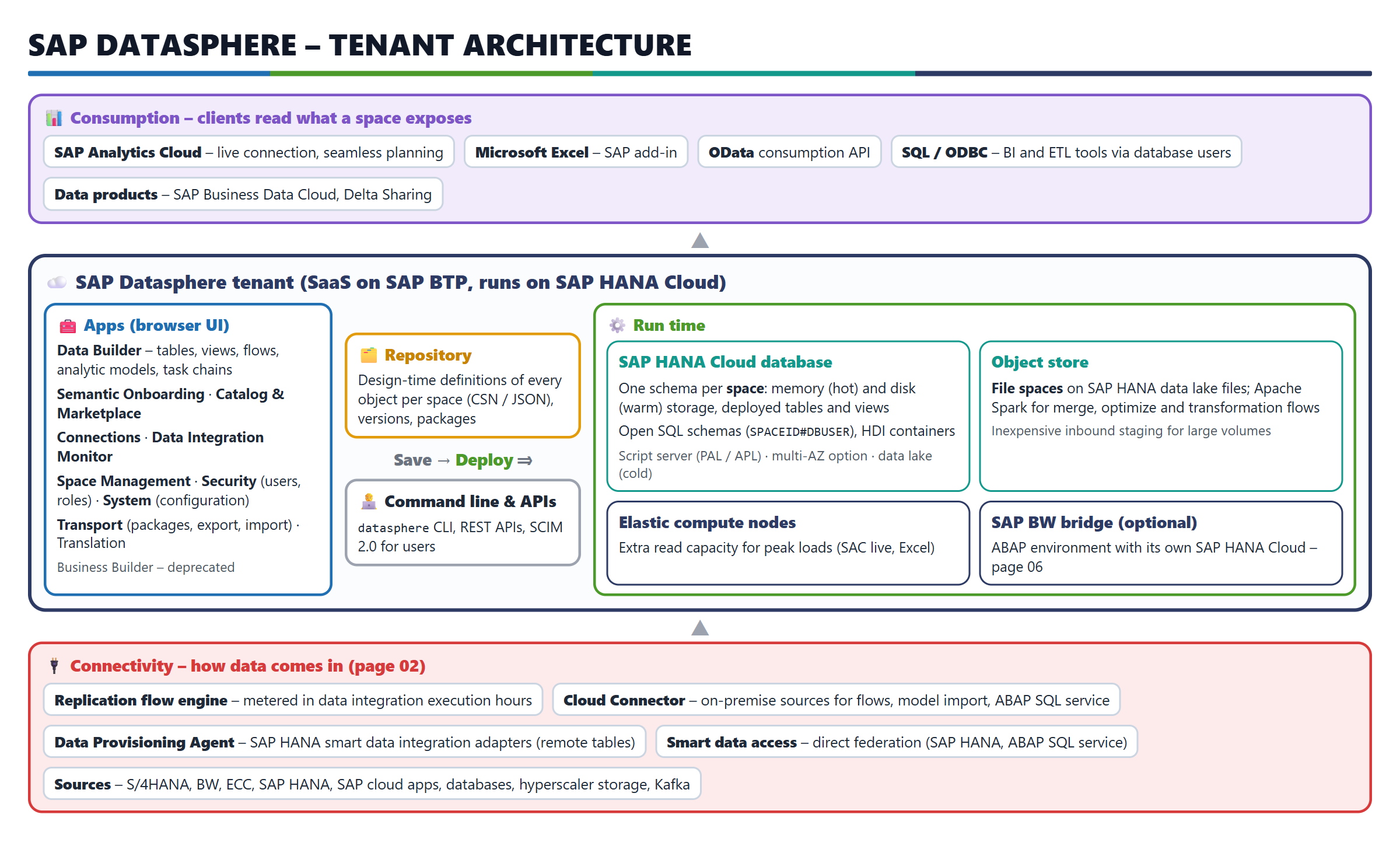
Component | What it is | Why it matters |
|---|---|---|
SAP HANA Cloud database | Run-time database of the tenant; memory (hot) and disk (warm) storage; each space is a schema; views run as SQL in HANA | Performance and cost depend on memory, disk and vCPU sizing (Part 7) |
Data lake | Optional cold storage tier (SAP HANA Cloud data lake); only one space can be connected to it | Historical data at lower cost |
Object store | SAP HANA data lake files used by file spaces; Apache Spark instances run merge, optimize and transformation flow tasks | Inexpensive inbound layer for very large volumes; tables are shared to standard spaces for modeling |
Repository | Design-time store of all objects per space in CSN (Core Schema Notation, JSON) with versions and packages | Save ≠ deploy; transport and CSN export work on repository objects (page 05) |
Open SQL schema / HDI container | Database users per space (schema | Native SQL, SQLScript procedures, external ETL tools (page 05) |
SAP HANA Cloud script server | Optional; enables the Predictive Analysis Library (PAL) and Automated Predictive Library (APL) | In-database machine learning |
Multi-availability zones | Optional synchronous replica in a second availability zone of the region (needs at least 64 GB memory) | High availability of the run-time database |
Elastic compute nodes | Additional compute and memory blocks that take over read peak loads for selected spaces and objects; consumption via SAC live connection and the Excel add-in | Size for the average load, buy block-hours for month-end or year-end peaks |
SAP BW bridge | Optional ABAP environment (SAP BTP ABAP environment) with its own SAP HANA Cloud for BW staging | Re-use BW extractors, ADSOs and ABAP routines (page 06) |
Connectivity | Replication flow engine, Data Provisioning Server + Data Provisioning Agent (SAP HANA smart data integration), smart data access, Cloud Connector | Which component is needed depends on connection type and feature (page 02) |
- Data center and availability: the tenant runs in a hyperscaler region (AWS, Microsoft Azure or Google Cloud) chosen at provisioning; each region has several availability zones. Maximum sizes differ per region (for example up to 12,000 GB memory in some AWS regions). SAP Datasphere is also offered on SAP Sovereign Cloud, subject to regional availability.
- Relationship with SAP Analytics Cloud: Datasphere and SAC are closely linked (shared user settings such as data access language, product switch between linked tenants); a Datasphere tenant can be linked to an SAC tenant, and SAC planning models can store their data in a Datasphere space (SAP Analytics Cloud › 01).
Part 4 – Apps and tools of a tenant
The left navigation shows only the apps your roles allow. Many apps (Data Builder, Data Integration Monitor) first ask for a space; the Repository Explorer shows objects from all your spaces.
App / tool | Purpose | Typical user |
|---|---|---|
Home | Recent objects, spaces, data integration tasks, quick actions | All |
Repository Explorer | Browse and create objects across all assigned spaces | Modeler |
Catalog & Marketplace | Discover, curate and publish data products, assets, glossary terms, KPIs; Data Marketplace | Catalog administrator / user |
Semantic Onboarding | Import semantically rich objects from SAP systems (S/4HANA, BW/4HANA, BW bridge), the Content Network and Data Marketplace | Modeler |
Business Builder (deprecated) | Business entities, fact models, consumption models | Modeler |
Data Builder | Tables, views, E/R models, analytic models, intelligent lookups, data access controls, data flows, replication flows, transformation flows, task chains | Modeler |
Connections | Create, validate and manage connections of a space; custom connection types | Space administrator / integrator |
Monitoring | System and spaces dashboard, capacities, task logs, expensive statements, elastic compute nodes, Data Integration monitor | Administrator, integrator |
Space Management | Create and configure spaces, assign users, lock / unlock | Administrator, space administrator |
Translation · Transport · Data Sharing Cockpit | Translate metadata for SAC; packages, export and import between tenants; offer data products in Data Marketplace | Space administrator, modeler |
Security | Users, roles, authorization overview, activities (object change log) | Administrator |
System | Configuration (tenant size, IP allowlist, workload management, identity provider, OAuth clients …) and Administration | Administrator |
- Personal settings: language and formats, business or technical names, privacy (recent objects tracking) and authorized consent – a user must give consent before scheduled tasks and task chains they own can run; consent is valid 365 days (page 02).
Part 5 – Spaces
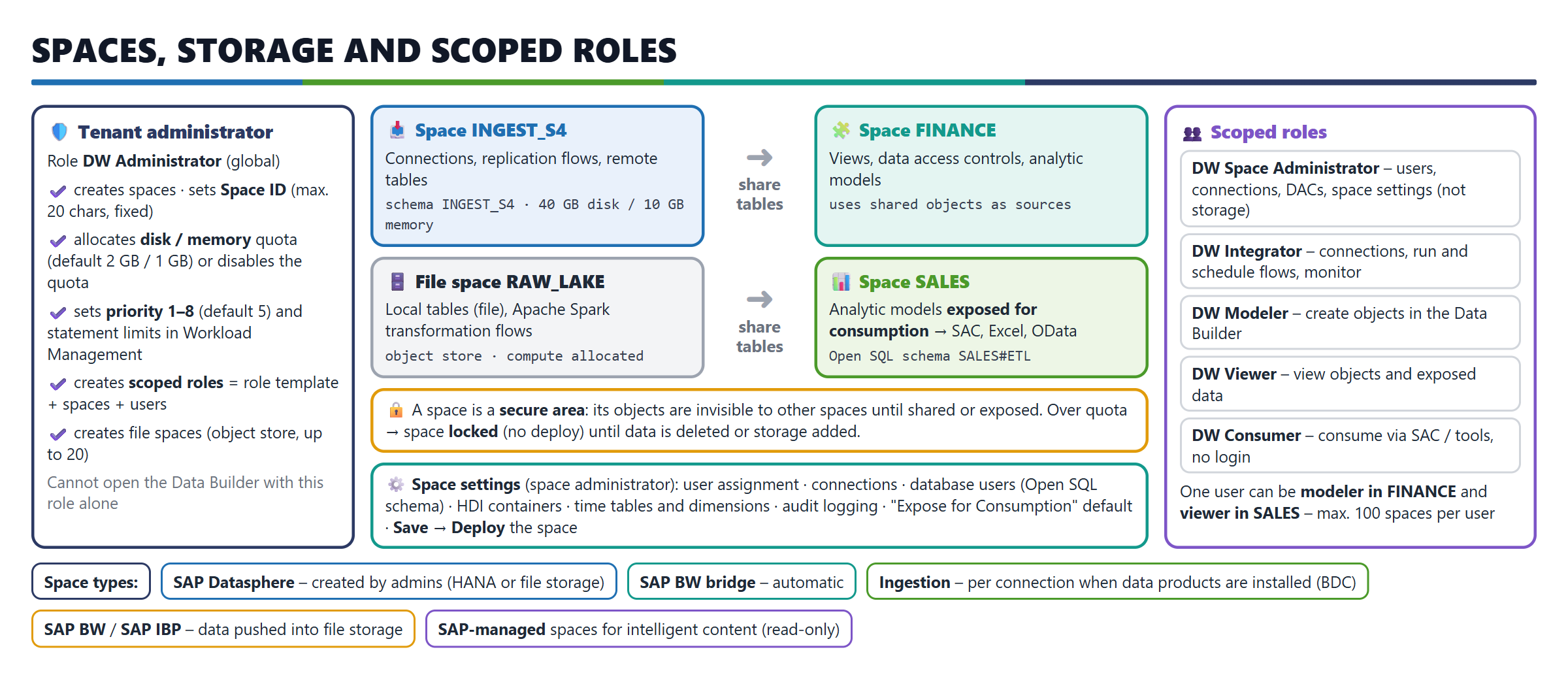
All data acquisition, preparation and modeling happens inside spaces. A space is a secure area: its objects and data cannot be accessed from outside unless a modeler shares a table, view, analytic model or task chain to another space or exposes a view or analytic model for consumption. Spaces are the unit for storage quotas, workload priority, users, connections, database users and audit logging – the Datasphere equivalent of separating content areas in a BW system.
5.1 Creating a space
- Only an administrator (global role with Spaces
C-------, e.g. DW Administrator) creates spaces, allocates storage and sets priority and statement limits. The other space properties are maintained by a space administrator assigned via a scoped role. - Space name (business name) up to 30 characters; Space ID (technical name) up to 20 uppercase letters, digits and
_, cannot be changed later, must not start with_SYSand should not start withDWC_orSAP_. The ID is visible in schema names and monitoring – keep business or personal data out of it. - Storage type is chosen at creation: SAP HANA Database (Disk and In-Memory) (standard space) or SAP HANA Data Lake Files (file space in the object store, only if object store resources are configured).
- Changes to space settings are saved and then deployed to the run-time database. The space must be added to one or more scoped roles before users can work in it.
5.2 Space types
Space type | Created by | Notes |
|---|---|---|
SAP Datasphere | Administrator | Default type for modeling; storage type HANA database or data lake files |
SAP BW bridge | Automatically with the BW bridge instance | Holds remote tables for BW bridge objects; administrators can change only the quota; deleted automatically when empty |
SAP BW | Automatically (Data Product Generator for SAP Business Data Cloud) | File storage, filled with data pushed from SAP BW; users monitor tables and create task chains for merge tasks |
SAP IBP | Automatically | File storage, filled with data pushed from SAP Integrated Business Planning |
Ingestion | Automatically when a data product is installed from a connection (BDC) | One per connection; the data product is stored once and shared to each requesting space |
SAP-managed preparation / application spaces | Automatically when BDC intelligent content is installed | Read-only, namespace-protected content; copy it to extend it (SAP Business Data Cloud › 02) |
5.3 Storage, data tiering and file spaces
Tier | Where | Use |
|---|---|---|
Memory (hot) | SAP HANA Cloud in-memory | Persisted views are stored in memory; tables can be switched to Store Table Data in Memory |
Disk (warm) | SAP HANA Cloud disk storage | Default for local tables and replicated remote tables |
Data lake (cold) | SAP HANA Cloud data lake | Historical data; only one space can access the data lake |
Object store | File spaces on SAP HANA data lake files | Large raw volumes loaded by replication flows or pushed by BW / IBP; prepared with Apache Spark transformation flows; shared to standard spaces via SAP HANA native SQL on files |
- Space quota: default 2 GB disk and 1 GB memory; memory can never exceed disk. The administrator can disable Enable Space Quota so the space may use storage up to the tenant total. This memory is for data, not for processing (processing is limited by statement limits).
- Locking: a space that exceeds its quota is locked after 60 minutes if storage is not freed; spaces are also locked when audit logs grow too large or when the tenant disk reaches a critical level. In a locked space users can still edit and save, but cannot deploy. A space administrator can unlock for a 24-hour grace period; the real fix is deleting data or adding storage.
- File spaces: up to 20 per tenant; each gets an Apache Spark instance whose memory (and derived vCPUs) the administrator sizes; no views, data flows, DACs, analytic models, remote tables, CSV import, database users or HDI containers; connections there support only replication flows.
5.4 Workload management: priority and statement limits
- Per space (default) or per group of processes: priority 1 (lowest) to 8 (highest), default 5. When spaces compete for threads, higher priority runs first.
- Statement limits: total thread limit and total memory limit for statements running concurrently. Default configuration uses a 70 % thread limit and an 80 % memory limit; for resilience SAP caps space workload at 80 % of CPU. When tenant memory use passes 60 %, a single statement is limited to 25 % of tenant memory.
- Group mode distributes the workload between eight groups – Analytic Consumption, Data Management, Modeling, SQL Access and four SAC groups (data management, interactive, long-running, system) – for example to give SAC stories more threads than background data loads.
5.5 Designing spaces – architect view
SAP's own example uses one space per department (HR, Sales) plus regional consumption spaces (Sales EU, Sales US) that model data shared from the source spaces. A common pattern in projects is a layered space design:
Layer | Example spaces | Content | Who works there |
|---|---|---|---|
Ingestion / inbound |
| Connections, replication flows, remote tables, raw local tables | Integrators (central IT) |
Harmonization / core |
| Cleansed, harmonised views and tables, master data, data access controls | Central modelers |
Consumption / LoB |
| Analytic models exposed to SAC and Excel, local business data (CSV) | Business modelers, viewers, consumers |
- Why layers: connections and credentials stay in a few integration spaces; the business logic is modeled once and shared; LoB spaces get freedom without copying data. Sharing is read-only, so ownership stays clear.
- Security rule: sharing a table shares all its rows – protect sensitive data by sharing a view with a data access control instead (page 04).
- Other space functions: copy a stack of related spaces with their Data Builder objects; deleted spaces go to a recycle bin first; spaces can be created and managed with the
datasphereCLI (page 05).
Part 6 – Users, roles and authentication
A role is a set of privileges (areas such as Spaces, Data Builder, Connection) with permissions (Create, Read, Update, Delete, Execute, Maintain / Manage, Share – shown as letters, e.g. CRUD---- or -R---MS-). Roles are either global (tenant-wide tasks such as administration) or scoped (privileges for selected spaces).
Concept | Meaning |
|---|---|
Global role | Contains global privileges (user, role, space creation, system configuration, catalog). Assigned directly to users, e.g. DW Administrator, Catalog Administrator |
Role template | Standard or custom role with scoped privileges used as the basis of scoped roles (DW Space Administrator, DW Integrator, DW Modeler, DW Viewer, DW Consumer) |
Scoped role | Template + list of spaces + list of users. Inherits the template's privileges; a user can have different scoped roles in different spaces (modeler in one, viewer in another) |
Custom role | Created by the administrator from a template with chosen privileges; changing it changes all scoped roles based on it |
6.1 Standard roles
Role | Type | What the user can do |
|---|---|---|
System Owner | Global | All privileges; exactly one user; the owner is named at provisioning and the role can be transferred |
DW Administrator | Global | Create users, roles, spaces; tenant configuration; cannot open the modeling apps with this role alone |
DW Space Administrator | Template (+ predefined DW Scoped Space Administrator) | Manage all space settings except storage and workload management; users of the space; connections; data access controls; also needs the global part of the role for tasks such as transport |
DW Integrator | Template | Create connections, run and schedule data integration tasks, monitor |
DW Modeler | Template | Create and edit Data Builder (and Business Builder) objects, view data |
DW Viewer | Template | View objects and data of views exposed for consumption |
DW Consumer | Template | Consume exposed data in SAC and other tools; cannot log in to Datasphere |
Catalog Administrator / Catalog User | Global | Govern and publish catalog assets / search and discover them; combined with another Datasphere role |
DW AI Consumer · DW Joule Consumer · DW Metadata Graph Consumer | Global | SAP Business AI features, Joule, metadata knowledge graph |
- Assignment rules: spaces must exist before they are added to a scoped role; users are added after spaces; a user can be assigned to at most 100 spaces across all scoped roles. A space administrator with the Scoped Role User Assignment (Manage) privilege can add and remove users of their own spaces; the change is written back to the scoped role.
- Licences: each user's licence consumption is determined only by the roles assigned. A user with only DW Administrator consumes an SAP Datasphere licence; SAC licence types (Planning Professional, Planning Standard, Analytics Hub) belong to SAC.
- Role IDs start with
PROFILE:– for examplePROFILE:sap.dwc:Data_Warehouse_Cloud_Administrator; the technical IDs you meet when roles are managed by automation (CLI, APIs).
6.2 Authentication and user provisioning
Option | How it works | Status |
|---|---|---|
Default identity provider | SAP Cloud Identity authentication for Datasphere only (no SSO to other SAP products) | Available for new and existing tenants |
Bundled SAP Cloud Identity Services tenant | Identity Authentication tenant provisioned for Datasphere; single sign-on to other SAP products; can forward all logins to the corporate IdP (e.g. Microsoft Entra ID) | Available for new and existing tenants; needed for SSO |
Custom SAML IdP | Direct SAML trust to a corporate IdP | Legacy – existing tenants only |
- Users are created manually, imported from a CSV file or provisioned via the SCIM 2.0 API; roles can be assigned dynamically from SAML attributes.
- Technical users / OAuth clients (System › App Integration) authenticate the CLI, REST APIs and, for example, ABAP-based connections with OAuth 2.0 client credentials; schedules can be owned by a technical user (page 02, page 05).
- Database users of a space (Open SQL schema) are not Datasphere business users – they authenticate with password or X.509 certificate directly to SAP HANA Cloud (page 05).
Part 7 – Provisioning, plans, sizing and capacity units
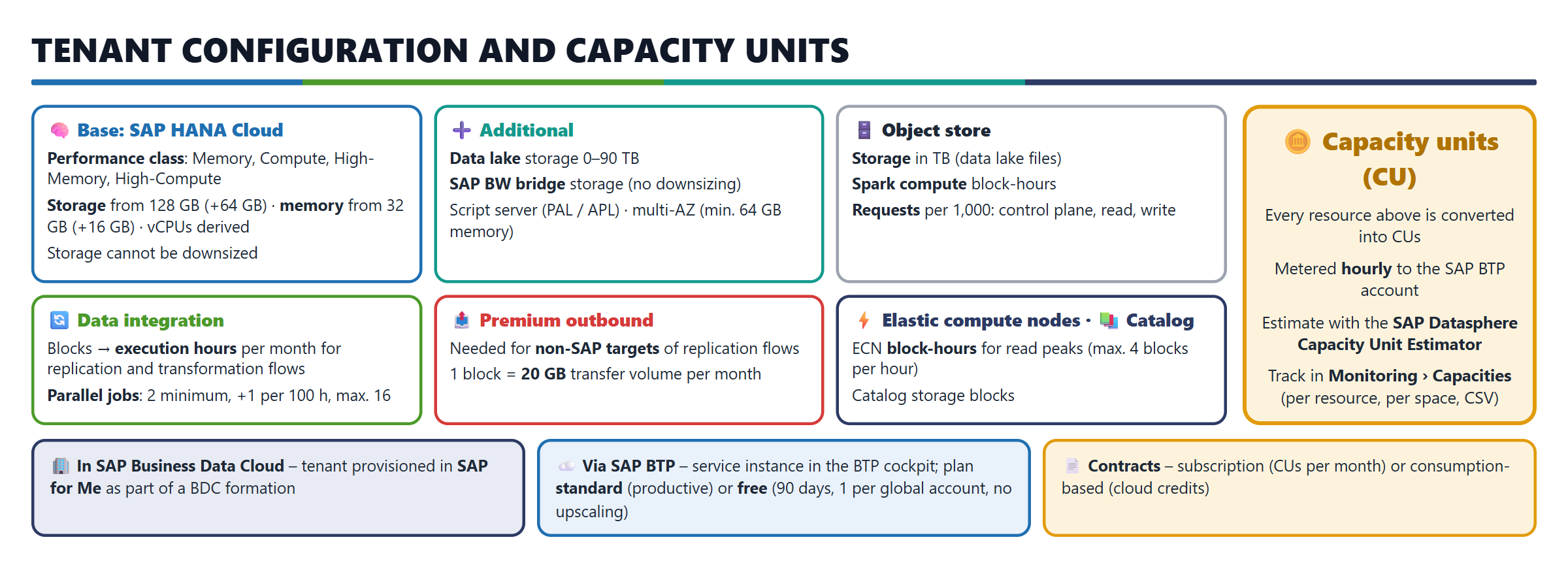
7.1 Provisioning
Access via | How the tenant is created |
|---|---|
SAP Business Data Cloud | Provisioned in SAP for Me as part of a BDC formation together with the other BDC components (SAP Business Data Cloud › 01) |
SAP BTP | A BTP subaccount administrator creates a service instance of SAP Datasphere in the SAP BTP cockpit (Service Marketplace, plan standard or free, runtime environment "Other"); the system owner named in the wizard receives an e-mail when the tenant is ready. SAP does not trigger the tenant creation. |
Characteristic | Standard plan | Free plan |
|---|---|---|
Use | Productive and non-productive | Trial |
Initial size | 128 GB storage, 32 GB memory (2 compute blocks); upscaling any time | 128 GB storage, 32 GB memory; no upscaling |
Metering | Capacity units reported hourly to the BTP account | Reported, not charged |
Time limit | Subscription: per contract; consumption-based: none | 90 days, not extendable; update to standard plan before expiry or the tenant is deleted |
Number of tenants | No limit; subscription CUs can be distributed among tenants | One per BTP global account |
- Contracts: subscription-based (a monthly CU entitlement) or consumption-based (cloud credits, pay per use). For BTP subscriptions the documentation refers to contracts initiated from November 2023.
7.2 Tenant configuration (System › Configuration › Tenant Configuration)
Resource | Settings | Rules to remember |
|---|---|---|
Base configuration | Performance class (Memory, Compute, High-Memory, High-Compute); storage; memory; vCPUs (derived from class and memory) | Storage from 128 GB in 64 GB steps, memory from 32 GB in 16 GB steps; storage cannot be downsized (recreate the tenant); HANA compute / storage change at most once per 24 h, about 10 minutes of HANA unavailability |
Additional | Data lake storage 0–90 TB; SAP BW bridge storage; script server; multi-AZ | BW bridge storage cannot be downsized; data lake can only be reduced by deleting and recreating it |
Object store | Storage (TB), Apache Spark compute block-hours, requests (control plane, read, write per 1,000) | Needed before file spaces can be created |
Elastic compute nodes | Performance class, block-hours | Max. 4 blocks per hour; for read peaks only |
Data integration | Blocks → execution hours per month for replication and transformation flows | Minimum 2 parallel jobs; +1 job per 100 execution hours, max. 16; one job processes about 5 replication objects in parallel; a default number of hours is included |
Premium outbound integration | Outbound blocks | 1 block = 20 GB per month; at least one block is required for non-SAP targets of replication flows |
Catalog | Storage blocks | Included by default; can be increased |
- Capacity units (CU): every resource is converted into CUs; the Tenant Configuration page shows estimated units for the month and current consumption. Use the SAP Datasphere Capacity Unit Estimator for offers and sizing workshops.
- Monitoring › Capacities: CU consumption per resource and per space (premium outbound volume, object store storage in TB-hours, compute in GB-hours, requests), with an hourly CSV download.
- Cost drivers an architect controls: memory size (persisted views, in-memory tables), replication flow run time (delta interval – billing is by job duration), premium outbound volume, ECN block-hours and object store requests. Running flows are not stopped when allocated hours are exceeded – they keep consuming CUs.
Part 8 – Where Datasphere fits in the SAP landscape
Product | Role | Relation to Datasphere |
|---|---|---|
SAP S/4HANA embedded analytics | Operational reporting on CDS views inside S/4HANA | Datasphere adds cross-system data, history and harmonisation; it extracts released CDS views (page 02) |
SAP BW/4HANA, SAP BW | On-premise enterprise data warehouse (ABAP-based) | BW models can be imported or federated, BW data pushed as data products, BW staging moved to BW bridge (page 06, BW › 06) |
SAP HANA Cloud | Database as a service (PaaS) | Datasphere runs on HANA Cloud but manages it for you; HDI containers and Open SQL schemas connect native HANA development (page 05) |
SAP Analytics Cloud | BI, planning and predictive (SaaS) | Main consumer of analytic models via live connection; planning data can be stored in Datasphere (SAP Analytics Cloud › 01) |
SAP Business Data Cloud | SaaS bundle for data products and AI | Datasphere is its data fabric and modeling layer; SAP Databricks consumes the same data products (SAP Business Data Cloud › 01) |
Non-SAP lakehouses (Databricks, Snowflake, Google BigQuery, Microsoft Fabric) | Partner data platforms | Connected through connections, replication flows (with premium outbound) and BDC partner integrations |
- Rule of thumb: embedded analytics for operational reporting in one S/4HANA system; Datasphere when data from several systems must be harmonised, historised, governed and shared; BW/4HANA where the customer stays on-premise; SAC on top for dashboards and planning.
- Architecture decisions (BW migration paths, BW bridge vs native, licensing, landscape with dev / test / prod tenants): page 06.
Part 9 – Interview questions
Q1. What is SAP Datasphere in one sentence?
A SaaS data warehouse and business data fabric on SAP HANA Cloud that integrates, federates or replicates SAP and non-SAP data into secure spaces, models it with business semantics and exposes it to SAP Analytics Cloud and other tools; it is the data foundation of SAP Business Data Cloud.
Q2. How is SAP Datasphere related to SAP Data Warehouse Cloud?
It is the same product renamed in March 2023: DWC (launched 2019) became SAP Datasphere with added catalog, replication flow and marketplace capabilities. Existing tenants were updated automatically; technical IDs such as sap.dwc role IDs and the DWC_ prefix still show the old name.
Q3. What is a space and why does it matter?
A space is a secure area in the tenant where all modeling happens. It has its own schema, storage quota, priority, users (via scoped roles), connections and database users. Objects are invisible to other spaces until shared or exposed. Spaces are therefore the main tool to separate departments or layers and to control cost and security.
Q4. What is the difference between a standard space and a file space?
A standard space stores data in SAP HANA Cloud (memory and disk) and supports all objects. A file space stores data as local tables (file) in the object store on SAP HANA data lake files, processed with Apache Spark; it is a cheap inbound layer for large volumes, supports replication flows, transformation flows and task chains, and shares its tables to standard spaces for modeling.
Q5. Explain global roles, role templates and scoped roles.
Global roles carry tenant-wide privileges (administration, catalog) and are assigned directly to users. Role templates such as DW Modeler define space-related privileges. A scoped role combines a template with a set of spaces and users, so one user can be modeler in one space and viewer in another.
Q6. Which standard roles do you know and what can a DW Consumer do?
System Owner, DW Administrator (global); DW Space Administrator, DW Integrator, DW Modeler, DW Viewer and DW Consumer (templates); Catalog Administrator and Catalog User; AI and Joule consumer roles. A DW Consumer cannot log in to Datasphere – the user only consumes exposed data in SAC or other tools.
Q7. What happens when a space exceeds its storage quota?
After 60 minutes the space is locked: users can still edit and save in the repository but cannot deploy. A space administrator can unlock it for a 24-hour grace period; then data must be deleted or the administrator assigns more disk or memory (or disables the quota).
Q8. Describe the architecture of a Datasphere tenant.
Browser apps write definitions into a repository (CSN); deploy creates run-time objects in the tenant's SAP HANA Cloud database, one schema per space, with memory, disk and optional data lake tiers. File spaces live in the object store with Apache Spark. Connectivity uses the replication flow engine, Cloud Connector, Data Provisioning Agent and smart data access. Optional elastic compute nodes and BW bridge add capacity and BW functions. Consumers are SAC, Excel, OData and SQL clients.
Q9. How is a Datasphere tenant provisioned and charged?
As part of SAP Business Data Cloud in SAP for Me, or as a service instance in the SAP BTP cockpit (standard plan, or a free plan for 90 days). Resources – memory, storage, data lake, object store, data integration hours, premium outbound blocks, ECN block-hours, catalog – are configured on the Tenant Configuration page and converted into capacity units, metered hourly.
Q10. Which sizing decisions are hard to reverse?
Disk storage cannot be downsized (the tenant must be recreated), BW bridge storage cannot be downsized, and data lake storage can only be reduced by deleting and recreating the data lake. Memory can be reduced within limits. Size storage carefully and use elastic compute nodes instead of permanent memory for short peaks.
Q11. How would you design spaces for a company with S/4HANA, SuccessFactors and several LoBs?
Integration spaces per source (connections, replication flows, raw tables), a central harmonization space for cleansed master and transaction data with data access controls, and LoB consumption spaces with analytic models for SAC. Share views (with DACs) instead of tables, give priority to consumption workloads, and use a file space if very large raw volumes must be staged cheaply.
Q12. When would you choose Datasphere instead of S/4HANA embedded analytics or BW/4HANA?
Embedded analytics is enough for real-time operational reporting within one S/4HANA system. Datasphere fits when data from several SAP and non-SAP systems must be combined, historised, governed and shared in the cloud, especially as part of Business Data Cloud. BW/4HANA remains an option for customers who stay on-premise; many landscapes combine them during a transition.
🏠 Start Here · 02 · Data Integration ▶ · Sections: CORE ABAP | OOPS ABAP | ABAP on HANA | Clean Core | RAP | ABAP Points | SAP Fiori | SAPUI5 | Mobile Development (MDK) | BTP Foundations | BTP Development | CAP | SAP Build | ABAP on BTP | Integration Suite | SAP Business AI | SAP BASIS | Security | SAP SDLC
Functional: FICO ABAP | TRM ABAP | VIM | SAP BIS | SD ABAP | MM ABAP | PP ABAP | QM ABAP | PM ABAP | PS ABAP | EWM | TM ABAP | GTM ABAP | EHS ABAP | HR ABAP | BW | SAP Datasphere | SAP MDG | SAP Analytics Cloud | SAP Ariba | SAP CX | SAP IBP