Before anything can be modeled, data has to reach a space. SAP Datasphere offers four basic patterns: federate (remote tables read the source live), replicate (replication flows copy many objects with initial and delta loads), transform and load (data flows and transformation flows write into local tables) and push or import (SQL writes into an Open SQL schema, CSV files, marketplace data, semantic import from SAP systems). All of them start with a connection in a space and are orchestrated with task chains, schedules and the Data Integration Monitor. This page covers connectivity, each integration object at technical-consultant depth, and the supported ways to extract data from SAP S/4HANA and other ABAP systems. Spaces and tenant sizing: page 01; views and analytic models on top of the loaded data: page 03; APIs, CLI and transport: page 05; BW-specific paths (BW bridge, model transfer, Data Product Generator): page 06.
Part 1 – Integration patterns at a glance
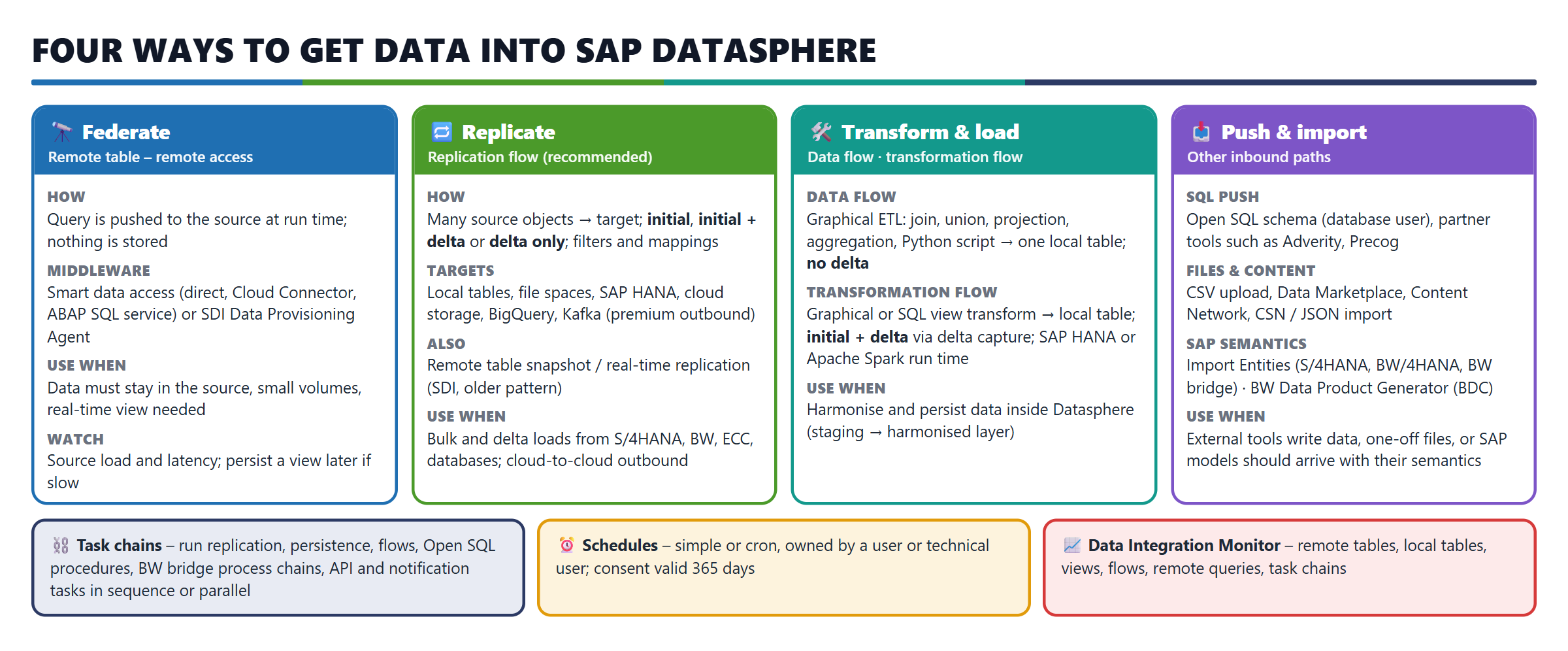
Requirement | Recommended object | Why |
|---|---|---|
Read S/4HANA or HANA data live, nothing stored | Remote table (remote access) – for ABAP sources via the ABAP SQL service | Federation pushes the query down to the source |
Copy many tables / CDS views with delta | Replication flow | SAP's recommended replication tool; initial + delta, up to 500 objects per flow, many targets |
Replicate one object and keep it in sync, older setups | Remote table with snapshot, scheduled or real-time replication | Still supported; for new ABAP replication scenarios use replication flows |
Join, aggregate or script data once and load a table | Data flow | Graphical ETL with Python script operator; initial load only |
Transform data inside Datasphere with delta | Transformation flow | Graphical or SQL view transform into a local table, delta via delta capture; SAP HANA or Apache Spark |
External tool writes data | Open SQL schema (database user) or partner connection (Adverity, Precog) | Data is pushed by SQL; Datasphere imports the table as a local table |
Load data to a non-SAP target (S3, BigQuery, Kafka …) | Replication flow + premium outbound integration | Outbound replication is licensed per 20 GB block |
Import SAP models with their semantics | Import Entities wizard (Semantic Onboarding) | Creates tables, views and analytic models with associations, texts and hierarchies |
- Federation vs persistence is a design decision per object: start federated for small or rarely-used data, persist (replicate the table or persist a view – page 03) when performance, source load or history require it. The View Analyzer's data persistence guidance and SAP both recommend replacing slow federated remote tables with replication flows.
Part 2 – Connections and connectivity infrastructure
A connection is an instance of a connection type (a template that defines properties and the supported features). Connections are created per space by users with the DW Space Administrator or DW Integrator role; modelers then use them. Always validate a connection after creating or editing it – validation reports which features are usable.
Feature | What it enables |
|---|---|
Replication flows | Source and / or target of replication flows (depends on the type) |
Remote tables | Import remote tables for federation; snapshot or real-time replication for some types |
Data flows | Use source objects in data flows |
Model import | Import objects with rich metadata from SAP systems (S/4HANA, BW/4HANA, BW bridge) |
API tasks | Call external REST APIs from task chains (Generic HTTP connections only) |
2.1 Important connection types
Connection type | Repl. flow source / target | Remote tables | Data flows | Other |
|---|---|---|---|---|
SAP S/4HANA On-Premise | Source | Yes (real-time) | Yes | Model import |
SAP S/4HANA Cloud | Source | Yes (real-time) | Yes | Model import |
SAP ABAP (incl. SLT, ODP) | Source | Yes (real-time) | Yes | – |
SAP BW · SAP ECC | Source | Yes (real-time) | Yes | – |
SAP BW/4HANA Model Transfer | – | – | – | Model import |
SAP HANA (on-premise and Cloud) | Source and target | Yes (real-time) | Yes | – |
SAP HANA Cloud, data lake files | Source and target | – | Yes | – |
SAP SuccessFactors · SAP Fieldglass · SAP Marketing Cloud | – | Yes | Yes | – |
SAP Signavio | Target | – | – | – |
Amazon S3 · Google Cloud Storage · Azure Data Lake Gen2 | Source and target | – | Yes | – |
Google BigQuery | Target | Yes | Yes | – |
Apache Kafka · Confluent | Target (Confluent also source) | – | – | – |
Microsoft SQL Server · Azure SQL · Oracle | Source | Yes (real-time) | Yes | – |
Snowflake · MySQL · Microsoft OneLake | Source | – | – | – |
Generic OData / JDBC / SFTP / HTTP | SFTP source and target | OData, JDBC | OData, SFTP | HTTP: API tasks |
Adverity · Precog | – | – | – | Data pushed via Open SQL schema |
- Source: "Connection Types Delivered by SAP" (as of November 2026) – check the current list before a project, it grows with almost every release.
- File spaces offer only a subset of connection types and only the replication flow feature. Custom connection types (file spaces only) connect to external REST APIs and load JSON data into the object store with replication flows.
- Connections can also be listed, created, validated and deleted with the
datasphereCLI and a REST API (not for custom connection types) – page 05.
2.2 Connectivity components
Component | What it does | Needed for |
|---|---|---|
Cloud Connector | Reverse-invoke tunnel from the customer network to SAP BTP; configured with a location ID, system mappings (virtual host / port, protocol RFC or HTTPS) and access control lists | On-premise sources for replication flows, data flows, model import, ABAP SQL service, SAP HANA remote tables via smart data access, API tasks |
Data Provisioning Agent (SAP HANA smart data integration, SDI) | Lightweight Java agent installed on a host in the customer network; hosts adapters (ABAP, Cloud Data Integration, databases) and talks to the Data Provisioning Server of the tenant via JDBC; one agent serves one tenant | Most remote table connections (federation and replication) of the SDI type; model import from S/4HANA on-premise |
SAP HANA smart data access (SDA) | Federation adapters built into SAP HANA Cloud | Direct remote tables, e.g. SAP HANA Cloud, SAP HANA on-premise via Cloud Connector, ABAP SQL service |
IP allowlist | All external connections to the tenant are blocked by default | Add the IP of the DP Agent host, Open SQL clients and partner tools |
Datasphere egress IPs | Shown in Profile › About › More: replication / data flow NAT IP and SAP HANA Cloud NAT IPs | Add to the allowlist of protected sources (SAP Note 3456052) |
Third-party drivers | JDBC libraries for the DP Agent; ODBC drivers uploaded for data flows | Oracle, Google BigQuery, Amazon Redshift … |
- Rule of thumb: flows and model import go through the Cloud Connector; remote tables of the classic type go through the DP Agent; modern ABAP federation uses the ABAP SQL service via Cloud Connector (on-premise) or directly (S/4HANA Cloud).
- Real-time replication of remote tables via SDI can be paused and restarted per connection (and per agent) – needed before source or agent maintenance.
Part 3 – Remote tables: federation and remote table replication
A remote table is imported from a connection (Data Builder › Import › Import Remote Tables, from an E/R model, or by dropping a source into a view). By default it federates: every query is sent to the source. Optionally its data is copied into a replica table in Datasphere.
Data access | How | Notes |
|---|---|---|
Remote | Federation; query pushdown through SDA or SDI | Default; no storage; source must be available and fast enough |
Replicated (snapshot) | Start Data Replication copies the full data set; a schedule refreshes it | Batch; can be partitioned and restricted |
Replicated (real-time) | Enable Real-Time Data Replication: initial copy + change data capture | Only for some connection types and source objects (see below); no logs per change |
- Remote Only data access on a connection (SAP HANA, SAP HANA Cloud; ABAP SQL service connections are remote-only too) forbids remote table replication – replicate with replication flows instead, so the same data is not copied twice.
- Restrict loads: remove unneeded columns and set filters on the remote table; partition large snapshot loads; store replicated data in memory for maximum speed; create statistics on remote tables to improve federated query plans.
- Real-time prerequisites: the source object must be delta-enabled (CDC-enabled). For ODP sources: BW InfoProviders with change log (ADSO with change log, classic DSO, InfoObjects), delta-enabled CDS views with primary key (filters only on key fields, because deletions carry only key values in the ODQ), and delta-enabled SAPI extractors with primary key (delta methods starting with ADD are not allowed).
- Switching a real-time table back to a schedule changes it to batch replication at the next run; Disable Real-Time Data Replication keeps the replica as a snapshot even if the source is unreachable.
- Monitoring: Data Integration › Remote Tables (replication runs) and Remote Queries (statements sent to sources).
Part 4 – Replication flows
A replication flow copies multiple source objects from one source connection and container to one target connection and container, with optional filters and mappings, as initial load, initial + delta, or delta only. It is the strategic replication tool of Datasphere (and of BDC) and replaces remote table replication for ABAP sources. Read SAP Note 3297105 (important considerations) before the first flow.
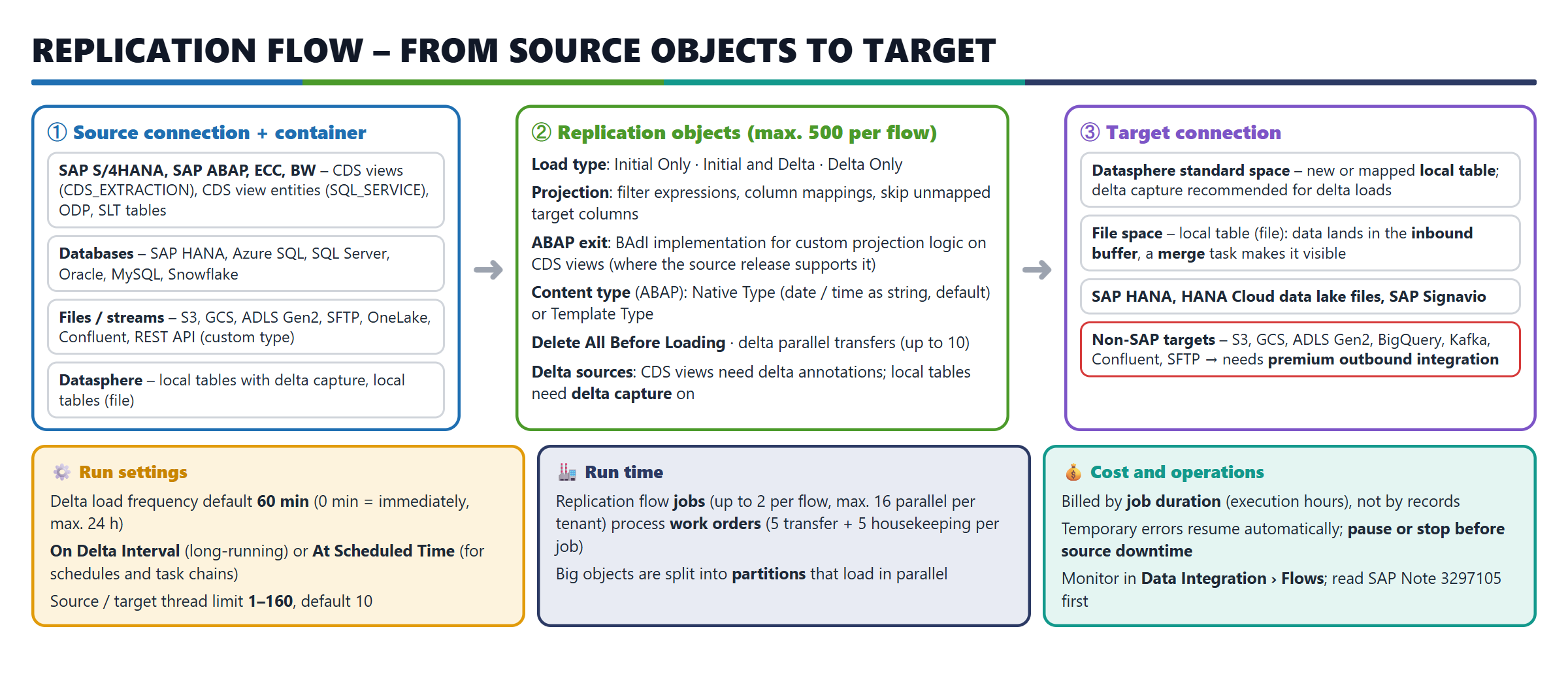
4.1 Building a replication flow
- 1. Source – Data Builder › New Replication Flow › select source connection and container (for ABAP sources e.g.
CDS_EXTRACTION,SQL_SERVICE, ODP or SLT containers) and add source objects. - 2. Target – select target connection and container; for SAP Datasphere the container is the current space and the target object is a new local table (created at deploy) or an existing one (Map to Existing Target Object).
- 3. Settings – load type, Delete All Before Loading, content type for ABAP sources, delta load frequency; per object: projections (filter expressions and mappings), delta capture of the target table, ABAP exit, maximum parallel delta transfers.
- 4. Deploy and run – deploy validates the flow; Run starts it; the DW Integrator role can edit run settings after deployment. Monitor it in Data Integration › Flows.
4.2 Load types and run settings
Setting | Values | Explanation |
|---|---|---|
Load type | Initial Only · Initial and Delta · Delta Only | Initial + delta runs as a long-running task that stays Active; Delta Only skips the initial load and cannot guarantee consistency |
Delta Load Run | On Delta Interval (default) · At Scheduled Time | At Scheduled Time processes the available deltas and ends – required to schedule the flow or run it in a task chain |
Delta load frequency | Default 60 min; 0 h 0 min – 24 h | 0 = replicate immediately; the next interval starts after the previous delta finished; billing is by job duration, so a longer interval costs less |
Source / target thread limit | 1–160, default 10 | How many partitions are processed in parallel during the initial load; same value for source and target recommended |
Maximum parallel delta transfers | 1–10, default 1 | Per object, for SLT tables, CDS views and CDS view entities with delta |
Delete All Before Loading | On / off | Database targets: truncate and reload, otherwise UPSERT by key; cloud storage targets: always on (object re-created); Kafka: topic re-created |
Content type (ABAP sources) | Native Type (default) · Template Type | Native: date / time become strings of native length; Template: source data types are kept (fails on non-ISO dates) |
Capture Source Schema Changes | On (cannot be switched off) | Only SAP ABAP connections with an SLT container to Datasphere targets; applies compatible source changes without restart |
Merge Data Automatically | File space targets | Runs the merge task when new files arrive in the inbound buffer |
4.3 Sources, targets and premium outbound integration
- Sources: SAP S/4HANA (cloud and on-premise), SAP ABAP, SAP ECC, SAP BW, SAP HANA, HANA Cloud data lake files, Azure SQL, SQL Server, Oracle, MySQL, Snowflake, cloud storage (S3, GCS, ADLS Gen2, OneLake – initial only), SFTP, Confluent, REST APIs (custom types), and Datasphere local tables themselves (with delta capture on for delta loads).
- SAP targets: Datasphere local tables (standard space) and local tables (file) (file space), SAP HANA, SAP HANA Cloud data lake files, SAP Signavio.
- Non-SAP targets – Amazon S3, Google Cloud Storage, Azure Data Lake Gen2, Google BigQuery, Apache Kafka, Confluent, SFTP – need premium outbound integration: at least one block allocated in the tenant configuration, 1 block = 20 GB per month. SAP's example: 300 GB initial + 60 GB delta per month to BigQuery = 18 blocks in month 1, then 3 per month (SAP Note 3470559 for volume estimates).
- Delta into Datasphere: use a target local table with delta capture for initial + delta loads; in a file space the flow writes files to the table's inbound buffer and a merge task (task chain, monitor or automatic) makes the data visible.
4.4 Sizing and run time
Concept | Value / rule |
|---|---|
Replication object | One source entity (CDS view, table …); max. 500 per flow |
Partition | Large objects are split automatically during the initial load; each partition is one work order |
Replication flow job | Background job doing the transfer; up to 2 per flow by default; shared by all flows of the tenant |
Work orders | Each job processes up to 5 transfer and 5 housekeeping work orders; one thread to source and target each |
Tenant limit | Max. 16 parallel jobs (2 included, +1 per 100 data integration hours) → up to 160 threads to source and target; excess work is queued |
Delta phase | By default each object is one partition handled by one work order (5 per job); schedule no more than 100 flows at the same interval |
Cost | Execution hours of the jobs, not the number of records; splitting objects across flows does not change the hours, but spreads the load |
- Operations: temporary errors (source or tenant unavailable) resume automatically where they failed; permanent errors need a manual restart. Always pause or stop running flows before a source system downtime or upgrade. E-mail notification can be set for failures at object level.
- Restrictions: no input parameters; ABAP sources without a primary key only support Initial Only; replicating the same source object in several flows at the same time affects performance.
Part 5 – Local tables, delta capture, data flows and transformation flows
5.1 Local tables and delta capture
A local table stores data in the space (disk by default, optionally in memory). It is filled by CSV upload, flows or manual maintenance. Switching on Delta Capture (only before the first deploy, key columns required, cannot be switched off later) turns it into a change-tracking table:
Object created at deploy | Content | Used by |
|---|---|---|
Delta capture table ( | All records plus Change Date (UTC timestamp) and Change Type (I insert, U update, D deleted, M archived in the ABAP source); deleted rows stay as records | Replication flows and transformation flows (read and write delta) |
Active records (deployed as a view) | Only current rows, without the delta columns and without | Views, E/R models, analytic models – behave as if delta capture were off |
- Deleted records are removed physically by a task-chain activity Delete Records with Change Type "Deleted" (with a retention in days) – plan this housekeeping, otherwise the delta table keeps growing.
- In BDC data products the delta columns are hidden; consumers receive changes through the Delta Sharing change data feed (SAP Business Data Cloud › 02).
5.2 Data flows
A data flow is graphical ETL (standard spaces only): drag sources from the Source Browser (connections, other space objects, Open SQL schemas, HDI containers), transform them and write to exactly one local table.
Operator / setting | What it does |
|---|---|
Join · Union · Projection · Aggregation | Combine data sets, add / remove / rename columns, SUM, AVG, MIN, MAX, COUNT |
Script | Python |
Target mode | Append (optionally UPSERT by primary key), Truncate (replace all), Delete (delete matching records) |
Input parameters | Prompted at run time; task chains use the default values |
Advanced properties | Dynamic memory allocation (expected data volume small / medium / large, 1–5 GB) and automatic restart on failure |
|
- The returned DataFrame must match the operator's output columns exactly (names, types, order); Python 3.11 is the recommended version.
- Limits: no delta processing (use replication or transformation flows), no spatial types, data preview for ABAP sources only in recent releases; data flows from ABAP sources read CDS extraction views and SLT tables with initial load only.
5.3 Transformation flows
A transformation flow reads one or more sources (local tables, views, Open SQL schema objects, remote tables of BW bridge spaces), transforms them in a graphical view transform or SQL view transform and writes the result to one local table. With load type Initial and Delta (delta capture on in source and target table) the first run loads everything and later runs load only changes, including deletions.
- Run time: SAP HANA in standard spaces; Apache Spark in file spaces, where a Python operator (pandas, batch-wise
mapInPandasor user-defined batchesapplyInPandas) and a data remediation table for erroneous records are available. - Simulate Run tests the flow without writing to the target; a run fails after 48 hours; input parameters come from the task chain when run there.
- Not supported as sources: views on remote tables (except BW bridge), views with data access controls; delta from views is not possible. Joins with active-records views can lose deletions (inner joins).
- Transformation flows consume data integration execution hours like replication flows; SAP suggests them as an alternative to persisting complex views.
5.4 Which flow for which job?
Replication flow | Data flow | Transformation flow | |
|---|---|---|---|
Purpose | Copy many objects 1:1 | ETL with operators and Python | SQL / view-based transformation inside Datasphere |
Objects per flow | Up to 500 sources → 500 targets | Several sources → 1 target table | Several sources → 1 target table |
Delta | Yes – initial + delta, delta only | No | Yes – via delta capture tables |
Sources | Connections (SAP, databases, files, streams), local tables | Connections, space objects, Open SQL, HDI | Local tables, views, Open SQL objects, BW bridge remote tables |
Targets | Local tables, file spaces, SAP HANA, cloud storage, BigQuery, Kafka … | Local table | Local table / local table (file) |
Run time | Replication flow jobs (data integration hours) | Data flow engine | SAP HANA or Apache Spark |
Part 6 – Task chains, scheduling and monitoring
A task chain groups tasks and runs them manually or on a schedule – the Datasphere counterpart of a BW process chain. It needs to be deployed, and the owner must have given authorized consent.
Task object | Activity |
|---|---|
Remote table | Replicate (or remove replicated data) |
View | Persist (or remove persisted data); views must not have data access controls |
Local table | Delete all / filtered records / records with change type deleted |
Local table (file) | Merge (inbound buffer → table) or optimize (with Z-order columns), with an Apache Spark setting |
Data flow · replication flow · transformation flow · intelligent lookup | Run (replication flows with delta need Delta Load Run = At Scheduled Time) |
Open SQL schema procedure | Run a SQLScript procedure (EXECUTE granted to the space) |
SAP BW bridge process chain | Run a process chain in the BW bridge |
API task · notification task | Call a REST API via a Generic HTTP connection; send e-mails |
Nested / shared task chain | Run a task chain of this or another space |
- Control flow: linear chains (next task on Success, or on failure via task ports) and parallel branches that continue when ANY or ALL branches complete; Ignore Error per task; failed runs are restarted with Retry Run; input and output parameters; e-mail notification.
- Scheduling: simple schedule or cron expression for remote tables, views, flows and task chains; the schedule owner can be a business user or a technical user; consent is valid 365 days (e-mail 30 days before expiry). Stagger schedules to avoid resource peaks.
- REST API and CLI: tasks and task chains can be started and monitored from outside (e.g. after an ERP batch job) – page 05.
6.1 Data Integration Monitor
Monitor | What you see and do |
|---|---|
Remote Tables | Replication status, start / remove replication, real-time, schedules, partitions |
Local Tables · Local Tables (File) | Metrics, record deletion; buffer and merge status for file tables |
Views | Persisted views, partitions, View Analyzer and persistence guidance (page 03) |
Flows | Runs of data, replication and transformation flows; replication flow metrics and substatuses; premium outbound volume |
Remote Queries | Statements sent to remote sources; remote table statistics |
Task Chains | Runs, steps, logs, retries |
Part 7 – Extracting data from SAP S/4HANA and other ABAP systems
For S/4HANA the unit of extraction is the CDS view, not the database table: released CDS views carry the business semantics and a stable contract (C1 release), which fits clean-core rules. Datasphere offers several technical paths; SAP's current recommendation is replication flows for replication and the ABAP SQL service for federation.
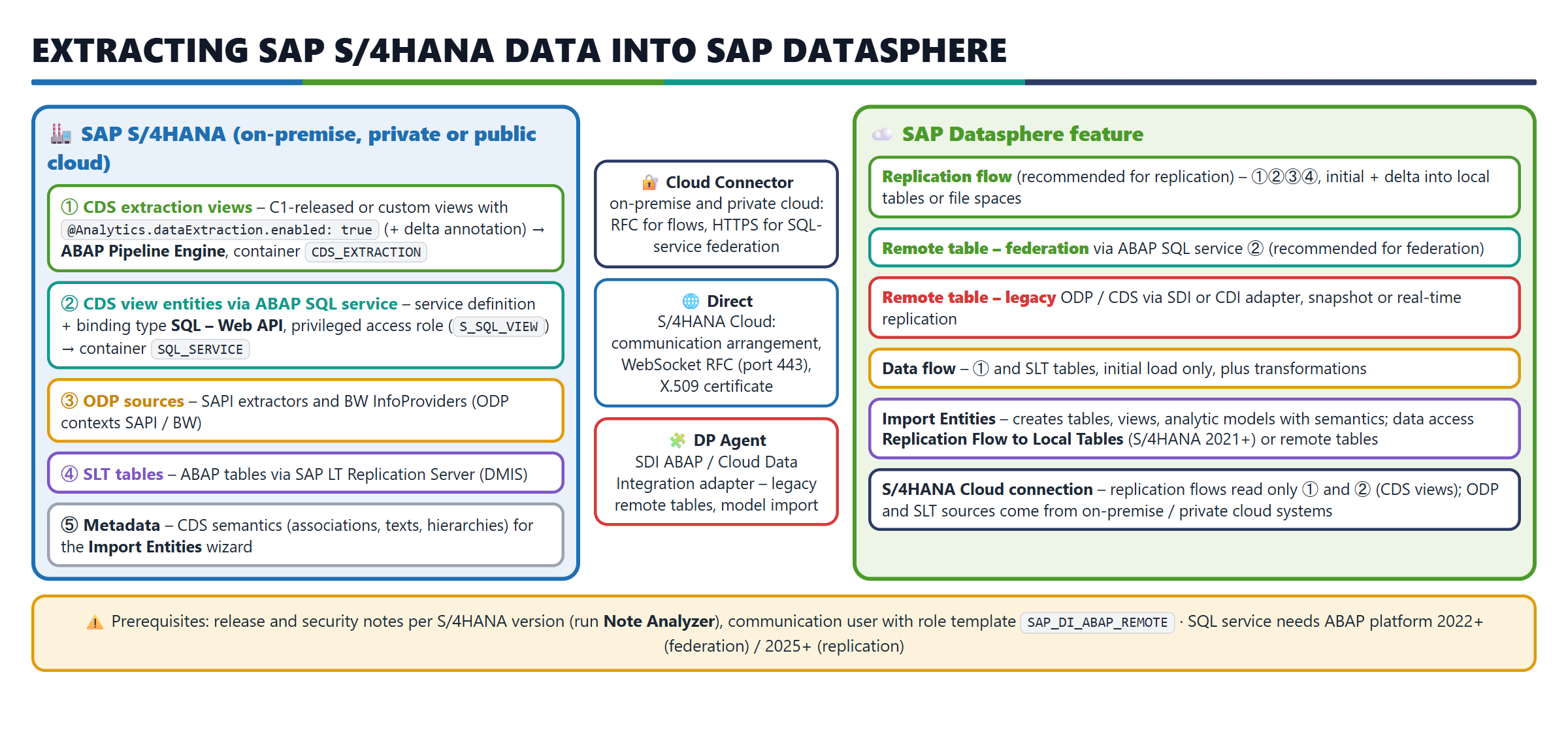
Path | Source objects | Datasphere feature | Minimum / notes |
|---|---|---|---|
CDS extraction views via ABAP Pipeline Engine | C1-released or custom CDS views with | Replication flows (initial + delta), data flows (initial) | Replication flows from S/4HANA 1909; delta needs a delta annotation (e.g. automatic change data capture) |
ABAP SQL service | CDS view entities exposed in a service definition with an SQL – Web API service binding; container | Remote tables (federation, remote only), replication flows | S/4HANA on-premise: ABAP platform 2022 FPS00+ for federation, 2025+ for replication; privileged access (S_SQL_VIEW) |
ODP | SAPI extractors, BW InfoProviders (contexts SAPI, BW) | Replication flows; legacy remote tables (ODP via SDI) | S/4HANA 1909+ or DMIS add-on; ECC and BW sources |
SLT | ABAP tables replicated by SAP LT Replication Server | Replication flows, data flows | DMIS 2018 SP06 / 2020 SP03+; not for S/4HANA Cloud Public Edition |
Legacy remote tables | ODP CDS / SAPI / DDIC tables via SDI ABAPAdapter (on-premise) or CDS via Cloud Data Integration (S/4HANA Cloud) | Remote tables with snapshot or real-time replication | Still supported; not recommended for new scenarios |
Import Entities | Extraction-enabled C1-released CDS views and their associations | Creates tables / views / analytic models; data access Replication Flow to Local Tables (S/4HANA 2021+, SAP_BASIS 756) or remote tables (S/4HANA 1809+) | Associated entities follow only for SAP-delivered views from SAP_BASIS 756 |
7.1 Prerequisites in the source system
- SAP Notes per release: implement the release note and the security note for your S/4HANA or DMIS version (for example S/4HANA 2023: SAP Note 3254953; security settings for all releases: SAP Note 3100673) and check compliance with Note Analyzer; SAP Note 2890171 lists the ABAP integration requirements.
- Communication user in S/4HANA with role template
SAP_DI_ABAP_REMOTE(replication via RFC); for the ABAP SQL service a role withS_STARTandS_SQL_VIEW(operations SELECT and REPLICATE). - Cloud Connector system mapping for the S/4HANA system: protocol RFC for flows (access limited to function modules with prefixes
DHAMB_,DHAPE_andRFC_FUNCTION_SEARCHfor the SQL service replication scenario) and HTTPS for SQL-service federation – same virtual host for both. - S/4HANA Cloud: the connection uses a communication arrangement (RFC fast serialization, SAP Note 3486245); no Cloud Connector.
- Fast serialization (RFC, default on) speeds up replication flows from ABAP sources (SAP Note 3486245).
- Custom projection logic: a BAdI implementation of
BADI_DHAPE_RMS_EVENTS(filterEXIT_NAME) can add complex filters or lookups to CDS view replication; the documentation lists SAP S/4HANA Cloud 2408 as the supported release.
7.2 What the ABAP developer builds
A custom extraction view for a custom table – delta-enabled with automatic change data capture, usable in replication flows (container CDS_EXTRACTION):
|
Exposure of CDS view entities through the ABAP SQL service – a service definition, then a service binding of type SQL – Web API created in ABAP Development Tools (container SQL_SERVICE in Datasphere):
|
- CDS basics, annotations and view entities: ABAP on HANA › 05 CDS Views; clean-core rules: ABAP on HANA › 08 Clean Core; BW-side extraction (ODP, extractors): BW › 03.
- Third-party tools: SAP does not permit non-SAP applications to extract via the ODP RFC interface; Datasphere replication flows and released APIs are the supported way (BW › 06).
7.3 Other SAP sources
Source | Main options |
|---|---|
SAP ECC | SAP ECC connection: ODP (SAPI extractors), SLT tables via DMIS, replication flows and remote tables |
SAP BW / BW/4HANA | SAP BW connection (ODP context BW, replication flows), BW/4HANA Model Transfer (import queries and models), BW bridge, Data Product Generator in BDC – page 06 |
SAP SuccessFactors | Remote tables and data flows; in BDC usually installed as data products |
SAP HANA (on-premise / Cloud) | Replication flows (source and target), remote tables via SDA or SDI, Remote Only option |
SAP Integrated Business Planning | Data pushed into an SAP IBP file space |
Part 8 – Interview questions
Q1. What are the main ways to bring data into SAP Datasphere?
Federation with remote tables, replication with replication flows (or remote table snapshot / real-time replication), transformation and load with data flows and transformation flows, and push or import: Open SQL schema, partner tools, CSV files, Data Marketplace, Content Network and the Import Entities wizard. Task chains orchestrate them.
Q2. When do you federate and when do you replicate?
Federate when data must stay in the source, volumes are small and the source can answer fast; replicate when performance, source load, history or availability matter, or when data is combined heavily. Many projects start federated and persist the objects that turn out slow.
Q3. Replication flow vs data flow vs transformation flow?
A replication flow copies up to 500 objects 1:1 with initial and delta loads to many targets. A data flow is graphical ETL with operators and Python into one local table, initial load only. A transformation flow transforms local data with a graphical or SQL view into one table and supports delta through delta capture tables, on SAP HANA or Apache Spark.
Q4. What load types does a replication flow support and what does "At Scheduled Time" mean?
Initial Only, Initial and Delta, Delta Only. Initial and Delta normally runs as a long-running task checking for deltas every interval (default 60 minutes). With Delta Load Run = At Scheduled Time the flow processes the available deltas and ends, so it can be scheduled or placed in a task chain.
Q5. How is replication charged and how do you control the cost?
By the run time of replication flow jobs in data integration execution hours, not by records. A longer delta interval or scheduled delta runs reduce hours. Non-SAP targets additionally consume premium outbound integration blocks of 20 GB each.
Q6. What are Cloud Connector and Data Provisioning Agent used for?
The Cloud Connector links on-premise systems to Datasphere for replication flows, data flows, model import, the ABAP SQL service and SAP HANA smart data access. The Data Provisioning Agent hosts SAP HANA smart data integration adapters for classic remote tables (federation and snapshot / real-time replication); one agent serves one tenant.
Q7. Which S/4HANA objects can a replication flow read?
Extraction-enabled CDS views (@Analytics.dataExtraction.enabled) via the ABAP Pipeline Engine, CDS view entities exposed with the ABAP SQL service, ODP sources (SAPI extractors, BW InfoProviders) and SLT tables. For delta, CDS views need a delta annotation such as automatic change data capture; objects without a primary key support only the initial load.
Q8. What is the ABAP SQL service and why is it recommended?
A standard ABAP protocol that gives SQL (ODBC) access to CDS view entities listed in a service definition with an SQL – Web API binding and protected by privileged-access roles. Datasphere uses it for federated remote tables (ABAP platform 2022+) and replication (2025+). It exposes only released or custom CDS entities – clean core, no table access.
Q9. What is delta capture on a local table?
A setting chosen before the first deploy that adds Change Date and Change Type columns and creates a delta table plus an active-records view. Replication and transformation flows read and write changes, including deletions, while views see only active records. Deleted records are cleaned up with a task chain activity.
Q10. A replication flow from S/4HANA is slow during the initial load. What do you check?
Source and target thread limits (default 10, up to 160), the number of parallel jobs the tenant has (data integration hours), other flows sharing the jobs, partitioning of big objects, fast serialization, filters to reduce volume, and source system load. Large objects can get their own flow; schedules can be staggered.
Q11. How do you orchestrate a nightly load in Datasphere?
With a task chain: e.g. run replication flows (At Scheduled Time), then transformation flows, persist views, delete old delta records and send a notification; parallel branches with ANY / ALL, Retry Run, parameters. The chain is scheduled with cron by a user or technical user with valid consent and monitored in the Data Integration Monitor.
Q12. As an architect, how would you design S/4HANA extraction for a clean-core greenfield project?
Use released CDS views (or custom CDS view entities on released objects) as the only interface, replicate them with replication flows into an ingestion space with delta capture tables, federate small or real-time data via the ABAP SQL service, avoid table-level and ODP RFC access by third-party tools, use Import Entities to bring semantics, and size data integration hours and parallel jobs for the initial loads. In BDC, prefer SAP-managed data products where they exist.
🏠 Start Here · ◀ 01 · Overview & Spaces · 03 · Data Modeling ▶ · Sections: CORE ABAP | OOPS ABAP | ABAP on HANA | Clean Core | RAP | ABAP Points | SAP Fiori | SAPUI5 | Mobile Development (MDK) | BTP Foundations | BTP Development | CAP | SAP Build | ABAP on BTP | Integration Suite | SAP Business AI | SAP BASIS | Security | SAP SDLC
Functional: FICO ABAP | TRM ABAP | VIM | SAP BIS | SD ABAP | MM ABAP | PP ABAP | QM ABAP | PM ABAP | PS ABAP | EWM | TM ABAP | GTM ABAP | EHS ABAP | HR ABAP | BW | SAP Datasphere | SAP Business Data Cloud | SAP MDG | SAP Analytics Cloud | SAP Ariba | SAP CX | SAP IBP