Once data is modelled (page 03) it has to reach people and tools – securely and findably. This page covers the business layer (the deprecated Business Builder and its successor, the analytic model), every consumption path (SAP Analytics Cloud live and planning integration, the Excel add-in, the OData consumption API, ODBC/JDBC through database users), the security model (roles, scoped roles, spaces, sharing and data access controls for row-level security, BW analysis authorization import), audit and privacy, the catalog with data products and the Data Marketplace, and monitoring. Spaces, users and capacity basics: page 01; connections and outbound replication: page 02; APIs for administration, CLI and transport: page 05.
Part 1 – How data leaves Datasphere: the exposure matrix
Three object types are visible to consumers. Analytic models and Business Builder perspectives are exposed automatically; views only when their Expose for Consumption switch is on. Consumers need at least the privileges of the DW Consumer role in the space, and every path respects data access controls.
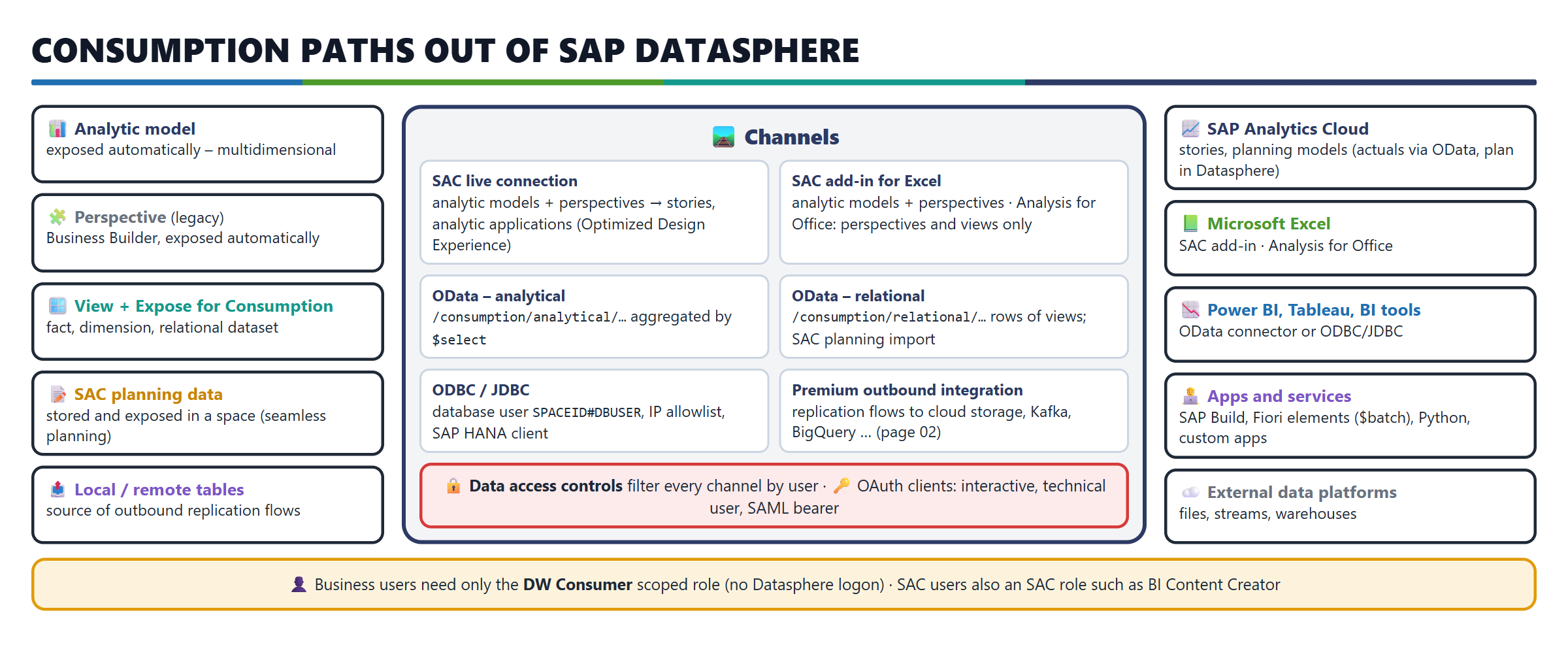
Object | SAP Analytics Cloud | Microsoft Excel | Other clients, tools, apps |
|---|---|---|---|
Analytic model (exposed automatically) | Live connection (stories, analytic applications) | Live via the SAP Analytics Cloud, add-in for Microsoft Excel | OData – analytical requests |
Perspective (Business Builder, legacy) | Live connection | Live via the SAC add-in; also SAP Analysis for Microsoft Office | – |
View with Expose for Consumption | OData (used mainly for planning imports) | Views also in Analysis for Microsoft Office | OData – relational requests; ODBC/JDBC via an Open SQL schema |
- Views with the deprecated semantic usage Analytical Dataset can still be consumed live in SAC and Excel, but SAP recommends migrating them to Fact + analytic model (Part 2.4).
- Physical copies out of Datasphere (to cloud storage, Kafka, BigQuery and other targets) are replication flows with premium outbound integration – page 02.
- Joule and natural language search in Datasphere help find and build objects; they are not a consumption channel for end users.
Part 2 – The business layer: Business Builder (legacy) and the move to analytic models
The Business Builder was designed as a semantic layer for business users on top of the Data Builder: business entities decoupled from the physical views, combined into consumption models and exposed as perspectives. It is deprecated and will not receive further updates (help.sap.com, as of November 2026); SAP recommends migrating consumption models to analytic models, the preferred way to expose data to SAC and other tools. Know it for interviews and for existing tenants; build new content as analytic models.
2.1 Business Builder objects
Object | What it is | Analytic-model equivalent |
|---|---|---|
Business entity (dimension or fact) | Wraps one Data Builder table / view; keys, attributes, measures (incl. derived and calculated), associations, input parameters. The source can be switched without breaking consumers (loose coupling) | Fact / dimension view with associations |
Fact model | Intermediate combination of business entities, reusable in several consumption models | Analytic model used as source of another analytic model |
Consumption model | Star schema of fact sources and dimension sources for one analytical scenario; can combine several fact sources (e.g. Actuals, Budget, Forecast) | Analytic model (one fact; combine facts in a view or union first) |
Perspective | Subset of a consumption model's measures, attributes and parameters, consumed live by SAC and Excel; can be saved from the data preview | The analytic model itself |
Authorization scenario | Row-level security for the business layer, built on a data access control, assigned to business entities and used in consumption models (or Public Data Access) | Data access control on the fact or analytic model |
Versions | Parallel versions of an object with status In Process, In Validation, Ready to Use, Deprecated, Discontinued – models adopt a new version explicitly | Release states of views (page 03 Part 8.4) and version history |
- Older perspectives use internal dimension names that are not transport-stable; Update Perspective for Transport fixes this but breaks SAC stories that consume them.
- The Import Entities wizard for S/4HANA, BW/4HANA and BW bridge historically also generated business entities and consumption models (page 03 Part 2.2).
- The Business Builder is not available in file spaces.
2.2 Why the analytic model replaced it
- One object instead of three (entity → consumption model → perspective), modelled directly in the Data Builder.
- Full analytical feature set: restricted / calculated / count distinct / conversion / non-cumulative measures, exception aggregation, all variable types, structures, analytical preview – aligned with SAC terminology.
- Consumable live in SAC and Excel and through the analytical OData API.
2.3 Migrating a consumption model
- Build the facts and dimensions (with associations) in the Data Builder – usually the business entities' sources already are such views.
- Recreate the measures, variables and filters in one analytic model per perspective; replace the authorization scenario with a data access control.
- Repoint SAC stories to the analytic model (copy the story page, switch measures and dimensions, compare, delete the old page), then retire the perspective.
2.4 Migrating an analytical dataset
SAP's documented sequence keeps stories working during the switch:
- 1. In the analytical dataset view click Create Analytic Model (same measures, attributes and associated dimensions); save and deploy it.
- 2. In each SAC story add the analytic model as a new data source, copy the affected pages and switch the measure and dimension references.
- 3. Compare the copied pages with the originals and delete the originals.
- 4. When no story uses the dataset any more, change the view's semantic usage to Fact and redeploy the view and the analytic model.
Part 3 – SAP Analytics Cloud and Microsoft Excel
3.1 SAC live connection
- In SAC a live data connection to the Datasphere tenant is created once (SAC administration); story designers then choose Add New Data › Data from an existing dataset or model, the connection, the space and the analytic model or perspective.
- Requirements: SAC role BI Content Creator (or equivalent) and in Datasphere a scoped role with Data Warehouse Consumption and Space Files read – the DW Consumer role for users who never log on to Datasphere itself.
- Analytic models need the Optimized Design Experience in SAC stories; the Classic Design Experience is not supported.
- No data is copied: every navigation sends a query to Datasphere; data access controls are evaluated for the SAC user. Limits of this connection type: SAP Note 2832606.
- If Datasphere and SAC are linked, the product switch jumps between the two tenants.
- SAC stories, models and live connections in depth: SAP Analytics Cloud › 02 and 03.
3.2 Planning integration
Scenario | How | Notes |
|---|---|---|
Seamless planning – store SAC data in Datasphere | SAC planning and analytic models, public dimensions and currency rate tables are saved in a Datasphere space; the SAC user decides per object whether to expose it | Exposed models appear as read-only local tables with usage Fact, public dimensions as Dimension; combine plan and actuals in views without replication (not usable as replication flow source) |
Actuals into SAC planning (import) | SAC OData Services connection to the relational OData URL of a view ( | View must be persisted and remote sources in its lineage replicated; OAuth client in Datasphere |
SAC plan data into Datasphere (copy) | Datasphere Cloud Data Integration connection to SAC (SAC Data Export API) – remote table or data flow | Alternative to seamless planning when SAC data stays in SAC |
Currency rates | Datasphere TCUR* views reused in seamless planning models | One set of rates for actuals and plan |
- Seamless planning needs both SAC planning licences and Datasphere capacity (SAP Analytics Cloud › 05 architect view).
3.3 Microsoft Excel
- SAP Analytics Cloud, add-in for Microsoft Excel (desktop or web): sign in to SAC, Add Table, pick the Datasphere connection, space and analytic model or perspective; works through the SAC live connection.
- SAP Analysis for Microsoft Office can consume perspectives and views, but not analytic models – plan the Excel tool when moving BW users (BW › 04 / 07 for AO with BW queries).
Part 4 – OData consumption API and ODBC/JDBC
4.1 OData consumption API
Datasphere offers read-only OData V4 services for analytic models and exposed views. The base URL is https://<tenant_url>/api/v1/datasphere/consumption/ (the older /api/v1/dwc/consumption/ is deprecated). The API specification is on the SAP Business Accelerator Hub; the editors' Generate OData Request dialog builds and previews URLs (up to 100 rows) or downloads an OpenAPI request.
Request | Use |
|---|---|
| List spaces and exposed assets the user may access |
analytical/<space>/<asset>/<asset> | Analytic models (and legacy analytical datasets) – aggregated results; |
relational/<space>/<asset>/<asset> | Views (facts, dimensions, relational datasets) – rows |
…/<asset>/$metadata | Metadata: measures, attributes, variables, annotations |
…/<asset>(<param>=<value>)/Set | Pass input parameters / variables |
POST …/$batch | For consumers such as SAP Build or SAP Fiori elements – one GET per batch |
|
- $select semantics (analytical): the result is aggregated by the selected measures and attributes; default maximum 50,000 records.
- Query options:
$select,$filter(eq, ne, gt, ge, lt, le, startswith, endswith, contains, and / or / not),$orderby(relational only),$top,$skip,$count. Filters on dimensions run before aggregation, filters on measures after – more expensive. - If any source in the asset's lineage is not replicated (remote access),
$count,$topand$skipare not supported and$filterallows only eq, and, or and brackets. - Variables: single values
(Country='DE')/Set; multi-value variables need an operator string such as'eq …','bt 2026-01-01,2026-01-31'or'in "A","B"'; parameters without default are mandatory. - Paging: the server returns
@odata.nextLinkwhen a result does not fit one response; client paging with$top/$skip. - Rate limit: about 300 requests per user per minute; beyond that HTTP 429 with
X-Ratelimit-*andRetry-Afterheaders. - Write operations are not supported – Datasphere is the source, not a transactional OData service.
4.2 OAuth clients for the API
OAuth client purpose | Grant | When |
|---|---|---|
Interactive Usage | Authorization code (three-legged) – the user logs on at the IdP | Power BI and other BI tools on behalf of a named user; data access controls use that user |
Technical User | Client credentials (two-legged) – the client carries its own privileges | Service-to-service integration; DACs use the user ID of the OAuth client |
API Access with SAML 2.0 bearer assertion | Principal propagation from a trusted IdP / app | Apps that already authenticated the user (e.g. on SAP BTP) |
- OAuth clients are created by an administrator in System › App Integration; consuming tools need the client ID, secret, authorization and token URLs.
4.3 ODBC / JDBC through a database user
- A space administrator or integrator creates a database user (Open SQL schema) for the space – technical name
SPACEID#DBUSER; with Enable Read Access (SQL) it reads all views of the space that have Expose for Consumption switched on. - The client IP must be in the tenant's IP allowlist; tools connect with the SAP HANA client (ODBC / JDBC) to the tenant's HANA Cloud host.
- Typical consumers: Power BI, Tableau, Python / data science tools, other SQL-based tools. Analytic models are not offered over SQL – use views or the analytical OData API.
- Database users can also write into their own Open SQL schema and use SAP HANA features – page 05.
- Data access controls apply to the database user name (
SPACEID#DBUSER) listed in the permissions entity.
Part 5 – Security model: roles, scoped roles, spaces and sharing
Security in Datasphere has four layers: authentication (SAP Cloud Identity Services or a custom SAML IdP), roles (what a user may do: global privileges and scoped privileges per space), spaces and sharing (which objects a user sees) and data access controls (which rows). Users, IdP setup and the space concept in detail: page 01.
Standard role | Purpose |
|---|---|
System Owner | All privileges; exactly one user |
DW Administrator | Users, roles, spaces and tenant administration; no access to the modelling apps |
DW Space Administrator / Scoped | Manages the assigned spaces (except storage and workload settings), creates data access controls, database users, audit settings |
DW Integrator / Scoped | Connections, data integration, monitoring in the space |
DW Modeler / Scoped | Creates and edits Data Builder (and Business Builder) objects, views data |
DW Viewer / Scoped | Views objects and data of views exposed for consumption |
DW Consumer / Scoped | Consumes exposed data from SAC, Excel, OData – cannot log on to Datasphere |
Catalog Administrator / Catalog User | Govern and publish catalog content / search and use it (Part 8) |
DW AI Consumer, DW Joule Consumer | SAP Business AI features (generate SQL, semantics) and Joule |
DW Metadata Graph Consumer | View the metadata knowledge graph |
- Global vs scoped: a scoped role combines a role template with a set of spaces and users – one user can be modeler in space A and viewer in space B. Role IDs look like
PROFILE:sap.dwc:Data_Warehouse_Cloud_Modeler. - Licence consumption follows the assigned roles (SAC licence types such as Planning Professional are SAC-side).
- Users can be provisioned via file import or the SCIM 2.0 API, and assigned to roles via SAML attributes from the IdP.
5.1 Spaces and sharing as a security boundary
- Without a DAC, every member of a space sees all data in that space.
- Objects are invisible to other spaces until shared; sharing grants read access to the object in its original space (no copy). Tables, views, task chains and analytic models can be shared – the latter only as source for other analytic models.
- Typical pattern: data owners keep raw data in an ingestion / IT space, apply DACs to harmonised views and share only the protected views to business spaces.
Part 6 – Data access controls (row-level security)
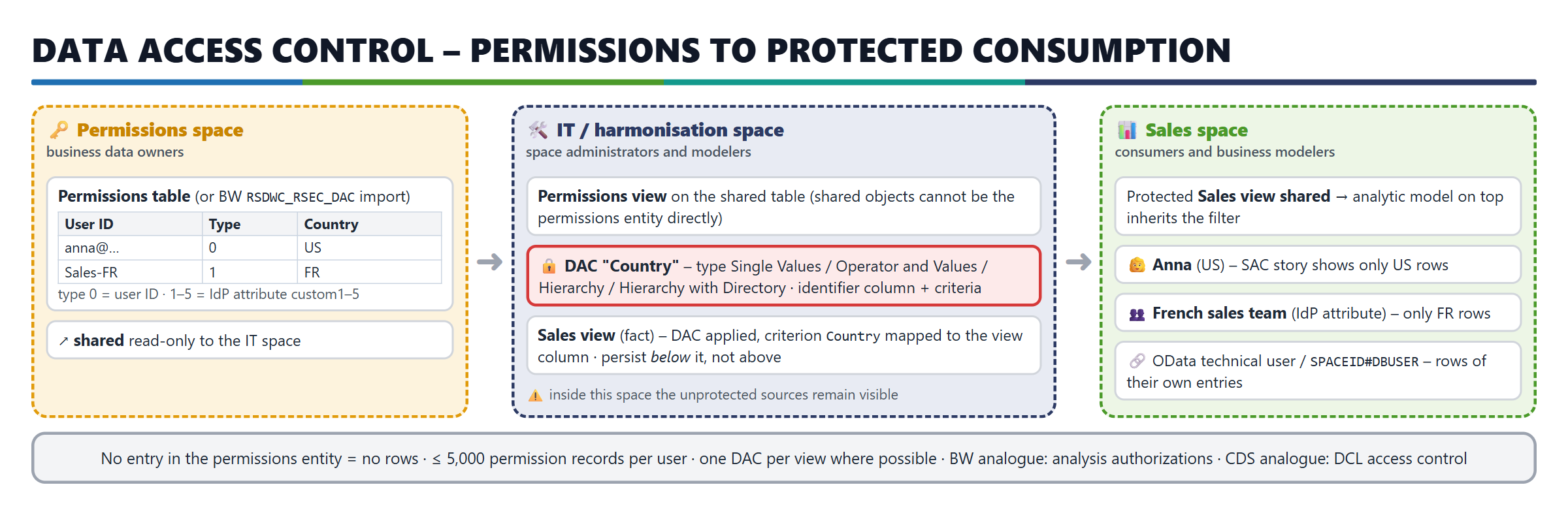
A data access control (DAC) is a Data Builder object created by a space administrator. It reads a permissions entity (a table or view that maps user identifiers to allowed values) and is applied by modelers to views and analytic models. Every user who reads the protected object – directly or through any object built on it – sees only the rows they are authorised for. It is the Datasphere counterpart of BW analysis authorizations and CDS access controls (DCL).
6.1 DAC types
Type | Permissions entity | Typical use |
|---|---|---|
Single Values | User ID + one or more criteria columns; user sees rows matching any of their values | Country, company code, sales organization |
Operator and Values | Permission ID (key), user ID, restriction, criterion, operator ( | Ranges and patterns, complex combinations – closest to BW analysis authorizations |
Hierarchy | User ID + node; external Hierarchy entity (single parent-child pair, one root, no multiple parents, no cycles); user sees the node and all descendants | Org units, regions |
Hierarchy with Directory | User ID + hierarchy name + node in a hierarchy with directory | Cost center or profit center hierarchies from S/4HANA |
- User identifiers in the permissions entity: IdP user IDs (e-mail, logon name – as configured for SAML), user IDs of technical-user OAuth clients, database users
SPACEID#DBUSER, or IdP attributes. A user with no entry sees no rows. - IdP attributes as identifiers: switch on Allow IdP User Attributes as Identifiers and add an identifier type column (0 = user ID, 1–5 =
custom1…custom5application attributes of SAP Cloud Identity Services, filled from e.g. country, department, cost center) – one row can then authorise all users of a department.
6.2 Applying a DAC
- Views: in the view's Data Access Controls section add the DAC and map each criterion to a view column. One DAC can protect many views.
- Analytic models: apply a DAC to the model or inherit the fact's DACs; for models with standard or reference date variables, mapping a DAC to a dimension attribute is not supported.
- Dimension DACs on facts: option Apply Dimension Data Access Controls to Fact on the fact-to-dimension association (page 03 Part 5.3).
- Shared tables or views cannot be used directly as permissions entity – wrap them in a view in the receiving space.
- Adding a criterion to an Operator and Values permissions entity blocks affected users until every consuming DAC is reviewed and mapped – use one filtered permissions view per DAC.
6.3 Rules and best practices
- Enforcement point: the DAC is enforced when the protected view is shared to another space or consumed outside the space (SAC, OData, …). Members of the owning space can still reach the unprotected sources – keep raw data and the DAC in a restricted IT space.
- Secure early or late? A DAC on each source view filters early but multiplies DAC evaluations and prevents persisting views on top; one DAC on the combined view is cheaper and allows persistence below it – SAP's guidance is to secure transactional and sensitive master data as early as possible and then only use the protected view.
- Avoid several DACs on one view; keep Operator and Values permissions under about 5,000 records per user; use
*for full access. - Performance problems with DAC-protected views: replicate the sources (especially > 500,000 rows).
- Persistence: a view with its own DAC can be persisted, a view consuming a DAC-protected view cannot; changing a DAC removes the persistence of views on top.
- Permissions entities may themselves be protected, but this costs performance.
6.4 Importing BW analysis authorizations
For data imported from SAP BW 7.5 SP16+ or SAP BW/4HANA 2.0+ (SAP ABAP, SAP BW or BW/4HANA Model Transfer connections), the Import Permissions wizard reuses BW analysis authorizations:
- A report from SAP Note 3062381 generates the permissions table
RSDWC_RSEC_DACin BW; BAdIRSDWC_DAC_RSEC_USER_UPDATEmaps BW users to Datasphere user IDs (e.g. e-mail) when needed. - The wizard imports this table, creates per protected object a permissions SQL view (
<object>_P) and a DAC (<object>_D), and applies the DAC to the imported object. - Supported: authorizations on characteristics of InfoProviders and CompositeProviders (navigation attributes too with Model Transfer); not on queries used as InfoProviders.
- Keep the permissions table remote (federated) or refresh it at least daily; run the BW report at least daily.
- For very large authorization sets SAP blogs describe SAP HANA analytic privileges in an Open SQL schema as an alternative (page 05).
Part 7 – Audit logging and personal data
- Space audit logs: in Space Management › Auditing the space administrator enables read and / or change audit policies with a retention of 7 to 10,000 days (default and minimum 7). Entries are written to the SAP HANA audit log and are visible in DPP_AUDIT_LOG in the audit schema DWC_AUDIT_READER (read it through a view).
- Open SQL schemas (database users) get their own read / change audit settings; disabling a policy or deleting the space deletes the entries – export them first (expose the view, read it with a database user).
- Audit logs can use a lot of disk; administrators monitor and delete them in Monitoring › Audit Logs. Changes to modelling objects are tracked in Activities.
- Personal data tags: columns marked as Personal Data or Sensitive Personal Data in data products are tagged in every table, view and analytic model that uses them; analytic models can hide the data preview export.
- Combine: DACs for rows, column exclusion in views for sensitive fields, read audit policy for spaces with personal data, and consumer roles without modelling access.
Part 8 – Catalog, data products and Data Marketplace
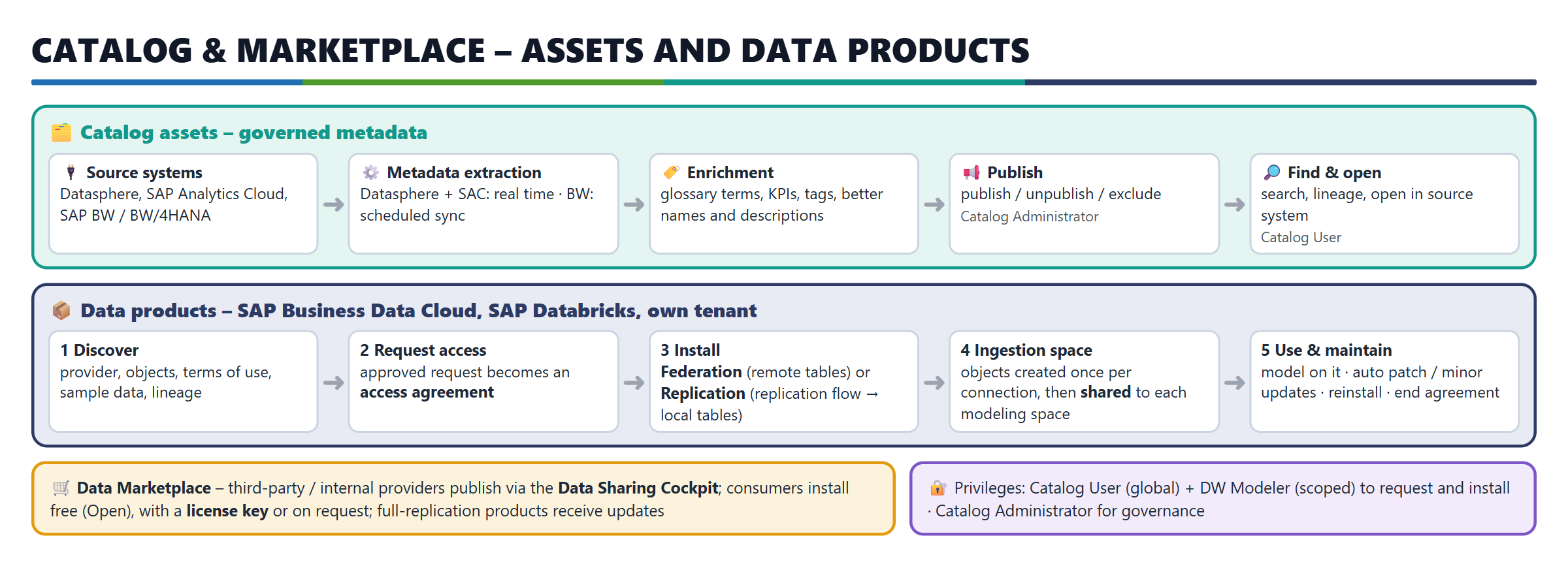
The catalog (side navigation Catalog & Marketplace) is the governed shop window of the tenant: it collects metadata from connected systems, lets catalog administrators enrich and publish it, and lets catalog users find assets and data products and request or install them.
8.1 Assets and metadata extraction
- A catalog administrator connects source systems (Metadata Extractions app): the Datasphere tenant itself, SAP Analytics Cloud tenants and SAP BW / SAP BW/4HANA systems (connections are created in the Connections app or the Metadata Extractions app).
- Datasphere and SAC changes are detected and extracted in real time; BW metadata is refreshed on the next scheduled synchronisation.
- Asset types include Datasphere analytic models, views, tables, flows, intelligent lookups and perspectives; SAC stories, models, datasets, data actions; BW ADSOs, CompositeProviders, InfoObjects, queries, DataSources, transformations, DTPs and more.
- Each asset shows extracted properties, documentation, impact and lineage across systems, statuses (functional status, publication status) and an Open button to jump to the source.
8.2 Governance: glossary, KPIs, tags, publishing
Element | Purpose |
|---|---|
Business glossary / terms | Central definitions of business terms (e.g. "Net Revenue"), in categories; linked to assets |
KPIs | Key performance indicators with a template (definition, calculation, owner …) linked to the assets that deliver them |
Tag hierarchies / tags | Classification (domain, data quality, confidentiality …) used as search filters |
Publishing | Administrators publish, unpublish or exclude assets; catalog users see only published assets with functional status Current |
Enrichment | Improved names and descriptions for catalog users, independent of the technical object |
- Catalog users search with collections (Data Products, Data Products (Marketplace), Assets, Data Providers, Terms, KPIs, Favorites, Recent), filters and natural language search.
8.3 Data products (SAP Business Data Cloud)
A data product is a curated, coherent data set with an API-based definition, published by SAP applications (in SAP Business Data Cloud), by partners such as SAP Databricks, or created in Datasphere. The lifecycle in the catalog:
- 1. Discover – details page: provider, objects, terms of use, sample data, documentation, lineage.
- 2. Request access – an access request goes to the approver; when approved it becomes an access agreement (Catalog & Marketplace › Data Product Access › Agreements).
- 3. Install into the space named in the agreement, choosing Federation (remote tables, freshest data, slower) or Replication (replication flow to local tables, faster, extra storage; you run or schedule the flow). External-system data products support federation only; Databricks data products need change data feed enabled on their delta tables.
- 4. Use – objects (with custom fields of the source) are created once in the connection's ingestion space and shared to each requesting modeling space; associations to other data products appear when those are installed too.
- 5. Maintain – patch and minor updates install automatically (manual Update if that fails); Reinstall refreshes objects and can switch federation / replication for all spaces; end the agreement when no longer needed.
- SAP-managed intelligent content (insight apps) brings read-only, namespace-protected preparation and application spaces. Data products, the Data Product Generator for BW and insight apps in depth: SAP Business Data Cloud › 02 and 03.
8.4 Data Marketplace
- The Data Products (Marketplace) collection offers data products created by data providers (third-party or internal) in Datasphere systems of the same landscape – free (Open), with a license key, or on request.
- Install: choose the target space (needs Space Files, Data Integration and Connection privileges), accept the terms; data products with full-replication delivery can receive updates; licences and contexts are managed in Managing Marketplace Data Products.
- Providers maintain their profile and offerings in the Data Sharing Cockpit; external offers can also be requested through the linked Datarade data finder.
Part 9 – Monitoring
Monitor | Who | What you see |
|---|---|---|
Data Integration Monitor (per space) | Space administrator, integrator | Remote tables (replication, statistics, partitions), views (persistence runs, partitions, View Analyzer), flows, task chains, remote queries, local tables (delete / housekeeping); schedules (simple or cron) |
System and Spaces | Administrator | Disk, memory and performance, task and out-of-memory issues across spaces; file space storage and Apache Spark usage |
Capacities Monitoring | Administrator | Monthly / daily capacity unit consumption against the subscription, hourly download |
Task Logs | Administrator | Execution history of all task runs; delete old logs |
Expensive Statement Logs | Administrator | SQL statements above configured thresholds (enable expensive statement tracing) |
Elastic Compute Nodes | Administrator | Extra on-demand compute that is scheduled to spin up for read peak loads (views, MDS queries): CPU / memory, run details, top statements |
Audit Logs, Activities | Administrator | Audit log volumes and deletion; object change history |
Database analysis user | Administrator | Read-only access to all space schemas in SAP HANA Database Explorer / SAP HANA Cockpit; can stop running statements |
- Recurring schedules run under a user who granted schedule consent; ownership of a schedule can be taken over (Assign Schedule To Me).
- Stagger schedules of replication flows and task chains instead of starting everything at the same time; use task chains for dependencies (page 02).
- Notifications (e-mail) for failed task chains and replication flow objects, and warning notifications in the monitor.
- Troubleshooting a broken pipeline: Data Pipeline Analyzer from the editor; performance: Runtime Metrics and View Analyzer (page 03 Part 8).
Part 10 – Interview questions
Q1. Which ways exist to consume Datasphere data?
Analytic models live in SAC stories and in the SAC Excel add-in; analytic models and exposed views through the OData consumption API (analytical and relational); exposed views over ODBC/JDBC with a database user; planning integration with SAC (seamless planning, OData import, CDI export); physical outbound replication with premium outbound integration.
Q2. What was the Business Builder and what replaces it?
A semantic layer of business entities, fact models, consumption models, perspectives and authorization scenarios on top of Data Builder views. It is deprecated and receives no updates; analytic models (with data access controls) replace consumption models and perspectives.
Q3. How do you migrate an analytical dataset without breaking stories?
Create an analytic model from the dataset, add it as a new source in the stories, copy and repoint the pages, compare, delete the old pages, then switch the view to semantic usage Fact and redeploy.
Q4. What does a user need to see a Datasphere analytic model in SAC?
An SAC role such as BI Content Creator, a live data connection to the tenant, a scoped role with Data Warehouse Consumption and Space Files read on the space (DW Consumer is enough), the Optimized Design Experience, and DAC entries if the model is protected.
Q5. How do you read an analytic model from Power BI or a custom app?
Through the analytical OData API /api/v1/datasphere/consumption/analytical/<space>/<model>/<model> with an OAuth client (interactive authorization code, technical user client credentials or SAML bearer). $select defines the aggregation; variables are passed as (<var>=<value>)/Set; about 300 requests per user per minute.
Q6. Explain the Datasphere security layers.
Authentication by the IdP; global and scoped roles for what a user may do per space; spaces and sharing for which objects are visible; data access controls for row-level security; plus audit logs and personal-data tagging.
Q7. What is a data access control and which types exist?
A Data Builder object that filters rows by the current user, based on a permissions entity mapping user IDs (or IdP attributes, OAuth technical users, database users) to values. Types: Single Values, Operator and Values, Hierarchy and Hierarchy with Directory. It is applied to views and analytic models and inherited by everything built on them.
Q8. A modeler in the IT space can see all rows although a DAC is applied. Why?
DACs are enforced when the view is shared to another space or consumed outside the space; inside the owning space the unprotected sources stay reachable. Keep raw data and DACs in a restricted space and share only protected views.
Q9. How do you reuse BW analysis authorizations?
Implement SAP Note 3062381 in BW 7.5 SP16+ or BW/4HANA 2.0+ to generate the RSDWC_RSEC_DAC permissions table, then run the Import Permissions wizard: it imports the table and creates a permissions SQL view and a DAC per imported InfoProvider and applies it. Keep the table current (federated or daily refresh).
Q10. What is the difference between a catalog asset and a data product?
An asset is the extracted metadata of an existing object (Datasphere view, SAC story, BW ADSO) that you open in its system. A data product is a curated data set with an API definition that you request, get an agreement for and install into a space by federation or replication.
Q11. How is a Business Data Cloud data product installed technically?
After the access request is approved, installation creates the objects once in the connection's ingestion space – remote tables for federation or local tables plus a replication flow for replication – and shares them to the requesting modeling space. Updates are applied automatically; reinstall switches the access mode.
Q12. As an architect, how do you design consumption and security for a new tenant?
Analytic models as the only SAC / Excel interface, released views exposed for OData / SQL tools; DW Consumer scoped roles for business users; IdP-attribute-based DACs on harmonised views in an IT space, shared to business spaces; audit policies on spaces with personal data; catalog governance with glossary, KPIs and published assets; monitoring of capacity, expensive statements and task logs.
🏠 Start Here · ◀ 03 · Data Modeling · 05 · Development ▶ · Sections: CORE ABAP | OOPS ABAP | ABAP on HANA | Clean Core | RAP | ABAP Points | SAP Fiori | SAPUI5 | Mobile Development (MDK) | BTP Foundations | BTP Development | CAP | SAP Build | ABAP on BTP | Integration Suite | SAP Business AI | SAP BASIS | Security | SAP SDLC
Functional: FICO ABAP | TRM ABAP | VIM | SAP BIS | SD ABAP | MM ABAP | PP ABAP | QM ABAP | PM ABAP | PS ABAP | EWM | TM ABAP | GTM ABAP | EHS ABAP | HR ABAP | BW | SAP Datasphere | SAP Business Data Cloud | SAP MDG | SAP Analytics Cloud | SAP Ariba | SAP CX | SAP IBP