SAP Datasphere is mostly modelled in graphical editors, but a technical consultant still writes a lot of code: SQL and SQLScript views, SQLScript procedures in an Open SQL schema, calculation views in an HDI container, Python in data and transformation flows, and scripts against the datasphere command line interface and the REST APIs. On top of that comes the lifecycle: save and deploy, release states, packages, the Transport app and SAP Cloud Transport Management. This page explains each technique with syntax taken from the SAP Datasphere documentation (as of November 2026), shows where it fits, and lists the limits that matter in a project. Spaces, users and roles: page 01; connections and flows: page 02; graphical views and analytic models: page 03; OData consumption, data access controls and the catalog: page 04; BW bridge: page 06.
Part 1 – Where code lives in SAP Datasphere
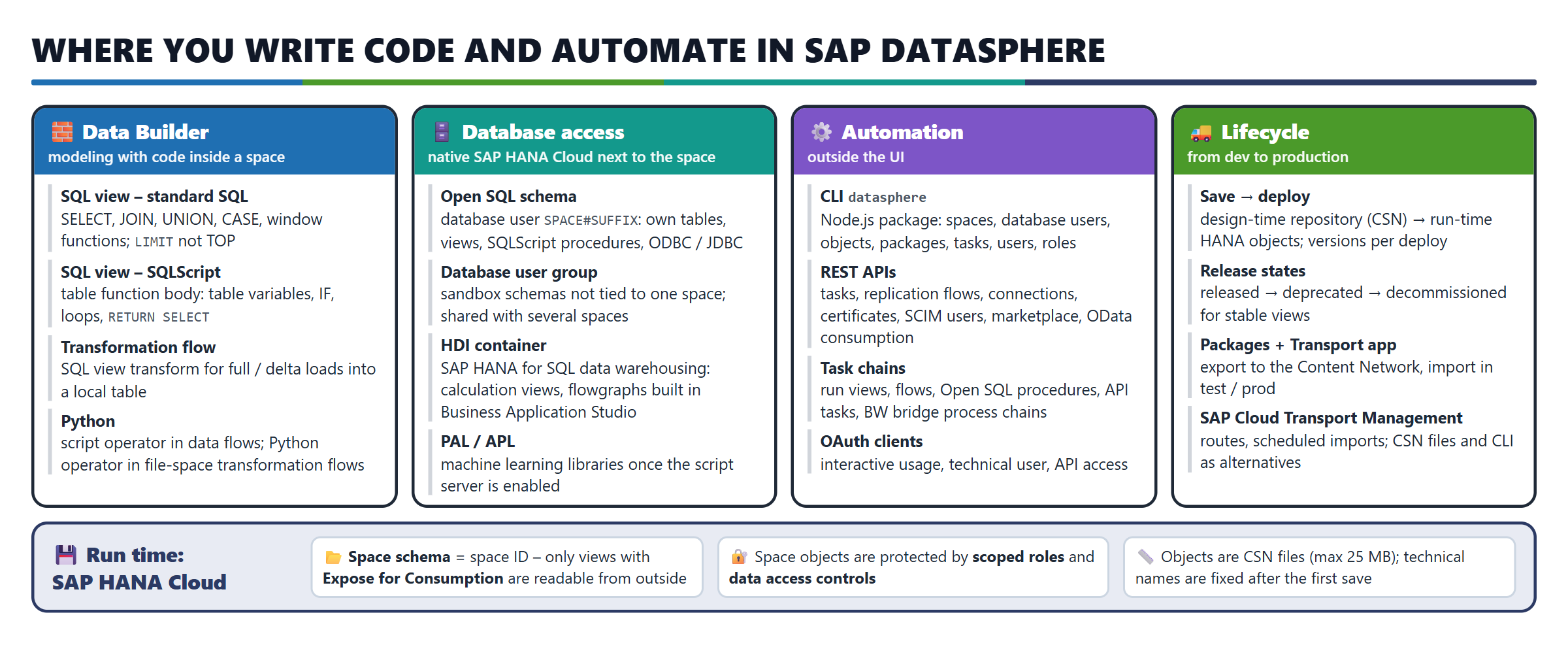
Every space has its own schema in SAP HANA Cloud whose name is the space ID. Data Builder objects are stored as CSN (Core Data Services Schema Notation) definitions in a design-time repository and become real HANA tables and views when you deploy them. Everything you build in the Data Builder is governed: scoped roles, data access controls, impact and lineage analysis, packages and transports. Code outside the Data Builder (Open SQL schemas, HDI) gives full HANA power but sits outside most of this governance – choose it consciously.
Technique | Use it for | Governed by Datasphere? |
|---|---|---|
SQL view – SQL (Standard Query) | Joins, unions, CASE logic, window functions that are easier to write than to click | Yes – a normal Data Builder view (semantics, DAC, lineage, transport) |
SQL view – SQLScript (Table Function) | Step-by-step logic with table variables, IF and loops | Yes, but the output columns must be maintained by hand; no AI generation, no personal-data tracing |
Transformation flow (SQL view transform) | Persisting full or delta loads into a local table | Yes – runs as a task, schedulable, in task chains |
Python (script / Python operator) | Row-batch transformations with Pandas and NumPy | Yes – inside data flows or file-space transformation flows |
Open SQL schema (database user) | Own tables, views, SQLScript procedures, ETL / BI tools via ODBC / JDBC, PAL / APL | Partly – objects are imported as sources; procedures can run in task chains |
HDI container | Existing calculation views and HDI artefacts, flowgraphs, advanced HANA features | Partly – container objects are imported as sources; built and deployed with HANA tools |
CLI and REST APIs | Automation, CI/CD, mass changes, monitoring | Run with the privileges of the user or OAuth client |
Part 2 – SQL views: standard SQL
In the Data Builder choose New SQL View and the language SQL (Standard Query) (default). Datasphere supports a subset of the SAP HANA Cloud SQL syntax: the SELECT statement with joins, unions, subqueries, the documented operators and predicates (including EXISTS, IN, LIKE, BETWEEN, CONTAINS), the CASE expression and the SQL functions listed in the SQL functions reference – including window functions such as ROW_NUMBER, RANK and DENSE_RANK and CONVERT_CURRENCY.
Rule | Why it matters |
|---|---|
Write technical names in double quotes – | The editor always works with technical names; tables, columns and aliases are not found without the quotes |
| A common syntax error for people coming from SQL Server or ABAP SQL |
Once you define an alias, use it in all clauses | Mixing source name and alias fails validation |
Objects of another space: | Shared objects keep the schema of their source space |
Source input parameters: | Every input parameter you create in the view must be used at least once |
Run in Analytical Mode | Sends the |
Semantic usage Fact, Dimension, Text, Hierarchy … and Expose for Consumption | Same properties as a graphical view – page 03 and page 04 |
Example: a consumption-ready fact view that joins order items with customers from a shared master data space, converts nothing yet, ranks items per customer and filters by an input parameter IP_YEAR (created in the side panel).
|
- Output columns are derived from the SELECT list. Mark
NetAmountas a measure with its currency column in the side panel, and add associations to dimensions there (page 03). - Generate SQL with AI (SAP Business AI, global privilege Data Warehouse AI Consumption) can draft standard SQL from a prompt – review it like any other code. It is not available for SQLScript.
- Runtime Metrics and the View Analyzer give an explain plan and persistence advice; persisting a view stores its result in a table (page 03).
Part 3 – SQL views: SQLScript table functions
With the language SQLScript (Table Function) Datasphere creates an SAP HANA Cloud table user-defined function from your code. You write only the body: declarations, table variable assignments, IF / loops, and a final RETURN that delivers the result set. The CREATE FUNCTION … RETURNS TABLE … AS BEGIN … END frame you know from HANA or AMDP is generated. All rules for UDFs apply – the function is read-only (no INSERT, UPDATE, DELETE, no DDL).
|
- Table variables (
lt_items) are referenced with a colon (:lt_items); so are scalar variables and input parameters (:IP_YEAR). The optimizer still combines the statements into one plan – it is not executed line by line. - Output structure: if Datasphere cannot derive the columns from complex SQLScript, you must maintain them in the side panel (Edit columns: names and data types). Keep the RETURN column list and the side panel in sync.
- Source views with input parameters use the arrow syntax in SQLScript:
"Sales"(IP_CITY => :IP_CITY, IP_DISCOUNT => 10)(SQL views useIP_CITY: :IP_CITY). - Limits: SQLScript cannot be formatted by the editor, cannot be generated with AI, does not support personal-data tracing, and a transformation flow that loads delta from a BW bridge remote table must use standard SQL, not SQLScript.
Standard SQL view | SQLScript table function | Open SQL procedure (Part 4) | |
|---|---|---|---|
Logic | One SELECT | Several statements, variables, IF, loops | Full SQLScript incl. DML, dynamic SQL |
Writes data? | No | No (read-only UDF) | Yes – into tables of the Open SQL schema |
Output columns | Derived automatically | Often maintained by hand | None (procedure) |
Governance | Full Data Builder object | Full Data Builder object | Outside the repository – not transported by the Transport app |
Run | On read or persisted | On read or persisted | Task chain or SQL console |
Part 4 – Open SQL schemas, database users and database user groups
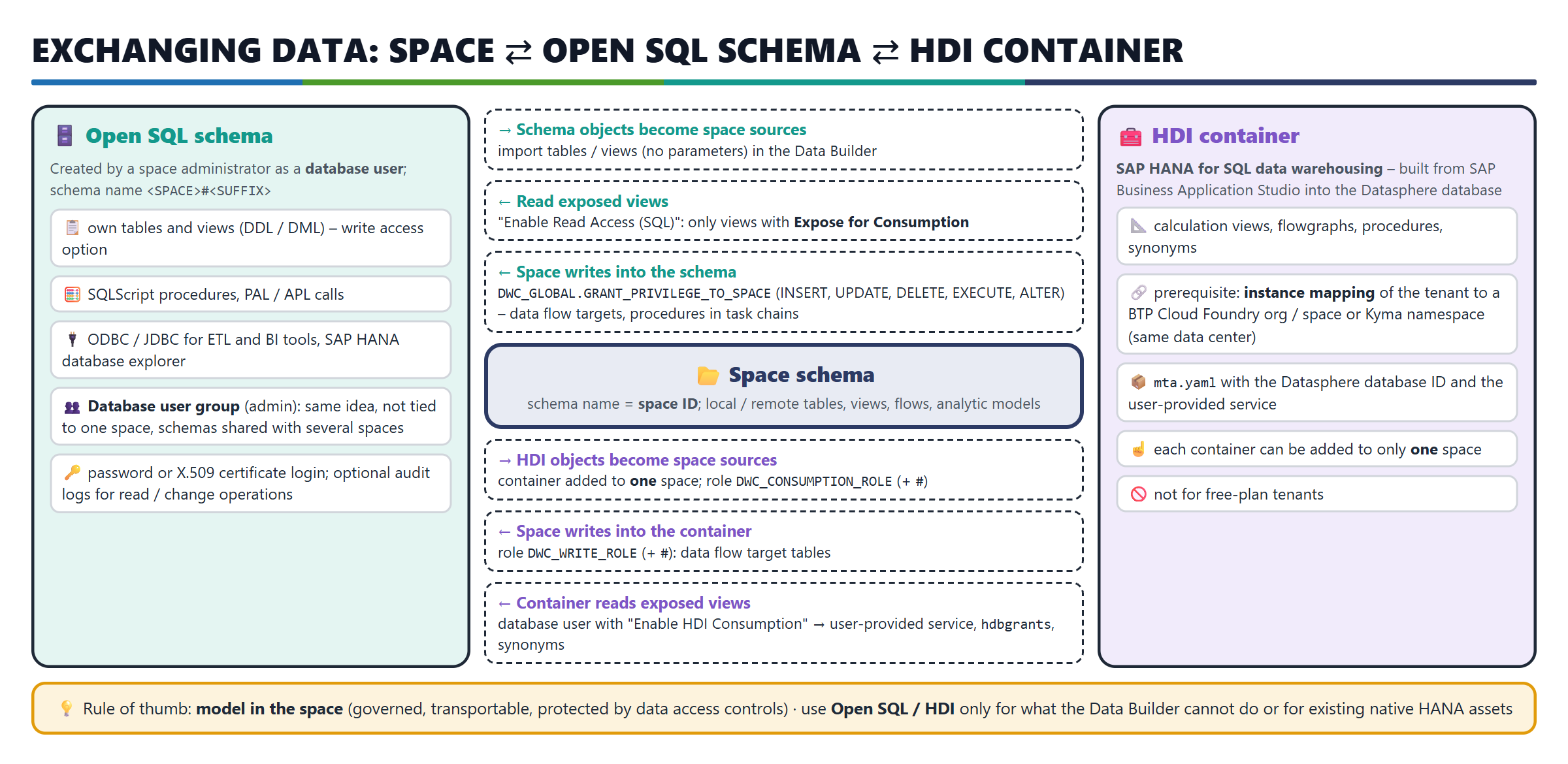
A space administrator creates a database user in Space Management › Database Access. Its Open SQL schema is named <SPACE_ID>#<SUFFIX> (suffix: uppercase letters, digits and underscore, at most 40 characters minus the space name length). The database user logs on with a password or an X.509 client certificate (after an administrator has uploaded the root CA; certificate users cannot switch back to password).
Option on the database user | Effect |
|---|---|
Enable Read Access (SQL) | The user can read all space views with Expose for Consumption – e.g. for an external ETL or BI tool via ODBC / JDBC. With Grant Option: may grant this read access to other database users |
Enable HDI Consumption | Allows a user-provided service so that an HDI container can read exposed space views (Part 5) |
Enable Write Access (SQL, DDL, DML) | The user creates tables and views and loads data in the Open SQL schema; space modelers can import these objects as sources (not views with parameters) |
Enable APL and PAL | Access to the SAP HANA Automated Predictive Library and Predictive Analysis Library – requires the script server to be enabled in the tenant configuration (not in free-plan tenants) |
Audit logs for read / change operations | Logs every statement of this user for audit |
The space cannot write into the Open SQL schema by default. The database user grants privileges to the space with the stored procedure DWC_GLOBAL.GRANT_PRIVILEGE_TO_SPACE (one privilege per call: INSERT, UPDATE, DELETE, EXECUTE or ALTER; schema level with an empty object name, or one table). Then data flows can use the schema's tables as targets and task chains can run its procedures.
Example: a cleansing procedure in the Open SQL schema SALES#ETL that reads an exposed space view, writes a log table and is scheduled from a task chain in space SALES.
|
- In the task chain editor the procedure appears under Others › SQL Script Procedures. Procedures need no deployment (they already exist in HANA), but the task chain does. Scalar input parameters are prompted when you add the procedure; LOB, spatial and array parameter types are not supported – such procedures are hidden without a message.
- Open SQL procedures cannot run in spaces with the data lake option enabled.
- Deleting a database user deletes its schema with all objects, data and audit-log entries – plan Open SQL schemas like any other persistence.
4.1 Database user groups
A DW Administrator can create a database user group (System › Configuration › Database Access). It is a sandboxed area in SAP HANA Cloud not attached to any space: a group administrator creates further users, schemas and roles with Datasphere stored procedures, builds tables and loads data (DDL / DML), and then lets one or more spaces read from or write to the group's schemas. Use it to move an existing SQL data warehouse into the Datasphere database or for a central technical team that serves several spaces.
- For debugging database issues a DW Administrator can create a database analysis user: read-only access to all space schemas and all SAP HANA Cloud monitoring views, every activity audit-logged. Create it only for a specific issue and delete it afterwards – it sees sensitive data of all spaces.
Part 5 – HDI containers and SAP HANA for SQL data warehousing
SAP HANA for SQL data warehousing lets developers build HDI containers (calculation views, flowgraphs, procedures, synonyms) with SAP Business Application Studio directly in the Datasphere run-time database, and exchange data with spaces. Typical reasons: bring existing HANA native models (for example from an XS Advanced / HANA Cloud project) into Datasphere, or use HDI features the Data Builder does not offer.
Step | What you do | Detail |
|---|---|---|
1 Instance mapping | Administrator maps the tenant to a BTP Cloud Foundry org (optionally a space) or a Kyma cluster / namespace (System › Configuration › Instance Mapping) | Same data center (e.g. eu10); not for free-plan tenants; containers are then created in the Datasphere database |
2 Roles in the container | Define | Add |
3 Build |
| Build the database module from Business Application Studio |
4 Add to a space | Space Management › HDI Containers › +; deploy the space | A container can belong to one space only |
5 Use | Import container objects as sources of views and data flows; or read exposed space views in the container through | The database user needs read, write and HDI consumption options; its full credentials feed the user-provided service |
|
- The file above is an
.hdbrolein the container (object names are examples). Read access to the whole container usesschema_privilegeswithSELECTinstead ofobject_privileges. - Architect view: HDI is the right place for existing native HANA assets and specialist features; new models belong in the Data Builder, where they are protected by data access controls, visible in lineage and transported with packages.
Part 6 – Python in data flows and transformation flows
Script operator (data flow) | Python operator (transformation flow, file space) | |
|---|---|---|
Where | Data flows in SAP HANA spaces | Transformation flows in file spaces (object store, Apache Spark runtime) |
Contract | Body of | Same |
Libraries | Python builtins, NumPy as | builtins 3.11, NumPy 1.26, Pandas 2.2 plus |
Batches | Data arrives in batches – no logic that needs the whole table (e.g. de-duplication) | System-managed batches ( |
Blocked | I/O and introspection: | Same restrictions |
Errors | Run fails on an exception | Optional data validation with a generated remediation table |
|
- Declare
NET_AMOUNTandPRIORITYas new columns in the operator's Columns section – script and columns are not synchronised automatically. For decimals use the built-inDecimalclass (available without import). - Select a supported Python version in the script operator (SAP recommends 3.11; 3.9 is no longer supported since October 2025).
- Use Python only for logic SQL cannot express well (string parsing, row-wise rules, simple scoring). Joins, aggregations and filters belong in SQL – they are pushed down to HANA.
Part 7 – The datasphere command line interface
The CLI is the Node.js package @sap/datasphere-cli (command datasphere; the old dwc command was decommissioned at the end of 2023). Install it with npm (Node.js 20–24), log in through an OAuth client created by an administrator, and set a default host.
Command group | What it does |
|---|---|
datasphere spaces | List, read, create / update (from a space definition JSON file), delete spaces; |
datasphere dbusers | List, create, update, delete database users; reset passwords |
datasphere objects <type> | List, read, create, update, delete modeling objects – |
datasphere objects packages export | Export a package to the Content Network |
datasphere tasks | Run / retry / cancel task chains, operate replication flows, read task logs, give or revoke consent for scheduled tasks |
| User and role administration |
datasphere workload | Space priorities and statement limits |
| TLS certificates; Data Marketplace providers, products, licenses |
|
- Login options: pass the OAuth data as options, in an options file, or skip the login by passing access and refresh tokens in a secrets file (tokens are valid 720 hours). Several tenants: log in to each and switch with
datasphere config host set. - Technical user OAuth clients (client credentials) work only for
objects,tasks,spaces connections,marketplaceandconfiguration certificates; they cannot start task chains that contain BW bridge process chains. Everything else needs an Interactive Usage client. - Dependencies: the CLI creates one object per call, so sources must exist before the objects that use them. A CSN file exported from an editor contains the view and its dependencies and cannot be used directly – split it per object.
- Space definition file:
{"<SPACE_ID>": {"spaceDefinition": {"version": "1.0.4", "label": …, "assignedStorage": <bytes>, "assignedRam": <bytes>, "members": [], "dbusers": {} …}}}– space IDs have at most 20 uppercase letters, digits or underscores. Only DW Administrators may set the ID and the storage and memory sizes. - Rate limit: about 300 requests per user per minute (25 for the Connections and Certificates APIs); above that HTTP 429 with
Retry-After.
Part 8 – REST APIs and OAuth clients
API | Endpoint (relative to the tenant URL) | Typical use |
|---|---|---|
Tasks |
| Start task chains from an external scheduler; poll status and logs |
Replication flows |
| Operate flows and single replication objects |
Connections, certificates |
| Create and validate connections as code |
SCIM 2.0 |
| User provisioning from an identity management system |
Consumption (OData v4) | /api/v1/datasphere/consumption/relational | analytical | catalog/… | Read exposed views and analytic models – page 04 |
Content (transport) | /api/v1/content/deploy/ | Target of SAP Cloud Transport Management (Part 10) |
Data Marketplace | Marketplace REST API | Data providers publishing products |
The specifications are published in the SAP Datasphere package on the SAP Business Accelerator Hub (api.sap.com/package/sapdatasphere). Every call needs an OAuth token from an OAuth client that a DW Administrator creates under System › Administration › App Integration.
OAuth client purpose | Grant | Used for |
|---|---|---|
Interactive Usage | Authorization code (three-legged – the user logs on in a browser once) | CLI, OData consumption by tools such as Power BI, Connections and Certificates APIs, Data Marketplace API, CTMS export |
Technical User | Client credentials (two-legged) | Scheduled automation: tasks API, selected CLI commands, OData consumption, SCIM (no delete), content transport |
API Access | Client credentials with an access scope | SCIM 2.0, SAP Cloud Transport Management (access: Analytics Content Network Interaction) |
|
- With an Interactive Usage client the user must have given authorized consent (profile settings) before task chains or replication flows can be run via API; the same consent lets schedules run on the user's behalf.
- BW bridge process chains in a task chain cannot be started by a technical user – the technical user has no mapped user in the bridge (page 06).
- API tasks turn the direction around: a task chain calls an external REST API (POST / PUT, GET and DELETE in synchronous mode) through an HTTP connection, synchronously (60-second timeout) or asynchronously with status polling – e.g. to trigger a Databricks job or a planning sequence.
Part 9 – Object lifecycle: save, deploy, versions and release states
Step | What happens | Watch out |
|---|---|---|
Save | Definition stored in the design-time repository (CSN); allowed with validation errors | CSN files are limited to 25 MB – very wide or complex views may hit it (SAP Note 3768744) |
Deploy | Run-time objects created or changed in HANA; undeployed objects in the lineage are deployed too; version number increases | Status values: Not Deployed, Deployed, Changes to Deploy, Design-Time Error, Run-Time Error |
Save / Deploy Anyway | Accept impact warnings on dependent objects | Fix the consumers right after – impact and lineage analysis shows them |
Versions | Each deploy creates a version; view, export or restore (views, analytic models, local tables with restrictions) | Remote tables and E/R models cannot be restored |
Release state | Not Released → Released (stable at least two years: columns, parameters and associations may only be added) → Deprecated with a successor → Decommissioned (after one year deprecated) → delete | Imports must keep a consistent release state; space administrators can revert or override |
Technical name | Fixed after the first save | Agree naming conventions before modeling |
- CSN/JSON export and import in the editors moves objects between spaces or tenants by file (views export their sources and data access controls, flows their sources and targets, task chains not the objects they run).
- Repository Explorer shows all objects of your spaces with status, folders and mass actions; Activities logs every deployment.
Part 10 – Transport: packages, Content Network and SAP Cloud Transport Management
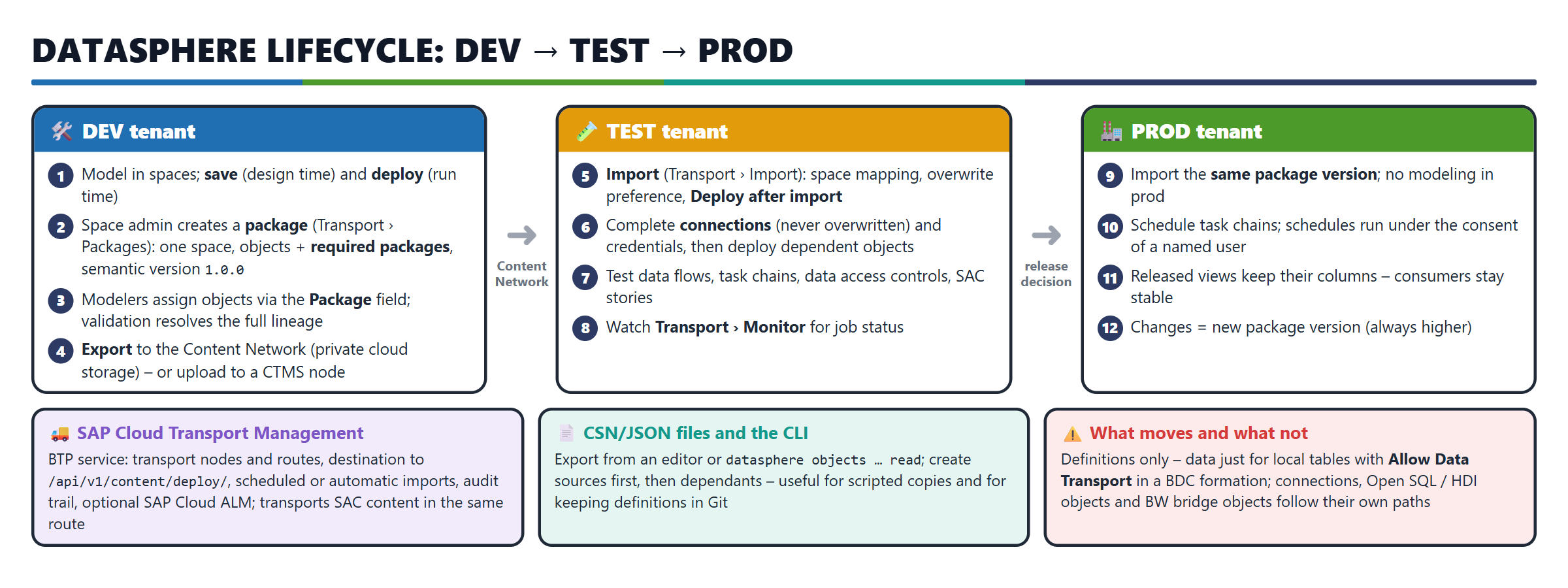
Organizations typically run three tenants – development, test and production. The Transport app moves object definitions between tenants through a private cloud storage area, the Content Network. There is no transport request as in ABAP – the unit is the package.
Concept | Rule |
|---|---|
One-off export | Transport › Export: pick objects, choose which tenants may see the package, export – fine for a single delivery |
Modeled package | Transport › Packages (space administrator, Lifecycle privilege): objects of one space; each object in one package; complete lineage inside the package or via required packages (also from other spaces); semantic version |
Import | Transport › Import (DW Administrator, or Lifecycle + scoped space rights): map each source space to one target space, choose Don't overwrite or Overwrite objects and data, optionally Deploy after import; connections are never overwritten and must be completed with credentials in the target |
Shared objects across spaces | Deploy after import does not handle them – deploy the source space first, then the consuming space |
Data | Definitions only; in an SAP BDC formation local tables (dimension, text, relational dataset) with Allow Data Transport can carry their data (item |
SAP Cloud Transport Management | BTP service with transport nodes and routes; the target destination points to |
Monitor | Transport › Monitor lists import and export jobs; CTMS logs via the content manager job endpoint |
- Not in the Transport app: objects of Open SQL schemas (re-create them with scripts), HDI containers (MTA deployment), and BW bridge objects (gCTS software components – page 06).
- Packages created with the CLI are JSON (
repositoryPackageswithrequires,_kind: repositoryPackage,contentDelivery.semantic_version, plusrepositoryPackagesAttachedObjects);datasphere objects packages exportexports them,--allow-overwritere-exports the same version. - In a BDC formation define system mappings so that content consuming data products connects to the right data products in the target tenant (SAP Business Data Cloud › 06).
Part 11 – Development guidelines and typical developments
Topic | Guideline |
|---|---|
Naming | Prefix by layer and type (e.g. |
Graphical vs SQL | Graphical views for business-readable logic; SQL views for complex joins, window functions, unions; SQLScript only when one SELECT is not enough |
Push-down | Joins, aggregates and filters in SQL views or transformation flows; Python only for row logic |
Persistence | Persist views or load with transformation flows when federation is too slow or sources must be protected – check memory (page 03) |
Stable interfaces | Release views that other spaces, SAC stories or OData clients consume |
Native HANA | Open SQL / HDI only with a reason; document the objects and their re-creation scripts because the Transport app does not move them |
Automation | CLI and REST APIs with technical-user OAuth clients; store secrets in the scheduler's vault, never in scripts |
Security | Data access controls on harmonised views; database users only with the options they need; audit logging for sensitive data |
Typical development | Technique |
|---|---|
Complex KPI logic (ranking, period comparison, cumulative values) | SQL view with window functions or SQLScript table function |
Nightly load orchestration with external dependency | Task chain (flows, view persistence, Open SQL procedure, API task) started by the Tasks REST API or the CLI |
Legacy HANA calculation views to reuse | HDI container added to the space |
Feed an external tool or data lake | Database user with read access (ODBC / JDBC) or OData API; replication flow with premium outbound for non-SAP targets |
Machine learning on warehouse data | PAL / APL procedures in an Open SQL schema, results back as source tables; or SAP Databricks in BDC |
CI/CD-like promotion and documentation | CLI |
User provisioning | SCIM 2.0 API from the identity management |
Part 12 – Interview questions
Q1. What is the difference between an SQL view in standard SQL and one in SQLScript?
Standard SQL is one SELECT statement; Datasphere derives the output columns. SQLScript creates an SAP HANA Cloud table function: you write the body with table variables, IF and loops and finish with RETURN. It is read-only, output columns often need manual maintenance, it cannot be formatted or generated with AI, and delta loads from BW bridge remote tables require standard SQL.
Q2. Which SQL rules typically break a Datasphere SQL view?
Missing double quotes around technical names, TOP instead of LIMIT, mixing aliases and source names, unused input parameters, and objects of other spaces without the space ID as schema.
Q3. What is an Open SQL schema and when do you use it?
The schema of a database user created by a space administrator, named SPACE#SUFFIX. It holds own tables, views and SQLScript procedures, serves ETL and BI tools via ODBC / JDBC, reads views exposed for consumption, and gives access to PAL / APL. Use it for what the Data Builder cannot do or for external tools – not as the default modeling place.
Q4. How can a space write into an Open SQL schema or run its procedures?
The database user calls DWC_GLOBAL.GRANT_PRIVILEGE_TO_SPACE with GRANT and one privilege (INSERT, UPDATE, DELETE, EXECUTE or ALTER) at schema or table level. Then data flows can target its tables and task chains can run its procedures from the SQL Script Procedures folder.
Q5. Database user, database user group, HDI container – what is the difference?
A database user belongs to one space and has one Open SQL schema. A database user group is created by an administrator, is not tied to a space and can share its schemas with several spaces. An HDI container is built with HANA tools via SAP HANA for SQL data warehousing, needs instance mapping and the DWC_CONSUMPTION_ROLE / DWC_WRITE_ROLE roles, and is assigned to exactly one space.
Q6. What are the rules for Python in a data flow?
You implement transform(data) on a Pandas DataFrame and return a DataFrame with exactly the declared output columns. NumPy and Pandas are available as np and pd without imports; I/O and introspection functions are blocked. Data arrives in batches, so no logic that needs the whole table.
Q7. How do you automate Datasphere?
With the datasphere CLI (spaces, database users, objects, packages, tasks) and the REST APIs (tasks, replication flows, connections, SCIM, consumption, content). Both authenticate with OAuth clients: Interactive Usage for users, Technical User or API Access for unattended jobs – with limits such as no BW bridge process chains for technical users.
Q8. How does a transport work in Datasphere compared with ABAP?
There are no transport requests: a space administrator models a package with objects of one space, its lineage and required packages and a semantic version, exports it to the Content Network, and the target tenant imports it with space mapping, overwrite option and optional deploy. SAP Cloud Transport Management adds routes, scheduled imports and audit.
Q9. What does the Transport app not move?
Data (except local tables with Allow Data Transport in a BDC formation), connection credentials (connections are never overwritten), Open SQL schema objects, HDI containers and BW bridge objects. Task chains are transported without the objects they run unless those are in the package.
Q10. What is a released view and why would you release one?
A view whose release state is Released: it must keep its columns, parameters and associations for at least two years; you can only add. To retire it you deprecate it with a successor and decommission it after a year. It gives other spaces, SAC and OData consumers a stable interface.
Q11. A task chain must start after an SAP job outside Datasphere. How do you design it?
Let the external scheduler call POST /api/v1/datasphere/tasks/chains/<space>/run/<chain> with a technical-user token and input parameters, keep the returned logId and poll the logs endpoint; or, the other way round, call the external system from the chain with an asynchronous API task.
Q12. Where do you keep the source of Datasphere models for review and audit?
The repository keeps versions per deployment and Activities log every deploy. For external review, export CSN/JSON per object with the CLI into version control; the actual promotion still runs through packages and the Transport app or CTMS so that dependencies and release states are checked.
🏠 Start Here · ◀ 04 · Consumption & Security · 06 · BW Bridge & Architect ▶ · Sections: CORE ABAP | OOPS ABAP | ABAP on HANA | Clean Core | RAP | ABAP Points | SAP Fiori | SAPUI5 | Mobile Development (MDK) | BTP Foundations | BTP Development | CAP | SAP Build | ABAP on BTP | Integration Suite | SAP Business AI | SAP BASIS | Security | SAP SDLC
Functional: FICO ABAP | TRM ABAP | VIM | SAP BIS | SD ABAP | MM ABAP | PP ABAP | QM ABAP | PM ABAP | PS ABAP | EWM | TM ABAP | GTM ABAP | EHS ABAP | HR ABAP | BW | SAP Datasphere | SAP MDG | SAP Analytics Cloud | SAP Ariba | SAP CX | SAP IBP