Almost every Datasphere project meets an existing SAP BW. This page explains the Datasphere side of that story: the SAP Datasphere, SAP BW bridge (a BW staging environment inside Datasphere), how it is provisioned, developed, connected and transported, the shell and remote conversion from BW into the bridge, the other ways to bring BW models and data into Datasphere, how Datasphere is licensed and sized, and the decisions an architect makes for landscape, spaces, persistence and the BW strategy. Facts that change with releases are marked "as of November 2026". Related: BW/4HANA conversion paths and maintenance dates on BW › 06; BW private cloud edition, Data Product Generator and Query Template Generator on SAP Business Data Cloud › 05; BDC licensing on SAP Business Data Cloud › 06; spaces and tenant basics on page 01.
Part 1 – BW and Datasphere: the options at a glance
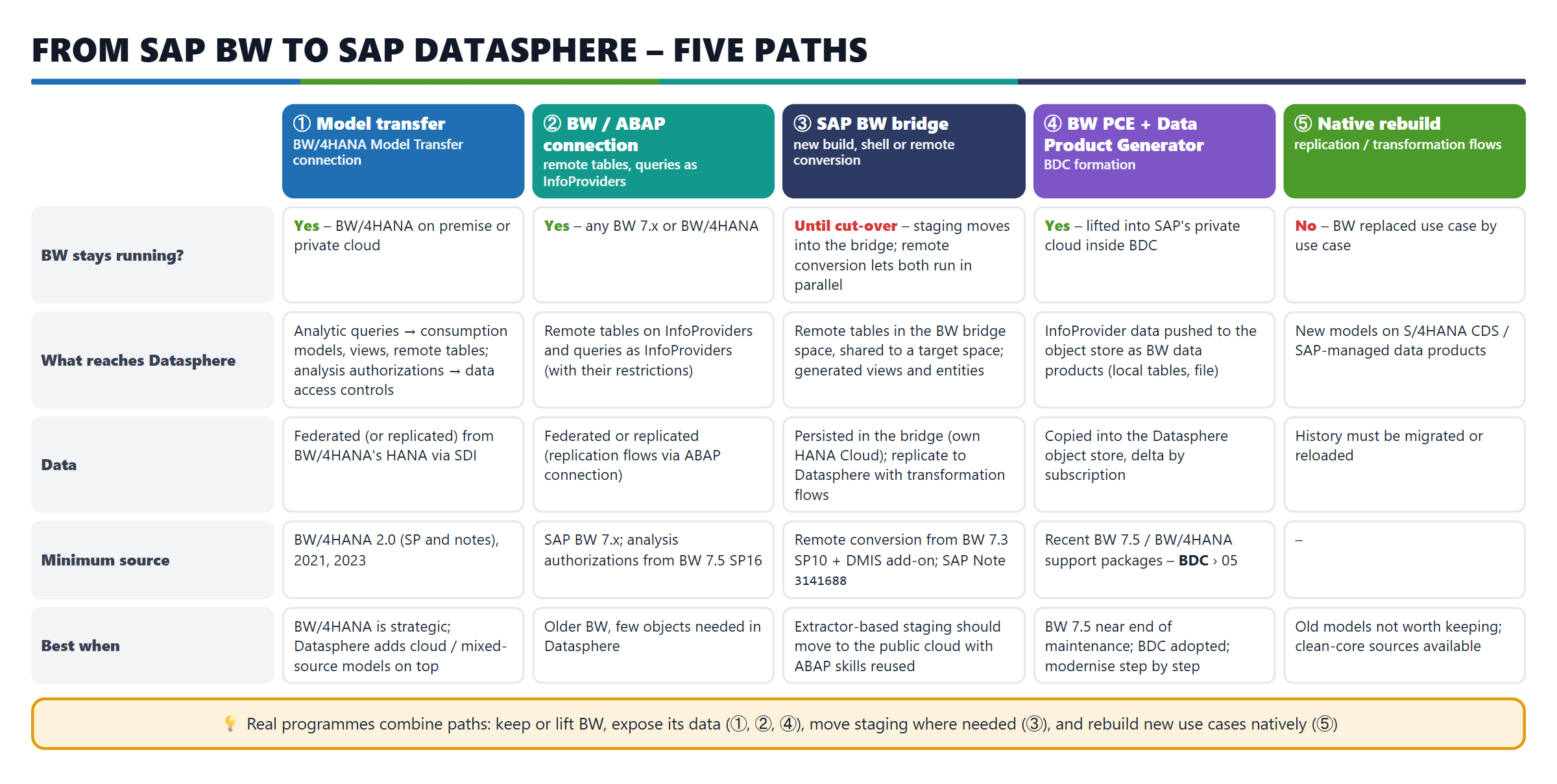
SAP documents four technical ways to get BW content into Datasphere, plus the option to rebuild: push BW data with the Data Product Generator (only in an SAP Business Data Cloud formation), enable the SAP BW bridge, use the Import Entities wizard for BW/4HANA and BW bridge models, and use SAP BW or SAP ABAP connections for older BW releases. They answer different questions:
Question | Answer in Datasphere |
|---|---|
Keep BW/4HANA and add cloud models on top of its queries? | Model transfer (Import Entities with an SAP BW/4HANA Model Transfer connection) – Part 6 |
Reuse BW staging (extractors, ADSOs, transformations, process chains) in the public cloud? | SAP BW bridge – Parts 2 to 5 |
Use BW data in Datasphere and SAP Databricks without moving BW logic? | BW PCE + Data Product Generator in BDC – SAP Business Data Cloud › 05 |
Read a few InfoProviders of an old BW 7.x? | SAP BW / SAP ABAP connection (remote tables, queries as InfoProviders, replication flows) – Part 6 |
Start clean on S/4HANA CDS extraction views or SAP-managed data products? | Native rebuild with replication and transformation flows – page 02 and page 03 |
Part 2 – SAP BW bridge: what it is and how it is built
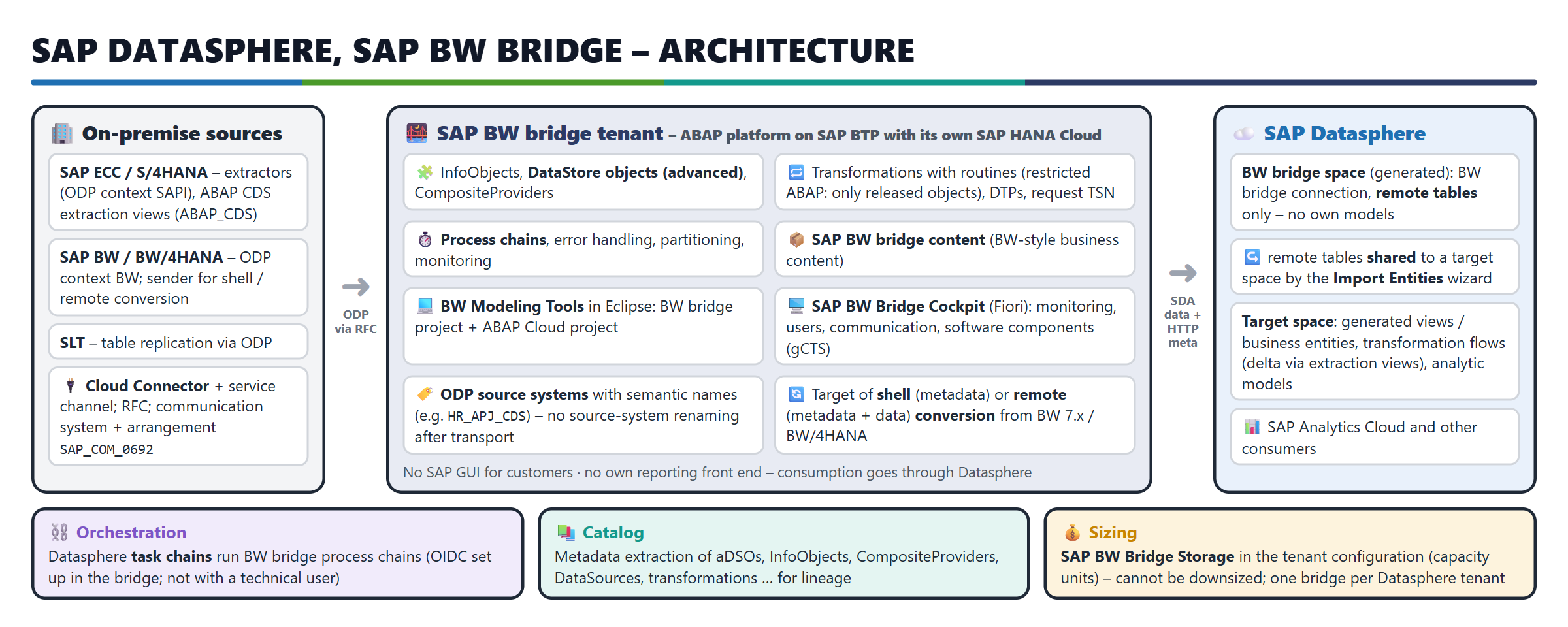
SAP Datasphere, SAP BW bridge is an optional Datasphere feature that offers SAP BW functionality in the public cloud: BW connectivity and business content for extractor-based data integration from SAP ECC and S/4HANA, and BW's enterprise staging layer with partitioning, monitoring and error handling. Technically it is a separate BW bridge tenant based on the ABAP platform in SAP BTP with its own SAP HANA Cloud runtime and compute, linked to exactly one Datasphere tenant.
Area | In the BW bridge |
|---|---|
Modeling objects | InfoObjects (with master data, texts, hierarchies), DataStore objects (advanced), CompositeProviders, transformations, DTPs, data flows, process chains; loads managed by request TSN (transaction sequence number) |
Sources | ODP source systems – ODP contexts such as SAPI (extractors), ABAP_CDS (CDS extraction views), BW and SLT; connected via Cloud Connector and RFC |
Content | SAP BW bridge content: preconfigured BW-style objects (DataSources, transformations, ADSOs) activated in the Content Explorer of the BW Modeling Tools |
Custom logic | Routines in transformations in restricted ABAP: only objects SAP has released for the bridge may be used; code from on-premise BW usually needs adaptation |
Tools | BW Modeling Tools in Eclipse (BW bridge project + ABAP Cloud project); SAP BW Bridge Cockpit (Fiori) for monitoring, process chains, users, communication management, software components |
Not available | SAP GUI access for customers and partners; an own reporting front end – consumption goes through Datasphere; Open Hub destinations; application development (that belongs on SAP BTP, ABAP environment) |
Data protection | Read access logging, information reports, deletion notifications – as in BW |
- Value proposition (SAP feature scope description): reuse BW data structures, transformations and skills for business continuity; connect on-premise SAP ERP with familiar extractors; innovate on BW data with Datasphere and SAP Analytics Cloud.
- The bridge is not a full BW: it is a staging and persistence layer. Business semantics, harmonisation with non-BW data, analytic models and consumption are built in Datasphere spaces.
- BW bridge or ABAP Cloud? The bridge runs on the ABAP platform but is not an application development environment – RAP apps and custom services go to the SAP BTP ABAP environment.
Part 3 – Setting up the BW bridge: provisioning, users, tools, connectivity, transports
3.1 Provisioning
Step | Detail |
|---|---|
1 Entitlement | Capacity units for SAP BW bridge in a subscription or consumption-based (cloud credits) contract |
2 Size | System › Configuration › Tenant Configuration › SAP BW Bridge Storage – the allocation includes the ABAP environment and the bridge's own HANA Cloud. A bridge cannot be downsized; after deleting it set the size to 0, otherwise it keeps consuming capacity units |
3 Create | System › Configuration › SAP BW Bridge › Create: name of the BW bridge space (cannot be changed later – use the same name in every tenant to simplify transports) |
4 Development flag | Enable system for development only for the development tenant; test and production bridges are created without it (no object creation or editing possible). The flag cannot be changed after creation |
5 Result | Status create succeeded: bridge tenant, BW bridge space and BW bridge connection exist (provisioning issues: SAP Note 3134262) |
3.2 Users and logon
- The bridge uses the identity provider of Datasphere – same e-mail, same password, single logon. The first logon must be done by the Datasphere system owner at the time of provisioning (initial bridge administrator).
- In the BW Bridge Cockpit create business roles from templates (e.g.
SAP_BR_ADMINISTRATOR_DWC,SAP_BR_DEVELOPER_DWC; switch write access to Unrestricted), then employees and business users. Users who import bridge objects into Datasphere need business catalogSAP_DW4_BC_MODELING_DWC_PC. - Add yourself as member of the BW bridge space; open the cockpit from the Data Integration Monitor (user mapping issues: SAP Note 3156000).
3.3 Tools and software components
Object | Purpose |
|---|---|
BW bridge project (BW Modeling Tools) | Connection to the bridge for BW objects; service instance URL = BW Bridge Cockpit URL (or extracted from the SAP BW service key of the BW bridge connection) |
ABAP Cloud project | ABAP packages, transport requests, routines code |
Software component | Created in the cockpit app Manage Software Components (globally unique name), cloned into the tenant: role Source – push and pull in development, Target – pull only in test and production; gCTS-based transport |
Development package | Sub-package of the generated structure package; BW bridge objects cannot be created in |
Feed Reader | Subscribe to the BW job repository to see jobs and short dumps |
3.4 Connectivity to on-premise ODP sources
The bridge talks to on-premise systems by RFC through the Cloud Connector (version 2.13.1 or higher). The steps:
- 1. Add the Datasphere subaccount in the Cloud Connector; 2. create the on-premise source system there and add its resources; 3. add a service channel to the BW bridge tenant (for the callback).
- 4. In the BW Bridge Cockpit create a communication system (technical name, e.g.
<SID>_<client>) and a communication arrangement with scenarioSAP_COM_0692, named like the ODP source system. - 5. In the BW Modeling Tools create the ODP source system (choose the ODP context, upload the application component tree, transfer exchange rates and customizing); in the source system create the RFC callback destination in SM59 pointing to the Cloud Connector service channel, client 100.
- Source systems need the SAP Notes listed in the guide (e.g. 2703850, 3076927, 3083347). Use semantic source-system names (e.g.
HR_APJ_CDS): unlike on-premise BW, the bridge does not rename source systems after transport (no RSLOGSYSMAP mapping), so DataSource names stay valid across tenants.
Part 4 – From BW bridge objects to Datasphere models
Step | How | Note |
|---|---|---|
1 Model or activate | Create InfoObjects, ADSOs, CompositeProviders, transformations, DTPs and process chains in the BW Modeling Tools, or activate BW bridge content | Or convert from BW (Part 5) |
2 Import Entities | Datasphere › Data Builder / Repository Explorer / Semantic Onboarding › Import Entities › connection type SAP BW Bridge; choose queries, CompositeProviders, ADSOs (inbound and / or active table) and master data incl. hierarchies | Target space = any space except the BW bridge space |
3 Generated objects | Remote tables in the BW bridge space, automatically shared to the target space; views, business entities, consumption models (for queries) and hierarchy objects in the target space | The BW bridge space cannot hold own models or connections; the Business Builder is deprecated – build analytic models on the generated views |
4 Load into Datasphere | Use extraction views with transformation flows for delta loads (including deletions) into local tables | Language standard SQL, not SQLScript |
5 Model and consume | Combine with other data in views, build analytic models, consume in SAC | Data access controls in Datasphere |
6 Orchestrate | Datasphere task chain runs the bridge process chain, then flows and persistence | OIDC must be configured; not with a technical user |
- Remote tables to the bridge use an SAP HANA smart data access connection for data and an HTTP ABAP connection for metadata. They give virtual access – the data stays in the bridge. They support statistics but no partitioning; SAP recommends replicating into Datasphere instead of reporting directly on the bridge.
- Reporting views vs extraction views: both exist for bridge remote tables; extraction views behave like delta-enabled remote tables and are the recommended choice (they do not appear in the Remote Tables monitor because they consist of two entities with delta logic).
- Importing queries: input-ready variables for characteristic values are supported and can be used in analytic models; compound characteristics and time-dependent dimensions are not; remodeling an object in the bridge breaks the imported query definition.
- OIDC: create a communication system with OpenID Connect provider in the BW Bridge Cockpit (token issuer and client ID from the error message in the task chain editor, SAP Note 3536298). Needed for process chains in task chains and for catalog synchronisation schedules.
- Catalog: metadata extraction of aDSOs, InfoAreas, CompositeProviders, InfoObjects, DataSources, InfoSources, source systems and transformations into the Datasphere catalog gives lineage across bridge and spaces (page 04).
- Locks: a bridge process chain is available in all spaces but runs once at a time – a second start returns "A conflicting task is already running".
Part 5 – Converting SAP BW into the BW bridge: shell and remote conversion
Besides a new implementation in the bridge, SAP offers two automated paths from an existing SAP BW or BW/4HANA (the in-place conversion exists only for BW/4HANA as target – BW › 06):
Shell conversion | Remote conversion | |
|---|---|---|
Moves | Metadata only: InfoObjects, DataSources, InfoProviders, transformations, process chains | Metadata and business data, request information (request ID → TSN) |
Data afterwards | Reload with standard BW techniques; delta DataSources must be initialised again | Data copied by generated programs; delta queues are cloned and synchronised, so sender and bridge can load in parallel until cut-over |
Sender prerequisites | SAP Note 3141688 (Note Analyzer files) | From BW 7.3 SP10; DMIS add-on required; Note Analyzer files for sender and its source systems (SAP Note 3141688) |
Communication scenarios |
|
|
Best when | Clean start, redesign, old history not needed | History must survive; parallel run with business validation |
5.1 How the remote conversion runs
- Connect: Cloud Connector service channel, communication system and arrangement in the bridge, RFC destination (SM59) from the sender to the bridge.
- Scope: a check task list
SAP_BW4_TRANSFER_CHECK_CLOUD_RMT(STC01 / STC02) simulates the scope collection; the real run uses task listSAP_BW4_TRANSFER_CLOUD_REMOTEwithin a migration package (RSB4HCONV). All objects touched by data requests are collected; carve-outs in the real run are final. - Object mapping: InfoCubes and classic DSOs become ADSOs, PSAs become ADSOs where the data flow needs it, InfoPackages become DTPs; receiver package and transport request come from the bridge.
- Preparation: compress InfoCube requests (mandatory for the request transfer), run RSRV checks in sender and target, clean up the scope (SAP Note 2926288 – options to make the scope smaller).
- Execution: setup, program generation, system lock with delta-queue synchronisation, data migration, post-processing (hierarchies, number ranges, queries), then Datasphere integration (import entities, share).
- Some steps need bridge back-end access that customers do not have – SAP support handles them through incidents (components BW-B4H-CNV-RMT, CA-LT-BW4).
- Embedded BW in ECC or S/4HANA can also act as sender for shell and remote conversion (see the conversion guide for the required releases). Restrictions of the bridge: SAP Note 3117800; simplification list: SAP Note 3154420.
Part 6 – Other paths: model transfer, BW connections, authorizations, data products
6.1 Model transfer from SAP BW/4HANA
An SAP BW/4HANA Model Transfer connection imports analytic queries with their CompositeProviders and InfoObjects; the Import Entities wizard translates them into Datasphere objects – a consumption model with perspective for a query, business entities, views and remote tables. Metadata comes over an SAP Analytics Cloud tunnel connection through the Cloud Connector, data through a Data Provisioning Agent (SAP HANA adapter) on BW/4HANA's HANA database.
- Supported sources: BW/4HANA 2023 and 2021 from SP00, 2.0 from SP07 with listed SAP Notes (SP01–SP06 with additional notes). Not for file spaces.
- Re-importing overwrites the imported table – changes made in Datasphere are lost; use the table editor's refresh if you changed it.
6.2 SAP BW and SAP ABAP connections
For SAP BW 7.x (and BW/4HANA) an SAP BW connection – a subset of the SAP ABAP connection – provides remote tables on ODP context BW (ADSOs, classic DSOs, CompositeProviders, InfoObjects, queries as InfoProviders with a subset of OLAP features), context SAPI and ABAP_CDS, plus replication flows and data flows. SAP BW only supports queries as InfoProviders; standard analytic queries need the BW/4HANA Model Transfer connection.
6.3 Importing BW analysis authorizations
The Import Permissions wizard turns BW analysis authorizations into data access controls: a report on the BW side (SAP Note 3062381) fills table RSDWC_RSEC_DAC; Datasphere imports it as a remote table and generates a permissions SQL view, a data access control and a protected wrapper view per object. Supported for BW 7.5 SP16+ and BW/4HANA 2.0+ via SAP ABAP, SAP BW or BW/4HANA Model Transfer connections. Run the report at least daily and keep the permissions table federated (real-time replication is not supported for it).
6.4 BW data products (BDC)
In an SAP Business Data Cloud formation, BW 7.5 or BW/4HANA – typically lifted as SAP BW, private cloud edition – pushes InfoProvider data with the Data Product Generator into the Datasphere object store, where it is used as local tables (file) and data products in Datasphere and SAP Databricks. The details (supported InfoProviders, subscriptions, delta, Query Template Generator) are on SAP Business Data Cloud › 05.
A common pattern after any of these paths is a harmonisation view that combines BW history with new data replicated from S/4HANA at a cut-over date, so consumers see one continuous fact:
|
- Both branches must deliver the same columns with compatible types; the column names come from the first SELECT. Release the view so that analytic models and SAC stories stay stable while the inbound side changes (page 05 Part 9).
Part 7 – Licensing, capacity units and sizing
As of November 2026 SAP Datasphere is offered as part of SAP Business Data Cloud; earlier it was sold as a separate product. Access is either through SAP BDC (tenant provisioned in SAP for Me) or through SAP BTP (service instance in the BTP cockpit with a subscription or consumption-based contract). Resources are bought and allocated as capacity units (CU); consumed CU are reported hourly to the BTP account. The SAP Datasphere Capacity Unit Estimator shows the permitted size combinations and their CU.
Resource in the tenant configuration | What it buys | Architect note |
|---|---|---|
Base configuration (performance class memory, compute, high-memory, high-compute) | SAP HANA Cloud memory and disk; minimum 32 GB memory and 128 GB storage | Size from data volume, persistence and concurrent queries; vCPUs follow memory and class |
Data integration (blocks) | Execution hours for replication and transformation flows; more hours = more parallel jobs (2 to 16) | Exceeding hours keeps flows running but costs extra |
Premium outbound integration | Outbound data volume (20 GB per block) | Required for replication flows to non-SAP targets |
Object store | Storage (TB), Spark compute block-hours, API requests | File spaces, Python operator, BW data products |
Data lake (where available) | SAP HANA Cloud data lake storage | Only one space can use it |
Catalog | Catalog storage blocks (a minimum is included) | Grows with harvested metadata |
Elastic compute nodes | Block-hours of extra read capacity | Peak reporting periods such as month-end close |
SAP BW Bridge Storage | Bridge tenant incl. ABAP environment and own HANA Cloud | Cannot be downsized – size carefully, start small |
- Free plan (BTP): one tenant per global account, minimum size, no upscaling, deleted after 90 days unless updated to the standard plan; no script server and no HDI containers.
- Subscription contracts can distribute their CU across several tenants – the usual way to fund a dev, test and production landscape.
- In BDC Datasphere, SAC, BW PCE and data products are licensed through BDC capacity units – see SAP Business Data Cloud › 06. Exact CU prices and block sizes are contract details: always use the estimator and the current service description.
Part 8 – Architect decisions: landscape, spaces, persistence, security
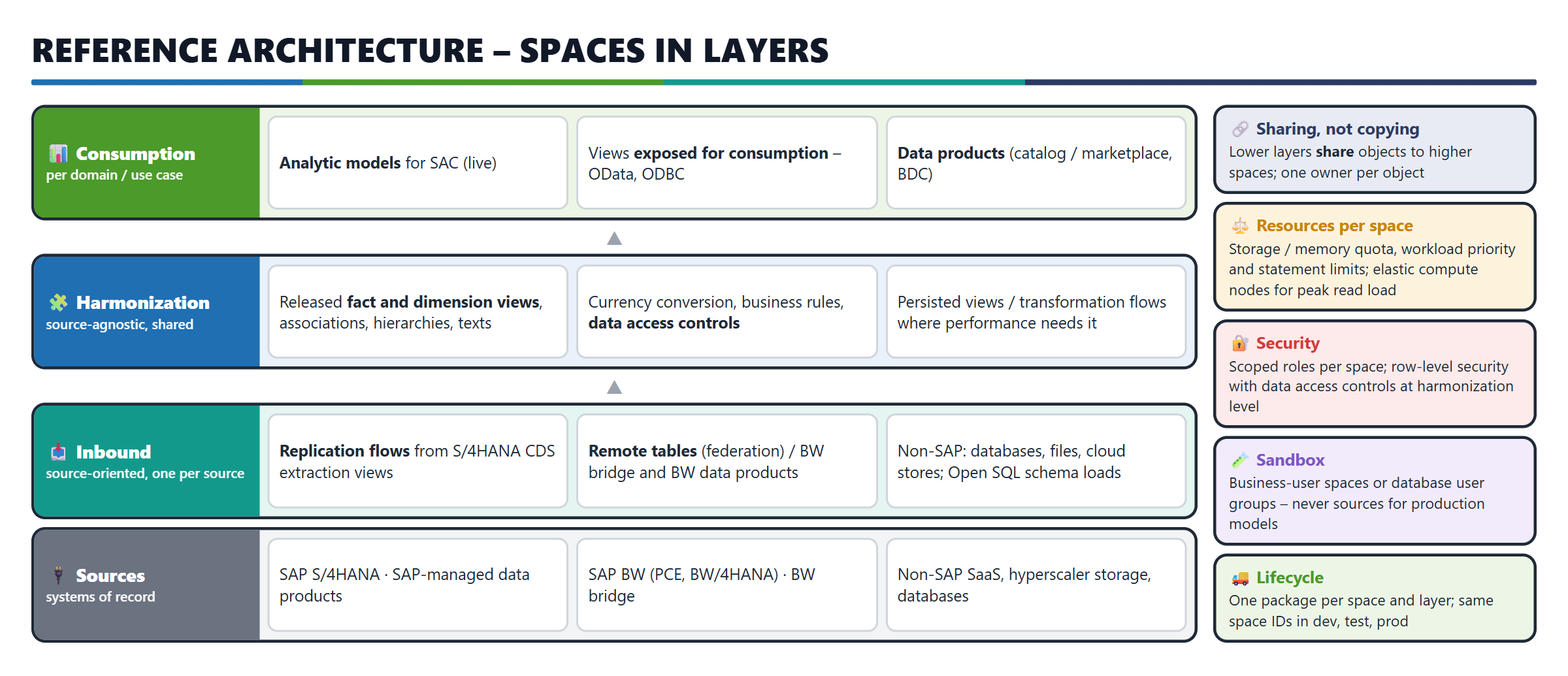
Decision | Options | Recommendation |
|---|---|---|
Tenant landscape | One tenant with spaces per stage, or separate tenants | Separate dev, test and prod tenants with packages / CTMS (page 05); bridge with development flag only in dev |
Space cut | By source, by layer, by domain, by team | Inbound spaces per source, a shared harmonization space, consumption spaces per domain; sandbox spaces for business users |
Federation vs replication | Remote tables live, replicated remote tables, replication flows, persisted views | Federate small or real-time-critical data; replicate large or frequently read data; persist expensive views |
S/4HANA extraction | Replication flows on CDS extraction views, ODP extractors in the bridge, SLT | CDS extraction views first (clean core); extractors in the bridge only where no CDS view exists and BW content saves effort; ODP RFC for non-SAP tools is not permitted (SAP Note 3255746) |
Native HANA | Open SQL schema, database user group, HDI | Only with a clear reason; they bypass the Transport app and parts of the governance |
Security | Scoped roles, data access controls, imported BW authorizations, Open SQL privileges | Row-level security on harmonised views; reuse BW authorizations during co-existence |
Workload | Space quotas, priorities and statement limits, elastic compute nodes | Protect production loads from sandbox queries; scale reads for peaks |
Consumption | SAC live on analytic models, OData, ODBC, data products | Analytic models as the single semantic layer for SAC; released views for technical consumers (page 04) |
Typical answer for an S/4HANA greenfield with an existing BW 7.5
Report operationally with S/4HANA embedded analytics; build new cross-system models natively in Datasphere on CDS extraction views; keep the BW running as long as its maintenance allows (or lift it into BDC) and expose its history through BW data products or remote tables; combine history and new data in released harmonisation views; consume everything through analytic models in SAP Analytics Cloud; decommission BW use case by use case.
Part 9 – BW strategy decisions and roadmap
Situation | Recommendation | Why |
|---|---|---|
Small or medium BW 7.x, extractor-based staging, public-cloud mandate | SAP BW bridge (shell or remote conversion) + Datasphere spaces | Reuses staging and ABAP skills; BW-style operations in the cloud |
Large BW 7.5 near end of mainstream maintenance (end of 2027), BDC adopted | Lift to BW PCE, expose data with the Data Product Generator, modernise in Datasphere | No conversion first; maintenance and BDC features – SAP Business Data Cloud › 05 |
BW/4HANA on a current release, strategic for years | Keep it, model transfer for cloud use cases (or lift as BW/4HANA PCE) | Maintained until at least 2040 (BW › 06) |
Models outdated, S/4HANA greenfield | Native rebuild in Datasphere; migrate history once | Clean core, no legacy staging to operate |
Mixed portfolio | Combine paths per use case | Each path has a different cost and lifetime |
- Positioning (as of November 2026): with Business Data Cloud, SAP's main modernization story for BW customers is lift – shift – innovate (BW PCE, BW data products, then Datasphere, SAP Databricks and SAP-managed data products). The BW bridge remains a documented, supported Datasphere option – confirm its fit and commercial availability with SAP before a large bridge project.
- Directions visible in the current documentation: Datasphere as the data fabric of BDC (data products, data sharing, system mappings for transports), file spaces on the object store with Spark transformation flows and the Python operator, AI-assisted modeling (SQL and semantics generation), and tighter BW bridge integration (process chains in task chains, catalog harvesting).
- Roadmap: check the SAP Roadmap Explorer (product SAP Datasphere / SAP Business Data Cloud) and the quarterly What's New before committing to a planned feature – SAP marks roadmap items as subject to change.
Part 10 – Interview questions
Q1. What is the SAP BW bridge?
An optional Datasphere feature that provides BW functionality in the public cloud: a separate tenant on the ABAP platform in SAP BTP with its own HANA Cloud, holding InfoObjects, ADSOs, CompositeProviders, transformations, DTPs and process chains, fed by ODP source systems and BW bridge content. Its objects are imported into Datasphere as remote tables in a generated BW bridge space and shared to other spaces.
Q2. What can you not do in the BW bridge compared with BW/4HANA?
No SAP GUI back-end access, no own reporting front end, no Open Hub, source connectivity through ODP source systems, no application development, and routines may only use objects SAP has released. Business semantics and consumption are built in Datasphere.
Q3. How do you connect an on-premise ECC to the BW bridge?
Through the Cloud Connector with RFC: add the Datasphere subaccount and the ECC system, a service channel to the bridge, a communication system and arrangement with SAP_COM_0692 in the BW Bridge Cockpit, the ODP source system in the BW Modeling Tools, and the callback RFC destination in ECC.
Q4. How does bridge data reach an analytic model?
Import Entities with the BW bridge connection creates remote tables in the BW bridge space, shares them to a target space and generates views and entities there. Extraction views feed transformation flows that load deltas into local tables; views and analytic models build on them; a task chain runs the bridge process chain first.
Q5. Shell or remote conversion – what is the difference?
Shell moves metadata only, data is reloaded and delta DataSources are initialised again. Remote moves metadata and data via RFC, converts request IDs to TSNs and clones delta queues so sender and bridge can run in parallel; it needs BW 7.3 SP10 or higher, the DMIS add-on and SAP_COM_0818 in addition to SAP_COM_0691.
Q6. How are BW bridge developments transported?
With gCTS software components: created in Manage Software Components, cloned as source (push and pull) in development and as target (pull only) in test and production; objects live in development packages below the structure package, never in $TMP. The Datasphere side is transported with packages; use the same BW bridge space name in all tenants.
Q7. How do you bring BW/4HANA queries into Datasphere without moving BW?
Create an SAP BW/4HANA Model Transfer connection (tunnel connection and Data Provisioning Agent) and import the analytic queries with the Import Entities wizard; Datasphere generates consumption models, business entities, views and remote tables. For BW 7.x only queries as InfoProviders over an SAP BW or SAP ABAP connection are possible.
Q8. How do you reuse BW analysis authorizations in Datasphere?
Generate table RSDWC_RSEC_DAC in BW with the report from SAP Note 3062381, then run the Import Permissions wizard: it imports the table and creates a permissions view, a data access control and a protected view per object. Supported from BW 7.5 SP16 and BW/4HANA 2.0.
Q9. How is Datasphere licensed and what drives the cost?
Through capacity units – as part of BDC or via SAP BTP subscription or consumption contracts. CU go to memory and storage, data integration execution hours, premium outbound volume, object store, catalog, data lake, elastic compute nodes and BW bridge storage; the Capacity Unit Estimator shows valid combinations. A BW bridge cannot be downsized.
Q10. How would you structure spaces in a large Datasphere implementation?
Inbound spaces per source, a shared harmonization space with released fact and dimension views and data access controls, consumption spaces per domain with analytic models, and sandbox spaces for business users – objects shared upwards, one owner each, quotas and workload limits per space, identical space IDs across tenants.
Q11. A customer on BW 7.5 asks: BW bridge, BW PCE or rebuild?
BW bridge for small or medium extractor-based BWs that must move to the public cloud and reuse staging; lift to BW PCE in BDC with the Data Product Generator for large BWs near end of maintenance; native rebuild when models are outdated and S/4HANA CDS sources exist. Usually a combination per use case, with harmonisation views joining BW history and new data.
Q12. Why replicate from the bridge instead of reporting on it directly?
Bridge remote tables use smart data access without partitioning and the data stays in the bridge; SAP recommends extraction views with transformation flows to replicate deltas into Datasphere, where modeling, data access controls and analytic models can work on local, well-performing data.
🏠 Start Here · ◀ 05 · Development · 07 · Interview Questions ▶ · Sections: CORE ABAP | OOPS ABAP | ABAP on HANA | Clean Core | RAP | ABAP Points | SAP Fiori | SAPUI5 | Mobile Development (MDK) | BTP Foundations | BTP Development | CAP | SAP Build | ABAP on BTP | Integration Suite | SAP Business AI | SAP BASIS | Security | SAP SDLC
Functional: FICO ABAP | TRM ABAP | VIM | SAP BIS | SD ABAP | MM ABAP | PP ABAP | QM ABAP | PM ABAP | PS ABAP | EWM | TM ABAP | GTM ABAP | EHS ABAP | HR ABAP | BW | SAP Datasphere | SAP MDG | SAP Analytics Cloud | SAP Ariba | SAP CX | SAP IBP