What SAP Fiori is, how it is designed, which app types exist and how the system landscape behind a Fiori app is built – on-premise (embedded or hub) and on SAP BTP. Running example: the Sales Order Approval business (reps manage orders, managers approve them). Launchpad content and security → SAP Fiori › 02 · SAP Fiori Launchpad & Security; Fiori elements → SAP Fiori › 03 · SAP Fiori Elements; tools → SAP Fiori › 04 · SAP Fiori Tools & Flexible Programming Model; adapting standard apps → SAP Fiori › 05 · Adaptation & Extensibility of SAP Fiori Apps; freestyle apps → SAPUI5 › 03 · SAPUI5 Fundamentals and 04 · Data, Binding & Navigation.
Part 1 – What SAP Fiori is
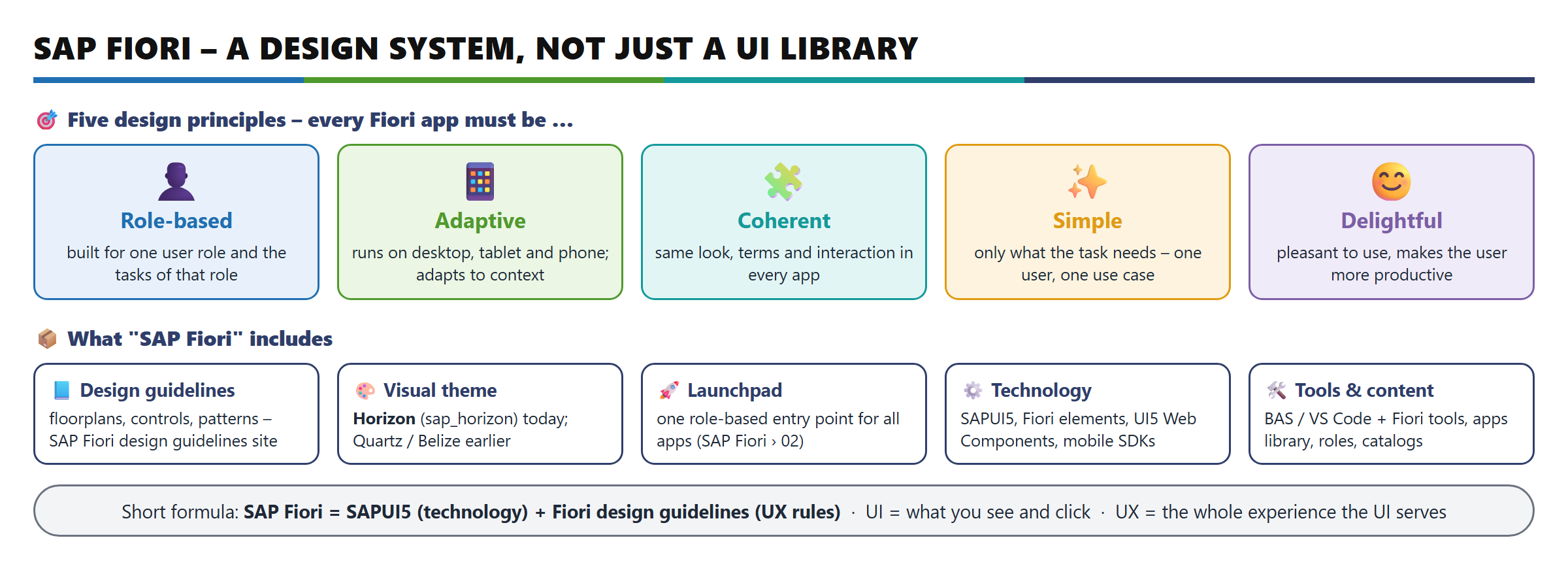
SAP Fiori is SAP's design system and user experience (UX) for all its business software. It defines how an SAP application looks and behaves, and it ships the pieces to build and run such apps.
- Short formula: SAP Fiori = SAPUI5 (the technology) + Fiori design guidelines (the UX rules).
- More than UI5 apps: design guidelines, a common visual theme, the SAP Fiori launchpad as single entry point, role-based content (catalogs, spaces, roles), SAP Fiori elements, tools and best practices.
- Technologies that produce Fiori UIs: SAPUI5 (freestyle and Fiori elements), UI5 Web Components, and the SAP mobile SDKs for iOS and Android.
- Default UX of SAP S/4HANA. Customers who stay on SAP GUI as their main UI get only limited benefit from S/4HANA innovations, because most new functions ship as Fiori apps.
1.1 UI vs UX
UI – user interface | UX – user experience | |
|---|---|---|
What | The screens, controls, colours, layout – what you see and click | The whole experience of reaching a goal with the software: effort, speed, clarity, feeling |
Nature | Technical artefact (views, controls, CSS theme) | Outcome; measured by research and usability tests |
Changes | Redesigned and rebuilt in releases | Improved iteratively from user feedback |
In Fiori | SAPUI5 controls, floorplans, Horizon theme | Role-based, task-focused apps; one entry point |
The goal of a Fiori project: build a UI that delivers the intended UX as closely as possible.
1.2 SAP S/4HANA context
- S/4HANA = SAP Business Suite 4 SAP HANA – the ERP successor of SAP ECC / Business Suite 7; runs only on the SAP HANA database. Simplified data model (many aggregate and index tables removed), Fiori as default UX, implementation based on SAP Best Practices (now in SAP Signavio Process Navigator).
- Editions: S/4HANA Cloud Public Edition (SaaS, browser only, standardised, limited configuration), S/4HANA Cloud Private Edition (RISE with SAP; full scope, SAP GUI, own code) and on-premise (customer runs it; full customizing in SPRO). SAP now markets the public edition as SAP Cloud ERP and the private edition as SAP Cloud ERP Private; the S/4HANA edition names remain in release names and much of the documentation.
- Business Suite 7 / ECC 6.0 maintenance: mainstream maintenance ends 31 December 2027; optional extended maintenance (extra fee) runs to end of 2030.
- App kinds in S/4HANA – all opened in the browser through the launchpad: Fiori apps (SAPUI5), classic transactions via SAP GUI for HTML (VA01, MIGO …), Web Dynpro ABAP apps and BSP apps.
- Object hierarchy: product (S/4HANA) → software components → application components → packages → SAP and custom objects.
Part 2 – Design principles, evolution and themes
2.1 The five design principles
Principle | Meaning | Example |
|---|---|---|
Role-based | Designed for one role and its tasks, not for a whole module | "Manage Purchase Orders" for a purchaser instead of the all-purpose ME21N |
Adaptive | Works on desktop, tablet and phone; adapts to screen size and context | Responsive tables that turn into lists on a phone |
Coherent | Same look, terms and interaction patterns in every app | Same filter bar, same save/cancel |
Simple | Only what the task needs: one user, one use case, few screens (1-1-3 idea) | An approval app with just the request and Approve / Reject |
Delightful | Pleasant, fast and modern; users want to use it | Clean visuals, instant feedback |
- Design guidelines site: SAP Fiori design guidelines (experience.sap.com/fiori-design-web, now served under sap.com/design-system/fiori-design-web) – floorplans, controls, patterns, wording, and guidance for AI features (Joule, generative-AI content). The site is versioned by SAPUI5 release – pick the version that matches your system.
2.2 Evolution of SAP user interfaces
- SAP R/2 (mainframe) → SAP R/3 (three tiers: presentation – application – database) → SAP ECC / Business Suite (ECC, BW, CRM, SRM, HCM …) → SAP S/4HANA (2015, on SAP HANA).
- UI technologies along the way: SAP GUI → web UIs BSP and Web Dynpro ABAP → SAP GUI for HTML (WebGUI) → SAPUI5 (responsive HTML5) with the SAP Fiori UX on top.
2.3 Fiori design versions and themes
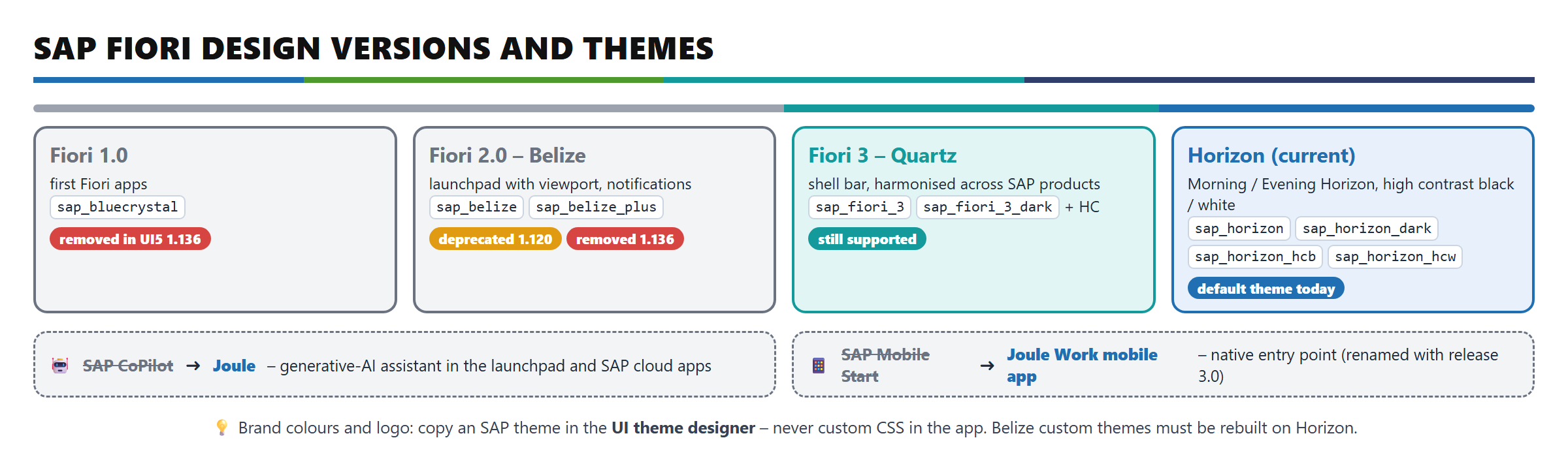
Design | Theme ID | Status |
|---|---|---|
Fiori 1.0 | sap_bluecrystal | Legacy – removed from SAPUI5 as of 1.136 |
Fiori 2.0 |
| Legacy – deprecated as of SAPUI5 1.120, removed as of 1.136; replacement |
Fiori 3 (Quartz) |
| Previous default; still supported |
Horizon |
| Current design and the default theme of current SAPUI5 releases and S/4HANA launchpads |
- Companies adapt colours and logo by copying an SAP theme in the UI theme designer (
/UI5/THEME_DESIGNER) – see SAP Fiori › 02 · SAP Fiori Launchpad & Security. No custom CSS in apps; use theme parameters. A custom theme built on Belize must be rebuilt on Horizon before the upgrade to a SAPUI5 release without Belize.
2.4 Current companions of the launchpad
- Joule – SAP's generative-AI assistant, integrated in the launchpad and SAP cloud apps (licence and set-up dependent). (Legacy: SAP CoPilot was discontinued; Joule is its successor.)
- Joule Work mobile app – native iOS/Android entry point to launchpad content, tasks and notifications. It is the former SAP Mobile Start, renamed with release 3.0; the functions stayed the same. Mobile development itself → Mobile Development (MDK) › 01 · Mobile Options & SAP Mobile Services.
Part 3 – Roles in a Fiori project
Role | Typical tasks |
|---|---|
SAP Basis consultant | Hardware and installation planning, stack.xml and installation, upgrades, SAP Notes, system health and backup, system security and user administration, GRC |
Fiori administrator / Fiori security consultant | Check components, install and activate standard apps, run task lists, lead the fit-to-standard workshop, scope roles, configure and adapt standard content, configure custom apps, design spaces and pages, create users and test users, company-wide theming, logon page, troubleshooting (SAP Fiori › 02) |
Key user (business, little coding) | Key-user adaptation of apps, configure apps such as My Inbox, KPI tiles and embedded analytics (Query Browser, Overview Page, Analytical List Page) |
UI5 / Fiori developer | Set up BAS or VS Code, connect via destinations and Cloud Connector, build apps with Fiori elements (annotations) or freestyle, develop and activate OData services, unit and integration tests, CI/CD, deploy to ABAP or BTP, prototypes |
Fiori architect | Spans all of the above: landscape, deployment option, standards, governance |
Part 4 – App types and choosing an approach
4.1 SAP Fiori app types
Type | Purpose | Technology / notes |
|---|---|---|
Transactional | Do a task: create, change, approve (Manage Sales Orders, Create Supplier Invoice) | OData service on the back end; runs on any supported database |
Analytical | Insight on KPIs, drill-down, real-time analytics | S/4HANA: CDS analytical views on SAP HANA · ECC (Business Suite): SAP HANA database required, virtual data model (SAP HANA Live); Overview Page, Analytical List Page, KPI tiles (SAP Smart Business) |
Fact sheet (Legacy) | Contextual 360° view of one business object with navigation to related objects | No longer developed – replaced by object pages built with Fiori elements · ECC: fact sheets run only on an SAP HANA database (with ABAP stack) |
Classic UIs | Existing transactions and Web Dynpro apps with Fiori theme | SAP GUI for HTML and Web Dynpro tiles in the launchpad |
The app type decides the target mapping type in the launchpad tools: SAPUI5 Fiori app, Transaction, Web Dynpro or URL (SAP Fiori › 02).
4.2 Ways to deliver a Fiori app
- Use the standard app as delivered (activate it, SAP Fiori › 02).
- Adapt it without code: key-user adaptation (hide fields, rearrange, add custom fields).
- Extend it with code: adaptation project / controller extensions in BAS. Both → SAP Fiori › 05 · Adaptation & Extensibility of SAP Fiori Apps.
- Build a custom app: SAP Fiori elements first (List Report / Object Page, Worklist, Overview Page, Analytical List Page – SAP Fiori › 03); freestyle SAPUI5 only when elements cannot meet the requirement (SAPUI5 › 03 and 04).
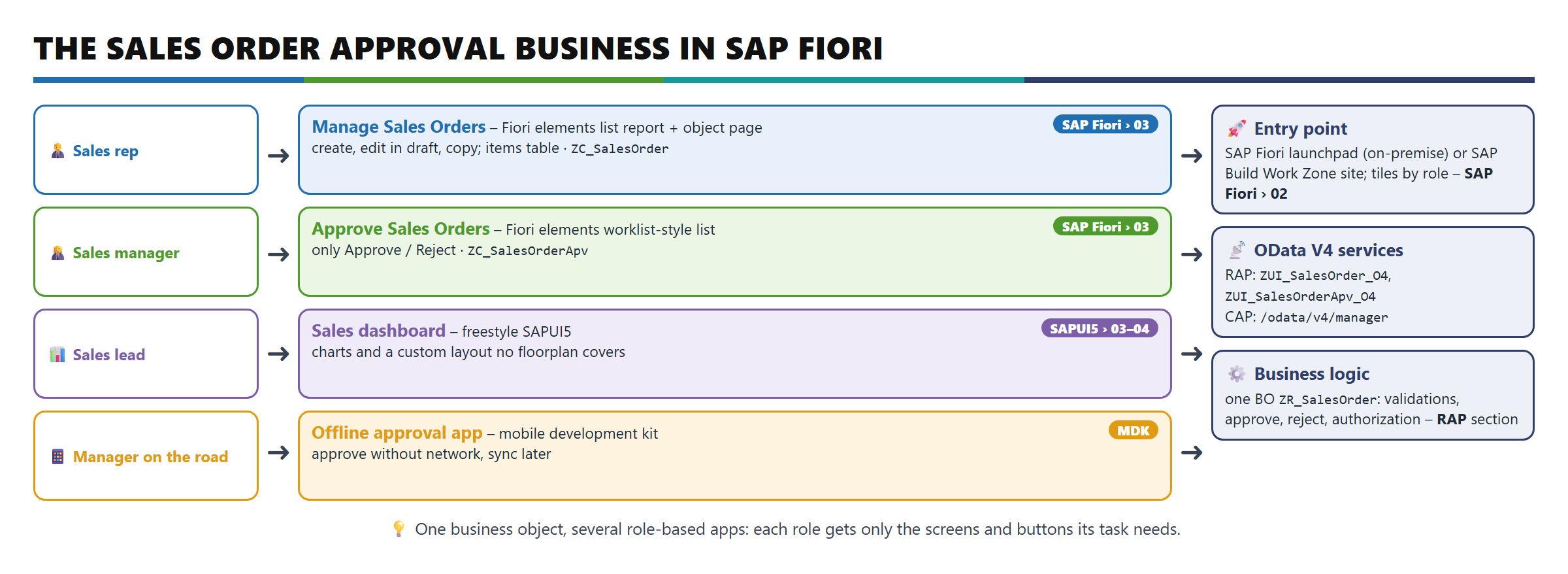
- In the running example: reps get the Fiori elements app *Manage Sales Orders*, managers the simpler *Approve Sales Orders*, the sales lead a freestyle dashboard, and managers on the road an offline MDK app – four UIs on one business object.
- SAP Screen Personas – simplify an existing SAP GUI transaction when it fits but looks too complex.
4.3 Decision tree – when to build a custom app
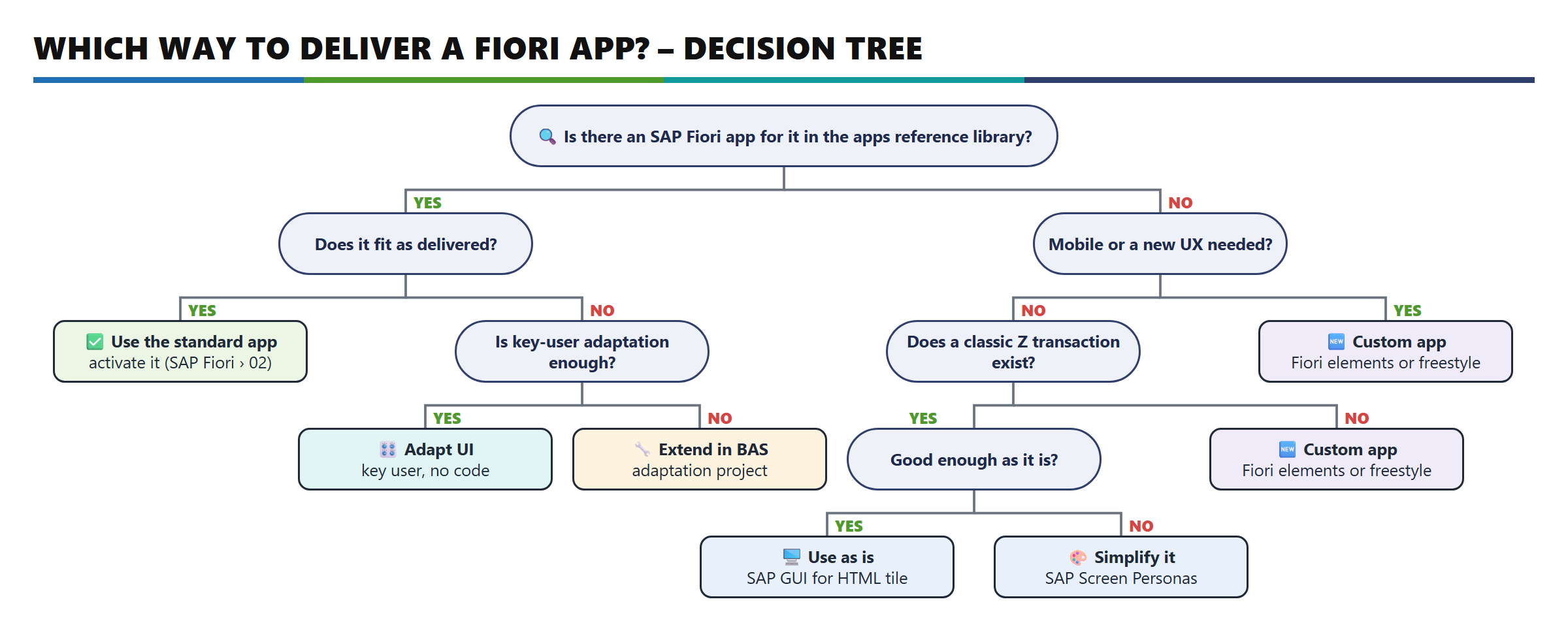
- App exists in the apps library and fits → use it; small gaps → adapt the UI; bigger gaps → extend in BAS.
- No app, mobile needed → custom app (Fiori elements or freestyle). No app, a classic Z transaction exists → use it as is or simplify it with Screen Personas; otherwise build a custom app.
Part 5 – SAP Fiori apps reference library
The SAP Fiori apps reference library (fioriappslibrary.hana.ondemand.com) lists every SAP-delivered Fiori app and the classic apps (SAP GUI, Web Dynpro) available in the launchpad, grouped by product.
- Search by role, line of business / functional area (finance, sales, procurement …), name or description, app ID (e.g. F0862 My Inbox), product and release, or transaction code.
- Per app and release, the Implementation Information tab gives what you need to activate it:
- front-end component and BSP / ICF node (
/sap/bc/ui5_ui5/sap/<bsp>), SAPUI5 component ID - OData service(s) with version, technical catalog, business catalog, business role
- semantic object and action (the intent), required back-end authorizations, SAP Notes, configuration
- front-end component and BSP / ICF node (
- SAP Fiori apps recommendation report: upload your transaction usage (ST03N data) or use the Fiori section of SAP Readiness Check; the report proposes Fiori apps and business roles that replace your most-used transactions. Used in the fit-to-standard workshop (SAP Fiori › 02).
Part 6 – Fiori architecture
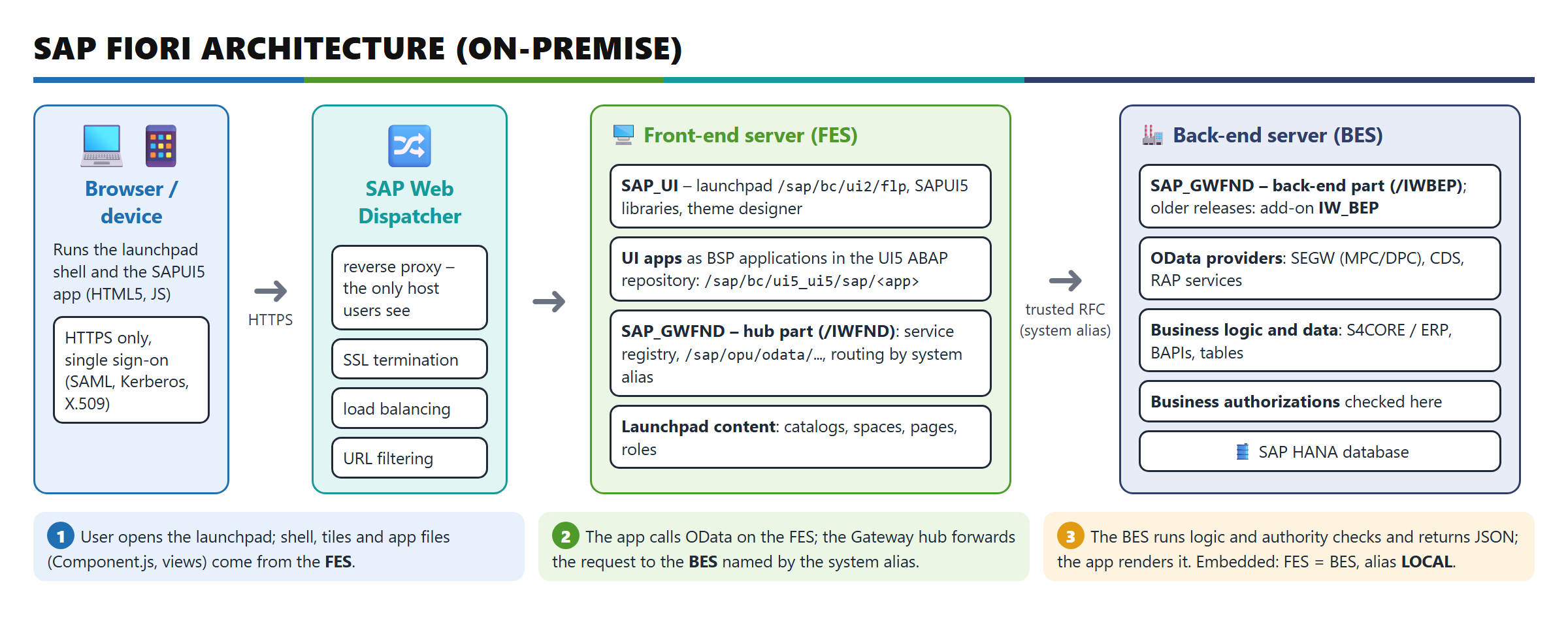
Layer | Components | Job |
|---|---|---|
Browser / device | Launchpad shell, SAPUI5 runtime, the app | Renders the UI, calls OData via HTTPS |
SAP Web Dispatcher | Reverse proxy | Single public host, SSL termination, load balancing, URL filter |
Front-end server (FES) | SAP_UI (launchpad, UI5 libraries, theme designer), SAP_GWFND hub part ( | Serves launchpad and app files, launchpad content, registers and routes OData services |
Back-end server (BES) | SAP_GWFND back-end part ( | OData providers (SEGW, CDS, RAP), business logic, data, business authorizations |
Database | SAP HANA (S/4HANA); any supported DB for ECC | Persistence, analytics |
- SAP_GWFND (from NetWeaver 7.40) bundles the former Gateway add-ons GW_CORE, IW_FND (hub) and IW_BEP (back-end enablement) into one component.
- Important URLs: launchpad
/sap/bc/ui2/flp(t-code/UI2/FLP); app files/sap/bc/ui5_ui5/sap/<bsp>; OData V2/sap/opu/odata/sap/<SERVICE>; OData V4/sap/opu/odata4/…; UI5 version info/sap/public/bc/ui5_ui5/. Host and ports: SMICM → Services. - System alias: a name on the FES that points to an RFC destination of a back end. Many services share one alias – if the back end moves, you change one RFC destination, not every service. Embedded systems use alias LOCAL.
- OData (Open Data Protocol): REST-based protocol created by Microsoft and standardised by OASIS (V4). SAP Gateway apps usually use V2; RAP services target V4. Service building, query options and Gateway internals: CORE ABAP › 08 OData; RAP services: RAP › 03 · Projection, UI, Access Control & Service.
Part 7 – Deployment options: embedded vs hub
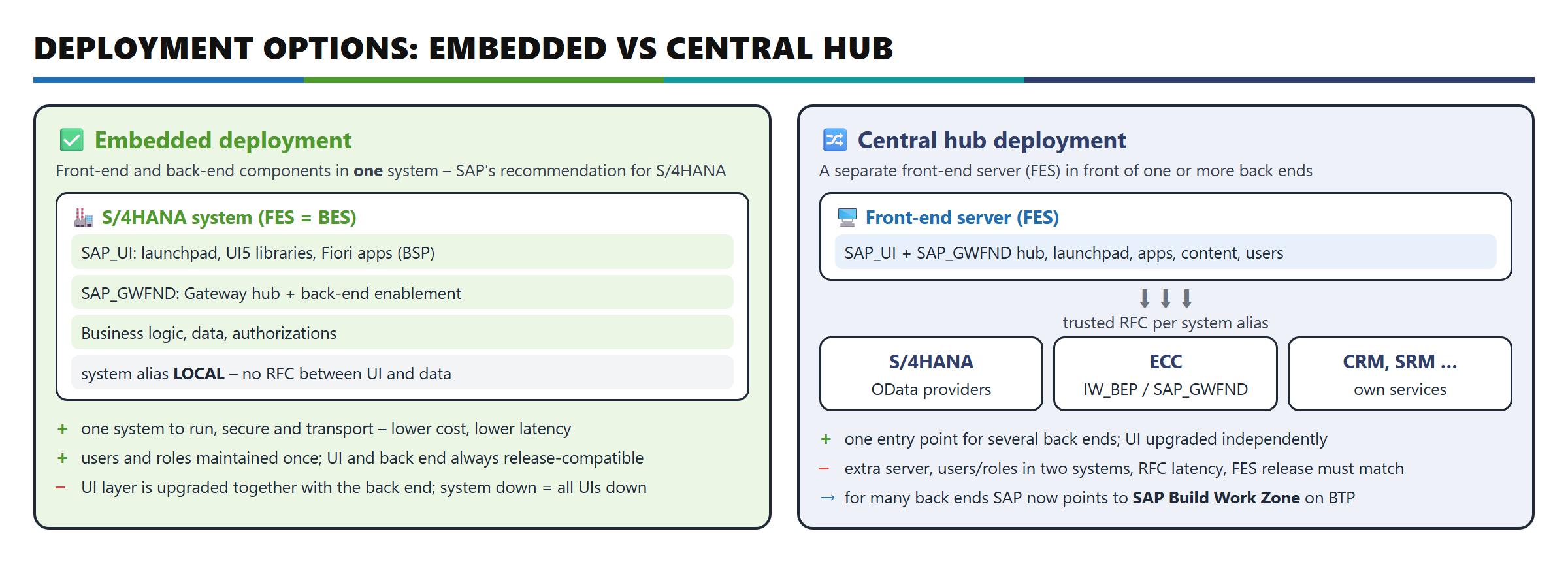
Embedded | Central hub | |
|---|---|---|
Systems | UI and back end in one system (alias LOCAL) | Separate FES connected by trusted RFC to one or more back ends |
Pros | Lower cost and latency; one place for users, roles, security and transports; no RFC set-up; UI and back end always compatible | Fiori without upgrading the back end ("innovation without disruption"); one entry point for several back ends; separate UI life cycle; extra security layer in front |
Cons | UI components upgraded with the back end; if the system is down, Fiori and classic UIs are down | Extra server and Basis effort; users and roles in two systems (the same user must exist in the back end); content split between FES and BES; RFC latency; the FES release must be supported for the back-end release |
Use | SAP's recommendation for S/4HANA | Classic ECC landscapes; special cases. For many back ends SAP now points to SAP Build Work Zone on BTP |
What lives where in a hub
- FES: SAP_GWFND, SAP_UI, UI component; all Fiori apps; launchpad and content tools; theme designer; Fiori content (roles, catalogs, spaces); OData service registration; system aliases and RFC destinations.
- BES: SAP_GWFND / IW_BEP and the application (e.g. S4CORE); SAP and Z transactions; back-end catalogs; application data; OData development (MPC/DPC classes, CDS).
- The launchpad designer shown in the picture is the legacy content tool – current tools: SAP Fiori › 02.
Part 8 – Development and delivery process
Phases: tools and set-up → design → prototype → development → testing → deployment → maintenance (development to maintenance run as DevOps with CI/CD).
8.1 Steps for a custom app
- 1. Follow the design guidelines and the standard project structure (MVC, Component.js, manifest.json – SAPUI5 › 03 · SAPUI5 Fundamentals).
- 2. Connect the tool to the SAP system (destination in BTP or local proxy configuration).
- 3. Build the OData service in the back end: RAP / CDS (current) or SEGW with DPC_EXT (classic).
- 4. Activate it: V2 in /IWFND/MAINT_SERVICE, V4 in /IWFND/V4_ADMIN; RAP services are published from the service binding in ADT.
- 5. Test locally in the tool, then deploy to the development system as a BSP application in the UI5 ABAP repository (or to BTP).
- 6. Configure the app in the launchpad (catalog, target mapping, space/page, role – SAP Fiori › 02).
- 7. Transport app, service registration, launchpad content and roles to QA and production.
8.2 Tools
- SAP Business Application Studio (BAS, on BTP) or VS Code with SAP Fiori tools – generators, guided development, preview, deployment. In depth → SAP Fiori › 04 · SAP Fiori Tools & Flexible Programming Model.
- Legacy: SAP Web IDE (Personal and Full-Stack) is no longer actively supported or distributed; Eclipse UI5 tools are obsolete.
8.3 Best practices
- Build Fiori apps with SAPUI5 (Fiori elements where possible) and follow the design guidelines.
- Users open apps only through the launchpad, never by direct URL.
- Keep one main OData service per app as a guideline; use a unique namespace per app.
- No custom CSS – use theme parameters and the theme designer.
- Hub landscapes: UI app on the front end, OData service on the back end (separate software components).
8.4 First-aid tools for developers
- Browser F12 developer tools: Network tab (find the
$batchcall and the service name, HTTP status), Console for errors, device emulation. - Ctrl+Alt+Shift+P – UI5 technical information (version, libraries); Ctrl+Alt+Shift+S – support diagnostics; UI5 Support Assistant – rule checks.
Part 9 – Configuration, customizing and personalization
Launchpad content is stored in three layers. A lower layer overrides the one above it for its scope.
Layer | Scope | Who / tool | Transport |
|---|---|---|---|
Configuration (CONF) | System-wide, cross-client | Administrator: | Workbench request |
Customizing (CUST) | Client-specific, all users of the client | Administrator: | Customizing request |
Personalization (PERS) | One user – highest priority | End user: theme, own pages / My Home, variants, settings | Not transported |
- Rule of thumb: create technical content (tiles, target mappings) in CONF; client-specific business content such as spaces and pages in CUST.
- Key-user adaptation (Adapt UI in the user menu) changes an app's UI for all users without code (hide or move fields, add custom fields); the changes can be transported. Personalization, key-user adaptation and adaptation projects in depth → SAP Fiori › 05 · Adaptation & Extensibility of SAP Fiori Apps.
Part 10 – Fiori on SAP BTP
Custom apps can also run on SAP BTP, for example when external users need access or several systems must be combined in one launchpad.
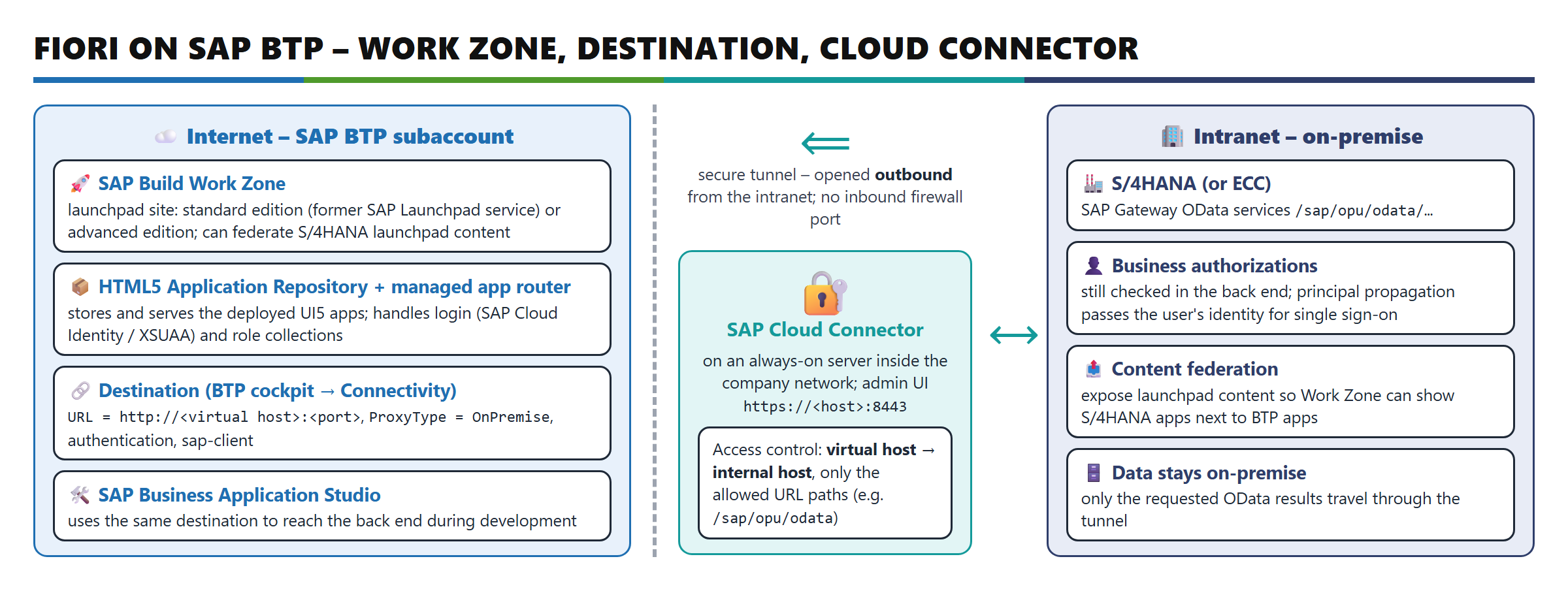
10.1 Building blocks
- SAP BTP is SAP's platform as a service. Environments: Cloud Foundry, Kyma (Kubernetes) and ABAP environment. Legacy: the Neo environment reaches end of life (SAP Note 3351844).
- SAP Build Work Zone – the launchpad on BTP. Standard edition (formerly SAP Launchpad service) for a central launchpad; advanced edition adds workspaces and content. It can show S/4HANA apps through content federation (the S/4HANA system exposes its launchpad content, Work Zone adds it as a content provider). Sites, content providers and editions in depth → SAP Build › 04 · SAP Build Work Zone & SAP Build Code.
- HTML5 Application Repository stores the deployed UI5 apps; the managed application router serves them and handles login. BTP role collections grant access to BTP-side apps.
- Destination (created in the BTP cockpit → Connectivity → Destinations): URL = the virtual host and port from the Cloud Connector, ProxyType = OnPremise, authentication (e.g. principal propagation), optional Location ID and properties such as
sap-clientandWebIDEUsage = odata_abap. - SAP Cloud Connector – installed inside the company network; opens a secure outbound tunnel to the BTP subaccount (reverse invoke: no inbound firewall port). Its access-control list maps a virtual host to the internal host and exposes only allowed URL paths. It is not a VPN.
- Developers using VS Code on a laptop reach on-premise systems through the corporate network or VPN instead. Destinations and the Cloud Connector in depth → BTP Foundations (BTP services, identity and connectivity); deploying Fiori apps to BTP → BTP Development.
10.2 Cloud Connector set-up
- 1. Download the Cloud Connector from tools.hana.ondemand.com; check the supported JDK (SAP JVM or SapMachine).
- 2. Install it on an always-on server (production use: not a laptop). On Windows use the installer; the portable version is for tests only.
- 3. Open the admin UI
https://<host>:8443, log on with the initial user and change the default password immediately. - 4. Connect the BTP subaccount (region, subaccount, credentials).
- 5. Add the on-premise system: back-end type, protocol, internal host:port, virtual host:port; then the resources (URL paths, e.g.
/sap/opu/odata) that may be called. - 6. In the BTP cockpit create the destination that uses the virtual host; test it in BAS.
10.3 Legacy – know it for interviews
- SAP Web IDE is no longer actively supported or distributed; the Neo environment reaches end of life (SAP Note 3351844) and Neo portal sites migrate to SAP Build Work Zone. Today: BAS or VS Code + Fiori tools, Cloud Foundry, HTML5 Application Repository, SAP Build Work Zone.
Part 11 – Interview questions
What is SAP Fiori? Is it a technology?
SAP Fiori is SAP's design system and UX: design principles and guidelines, a visual theme (Horizon), the launchpad as single entry point, role-based content and tools. The main technology behind it is SAPUI5 (freestyle and Fiori elements) – hence the formula Fiori = SAPUI5 + design guidelines.
Name the five Fiori design principles.
Role-based, adaptive, coherent, simple, delightful. Example: a role-based approval app shows one request with Approve/Reject instead of a large all-purpose transaction.
What is the difference between UI and UX?
The UI is the interface artefact – screens, controls, theme. The UX is the overall experience of reaching a goal with the software. A good UI serves the intended UX; both are improved iteratively.
Which Fiori app types exist?
Transactional (tasks such as create/approve), analytical (KPIs, Overview Page / ALP; S/4HANA: CDS on HANA · ECC: HANA database required, SAP HANA Live VDM) and fact sheets (legacy, ECC: HANA only; replaced by Fiori elements object pages). Classic transactions and Web Dynpro apps also run in the launchpad.
Fiori elements or freestyle – which do you choose?
Fiori elements first: floorplans driven by OData annotations give consistent UIs with little code. Freestyle SAPUI5 only when the floorplans cannot meet the requirement, e.g. highly custom layouts.
Explain the Fiori architecture.
Browser → SAP Web Dispatcher → front-end server (SAP_UI: launchpad and UI5 apps as BSPs; SAP_GWFND hub: OData registration and routing) → trusted RFC via system alias → back-end server (SAP_GWFND/IW_BEP OData providers, business logic, authorizations) → database. In embedded deployment FES and BES are one system.
Embedded or hub – which does SAP recommend and why?
For S/4HANA SAP recommends embedded: one system, no RFC between UI and data, users and roles once, lower cost and latency, always compatible releases. A hub fits classic ECC landscapes; for many back ends SAP now recommends SAP Build Work Zone on BTP.
What is a system alias?
A name on the front-end server that points to the RFC destination of a back end. Registered OData services use the alias, so a changed back end only needs one destination change. Embedded uses LOCAL.
What do you find in the Fiori apps reference library?
All SAP Fiori and classic launchpad apps, searchable by role, line of business, app ID or transaction. Per release: BSP/ICF node, OData services, technical and business catalog, business role, intent and required authorizations – everything needed to activate the app. It also offers the apps recommendation report.
Configuration vs customizing vs personalization?
Configuration is cross-client and transported with workbench requests; customizing is client-specific and uses customizing requests; personalization is per user and not transported, with the highest priority.
How does a BTP app reach on-premise OData?
Through a destination in the BTP cockpit (virtual host, ProxyType OnPremise) and the SAP Cloud Connector, which opens an outbound tunnel from the company network to the BTP subaccount and only exposes allowed paths. Apps are stored in the HTML5 Application Repository and offered in SAP Build Work Zone.
What replaced SAP Web IDE, SAP CoPilot and SAP Mobile Start?
SAP Business Application Studio or VS Code with SAP Fiori tools replaced Web IDE; Joule, SAP's generative-AI assistant, replaced CoPilot; SAP Mobile Start was renamed the Joule Work mobile app.
Which theme do you use, and what happens to an old Belize custom theme?
Horizon (sap_horizon, with dark and high-contrast variants) is the current default. Belize was deprecated with SAPUI5 1.120 and removed with 1.136, Blue Crystal too, so a Belize-based custom theme has to be rebuilt on Horizon in the UI theme designer before the system moves to such a release. Quartz (sap_fiori_3) is still supported. Apps never hard-code colours; they use theme parameters.
Scenario: reps, managers and a sales lead need sales order UIs. How many apps, and which kind?
One business object with several role-based apps: a Fiori elements list report and object page for the reps (create, edit, items), a slim Fiori elements approval app for managers with only Approve and Reject, a freestyle SAPUI5 dashboard for the sales lead because no floorplan fits the custom charts, and an offline MDK app if managers approve on the road. All share the OData V4 services and one launchpad or Work Zone entry point with role-based tiles.
🏠 Start Here · 02 · Launchpad & Security ▶ · Sections: CORE ABAP | OOPS ABAP | ABAP on HANA | Clean Core | RAP | ABAP Points | SAP Fiori | SAPUI5 | Mobile Development (MDK) | BTP Foundations | BTP Development | CAP | SAP Build | ABAP on BTP | Integration Suite | SAP Business AI | SAP BASIS | Security | SAP SDLC
Functional: FICO ABAP | TRM ABAP | VIM | SAP BIS | SD ABAP | MM ABAP | PP ABAP | QM ABAP | PM ABAP | PS ABAP | EWM | TM ABAP | GTM ABAP | EHS ABAP | HR ABAP | BW | SAP Datasphere | SAP Business Data Cloud | SAP MDG | SAP Analytics Cloud | SAP Ariba | SAP CX | SAP IBP