How apps get into the SAP Fiori launchpad and who may use them: the content model (catalogs, tiles, target mappings, spaces and pages, roles), the tools, the authorization layers, activating standard apps (manually and with task lists), troubleshooting, cache, translation and My Inbox. Architecture and deployment options → SAP Fiori › 01 · SAP Fiori Design & Architecture. Examples use the two Sales Order Approval apps (reps and managers).
Part 1 – The SAP Fiori launchpad
Without a launchpad, 500 apps would mean 500 URLs to send around, 500 logon screens and no central control over who opens what. The SAP Fiori launchpad (FLP) is the single, role-based entry point for all SAP and custom apps – Fiori apps, SAP GUI for HTML transactions and Web Dynpro apps.
1.1 How to open it
Way | Value |
|---|---|
T-code |
|
URL | |
URL (legacy) | …/sap/bc/ui5_ui5/ui2/ushell/shells/abap/FioriLaunchpad.html#Shell-home |
Host and port | SMICM → Goto → Services (HTTPS port) |
On SAP BTP | SAP Build Work Zone site (1.3) |
1.2 Features
- Shell for all apps with central logon (or single sign-on) and the same header everywhere.
- Role-based: users see only the apps their roles allow; this is the only way users should open apps.
- Personalization (theme, own pages / My Home, settings) affects only that user.
- Enterprise search, notifications, App Finder (all apps the user may launch, even those not on the home page), cross-app navigation (intent-based, Part 2).
- Responsive on desktop, tablet and phone; integrates classic UIs (SAP GUI for HTML, Web Dynpro, BSP).
- Company branding through the theme designer (Part 12); Joule assistant in newer releases (SAP Fiori › 01 · SAP Fiori Design & Architecture).
- On phones, the Joule Work mobile app (formerly SAP Mobile Start) gives native access to the same launchpad content, tasks and notifications.
1.3 One launchpad for several systems: SAP Build Work Zone
- Embedded launchpad (
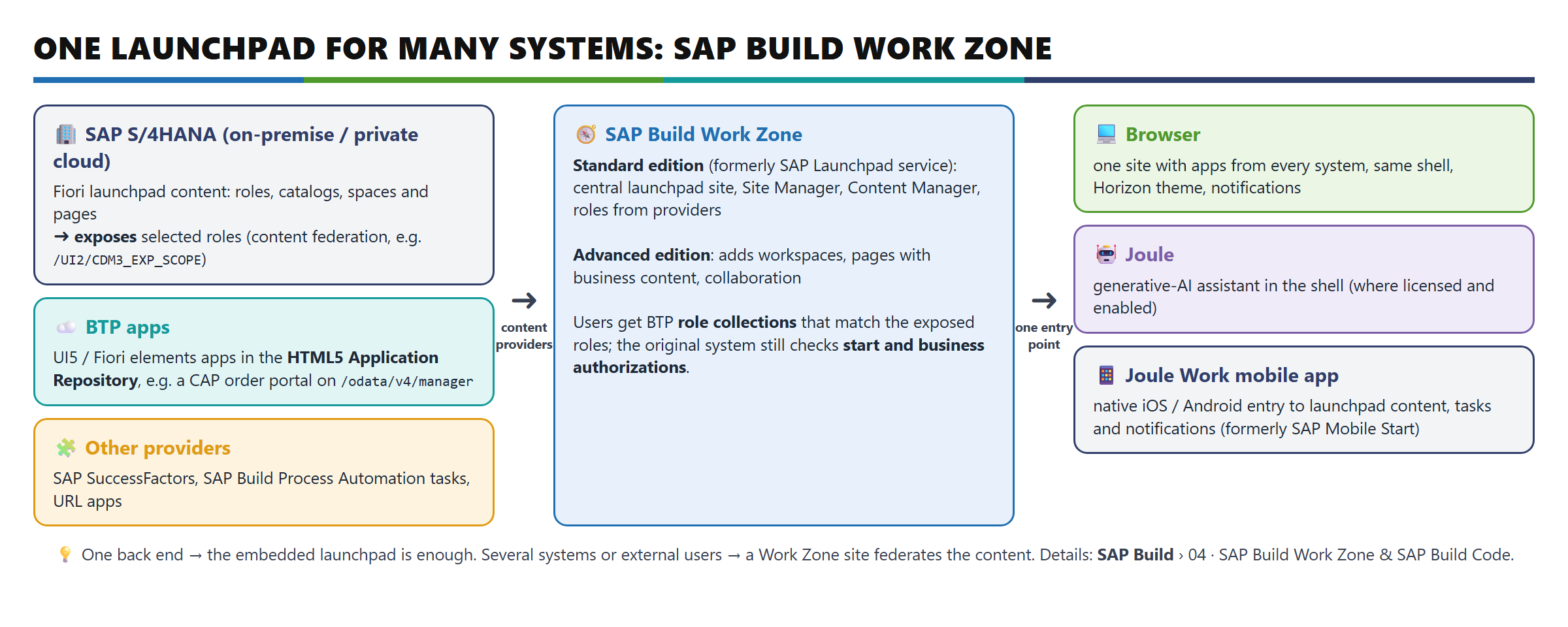
/UI2/FLP) is enough when users work in one S/4HANA system. - SAP Build Work Zone, standard edition (formerly SAP Launchpad service) is the launchpad on SAP BTP: one site for several systems. S/4HANA exposes selected roles (content federation), Work Zone adds the system as a content provider, and BTP role collections give users the matching roles. The source system still checks start and business authorizations. The advanced edition adds workspaces and business content pages.
- Content created in the S/4HANA tools of this page (catalogs, spaces and pages, roles) is the same content Work Zone federates – build it once. Work Zone sites in depth → SAP Build › 04 · SAP Build Work Zone & SAP Build Code.
Part 2 – Launchpad content model
2.1 Building blocks
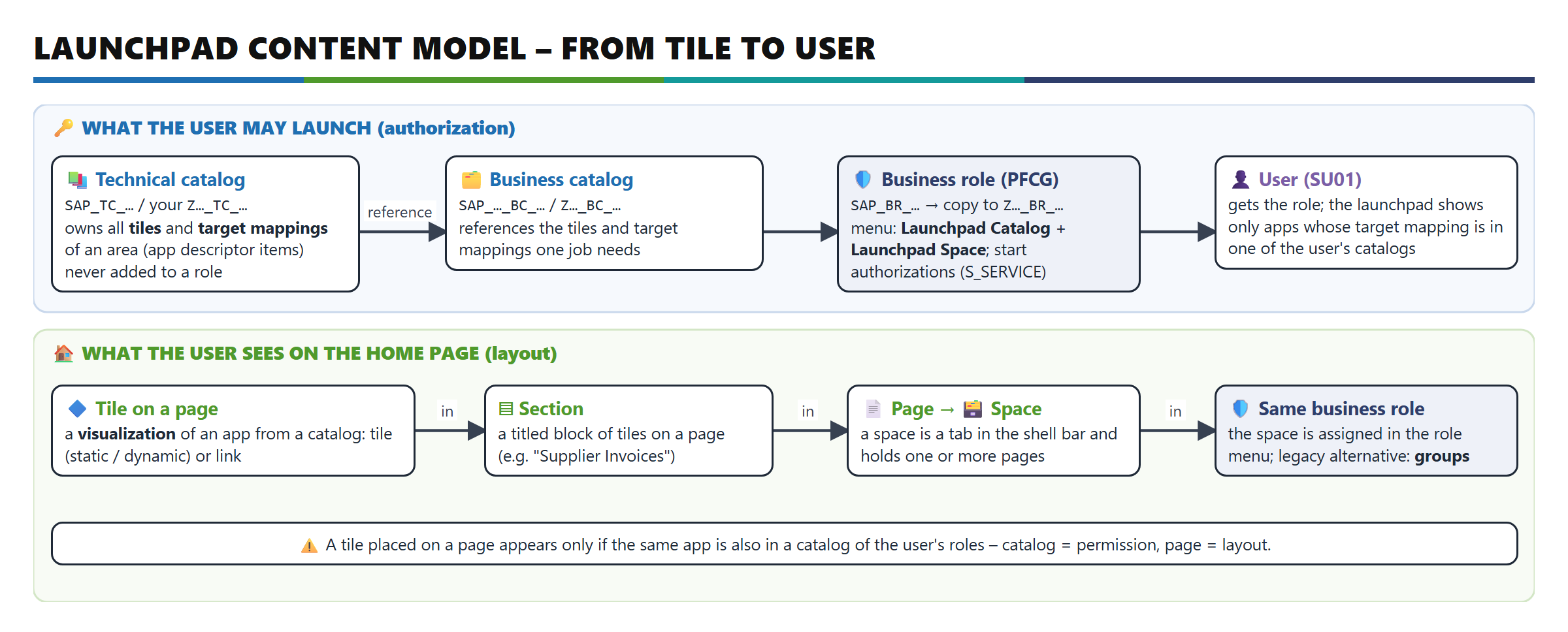
Object | What it is |
|---|---|
Tile | Entry point of an app on the launchpad: properties (title, subtitle, icon, info) + an intent. Static tile = fixed text; dynamic tile = shows a number read from a service URL (e.g. open orders); custom/news and KPI tiles (SAP Smart Business) exist too. On pages a tile can also be shown as a link. |
Semantic object | The business object the app works on: |
Action | What the user does with it: |
Intent | Semantic object + action (+ optional parameters): |
Target mapping | Maps an intent to the real target: SAPUI5 app (component + ICF path), transaction (SAP GUI for HTML), Web Dynpro app or URL; also device types, parameters, system alias |
App descriptor item | In App Manager: one target mapping plus its tile(s) as one entity |
Technical catalog | Container that owns tiles and target mappings of an area (e.g. all sales apps) |
Business catalog | Set of apps for one job; references tiles and target mappings from technical catalogs. Grants the right to launch the apps. |
Space / page / section | Home-page layout: a space is a tab in the shell bar, holding one or more pages; a page has sections with tiles and links. Pure layout. |
Business role | PFCG role that contains business catalogs and spaces; assigned to users |
2.2 Intent-based navigation
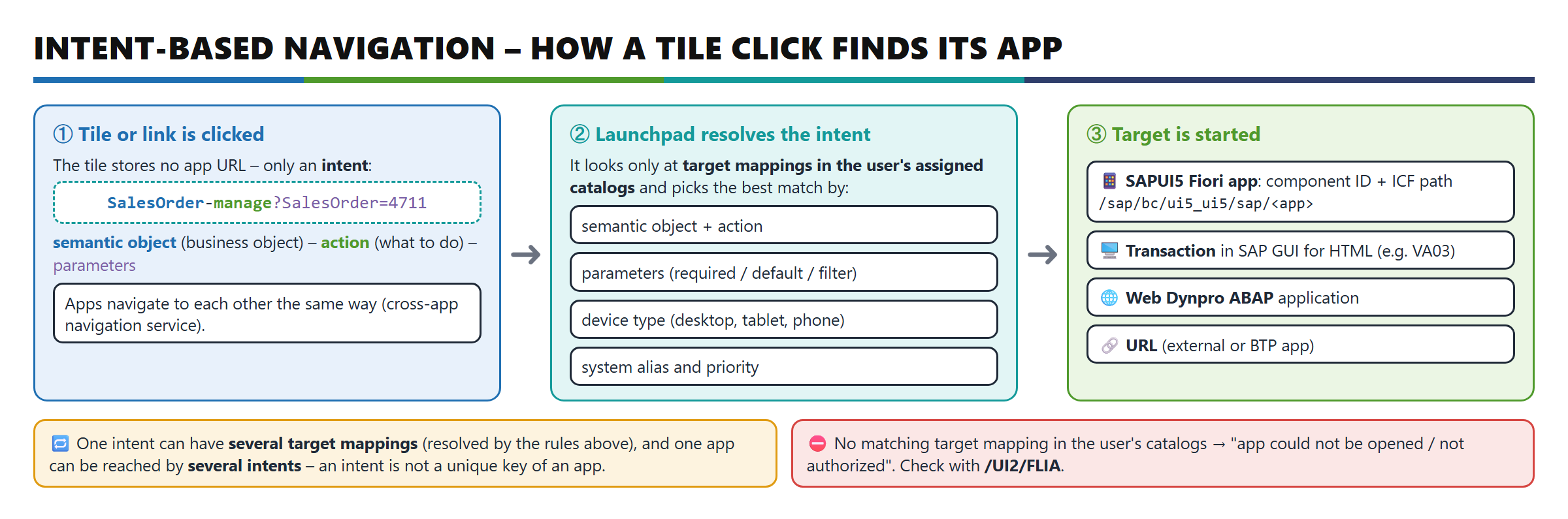
- Tiles and in-app links never hard-code app URLs. The launchpad resolves the intent against the target mappings in the catalogs assigned to the user. Without such a catalog the navigation fails, even if the app is installed.
- One intent can have several target mappings – the launchpad picks one by parameters, device type, system alias and priority. One app can be reached through several intents. So an intent is not a unique key of an app.
- Apps navigate to each other the same way through the launchpad's navigation service (cross-app navigation).
2.3 Spaces and pages
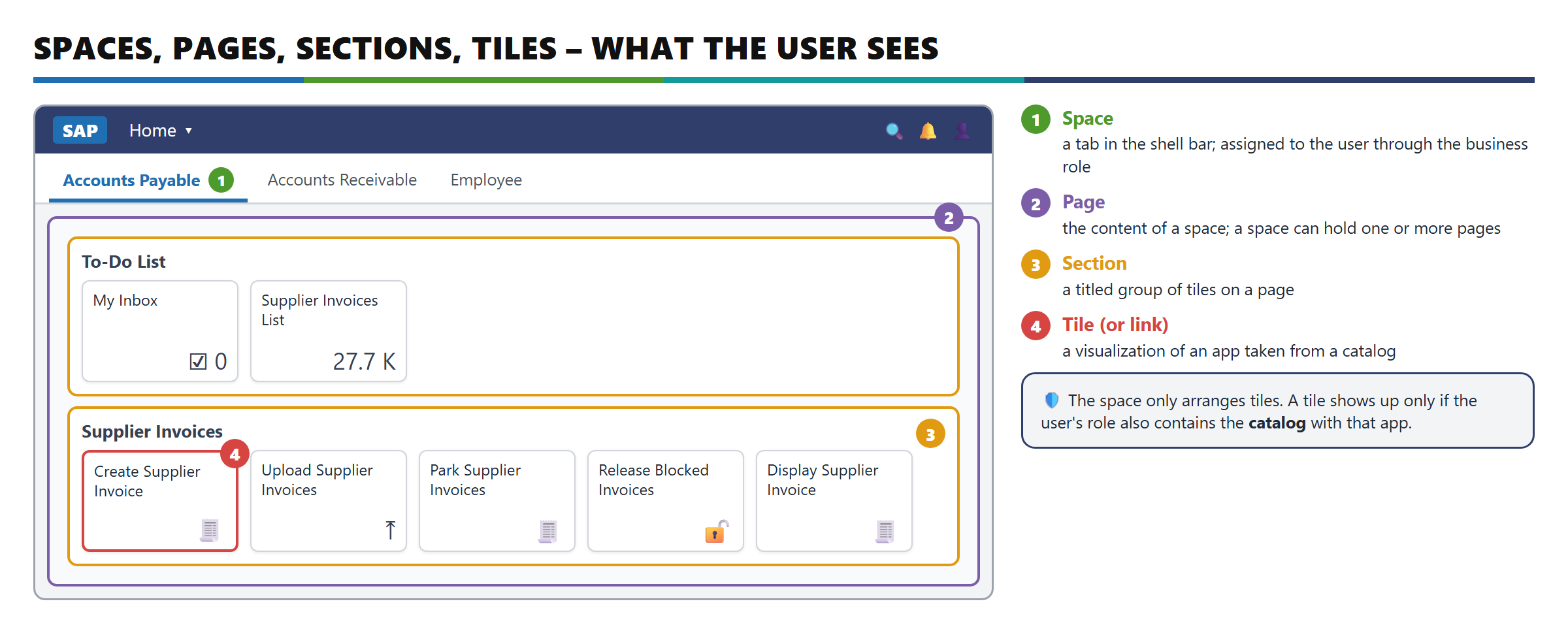
- Business role → space → page → section → tile. The same role must also contain the catalog of each tile, because the catalog grants the authorization.
- Available on-premise with SAP Fiori front-end server 2020 (S/4HANA 2020; also usable with 1809 / 1909) and the recommended home-page mode from S/4HANA 2020; SAP delivers standard spaces and pages for its business roles. Groups mode is deprecated since S/4HANA 2021 FPS01; plan the move to spaces and pages.
- My Home is a personal entry page in spaces mode with sections such as to-dos, favourite apps, news and insights cards. It came with S/4HANA Cloud 2208 and with S/4HANA 2023 FPS01 on-premise / private cloud, where it is off by default and the administrator switches it on with launchpad configuration parameters (
/UI2/FLP_SYS_CONF//UI2/FLP_CUS_CONF). - Switched on with launchpad configuration parameters such as
SPACES(andSPACES_ENABLE_USERto let users choose) in/UI2/FLP_SYS_CONF//UI2/FLP_CUS_CONF. From ABAP Platform 2021 FPS01 (on-premise and private cloud) the app Create Launchpad Pages from Groups turns selected groups into the sections of a new page; the page is then edited in Manage Launchpad Pages and assigned to a space in Manage Launchpad Spaces.
2.4 Legacy – groups
In the classic home page a group arranged tiles referenced from catalogs, and roles contained catalogs and groups. Tiles were never created in a group, only referenced. Groups are deprecated because:
- the tile order is not guaranteed and groups load slowly (performance);
- groups sit directly in roles, so every group change means role maintenance;
- a group can take tiles from any catalog, so the link to the standard role is lost.
Part 3 – SAP-delivered content
SAP delivers ready content per job function – technical catalogs, business catalogs, spaces, pages, business roles, tiles, target mappings and semantic objects – so you do not create tiles for standard apps by hand.
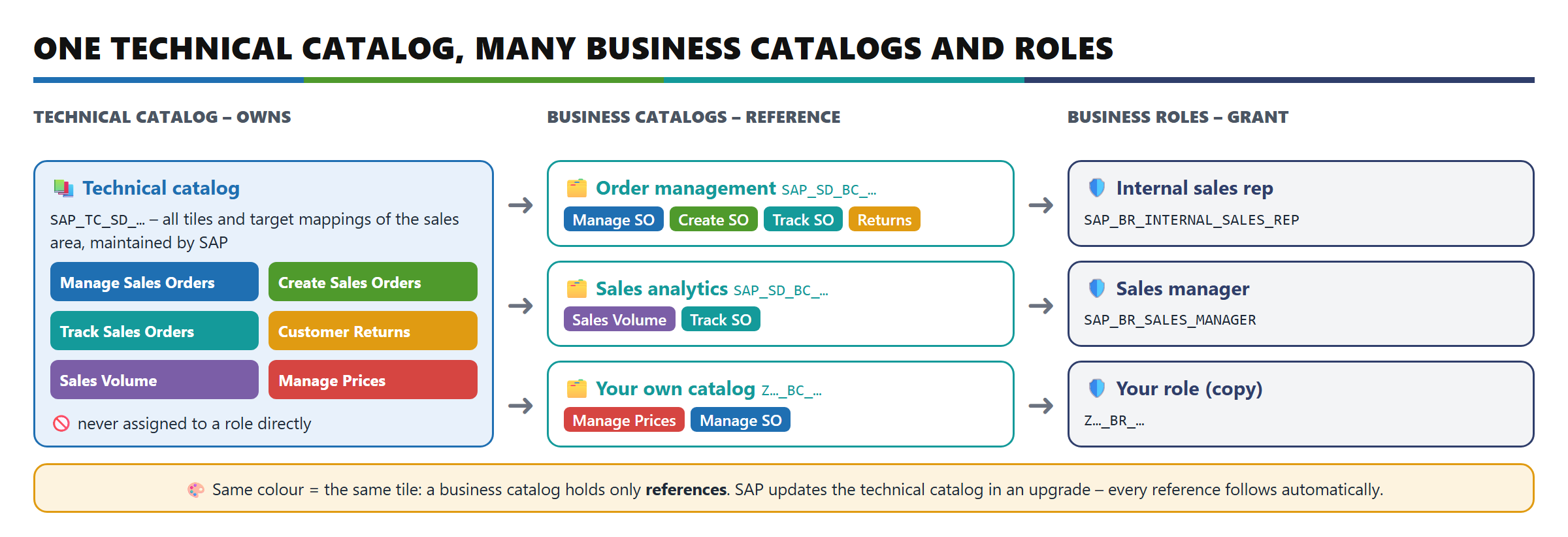
Object | Naming pattern | Content and rule |
|---|---|---|
Technical catalog |
| All tiles and target mappings of an area. Never add a technical catalog to a role. |
Business catalog | SAP_<area>_BC_… | Apps of one business function, as references to the technical catalog. To adapt, create your own |
Business catalog group (Legacy) | SAP_<area>_BCG_… | Home-page grouping for the old group mode – replaced by spaces and pages |
Space / page |
| Standard home-page layout for a role; copy to change |
Business role |
| Template PFCG role with business catalogs and spaces (S/4HANA delivers hundreds). Copy to |
The goal of the fit-to-standard workshop (Part 8) is to map these business roles to the users of the company.
Part 4 – Launchpad tools
Tool | T-code / app | Use it for |
|---|---|---|
Launchpad content manager |
| Explore and copy catalogs and roles, create business catalogs, assign catalogs to roles, check references |
Launchpad App Manager | /UI2/FLPAM | Technical catalogs: create and change app descriptor items (target mapping + tiles), good search, mass maintenance |
Manage Launchpad Spaces / Pages | Fiori apps (space designer, page composer) | Create spaces and pages, add sections and tiles; SAP and customer spaces shown separately |
Manage Launchpad Business Catalogs | Fiori app | Client-specific business catalogs |
Semantic objects |
| Define custom semantic objects |
Launchpad configuration |
| Launchpad parameters: spaces mode, default theme, how SAP GUI apps open … |
UI2 customizing | /UI2/CUST | IMG for UI technologies (launchpad settings) |
- Administrators can also open these tools as tiles in the launchpad itself, through the launchpad admin role and space (
SAP_FLP_ADMINcontent): Launchpad App Manager, Launchpad Content Manager (cross-client / client-specific), Manage Launchpad Spaces and Manage Launchpad Pages. - Catalog type and app types (SPRO → SAP NetWeaver → UI Technologies → SAP Fiori → … → settings for technical catalogs): tell App Manager what administrators may create in this system. Embedded: standard catalog; hub: standard catalog on the front end, empty on the back end. Also maintain the allowed app types on the front end.
Legacy – SAP Fiori launchpad designer
/UI2/FLPD_CONF(configuration layer) and/UI2/FLPD_CUST(customizing layer); URL/sap/bc/ui5_ui5/sap/arsrvc_upb_admn/main.html?scope=CONF&sap-client=<client>&sap-language=EN.- Features gradually deprecated since S/4HANA 1709 (superseded by App Manager + Content Manager): still usable, no new features. Its jobs moved to the tools above (groups → spaces/pages, business catalogs → content manager, technical catalogs/tiles/target mappings → App Manager).
- Weak points: transport must be chosen manually in the settings, tile and target mapping maintained in different places, SAP and custom content mixed in one long list, weak search, slow.
- The three layers CONF / CUST / PERS and their transports are explained on SAP Fiori › 01 · SAP Fiori Design & Architecture, Part 9.
Part 5 – Security concepts and admin authorizations
5.1 Authentication vs authorization
- Authentication comes first: is this user allowed into the system at all (valid user and password, certificate or SSO ticket)?
- Authorization: once logged on, what may the user open and do? Granted through PFCG roles.
5.2 The three authorization layers
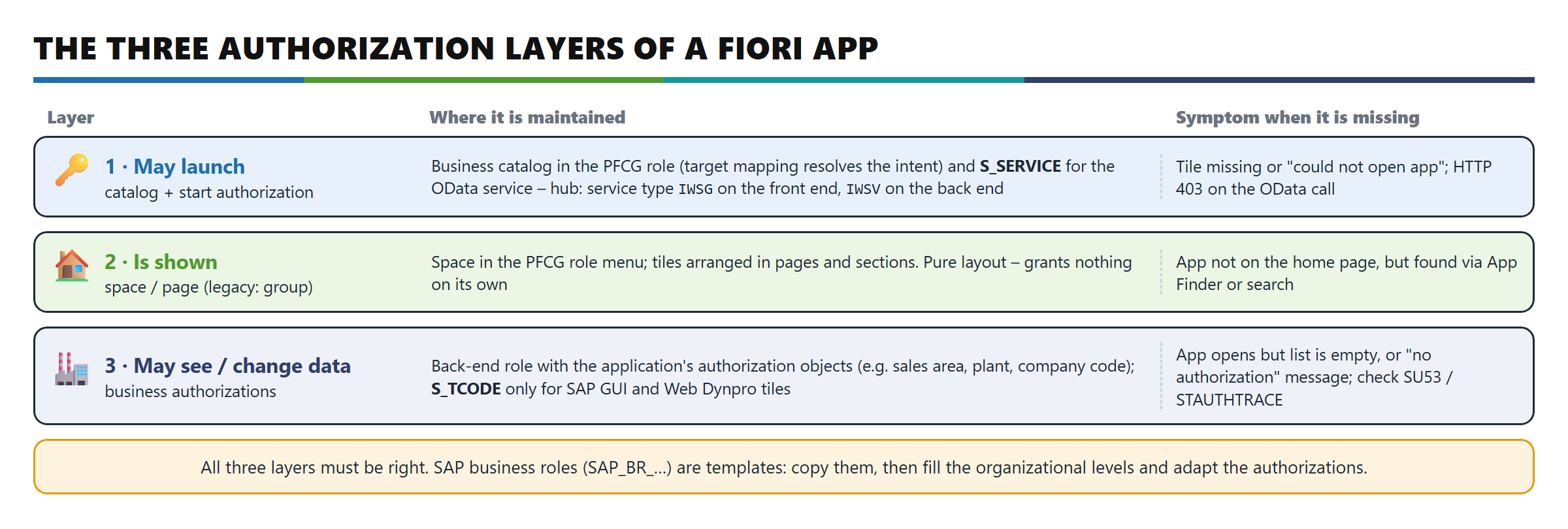
Layer | Controls | Maintained in |
|---|---|---|
1. Catalog in role + start authorization | Which apps the user may launch; start authorization for the OData service | PFCG role (Launchpad Catalog node). OData V2: |
2. Space / page (legacy group) | What appears on the home page | PFCG role (Launchpad Space node) |
3. Back-end authorization objects | Which data the user may see or change | Back-end role (e.g. sales area, plant); |
5.3 Authorizations for launchpad administrators
- Classic designer: t-codes
/UI2/FLPD_CONF,/UI2/FLPD_CUSTand the OData services/UI2/PAGE_BUILDER_CONF(configuration layer),/UI2/PAGE_BUILDER_CUST(customizing layer),/UI2/TRANSPORT(reads transport requests so content can be recorded) – with S_SERVICE for each. - Current tools:
/UI2/FLPCM_CONF,/UI2/FLPCM_CUST,/UI2/FLPAMand the launchpad admin apps (Manage Launchpad Spaces / Pages …) with their services; which catalogs your release delivers is in the apps library. - Gateway admin authorization templates (PFCG → Insert authorization from template):
/IWFND/RT_ADMIN,/IWBEP/RT_BEP_ADM,/IWBEP/RT_MGW_ADM,/IWNGW/RT_WF_ADM,/IWFND/RT_DEVELOPER. - SAP template role for launchpad administrators:
SAP_UI2_ADMIN_700(copy and adapt).
5.4 Staying up to date
- SAP Help: "SAP Fiori launchpad" and the "SAP Fiori: Security" guide for your SAP_UI / S/4HANA release; release notes; SAP Community;
/UI2/CUSTfor available settings.
Part 6 – Building launchpad content for a custom app
Scenario: the development team has deployed the two Sales Order Approval apps as BSP applications (from BAS or VS Code): *Manage Sales Orders* for reps on ZUI_SALESORDER_O4 and *Approve Sales Orders* for managers on ZUI_SALESORDERAPV_O4. The Fiori administrator makes them available to the right users.
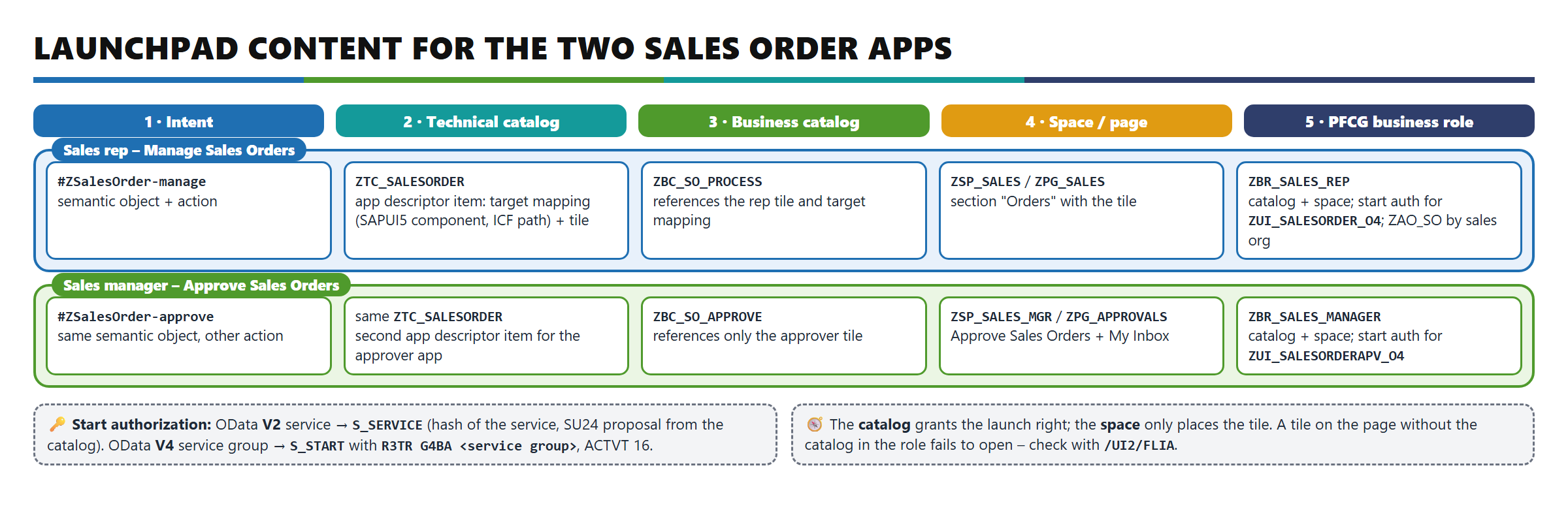
6.1 Current way (S/4HANA 2020 and later)
- 1. Create or choose a semantic object (
/UI2/SEMOBJ) and decide the actions, e.g.ZSalesOrder-manage(reps) andZSalesOrder-approve(managers). - 2. In App Manager (
/UI2/FLPAM) create a technical catalog, e.g.ZTC_SALESORDER, with one app descriptor item per app: target mapping (intent, app type SAPUI5, component ID, ICF path) + tile (title, icon). - 3. In the content manager (
/UI2/FLPCM_CUSTor CONF) create the business catalogsZBC_SO_PROCESSandZBC_SO_APPROVE, each referencing only its app's tile and target mapping. - 4. In Manage Launchpad Spaces / Pages create space
ZSP_SALESwith pageZPG_SALES(reps) andZSP_SALES_MGRwithZPG_APPROVALS(managers, together with My Inbox). - 5. In PFCG create roles
ZBR_SALES_REPandZBR_SALES_MANAGER: Menu → SAP Fiori Launchpad → Launchpad Catalog and Launchpad Space; add the start authorization for the OData V4 service group (S_START,R3TR G4BA; for a V2 serviceS_SERVICE) and the business authorizations (e.g. authorization objectZAO_SOby sales organisation, → RAP › 03 · Projection, UI, Access Control & Service); generate. - 6. Assign the role in SU01, record everything on transports, test in
/UI2/FLP.
Example design of custom spaces for two roles:
Role | Space | Page | Sections → tiles |
|---|---|---|---|
ZBR_SALES | ZSP_SALES | ZPG_SALES | Sales → Manage Sales Orders, Fulfilment |
ZBR_HR | ZSP_HR | ZPG_HR_TIME | Manage your time → Create Timesheet, Create Leave Request; Approve time → Approve Timesheets, Approve Leave Requests, My Inbox |
ZBR_HR | ZSP_HR | ZPG_HR_LEAVE | Leave overview tiles |
6.2 Adapting an SAP space
- SAP-delivered spaces and pages cannot be changed. Copy the SAP space (e.g. a transportation planning space
SAP_TM_SP_…) toZTM_SP_TRANSPORTNPLNG, copy the pages you want to change (ZTM_PG_PLANNING), keep unchanged SAP pages as they are (e.g.SAP_TM_PG_MASTERDATA) and assign the Z space in roleZBR_TRANSPORTATION_PLANNER.
6.3 Legacy – the designer procedure
- 1. Create a workbench request (SE01); start
/UI2/FLPD_CONF; choose transport and package in the settings. - 2. Create a technical catalog (e.g.
ZTC_MANAGE_PROD) with a tile (properties + intent) and a target mapping (intent, app type, navigation target); save. - 3. Create a business catalog
ZBC_MANAGE_PRODreferencing them, and groups (e.g.ZBCG_MANAGE_PROD_FIORI,ZBCG_MANAGE_PROD_GUI). - 4. PFCG role
ZBR_MANAGE_PRODwith the business catalog and the groups; generate; assign; test.
6.4 Tips
- An app that is in the user's catalog but on no page/group is still found in the App Finder.
- Tile not visible? Check tile and target mapping (intent spelled identically, device types), then Part 10.
Part 7 – Activating a standard app end to end
The manual path – needed when task lists are not used or a single app is missing. Look up the app in the SAP Fiori apps reference library first (SAP Fiori › 01 · SAP Fiori Design & Architecture, Part 5).
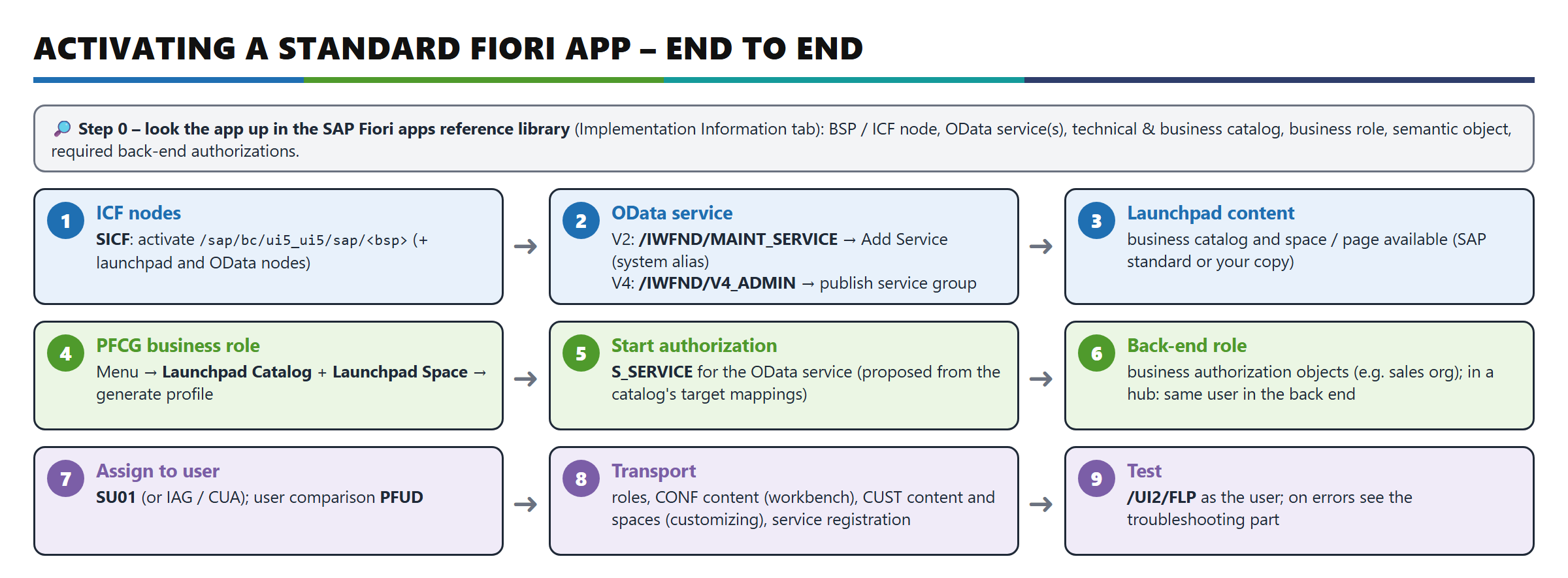
# | Step | How |
|---|---|---|
1 | ICF nodes | SICF: activate |
2 | OData service | V2: /IWFND/MAINT_SERVICE → Add Service → system alias (LOCAL or back end) → service → package/transport. V4: /IWFND/V4_ADMIN → publish the service group |
3 | Content | Business catalog and space/page available – SAP standard or your copy |
4 | PFCG business role | Menu → Insert node → SAP Fiori Launchpad → Launchpad Catalog and Launchpad Space (legacy: Launchpad Group) → generate |
5 | Start authorization | V2: S_SERVICE for the OData service, proposed automatically from the catalog's target mappings (authorization default values). V4: S_START for the service group ( |
6 | Back-end role | Business authorization objects of the app (e.g. |
7 | Assign | SU01 (or IAG / CUA); user comparison PFUD |
8 | Transport | Roles via PFCG; CONF content on workbench requests; CUST content and spaces on customizing requests; OData service registration on its own transport |
9 | Test |
|
Part 8 – Rapid content activation and fit-to-standard
8.1 Why rapid activation
The old way was app by app: activate Gateway, activate each OData service, activate SICF nodes, copy SAP roles, add authorizations by hand – slow and error-prone, with high effort before anyone could try Fiori. From S/4HANA 1809, SAP offers rapid content activation: choose business roles, activate all their apps in one run, then adjust content and roles.
8.2 Task lists
A task list is an automated, ordered sequence of configuration steps, run in STC01 (logs in STC02). Task lists exist for Gateway and launchpad set-up in general; rapid content activation is the S/4HANA-specific part. SAP Note 2902673 (Rapid Activation for SAP Fiori in SAP S/4HANA – Overview) links to one composite note per S/4HANA release with that release's steps and task list variants.
Task list | Purpose |
|---|---|
SAP_GATEWAY_BASIC_CONFIG | Basic SAP Gateway configuration |
SAP_SAP2GATEWAY_TRUSTED_CONFIG | Trusted RFC between front end and back end (hub) |
SAP_GW_FIORI_ERP_ONE_CLNT_SETUP | Gateway and launchpad set-up in a one-client embedded system |
SAP_FIORI_LAUNCHPAD_INIT_SETUP | Initial launchpad set-up (services, ICF nodes) |
SAP_FIORI_FOUNDATION_S4 | Fiori foundation for S/4HANA: theme, launchpad, admin role |
SAP_ESH_INITIAL_SETUP_WRK_CLIENT | Enterprise search in the working client |
SAP_GATEWAY_ACTIVATE_ODATA_SERV | Activate a list of OData services in one go |
SAP_BASIS_ACTIVATE_ICF_NODES | Activate a list of ICF nodes |
SAP_FIORI_CONTENT_ACTIVATION | Rapid content activation for selected SAP business roles |
SAP_FIORI_FCM_CONTENT_ACTIVATION | Same activation for customer-created business roles |
SAP_FIORI_FCM_CATALOG_ACTIVATION | Activation by business catalog (S/4HANA 2023 FPS01+); both FCM lists start from the launchpad content manager |
Example: running content activation for the internal sales representative role activated all OData services of its apps, created a Z copy of the business role with all start authorizations, and created a test user.
Limitations after activation
- Designed for embedded systems – use the hub variants carefully on a hub.
- OData services activated by the task list are not on a transport: record the registrations manually.
- Dynamic tiles, analytical apps and apps needing special configuration may not work out of the box.
- Classic apps (SAP GUI, Web Dynpro) need the back-end catalogs replicated (Part 9).
- Generated roles still need organizational levels and business authorizations.
8.3 Fit-to-standard workshop
A workshop with delivery managers, business and functional consultants, technical consultants, architects, scrum leads and the security team. Goal: find the business roles and apps the company needs; the resulting role list is the input for rapid content activation.
- Phase 1 – roles from today's SAP GUI usage (system conversion):
- 1.1 Most-assigned roles (table
AGR_USERS) and their transactions (tableAGR_1251, objectS_TCODE). - 1.2 Most-used transactions of the last month: ST03N workload statistics.
- 1.3 Combine both lists; 1.4 remove duplicates and transactions obsolete in S/4HANA (simplification item check, SYCM).
- 1.5 Upload the result to the SAP Fiori apps recommendation report (or use SAP Readiness Check); it rates matching apps by relevance. Collect the business roles of the recommended apps.
- 1.1 Most-assigned roles (table
- Phase 2 – lighthouse scenario: read SAP Best Practices process documents (SAP Signavio Process Navigator) and take their roles.
- Phase 3 – key business processes of the company → roles, picked in the apps reference library.
- Phase 4 – combine the roles = scope. Phase 5 – plan for residual requirements (custom apps, adaptations).
|
Part 9 – Back-end catalog replication
Putting a SAP GUI transaction on the launchpad by hand means: semantic object → target mapping with the transaction → tile → catalog → space → role. SAP already delivers these tiles in back-end catalogs (technical catalogs SAP_TC_…_BE_…), and SAP business catalogs reference them. In a hub they live on the back end. Until they are replicated into the launchpad content, the business catalogs show broken references ("reference lost") and the tiles cannot load. Replication is also needed in embedded systems.
- Find the catalog: search the transaction in the apps reference library, or read back-end table
SUI_TM_MM_APP. Example: MM01 is in back-end catalogSAP_TC_CA_PR_BE_APPS, referenced by business catalogSAP_CMD_BC_PR_MAINT. - System aliases: each back-end catalog belongs to a system alias (table
/UI2/SYSTEMALIAS; alias per catalog in view/UI2/V_ALIASCAT). Replication needs per alias an RFC destination<ALIAS>_RFCand an HTTPS destination<ALIAS>_HTTPSin SM59 (e.g.S4CMD_RFC,S4CMD_HTTPS). - Fewer destinations: with 44 aliases you would need 88 destinations. Map all aliases to one name in view
/UI2/V_ALIASMAP(e.g.S4CON,S4CPA,S4CRM→S4BE), then create onlyS4BE_RFCandS4BE_HTTPS. In an embedded system after rapid activation, the destinationsFIORI_CLASSIC_UI_RFCandFIORI_CLASSIC_UI_HTTPSare generated and an empty target alias in/UI2/V_ALIASMAPis enough. - Replicate (on the front-end server, full or delta, with a test mode):
/UI2/APPDESC_GET– the back-end and replicable catalogs referenced in selected business catalogs;/UI2/APPDESC_GET_ALL– all of them for all system aliases;/UI2/APPDESC_GET_DEV(report/UI2/GET_APP_DESCR_REMOTE_DEVin SA38) – selected catalogs of one alias. - Remove replicated catalogs of an alias with report
/UI2/DELETE_APP_DESCR_CATS.
Part 10 – Troubleshooting
10.1 Tools
Tool | Use |
|---|---|
Browser F12 | Network tab: failing requests, |
/UI2/FLIA – Launchpad Intent Analysis | Which intents exist in which catalogs, their status, and whether a given user has an intent through a role |
/UI2/FLC – Launchpad Checks | Finds problems with tiles, catalogs, groups, target mappings, intents, apps |
SLG1, object | Launchpad back-end log, e.g. failed navigation to an app |
/IWFND/ERROR_LOG | OData errors on the Gateway hub (front end) |
/IWBEP/ERROR_LOG | OData errors in the back end (provider) |
/IWFND/GW_CLIENT, /IWFND/TRACES | Call a service manually; trace requests and payloads |
ST22 | ABAP short dumps caused by OData calls |
SU53, STAUTHTRACE | Failed authorization checks; system-wide authorization trace |
/UI5/APP_INDEX_CALCULATE | Recalculate / check the SAPUI5 application index |
Ctrl+Alt+Shift+P | UI5 version and technical info of the running app |
10.2 Typical issues
Issue | Cause | Fix |
|---|---|---|
Tile shows "Cannot load tile" | Tile deleted from its catalog but still referenced; back-end catalog not replicated | Replicate the back-end catalog (Part 9) or remove the broken reference |
Tile not displayed | No matching target mapping; broken reference to standard content | /UI2/FLIA, /UI2/FLC; fix the target mapping or reference |
Catalog / space not displayed | Not in the user's PFCG role, or role not generated / compared | PFCG, PFUD; /UI2/FLC |
"Intent does not exist" warning | The intent in the URL or link is not defined | Correct the intent or create the target mapping |
App in role but not on home page | Not on any page / group | App Finder; add it to a page |
Old app version after deployment | Browser or launchpad cache; app index not recalculated; half-imported transport | /UI5/APP_INDEX_CALCULATE; cache steps (Part 11); redeploy ( |
Deployment from BAS fails: virus scan profile not active | No active profile for | Maintain the profile in /IWFND/VIRUS_SCAN (and VSCANPROFILE) |
Tile click does nothing / error | Wrong target mapping; ICF node inactive; OData failing; app bug | Check target mapping, SICF node, ST22, /IWFND/ERROR_LOG, /IWBEP/ERROR_LOG; else developer |
App opens, list empty or 403 | Missing S_SERVICE or business authorization | SU53, STAUTHTRACE; adapt roles |
10.3 Custom app checks after deployment
- Must have
Component.jsandmanifest.json, a unique namespace / component ID, and a correct ICF path. - UI5 version: the server's SAPUI5 version comes with the SAP_UI (or front-end server) support package; it is not upgraded freely. Patch levels arrive through SAP Notes (report
/UI5/UI5_UPLOAD_PATCH_TO_MIME). Check it with Ctrl+Alt+Shift+P or/sap/public/bc/ui5_ui5/; apps declareminUI5Versionin the manifest. - Broken navigation is usually a wrong routing configuration, a wrong component name/namespace or a missing app index entry.
- Launchpad defaults (how SAP GUI apps open, default theme, spaces mode) are parameters in
/UI2/FLP_SYS_CONF.
Part 11 – Cache
Browsers and the launchpad cache JavaScript, XML views, JSON, CSS, HTML and i18n files, launchpad content and OData metadata.
Advantages | Disadvantages |
|---|---|
Apps load faster | After an update users may still get the old version |
Less server load | A developer deploys a change but cannot see it |
Cached files can display even with a poor connection | A catalog was added to a role, the user still sees no tile |
- SAP's built-in handling: HTTP
max-agelifetimes and cache-buster tokens – each app's URL contains a token from the application index that changes on deployment, so users normally need not clear their cache. Run /UI5/APP_INDEX_CALCULATE if a deployment arrived by transport and the index is outdated. - Browser: test in a private window, or F12 → right-click the reload button → Empty cache and hard reload.
- OData metadata: /IWFND/CACHE_CLEANUP (front end) and /IWBEP/CACHE_CLEANUP (back end).
- Launchpad content and UI2 service caches: reports /UI2/INVALIDATE_GLOBAL_CACHES (all clients) and /UI2/INVALIDATE_CLIENT_CACHES (current client).
Part 12 – Translation, logon page and theming
12.1 Languages and translation
- Import the needed language packages into the system; SMLT shows and manages installed languages.
- Launchpad content texts (tile titles, catalogs, spaces, pages): translate with the translation support of the content tools or with SE63; the objects and tables to choose depend on layer and release – see SAP Help "Translating launchpad content".
- App texts come from the app's i18n files (SAPUI5 › 03 · SAPUI5 Fundamentals); ABAP messages are translated in SE91 / SE63; master data via text tables in the application.
12.2 Fiori-style logon page
- SICF → find the launchpad services (
flp,ushell) → Error Pages tab → Logon Errors → System Logon → Configuration → custom implementation class/UI2/CL_SRA_LOGIN(Fiori logon page). - The language selection on the logon page is enabled in the same system logon configuration.
12.3 Theme designer
- Companies want their colours and logo. The UI theme designer (
/UI5/THEME_DESIGNER) ships wherever Fiori is installed: copy an SAP theme (Horizon), change brand colour, logo and background, save and build, then set it as default in the launchpad configuration.
Part 13 – Workflow and My Inbox
SAP Business Workflow automates processes in which a requester starts something and agents (approvers, processors) act on work items. Builder SWDD, configuration SWU3, classic inbox SBWP. Full workflow notes: CORE ABAP › 12 Workflow.
- Prerequisites: background steps run under the workflow system user – SAP_WFRT in S/4HANA (WF-BATCH in older systems) – with RFC destination WORKFLOW_LOCAL_<client>; check everything in SWU3.
- My Inbox (app F0862) is the Fiori inbox: act on work items on any device, mass approval, substitutes, attachments and comments, share by e-mail. Delivered out of the box and activated with rapid content activation. OData service
/IWPGW/TASKPROCESSING; included in business roles such asSAP_BR_MANAGER. - Configuration: SPRO → SAP Gateway Service Enablement → Content → Task Gateway → Task Gateway Service → Scenario Definition (
/IWWRK/WF_FILTER): define a scenario with its task definitions (and decision options) for scenario-specific My Inbox tiles. Without it the All Items tile still works. - SWFVISU (task visualization): open a custom Fiori app (intent) for a task instead of the standard task UI.
- On BTP, SAP Task Center collects tasks from several systems in one inbox; tasks of SAP Build Process Automation appear in its My Inbox → SAP Build › 03 · Automations, Actions & My Inbox.
Part 14 – Interview questions
What is the difference between a technical catalog and a business catalog?
A technical catalog owns the tiles and target mappings of an area and is never assigned to a role. A business catalog references the subset one job needs and is added to the business role – it grants the right to launch those apps.
What is an intent and what is a target mapping?
An intent is semantic object + action, e.g. SalesOrder-manage, optionally with parameters. A target mapping resolves the intent to the real target – SAPUI5 app, transaction, Web Dynpro or URL – with device types, parameters and system alias. One intent can have several target mappings, and one app several intents.
Groups vs spaces and pages?
Groups (legacy) were tile collections placed directly in roles, with unstable order, slow loading and no link to the standard role. Spaces and pages (recommended from S/4HANA 2020) structure the home page as space → page → section → tile, are assigned in the role and are pure layout; the catalog still grants the authorization.
A user has the space, but a tile is missing. Why?
The tile's app is not in any business catalog of the user's roles, so its target mapping cannot be resolved. Check with /UI2/FLIA for that user, add the catalog to the role, generate and run PFUD.
Which tools replaced the launchpad designer?
App Manager /UI2/FLPAM for technical catalogs, tiles and target mappings; content manager /UI2/FLPCM_CONF and /UI2/FLPCM_CUST for business catalogs and role assignment; the Manage Launchpad Spaces and Manage Launchpad Pages apps for the home-page layout.
Walk me through activating a standard Fiori app.
Look it up in the apps library; activate the ICF node in SICF; register the OData service in /IWFND/MAINT_SERVICE (V4: /IWFND/V4_ADMIN); make the business catalog and space available; add both to a PFCG role with S_SERVICE and the business authorizations; assign in SU01; transport; test in /UI2/FLP.
What are the three authorization layers of a Fiori app?
Catalog in the role plus S_SERVICE (may launch), space/page (is shown on the home page) and back-end authorization objects (may see or change data). All three must be right.
What is rapid content activation and what are its limits?
Task lists run in STC01 (e.g. SAP_FIORI_CONTENT_ACTIVATION) that activate all apps of selected business roles – OData services, ICF nodes, a Z copy of the role and a test user. Limits: service registrations are not transported, dynamic and analytical tiles may need extra work, back-end catalogs must be replicated and organizational levels still have to be filled.
What is the goal of a fit-to-standard workshop for Fiori?
To decide which SAP business roles and apps the company needs, from current transaction usage (AGR_USERS, AGR_1251, ST03N, SYCM, apps recommendation report), best-practice processes and key business processes. The role list feeds rapid content activation.
Why replicate back-end catalogs?
SAP business catalogs reference SAP GUI and Web Dynpro tiles that live in back-end catalogs. Until these are replicated (/UI2/APPDESC_GET with the alias destinations), the references are broken and the tiles fail.
A user still sees the old app version after deployment. What do you do?
Run /UI5/APP_INDEX_CALCULATE for the app, clear OData metadata caches (/IWFND/CACHE_CLEANUP, /IWBEP/CACHE_CLEANUP) and launchpad caches (/UI2/INVALIDATE_GLOBAL_CACHES) if needed, and ask the user to hard-reload or use a private window. Normally cache-buster tokens make this unnecessary.
Which start authorization does a RAP OData V4 service need?
For OData V4 the check is on the service group with authorization object S_START (R3TR G4BA <service group>), maintained through the authorization default for OData V4 service groups in PFCG / SU24. S_SERVICE is the object for OData V2 services. A missing value gives HTTP 403 with "no start authorization".
Scenario: reps and managers must see different sales order apps. How do you set up the content?
One technical catalog with two app descriptor items (ZSalesOrder-manage, ZSalesOrder-approve), two business catalogs each referencing one app, two spaces/pages, and two PFCG roles: ZBR_SALES_REP with the process catalog and start authorization for ZUI_SALESORDER_O4, ZBR_SALES_MANAGER with the approval catalog, My Inbox and ZUI_SALESORDERAPV_O4. The rule who may really approve stays in the RAP business object, so a rep who guesses the approver URL still cannot approve.
Embedded launchpad or SAP Build Work Zone?
For users of one S/4HANA system the embedded launchpad is enough. When several systems (S/4HANA, BTP apps, SuccessFactors) or external users need one entry point, a Work Zone site federates the existing launchpad content through content providers; the source systems still check authorizations.
Which tools do you use when a launchpad app fails?
Browser F12 network and console; /UI2/FLIA and /UI2/FLC for content; /IWFND/ERROR_LOG and /IWBEP/ERROR_LOG for OData; ST22 for dumps; SU53 / STAUTHTRACE for authorizations; SLG1 object /UI2/BE for launchpad navigation logs.
🏠 Start Here · ◀ 01 · Design & Architecture · 03 · Fiori Elements ▶ · Sections: CORE ABAP | OOPS ABAP | ABAP on HANA | Clean Core | RAP | ABAP Points | SAP Fiori | SAPUI5 | Mobile Development (MDK) | BTP Foundations | BTP Development | CAP | SAP Build | ABAP on BTP | Integration Suite | SAP Business AI | SAP BASIS | Security | SAP SDLC
Functional: FICO ABAP | TRM ABAP | VIM | SAP BIS | SD ABAP | MM ABAP | PP ABAP | QM ABAP | PM ABAP | PS ABAP | EWM | TM ABAP | GTM ABAP | EHS ABAP | HR ABAP | BW | SAP Datasphere | SAP Business Data Cloud | SAP MDG | SAP Analytics Cloud | SAP Ariba | SAP CX | SAP IBP