Most Fiori work in an S/4HANA project is not building new apps but fitting SAP's apps to the business: an end user saves a filter, a key user hides a field for everyone, a developer adds a section to a standard app. This page explains who can change what, how SAPUI5 flexibility stores those changes upgrade-safely, how adaptation projects and app variants work, how classic extension points compare, and how all of this fits clean core – again with the Sales Order Approval scenario. App types and the apps reference library basics are on SAP Fiori › 01 · SAP Fiori Design & Architecture; launchpad content on SAP Fiori › 02; FPM extensions in your own apps on SAP Fiori › 04 · SAP Fiori Tools & Flexible Programming Model.
Part 1 – Who changes what: the adaptation ladder
Every change to a Fiori app should be made by the lowest role with the lowest effort that can do it. A user's favourite filter is not a development request, and hiding a field for all sales reps does not need a developer. The ladder below is also what interviewers expect when they ask "how would you change a standard Fiori app?".
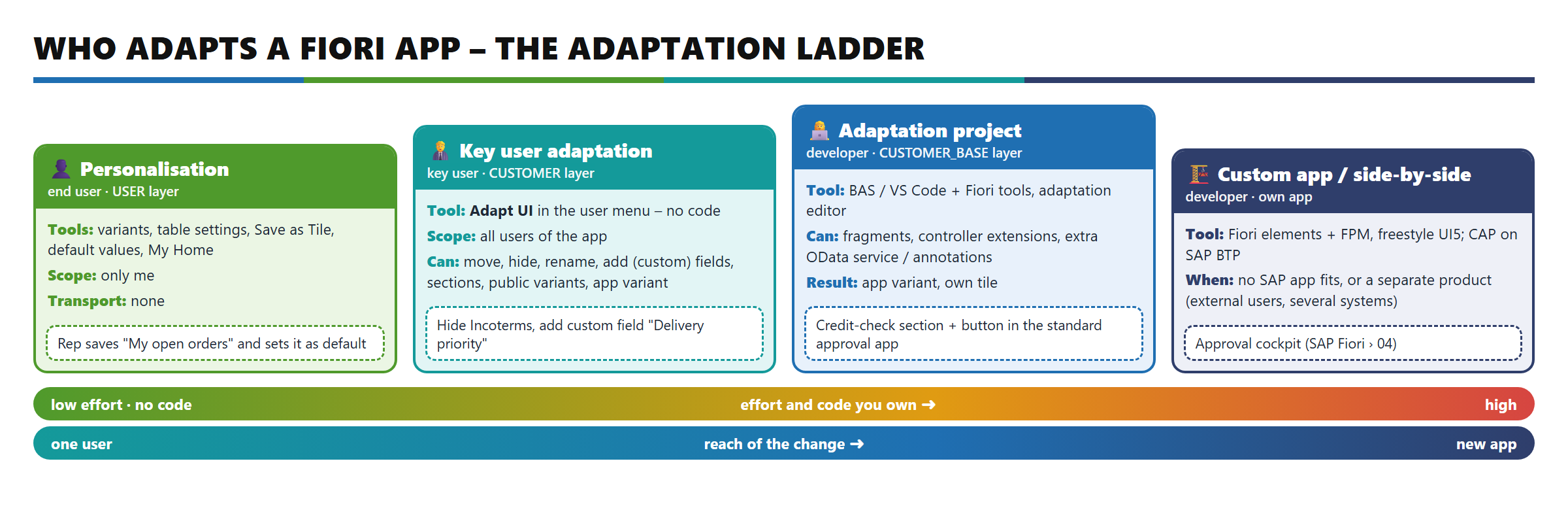
Level | Who | Tool | Scope | Sales Order example |
|---|---|---|---|---|
Personalisation | End user | Variant management, table settings, Save as Tile, default values | Only this user | A rep saves the variant "My open orders" |
Key user adaptation | Key user (business) | Adapt UI in the launchpad user menu | All users of the app (in the client) | Hide "Incoterms", rename a label, add the custom field "Delivery priority" |
Developer adaptation | Developer | Adaptation project in BAS / VS Code | A new app variant or the app for all users | Add a credit-check section and a button to the standard approval app |
Custom app / side-by-side | Developer | Fiori elements + FPM or freestyle; CAP on SAP BTP | New app | Approval cockpit (SAP Fiori › 04) |
Part 2 – How SAPUI5 flexibility stores changes
Personalisation, key user adaptation and adaptation projects all use the same mechanism: SAPUI5 flexibility. A change is not a modified copy of the app. It is a small JSON change file ("rename control X to Y", "hide control Z", "add fragment F at extension point P") stored outside the app. At start-up the flexibility services load the changes for the user's layers and apply them to the original views. The SAP app itself stays unchanged – that is why these changes survive upgrades.
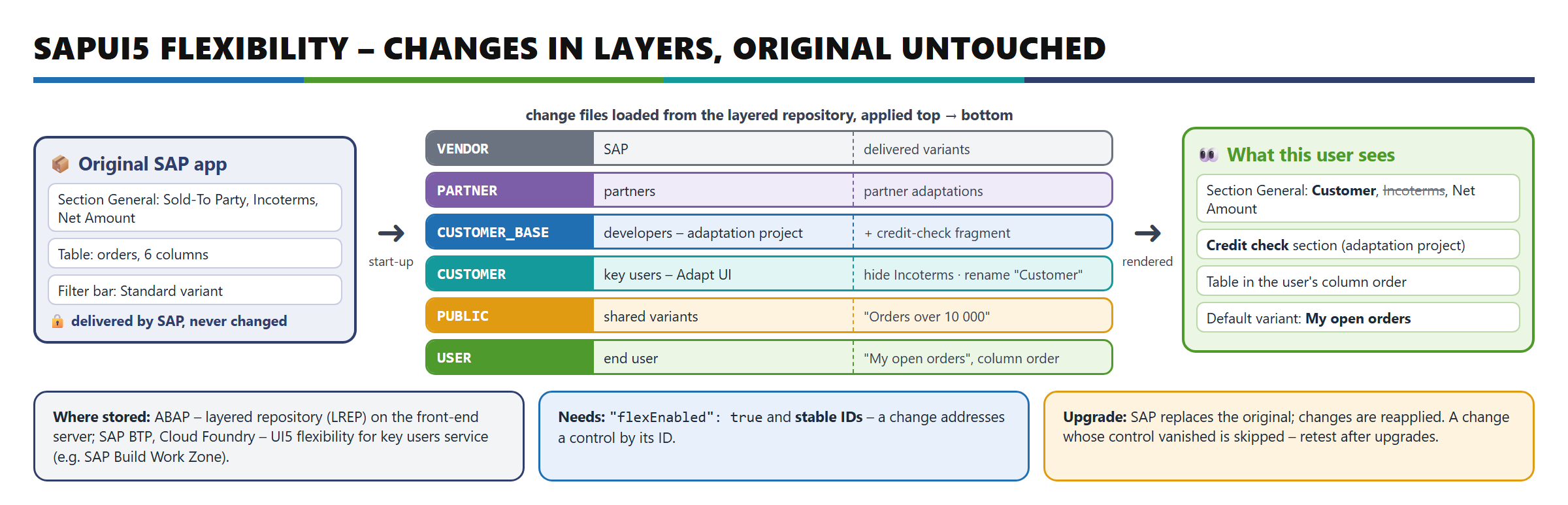
Layer | Who writes it | Typical content |
|---|---|---|
VENDOR | SAP | SAP's own delivered variants and changes |
PARTNER | Partners | Partner-delivered adaptations |
CUSTOMER_BASE | Customer developers | Adaptation projects and app variants created by developers |
CUSTOMER | Key users | Adapt UI changes, key user app variants |
PUBLIC | End users | Views (variants) saved as *Public* |
USER | End user | Personal variants and table settings |
- Layers are applied from top to bottom: customer changes overrule SAP's, and a USER change can override a CUSTOMER change for that user.
- On ABAP (and SAP BTP, Neo) the changes live in the layered repository (LREP); on SAP BTP, Cloud Foundry environment the UI5 flexibility for key users service stores them, for example for apps in SAP Build Work Zone.
2.1 Prerequisites for an adaptable app
"flexEnabled": trueinsap.ui5ofmanifest.json(descriptor version 1.11, SAPUI5 1.56 and later) – required for key user adaptation in every app, Fiori elements or freestyle; the Fiori tools generator sets it for new apps, and the Page Map shows it as *Flex Enabled*.- Stable IDs – a change addresses a control by ID. Generated IDs (
__button3) change between releases, so freestyle views need explicit IDs on every control. Fiori elements creates stable IDs from annotations (for example…::FieldGroup::General); only your extensions need explicit IDs. - The UI5 Support Assistant rule *Stable control IDs are required for SAPUI5 flexibility services* reports controls without stable IDs.
|
- Simplified view of a change file – you never write these by hand; the tools create them.
Part 3 – Personalisation and variants (end user)
3.1 Variant management
A variant saves the state of a filter bar and/or table (filter values, columns, sorting, grouping) under a name. Fiori elements has it built in; in V4 the list report setting variantManagement decides the granularity:
Setting | Behaviour | When |
|---|---|---|
"Page" | One variant stores filter bar and table together | Default for list reports |
"Control" | Separate variants for the filter bar and for each table | Users combine filters and table layouts freely |
"None" | No variant management | Simple apps, object pages |
- Variant options: Set as Default, Apply Automatically (run the search on start), Public (visible to all users – needs authorisation), Manage Views to rename, share or delete.
- Standard is the delivered variant; key users can create public variants and change the default for everyone.
3.2 Other personalisation
- Table settings (gear icon): columns, sort, group, filter – saved in the current variant.
- Save as Tile (Share menu): puts a tile with the current variant on the user's home page or a personal page – e.g. "Orders waiting for approval" with a live count.
- User settings in the launchpad: theme, language and region, and Default Values (sales organisation, company code …) that prefill filter fields in all apps.
- My Home / personal pages: own tiles and app arrangement (SAP Fiori › 02).
- Personal changes are not transported; they live in the USER layer of the production system.
Part 4 – Key user adaptation (UI adaptation at runtime)
A key user – a business expert, not a developer – opens the app, chooses Adapt UI in the user menu (profile picture) and changes the screen in place. The changes apply to all users of the app.
4.1 What a key user can do
Action | Example in Manage Sales Orders |
|---|---|
Move, hide, reveal fields, groups and sections | Hide Incoterms for the reps; move Net Amount up |
Rename labels | "Sold-To Party" → "Customer" |
Add fields that the service already offers | Show Customer Reference in the header |
Add custom fields (created in the Custom Fields app) | New field "Delivery priority" on the sales order, then add it to the form |
Add groups or sections, combine or split fields | Group "Approval data" with status and approver |
Embed content (an iFrame section) | A web page with the customer's delivery terms |
Create or change variants for everyone, create an app variant ("Save As") | Variant "Orders over 10 000" as default for managers |
4.2 Prerequisites and roles
- On-premise: the PFCG role template
SAP_UI_FLEX_KEY_USER(copy it to a Z role); on SAP BTP the roleFlexKeyUserin a role collection; in SAP S/4HANA Cloud Public Edition the administrator assigns a business role that contains the UI adaptation business catalog. - The app must be flex-enabled and use stable IDs (Part 2). Most current SAP apps qualify; old freestyle apps may not offer Adapt UI.
- Custom fields need a supported business context (e.g. sales document header) in the Custom Fields app; the field is then offered in Adapt UI under Add Field.
4.3 Saving, versions and transport
- Where the platform supports versioning (the flexibility versions API exists from SAPUI5 1.74), changes stay in a draft until the key user activates them as a new version; the version history lists the activated versions.
- Visualization mode in the Adapt UI toolbar shows which controls were changed.
- Transport: how key user changes reach production depends on the platform and its extensibility set-up – agree it with the basis and extensibility team before key users start. An adaptation project can also import existing key user changes (wizard option *Import Key User Changes*).
4.4 Common mistakes
- Hiding a field is not security – the data still comes through the OData service. Restrict data with authorisations and CDS access control.
- A mandatory field must not be hidden, or users cannot save.
- Key user changes made directly in production without governance – agree who may adapt which apps.
Part 5 – Developer adaptation projects
When key user adaptation is not enough – new logic, a new section with its own controls, an extra OData service – a developer creates an adaptation project on the SAP standard app. It produces an app variant: a delta (descriptor changes, UI changes, fragments, controller extensions) on top of the unchanged SAP app.
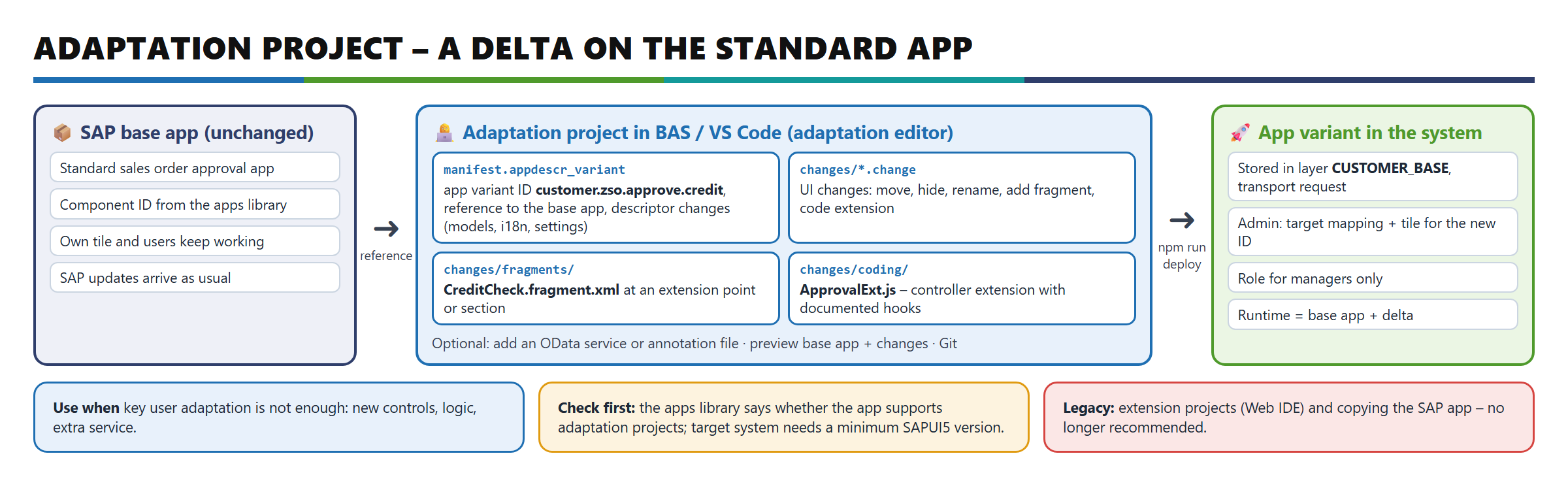
5.1 Steps
- 1. Find the app in the SAP Fiori apps reference library and check that it is extensible (Part 8).
- 2. Command Palette → Fiori: Open Template Wizard → tile Adaptation Project (the first time, run Fiori: Open Adaptation Project Generator); project name, namespace after the fixed
customer.prefix (e.g.customer.zso.approve.credit), SAPUI5 version, system and base app. - 3. Open the Adaptation Editor (visual editor, like Adapt UI) with
npm run start-editoror right-clickmanifest.appdescr_variant→ *Open Adaptation Editor*; quick actions offer the most common changes for list reports and object pages. - 4. Make changes: UI changes (move, hide, rename), Add Fragment at an extension point or aggregation, Extend with Controller (controller extension), add or replace an OData service or annotation file, change descriptor settings.
- 5. Preview (*Preview Application* → *start*), commit to Git, deploy with *Open Deployment Wizard* or
npm run deployto the ABAP system (stored in the CUSTOMER_BASE layer of the LREP, with a package and transport request). - 6. Administrator: catalog, target mapping and tile for the app variant ID, role assignment (SAP Fiori › 02).
5.2 Project structure
|
|
- The controller extension in
changes/codingusessap.ui.core.mvc.ControllerExtensionwithoverridehooks – the same pattern as in your own apps (SAP Fiori › 04, Part 10). For a Fiori elements V4 base app, use the FE extension API; for a freestyle base app, the documented hooks of that app.
Target | Prerequisites (SAP Fiori tools documentation) |
|---|---|
On-premise ABAP (S/4HANA, Private Edition) | SAP_UI 7.54 or higher; base app with |
SAP S/4HANA Cloud Public Edition, SAP Business AI Platform, ABAP environment | App released for adaptation projects (apps reference library → Extensibility); S/4HANA Cloud needs a 3-system landscape with a developer tenant; catalog *Development – UI Deployment* ( |
SAP BTP, Cloud Foundry | SAP or partner app exposed as a business service; the adaptation project is a module of an MTA project |
Part 6 – App variants
An app variant is a new app (own ID, own tile) that reuses an existing app and adds changes. The original app keeps running unchanged for its users.
- Created by a key user (Adapt UI → Save As) or a developer (adaptation project).
- Use when two roles need the same app with different defaults or layouts: "Manage Sales Orders" for reps and an app variant "Manage Sales Orders – Approver" with status N pre-filtered, approval fields on top and Approve / Reject first.
- Each app variant needs its own launchpad content (target mapping, tile, catalog) and role assignment.
- When SAP updates the base app, every app variant inherits the update – no copy to keep in sync.
Changes on the original app | App variant | |
|---|---|---|
Users affected | Everyone who opens the app | Only users who get the new tile |
Launchpad content | No change | New target mapping and tile |
Typical use | One company-wide layout | Role-specific versions of one app |
Part 7 – Extending standard apps: classic extension vs adaptation projects
Before SAPUI5 flexibility, SAP freestyle apps were extended with extension projects (SAP Web IDE): a new UI5 component that inherits from the SAP component and plugs into named extension points.
Classic extension project (legacy) | Adaptation project (current) | |
|---|---|---|
Mechanism | New component; | App variant of SAPUI5 flexibility: descriptor variant + change files |
Hooks |
| Any stable-ID control or aggregation, extension points, FE extension API |
Tool | SAP Web IDE (no longer supported) | BAS or VS Code with SAP Fiori tools |
Upgrade risk | Higher – view replacements and copied code break when SAP changes the view | Lower – deltas on stable IDs, SAP base app untouched |
Status | Legacy; existing ones keep running, no new ones | Recommended by SAP |
|
- The extension point names and controller hooks of a SAP app are listed in the apps reference library (Implementation Information → extensibility) or found in the app's views.
- The field name above is only an example; custom fields from the Custom Fields app carry the
ZZ1_prefix. - Never copy an SAP app ("copy and modify") or change its BSP – a copy gets no SAP fixes, and a change to SAP's BSP is a modification that the next upgrade overwrites.
Part 8 – Identifying an app and using the apps reference library
Every extension request starts with "which app is this exactly?". The library basics (search, Implementation Information tab) are on SAP Fiori › 01, Part 5; here is the practical sequence.
Step | Where | What you get |
|---|---|---|
1. About dialog | Launchpad user menu → About | App ID (Fiori ID, e.g. F-number), SAPUI5 component ID, app version, UI5 version |
2. Technical information | Ctrl+Alt+Shift+P in the app | SAPUI5 version, app URL, user agent; switch on debug sources, open support tools |
3. Service | Browser F12 → Network → | OData service name and version |
4. Apps reference library | Search by Fiori ID | BSP name, OData services, catalogs and roles, intent, extensibility (extension points, whether adaptation projects are supported), release |
5. Intent analysis | Launchpad tools, e.g. | Which target mapping and catalog a tile resolves to (SAP Fiori › 02) |
- For the Sales Order approval request: About shows the standard app's Fiori ID → the library confirms it is a Fiori elements app on an OData V4 service with key user adaptation and adaptation projects supported → decide the level (Part 10).
Part 9 – App types and their extension options
The three Fiori app types (transactional, analytical, fact sheet) are explained on SAP Fiori › 01, Part 4. What matters here is how each one is extended:
App type | Built with | How to adapt or extend |
|---|---|---|
Transactional | Fiori elements (V2 or V4) or freestyle UI5 on OData | Key user adaptation, adaptation projects; custom fields and custom logic in the backend |
Analytical | Overview page, analytical list page, KPI tiles on CDS analytical queries | Key user tools for queries and KPIs (e.g. Custom Analytical Queries, KPI apps), variants; adaptation projects for the UI |
Fact sheet | Legacy – replaced by object pages | Use the object page of the Fiori elements app |
Classic UIs | SAP GUI for HTML, Web Dynpro | SAP Screen Personas or Web Dynpro configuration – not SAPUI5 flexibility |
Part 10 – Choosing an option and the clean core view
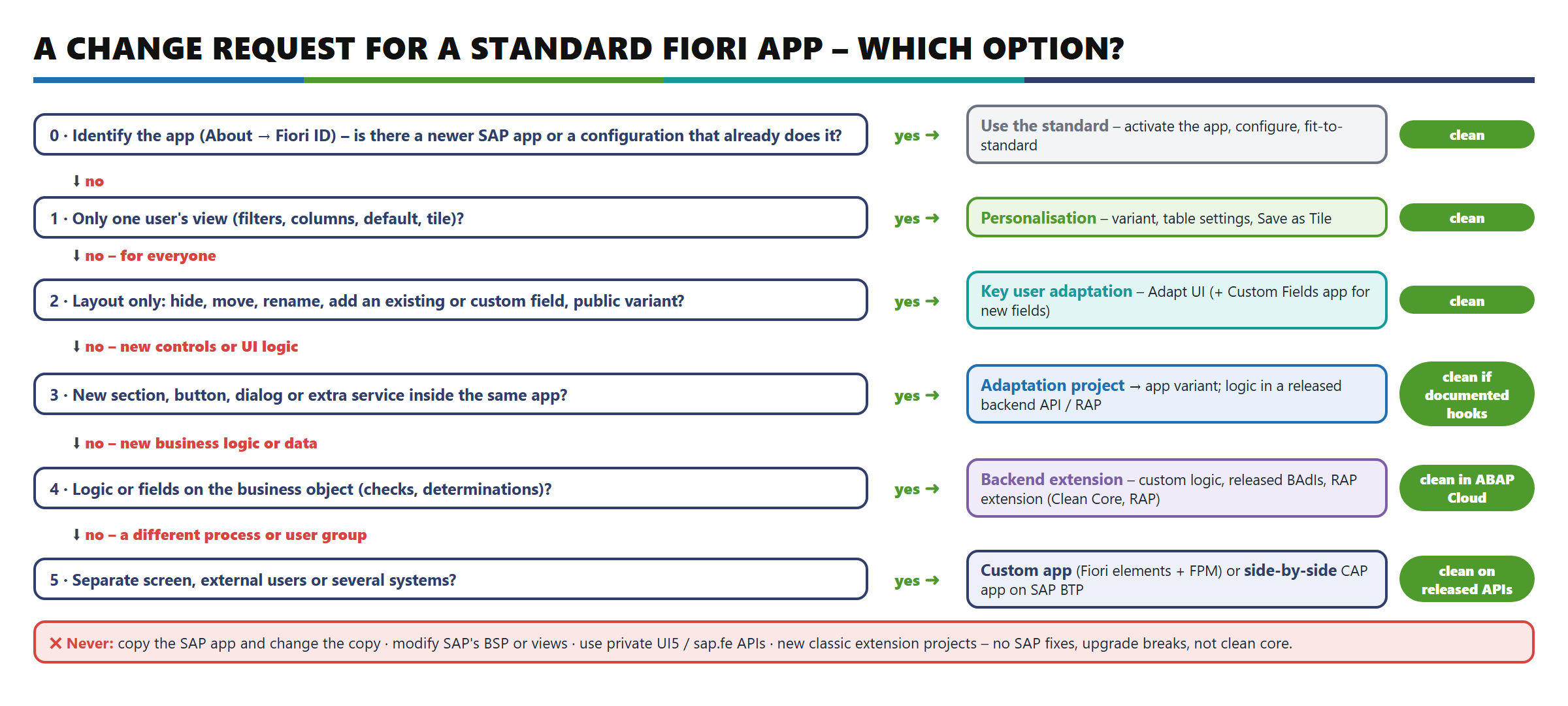
10.1 Clean core rules for Fiori UIs
- Stay in the standard where possible – first check if a newer SAP app or a configuration covers the need (fit-to-standard, SAP Fiori › 02).
- Upgrade-stable UI changes – personalisation, key user adaptation and adaptation projects are deltas in SAPUI5 flexibility; the SAP app is never copied or modified.
- Released hooks only – documented extension points, stable IDs and the Fiori elements extension API; no private UI5 or
sap.feAPIs. - Backend in ABAP Cloud – a new field goes through key user custom fields or a released extension include; logic through released BAdIs or RAP extensions; new apps on released CDS and RAP APIs (Clean Core and RAP sections).
- Side-by-side when it is a separate product – a portal for external users or an app combining several systems: CAP on SAP BTP with SAP Build Work Zone (SAP BTP › CAP).
- Even upgrade-stable adaptations need a regression test after each upgrade, because SAP can remove a field or section the adaptation refers to.
10.2 Comparison
Option | Clean core | Effort | Transport |
|---|---|---|---|
Personalisation | Clean | None | Not transported |
Key user adaptation | Clean | Low, no code | Depends on the platform's extensibility set-up |
Adaptation project | Clean if only documented hooks are used | Medium, some UI5 code | Deployed with a transport request |
Custom Fiori elements app on released APIs | Clean | Medium | Normal transport |
Classic extension project | Legacy, upgrade risk | Medium to high | Normal transport |
Copy or modify the SAP app | Not clean | High and recurring | Modification adjustment at upgrades |
Part 11 – Interview questions
Q1. Personalisation, key user adaptation, adaptation project – what is the difference?
Personalisation is done by an end user for himself (variants, table settings, Save as Tile) and is not transported. Key user adaptation (Adapt UI) changes the app for all users without code. An adaptation project is developer work in BAS or VS Code that adds fragments, controller extensions or services as an app variant. All three use SAPUI5 flexibility, so the SAP app stays unchanged.
Q2. What is SAPUI5 flexibility and why is it upgrade-safe?
A framework that stores UI changes as small change files in layers (VENDOR, PARTNER, CUSTOMER_BASE, CUSTOMER, PUBLIC, USER) in the layered repository and applies them at runtime to the original app. The app's code is never modified, so SAP updates arrive and the changes are reapplied on top.
Q3. What does an app need to support key user adaptation?
flexEnabled: true in the manifest, stable control IDs, and the key user needs the authorisation (on-premise role template SAP_UI_FLEX_KEY_USER, on SAP BTP the FlexKeyUser role). Fiori elements generates stable IDs itself, but the app still needs flexEnabled: true.
Q4. What is an app variant and when do you use one?
A new app with its own ID and tile that references an existing app and adds changes. Use it when different roles need different versions of one app, e.g. an approver variant of Manage Sales Orders. It needs its own target mapping, tile and role assignment and inherits SAP updates of the base app.
Q5. Adaptation project vs classic extension project?
An extension project (Web IDE) created a new component inheriting from the SAP app with view extensions, replacements and controller extensions – legacy and riskier at upgrades. An adaptation project creates an app variant of change files on stable IDs in BAS or VS Code and is SAP's recommended way.
Q6. How do you find out which app a user is running and whether it can be extended?
User menu → About for the Fiori ID and component ID, Ctrl+Alt+Shift+P for technical details, F12 for the OData service, then the SAP Fiori apps reference library for BSP, services, catalogs, roles and extensibility information.
Q7. Page variant vs control variant?
With variantManagement: "Page" one variant holds the filter bar and table state together; with "Control" the filter bar and each table have their own variants. "None" switches it off.
Q8. Does hiding a field with Adapt UI protect the data?
No. It only changes the UI; the field is still in the OData response. Use authorisations, CDS access control or field control in the backend for real protection.
Q9. Scenario: sales managers want the standard sales order app to show a new "Delivery priority" field and a credit-check panel. How do you deliver it with clean core?
Create the field with the Custom Fields app (key user extensibility) so it exists in the database and service, and let a key user place it with Adapt UI. The credit-check panel needs controls and logic, so a developer builds an adaptation project: a fragment at an extension point or section, a controller extension using documented hooks, and the credit logic as a released backend API or RAP action. If only managers need it, deploy it as an app variant with its own tile.
Q10. Scenario: after an upgrade, a key user adaptation no longer shows a moved section. What happened and what do you do?
SAP probably changed or removed the control the change refers to (its stable ID); the flexibility framework skips changes it cannot apply instead of breaking the app. Check the app in Adapt UI visualization mode, redo the adaptation on the new layout, and add the app to the post-upgrade regression test list.
Q11. Why must you never copy an SAP Fiori app to change it?
A copy is a separate custom app: it receives no SAP fixes or new features, its OData and UI dependencies drift, and it must be maintained forever. Changing SAP's BSP is a modification overwritten by upgrades. Adaptation projects and key user adaptation give the same result as deltas on the standard app.
🏠 Start Here · ◀ 04 · Fiori Tools & FPM · 06 · Interview Questions ▶ · Sections: CORE ABAP | OOPS ABAP | ABAP on HANA | Clean Core | RAP | ABAP Points | SAP Fiori | SAPUI5 | Mobile Development (MDK) | BTP Foundations | BTP Development | CAP | SAP Build | ABAP on BTP | Integration Suite | SAP Business AI | SAP BASIS | Security | SAP SDLC
Functional: FICO ABAP | TRM ABAP | VIM | SAP BIS | SD ABAP | MM ABAP | PP ABAP | QM ABAP | PM ABAP | PS ABAP | EWM | TM ABAP | GTM ABAP | EHS ABAP | HR ABAP | BW | SAP Datasphere | SAP Business Data Cloud | SAP MDG | SAP Analytics Cloud | SAP Ariba | SAP CX | SAP IBP